10 Smart Business Process Automation Examples for Indiana Companies in 2026
TL;DR
This article details 10 business process automation examples that help Indiana businesses convert wasted tech time into billable hours. We explain how automating IT ticketing, cybersecurity threat detection, data backups, and user provisioning directly prevents costly downtime—which can reach $9,000 per minute. By implementing solutions like automated patch management with Bitdefender GravityZone and network configuration with UniFi hardware, companies along the I-65 corridor can achieve predictable IT budgets and stronger security. We cover how these automations help meet compliance standards like HIPAA and CMMC. The key is to start small by identifying a major operational bottleneck, like an aging server in Greenwood, and applying a specific, high-ROI automated solution to fix it permanently.
If you're running a business anywhere along the I-65 corridor, you know that time is money. But how much are you losing every single day to repetitive, soul-crushing manual tasks? We're talking about the little things that add up to big headaches, like an aging server in a Greenwood business park that causes daily slowdowns or the spotty Wi-Fi in an old downtown Indy brick building that kills productivity. These aren't just minor inconveniences; they're a direct, painful hit to your bottom line.
Forget about complex, enterprise-level robots that require a team of engineers. We're talking about smart, practical automation that fixes real-world problems for Indiana businesses like yours. This isn't a theoretical exercise. This article breaks down 10 tangible business process automation examples you can put into action right now. We'll show you exactly how these automations prevent costly downtime, which can reach an astonishing $9,000 per minute, and convert those wasted hours into billable work and a predictable monthly IT budget.
Drawing from our 17 years of local service helping businesses from Hamilton County to the Southside, we’re not just listing ideas. We're explaining the 'how' behind each solution, from using Zero Trust architecture for automated threat detection to deploying latency-optimized mesh nodes for flawless network configuration. We'll use real-world scenarios to demonstrate massive ROI and show you how to turn your biggest operational headaches into your greatest competitive strengths. No fluff, just actionable strategies to make your business run better.
1. Robotic Process Automation (RPA) for IT Ticketing and Support
Got an IT support desk that feels more like a frantic game of whack-a-mole? That’s where Robotic Process Automation (RPA) steps in. Think of it as a digital employee that handles the grunt work. RPA uses software "bots" to mimic human actions for repetitive, rule-based tasks. Instead of a technician manually creating, categorizing, and assigning every single IT ticket, a bot can read the incoming email or support form, identify keywords like "password reset" or "VPN access," and route it to the right queue or even resolve it instantly.
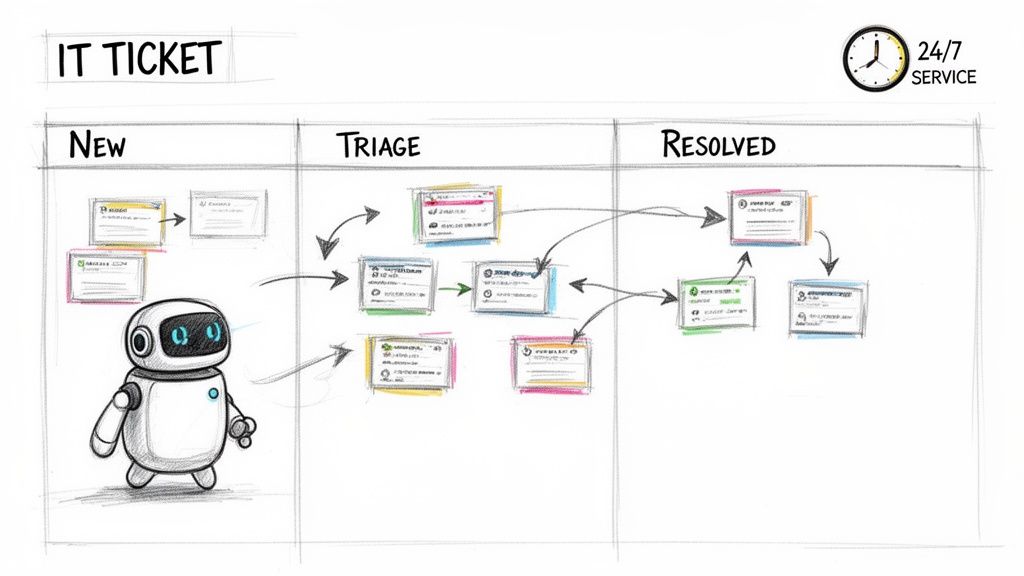
This automation is a game-changer for managed IT providers like us, especially for local Indiana businesses needing immediate support. Imagine a user in a Greenwood office can’t connect to the network. An RPA bot can perform initial diagnostics, like pinging the device or checking server status, before a human technician even sees the ticket. This frees up our senior techs to focus on complex issues like HIPAA compliance checks for a Carmel healthcare provider or configuring a new UniFi network for a growing warehouse near the I-65 corridor.
Strategic Breakdown & Actionable Tips
This is one of the most effective business process automation examples because it directly tackles a major source of "wasted tech time."
- Start Small, Win Big: Don't try to automate your entire helpdesk overnight. Begin with the highest-volume, lowest-complexity tasks. An automated password reset workflow, for instance, can immediately reduce ticket volume by up to 30%, giving your team back valuable hours.
- Map Before You Automate: Document every single step of the existing process. You’ll often find inefficiencies you can fix even before introducing a bot.
- Monitor and Tune: Your bots need supervision. Track metrics like resolution time and error rates. Plan to review and adjust your automation rules quarterly to keep them effective.
- Bots as Teammates: Train your staff to see bots as assistants, not replacements. They handle the repetitive noise, so your skilled humans can handle the critical thinking.
2. Automated Cybersecurity Threat Detection and Response
Is your security team playing a high-stakes guessing game against cyber threats that move at lightning speed? Modern attacks don't wait for a human to notice them. That’s where automated threat detection and response comes in, acting as a tireless digital sentinel for your network. This approach, often called SOC-as-a-Service, uses AI and machine learning to continuously monitor network traffic, endpoint behavior with tools like Bitdefender GravityZone, and security logs. When it spots the signature of an attack, it acts instantly—no coffee break needed.
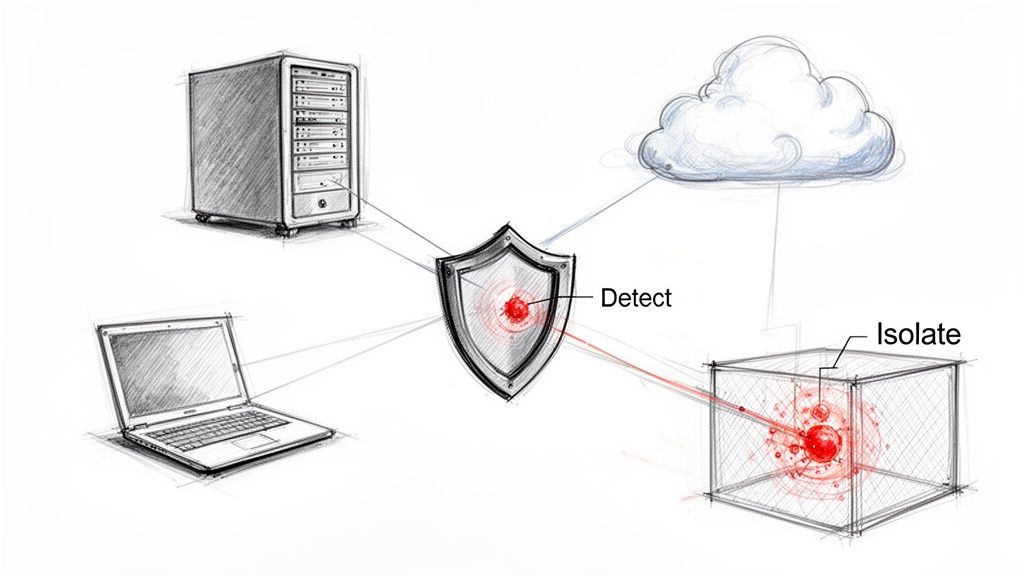
This automation is a lifeline for businesses managing sensitive data, from a Hamilton County medical practice handling HIPAA-protected records to a defense contractor near Crane Naval Base needing CMMC compliance. Imagine ransomware begins encrypting files on a workstation in your downtown Indy office. An automated system can detect this malicious behavior in seconds and immediately isolate that machine from the network, stopping the attack from spreading and crippling your entire operation. This means your business stays online, and your human security experts can focus on strategic defense rather than frantic damage control.
Strategic Breakdown & Actionable Tips
This is one of the most critical business process automation examples because it directly counters the speed and volume of modern cyberattacks, preventing devastating downtime.
- Define Your Playbooks: Before letting a bot take action, create clear, documented rules. A "playbook" should define what actions are fully autonomous (like blocking a known malicious IP) versus what requires human approval (like shutting down a production server).
- Crawl, Walk, Run: Start with low-risk, high-confidence automation. Begin by automating alerts and data gathering. Once you trust the system's accuracy, gradually enable automated responses like endpoint isolation or user account suspension.
- Review and Refine: Your automation is not a "set it and forget it" tool. Regularly review its actions, especially false positives. Use these instances to retrain your detection models, making the system smarter and more precise over time.
- Maintain Manual Overrides: Always have a backup plan. Ensure your team knows how to manually intervene and override the automation during the transition or in an unexpected scenario. This is a core part of effective Zero Trust architecture for Indianapolis businesses.
3. Automated Network Configuration and Deployment
Ever tried to update firewall rules or roll out a new Wi-Fi network across multiple locations, one device at a time? It’s a recipe for human error and wasted weekends. This is where Infrastructure-as-Code (IaC) tools like Ansible and Terraform come in. They let you manage your network hardware (routers, switches, firewalls) using configuration files, treating your infrastructure just like software. Instead of manually logging into each device, you write a script that defines the desired state, and the automation handles the rollout.
This process is a lifesaver for businesses expanding across Indiana. Imagine a logistics company opening three new warehouses along the I-65 corridor. Instead of sending a technician to each site for a day-long setup, we can use an automation script to deploy identical, secure UniFi network configurations to all three in a matter of hours. This ensures consistency, eliminates configuration drift, and gets the new sites operational faster, turning wasted tech time into profitable uptime.
Strategic Breakdown & Actionable Tips
This is one of those powerful business process automation examples that moves IT from a reactive cost center to a strategic growth enabler.
- Start with Read-Only: Before you automate changes, start by using tools to pull configurations and audit your network. This is a safe way to get comfortable with the process and identify inconsistencies without risk.
- Use Version Control (Git): Treat your network configurations like code. Store them in a version control system like Git. This creates an auditable history of every change, who made it, and why, which is critical for compliance and troubleshooting.
- Test in a Sandbox: Never deploy untested configuration code to a live production network. Create a virtual lab or a non-critical network segment to validate all changes first. This prevents a single typo from causing a company-wide outage.
- Document in the Code: Use comments within your configuration files to explain the "why" behind a specific rule or setting. This helps your team (and your future self) understand the intent, which is crucial for proper network monitoring and maintenance.
4. Automated Data Backup and Disaster Recovery
Relying on a sticky note to remind someone to swap out a backup tape is a recipe for disaster. Automated data backup and disaster recovery is the always-on, digital guardian that protects your business from everything from a ransomware attack in Carmel to a catastrophic server failure at a warehouse near the I-65 corridor. It’s a system that continuously creates immutable off-site backups of critical business data to multiple secure locations, both on-site and in the cloud, without any human intervention. When a problem occurs, the system can automatically initiate recovery procedures, restoring operations in minutes instead of days.
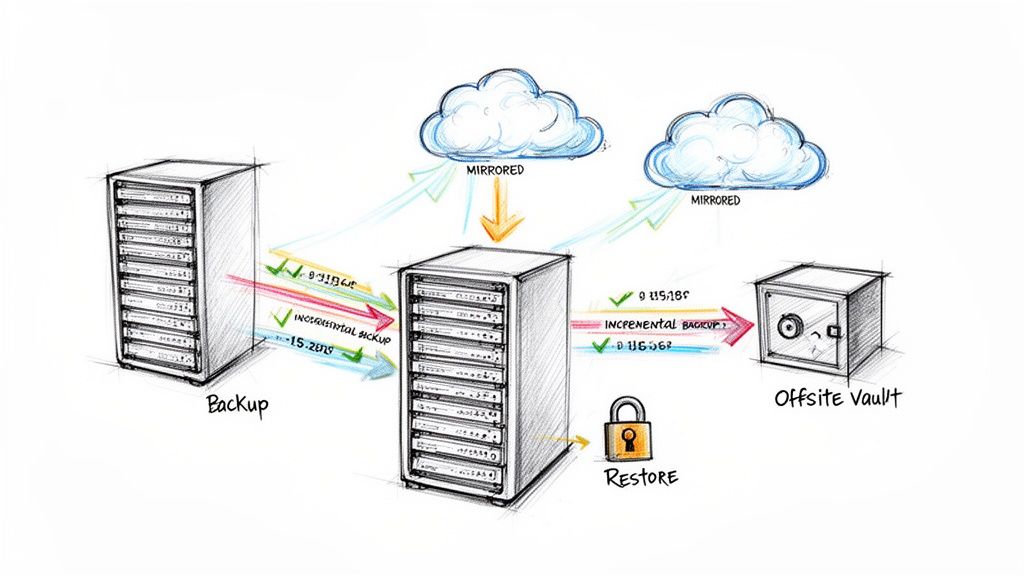
For a growing manufacturing plant in Johnson County, this means automated hourly backups with a five-minute recovery capability. If a critical piece of machinery's control software gets corrupted, they aren't facing a full day of lost production. Instead, an automated process restores a clean version from just moments before the incident. This automation transforms business continuity from a hopeful plan into a predictable, tested reality, protecting your most valuable asset: your data.
Strategic Breakdown & Actionable Tips
This is one of the most critical business process automation examples because it directly safeguards your revenue and reputation.
- Implement the 3-2-1 Rule: This is non-negotiable. Maintain 3 copies of your data, on 2 different types of media, with at least 1 copy located off-site. Automation makes managing this complex strategy simple and error-free.
- Test, Test, and Test Again: A backup you haven't tested is just a guess. Automate and schedule monthly recovery drills to a sandboxed environment. This ensures your recovery plan actually works before you’re in a real crisis.
- Monitor and Alert: Configure your system to send immediate alerts for any failed or incomplete backups. A missed backup is a hole in your safety net; automation ensures you know about it the second it happens.
- Document for Your Team: Create a clear, step-by-step recovery procedure document. Even with automation, key personnel must know who to call and what buttons to push if the primary system administrator is unavailable.
5. Automated Patch Management and System Updates
Trying to manually update every piece of software on every computer is a nightmare scenario. It’s like playing a city-wide game of hide-and-seek where the prize for losing is a major security breach. Automated patch management takes this impossible task off your plate. It uses centralized software to automatically discover, test, and deploy critical software patches and security updates to all your devices without a technician ever touching a keyboard.
This process is vital for business continuity. For a busy logistics company near the Indianapolis airport, we can deploy monthly Windows updates and critical security patches to over 200 endpoints overnight, ensuring zero disruption to their daytime operations. When a zero-day vulnerability hits the news, our automated system can push the fix within hours, not days, protecting sensitive shipping data long before cybercriminals can exploit it. This automation is the difference between a secure network and a front-page data breach story.
Strategic Breakdown & Actionable Tips
This is one of the most critical business process automation examples because it directly reinforces your cybersecurity posture and prevents costly downtime.
- Stage Your Rollout: Never push a patch to everyone at once. Create a staged deployment plan: start with a small group of test devices, move to a single department, and then proceed with a company-wide rollout. This quarantines any potential issues.
- Schedule for Silence: Deploy patches during low-usage windows, like 2 AM on a Sunday. This minimizes the risk of interrupting an employee in the middle of a critical task and prevents productivity loss.
- Document Everything: Maintain a clear and accessible log of every patch deployed, the systems it affected, and its status. This is crucial for compliance audits (like HIPAA or NIST CSF) and for troubleshooting if something goes wrong.
- Automate Your Alerts: Configure the system to send immediate alerts to your IT team or managed service provider if a patch fails to install. The faster you know about a failure, the faster you can manually intervene and close the security gap.
6. Automated User Provisioning and Access Management
Is your IT team’s calendar clogged with tickets just to get a new hire their email login? Automated user provisioning is the answer. It’s a system that automatically handles employee access rights across their entire lifecycle, from their first day to their last. When an employee is added to your HR system, this automation instantly creates their accounts in Microsoft 365, grants network access, and provisions software licenses based on their job role. No manual intervention, no forgotten passwords, no security gaps.
This is crucial for companies managing compliance and rapid growth. For a defense contractor in Johnson County, this means a new engineer gets immediate, correct access based on CMMC requirements. When a team member at a Carmel-based healthcare provider moves from billing to patient records, their access changes automatically, maintaining strict HIPAA compliance. Most importantly, when an employee leaves, the system revokes all access within minutes, shutting down a major security vulnerability that many Indiana businesses overlook. It turns a week-long manual process into a hands-off, instantaneous one.
Strategic Breakdown & Actionable Tips
This is one of the most powerful business process automation examples because it directly strengthens security while eliminating a massive administrative bottleneck.
- Map the User Lifecycle: Before automating, flowchart every step of a user's journey: onboarding, role changes, and offboarding. Identify every system and permission level needed for each role.
- Role-Based Access is Key: Don't assign permissions ad-hoc. Create clear access control policies tied to specific job titles. Your "Accountant" role should automatically get QuickBooks access, while your "Sales Rep" role gets CRM access.
- Audit, Audit, Audit: Automation isn't "set it and forget it." Regularly review the provisioning logs generated by systems like Azure AD or Okta to catch any exceptions or configuration errors.
- Test in a Sandbox: Never roll this out live. Create dummy user accounts in a test environment to run through every lifecycle scenario. Ensure a "terminated" test user is properly and fully de-provisioned before you go live.
7. Automated Invoice Processing and Expense Management
Is your accounts payable department buried under a mountain of paper invoices? This manual grind of data entry, matching, and approvals is a classic time-sink. Automated invoice processing uses Optical Character Recognition (OCR) and AI to digitize this entire workflow. The system reads an invoice, extracts key data like vendor name, amount, and due date, matches it to a purchase order, and then routes it for approval without a human ever touching a keyboard.
For a busy managed service provider like Finchum Fixes IT, this means billing for a UniFi network installation in a Fishers warehouse or tracking hardware expenses for a client in downtown Indy happens almost instantly. The system can automatically flag duplicate invoices before payment, a common and costly error, and slash the entire invoice-to-payment cycle from weeks down to just a few days. This sharpens cash flow and frees up our finance team to focus on strategic planning instead of chasing paperwork.
Strategic Breakdown & Actionable Tips
This is one of the most powerful business process automation examples for its direct impact on a company's financial health and operational efficiency.
- Start with Your Cleanest Invoices: Don't throw your messiest, handwritten receipts at the system on day one. Begin by automating invoices from high-volume vendors with clean, consistent formats. This builds momentum and makes it easier to train the system for more complex documents later.
- Set Clear Rules and Thresholds: Define your business logic upfront. For example, automatically approve any PO-matched invoice under $500, but require manager sign-off for anything over that amount. Clear rules prevent bottlenecks.
- Train, Test, and Retrain: An automation system is not a "set it and forget it" tool. Initially, you'll need to train it on your specific invoice layouts. Monitor its accuracy rates closely and plan for periodic retraining to keep it sharp.
- Integrate with Your Accounting Core: The real power comes from connecting the automation tool directly to your accounting software. This creates a seamless flow of data from invoice receipt to final ledger entry, eliminating manual reconciliation.
8. Automated Help Desk Chatbots and Self-Service Support
Is your support team drowning in a sea of repetitive questions? Think password resets, printer connection problems, and basic software inquiries. AI-powered chatbots are the 24/7 front line that can handle this deluge. These aren't the clunky bots of yesteryear; modern chatbots use Natural Language Processing (NLP) to understand what a user is actually asking for, even with typos or casual phrasing. They can provide instant answers, guide users through troubleshooting steps, and automatically create a detailed support ticket if the issue needs a human touch.
This kind of immediate, self-service support is a massive win for efficiency. For a busy logistics company in a Plainfield warehouse, a chatbot can instantly resolve 40% of their printer-related tickets, keeping shipping labels printing and trucks moving without delay. This automated first-response system filters out the simple stuff, allowing our skilled technicians at Finchum Fixes IT to concentrate on higher-value tasks, like securing a client's network to meet CMMC requirements or implementing a disaster recovery plan for a law firm in downtown Indy. It's about letting machines handle the predictable so humans can solve the complex.
Strategic Breakdown & Actionable Tips
This is one of the most impactful business process automation examples for service-oriented departments because it directly improves both employee and customer satisfaction.
- Start with the Obvious: Launch your chatbot with a specific, high-volume, low-complexity use case. Focus on password resets, VPN access guides, or basic printer troubleshooting first. Nail these before expanding its knowledge.
- Create an Escape Hatch: The most frustrating chatbot experience is being stuck in a loop. Always provide a clear and easy path to escalate the conversation to a human technician. A simple "Talk to an agent" button is non-negotiable.
- Review and Refine: Regularly check the chatbot's conversation logs. Look for where users get confused or what questions the bot can't answer. Use these insights to update its training data and improve its accuracy.
- Connect to Other Systems: A great chatbot doesn't just talk; it does things. Integrating it with other business systems, like those for automating expense reports, can turn a simple Q&A tool into a powerful workflow engine.
9. Automated Software Deployment and Release Management
Ever feel like pushing a new software update is like defusing a bomb while walking a tightrope? A single typo or a missed step can bring everything crashing down, causing downtime that infuriates users from Greenwood to Fishers. This is where Continuous Integration/Continuous Deployment (CI/CD) pipelines come in. This automation creates a digital assembly line that takes new code, runs it through a gauntlet of automated tests, and deploys it to your users, all without a developer manually clicking a "deploy" button.
This process ensures that a custom web app for a Johnson County logistics firm gets a critical bug fix within hours of discovery, not weeks. Instead of manual, error-prone deployments that tie up your best developers, the CI/CD pipeline handles the build, testing, and release process automatically. It’s how modern tech companies deploy updates dozens of times a day without causing chaos, maintaining stability and security with every single code change.
Strategic Breakdown & Actionable Tips
This is one of the most powerful business process automation examples for any company developing its own software, turning a high-risk, high-stress event into a routine, low-risk operation.
- Test Everything, Then Automate: Don't even think about CI/CD until you have a rock-solid automated testing suite. Your pipeline is only as reliable as the quality checks it runs. A good starting point is ensuring 80% code coverage with unit and integration tests.
- Use Feature Flags for Safety: Instead of a big-bang release, use feature flags to roll out new functionality to a small subset of users first. This lets you test in a live environment without risking a full-scale outage.
- Monitor Your Pipeline's Health: Track metrics like deployment frequency, change failure rate, and mean time to recovery (MTTR). These numbers will tell you if your process is getting faster and more reliable or if it needs tuning.
- Document the Automation: The pipeline itself is code and configuration. Maintain clear documentation of how it works, what each stage does, and how to troubleshoot it.
10. Automated Compliance Monitoring and Reporting
Facing an annual compliance audit can feel like cramming for a final exam you forgot about all year. Automated compliance monitoring turns this frantic, last-minute scramble into a continuous, low-stress process. It uses software to constantly check your systems against specific regulatory frameworks, gathering evidence and flagging issues in real time. Instead of an employee manually pulling server logs to prove HIPAA compliance, a system does it automatically, every single day.
For a healthcare provider in Carmel or a financial firm in downtown Indy, this is a lifesaver. An automated platform can continuously scan against the NIST CSF, ensuring cybersecurity best practices are followed, or collect the necessary audit trail evidence for CMMC reports. It transforms compliance from a yearly event into a daily operational habit, drastically reducing the risk of a failed audit and the steep penalties that follow. This proactive stance means you're always prepared, not just when the auditor comes knocking.
Strategic Breakdown & Actionable Tips
This is one of the most critical business process automation examples for any business handling sensitive data, as it directly reduces legal and financial risk.
- Start with Your Biggest Pain Point: Don't try to automate all your compliance frameworks at once. If you're a defense contractor on the I-69 corridor, begin with CMMC. If you handle patient data, focus on HIPAA first. Master one, then expand.
- Involve the Experts: These are not set-it-and-forget-it tools. Your compliance and IT experts must be involved in configuring the rules. A misconfigured automated report is worse than no report at all.
- Review, Don't Just Receive: Schedule monthly or quarterly reviews of the automated compliance reports. Look for trends and potential vulnerabilities before they become critical findings. These reports are your early warning system.
- Document Your Response: Automation finds the problems; humans still need to fix them. Maintain a clear, documented procedure for how your team addresses any non-compliance alerts generated by the system. This documentation is itself a key piece of audit evidence.
10-Point Business Process Automation Comparison
| Solution | 🔄 Implementation Complexity | 💡 Resource Requirements | ⭐📊 Expected Outcomes | Ideal Use Cases | ⚡ Key Advantages |
|---|---|---|---|---|---|
| Robotic Process Automation (RPA) for IT Ticketing and Support | 🔄 Medium — process mapping, integrations and bot maintenance | 💡 RPA licenses, integration effort, monitoring staff | ⭐⭐⭐⭐ — 📊 Response time hours→minutes; fewer categorization errors; scalable | 24/7 support centers, high-volume repetitive tickets, triage/initial diagnostics | ⚡ Faster response; reduced manual entry; frees technicians for complex work |
| Automated Cybersecurity Threat Detection and Response | 🔄 High — ML models, SIEM/EDR integration, playbook design | 💡 Enterprise SIEM/EDR, training data, security engineers | ⭐⭐⭐⭐ — 📊 Detection→response hours→seconds; faster containment and audit trails | Continuous network monitoring, threat hunting, high-risk environments | ⚡ Rapid containment; reduces breach impact; adaptive threat detection |
| Automated Network Configuration and Deployment | 🔄 High — IaC design, version control, testing and rollback plans | 💡 IaC tools, network engineers with coding skills, sandbox environments | ⭐⭐⭐⭐ — 📊 Deployment time ↓70–80%; consistent configs and drift detection | Multi-site Wi‑Fi rollouts, large-scale firewall/routing changes, DR setups | ⚡ Consistent, repeatable deployments; fast scale and rollback capability |
| Automated Data Backup and Disaster Recovery | 🔄 Medium‑High — replication design, failover orchestration, testing | 💡 Storage/replication targets, bandwidth, backup software, DR testing resources | ⭐⭐⭐⭐ — 📊 RTO from days→hours/minutes; immutable backups and compliance support | Mission‑critical data, ransomware protection, multi-site continuity | ⚡ Rapid recovery; continuous protection; minimizes downtime and data loss |
| Automated Patch Management and System Updates | 🔄 Medium — testing, scheduling, compatibility management | 💡 Patch management tools, test labs, maintenance windows planning | ⭐⭐⭐ — 📊 Vulnerability window ↓ weeks→days; consistent security posture | Large endpoint fleets, compliance-driven organizations, frequent updates | ⚡ Faster security fixes; reduces manual patch effort; improves compliance |
| Automated User Provisioning and Access Management | 🔄 Medium — HR integration, RBAC modeling, lifecycle mapping | 💡 IAM tools, HR system connectivity, policy definition and audits | ⭐⭐⭐⭐ — 📊 Onboarding hours vs days; fewer orphaned accounts; audit trails | Organizations with frequent hires/transfers/terminations, SaaS customers | ⚡ Faster onboarding/offboarding; improved security and reduced IT overhead |
| Automated Invoice Processing and Expense Management | 🔄 Medium — OCR tuning, matching rules and approval workflows | 💡 OCR/AI engines, accounting integrations, rule configuration | ⭐⭐⭐ — 📊 Processing time days→minutes; fewer data-entry errors; improved cash flow | High-volume invoicing, finance teams, service providers | ⚡ Faster payments, reduced manual entry, improved forecasting |
| Automated Help Desk Chatbots and Self-Service Support | 🔄 Medium — NLP training, knowledge base integration, escalation flows | 💡 NLP/chat platform, training data, integration with ticketing systems | ⭐⭐⭐ — 📊 Ticket volume ↓30–50%; 24/7 first-response; captures common issues | Routine support (passwords, printers, VPN), multi‑language user bases | ⚡ Instant availability; reduces ticket load; scalable self‑service |
| Automated Software Deployment and Release Management (CI/CD) | 🔄 High — pipeline creation, automated testing, feature flagging | 💡 CI/CD tools, comprehensive automated tests, DevOps expertise | ⭐⭐⭐⭐ — 📊 Time‑to‑market hours/days; frequent stable releases; quicker fixes | Agile development teams, SaaS, frequent release cadence projects | ⚡ Rapid, reliable deployments; fewer human errors; integrated QA |
| Automated Compliance Monitoring and Reporting | 🔄 High — mapping standards to controls, log collection, tuning | 💡 Compliance tooling, subject‑matter experts, continuous maintenance | ⭐⭐⭐ — 📊 Continuous evidence collection; audit prep months→days; gap detection | Regulated industries (PCI, HIPAA, SOC 2), enterprise compliance programs | ⚡ Ongoing compliance visibility; reduces audit burden and risk |
Ready to Automate? Let's Find Your Biggest Wins.
We've just walked through ten powerful business process automation examples, from the nitty-gritty of automated patch management to the high-stakes world of cybersecurity threat response. It's easy to see these as complex systems reserved for massive corporations with sprawling IT departments. But that’s a misconception that costs Indiana businesses time, money, and a serious competitive edge. The reality is, these automations are more accessible and impactful for small to medium-sized businesses than ever before.
Think about the real-world scenarios right here along the I-65 corridor. We’ve seen a Johnson County manufacturing firm save dozens of hours a month by automating their invoice processing, freeing up their finance team to focus on growth strategy instead of data entry. We’ve helped a healthcare provider in Greenwood meet HIPAA compliance requirements with automated reporting, turning a stressful, manual audit preparation process into a simple, scheduled task. Each example in this article isn't just a technical concept; it's a direct solution to a common operational bottleneck.
From Manual Grind to Strategic Growth
The core takeaway is simple: automation converts "wasted tech time" into a predictable, revenue-driving asset. Every minute your team spends manually rebooting a server, provisioning a new user account, or chasing down an IT ticket is a minute they aren't serving a customer or closing a sale. Automation isn't about replacing people; it's about elevating them from repetitive tasks to strategic work that actually grows your business.
Consider the compounding value:
- Automated Patch Management: Using a tool like Bitdefender GravityZone doesn’t just update software. It builds a foundational layer of security that prevents the kind of catastrophic downtime that can cost a business thousands per minute.
- Automated Data Backups: Implementing immutable off-site backups is more than just a safety net. It’s a guarantee of business continuity, ensuring that a ransomware attack or hardware failure is a recoverable inconvenience, not a company-ending event.
- Automated Network Configuration: Deploying latency-optimized UniFi mesh nodes isn't just about faster Wi-Fi. It’s about creating a stable, reliable digital backbone for your entire operation, from point-of-sale systems to inventory management.
These aren't just theoretical benefits. In our 17 years of local service, we’ve seen these exact outcomes. When we dissembled a similar client’s failing RAID array, we implemented an automated backup system so it would never happen again. We understand that for a growing business in Hamilton County, every dollar and every minute counts.
Your First Step Toward a Smarter Operation
The journey into business process automation doesn't require a massive, disruptive overhaul. It starts by identifying the single biggest manual time-sink in your organization and targeting it with a precise, high-ROI solution. Is it your chaotic IT help desk? Your painful employee onboarding process? Your vulnerability to security threats?
You don’t have to guess. The key is to start with a clear assessment of where you are now. By pinpointing the specific operational drags, you can build a strategic roadmap for automation that delivers immediate, measurable results. This is how you transform your IT from a cost center into a powerful engine for efficiency and growth.
Ready to stop wasting time on manual tasks and discover the specific automation opportunities that will make the biggest difference for your bottom line? The team at Finchum Fixes IT has spent years helping Indiana businesses implement the exact business process automation examples detailed in this article. We invite Greenwood and Indianapolis business owners to schedule a complimentary Free Network Assessment to identify your highest-impact automation wins.