Your Guide to a Business Impact Analysis Template

A business impact analysis template isn't just another corporate document to file away. Think of it as a financial survival guide. It’s the tool you use to turn vague worries about "what if the system goes down?" into a concrete plan for keeping your business afloat.
- What is a BIA? A Business Impact Analysis (BIA) is how you figure out which of your business systems are absolutely critical and what it actually costs you—in real dollars—when they're down. Downtime can cost up to $9,000 per minute, so this isn't just a technical exercise.
- Why is it crucial? A BIA is your roadmap to smart IT spending. It helps you protect what matters most and converts the financial chaos of a tech failure into a predictable monthly budget. It’s about building resilience and turning wasted tech time into billable hours.
- What's the goal? We're moving from guessing what's important to knowing what's important. This guide, along with our downloadable business impact analysis template, will walk you through mapping your risks and building a solid defense with technologies like immutable off-site backups against crippling interruptions.
Why a BIA Is Your Best Defense Against Downtime
Imagine your aging server hardware finally gives out at your Greenwood office, or a cyberattack freezes your operations in Hamilton County. The moment it happens, a clock starts ticking—and every single minute of that downtime is money draining from your bank account, trust eroding with your clients, and your reputation taking a hit.
A Business Impact Analysis (BIA) is your first and most powerful line of defense against that chaos. It's not a theoretical exercise. It's a brutally honest financial tool that forces you to answer one question: "What breaks first, and how much is it going to cost us when it does?"
This process shines a bright light on all the moving parts of your business you take for granted. Suddenly, you see with perfect clarity which systems—whether it’s your CRM, accounting software, or a custom manufacturing app—are the ones you truly can't live without. Once you know that, you can stop fighting fires and start building a fortress.
From Chaos to Control
Flying without a BIA means you're just guessing where your biggest vulnerabilities are. In our 17 years of local service, we’ve seen too many Johnson County business owners get blindsided by a system failure they never imagined could happen.
A BIA changes the entire game. It gives you the hard data you need to make smart investments in the right places.
- Pinpoint Your Weak Spots: Uncover those sneaky single points of failure before they have a chance to bring your entire operation to a screeching halt.
- Put a Price Tag on Downtime: You'll be able to attach a real dollar amount to an outage for each critical part of your business.
- Build a Rock-Solid Case for Resilience: Justify spending on robust solutions like immutable off-site backups by showing leadership the staggering cost of doing nothing.
When you understand the potential losses, you can prepare for them. Maybe that means getting the right business interruption insurance or simply investing in better backups. Either way, you turn "wasted tech time" and panicked fixes into a predictable, stable operation with a manageable monthly budget.
Let's be honest, the threats aren't going away. With cyberattacks jumping 38% every year and natural disasters causing billions in damages, Indiana businesses can't afford to cross their fingers and hope for the best. As you can see from recent industry data about business impact analysis guides, companies that do a BIA are the ones that bounce back fast. It's not just a good idea; it's an essential investment.
How to Fill Out Your BIA Template Correctly
Alright, so you've downloaded our business impact analysis template. Fantastic. But a blank template is like an unassembled piece of furniture—the real work, and the real value, is in putting it together correctly. This isn't just a box-checking exercise. We're about to build a practical, custom-fit shield for your business.
Think of this process as your workshop for turning vague worries into a concrete defense plan. The goal is to get past the guesswork and really understand the moving parts that make your company money. What truly can't you live without? Is it your CRM? Your accounting software? That one quirky, custom-built app that runs your entire shop floor? Let's find out.
The journey we're about to take follows a simple, logical path: identify, analyze, and then plan.
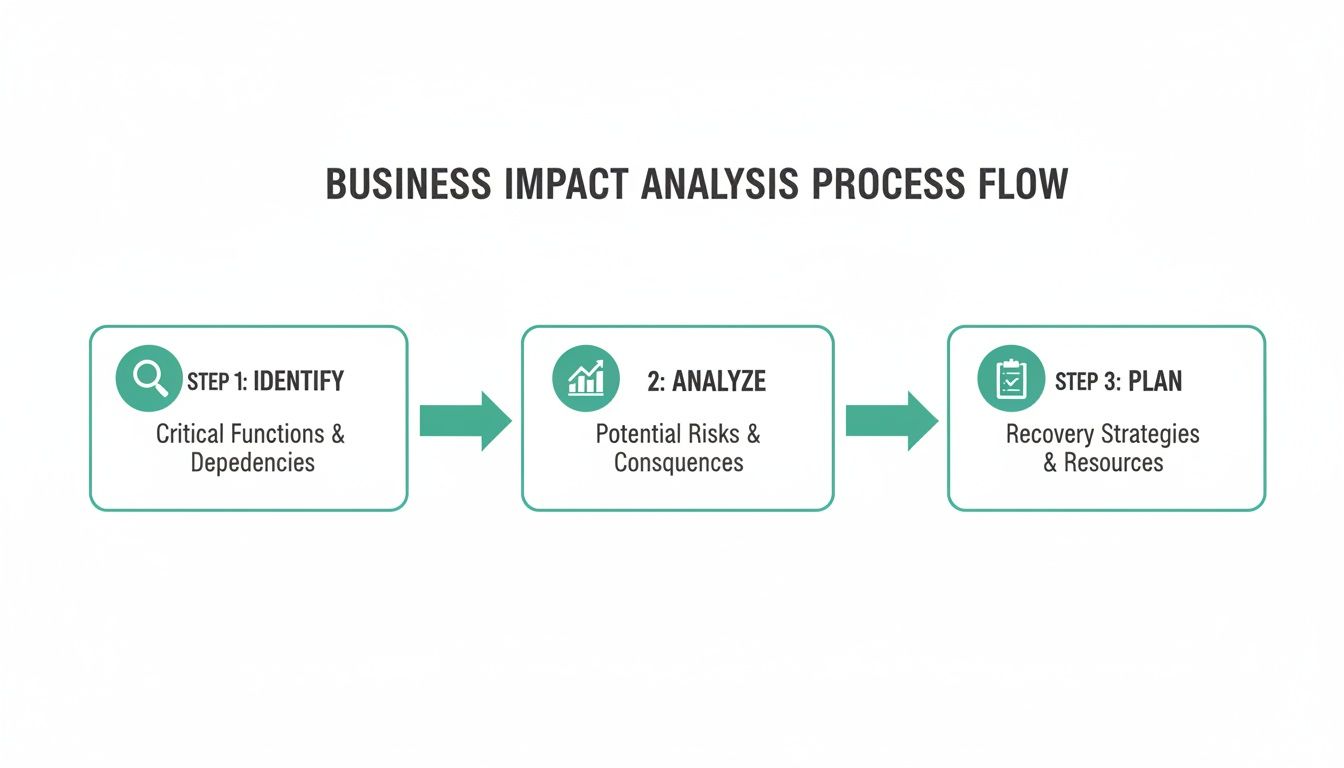
See? It's a structured process, not a frantic scramble. It all starts with discovery and ends with a solid strategy.
Identifying Your Core Business Processes
First things first: you need a list of every single process that keeps the lights on and the money coming in. But "vague" is the enemy here. Don't just write down "Finance." That's not helpful. Break it down into what people actually do. Think "Accounts Payable Processing," "Client Invoicing," and "Weekly Payroll."
We see this all the time with businesses we help along the I-65 corridor. A logistics company might think its fancy routing software is the crown jewel, completely forgetting that the UniFi networking gear connecting the warehouse scanners to that software is just as vital. If the Wi-Fi goes down, the whole operation grinds to a halt.
The best way to get this information is to go straight to the source. Pull your department heads aside and ask them one simple question: "If the building was on fire and you could only save three business functions, what would they be and why?" Their gut reactions will tell you exactly what they can't live without.
Quantifying the Real-World Impact
With a list of processes in hand, it's time to attach a price tag to what happens when they break. This is where the BIA gets real. We're going beyond just "lost revenue" and looking at the full blast radius of an outage.
We recently worked with a law firm in downtown Indy whose ancient on-premise server was crashing constantly. They were worried about lost billable hours, which is bad enough. But when we dug in, we found the real nightmare: a total server failure could corrupt their entire case management system. We're talking a regulatory disaster that could ruin their reputation.
For each process on your list, think through these specific impact categories:
- Financial Impact: How much money are you losing per hour or day? Don't forget to include potential penalties and fines (think HIPAA for medical offices or CMMC for defense contractors) and the cost of paying people to do things manually.
- Operational Impact: Who else does this outage affect? If the production line stops, can the sales team still fulfill new orders? If the CRM is down, is your customer support team flying completely blind?
- Reputational Impact: What's the cost of losing a customer's trust? This one's tough to put a number on, but for any Johnson County business owner who thrives on local reputation, it’s absolutely critical.
A BIA is so much more than a technical spreadsheet; it’s a cornerstone of your business strategy. To get even deeper into this side of things, our guide on how to perform a cyber security risk assessment is a great next read.
Assigning Recovery Priorities
Now for the fun part. With all your impacts documented, you can finally start ranking things. This is where the rubber meets the road, and it will dictate your entire recovery strategy. The processes with the most devastating impact get top priority. This is how you decide where to invest in protective tech like immutable off-site backups or a Zero Trust architecture.
For instance, a manufacturing plant in a Greenwood business park will almost certainly rank its production line control system as Priority 1, needing it back online in under an hour. That same company’s internal marketing blog? It’s probably a Priority 4, with a recovery window of 24 hours or more. No big deal.
This data-backed prioritization turns your IT budget from a frustrating cost center into a strategic investment. It gives you the cold, hard proof you need to justify spending on the right tools—like Bitdefender GravityZone for endpoint protection—that will prevent a $9,000-per-minute disaster and keep your team focused on what they do best.
Don't Let RTO & RPO Scare You—Let's Actually Make Sense of It
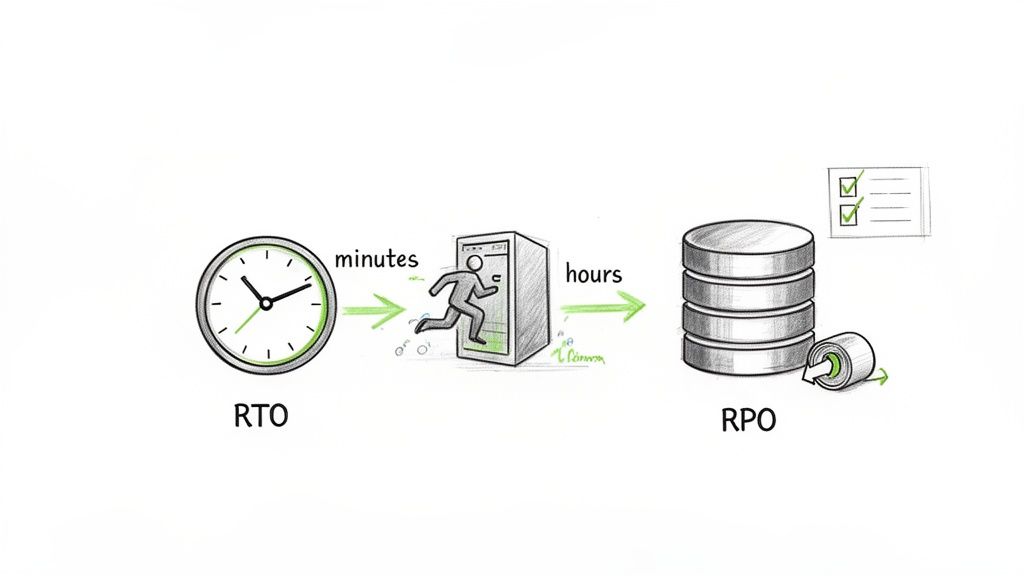
Recovery Time Objective (RTO) and Recovery Point Objective (RPO). I know, they sound like corporate jargon spit out by an IT textbook. But forget the fancy terms for a second. At their core, they answer two dead-simple questions that are the absolute foundation of your entire recovery plan:
- RTO: After a disaster hits, how fast do we absolutely need this system back online before things get ugly?
- RPO: If we have to restore from a backup, what’s the maximum amount of data we can stand to lose without it causing a full-blown crisis?
Getting these two numbers right is precisely where a good business impact analysis template starts paying for itself. This is how you move from just worrying about an outage to having a concrete, technical blueprint for survival.
Why These Numbers Dictate Your Entire Tech Budget
Here’s the thing: your RTO and RPO numbers directly tell us what kind of tech you need and, frankly, how much it’s going to cost. A super low RTO (think, "we need to be back up in less than 15 minutes") requires some serious, and often more expensive, hardware like high-availability systems that fail over automatically. A more relaxed RTO of 24 hours, however, might be perfectly served by a more standard backup and recovery process.
It’s the same story for RPO. If you can't afford to lose a single transaction (RPO of near-zero), you need continuous, real-time data replication. But if you can live with losing a few hours of work, then backups that run every four hours will do the job. This is how you stop overspending on bulletproof protection for systems that don't need it and avoid being dangerously under-protected where it truly counts.
Think about a busy e-commerce shop in a downtown Indy tech hub. Their public website might have an RTO of five minutes and an RPO of mere seconds. But the internal HR software they use for quarterly reviews? An RTO of eight hours and an RPO of 24 hours is probably just fine. It’s all about context.
The Technology That Makes These Numbers a Reality
This is where our expertise turns your goals into a working solution. We don't just ask for your RTO/RPO and nod along; we build the system that can actually deliver on those promises.
In our 17 years of local service, I can't tell you how many times we've seen companies pick an aggressive RTO out of thin air. We walked into a Johnson County manufacturing firm that wanted a one-hour RTO for their production database. Sounds great, right? Except their only protection was a single backup that ran every night. Their real-world RTO wasn't one hour; it was closer to 24 hours, and they had no idea.
Here’s a quick look at how specific tech choices directly map to your recovery goals:
-
Immutable Off-Site Backups: This is your absolute best friend for hitting your RPO. By creating unchangeable copies of your data and storing them somewhere else entirely, you have a guaranteed clean version to restore from. Ransomware can't touch it. This directly determines the maximum data you can lose.
-
Zero Trust Architecture: This is a total game-changer for your RTO. Instead of trusting everything inside your network, this model assumes nothing is safe. A breach that might have previously spread and taken down your entire server farm gets stopped dead at a single workstation. The incident becomes a minor blip, not a full-scale meltdown, drastically shrinking your recovery time.
Understanding how these pieces fit together is critical. Our guide on building a cybersecurity incident response plan dives deeper into how this technology supports your overall strategy.
Sample RTO and RPO for Common Indiana Business Systems
To help you get started, we've put together a table with some realistic targets for common systems we see in businesses all over the state. Think of this as a conversation starter for you and your team—not a rigid set of rules.
| Business System/Process | Example | Sample RTO (Max Downtime) | Sample RPO (Max Data Loss) |
|---|---|---|---|
| E-commerce Platform | Customer-facing Shopify or Magento site | < 15 Minutes | < 5 Minutes |
| Financial/Accounting | QuickBooks, Sage, or custom ERP | < 4 Hours | < 1 Hour |
| Client/Patient Records | Healthcare EMR (HIPAA regulated) | < 1 Hour | < 15 Minutes |
| Internal Communications | Email Server, Microsoft Teams/Slack | < 2 Hours | < 1 Hour |
| Networking Infrastructure | UniFi networking switches and access points | < 30 Minutes (with failover) | N/A (Configuration backup) |
| Internal File Server | Shared drives for marketing or operations | < 8 Hours | < 4 Hours |
Getting these numbers right isn't just a technical exercise. It’s a strategic business decision. This is how you avoid becoming another statistic in that scary $9,000-per-minute downtime cost and turn chaos into a controlled, manageable process. Honestly, getting your RTO and RPO defined is the most valuable part of filling out your business impact analysis template.
Mapping Your Critical System Dependencies
So, you've pinpointed your most important business functions and even assigned RTO/RPO targets. Fantastic. But this is exactly where most businesses drop the ball, and where a minor hiccup can morph into a full-blown catastrophe. A truly effective business impact analysis template goes deeper by mapping out all the hidden dependencies.
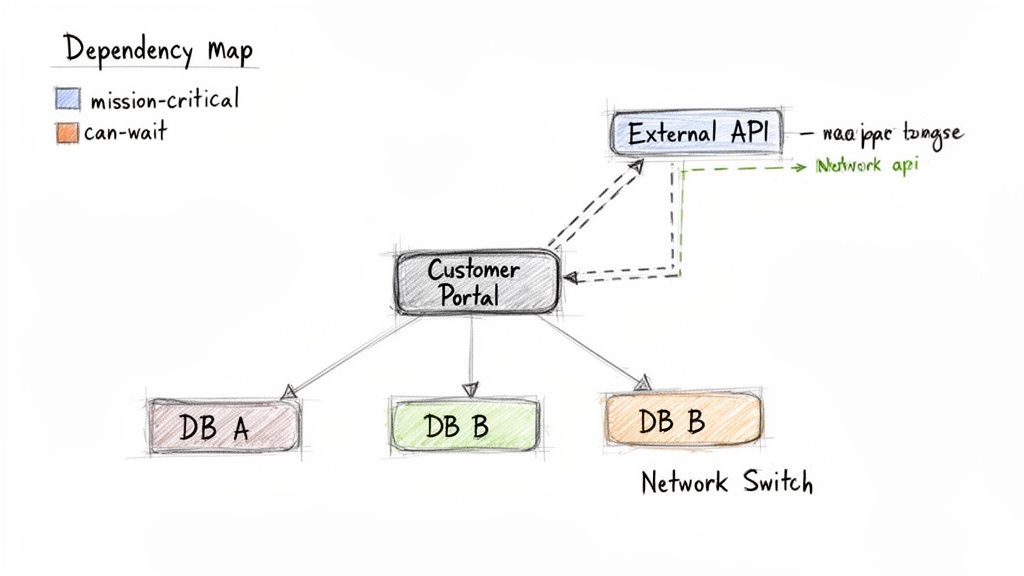
Think about your customer portal. On the surface, it’s one system. But under the hood, it’s a chaotic symphony of moving parts. It might be pulling data from three different databases, using an external API for logins, and all running on a specific server connected by a single UniFi networking switch. If just one of those threads snaps, the whole portal comes crashing down.
This isn't just about making a list of your software. It's about uncovering the invisible connections that hold your entire business together and finding that one weak link that could take everything offline.
A Real-World Story of a Hidden Dependency
Let me tell you about a frantic call we got from a logistics company here in the Indianapolis area. Their entire business was at a standstill. No orders, no dispatching, no tracking—total paralysis. They were convinced their main server had finally kicked the bucket.
It wasn't that simple. After we got on-site and started digging in—literally pulling apart their failing RAID array—we found the real villain.
When we dissembled a similar client’s failing RAID array, we found the real problem was a dependency they never knew existed. Their custom dispatch software, their client portal, and even their internal inventory system were all hard-coded to talk to that one specific array. There was no backup plan, no failover. It was a single, fragile point of failure they never saw coming.
Because they hadn't mapped these connections, their disaster recovery plan was worthless. Restoring the database to a new server did nothing until every single one of those other systems was painstakingly reconfigured, adding hours of expensive downtime to an already bad day.
How to Build Your Dependency Map
Don't panic—building a dependency map isn't as intimidating as it sounds. For every critical process you've identified, you just need to keep asking, "What else does this need to work?"
Start with your highest-priority functions and start playing detective. For each one, document every piece of the tech stack:
- Hardware: Which servers, switches, workstations, or firewalls does this process touch? Get specific. "Server 3 in the main rack" is way more helpful than just "the server."
- Software: List out every application involved, from your off-the-shelf antivirus like Bitdefender GravityZone to that quirky custom tool your ops team built a decade ago.
- Data & Databases: Where does the information live? Is it a local SQL database, a cloud service, or a tangled mess of spreadsheets on a shared drive?
- People: Who are the key people needed to run this process or, more importantly, to fix it? What happens if they're on vacation?
- External Services: Are you leaning on third-party APIs, cloud providers like AWS, or specific vendors for support?
And don’t forget about communications! Platforms for Unified Communications for Business are often the lifeblood of an organization. A dead phone system can be just as crippling as a dead server, so make sure it's on your map.
From Map to Action Plan
Once you’ve built this map, the weak points will practically scream at you. You’ll suddenly see where a single hardware failure could trigger a domino effect, taking down multiple departments at once. This is where your BIA transforms from a document into a powerful tool for smart spending.
Maybe your map reveals that your accounting, CRM, and sales software all live on the same aging server in your Greenwood office. That’s a huge gamble. Armed with this data, your action plan might be to finally virtualize those systems or move them to a high-availability cloud setup.
This deep dive is what separates a flimsy checklist from a real-world recovery strategy. It ensures you don't have any blind spots when disaster strikes. A detailed dependency map is non-negotiable for a modern IT strategy, and we always review it during a comprehensive IT infrastructure audit. For the fast-moving companies in downtown Indy's tech hubs, you simply can't afford a single minute of unexpected downtime.
Now What? Turning Your BIA Into a Real-World Recovery Plan
So you’ve finished your business impact analysis template. Fantastic. But don't you dare let it gather dust on a digital shelf. That document isn't a trophy; it's the starting pistol for building some serious resilience.
All that analysis you just did? That’s your treasure map. It shows you exactly where the weak points are and what you need to protect first. This is how you shift your IT budget from a guessing game into a smart, strategic investment. It’s how you prevent that gut-wrenching $9,000-per-minute downtime cost and turn chaotic tech spending into a predictable, manageable line item.
Your BIA gave you the "why." Now let's talk about the "how"—turning those RTO and RPO numbers into a concrete plan that keeps you in business, no matter what curveballs get thrown your way.
Choosing the Right Tools for the Job
This is where the rubber meets the road. You have your BIA data, and now you have to pick the right technical solutions to match. It’s a classic Goldilocks problem: many businesses either overspend on a fortress when a helmet would do, or they cheap out and leave the front door wide open. Your BIA takes away all the guesswork.
For instance, did your analysis flag a critical system with an RTO of just a few minutes? That’s your cue to look at a high-availability solution that can fail over automatically. But what about that Tier 3 system with a 24-hour RTO? An immutable off-site backup and a well-rehearsed recovery script is a far more practical and cost-effective answer.
We saw this play out with a healthcare provider right here in Hamilton County. Their BIA screamed that the patient scheduling system was mission-critical. Instead of us pushing an absurdly expensive server cluster on them, we built a plan around robust backups and a clear recovery playbook. It met their one-hour RTO, kept them HIPAA compliant, and didn't blow up their budget.
That’s the power of data. You’re matching the solution to the specific risk you've identified.
Getting Ahead of the Disaster with Proactive Defense
A great recovery plan is crucial, but you know what's even better? Never having to use it. That's where proactive security comes into play. For businesses up and down the I-65 corridor, cyber threats are getting sneakier by the day. Simply waiting for something to break is a recipe for disaster.
This is why we almost always pair a solid continuity plan with SOC-as-a-Service (Security Operations Center) monitoring. Think of it as a 24/7 digital watchdog for your entire network. It uses powerful tools and human expertise to spot the faint whispers of an attack before it becomes a deafening roar.
- Threat Hunting: Our team actively searches for suspicious behavior that automated tools might miss.
- Log Analysis: We constantly sift through system logs, looking for the tell-tale signs of a compromise.
- Incident Response: The second a credible threat is found, we're on it, guiding you through the steps to shut it down fast.
Catching these threats early can stop a disaster in its tracks. It's the ultimate layer of defense for your business continuity. You can get a better feel for how this plugs into a bigger strategy by reading about our approach to managed IT services for small businesses.
Fixing the Problems Hiding in Plain Sight
Sometimes, the biggest threat isn't a shadowy hacker but your own aging or poorly designed infrastructure. In our 17 years of local service, we've seen countless "Southside Problem" scenarios where the real enemy is just plain bad tech creating constant, nagging downtime.
A perfect example is the beautiful old brick buildings you see in many Greenwood business parks. They've got character, but they’re absolute black holes for Wi-Fi signals. Spotty connectivity isn't just an annoyance; it’s a direct hit to your bottom line.
Your BIA might not have a line item for "lousy Wi-Fi," but it will absolutely show the impact—sluggish warehouse scanners, dropped sales calls, and painfully slow access to cloud apps. The fix isn't just another router from a big-box store. The real fix is a properly engineered network of latency-optimized mesh nodes that blankets your entire space with a strong, reliable signal.
This is how a BIA leads to permanent solutions. It shines a spotlight on the business pain, and we bring the technical cure that removes the bottleneck for good.
Alright, you did it. You pushed through and completed your business impact analysis template. Give yourself a pat on the back, because that’s the heavy lifting most businesses never even start.
But here’s the thing: a BIA on paper is just a really well-organized theory. Now comes the fun part—making sure your technology can actually pull off what you've planned. After 17 years of local service, I can tell you that the gap between a great plan and a real-world recovery can be shockingly wide.
Time for a Reality Check
Think of your BIA as the blueprint. The next step is to have a professional walk the construction site—your network—to see if the foundation is solid. You need to put your assumptions to the test and see how your current tech stacks up against the recovery times you just defined.
This is where you unearth the nasty little surprises that a BIA can only hint at. We’re talking about specific, ticking time bombs like:
- Forgotten Software: That one ancient application nobody’s patched in years, which is basically a welcome mat for attackers.
- "Compliant" Backups: Discovering your backup system doesn’t actually meet CMMC or HIPAA rules, putting you on the hook for crippling fines.
- The Single Point of Failure: Finding out your entire office's operation depends on a single, unmanaged switch blinking away in a dusty closet.
Look, don't let all your hard work end up in a binder that just gathers dust. The real value isn't in the document itself; it's in using what you've learned to build a business that can take a punch and keep on going.
We want to help you bridge that gap. For businesses in the Greenwood and greater Indianapolis area, we offer a Free Network Assessment to do just that. Let’s turn your analysis into an action plan that actually protects your people, your data, and your bottom line.
Your BIA Questions, Answered
Whenever we sit down with business owners around Indianapolis to talk about resilience, the same questions about Business Impact Analysis always seem to pop up. It’s a crucial tool, but it can feel a little abstract at first. Let's clear the air and tackle the most common ones we hear.
What's the Difference Between a BIA and a Risk Assessment?
It’s a classic mix-up, but the difference is actually pretty simple. A BIA tells you what's most important, while a risk assessment tells you what threatens it. You absolutely need both.
A Business Impact Analysis (BIA) is all about the consequences. It answers the question, "If our invoicing system goes down, how much money do we lose and how quickly does it start to hurt?" A risk assessment, on the other hand, identifies all the nasty things that could cause that outage—from a server crash or a ransomware attack to a burst pipe in the server room.
How Often Should We Be Updating Our BIA?
An outdated BIA is a liability, plain and simple. It gives you a false sense of security that can be more dangerous than having no plan at all. We tell all our clients to review and refresh their business impact analysis template at least once a year.
After 17 years of local service, we've seen it happen: a company gets crippled because their three-year-old BIA didn't account for the new CRM system that now runs their entire sales operation. An annual check-up prevents exactly that kind of disaster.
Of course, you should also pull it out for a refresh anytime you make a big change. Think new core software, an office move, or a major shift in how you get things done.
Can a Small Business Really Afford All This?
We hear this one a lot. But the better question is: can your business afford to be dead in the water? When downtime can cost up to $9,000 per minute, doing nothing is the most expensive option on the table.
This is where your BIA becomes your best friend. It’s a roadmap for smart spending, showing you exactly where to focus your resources to get the most bang for your buck. Modern tools like immutable off-site backups or top-tier managed security from providers like Bitdefender GravityZone are far more accessible than people think. The ROI isn't just about dodging a bullet; it's about gaining peace of mind and predictable tech costs.
Don't let your analysis just become another document gathering dust. The real value comes from turning those insights into a rock-solid technical strategy.
At Finchum Fixes IT, we help businesses across Greenwood and the greater Indianapolis area do just that. We'll help you translate your BIA into an actionable IT plan that works for your budget.
Ready to see where you really stand? Schedule a Free Network Assessment with us today.