How to Protect Against Phishing Attacks: A Business Guide to ROI
A generic spam filter is no longer enough to protect your business. Defending against modern phishing attacks requires a blend of smart technology and a well-trained team. A single, cleverly disguised email can bypass basic defenses, which is why a multi-layered strategy—covering everything from email authentication to endpoint security—is essential. Just as critical is a solid incident response plan, ready to execute to limit damage when an attack inevitably gets through.
The Real Cost of Phishing for Indiana Businesses
Phishing is not a minor IT issue; it is a direct assault on your revenue. For businesses across the Indy metro, a single employee clicking the wrong link creates a significant operational bottleneck, grinding productivity to a halt and directly impacting profitability. A successful attack diverts your most valuable resources—your people and your cash flow—away from core business functions and into costly, time-consuming damage control.
Consider the diverse business landscape here in Indiana. A phishing attack against a logistics firm can snarl complex 3PL supply chains, triggering shipment delays that lead to steep contract penalties and a permanent loss of client trust. At a manufacturing plant in the "Crossroads of America," one stolen password could halt a production line, costing thousands of dollars for every hour of downtime. The solution is not just better security, but a custom security posture that protects your specific operational vulnerabilities.
The Financial Impact Across Industries
In professional services, the damage is measured in lost billable hours as your top performers are pulled off client work to deal with the fallout. For healthcare providers, the consequences are even more severe. A phishing email that exposes patient data can result in staggering HIPAA violation fines and a loss of patient confidence that is nearly impossible to recover. These are not hypothetical scenarios; they are daily occurrences for unprepared businesses.
The volume of these threats is immense. An estimated 3.4 billion phishing emails are sent globally every day, and phishing is the entry point for 36% of all data breaches. With this constant pressure, it's not a question of if you'll be targeted, but when and how much it will cost.
The core problem with phishing is how it weaponizes your own operations against you. It uses simple deception to sidestep millions of dollars in technology investment by targeting your people. A proactive defense isn't just another business expense; it's revenue insurance.
To get ahead of this, you need a foundational defense. Below is a quick checklist of the essential layers every business should have in place.
Foundational Phishing Defense Checklist
| Defense Layer | Objective | Implementation Focus |
|---|---|---|
| Email Authentication | Verify sender identity to block spoofs. | Configure SPF, DKIM, and DMARC records for your domain. |
| Advanced Email Filtering | Scan and block malicious links/attachments. | Use a solution that analyzes email content, sender reputation, and behavior. |
| Endpoint Protection | Protect devices from malware if a user clicks. | Deploy modern antivirus/EDR and keep it updated on all company devices. |
| Multi-Factor Authentication (MFA) | Prevent unauthorized account access. | Enforce MFA on all critical systems, especially email and financial apps. |
This table provides a starting point, but true resilience comes from a more holistic approach.
Shifting from Reaction to Prevention
The smartest move is to treat cybersecurity as a direct contributor to your company's financial health. A well-designed security strategy does more than block malicious emails; it protects your core ability to operate and generate revenue. By implementing custom rules powered by specific APIs, you can automate the rejection of fraudulent RFQs and fake invoices before they ever reach your finance team’s inbox, saving valuable labor hours and preventing costly payment errors.
At Magnitude Marketing, we build custom solutions that turn complex security requirements into practical, business-focused defenses. We build defenses tailored to your specific vulnerabilities, whether that's securing sensitive patient data or ensuring your logistics network never misses a beat. This proactive stance dramatically lowers your risk of data loss and operational chaos. You can dive deeper into these strategies in our guide to data loss prevention best practices.
The end goal is an organization where your technology and your team work in concert, spotting and neutralizing threats before they can cause financial harm. To see how a custom-built defense plan can protect your assets and support your growth, schedule a Custom Tech Audit with our team.
Establishing Your Technical Defenses
While training your team is critical, your first and most powerful line of defense against phishing is always technology. Building a solid technical wall isn't about buying expensive software; it's about implementing foundational controls that systematically filter out threats before a human ever has to make a judgment call. This is where you achieve a tangible return on investment by drastically reducing the volume of malicious emails that waste your team's time and pose a direct financial risk.
I’ve seen it countless times with businesses here in Indiana, especially in manufacturing and logistics. A common bottleneck is the constant flood of fraudulent invoices and fake RFQs. These emails are designed to look identical to real communications, often spoofing the addresses of trusted vendors. The solution is to make it technically impossible for these fakes to ever land in an inbox.
The Power of Email Authentication
Think of email authentication as a digital postmark that verifies a sender's identity, effectively slamming the door on domain spoofing. Implementing these protocols is a crucial first step in learning how to protect against phishing attacks. This is "How" it works technically:
- SPF (Sender Policy Framework): This is a public list, stored in your DNS records, of mail servers authorized to send email from your domain. If a message arrives from an unlisted server, it’s flagged as suspicious.
- DKIM (DomainKeys Identified Mail): This attaches a unique, encrypted digital signature to your outgoing emails. The receiving server uses it to verify the message hasn't been altered during transit.
- DMARC (Domain-based Message Authentication, Reporting & Conformance): This is the enforcer that ties SPF and DKIM together. DMARC tells other email servers exactly what to do with messages that fail SPF or DKIM checks—either quarantine them or reject them outright.
Correctly configuring DMARC is a game-changer. It removes guesswork by creating an automated policy for handling unverified emails, meaning fraudulent invoices are far less likely to be seen, let alone paid. This directly reduces financial risk and saves labor hours. To dig deeper into this, you can check out our guide on email security best practices.
Going Beyond Basic Spam Filters
Your standard spam filter struggles with sophisticated, targeted phishing attacks. Advanced email filtering solutions use AI models to analyze incoming emails for suspicious links, malicious attachments, and even the tone and sentiment of the language. They are trained to spot the classic signs of a phishing attack—like urgent demands for payment or unexpected credential update requests—and quarantine the message before it tempts an employee to click. The amount of labor saved from not having to manually vet suspicious emails is enormous.
Investing in email authentication and advanced filtering isn't an expense; it's a productivity multiplier. Every malicious email blocked is time your team gets back to focus on revenue-generating activities instead of playing digital defense.
Deploying protocols like DMARC, SPF, and DKIM is a foundational control that can slash spoofing attempts by 80-90%. This is especially critical for vulnerable sectors like retail, which suffers from a 36.5% phish-prone rate. When you pair these technical controls with continuous monitoring, you create a system that can identify and shut down threats with incredible efficiency. For more on the latest trends, you can explore the latest findings on cyber threats.
Securing the Last Mile with Endpoint Protection
No system is foolproof. A clever phishing email might eventually slip through, and an employee might click a malicious link. When that happens, your last line of defense is the endpoint protection installed on the device itself—the laptop, desktop, or smartphone.
Modern Endpoint Detection and Response (EDR) is far ahead of traditional antivirus. It doesn’t just scan for known virus signatures; it actively monitors device behavior for any sign of a compromise. For instance, if a user clicks a link that tries to install ransomware, the EDR solution detects that unusual activity in real-time. It can then automatically isolate that single device from the network, preventing the threat from spreading to other computers or your servers. This rapid response contains the damage, protects your critical business data, and prevents costly operational downtime. At Magnitude Marketing, we integrate these systems via APIs, creating a unified security posture where your email filter and endpoint protection work together as a single, cohesive defense.
To understand your current vulnerabilities and build a technical defense that delivers a real ROI, a detailed review of your infrastructure is the best place to start. Schedule a Custom Tech Audit with our team to get a clear, actionable plan.
Turning Your Team Into a Human Firewall
Let's be realistic. Your technical security controls are your foundation, but they aren't foolproof. Eventually, a sophisticated phishing email is going to slip past your filters and land in an employee's inbox. When that happens, your most important security tool isn't a piece of software—it's the person staring at that screen.
This is where so many businesses, especially here in Indiana, hit a wall: human error.
The fix isn't a generic, once-a-year warning memo. It’s about building a living, breathing security culture that turns your team from a potential liability into your greatest defensive asset. A strong "human firewall" is a massive advantage, creating a vigilant, threat-spotting force that no technology can replicate.
And this shift has never been more critical. AI-powered phishing is exploding, with attacks surging by a staggering 1,265% in the last year alone. Technology helps, but it can't win the war on its own when 68% of all breaches involve a human element. We've seen firsthand that a well-designed training program can increase threat reporting by 9x in simulations and 10x during real attacks. Even better, it slashes "dwell time"—the dangerous gap between when an email arrives and when it's reported—by a third. You can dig deeper into how cyber threats are evolving at Cybersecurity Ventures.
Running Phishing Simulations That Actually Work
So, how do you measure and sharpen your team's instincts? With controlled phishing simulations.
Think of these not as "gotcha" tests to embarrass people, but as invaluable diagnostic tools. The entire point is to see where your team stands right now so you can deliver training that genuinely helps.
A program that gets results has a few key ingredients:
- Plausible Scenarios: The simulations need to feel real. If you run a logistics company, a fake shipment notification will be far more effective than a generic password reset email. For a law firm, it might be a spoofed invoice or a fake calendar invite from a "client."
- A Mix of Difficulty: Don't just lob softballs. You need to mix in sophisticated attacks that use your company’s branding and sound perfectly reasonable. This trains your team to spot the subtle red flags, not just the obvious junk mail.
- Instant Teachable Moments: When someone clicks a simulated phish, they shouldn't just see an error. They should land on a page that immediately explains it was a test, breaks down the red flags they missed, and reinforces how to report it next time. This turns a mistake into muscle memory.
The data you get from these tests is pure gold. You can pinpoint if a specific department is struggling or if a certain type of lure is particularly effective. This lets you focus your training efforts where they’ll have the biggest impact instead of wasting time on generic security lectures nobody pays attention to.
Taking Apart Real-World Phishing Emails
Theory is fine, but seeing is believing. The lessons that really stick come from deconstructing actual phishing emails with your team and pointing out exactly what gives them away.
Let's walk through a common one: an email claiming to be from HR, demanding an urgent password reset for the payroll system. Here’s what your team needs to learn to look for instinctively:
- Who's It Really From? The display name might say "HR Department," but a quick check reveals the email address is something fishy like
hr-support@company-mail.netinstead of your real domain. - The Panic Button: Attackers love using urgent, threatening language like "Immediate Action Required" or "Account Suspension Notice." It’s a cheap psychological trick to rush you into making a mistake.
- The Bait-and-Switch Link: Hovering your mouse over the link reveals its true destination. A legitimate link will go to your company's domain, not some bizarre, shortened URL.
- Impersonal Greetings: Vague salutations like "Dear Employee" or "Valued Customer" are a huge red flag. Attackers send these in bulk; they don't know who you are.
A well-trained employee doesn't just delete a suspicious email; they report it. This active reporting gives your IT team real-time threat intelligence, allowing them to block the attacker and warn others before any real damage is done.
And remember, this isn't just about email anymore. As more businesses in Hamilton County and across the Indy metro shift to hybrid work, we're seeing a rise in phishing over text messages (smishing) and phone calls (vishing). It's critical to review remote work security best practices to keep your whole team safe, wherever they are.
At Magnitude Marketing, we don’t do cookie-cutter training. We build custom workshops based on the threats your business actually faces, using data from your simulations to create engaging content that measurably lowers risk. A Custom Tech Audit is the perfect way to see where you stand and how a tailored security program can fortify your business.
Your Phishing Incident Response Plan
No matter how solid your technical defenses are or how well-trained your team is, a sophisticated phishing attack can still slip through the cracks. When it does, panic is your worst enemy. The minutes and hours that follow an attack are absolutely critical, and having a clear, documented incident response plan is what separates a controlled event from a full-blown crisis.
For a busy Indiana business, a single compromised account can bring operations to a grinding halt. The real damage often isn’t from the initial breach itself, but from the chaotic, disorganized scramble that follows. A methodical, step-by-step playbook ensures anyone on your team can act decisively to contain the threat and minimize the fallout.
Immediate Containment: Stop The Bleeding
The second you suspect a phishing attack, your first priority is containment. This isn't the time for a deep-dive investigation; it's about swift, decisive action to prevent an attacker from digging deeper into your network. This phase should be almost automatic, kicking in within moments of confirming a problem.
Here’s what to do immediately:
- Disconnect the Affected Device: Unplug it. Get it off the network. This means yanking the ethernet cable and disabling the Wi-Fi. Cutting the connection severs the attacker's lifeline to your internal systems.
- Lock Down the Compromised Account: If an employee entered their credentials into a phishing site, that account is compromised. Reset their password instantly and force a log-out from all active sessions. This slams the door shut before the attacker can access shared drives, email, or other sensitive applications.
A fast response is everything. The goal here is to shrink the "blast radius" of the attack. By cutting off the compromised device and account, you stop a small fire from turning into a business-wide inferno.
When an attack hits, you need a clear, no-nonsense guide. This quick-action table outlines the immediate steps your team should take.
Incident Response Quick Action Plan
| Phase | Key Action | Primary Goal |
|---|---|---|
| Containment | Disconnect device, reset credentials, disable remote access. | Stop the attack from spreading and lock out the attacker. |
| Investigation | Analyze logs, scan for malware, determine data exposure. | Understand the full scope and impact of the breach. |
| Remediation | Remove malware, restore from backups, patch vulnerabilities. | Clean up the damage and restore secure operations. |
| Review | Conduct a post-mortem to identify root causes. | Strengthen defenses to prevent a repeat incident. |
Following a structured plan like this replaces panic with purpose, ensuring a measured and effective response every time.
Investigation: Understand The Scope of The Breach
Once the immediate threat is contained, you can breathe for a second and shift into investigation mode. The goal now is to figure out exactly what happened, how it happened, and how far the attacker managed to get. This means carefully piecing together the timeline by looking at system logs and user activity.
You need to find the answers to some critical questions:
- Did the attacker pivot to any other systems?
- Was any sensitive data accessed or, even worse, exfiltrated? This includes customer lists, financial records, or protected health information.
- Is there any lingering malware on the compromised device?
This is often the point where calling in a professional incident response team is the right move. Here at Magnitude Marketing, we use specialized tools to trace an attacker's digital footprints, quickly determining the extent of the breach and ensuring no nasty surprises are left behind.
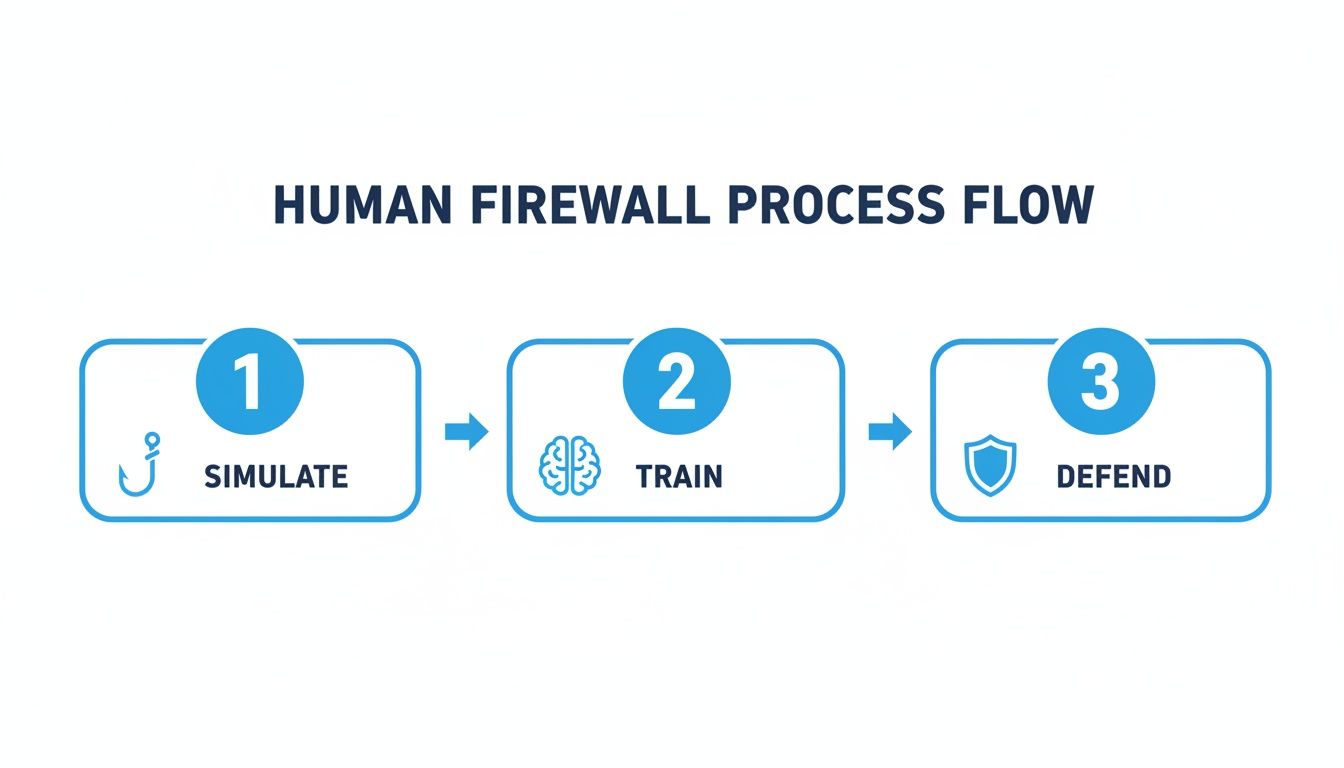
This process flow shows how an active defense—simulating attacks, training staff, and defending proactively—builds a "human firewall." It’s a great reminder that your response plan is a key part of an ongoing security cycle, not just a document you write once.
Remediation And Review: Clean Up And Learn
With a clear picture of the damage, you can begin remediation—the process of cleaning up the mess and getting back to business. This involves eradicating any malware, restoring data from clean backups if needed, and patching the security holes that allowed the attack to happen in the first place.
If a phishing attack leads to significant data loss, having a plan B is vital. For Indiana businesses, knowing who to call for professional Indiana Data Recovery services should be a core part of your incident response strategy.
Finally, the most crucial step is the review. Sit down with your team and conduct a post-incident analysis to get to the root cause. Was it a gap in training? A missing technical control? The lessons you learn from one incident are your best defense against the next one. This mirrors the same logic we cover in our guide on how to prevent ransomware attacks, where every incident becomes an opportunity to get stronger.
Advanced Strategies to Fortify Your Business
Basic defenses are a great start, but to truly secure a growing Indiana business, you must think like an attacker. An attacker’s primary goal is often just to get a single password. That one credential can be the key that unlocks your entire network, moving them from a simple inbox compromise to a full-blown crisis. This is where advanced security frameworks come in. They are designed to solve this exact problem, making one stolen password far less catastrophic.
These strategies aren't just for massive corporations. They are practical, ROI-driven approaches that protect your operations, secure customer data, and slash the labor costs associated with cleaning up after a breach. For businesses experiencing the rapid growth seen in Hamilton County, this is about building a system that assumes a breach could happen and is ready to contain it instantly.
Adopting a Zero Trust Mindset
The old cybersecurity model was a castle with a moat: a strong perimeter, but once an attacker got inside, they could roam freely. Zero Trust flips that model on its head. It works on a simple, powerful principle: never trust, always verify.
This means no user or device is trusted by default, regardless of their location. Every single request to access a resource—a shared drive, a financial app, a custom database—must be authenticated and authorized. Every. Single. Time.
A Zero Trust architecture essentially creates tiny, secure perimeters around your most critical data. Even if an attacker steals a password, they can't pivot to another system because every move they make triggers a new verification challenge. It stops lateral movement dead in its tracks.
Putting this into practice involves using APIs to get your systems to talk to each other and enforce consistent access policies. For example, a request to access your accounting software would be cross-verified against the user's identity, the health of their device, and their physical location before access is granted.
Enforcing the Principle of Least Privilege
Working hand-in-hand with Zero Trust is the principle of least-privilege access. The idea is simple: give every employee access to only the information and systems they absolutely need to do their job—and nothing more.
This is a classic blind spot for growing businesses. As people change roles or move between departments, they often accumulate access permissions they no longer need, creating a huge, unnecessary attack surface.
Here’s how this simple principle protects your business:
- Limits Data Exposure: If an accountant’s email is compromised, the attacker only gets into financial systems, not your engineering plans or client lists.
- Reduces Insider Threats: It minimizes the potential damage, whether accidental or malicious, that can be done by someone already on your team.
- Simplifies Audits: When it's time for compliance checks, like for HIPAA, it’s far easier to prove that access to sensitive data is locked down.
This approach is fundamental to any robust strategy for how to protect against phishing attacks because it dramatically lowers the value of any single stolen credential. Beyond phishing defenses, it's also crucial for preventing identity fraud and protecting your data from misuse.
Multi-Factor Authentication: The Non-Negotiable Control
If there's one security control that delivers the most bang for your buck, it's Multi-Factor Authentication (MFA). MFA forces users to provide two or more verification factors to gain access, like a password (something you know) and a code from a smartphone app (something you have).
MFA is your single best defense against password theft. It can block over 99% of account compromise attacks, even when an attacker has a valid, stolen password from a phishing scam. It's a simple, low-cost solution that provides a massive and immediate security uplift. For more insights on this topic, feel free to read our guide on endpoint security best practices.
Implementing these advanced strategies transforms your security from a reactive checklist into a proactive, intelligent defense system. To see how a Zero Trust architecture could be designed for your specific business needs, schedule a Custom Tech Audit with Magnitude Marketing.
So, What's Next? Putting Your Plan Into Action
We’ve walked through the fundamentals of a solid anti-phishing strategy. You now have the playbook for layering your defenses, from technical controls like email filtering to building a sharp, security-aware team. The goal is to make your business a much harder target for attackers.
But a plan on paper is just that—a plan. The real work, and the real protection, begins when you put these steps into motion.
It's tempting to put this on the back burner, but waiting for an attack to happen is the most expensive strategy of all. For businesses here in Indiana, especially in logistics, healthcare, or manufacturing, the cost of downtime isn't just an inconvenience; it can bring your entire operation to a halt.
Think about it this way: taking action now is a direct investment in your business's stability and profitability. Preventing even one serious phishing incident can save you thousands in remediation, avoid steep fines for things like HIPAA violations, and keep your team focused on billable work instead of a crisis.
Designing a Defense That Fits Your Business
At Finchum Fixes IT, we know that a one-size-fits-all checklist just doesn't cut it. We bring enterprise-level expertise to the table but deliver it with the responsive, local support that Indiana businesses count on. We'll work with you to build a security plan that makes sense for your specific risks and budget.
The best way to start is with a clear picture of where you stand today. A Custom Tech Audit is the logical next step. Our team will dive into your current setup, identify the real-world vulnerabilities you face, and map out a clear, practical strategy to lock things down.
Common Questions About Phishing Protection
Even with a solid plan, I know that business owners in Indiana still have practical questions about getting these defenses in place. It's completely normal to worry about the cost, the complexity, and whether your team will actually go along with it.
Let's tackle the questions I hear most often from businesses right here in the Indy metro area.
Is This Level of Protection Actually Affordable for a Small Business?
Yes, absolutely. Modern cybersecurity isn't about buying the most expensive box on the shelf; it's about smart, layered protection. Foundational tools like Multi-Factor Authentication (MFA) and getting your DMARC records set up correctly have very low direct costs but offer a massive security upgrade.
Think about the Return on Investment (ROI). A single successful phishing attack can easily cost a small business tens of thousands of dollars in downtime, lost billable hours, and even hefty compliance fines. That potential loss dwarfs the cost of being proactive. My whole approach is to build security packages for SMBs that focus on the highest-impact defenses first, so every dollar you invest directly targets your biggest financial risks.
How Do We Train Our Team Without Killing Productivity?
Nobody has time for long, boring security seminars. That's why effective security awareness training has to be continuous and integrated, not some disruptive, one-off event.
We've found that micro-learning modules and brief, simulated phishing tests work best. These take just a few minutes of an employee's time each month but build a security-first mindset over time. The goal is to make spotting a phish a natural reflex, not a chore that pulls your team away from their real work. This approach fits right into your existing operations and quietly reduces the human error that leads to the most expensive mistakes.
If you do only one thing, make it this: Enforce Multi-Factor Authentication (MFA) on every critical account, especially email and financial systems. MFA is proven to block over 99% of account compromise attacks, even when a phisher manages to steal a password.
It's a simple, low-cost step that gives you a huge security boost right away. A Custom Tech Audit with our team is the perfect way to plan a smooth rollout and immediately strengthen your defenses against the most common cyberattack out there.
Ready to build a phishing defense that protects your revenue and lets you focus on growth? The experts at Magnitude Marketing can help you find your specific weak spots and create a practical, effective security roadmap.