10 Best Practices for Network Monitoring Your Indiana Business Needs in 2026
Let's be direct: for a small business in Indianapolis or Greenwood, your computer network is your central nervous system. When it's slow, unreliable, or completely down, everything grinds to a halt. Orders stop, productivity plummets, and customer trust evaporates. The problem is, most network issues don't just happen out of the blue; they send warning signs first.
These warnings can be subtle, like minor performance dips, odd traffic spikes, or a router's CPU running a little too hot. The difference between a minor hiccup and a full-blown catastrophe is whether you're equipped to see and understand these signals. This is precisely where effective network monitoring comes in. It's not about passively watching for blinking red lights; it’s about proactively managing the health, security, and performance of the technology your business depends on. To truly understand how to listen to your network, begin with a practical guide on what is infrastructure monitoring to grasp the foundational concepts.
Think of it as having a heartbeat monitor for your entire business operation. It provides the visibility needed to catch problems before they impact your bottom line, secure your data against threats, and plan for future growth. Having a local IT partner here in Central Indiana means you have experts ready to translate those signals into action, but understanding the fundamentals is the first step.
In this no-fluff guide, we'll break down the 10 essential best practices for network monitoring. We will move beyond the jargon and give you practical, actionable strategies you can use to keep your network humming and your business secure, with a few pro-tips you can implement today. Let's get started.
1. Implement Real-Time Network Monitoring and Alerting
Think of your network as the central nervous system of your business. If it goes down, everything stops. Real-time network monitoring is like having a cardiologist on staff 24/7, keeping a constant watch on its pulse. It’s about using specialized software to get a live, play-by-play feed of your network traffic, device health, and system performance. This isn't about checking logs after a crash; it’s about catching the hiccup before it becomes a full-blown cardiac event.
When a router starts dropping packets or a server's memory usage spikes, an automated alert is instantly sent to your IT team (or us, if we're managing it for you). This proactive approach transforms your IT from a reactive "break-fix" model into a strategic asset. Instead of scrambling to fix a system that’s already down and costing you money, you’re addressing the root cause before your team even notices a slowdown.
Why This is Mission-Critical
For a small business in Greenwood or Indianapolis, an hour of downtime isn't just an inconvenience; it's lost sales, missed deadlines, and a damaged reputation. This is one of the most fundamental best practices for network monitoring because it directly impacts your bottom line by drastically reducing Mean Time to Resolution (MTTR). For businesses looking to implement real-time network monitoring and alerting, exploring various IT infrastructure monitoring tools can provide the necessary capabilities to achieve this level of visibility and control.
Quick Fix: Set up a free monitoring tool like UptimeRobot to ping your company website and main server every five minutes. It's not deep monitoring, but it will instantly email you if your most critical public-facing assets go down. This simple step can turn a multi-hour outage into a 15-minute problem.
2. Establish a Network Baseline and Performance Standards
Imagine trying to figure out if your car is making a weird noise if you have no idea what it sounds like when it’s running perfectly. That's what managing a network without a baseline is like. Establishing a network baseline is the process of measuring and documenting your network’s normal, everyday performance. This isn't a one-time snapshot; it’s a detailed motion picture of your network’s health during typical business operations.
By collecting data over a period of time, you create a reference point for what "normal" looks like. When is bandwidth usage highest? What is the standard response time for your critical applications? How much memory does your main server typically use on a Tuesday afternoon? This documented standard is your yardstick. When something deviates from it, like a sudden, massive spike in outbound traffic at 3 AM, your monitoring tools can flag it as an anomaly instead of just another blip on the screen.
Why This is Mission-Critical
Without a baseline, you're essentially flying blind. You can’t tell if a slowdown is a minor hiccup or the first sign of a failing switch or a malware infection. For a growing business in Central Indiana, this baseline is a foundational best practice for network monitoring that enables proactive capacity planning and security threat detection. It allows you to anticipate when you'll need to upgrade your internet connection or hardware, long before your team starts complaining about lag. It’s the difference between being a network historian who analyzes crashes and a network architect who prevents them.
Pro-Tip: Collect baseline data for at least two to four weeks to capture a full business cycle, including weekly peaks and lulls. Don't just measure network-wide traffic; create separate, more granular baselines for critical periods like month-end closing or after-hours backup windows to get a truly accurate picture.
3. Deploy Network Segmentation and Micro-Segmentation
Imagine your business network is a large, open-plan office. If one person gets the flu, it’s only a matter of time before everyone is coughing. Network segmentation is like building walls and private offices. It divides your network into smaller, isolated zones, so if a security threat (like a virus) gets into one area, it can't spread freely across the entire company. Micro-segmentation takes this a step further, placing a security guard at every single cubicle door.
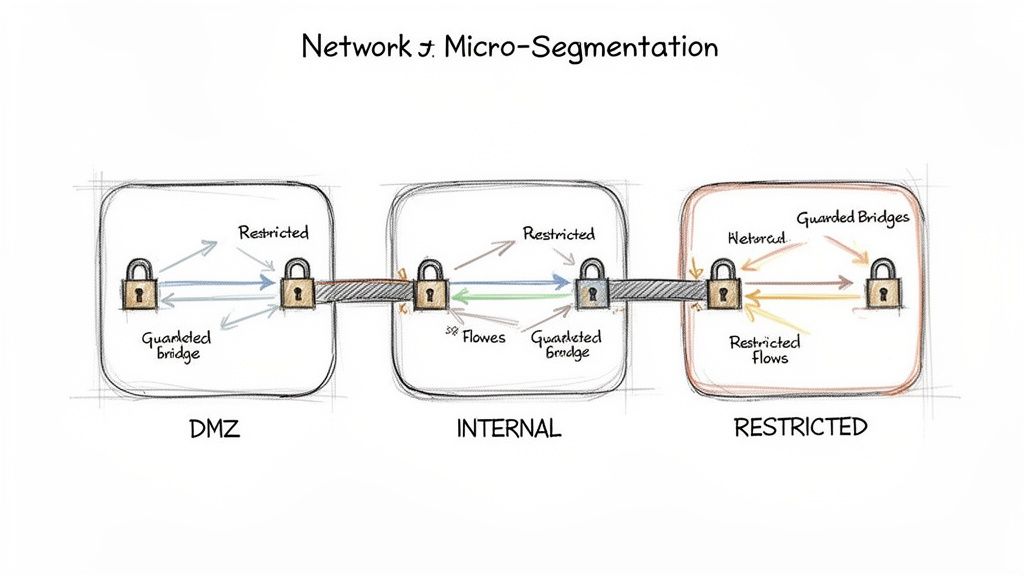
This practice creates controlled "neighborhoods" for different types of data and devices. For instance, a healthcare clinic can isolate its patient records network from the public guest Wi-Fi, or a manufacturer can separate its sensitive operational technology (OT) machinery from its corporate IT network. By monitoring the traffic crossing these internal boundaries, you can spot unauthorized access attempts or unusual data movement instantly, containing a breach before it becomes a catastrophe.
Why This is Mission-Critical
For any business in Indiana handling sensitive information-from customer payment details to confidential patient data-a single breach can be devastating. Uncontrolled "lateral movement" is how hackers turn a minor intrusion into a full-scale disaster. One of the most effective best practices for network monitoring involves creating these digital bulkheads. It dramatically reduces your attack surface and limits the potential damage from ransomware or a data leak, turning a potential company-wide crisis into a manageable, isolated incident.
Pro-Tip: Start your segmentation journey by creating a data flow map. You can't build effective walls if you don't know where the high-traffic hallways are. Understand which systems need to talk to each other, and which absolutely do not. This map becomes the blueprint for your entire segmentation strategy.
4. Monitor Network Security Metrics and Threat Detection
If your network is the central nervous system, then network security monitoring is the immune system. It’s not just about keeping the data flowing; it's about actively hunting for invaders, saboteurs, and digital diseases trying to infect your business. This practice involves using specialized tools like Intrusion Detection Systems (IDS) and Security Information and Event Management (SIEM) platforms to watch for telltale signs of trouble, like unauthorized access attempts, malware signatures, or strange data exfiltration patterns. It's the digital equivalent of having security guards patrolling your perimeter 24/7.
When a hacker in another country tries to brute-force a password on your server or an employee's machine starts communicating with a known command-and-control server, your security monitoring system flags it immediately. This allows your IT team (or a local partner like us here in Greenwood) to neutralize the threat before it escalates into a full-blown data breach. This is one of the most vital best practices for network monitoring because it directly defends your company’s assets, reputation, and customer trust.
Why This is Mission-Critical
For any Indiana business, from a law firm in downtown Indy to a manufacturing plant in the suburbs, a security incident can be catastrophic. It’s not a matter of if you will be targeted, but when. Continuously monitoring for threats turns your network from a passive target into a hardened fortress. It allows you to spot a breach in minutes instead of months, drastically limiting the potential damage. For organizations ready to bolster their defenses, investing in comprehensive cyber security services is the most effective step forward.
Quick Fix: Review the outbound firewall rules for your servers. Most servers (except web servers) have no business initiating connections to the wider internet. Create a rule that blocks all outbound traffic by default and only allows specific, necessary connections. This single change can stop many types of malware from "phoning home."
5. Implement Centralized Logging and Log Analysis
Imagine trying to solve a crime by only looking at one security camera in a building with a hundred exits. That’s what troubleshooting network issues is like without centralized logging. Each device-your firewall, servers, switches, and even applications-is constantly generating its own log files, creating a scattered mess of digital breadcrumbs. Centralized logging corrals all these disparate logs into one searchable, analyzable database. It’s like having a master security hub where you can see every door, window, and hallway at once.
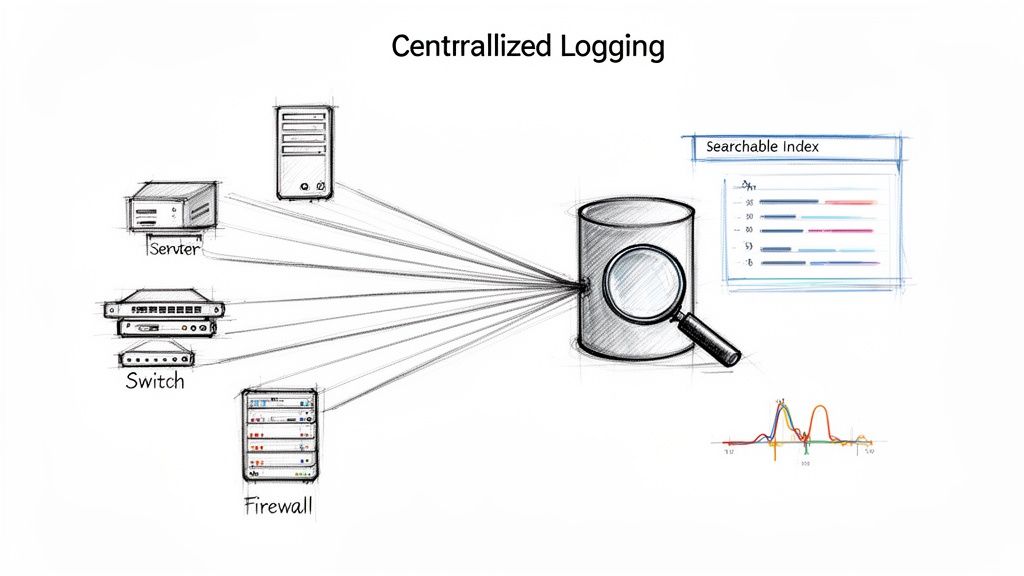
This process uses tools like the ELK Stack or Splunk to collect, normalize (translate into a common format), and store log data. Suddenly, you can correlate a failed user login on one application with a specific firewall denial and a spike in server CPU, telling a complete story instead of just seeing isolated incidents. This unified view is a game-changer for both security investigations and operational troubleshooting.
Why This is Mission-Critical
For any business in Indiana handling sensitive data, especially for PCI-DSS or HIPAA compliance, centralized logging isn't just a good idea; it's a requirement. It provides an immutable audit trail to prove you're meeting your regulatory obligations. When a security breach happens, this correlated data is your primary tool for forensic analysis, allowing you to trace an attacker's steps across multiple systems. This is one of the most powerful best practices for network monitoring because it transforms mountains of raw data into actionable intelligence, helping you spot insider threats and advanced attacks that would otherwise go unnoticed.
Pro-Tip: Start by defining your log retention policies. Compliance standards often dictate how long you must store logs (e.g., one year for PCI-DSS). Set this up from day one to avoid frantic data retrieval later. Also, ensure you encrypt logs both in transit (as they travel to your central server) and at rest (while stored) to protect the sensitive information they contain.
6. Monitor Bandwidth Usage and Capacity Planning
Think of your network’s bandwidth as the highway system for your company's data. If you don't monitor the traffic, you’ll eventually end up with gridlock, slowing every single business operation to a crawl. Monitoring bandwidth usage is about understanding who and what is using up your data highway, identifying rush hours, and spotting unexpected traffic jams. This isn't just about catching someone streaming movies; it’s about strategic planning to ensure your network can handle future growth without buckling under pressure.
By tracking consumption patterns across applications, departments, and even individual users, you get a clear picture of your network's health. This allows you to see if your new video surveillance system is hogging all the bandwidth or if a cloud backup is scheduled at the worst possible time. This insight allows you to make informed decisions, preventing performance degradation and ensuring critical business applications always have the speed they need. It’s the difference between building more lanes before traffic gets bad and being stuck in a jam wondering what went wrong.
Why This is Mission-Critical
For a growing Indianapolis business, running out of bandwidth is like a retail store running out of parking spots on Black Friday. It directly chokes your ability to operate and serve clients. This is one of the most vital best practices for network monitoring because it bridges the gap between today’s IT operations and tomorrow’s business strategy. A manufacturing facility can identify if new IoT devices are impacting production-line systems, while a SaaS company can track API usage to manage costs and ensure service levels. It turns your network data into a powerful business planning tool.
Quick Fix: Log into your business router and look for a traffic meter or bandwidth usage chart. Identify the top 5 data-consuming devices on your network. Are they what you expect? A surprise device at the top of the list could indicate a misconfiguration or even a security issue that warrants a closer look.
7. Establish Network monitoring for Wi-Fi Infrastructure
Treating your Wi-Fi network as an afterthought is like building a highway and forgetting the on-ramps. In today’s mobile-first world, your wireless infrastructure is just as critical as your wired network, yet it comes with its own unique set of headaches: signal dead zones, interference, and security risks. Specialized Wi-Fi monitoring is like having air traffic control for your wireless signals, ensuring every device gets a clear, secure, and fast connection. It’s about proactively managing coverage, performance, and security, not just reacting when someone complains about a dropped video call.
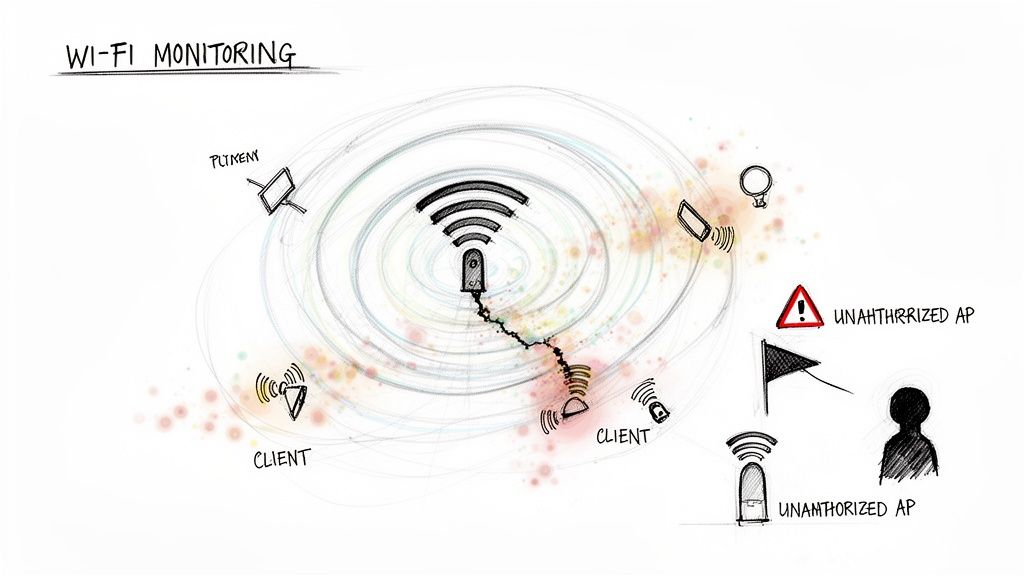
This level of monitoring provides a detailed view of everything from signal strength and client density on each access point (AP) to roaming performance as employees move through your building. More importantly, it acts as a silent guardian, instantly detecting rogue access points that could be set up by malicious actors or well-meaning but misguided employees. By integrating wireless monitoring with your overall network strategy, you get a complete picture of your digital environment, preventing connectivity bottlenecks and plugging potential security holes before they can be exploited.
Why This is Mission-Critical
For any modern Indiana business, from a warehouse in Greenwood using Wi-Fi scanners to a bustling Indianapolis office relying on laptops and mobile devices, unreliable Wi-Fi is a productivity killer. This dedicated monitoring practice is essential because it addresses the volatile nature of wireless environments. It prevents frustrating coverage gaps, ensures consistent performance for critical applications, and hardens your security posture against wireless threats. Instead of guessing why the connection in the conference room is always terrible, you’ll have hard data to pinpoint and resolve the issue. For a deeper dive, check out our guide on how to improve Wi-Fi coverage for Indiana businesses.
Pro-Tip: Monitor from the client's perspective, not just the AP's. An access point might report a strong signal, but if the user's laptop has a weak antenna or there's interference, their experience will suffer. Use monitoring tools that can simulate or report on the end-user experience to get a true picture of performance.
8. Monitor Network Device Health and Availability
If your network is the nervous system, then your routers, switches, and firewalls are the major organs. If one starts failing, it doesn't just cause a local problem; it can trigger a full-system meltdown. Monitoring network device health and availability is like giving these critical components a regular check-up, watching their vital signs like CPU load, memory usage, and operational status to catch problems before they flatline. This isn't just about seeing if a device is online or offline; it's about understanding if it's struggling to keep up.
Using tools like PRTG or Zabbix, we can continuously poll your infrastructure for this data. When a switch's CPU consistently runs at 90% or a firewall starts dropping packets due to a hardware fault, we get an instant alert. This allows us to intervene before the device fails completely, preventing a catastrophic outage that takes your entire business offline. It's the difference between scheduling a minor procedure and being rushed into the emergency room.
Why This is Mission-Critical
For a business in Indiana, a failed core switch can be just as devastating as a server crash. It severs the connection between your team and the tools they need to work, grinding productivity to a halt. This practice is one of the most crucial best practices for network monitoring because it preserves the very foundation your digital operations are built on. By tracking device health trends, we can proactively schedule maintenance, plan for upgrades, and replace aging hardware before it has a chance to fail. It's about ensuring the long-term stability and reliability of your network infrastructure.
Pro-Tip: Set realistic alert thresholds. Start by alerting when CPU or memory usage consistently exceeds 80% for more than five minutes. This helps filter out normal, temporary spikes and focuses your attention on genuine performance issues. Also, remember that sometimes a device isn't just failing-it may need a physical cleaning or a better-ventilated home, which is where a local partner for hands-on computer repair can make all the difference.
9. Implement Application Performance Monitoring (APM) in Network Context
It’s the classic IT blame game: the app team swears their code is perfect, while the network team insists the pipes are clear. The result? Your e-commerce site checkout hangs, your custom software lags, and your customers get frustrated. Application Performance Monitoring (APM) in a network context is the referee that ends this fight. It’s about looking beyond simple device uptime and measuring what truly matters: the end-user's experience with the applications that run your business.
This approach connects application-level metrics (like how long a database query takes) with network-level data (like latency, packet loss, and DNS resolution times). When a user in Greenwood complains your SaaS platform is slow, APM helps you pinpoint if the issue is a sluggish server in your data center, a network bottleneck with your ISP, or inefficient code in the application itself. It stops the finger-pointing and gets you to a solution faster.
Why This is Mission-Critical
For any business in Indiana running a customer-facing website or relying on critical internal software, slow is the new down. A few extra seconds of page load time can mean a lost sale or a frustrated employee unable to do their job. This is one of the most vital best practices for network monitoring because it directly ties network health to business outcomes and user satisfaction. It helps you see your infrastructure through your customers' eyes, ensuring your technology isn't just running, but is actually performing for the business.
Pro-Tip: Start by mapping your most critical application first. For an e-commerce business, this is your checkout process. For a professional services firm, it might be your CRM. Understand all the dependencies-the web servers, databases, and APIs-and how the network connects them. This map becomes your holy grail for troubleshooting.
10. Establish Monitoring Governance, Documentation, and Continuous Improvement
If your network monitoring is a chaotic free-for-all, you’re not monitoring, you’re just guessing. Establishing governance is like creating the official rulebook for your network's health. It’s the process of creating documented policies and procedures that define who does what, when, and how. This isn't about creating bureaucracy; it’s about ensuring every alert has a purpose, every response is consistent, and the entire system gets smarter over time.
Think of it as the playbook for your IT team. When a critical server alert fires at 2 AM, there's no confusion about who gets the call, what the first five steps are, and how to escalate if the problem isn’t solved in 15 minutes. This framework, popularized by standards like ITIL, transforms your monitoring from a collection of noisy tools into a finely tuned, strategic operation. It’s the meta-practice that ensures all the other best practices for network monitoring are actually followed.
Why This is Mission-Critical
Without governance, you get alert fatigue, inconsistent responses, and blame games. For a growing business in Indiana, this chaos translates directly to longer downtime and higher costs. A documented playbook ensures that whether your senior engineer or a new hire is on call, the response is swift, effective, and repeatable. It’s what separates professional IT management from amateur hour, ensuring your monitoring efforts deliver real business value instead of just more noise.
Pro-Tip: Start by creating a "Monitoring Wiki" or a shared knowledge base. Document just three things for your most critical system: the person responsible, the top five most common alerts and their solutions, and the step-by-step escalation path. This simple document is the seed for a powerful governance framework that can grow with your business.
Top 10 Network Monitoring Best Practices Comparison
| Item | Implementation Complexity 🔄 | Resource Requirements ⚡ | Expected Outcomes 📊⭐ | Ideal Use Cases 💡 | Key Advantages ⭐ |
|---|---|---|---|---|---|
| Implement Real-Time Network Monitoring and Alerting | 🔄 Medium–High: deployment, tuning, event correlation | ⚡ High: monitoring platform, skilled staff, licenses | 📊⭐ High: proactive detection, reduced MTTR, improved uptime | 💡 24/7 operations, MSPs, mission‑critical services | ⭐ Proactive issue detection; capacity planning; SLA adherence |
| Establish a Network Baseline and Performance Standards | 🔄 Medium: extended data collection and analysis | ⚡ Low–Medium: data collection tools, stakeholder time | 📊⭐ Moderate: clear benchmarks, better anomaly detection | 💡 Capacity planning, SLA validation, pre‑optimization projects | ⭐ Baseline metrics; factual capacity and trend insights |
| Deploy Network Segmentation and Micro-Segmentation | 🔄 High: design, policy, cross‑team coordination | ⚡ High: SDN/segmentation tech, policy management, testing | 📊⭐ High: reduced blast radius, stronger compliance posture | 💡 Environments with sensitive data (PCI/HIPAA), OT/IT separation | ⭐ Containment of breaches; focused monitoring; compliance support |
| Monitor Network Security Metrics and Threat Detection | 🔄 High: IDS/IPS, SIEM integration, tuning and playbooks | ⚡ High: security tooling, threat intelligence, analysts | 📊⭐ High: early threat warning, forensic evidence, faster response | 💡 Regulated industries, high‑threat sectors (finance, retail) | ⭐ Early detection; detailed forensics; compliance audit trails |
| Implement Centralized Logging and Log Analysis | 🔄 Medium–High: aggregation, normalization, search setup | ⚡ High: storage, indexing, log management licenses | 📊⭐ High: comprehensive audit trails and cross‑system correlation | 💡 Compliance-driven orgs, incident investigations, MSPs | ⭐ Unified logs; fast correlation; strong forensic capability |
| Monitor Bandwidth Usage and Capacity Planning | 🔄 Medium: flow collection and forecasting workflows | ⚡ Medium: NetFlow/sFlow tools, analytics, periodic reviews | 📊⭐ Moderate–High: right‑sized infrastructure, fewer bottlenecks | 💡 Growing businesses, WAN optimization, SaaS operators | ⭐ Data-driven capacity decisions; cost and performance optimization |
| Establish Network Monitoring for Wi‑Fi Infrastructure | 🔄 Medium: site surveys, coverage and interference tuning | ⚡ Medium: wireless monitoring tools, AP upgrades, surveys | 📊⭐ Moderate–High: improved coverage, fewer connectivity issues | 💡 Offices, healthcare, warehouses, guest Wi‑Fi environments | ⭐ Better UX; rogue AP detection; optimized coverage/capacity |
| Monitor Network Device Health and Availability | 🔄 Low–Medium: SNMP/API enablement and thresholding | ⚡ Low–Medium: device access, monitoring platform integrations | 📊⭐ High: early hardware failure warnings, improved MTTR | 💡 Enterprises, data centers, MSP‑managed estates | ⭐ Prevents device failures; inventory and warranty tracking |
| Implement Application Performance Monitoring (APM) in Network Context | 🔄 High: end‑to-end tracing, instrumentation across stacks | ⚡ High: APM tools, instrumentation, cross‑team effort | 📊⭐ High: precise root‑cause identification for user impact | 💡 E‑commerce, SaaS, latency‑sensitive finance/trading systems | ⭐ Correlates app vs network issues; user experience visibility |
| Establish Monitoring Governance, Documentation, and Continuous Improvement | 🔄 Medium: policy design, SOPs, escalation workflows | ⚡ Low–Medium: time, governance roles, training and reviews | 📊⭐ Moderate–High: consistent, scalable monitoring; lower MTTR | 💡 Scaling organizations, MSPs, ITIL/SMB service programs | ⭐ Repeatability; clear accountability; continuous improvement |
Turning Monitoring into Action
And there you have it, folks. We've navigated the digital trenches together, from establishing baselines and segmenting your network like a pro, to deploying eagle-eyed security monitoring and making sure your Wi-Fi doesn't buckle under the pressure of Monday morning’s coffee-fueled Zoom marathon. It's a lot to take in, we get it. But implementing these best practices for network monitoring isn't just about adding another task to your already-packed to-do list. It's about a fundamental shift in mindset.
You’re moving your business from a state of constant reaction, a "break-fix" cycle where you're always one server crash away from a full-blown panic, to a proactive, strategic command center. Your network stops being a mysterious black box that just "goes down" and transforms into a transparent, predictable, and powerful asset. It becomes the stable foundation upon which you can build, innovate, and grow your Indiana business. When your network is humming along, your team is productive, your data is secure, and you can sleep a little easier at night.
The Real Takeaway: From Data Points to Business Decisions
Let’s boil it all down. The ultimate goal here isn't to collect mountains of data just for the sake of it. Staring at a dashboard full of blinking green lights is nice, but it doesn't pay the bills. The real magic happens when you turn that raw data into actionable intelligence.
- Proactive Problem Solving: You spot that a key switch's memory usage is slowly creeping up over weeks. Instead of waiting for it to fail during a critical client presentation, you schedule a maintenance window to reboot or replace it. Crisis averted.
- Smarter Spending: Your bandwidth monitoring shows that the expensive gigabit internet connection you’re paying for is only hitting 40% utilization, even during peak hours. That’s an opportunity to renegotiate your contract and reinvest those savings elsewhere.
- Enhanced Security Posture: A sudden spike in outbound traffic from a workstation that’s usually quiet? Your monitoring system flags it instantly. You investigate and find a malware infection trying to phone home, isolating the machine before it can exfiltrate sensitive client data.
This is what elite-level monitoring looks like in practice. It’s not just about preventing downtime; it's about optimizing performance, securing your assets, and making informed decisions that directly impact your bottom line. It’s about leveraging technology to gain a competitive edge.
Your Next Move: Don't Go It Alone
We know what you're probably thinking. "This all sounds great, but I'm running a business in Greenwood, not managing a data center for Google." You’ve got payroll to run, customers to serve, and a business to grow. Becoming a full-time network analyst wasn't part of the original plan.
This is precisely where having a local IT partner in Central Indiana becomes a game-changer. Instead of wrestling with complex configurations or trying to interpret cryptic alerts at 2 AM, you can have a dedicated team of experts in your corner. We live and breathe this stuff so you don't have to. We don't just set up the tools and walk away; we manage the systems, analyze the data, and take decisive action to keep your network secure, stable, and screamingly fast. We handle the IT headaches so you can get back to what you do best.
Ready to turn your network from a potential liability into your greatest business asset? Let the team at Finchum Fixes IT build a custom monitoring strategy that provides true peace of mind and keeps your Indianapolis-area business running smoothly. Reach out today for a no-obligation consultation at Finchum Fixes IT and let’s secure your network’s future.