What Is the 3-2-1 Backup Rule and Why Indiana SMBs Need It
A Greenwood office with aging server hardware can look perfectly healthy until staff arrive to encrypted files, a ransom note, and a phone system that can't reach customer records. That's the moment a backup plan either earns its keep or reveals it was only a green checkmark on a dashboard. For Johnson County business owners, the useful question isn't whether backups run. It's whether the business can restore clean data and get people working again.
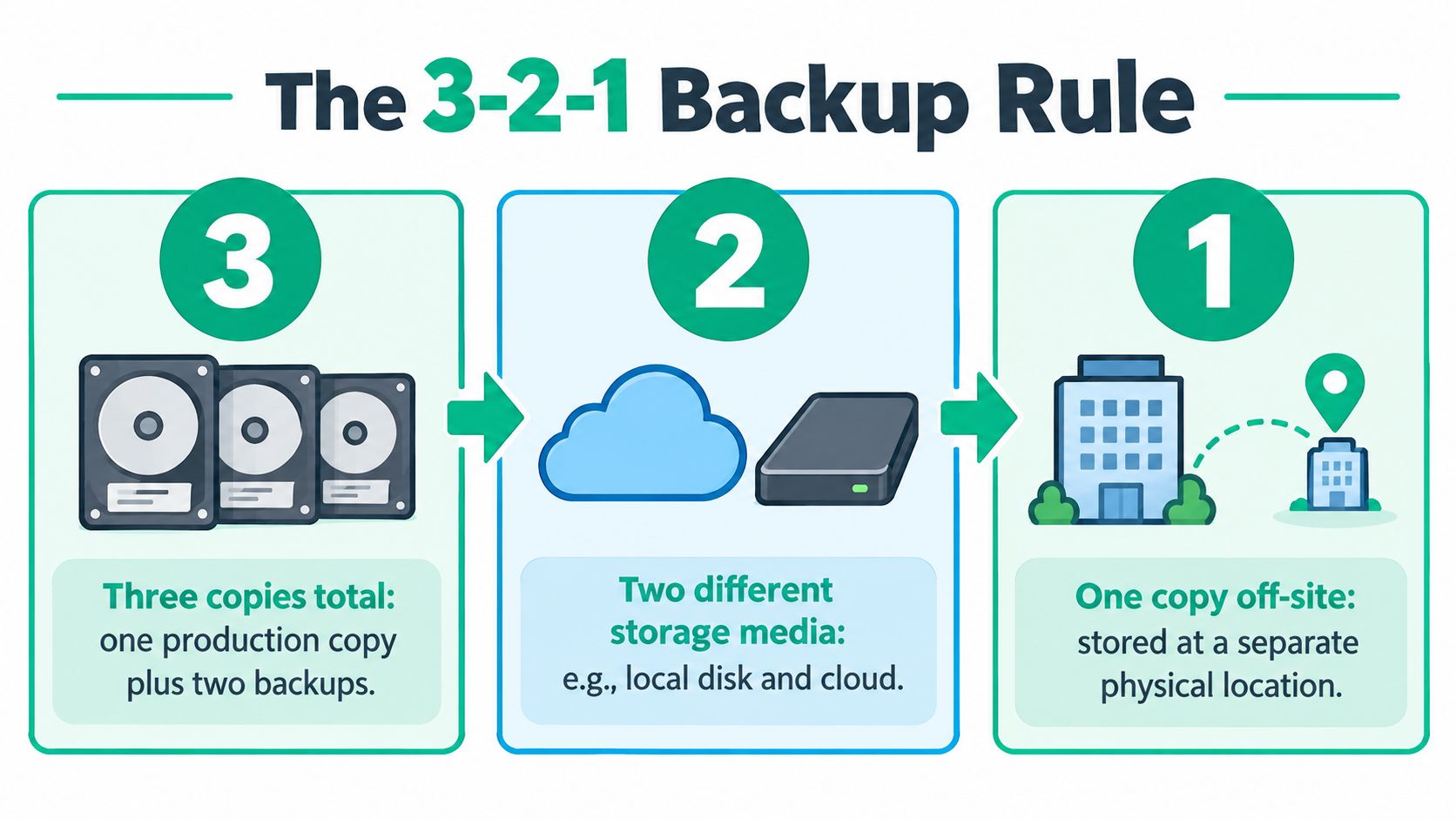
The 3-2-1 backup rule means keeping three copies of important data, storing them on at least two different types of media, and keeping at least one copy off-site. Treat it as the starting architecture, not a promise of recovery. Stale backups, shared administrator credentials, and untested restore steps can still turn a short incident into expensive downtime.
The Tuesday a Greenwood Server Lost Everything
A 32-seat professional services firm on the I-65 corridor starts Tuesday with a problem no owner wants: the server is encrypted, workstations display a ransom note, and staff can't open the files they need to serve clients. The office manager can't close out yesterday's work. The owner has to decide whether to pay, rebuild, or find a clean recovery point.
In this scenario, the business has more than a backup notification. It has a tested recovery design: a local copy for speed, a separate backup stored on different media, and an off-site copy protected from routine production access. The IT lead isolates affected systems, checks the backup's integrity, and restores yesterday's close from a clean recovery point. Employees can return to critical work without making ransom payment the recovery plan.

That's an illustrative Greenwood-style scenario, not a client case history. The point is blunt: the recovery decision is made before the incident, when someone chooses separate storage, limits access, and tests a restore. Advice on Houston managed IT disaster recovery planning offers another perspective on preparing a business to recover instead of improvising after an outage. For Indiana-specific planning, see these disaster recovery options for Indiana SMBs.
What the 3-2-1 Backup Rule Actually Means
Three copies: Keep the live production data and at least two backups. The production server or endpoint counts as one copy, not as a backup.
Two media types: Store copies using at least two materially different storage technologies, such as local disk and cloud storage. Two folders or partitions on one disk don't qualify as meaningful diversity because they share the same hardware failure risk.
One off-site copy: Keep at least one copy in a separate physical location, so a disaster at the office doesn't take every copy with it.
For a Greenwood business, that could mean live files on a server, a local backup appliance for quick recovery, and an encrypted cloud backup in a separate location. Those aren't three copies if the “cloud backup” is only a sync folder that mirrors deletions and remains under the same compromised account. Synchronization is not the same as a protected, recoverable backup.
Vendor question: Ask where each copy lives, what storage technology it uses, which credentials control it, and when someone last restored from it. “We have cloud backup” doesn't answer those questions.
The rule is a design baseline, not a backup product or software specification. It doesn't set how often backups should run, how long data should be retained, or how quickly systems must return. Define those requirements separately, then test them. Otherwise, a vendor can call a setup compliant with the numbers while leaving the business unable to recover the files that matter.
Why Three Copies on Two Media Survive Real Failures
The value of 3-2-1 is fault isolation. Each part helps contain a different kind of failure. A failed local disk can damage the live system without necessarily affecting cloud storage or removable media. A fire, flood, or theft can take out equipment at one site, while a geographically separate copy remains outside that event's reach.
Storage diversity matters because two copies on the same device aren't independent. If a business keeps its working files and backup on the same disk, one hardware failure can take both. A combination such as an internal disk and cloud storage has different failure characteristics. CISA uses hard drive and cloud storage as an example of two media types, while the New School's digital-preservation guidance describes the model as three copies, two media types, and one geographically separate copy (New School guidance on preservation copies).
Geography alone doesn't stop ransomware. If every copy is reachable using the same compromised login, malicious software or an attacker may reach more than the production server. That's why the basic rule needs access separation and, where feasible, an offline or immutable copy. The CISA backup guidance for small and medium-sized businesses supports using distinct backup media, but the owner still needs to check how each repository is protected.
This is why the rule has lasted through changes in storage technology. It turns “back up your data” into a simple architecture that addresses device, media, and site-level risks. It can't eliminate every risk, but it gives an Indiana SMB a clear starting point for designing recovery around more than one failure boundary.
Three Implementation Patterns Indiana SMBs Actually Use
A Johnson or Hamilton County business doesn't need a sprawling enterprise system to apply 3-2-1. It does need an arrangement that matches the data it can't afford to lose and the recovery speed it needs. These patterns are examples to discuss with an IT partner, not promises that one configuration fits every company.
| Pattern | Best At | Failure Absorbed | Cost Shape | Ransomware Risk |
|---|---|---|---|---|
| File server, local NAS, encrypted cloud target | Fast recovery for shared files and business systems | Server or local-device failure, plus some site-level events | Upfront or managed appliance cost, with recurring cloud storage and service costs | Elevated if the NAS or cloud account remains reachable through production credentials |
| Production data, rotated USB media, off-site vault | Keeping a copy disconnected from routine network access | Ransomware that reaches network-connected storage, plus local site loss if media is stored separately | Lower equipment cost, with staff time for rotation, custody, and verification | Lower while the current media is disconnected, but handling and restore discipline matter |
| Endpoint agents, immutable cloud, offline USB at a second site | Protecting distributed devices and preserving a locked recovery copy | Endpoint loss, site damage, and attempts to alter protected backup data | Ongoing per-device and cloud service costs, plus time for policy and testing | Reduced when immutability, credential separation, and offline storage are configured correctly |
The file server plus NAS plus cloud pattern is a practical fit when staff need quick access to shared files after a local hardware failure. A NAS won't help if ransomware can administer it through the same compromised account as the server, so separate credentials and protected cloud retention are part of the design, not optional extras.
USB rotation can create a disconnected copy, but only if someone follows the rotation schedule, labels media, stores it securely, and checks that the data can be read. A drive left plugged into a workstation all the time is not a dependable offline copy.
Endpoint agents with immutable cloud storage fit businesses with many laptops or remote staff. Immutability can prevent stored recovery points from being changed during a defined retention period, while an offline USB copy at a second site adds another separation layer. The trade-off is ongoing management: someone must watch backup status, access policies, and restore results.
Ask providers to explain how each pattern handles your accounting records, customer data, application code, and configurations. A useful comparison of cloud backup options for small businesses can help frame that discussion. Choose by which failure you need to survive, not by a vendor's preferred bundle.
Where Most 3-2-1 Setups Quietly Fail
Copy count can create false confidence. In the 2025 ransomware figures provided by Sophos, 53% of organizations used backups to restore encrypted data, the lowest rate in four years, and 89% of organizations had backup repositories targeted (Sophos State of Ransomware report). Those findings point to the gap between having copies and having a trustworthy recovery path.
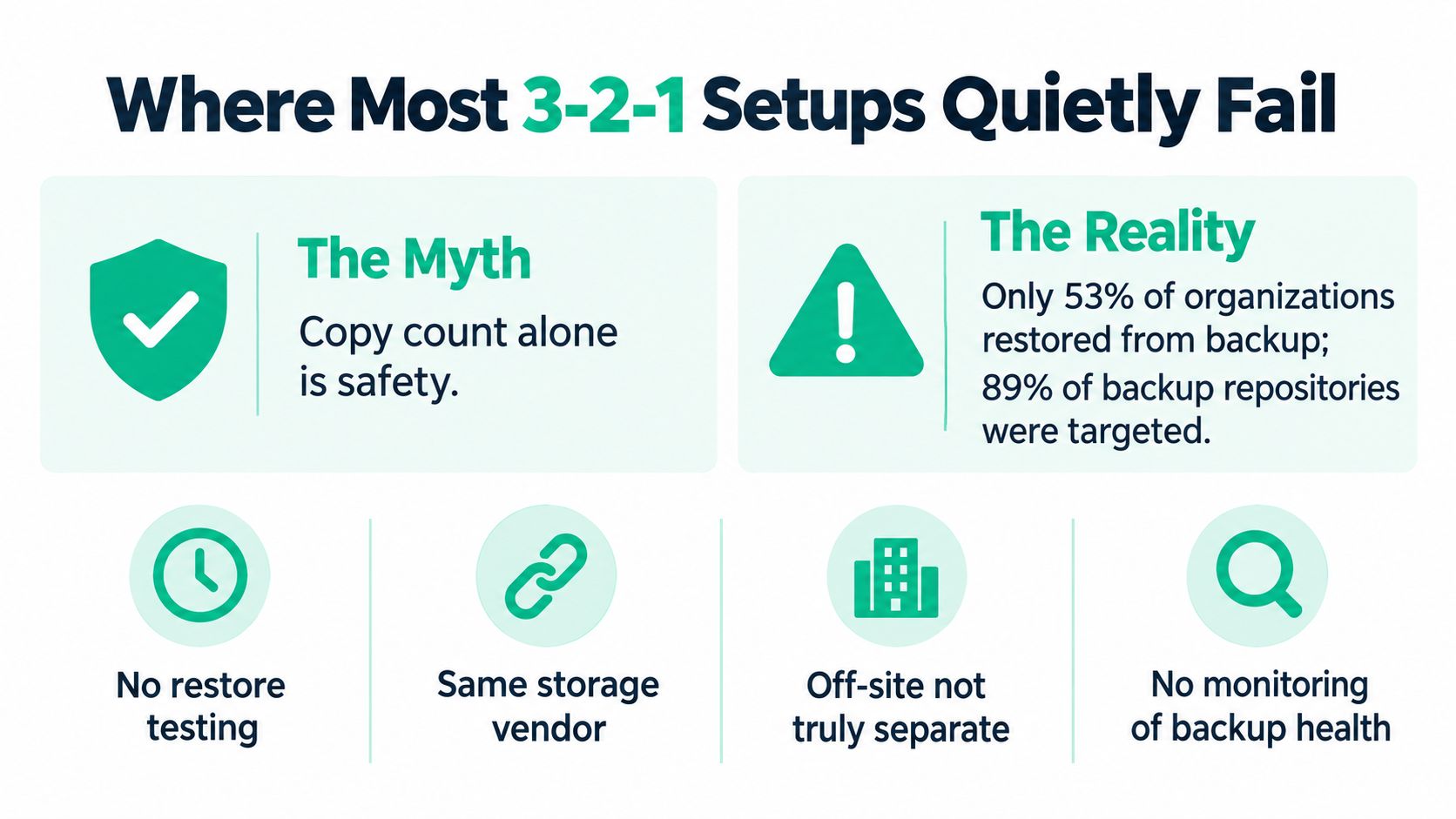
Four failures show up repeatedly in backup designs:
- The copy is stale: Jobs have stopped, coverage has changed, or the last usable backup is older than the business can tolerate.
- Nobody knows how to restore: The procedure depends on one person's memory, expired credentials, or undocumented steps.
- One credential controls everything: An attacker who compromises a production administrator account can reach connected backup repositories too.
- Nothing is isolated or immutable: All copies remain exposed to the same network or account attack.
Immutable off-site backups are the contrarian hero here. Buying another ordinary cloud replica can add availability, but it won't necessarily block deletion by a compromised administrator or ransomware. A protected copy, separate credentials, restricted administrative access, monitoring, and routine restore checks address a more important question: can the business still trust the backup after an attack?
CISA advises organizations to test full and partial restoration, including the ability to roll back at least seven days, in its backup options guidance. That's a reason to spend the next backup dollar on isolation and restore drills before adding a fourth copy. For a practical checklist of controls that also help limit ransomware exposure, see this SMB ransomware prevention checklist.
Turning the Rule Into RPO, RTO, and Restore Drills
A sound backup layout still needs operating targets. A recovery-point objective (RPO) answers how much recent work the business can afford to lose. A recovery-time objective (RTO) answers how long a system can stay unavailable before the interruption becomes unacceptable.
Write those targets down by system. A shared drive, accounting platform, point-of-sale system, and production application may not need identical backup schedules or recovery priorities. If the owners haven't decided which systems come back first, that decision will happen during the outage, when staff are waiting and information is incomplete.
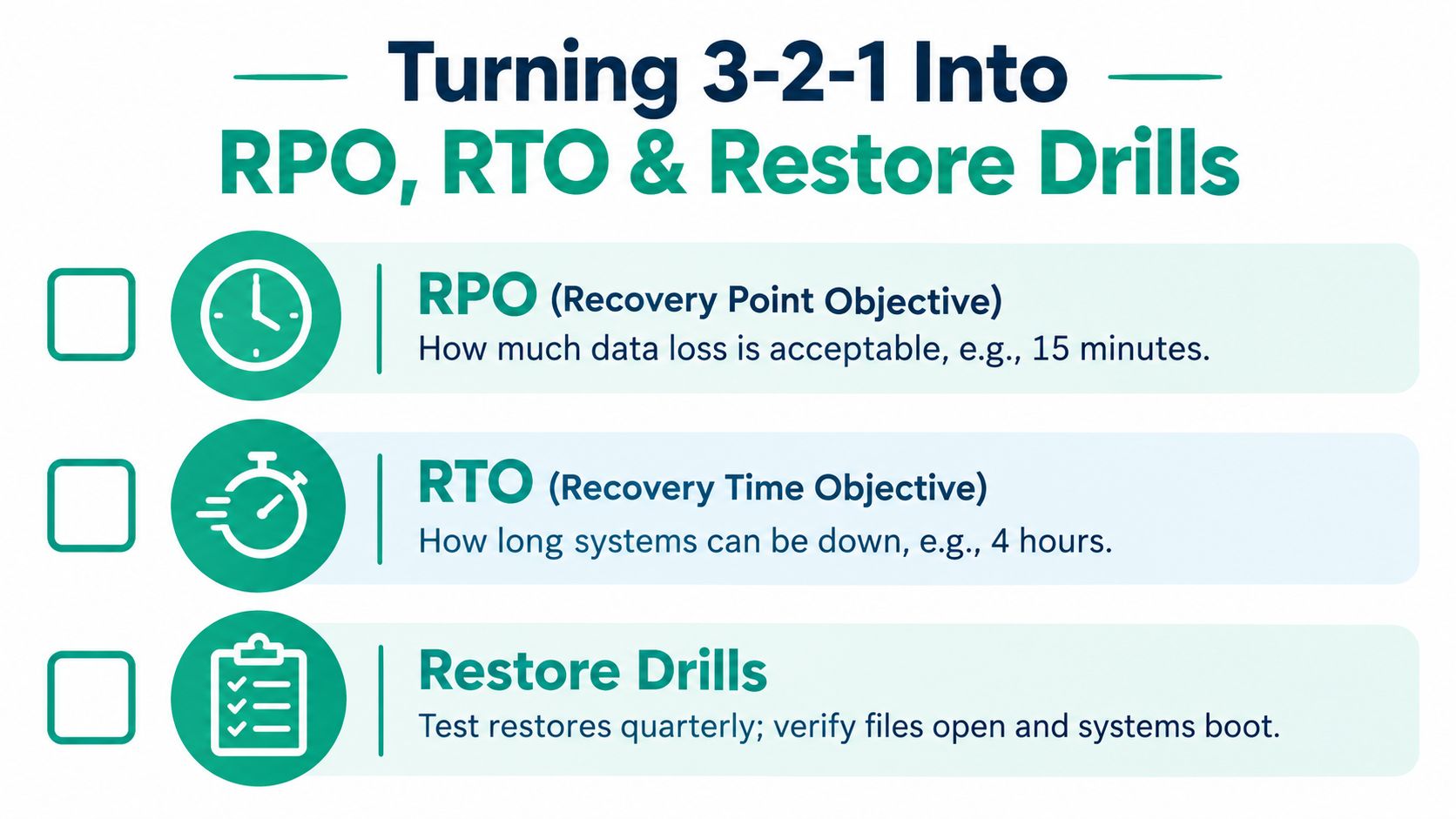
Put a recurring restore drill on the calendar and test one critical system at a time. Record the recovery point used, elapsed restore time, errors, and whether employees can open the recovered data. Include both a file-level restore and a full-system restore in the broader test plan. The CISA guidance on protecting government data recommends testing restoration and keeping the ability to roll back at least seven days in view.
Restore runbook: Name the system owner, the approved recovery point, required credentials, the restore sequence, the person who verifies business use, and the escalation path if the test fails.
A backup job can complete while the resulting data remains unusable because of corruption, missing encryption keys, expired access, or a snapshot that wasn't application-consistent. Bit-level data recovery can help address damaged media, but it doesn't replace a clean backup. Test application-consistent snapshots by confirming the recovered system boots and the application behaves as expected.
For a plain-language explanation of recovery targets, use this guide to RPO and RTO in disaster recovery. The CISA restore-testing video can also support the conversation with your IT team.
Mapping 3-2-1 Onto HIPAA, CMMC, and NIST CSF
Regulated businesses shouldn't treat a backup diagram as compliance evidence by itself. The useful evidence is the policy, the access controls, and the documented tests showing the organization can recover protected information.
For a healthcare clinic subject to HIPAA, define how backup copies containing protected health information are encrypted, who can access them, how long they're retained, and how restoration is verified. An immutable off-site copy can strengthen protection against alteration or deletion, but it doesn't automatically satisfy every HIPAA obligation.
Defense contractors working under CMMC should connect backup procedures to their broader media-protection and recovery practices. Keep the inventory of protected data, limit administrative access, document where copies reside, and preserve evidence that restoration procedures work.
For businesses aligning security practices with the NIST Cybersecurity Framework (NIST CSF), backup and recovery controls should be part of a written continuity process, not an informal promise from a service provider. Match the backup design to the systems that support operations, then retain records of successful and failed tests and the corrective work.
The same discipline helps with audits and real incidents: a reviewer can see what the business protects, who owns the process, and whether the recovery plan has been exercised. Use this Indiana SMB compliance guide to organize the discussion with your compliance and IT leads.
What a Mature Backup Policy Looks Like for a Central Indiana SMB
A mature policy fits on paper and works under pressure. It names the systems and data being protected, lists each copy and its storage medium, identifies the off-site location, and sets retention, encryption, and access rules. It also assigns a named owner who checks job failures and keeps restore evidence.
Write the following into the policy:
- Copy inventory: Identify production data and each backup destination.
- Storage and isolation: Record the media types, off-site location, and whether a copy is offline or immutable.
- Protection rules: Define retention, encryption, administrator access, and credential separation.
- Recovery targets: Document RPO and RTO by system, plus which systems return first.
- Proof of recovery: Set the restore-drill cadence, name the tester, and retain test results and follow-up actions.
Downtime has a real operating cost. NIST's ransomware guidance cites industry estimates of up to roughly $9,000 per minute for some business operations, and recommends regular, maintained, and tested backups so employees can resume work without waiting for ransom negotiations or manual rebuilds (NIST ransomware recovery guidance). The exposure varies by business, but the business case is plain: reliable recovery can prevent lost work from turning into prolonged downtime.
For an Indiana company, managed backup can also replace scattered emergency labor with a predictable monthly budget. Staff spend less time chasing failed jobs, hunting for files, and waiting for someone to rebuild a server, leaving more of their working time for customer service and billable work. A security plan that includes Zero Trust architecture, separate backup credentials, and SOC-as-a-Service monitoring can help keep access and alerts under active review. Where the office has spotty Wi-Fi in an old brick building, fixing the network with properly placed, latency-optimized mesh nodes matters too. UniFi networking may suit some sites, but Wi-Fi coverage and backup design should be assessed against the building and workload, not chosen from a product list. Bitdefender GravityZone can be part of endpoint security, but endpoint protection doesn't replace recoverable backups.
Get the policy, access controls, and restore tests reviewed before an outage forces the decision. For businesses in Greenwood and Indianapolis, request a Free Network Assessment or a Security Risk Audit and leave with specific backup and recovery gaps to address.
Finchum Fixes IT can review backup coverage, access controls, network reliability, and restore procedures for Greenwood and Indianapolis businesses. Bring your current backup plan to Finchum Fixes IT and ask for a Free Network Assessment or Security Risk Audit focused on keeping your business recoverable.