Your No-Nonsense Guide to Secure Data Transfer for Indiana Businesses
Think about the last time you sent a client file. Did you just attach it to a regular email and hit send? If so, you basically just left a briefcase full of cash on a bench at White River State Park and hoped for the best. It might get there, but you’re taking a wild, unnecessary gamble.
For small businesses, secure data transfer methods aren't just nerdy IT talk. They're the digital equivalent of an armored truck, making sure your most valuable assets—your client data, your financial records—don't end up in the wrong hands.
Why Should Your Business Care? Let's Get Real.
Let’s cut to the chase. Every time you move data—an invoice, a customer's private info, your own financial records—you’re creating a potential weak point. Without the right locks on the door, you’re inviting trouble. A single data breach can spiral into a nightmare of financial losses, a trashed reputation, and even eye-watering regulatory fines.
This isn’t some abstract, "big city" problem. Whether you're in Greenwood or downtown Indianapolis, cybercriminals are actively hunting for small businesses, betting that you're the low-hanging fruit with weaker security. Using insecure methods is like shouting your bank details across the Circle Centre Mall—it's only a matter of time before someone listens in.
Quick Guide to Common Data Transfer Methods
Not all transfer methods are created equal. Let's be honest, many of the convenient, everyday tools we use are full of security holes. The first step to plugging those holes is knowing where they are.
Here’s a quick rundown of some common ways businesses move data, what they're actually good for, and how much risk you're taking on.
| Transfer Method | Best Use Case | Security Risk Level |
|---|---|---|
| Standard Email | Non-sensitive, general communication like scheduling a meeting. | High |
| Consumer Cloud Storage | Sharing public marketing materials or collaborating on non-critical documents. | Moderate |
| Encrypted Email | Sending contracts, financial statements, or other confidential documents. | Low |
| Secure File Transfer (SFTP) | Automated, large-scale transfers of sensitive data to a trusted partner. | Very Low |
Looking at this, it becomes pretty clear that using the right tool for the job is non-negotiable when sensitive information is involved.
Pro-Tips You Can Use Today
You don't need a Fortune 500 budget to start making smarter, safer choices. Here are three simple, powerful fixes you can put into practice right now:
Pro-Tip #1: Kill the Personal Email Habit. Make it a company rule, starting today: no work files get sent from personal email accounts like Gmail or Yahoo. Business-grade email platforms come with far better security controls and give you the power to manage your data properly.
Pro-Tip #2: Lock It Down with a Password. Before you attach a sensitive file—like a spreadsheet packed with client info—encrypt it with a strong password. Then, and this is the crucial part, send the password to your recipient through a different channel, like a text message or a quick phone call.
Pro-Tip #3: Interrogate Your Cloud Service. Take a hard look at the security settings on whatever cloud storage you're using. Is two-factor authentication on? Can you control who sees specific folders? If the answer is "no" or "I don't know," it’s time to find a more secure solution.
These small shifts are the bedrock of a solid security posture. If you're scratching your head wondering where to start, having a local Central Indiana IT partner can make all the difference. Protecting your data isn't a "nice-to-have"—it's a core part of staying in business.
If you're ready to stop crossing your fingers and start implementing a real security strategy, reach out to Finchum Fixes IT for a no-obligation consultation.
Understanding Encryption: The Digital Lockbox for Your Data
Encryption is the secret weapon behind every genuinely secure data transfer. But what does that actually mean? Let’s ditch the jargon for a second.
Imagine you had to mail a highly sensitive contract. You wouldn't just slap a stamp on it. You'd seal it in a security envelope or, even better, lock it in a briefcase.
Encryption is the digital version of that lockbox. Before your data ever leaves your computer, it gets scrambled into a seemingly random jumble of characters using a secret digital "key." The only way to unscramble it and read the original file is to have the matching key. To anyone who tries to peek while it's in transit, it’s just gibberish.
This single process is what stands between your sensitive information and prying eyes on the internet.
The Two Flavors of Encryption Keys
So, how do these "keys" work? It's not as complicated as it sounds. For your business, you'll generally run into two main types.
-
Symmetric Encryption: This is the simple one. Think of a safe that uses the exact same key to both lock and unlock it. You lock the data, send it off, and then you have to get an identical copy of the key to your recipient securely. It’s fast and efficient, making it perfect for encrypting huge chunks of data at once.
-
Asymmetric Encryption: Now this is where things get clever. This method uses a matched pair of keys: a public key that you can hand out to anyone, and a private key that you guard with your life. Anyone can use your public key to lock a file and send it to you, but only your private key can open it. This is a fantastic system for securely receiving files from lots of different people without having to share your secret key.
Most modern data transfer tools actually use a smart combination of both, giving you the speed of symmetric and the rock-solid security of asymmetric encryption.
Why Old Encryption is a Ticking Time Bomb
The cybersecurity world moves at a blistering pace. What was considered Fort Knox-level security a decade ago might be a puzzle a modern hacker could solve on their lunch break.
Take the Data Encryption Standard (DES), for example. Back in 1975, it was the king, securing a huge chunk of financial transactions. But as computers got faster, its 56-bit key started to look pretty flimsy. By 1998, it could be cracked in just 56 hours.
That vulnerability is what pushed the industry to develop the Advanced Encryption Standard (AES), which is now the gold standard worldwide.
Pro-Tip: Check the Label. Make it a habit to check that any tool you use for transferring data—from cloud storage to file-sharing platforms—uses modern AES 256-bit encryption. Using anything less is like trying to protect a bank vault with a screen door.
For Indiana small businesses, clinging to outdated tech with weak encryption isn't just risky; it's a massive liability. For a deeper dive, check out this great resource on Understanding the Role of Encryption in Information Security. Having a local IT partner right here in the Indianapolis area makes all the difference, ensuring your systems are always up-to-date and wrapped in the strongest protection available.
Your Top 4 Secure Data Transfer Methods Unpacked
Okay, so we've established that encryption is the digital equivalent of a high-security lockbox for your data. Fantastic. But how do you actually move that lockbox from point A to point B without a gang of cyber-thieves grabbing it off the back of the truck?
That’s where secure data transfer methods come in. Forget the confusing tech jargon; these are the real-world tools that any small business in Indianapolis or Greenwood can start using today.
This little flowchart nails the core decision you have to make every single time you hit "send."
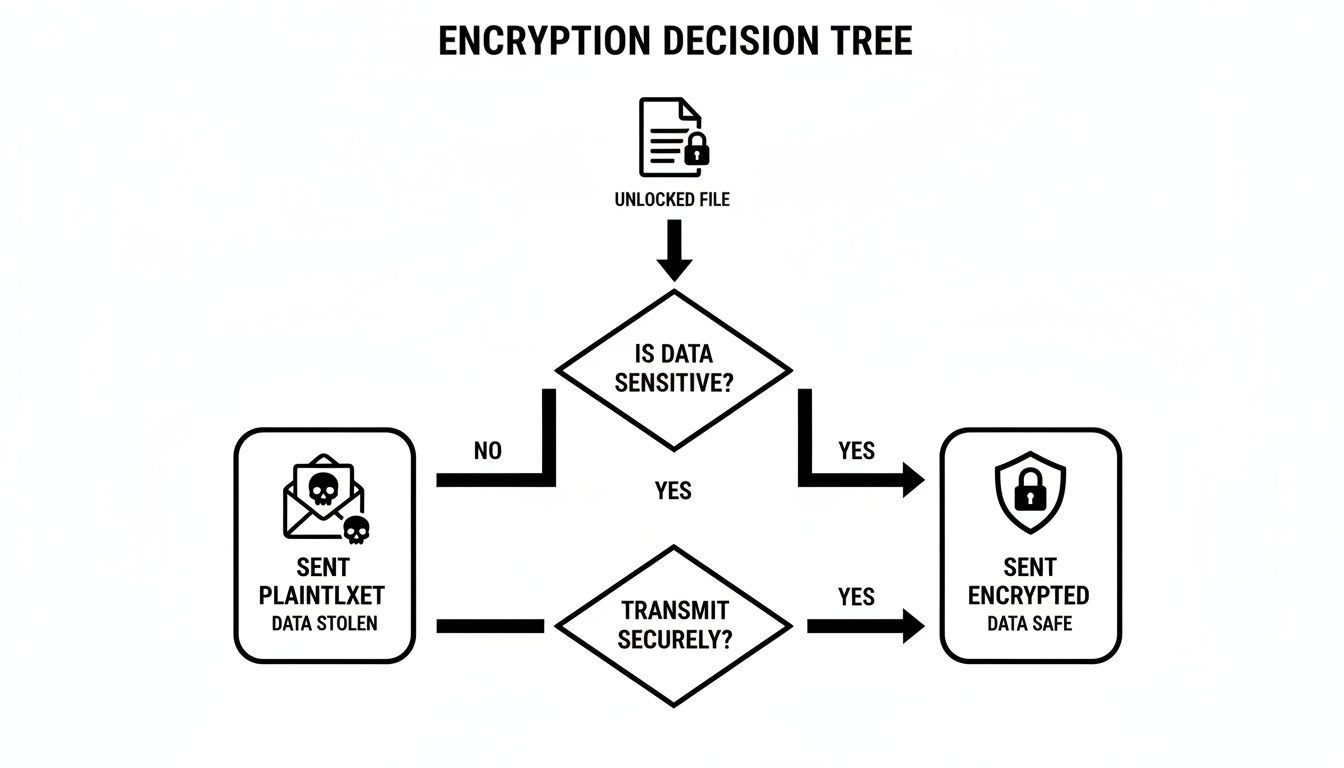
As you can see, skipping encryption is basically leaving the front door wide open. Taking that extra step to lock things down is what keeps your business safe. Let's dig into the best ways to do it.
Method 1: Secure File Transfer Protocol (SFTP)
Think of SFTP as your own private, armored courier service for digital files. It uses a technology called Secure Shell (SSH)—a kind of super-secure handshake—to create a single, heavily encrypted tunnel between two computers. Once that connection is made, your files zip through that tunnel, completely invisible to prying eyes.
Who it's for: A Greenwood accounting firm that needs to automatically blast large payroll files to a processing partner every two weeks. SFTP is the undisputed champion for scheduled, automated, and bulk file transfers where security is a deal-breaker.
The Good:
- Rock-Solid Security: SFTP doesn't just encrypt the files; it encrypts your login credentials and everything else, too. It’s a complete package.
- Firewall Friendly: It cleverly uses just one connection, making it way easier for your office firewall to handle.
- Automation Powerhouse: If you need to "set it and forget it," SFTP is your best friend. It’s built for recurring, automated transfers, which saves a ton of time and cuts down on human error.
The Not-So-Good:
- A Bit Technical: Setting up an SFTP server isn't a one-click-and-you're-done kind of thing. It takes a little technical know-how.
- Requires Software: Both you and the person you're sending files to will need to use an SFTP client (specialized software) to make it happen.
Quick Fix: Avoid Sketchy Cousins. Please, please don't confuse SFTP with its sketchy cousins, FTP and FTPS. Standard FTP sends your username and password in plain text (a massive security sin!), and FTPS is notoriously tricky to get working with firewalls. Just stick with SFTP.
Method 2: Virtual Private Network (VPN)
A VPN is less about sending a specific file and more about wrapping your entire internet connection in a secure bubble. Picture this: you're working from a coffee shop in Carmel. A VPN creates a private, encrypted tunnel from your laptop all the way back to your office network. To the internet, it looks like you're sitting right at your desk.
Everything you do online—sending emails, accessing server files, browsing websites—is routed through this secure tunnel, making it invisible to anyone snooping on the public Wi-Fi.
Who it's for: An Indianapolis-based sales team that’s always on the road. They need to securely tap into the main office server from hotels, airports, and client sites without missing a beat.
The Good:
- Total Connection Security: It encrypts all of your device's internet traffic, not just one file transfer.
- Remote Access Solved: This is the gold standard for giving employees secure access to internal company resources from anywhere.
- Easy for Users: Once it's set up properly, employees usually just have to click a single button to connect.
The Not-So-Good:
- Can Slow You Down: All that heavy-duty encryption requires processing power, which can sometimes put a dent in your internet speed.
- Initial Setup is Key: A poorly configured VPN is riddled with security holes. Getting the setup right from the start is absolutely critical, which is where having local IT support is a game-changer.
For a deeper dive into how a well-built network protects your business, you can learn more about our approach to networking and Wi-Fi security.
Method 3: Secure Cloud Storage Services
You’re probably already using something like Dropbox or Google Drive. But a true, secure, business-grade cloud service is in a whole different league. These platforms are built from the ground up with security as their number one job.
They encrypt your data twice: once while it’s being uploaded (in transit) and again while it’s just sitting on their servers (at rest). This two-layer protection is absolutely non-negotiable for any business data.
Who it's for: A marketing agency that needs to collaborate on sensitive client campaigns with a mix of in-house staff and outside contractors, all while keeping a tight leash on who can see, edit, or download files.
The Good:
- User-Friendly: Most people get how cloud storage works, so getting your team on board is usually a breeze.
- Advanced Controls: Business versions let you get super specific with permissions, track who accessed a file and when, and even remotely wipe data from a lost laptop.
- Collaboration Focused: These tools are designed to help teams work together without tripping over each other.
The Not-So-Good:
- You're Trusting a Third Party: Your data is sitting on someone else's computers. You have to do your homework and make sure you trust their security practices.
- Risk of Misconfiguration: It’s shockingly easy to accidentally share a folder with the whole world if you aren't paying close attention.
Method 4: Encrypted Email Services
Using standard email is like sending a postcard. Every postal worker who handles it can read your message. Encrypted email, on the other hand, is like sending that postcard inside a locked metal briefcase.
These services ensure that a message can only be decrypted and read by the person it was sent to. Many now offer "zero-knowledge" encryption, a fancy way of saying that even the email company itself can't read your messages.
Who it's for: A law firm that needs to send confidential case files and communicate sensitive information with clients, ensuring that attorney-client privilege is maintained in the digital realm.
The Good:
- End-to-End Protection: The message is scrambled on your device and only unscrambled on the recipient's, leaving no weak spots in between.
- Compliance Friendly: This is a must-have for any business handling data regulated by laws like HIPAA.
- Proof of Delivery: Many services can tell you when your message was opened, which can be invaluable.
The Not-So-Good:
- Can Be Clunky: It often forces the recipient to take an extra step, like creating an account or entering a password to view the message.
- Both Sides Need to Play Ball: The security is only truly "end-to-end" if both the sender and the receiver are on board.
Picking the right tool boils down to what you’re sending and who it's going to. If this all feels like a bit much, don’t sweat it. Finchum Fixes IT is here to help you figure out the right secure data transfer methods for your Central Indiana business.
How to Implement Secure Transfers Without Causing a Riot
So, you've picked out the perfect secure data transfer method. Fantastic. It's like buying a state-of-the-art security system for your office. But if you just leave the box on the front desk, it's not going to stop anyone, is it?
Rolling out new security protocols without a solid plan is a recipe for chaos. Employees get frustrated, productivity grinds to a halt, and before you know it, everyone’s sneaking back to their old, insecure habits just to get work done. The goal here is a smooth transition—not a full-blown office mutiny.
Start With a Simple Audit
Before you can fix the leaks, you have to find them. Get an honest look at how your team is actually moving data right now. Don't assume; go ask them.
You’ll probably discover that different departments have their own "unofficial" workarounds. Maybe the marketing team is using a free cloud service to share huge design files, while accounting is emailing spreadsheets filled with sensitive numbers.
This isn’t about pointing fingers. It’s about creating a baseline so you know exactly what problems you need to solve.
Create a Clear and Simple Policy
Next, write it down. Create a one-page Data Transfer Policy that’s so simple a brand-new intern could understand it. Ditch the corporate jargon.
This document should spell out a few key things:
- What data is considered sensitive (e.g., client information, financial records).
- Which tools are approved for sending sensitive vs. non-sensitive data.
- What tools are explicitly banned (e.g., personal email, unapproved cloud services).
- Who to contact with questions.
That's it. Keep it simple and direct.
Quick Fix: Use a Simple Table. In your policy document, create a simple table. One column lists the type of data (like "Client Invoices"), and the next column lists the only approved tool for sending it (like "Our Secure Client Portal"). This removes all guesswork for your team.
Run a Pilot Program First
Whatever you do, don't roll out a new system to the entire company all at once. That's just asking for trouble. Instead, pick a small, tech-savvy group to be your guinea pigs.
Let them use the new secure file transfer tool for a week or two. Their feedback will be pure gold. They'll tell you what's confusing, where the process gets clunky, and what features are genuinely helpful.
This lets you iron out all the kinks on a small scale. By the time you introduce it to everyone else, you'll have a much smoother, battle-tested process ready to go.
Train, Train, and Train Again
Here’s a hard truth: the biggest security risk in any business isn't a piece of software. It’s a person who doesn't know any better. You can have the best tech in the world, but if your team doesn't understand why they need to use it—or how—they will find a workaround.
And please, don't make training a boring, one-and-done webinar. Show them real-world examples of data breaches that started with one wrong click. Most importantly, focus on the "how-to" so they feel confident, not intimidated.
For any Indiana business that's serious about a seamless transition, this is where a local IT partner becomes a game-changer. Managing these steps—from the initial audit to hands-on team training—is what we live and breathe. For more advanced needs, a guide to a secure SharePoint migration can offer practical advice, while exploring best practices for network monitoring will help keep your entire system secure.
Common Data Transfer Disasters and How to Avoid Them
Even the sharpest business owner in Indianapolis can make a simple mistake that blows a massive hole in their company's security. It’s the small, seemingly harmless habits that often snowball into the biggest headaches, costing you money, clients, and your hard-earned reputation.
We've been in the trenches with Central Indiana businesses, and believe me, we've seen it all. Here are the most common—and completely avoidable—data transfer disasters we see every week.
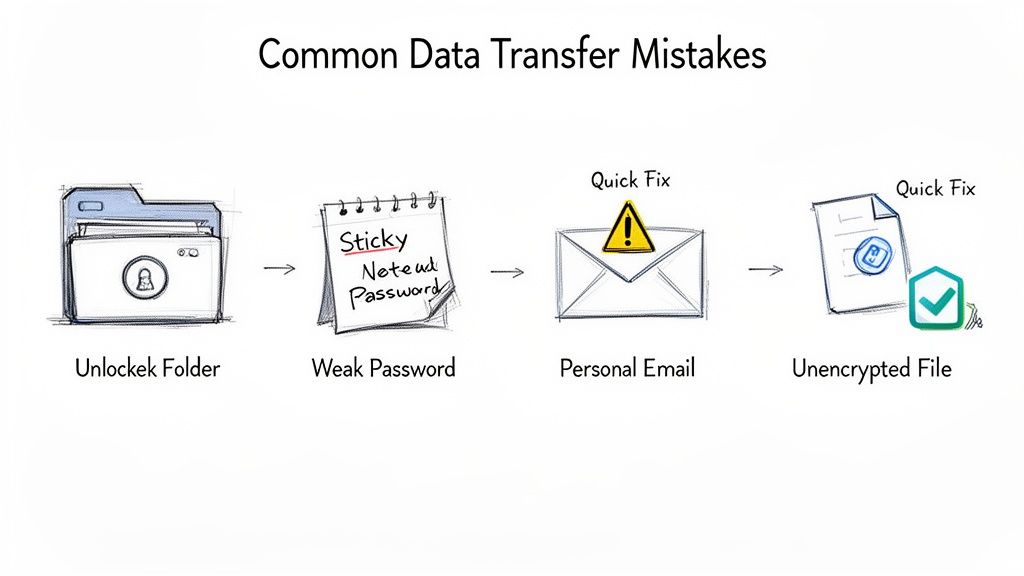
Disaster 1: Using Personal Email for Business Files
This is the big one. An employee is working from home, the work email is acting up, so they pop a client proposal into a personal Gmail and hit send. Problem solved, right? Nope.
You've just shot sensitive company data through a channel you have zero control over. When that employee’s personal account gets hacked—which happens all the time—your client’s information is now in the hands of criminals. We saw a local contractor lose a five-figure bid this way; their competitor got ahold of their pricing sheet after an employee’s personal email was compromised.
Quick Fix: Zero-Tolerance Policy. Implement a strict, zero-tolerance policy against using personal email for company business. Give your team reliable, secure, business-grade email and file-sharing tools. If they have the right tools that actually work, they won't need to find risky workarounds.
Disaster 2: Weak Passwords and No MFA
You’d be horrified to know how many businesses are "protecting" their cloud accounts with passwords like "Summer2024!" For a hacker, a weak password isn't a hurdle; it's a welcome mat.
Worse yet, without Multi-Factor Authentication (MFA)—that little code you get on your phone to prove it’s really you—a criminal with a stolen password has the keys to your entire digital kingdom. Phishing attacks often target login credentials, and without MFA, a successful phish can be catastrophic.
Pro-Tip: Enforce, Don't Encourage. Don't just encourage strong passwords and MFA; enforce it. Use a company-wide password manager to generate and store complex, unique passwords for every service. Then, make MFA mandatory for logging into email, cloud storage, and any other system holding sensitive data. It’s one of the single most effective security moves you can make.
Disaster 3: Failing to Verify Your Recipient
Phishing attacks are getting scarily sophisticated. A hacker can whip up an email address that looks almost identical to your client's, maybe changing just one letter. Next thing you know, you get an email asking for an "updated invoice."
We worked with a Greenwood-based firm that wired a $20,000 payment to a cybercriminal posing as one of their regular vendors. The entire scam hinged on one convincing email from a slightly misspelled domain name. That money was gone forever. This underscores the need for better secure data transfer methods and vigilant staff.
Quick Fix: Pick Up the Phone. Train your team to always verify unusual or urgent requests for sensitive data or payments through a separate channel. A quick phone call to a number you already have on file is all it takes. This simple, 30-second check can prevent a devastating financial loss.
Disaster 4: Ignoring Encryption for Data 'At Rest'
Most people think about securing data when it's moving (in transit). But what about when it’s just sitting on a server, a laptop, or even on high-speed SSDs (Solid State Drives)? That's called data at rest, and if it’s not encrypted, it's a sitting duck.
If an employee loses a company laptop with unencrypted client files at the Indianapolis airport, you don't just have a lost piece of hardware—you have a full-blown data breach. The fines and reputational damage can be catastrophic.
Pro-Tip: Turn on Full-Disk Encryption. Enable full-disk encryption on all company laptops and devices. Tools like BitLocker for Windows and FileVault for Macs are built-in and easy to turn on. For cloud storage, make sure you're using a business-grade service that automatically encrypts all your files at rest.
Avoiding these disasters isn't about buying expensive software. It’s about building smart, simple security habits. If you’re unsure where to start, our team at Finchum Fixes IT is right here to help. Reach out for a consultation, and let’s make sure your business doesn't become another cautionary tale.
Staying Compliant and Keeping Your Data Safe
For a ton of businesses here in the Indianapolis area—especially if you're in healthcare, finance, or the legal world—using secure data transfer methods isn't just a good idea. It's the law.
Violating regulations like HIPAA or PCI DSS isn’t a simple slap on the wrist. We're talking about business-crippling fines and a complete collapse of the trust you've built with your clients.
These rules aren't just bureaucratic hoops. They're in place for a darn good reason: to protect people's most sensitive personal and financial details. When you email a patient’s chart or handle a client's credit card info, you’re on the hook for keeping that data locked down tight, both on your server and while it's zipping across the internet.
Unpacking Data Compliance
"Compliance" sounds like a scary, complicated word, but at its heart, it's all about proof. Can you prove you took reasonable, modern steps to safeguard sensitive data?
Using an encrypted email service or SFTP for file transfers creates a digital paper trail. It’s your evidence that you took your responsibility seriously. On the flip side, sending a spreadsheet full of patient data through a standard, unencrypted email is a slam-dunk compliance failure. The fallout can be staggering, with HIPAA fines stretching into the millions for willful neglect.
- HIPAA (Health Insurance Portability and Accountability Act): If you handle Protected Health Information (PHI), this is your bible. It insists that any data in transit must be encrypted and only accessible to authorized people.
- PCI DSS (Payment Card Industry Data Security Standard): Taking credit card payments? This is your rulebook. It requires powerful encryption for all cardholder data sent across any open, public network.
Pro-Tip: Log Everything. Set up a system for logging and auditing every single sensitive data transfer. You need a detailed record of who sent what, to whom, and when. If a regulator ever comes knocking, this log is your first and best line of defense, proving you have a handle on your data.
How a Local IT Partner Makes Compliance a Breeze
Trying to keep up with all these rules, document everything perfectly, and make sure your tech is up to snuff can feel like a full-time job. This is exactly where having a local IT partner in Central Indiana gives you a massive leg up.
We can put the right technical controls in place and manage them for you, from setting up secure transfer methods to maintaining those critical audit logs. It just gets done.
A managed IT service takes that entire weight off your shoulders. You get to focus on serving your clients, not getting bogged down in regulatory headaches. To see how we protect businesses from every possible angle, learn more about our dedicated cybersecurity services.
Got Questions? We've Got Answers.
We've thrown a lot of tech-speak your way, so it's natural if your head is still spinning a bit. Let's tackle some of the most common questions we hear from business owners right here in town.
"I'm Just a Small Business. Are Hackers Really Going to Bother With Me?"
This is one of the most dangerous misconceptions out there. Hackers aren't master villains hand-picking their targets. They’re running automated scripts that constantly scan the internet for any weakness, like a thief rattling every doorknob on the block.
Your small business is actually a prime target precisely because they assume you haven’t invested in serious security. To a cybercriminal, you look like low-hanging fruit. They don't care if you're a major corporation on Monument Circle or a local favorite in Greenwood—they just want an easy score.
"SFTP, FTPS... What's the Actual Difference?"
Great question. Think of it this way: both are designed to get your data from here to there without anyone snooping, but they take completely different routes.
- SFTP (Secure File Transfer Protocol) is like a modern armored truck. It uses a single, heavily encrypted channel (called SSH) for both commands and data. It's clean, efficient, and built for security from the ground up.
- FTPS (File Transfer Protocol Secure) is more like strapping bulletproof panels onto a much older delivery van. It bolts security (SSL/TLS) onto the old, insecure FTP protocol. It can work, but it often needs multiple connections, which can get tripped up by firewalls.
For most businesses, SFTP is the simpler and more robust choice.
Quick Fix: Ask an Expert. Don't get lost in the alphabet soup. The best protocol is the one that works seamlessly and securely with your existing systems. Ask your IT pro which one is the path of least resistance—and greatest security—for your setup. This is where having a local IT partner in Central Indiana saves you time and headaches.
"How Do I Get My Team to Actually Follow These Rules?"
This is the million-dollar question, isn't it? You can install the most advanced security system in the world, but it means nothing if someone leaves the back door wide open. Getting team buy-in is a mix of smart psychology and even smarter tech.
Start by making the secure way the easy way. Choose tools that are intuitive and don't feel like a chore to use. Once you have a user-friendly solution in place, block the old, insecure methods so nobody is tempted to revert to bad habits.
Finally, remember that training isn't a one-time meeting. It’s about creating a culture where everyone understands they play a role in protecting the business.
Feeling overwhelmed? You don't have to figure this all out on your own. If you need a partner to help choose the right tools, train your team, and build a rock-solid data security plan that just works, Finchum Fixes IT is ready to help. We're right here in Central Indiana, ready for on-site support when you need it.