Your Ultimate 10-Point IT Infrastructure Audit Checklist for 2026
Let's be direct: what you don't know can and will hurt your business. An outdated server, a sloppy firewall rule, or a forgotten employee account aren't minor oversights. They're bright, flashing "Vacancy" signs for downtime, data breaches, and ransomware attacks that can cripple a Greenwood or Indianapolis business overnight.
Most business owners treat their tech like the office refrigerator—they assume it's working until it catastrophically isn't. An IT infrastructure audit isn't about finding fault; it's about finding risks before they find you. It’s the business equivalent of checking the foundation of your building. You wouldn't skip that, so why skip checking the foundation of your entire digital operation?
This isn't just another boring technical document. This is your practical, no-fluff IT infrastructure audit checklist, designed for Indiana's small and medium-sized businesses. We'll break down the 10 critical areas you need to inspect, from network security to data backups. To guide your efforts, this comprehensive IT security assessment checklist offers a practical framework for identifying and addressing vulnerabilities across your infrastructure.
Think of it as a roadmap to uncover hidden liabilities before they become expensive emergencies. Let's get to work and defuse those ticking time bombs.
1. Network Infrastructure Documentation and Asset Inventory
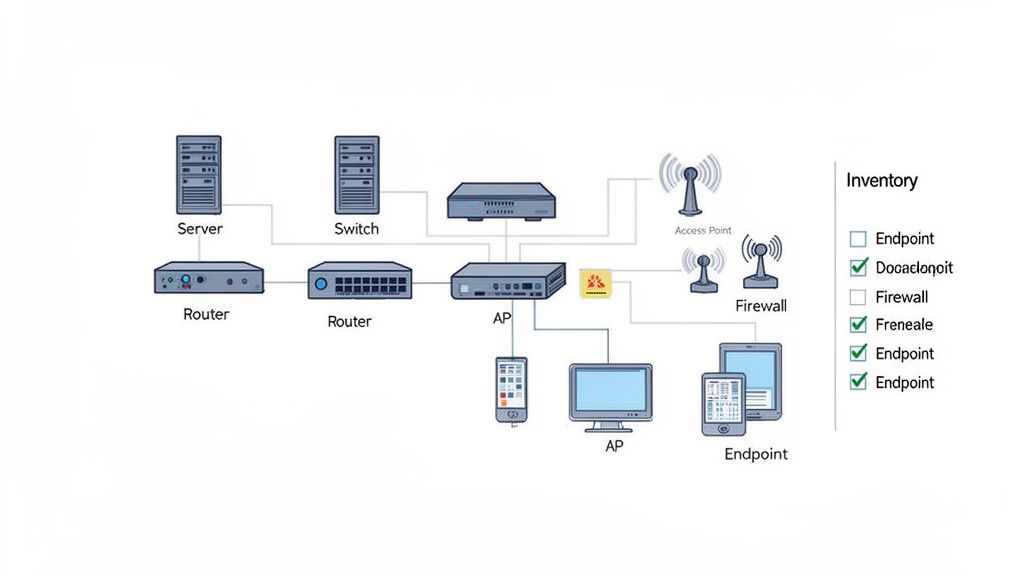
You can't protect what you don't know you have. It sounds like something a grizzled IT veteran would say, but it's the absolute truth. The very first step in any robust it infrastructure audit checklist is to create a complete inventory of every single piece of technology touching your network. This isn't just about counting laptops; it's about knowing the what, where, and why of your entire digital ecosystem.
Think of it as the blueprint for your business's technology. This foundational document catalogs everything: servers, switches, routers, firewalls, Wi-Fi access points, and even that dusty printer in the corner. For our fellow Indiana businesses, especially those with offices from Greenwood to Carmel, this complete visibility is critical for managing security, planning upgrades, and preventing chaos.
Why It’s the Bedrock of Your Audit
Without a precise asset inventory, you're flying blind. A local manufacturing plant can't ensure its networked industrial equipment is patched without first knowing it exists. A healthcare practice in Indianapolis must maintain a perfect device inventory to stay on the right side of HIPAA. This list forms the basis for security, compliance, and even your budget. When it's time to retire old gear, a detailed inventory is essential. As part of this process, ensure you have a robust server decommissioning checklist in place to securely wipe data and dispose of hardware, preventing sensitive information from ending up at a garage sale.
Pro-Tip: Tag, You're It. Don't just list your assets; rank them. Assign a business criticality level (e.g., Critical, High, Medium, Low) to each item. This helps you prioritize patching and maintenance, focusing your resources where they matter most. A downed server for your point-of-sale system is a much bigger fire than a broken printer.
2. Access Control and Authentication Management
Having an inventory is step one, but controlling who can access what is where the real security game is played. This part of your it infrastructure audit checklist is all about identity and access management (IAM). It’s the digital bouncer for your business, ensuring only the right people get past the velvet rope to access sensitive systems and data. You wouldn't hand out the master key to your building to every employee, and the same logic applies here.
This process involves auditing everything from how users log in to what they can do once they're inside. For a law firm in downtown Indianapolis, this means ensuring paralegals can’t access partner-level financial data. For a logistics company in Plainfield, it means a warehouse manager's login won't work on the CEO's computer. It's about enforcing the principle of least privilege: give people access only to what they absolutely need to do their jobs, and nothing more.
Why It’s Your Digital Gatekeeper
Weak access controls are like leaving your front door unlocked. A local bank in Fishers, for instance, must enforce strict multi-factor authentication (MFA)—that's when you need a code from your phone in addition to your password—to comply with regulations and prevent fraud. Properly managed authentication isn't just a best practice; it’s a foundational security control that protects your most valuable information.
Quick Fix: MFA Everywhere, No Excuses. Start by deploying multi-factor authentication on every single remote access point, from VPNs to cloud applications like Microsoft 365. This single step dramatically reduces the risk of a breach from stolen credentials. It's the most impactful security change you can make today.
3. Patch Management and Software Update Process
Leaving your software unpatched is like leaving the front door of your Noblesville office wide open with a "Welcome, Hackers!" sign on it. It’s not a matter of if a vulnerability will be exploited, but when. A rigorous patch management process is a non-negotiable part of any it infrastructure audit checklist, ensuring that known security holes are plugged before cybercriminals can wiggle their way in.
Think of it as routine maintenance for your digital assets. Just as you’d get the oil changed in your company van, you need to apply regular security updates to your software. From Microsoft’s monthly "Patch Tuesday" releases to critical updates for your firewall, this process neutralizes threats before they become business-ending disasters. For Indiana businesses, where a single ransomware attack can halt operations for weeks, a sloppy patching process is an unacceptable risk.
Why It’s a Critical Security Control
Unpatched software is the low-hanging fruit for attackers. The infamous Equifax breach, which exposed the data of nearly 150 million people, was traced back to a failure to patch a known vulnerability. Closer to home, a Fishers-based accounting firm can't afford that kind of reputational damage. A systematic approach to patching is your primary defense against a huge percentage of cyberattacks.
Pro-Tip: Test Before You Deploy. Don't let a patch break a critical application. Always test updates in a controlled environment or on a small group of non-critical systems before rolling them out company-wide. This prevents a well-intentioned update from causing an outage during peak business hours. When you need boots on the ground to troubleshoot a bad patch, having a local IT partner in Central Indiana is invaluable.
4. Backup and Disaster Recovery (DR) Testing
Having a backup is great, but a backup you've never tested is just a hopeful myth. The fourth critical stop on your it infrastructure audit checklist is a rigorous evaluation of your backup and disaster recovery (DR) capabilities. This ensures they actually work when everything else has gone sideways.
This isn't just about making copies of files; it's about validating your ability to withstand a crisis. Whether it's a server fried by a power surge in Fishers or a ransomware attack trying to lock down a law firm in downtown Indy, a tested DR plan is what separates a minor inconvenience from a business-ending catastrophe.
Why It’s Your Business’s Get-Out-of-Jail-Free Card
A successful backup is your ultimate trump card against cyber threats and hardware failures. Ransomware gangs explicitly target organizations without tested DR plans because they know those businesses are more likely to pay. This audit step ensures your business has a lifeline when you need it most, and it’s a critical part of knowing how to recover deleted files from a computer on a much larger scale.
Quick Fix: Live by the 3-2-1 Rule. This is the golden standard. Keep 3 copies of your data, on 2 different types of media (like a local server and the cloud), with at least 1 copy stored securely off-site. This strategy provides layers of redundancy against almost any failure scenario, from fire to ransomware.
5. Firewall Configuration and Network Segmentation
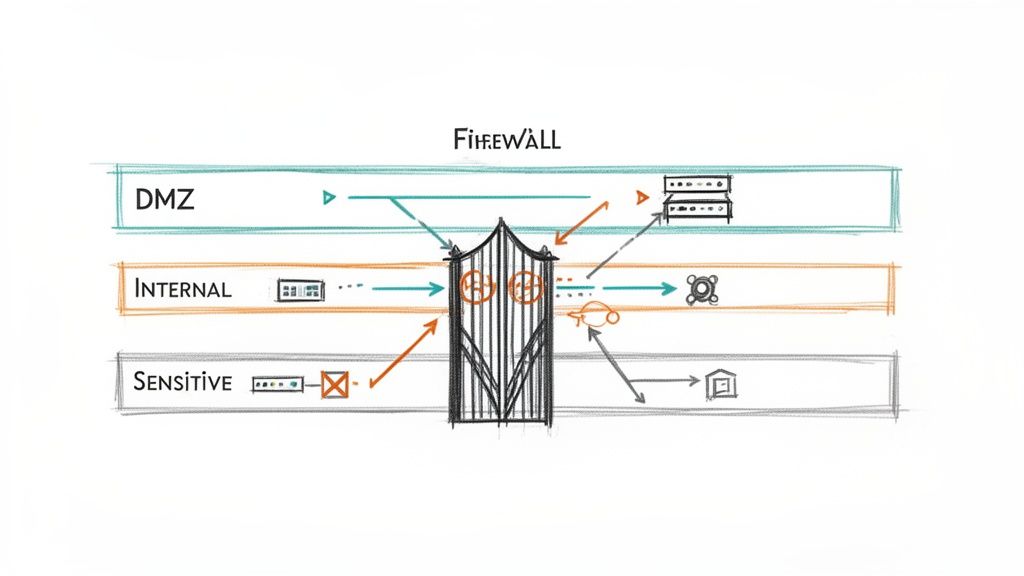
Think of your network as a building. A firewall is the single, heavily guarded front door, but what happens once someone gets inside? If you have one big, open-plan office, a threat can roam freely. Network segmentation is like creating locked-down departments: a breach in the mailroom doesn't automatically grant access to the executive suite. Auditing your firewall and segmentation is a non-negotiable part of any it infrastructure audit checklist.
This process involves a deep dive into your firewall rules, ensuring every allowed connection has a business reason. For our local Indiana businesses, from a Fishers accounting firm protecting client financials to a Plainfield logistics company safeguarding shipping data, this control is your digital fortress wall. It's about containing threats and making an attacker's job impossibly difficult.
Why It’s Your Digital Bouncer
Poor segmentation is a welcome mat for cybercriminals. The infamous Target breach was a masterclass in this failure; attackers got in through an HVAC vendor and then moved freely across the flat network to steal credit card data. By contrast, a local hospital in Avon that isolates its critical medical devices on a separate network prevents a compromised lobby Wi-Fi kiosk from ever threatening patient care systems.
Pro-Tip: Rule Review Ritual. Don't let your firewall rules become ancient hieroglyphics. Implement a mandatory annual review. Every single rule must have a documented business justification and an owner. If it doesn't have a purpose, kill it. A clean firewall is a happy firewall.
6. Endpoint Detection and Response (EDR) and Antivirus Management
If traditional antivirus is the bouncer checking IDs, Endpoint Detection and Response (EDR) is the full security team monitoring every camera and ready to neutralize threats inside the building. Simply having basic antivirus today is like bringing a flip phone to a board meeting; it technically works, but you're dangerously behind the times. This part of your it infrastructure audit checklist evaluates if your endpoints (laptops, servers, workstations) are truly protected.
EDR goes beyond just scanning for known viruses. It analyzes behavior, watches for suspicious activity (like a Word document trying to encrypt your files), and can automatically isolate a compromised machine before ransomware spreads. For a logistics company in Plainfield, EDR could be the difference between one infected laptop and a complete operational shutdown.
Why It’s the Bedrock of Your Audit
Relying solely on old-school antivirus is an open invitation for disaster. It can't stop modern threats. An EDR platform provides the deep visibility needed to see an attack as it unfolds, not just after the damage is done. A financial firm in Carmel can use EDR to contain a threat on a single advisor's laptop before it can access sensitive client data, saving them from a costly breach.
Quick Fix: Centralize and Automate. Use a centralized management console to oversee all your endpoints. Configure automated response actions for high-confidence threats, such as isolating a device from the network the moment ransomware behavior is detected. This stops an attack in its tracks, even at 3 a.m.
7. Security Information and Event Management (SIEM) and Log Monitoring
If your IT assets are cars on a highway, logs are the traffic cameras, recording everything. A Security Information and Event Management (SIEM) system is the command center that watches all those camera feeds at once, using smart analysis to spot the one driver going the wrong way down I-465 before they cause a pileup. This part of your it infrastructure audit checklist evaluates how you collect, analyze, and act on these digital breadcrumbs.
A SIEM platform pulls in log data from everywhere: your firewalls, servers, applications, and endpoints. It then connects the dots to uncover suspicious patterns that a human would miss. For a financial institution in Fishers, this could mean catching an insider threat by correlating unauthorized database access with a login from an unusual location.
Why It’s Your Digital Detective
Without centralized log monitoring, investigating a security incident is like trying to solve a crime with no witnesses. You're left guessing. A SIEM provides the evidence trail needed to understand the "who, what, when, and where" of an attack, making it indispensable for threat detection and compliance. It transforms reactive problem-solving into proactive threat hunting.
Pro-Tip: Don't Just Collect, Correlate. Sending all your logs to one place is just step one. Create specific alerts for high-risk scenarios relevant to your business. Think "multiple failed logins followed by a success from a new IP" or "large amount of data being sent to an unknown country," not just "server CPU is high."
8. Vulnerability Management and Penetration Testing
Simply having a firewall and antivirus is like locking your front door but leaving all the windows wide open. Vulnerability management is the process of systematically checking every one of those windows, while penetration testing is hiring a professional to see if they can pick the locks. This part of your it infrastructure audit checklist is about proactively finding weaknesses before a criminal does.
This isn't just about running a scan. It’s a continuous cycle of discovery, prioritization, and fixing what's broken. For a healthcare organization in Indianapolis, this process could uncover a critical vulnerability in their patient records database, preventing a HIPAA nightmare. Likewise, a financial firm in Fishers might use a penetration test to find an exposed server before it becomes a front-page data breach.
Why It’s Your Digital Immune System
Without actively looking for flaws, you're essentially waiting for an attack to tell you where you're vulnerable. A robust vulnerability management program allows you to identify and fix security gaps on your own terms, not a hacker's. It shifts your security posture from defense to offense, hardening your entire infrastructure and satisfying demanding compliance standards.
Quick Fix: Scan Early, Scan Often. Don't treat vulnerability scanning as a once-a-year event. Implement automated scans on a weekly or bi-weekly schedule. Consistency is key to catching new vulnerabilities as they emerge. Tools like Nessus or Qualys can get you started.
9. Wireless Network Security and Access Point Management
Your Wi-Fi network isn't just for convenience; it's a doorway into your entire business. Left unsecured, it’s like leaving the front door of your Noblesville office wide open. A critical part of any it infrastructure audit checklist is a thorough review of your wireless infrastructure, from the security protocols you use to how you manage the access points broadcasting your signal.
In today's world of Bring-Your-Own-Device (BYOD) policies and hybrid work, your Wi-Fi is a primary security perimeter. For Indiana businesses, a weak or poorly configured wireless network is one of the most common and easily exploited entry points for attackers.
Why It’s a Critical Security Gateway
An unsecured Wi-Fi network gives attackers a direct line to your internal resources. A local law firm must prevent unauthorized access to its Wi-Fi to protect confidential client data. A hospital in Indianapolis needs to provide a guest network that is completely isolated from the network handling sensitive patient records. This isn't just about good IT hygiene; it's about fundamental business protection.
Pro-Tip: Segment Your Airspace. Create separate SSIDs (network names) for different user groups. One for corporate devices, one for guests, and maybe even one for IoT devices like security cameras. Each should have its own security policy, with the guest network completely firewalled off from your internal network. This simple step contains threats and keeps visitors away from your sensitive data.
10. Data Loss Prevention (DLP) and Incident Response Plan
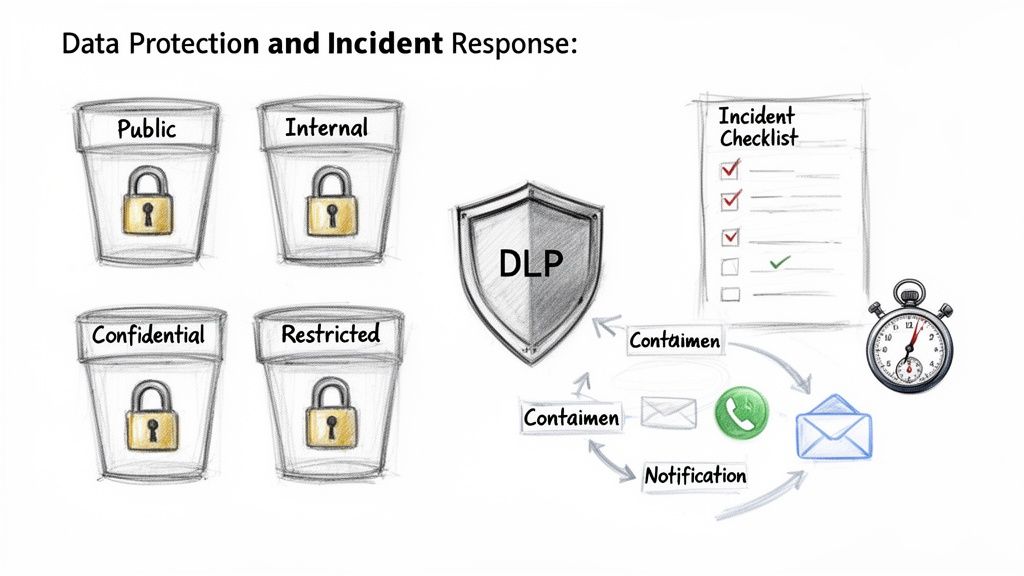
Think of your sensitive data as the crown jewels. Data Loss Prevention (DLP) is the high-tech security system guarding the vault, while your Incident Response (IR) plan is the tactical team that knows exactly what to do when an alarm is tripped. An it infrastructure audit checklist that skips this dual-threat defense is leaving the doors to the treasury wide open.
This part of the audit checks two critical functions: your ability to prevent sensitive data from leaving your network and your readiness to react when a security event happens. For a law firm in Fishers, this means preventing confidential case files from being emailed out accidentally. For a financial advisor in Zionsville, it’s about having a practiced plan to handle a potential data breach.
Why It’s the Bedrock of Your Audit
Protecting data and responding to incidents aren't just good ideas; they are legal and financial necessities. A data breach without a response plan is like a fire without an extinguisher—it quickly spirals into a catastrophe. A healthcare provider that suffers a ransomware attack but has a solid IR plan can maintain patient care and recover quickly. This audit ensures your defenses are active and your response is reflexive, not reactive.
Quick Fix: Run Fire Drills for Cyber Attacks. Don't let your Incident Response plan gather dust. Conduct quarterly "tabletop exercises" where you simulate a breach scenario (like ransomware) and walk through the response steps with your key team members. This is the best way to find gaps before a real crisis hits.
10-Point IT Infrastructure Audit Checklist Comparison
| Control | Implementation Complexity 🔄 | Resource Requirements ⚡ | Expected Outcomes ⭐ 📊 | Ideal Use Cases 💡 | Key Advantages ⭐ |
|---|---|---|---|---|---|
| Network Infrastructure Documentation and Asset Inventory | 🔄 High — initial discovery and ongoing governance | ⚡ Moderate — discovery tools, CMDB, staff time | ⭐ High visibility; 📊 faster troubleshooting & compliance | Multi-site businesses, regulated environments | Complete asset visibility; enables other controls |
| Access Control and Authentication Management | 🔄 High — IAM, RBAC, PAM integrations | ⚡ High — identity platform, MFA devices, admin effort | ⭐ Strong access protection; 📊 reduced breach likelihood | Organizations handling sensitive data, remote work | Enforces least-privilege and MFA; audit trails |
| Patch Management and Software Update Process | 🔄 Moderate — automation plus testing workflows | ⚡ Moderate — patch tools, staging/test environments | ⭐ Reduces known vulnerabilities; 📊 fewer incidents | Environments with many endpoints or exposed services | Proactive vulnerability mitigation |
| Backup and Disaster Recovery (DR) Testing | 🔄 Moderate–High — RTO/RPO design and restore testing | ⚡ High — storage, off-site replication, test resources | ⭐ Ensures recoverability; 📊 business continuity maintained | Data-critical businesses (healthcare, finance) | Validated recovery; reduces catastrophic data loss |
| Firewall Configuration and Network Segmentation | 🔄 High — rule design, segmentation, IDS/IPS tuning | ⚡ High — NGFWs, network engineers, monitoring | ⭐ Limits lateral movement; 📊 reduces breach impact | PCI/HIPAA, environments needing strict separation | Controls traffic flows; contains attacks |
| Endpoint Detection & Response (EDR) and Antivirus | 🔄 Moderate — deployment, tuning, response playbooks | ⚡ Moderate–High — EDR licenses, SOC/analyst time | ⭐ Detects advanced threats; 📊 faster containment | Targets of targeted attacks and ransomware risk | Behavioral detection; rapid containment and forensics |
| SIEM and Log Monitoring | 🔄 High — integration, correlation, alert tuning | ⚡ High — licensing, storage, skilled analysts | ⭐ Early detection & forensic capability; 📊 compliance reporting | Regulated firms and large hybrid environments | Correlated visibility across systems |
| Vulnerability Management & Penetration Testing | 🔄 Moderate — scanning cadence and remediation workflows | ⚡ Moderate — scanners, pentesters, remediation effort | ⭐ Identifies weaknesses; 📊 reduces attack surface | Regular security assessments and compliance programs | Prioritized remediation and risk visibility |
| Wireless Network Security & Access Point Management | 🔄 Moderate — WPA3/802.1X, site surveys, controller setup | ⚡ Moderate–High — APs, controllers, survey tools | ⭐ Secure wireless access; 📊 reduced Wi‑Fi attack surface | BYOD environments, multi-site offices, guest networks | Encrypted auth and centralized management |
| Data Loss Prevention (DLP) & Incident Response / Security Ops | 🔄 Very High — DLP + IR integration, cross-functional processes | ⚡ Very High — DLP/forensics tools, IR team, legal support | ⭐ Protects sensitive data; 📊 faster containment & compliance | Data-sensitive organizations, high-impact breach risk | Prevents exfiltration; coordinated incident response |
From Checklist to Action Plan: Your Next Move
Well, you made it. You now have a comprehensive IT infrastructure audit checklist that’s more than just a piece of paper; it’s a treasure map. Instead of leading to gold, it points to vulnerabilities and opportunities that could save your business from disaster. The journey from a list of checkboxes to a fortified, efficient business is where the real work begins.
Completing the audit is like getting a diagnosis. You now know what’s wrong, what’s healthy, and what needs immediate attention. The next step is creating the treatment plan. Your findings likely fall into a few categories: the easy wins, the critical fixes, and the long-term projects. Don’t try to fix everything at once. That’s a one-way ticket to burnout.
Prioritize and Conquer: Turning Insights into Action
The key is to prioritize with a ruthless focus on impact. What’s the single biggest risk to your business right now? If your backups haven’t been tested since the last solar eclipse, that’s your starting point. If employees are still using Password123, enforcing Multi-Factor Authentication (MFA) is a non-negotiable first step.
Think of it in tiers:
- Tier 1: The "House is on Fire" Fixes. These are the critical vulnerabilities that could lead to a breach or significant downtime tomorrow. This includes patching critical vulnerabilities, confirming your backups are restorable, and locking down admin-level access.
- Tier 2: The "Leaky Roof" Projects. These are important issues that are causing problems but aren't yet catastrophic. This might involve segmenting your network, deploying an Endpoint Detection and Response (EDR) solution, or formalizing your incident response plan.
- Tier 3: The "Landscaping" Upgrades. These are the strategic improvements that will enhance efficiency and future-proof your business, like implementing a full SIEM system.
The Audit is a Cycle, Not a One-Off Event
Remember, your IT environment is not a static museum piece. It’s a living, breathing ecosystem. New employees join, old hardware is retired, software is updated, and cyber threats evolve faster than an IndyCar on race day. This IT infrastructure audit checklist isn't something you do once and file away. It's a process you should revisit annually, or even quarterly for critical security components.
Regular audits transform your IT from a reactive cost center into a proactive business enabler. This discipline builds a culture of security and resilience that becomes a competitive advantage. It assures your clients that you take their data seriously and demonstrates to your team that you’re invested in giving them reliable tools to do their jobs.
This process can feel daunting. If staring at firewall rules or penetration test results makes your head spin, that's normal. That’s why having a local IT partner in Central Indiana is so crucial. You need someone who can not only run the diagnostics but also help you interpret the results and build a practical, budget-friendly plan for remediation.
Feeling overwhelmed by your audit results or don't know where to start? Finchum Fixes IT specializes in turning complex IT infrastructure audit checklists into clear, actionable roadmaps for businesses in the Indianapolis and Greenwood area. Let our expert team provide the clarity and hands-on support you need to secure your technology and protect your bottom line. Contact us today for a no-obligation consultation!