Business Continuity Strategy: Keep the Lights On

A business continuity strategy is a short list of critical processes, each with a recovery deadline, an acceptable data-loss limit, specific recovery controls, and a named owner. It keeps people working through outages by settling practical questions before trouble starts: who can stop operations, who can spend money, and who can access the systems.
Say your Greenwood logistics office loses phones, order processing, and employee sign-in for a full day. Trucks still arrive along the I-65 corridor. Dispatchers start texting screenshots. The owner asks whether the backup works, but nobody knows who has permission to restore it.
The permanent fix isn't another box in the server closet. It's supported infrastructure, protected recovery access, tested workarounds, and clear authority. Buying equipment without assigning responsibility just gives the next outage nicer furniture.
Map Critical Systems and Set Recovery Targets
Start with the work that pays the bills, not the server inventory. Your warehouse needs dispatch working before anyone needs the training archive.
The NIST contingency planning guide defines recovery time objective, or RTO, as the maximum period a system resource can remain unavailable before unacceptable effects occur across dependent resources and business processes. Your recovery point objective, or RPO, sets the acceptable data-loss window.
Put business owners in charge of priorities
- List revenue and legal duties. Include taking orders, shipping, invoicing, payroll, patient scheduling, and required records.
- Trace each dependency. Record applications, logins, internet connections, vendors, equipment, and the people who know the workflow.
- Rank the consequences. Compare revenue, safety, legal obligations, and customer impact rather than letting the loudest department win.
- Get written approval. Have the business owner approve RTO and RPO, along with the minimum service level and maximum tolerable downtime.
Use a business impact analysis template to keep those decisions together. Give each process an owner and an alternate, not a department name that nobody answers to.
Recovery tiers for a typical Indiana SMB
These are proposed planning targets, not guarantees. A restore exercise must prove that the controls can meet them.
| Tier | Typical systems | Target RTO | Target RPO | Recovery control |
|---|---|---|---|---|
| Tier 1, revenue-stopping | POS, payments, email, sign-in | 4 hours | 1 hour | Immutable cloud copy plus LTE failover internet |
| Tier 2, operations | Accounting, CRM, shared file server | 24 hours | 24 hours | Nightly off-site image plus written manual workaround |
| Tier 3, support | Archives, training servers, old project files | 5 days | 7 days | Weekly cold copy restored on request |
An LTE connection won't restore a failed identity service. An immutable copy won't help if downloading it takes longer than the recovery window. Include replacement compute, usable credentials, application consistency, and restore bandwidth in the design.
Turn recovery targets into a buying decision
For a deliberately severe worked example, model downtime at up to $9,000 per minute, including missed orders, overtime, penalties, and idle labor. Don't treat that figure as your company's measured loss. Calculate your own exposure from actual margins and obligations.
Then compare the proposed monthly service cost with technician hours avoided, employee rework prevented, and billable work preserved. For the example above, a four-hour RTO can cost less than one bad afternoon, but only if your loss calculation supports the investment.
Practical rule: Buy faster recovery for work that can't wait. Don't pay emergency-recovery prices for files nobody has opened since the office moved.
Find Single Points of Failure Before They Fail
Consider an aging server in a Greenwood business park with a five-year-old RAID 5 array nobody checks. Pair it with a 1920s downtown brick building where Wi-Fi disappears behind plaster walls and Low-E windows. Both problems invite staff to invent workarounds instead of finishing customer work.
Replace or migrate the server to a supported platform after checking application compatibility and recovery requirements. For UniFi networking, survey actual coverage, place access points for roaming, and use wired backhaul wherever practical. Latency-optimized mesh nodes still need a strong uplink; mesh isn't permission to ignore masonry.
Diagnose before replacing equipment
The NIST Cybersecurity Framework 2.0 overview places asset understanding under Identify and responsibility, policy, and oversight under Govern. In plain English: know what you've got, then name someone accountable for it.
Diagnostic checks for hardware, backups, Wi-Fi and access
| Check | Command or tool | Healthy result | Warning sign |
|---|---|---|---|
| Linux disk health | smartctl -a /dev/sda | Overall result PASSED and reallocated or pending sector counts flat | Count rising, or overall result FAILED |
| Linux RAID state | mdadm --detail /dev/md0 | State: clean | State: degraded or endless rebuilds |
| Windows disk health | Get-PhysicalDisk in PowerShell | HealthStatus Healthy | Warning or Unhealthy |
| Backup recency | wbadmin get versions | Newest version within your RPO | Newest version older than your RPO |
| Wi-Fi coverage | UniFi Network heat map | Coverage validated by an on-site roaming test | Dead zones or roaming drops between nodes |
| Internet stability | ping -t <approved-test-host> | Stable replies against the site's baseline | Any loss or spikes at peak hours |
| Endpoint protection | Bitdefender GravityZone console | Every device reporting and current | Unmanaged or outdated devices |
Run commands against the actual device names. mdadm checks Linux software RAID, not every hardware controller. wbadmin only describes Windows Backup jobs; use the relevant console for other backup products.
A ping warning deserves investigation, not an automatic accusation against the ISP. Compare wired and wireless results, gateway behavior, application performance, and circuit monitoring.
Check whether alerts reach a human
Say a technician dissects a failing RAID array and discovers that another drive has logged rising reallocated sectors for four months. The dashboard stayed green because nobody configured the alert destination.
The lesson isn't that RAID is useless. RAID provides availability against certain disk failures; it doesn't replace backup, monitoring, or escalation.
For Johnson County business owners, the useful deliverable is a risk register with plain consequences. Every single point of failure without a tested replacement gets an owner and a due date. An unresolved risk shouldn't live exclusively in a technician's memory.
Backups Built to Survive Ransomware
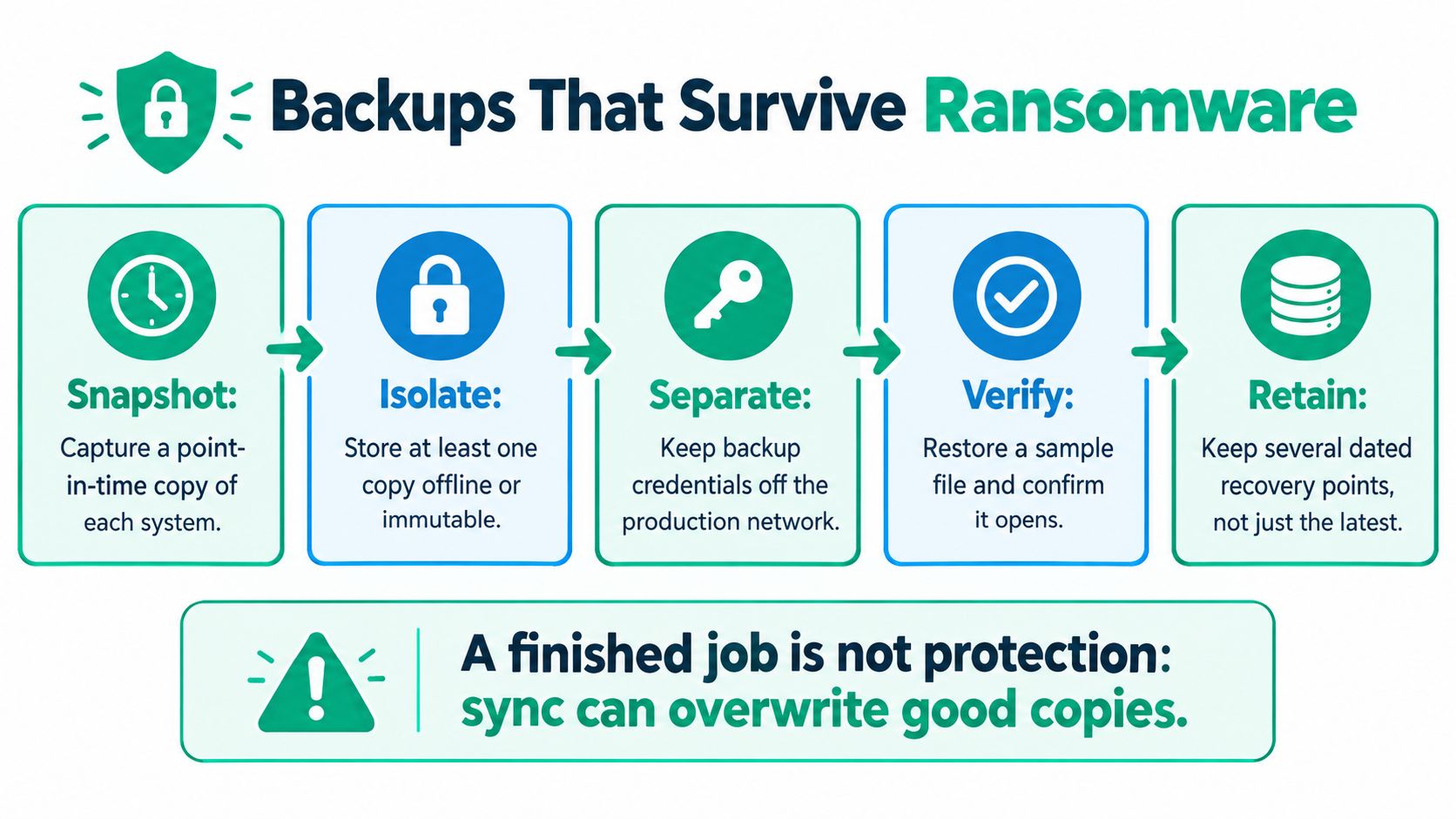
A green backup check means a job finished. It doesn't prove you can recover payroll, authenticate users, or open the accounting database.
The CISA ransomware guide recommends offline, encrypted backups and regular integrity testing, and warns that ordinary cloud synchronization can replicate encrypted files over unaffected copies. Sync is convenient file movement, not a complete recovery design.
Separate recovery from production
Use the 3-2-1-1-0 rule as a design checklist: three copies, two media types, one off-site copy, one offline or immutable copy, and zero unresolved verification errors. The backup rule guide for Indiana SMBs helps translate that shorthand into purchasing questions.
A concrete setup is Veeam Backup & Replication writing encrypted backups to S3-compatible object-lock storage. Set a documented retention period based on how far back you may need to recover, storage cost, and recordkeeping obligations.
Configure immutability before relying on the repository. Confirm the product's supported object-lock configuration, protect encryption keys separately, and test what happens when production administrator credentials are unavailable.
Use this flow to check that each layer exists.
Prove the application works
The operational sequence is straightforward:
- Choose critical services and restore order. Recover prerequisites before dependent applications.
- Create encrypted off-site copies. Consider a separate provider to reduce shared-account exposure.
- Enable retention protection. Keep backup administration separate from everyday production access.
- Restore into an isolated VLAN. Use clean devices and prevent restored systems from contacting compromised production services.
- Record actual results. Measure restoration time, recovered data age, and whether the user can complete the workflow.
Privileged-account protection matters as much as storage. Require strong MFA where supported, restrict backup-console access, and keep recovery credentials out of ordinary shared folders.
For Microsoft 365 mail, verify that messages open, attachments are readable, and the intended recovery destination works. A folder count isn't a user acceptance test.
Don't turn a damaged drive into a worse one
Bit-level data recovery starts with preserving readable sectors, not repeatedly attempting repairs on the original disk. For a stable, readable device, a trained technician might image it with ddrescue -n /dev/sdb sdb.img sdb.map, writing the image and map to healthy storage with enough capacity.
A clicking drive is different. Stop powering it on and consult a recovery specialist; even a careful imaging attempt can worsen mechanical damage.
The final checkpoint is wonderfully unglamorous: can a user open last month's invoice template from the restored share? If not, the restore isn't finished.
Keep Work Moving While Systems Are Down
Recovery deadlines leave a gap between failure and normal work. Give staff something useful to do during that gap besides refreshing the outage ticket.
Assign workarounds to people
- Operations manager: Name employees approved to work remotely. Each quarter, test VPN access from their approved laptops, including access to the applications they rely on day to day.
- Network administrator: Disconnect the primary WAN during a controlled test. Confirm the LTE failover router supports priority payment and email traffic without background downloads consuming the connection.
- Office lead: Maintain a printed price list, carbon-copy order forms, and a weekly offline order export in a locked drawer. Document who reconciles handwritten orders afterward so customers aren't billed twice.
- Department supervisors: Cross-train two people on invoicing and shipping. Have the alternate perform the task while the usual owner watches without taking over.
If the building itself becomes unusable, compare remote work with temporary space before an emergency. Pacific Mobile Structures, Inc.'s short-term office rental options provide a useful starting point for evaluating workspace alternatives, but confirm local availability, power, connectivity, and setup requirements.
Keep a SaaS dependency sheet
For every cloud application, record:
- Access: Login location, admin owner, and approved MFA recovery method.
- Data: Export path, export format, and where an authorized employee can access the offline copy.
- Tolerance: Longest workable outage and the approved manual substitute.
- Contacts: ISP support, payment processor, phone carrier, and managed partner emergency number.
Don't print live passwords alongside general vendor contacts. Point authorized staff to the protected credential store and emergency access procedure.
For healthcare workflows, have the HIPAA privacy and security owners approve paper handling, remote access, and disposal procedures. A workaround mustn't scatter patient records across personal devices.
Write each procedure on a single page using the screen labels employees will see. End with a business task, such as accepting and recording an order, rather than merely connecting to the VPN.
Incident Response and Communications in the First Hour
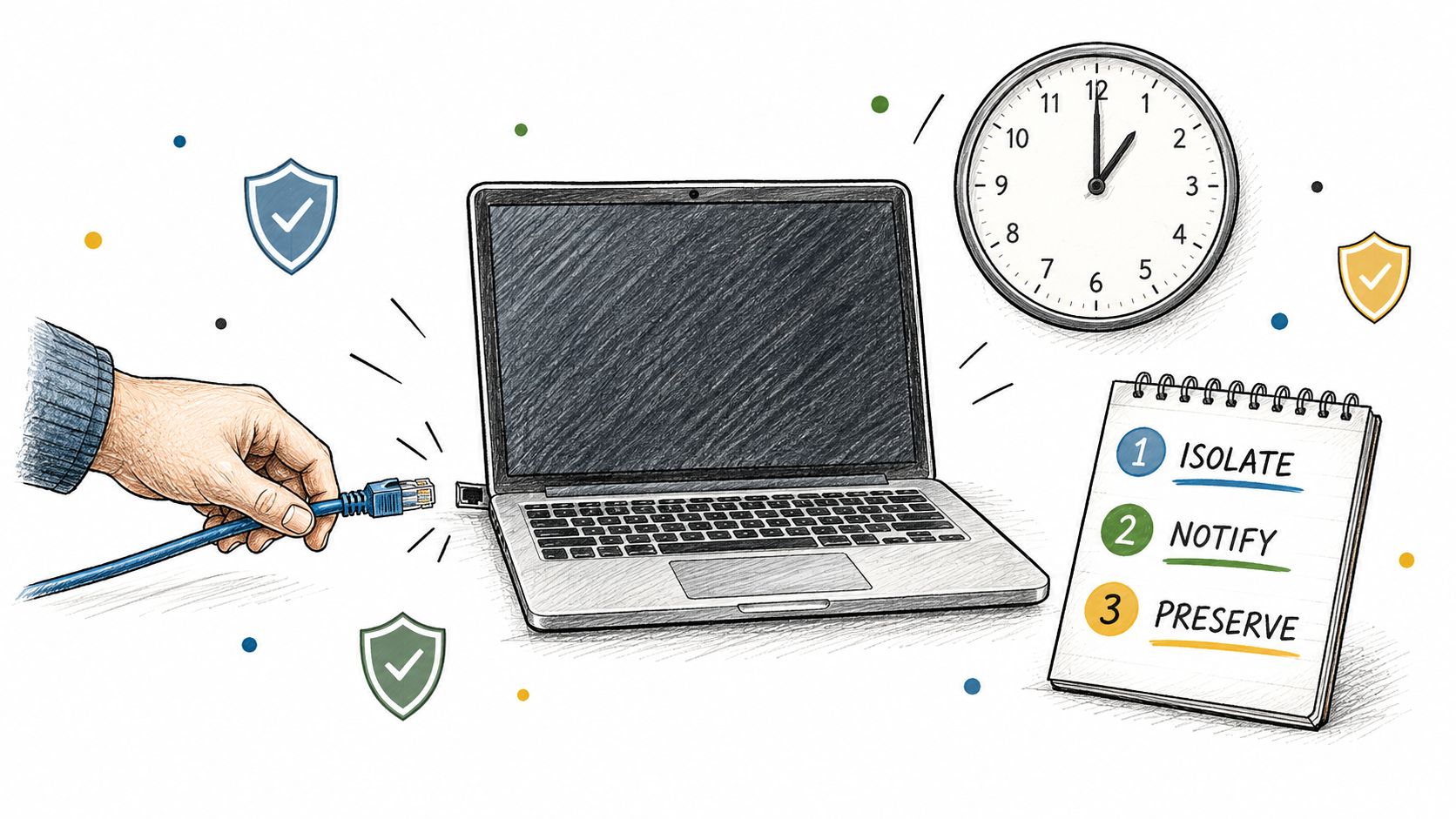
The first employee who spots suspicious encryption needs a clear action, not permission to assemble a committee. Make containment safe enough for the office manager to start while technical responders take over.
Physical network disconnection can be the simplest containment option.
Put the response on paper
- Isolate affected machines. Use Bitdefender GravityZone network isolation where available. Alternatively, from a local administrator prompt, run
netsh interface set interface name="Ethernet" admin=disabled, using the actual adapter name and addressing Wi-Fi too. - Call the incident lead. Use the printed contact sheet in the locked drawer or its protected offline PDF on approved phones. Don't depend on company email.
- Confirm authority. The named alternate checks emergency spending limits and the preauthorized shutdown scope.
- Start the approved recovery sequence. Technical responders first establish a clean recovery environment, preserve evidence, and address compromise before reconnecting Tier 1 systems.
- Send a holding message. Set a planning target of notifying affected customers and vendors within two hours through an approved alternative channel.
- Keep a timestamped log. Record symptoms, decisions, actions, and messages in a shared incident notebook, using paper if collaboration services are unavailable.
Don't casually power down affected equipment and lose volatile evidence. If isolation isn't possible or an immediate safety risk exists, follow the incident lead's direction rather than treating evidence preservation as the only priority.
Make absence part of the exercise
A 2024 Japanese survey of 11,410 companies, discussed in the small-enterprise white paper, identified insufficient skills and know-how and unavailable personnel as prominent barriers among businesses without continuity plans. For an Indianapolis office, the practical response is a playbook that still runs when its author is absent.
Rehearse prolonged internet loss while the owner is unreachable. Use incident planning advice from Overton Security when aligning physical access and staff responsibilities, alongside an incident response plan for Indy SMBs.
Use this accompanying video during staff preparation.
The named incident lead, or the documented alternate, can authorize the agreed shutdown scope. Call the managed partner immediately for suspected compromise or an outage threatening an approved recovery deadline.
Testing Cadence From Tabletop to Full Restore
Freeze the exercise scenario before anyone starts improvising: ransomware disables identity services and shared files at 9 a.m. on a Tuesday. For this hypothetical test, write down what counts as success before participants see the recovery checklist.
The NQA ISO 22301 implementation guide describes an exercise program with defined objectives, validation, and post-exercise outcomes and improvement actions. A meeting where everyone agrees the plan looks sensible isn't equivalent to an exercise.
Measure decisions as well as restores
Record detection time, escalation time, decision latency, restoration time, data-loss interval, workaround capacity, and unresolved dependencies. Compare relevant results with approved RTO, RPO, and maximum tolerable downtime.
Exercise types, cadence and pass criteria
The following is a proposed operating schedule with explicit pass targets.
| Exercise | Frequency | Who attends | Pass test |
|---|---|---|---|
| Tabletop, ransomware scenario | Quarterly | Owner, office lead, IT lead | Decisions and shutdown authority agreed within 30 minutes |
| Technical restore, Tier 1 systems | Semiannual | IT lead plus one non-IT witness | Restored within 4-hour RTO, data within 1-hour RPO |
| Backup sample restore | Monthly | IT lead | Random files open cleanly and match expected age |
| Integrated exercise | Annual | Leadership, ISP, payment vendor, staff | Customers notified within 2 hours, Tier 1 running on workaround |
The non-IT witness matters. A technician can confirm that a service started; an accounts employee can confirm that it produces the right invoice.
Close gaps instead of collecting reports
Avoid these recurring failures:
- Backup-only testing: Include identity, application licensing, communications, and operating procedures.
- Missing third parties: Ask vendors to participate or document the support path and limitations.
- Perfect attendance assumptions: Remove a key employee from the scenario.
- Untested alternate access: Try the approved home laptop and remote connection, not just the office workstation.
Every failed control gets a corrective-action owner, a due date, and a retest. Keep the evidence with the plan, including screenshots, timestamps, and the business witness's acceptance.
Consider a tabletop scenario where the only person who knows the admin password is on a flight to Denver. The proposed fix is a sealed break-glass credential in the office safe plus a separately reviewed admin account.
The next exercise must confirm that two named, authorized people can open the safe and use emergency access. Log use and rotate exposed credentials afterward. A sealed envelope nobody can reach is just stationery with ambition.
Maintenance Calendar That Keeps the Plan Current
Continuity procedures decay when staff leave, applications change, or vendor support details go stale. The Insurance Information Institute's disaster preparation guide frames preparation, response, and recovery as business survival work. A calendar helps turn that work into assigned operations, not a backup purchase nobody owns.
Give upkeep a calendar and an owner
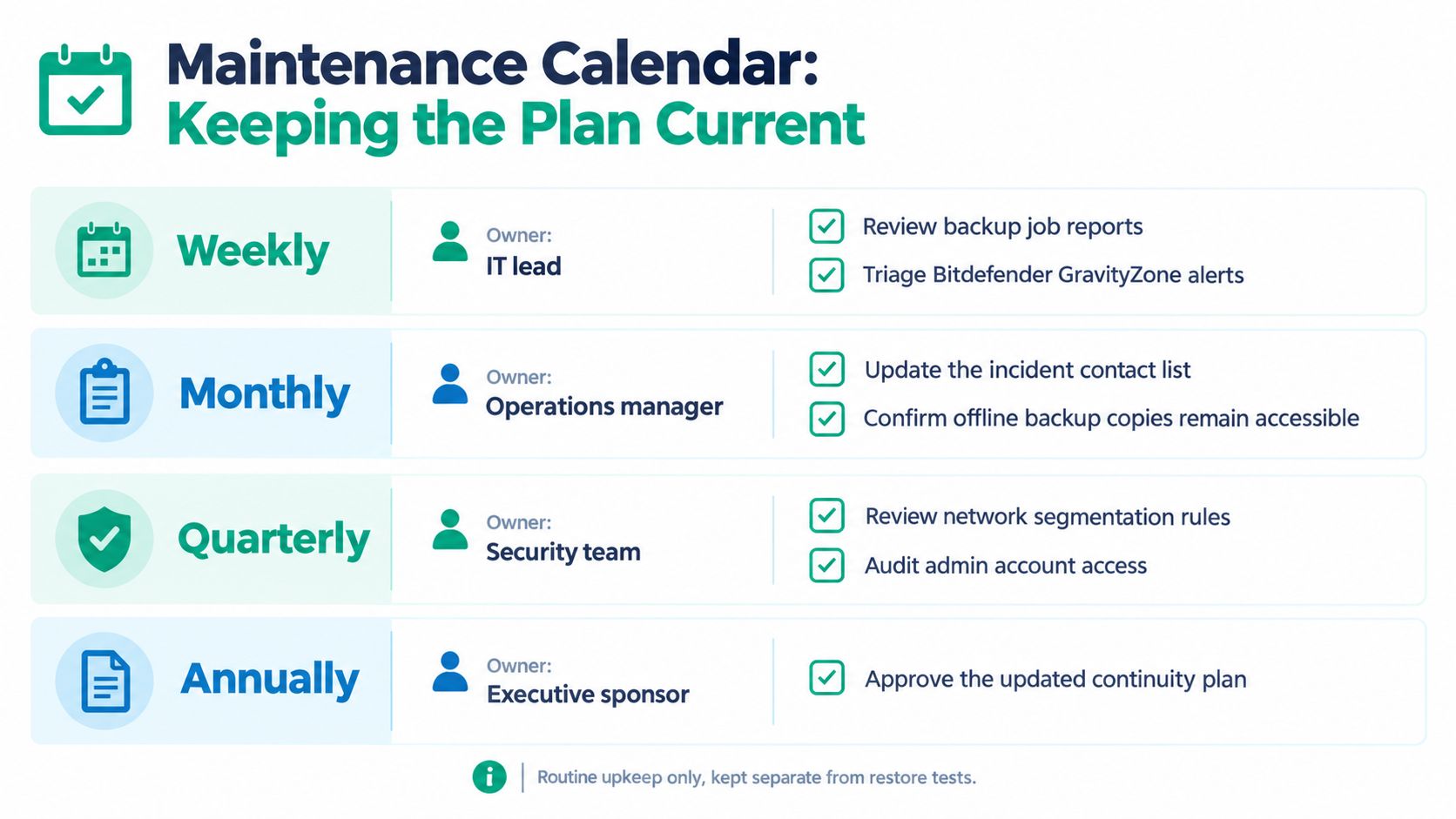
- Weekly, IT lead: Review backup reports and triage Bitdefender GravityZone alerts. Track each unmanaged device until it is enrolled, retired, or accounted for.
- Monthly, IT lead and operations manager: Review UniFi Network firmware,
smartctloutput, andGet-PhysicalDiskresults. Agree on a patch window, such as Tuesday at 6 p.m. Prepare rollback steps and get business approval before updates begin. - Quarterly, security owner: Refresh emergency contacts, review segmentation, admin accounts, and MFA enrollment, and remove former staff access. Confirm that authorized staff know where emergency credentials are stored and who can approve a shutdown.
- Annually, executive sponsor: Refresh the business impact analysis and cyber-insurance review. Use year five as a proposed server replacement review point, not an automatic disposal date.
Keep the owner, task, and evidence together. A maintenance calendar chart outlining weekly, monthly, quarterly, and annual IT tasks and their responsible owners. makes responsibilities visible. A task without a named owner is a reminder nobody has to obey.
Budget the work before it becomes urgent
Facilities maintenance and IT ownership need to line up, so staff know who handles building-related dependencies when systems are affected. See planning maintenance with Celtic Fire & Security for facilities coordination, and use proactive system monitoring to keep system issues visible between scheduled reviews.
For a Johnson County office losing Friday afternoons to emergency patch repairs, a scheduled window with rollback preparation gives the owner a forecastable maintenance commitment. Scheduled upkeep turns technician hours into a budget line and leaves employees more time for customer-billable work.
Decide Whether Your Team or a Managed Partner Owns It
The continuity plan needs an owner with authority, time, and access. Keep work in-house if a named IT lead has protected maintenance time, owns weekend alerts, and can show a recent successful Tier 1 restore. Ask for the restore result and confirm the business accepts it.
A managed partner may fit better if failed backups go unnoticed, restore results lack business approval, or your team cannot assemble the security evidence customers request. The key question is who can authorize a shutdown and locate the credentials needed to recover. A backup is no help if nobody can act on it.
Judge the operating model, not the sales pitch
Use this in-house versus managed IT comparison to compare responsibilities, exclusions, escalation, and operating cost. Internal staff, a hybrid arrangement, or an outsourced service can each work when ownership is explicit.
Put these duties in the agreement:
- Monitoring: Define who reviews alerts and who handles human escalation.
- Access: Specify how access is verified and permissions limited, rather than trusting every office-connected device.
- Recovery: Require documented restore results and name the person responsible for corrective action.
- Commercial terms: Set the monthly scope, evidence reports, and charges for excluded projects.
Defense suppliers may need CMMC-ready evidence, such as access reviews and backup validation. Continuity documentation alone does not establish certification. Healthcare businesses should likewise assign HIPAA responsibilities in service agreements and operating procedures.
Finchum Fixes IT, based in Greenwood, offers managed support, networking, cybersecurity, and data recovery. Whichever model you choose, make ownership clear: name who can approve a shutdown, where administrator credentials are kept, and who acts when an alert arrives.
Contact Finchum Fixes IT in Greenwood to review recovery priorities, restore testing, and single points of failure, whether your office is in downtown Indianapolis or along the I-65 corridor.