Backup and Recovery for SMBs: A Practical Playbook
Only 10% of IT users perform daily backups, and just 61% of restores succeed, according to a 2026 summary of backup-industry data from CrashPlan's 2026 data-loss report. For a Greenwood or Indianapolis business, that means a green backup icon can hide an ugly reality: when the server fails, recovery may not work.
A nightly job isn't a recovery plan. Backup and recovery means copying data, then proving that systems, applications, and files can return to usable operation within a documented limit. That distinction protects revenue, keeps wasted technology time from consuming billable hours, and helps turn unpredictable emergencies into a manageable monthly IT budget.
What Backup and Recovery Means for Your Business
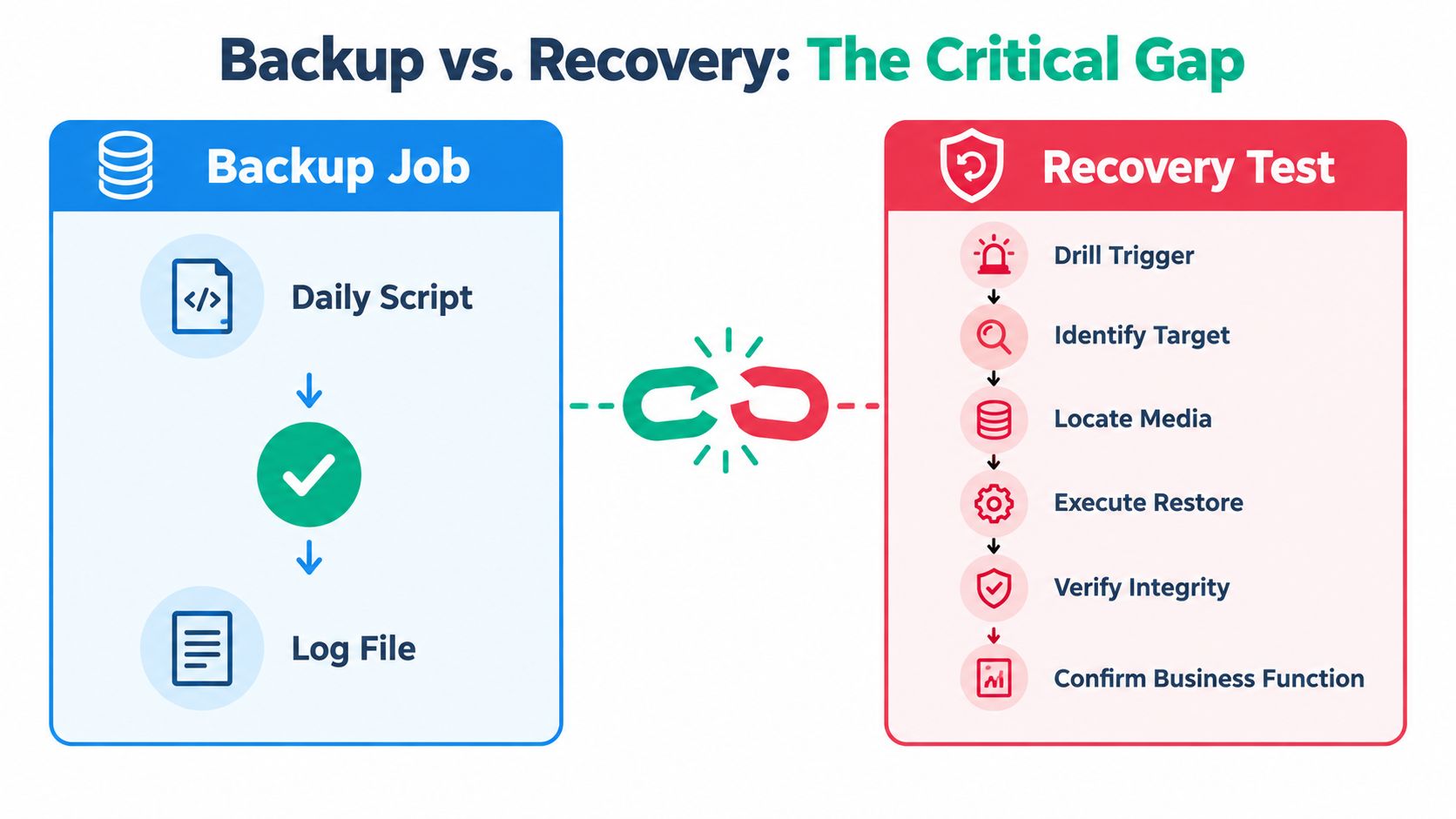
A completed backup job proves only that software finished a task. It does not prove the data is usable, the repository survived ransomware, or the team can restore the correct server under pressure.
Backup copies and retains files, databases, applications, configurations, or complete system images. Recovery proves those assets can return to service through a tested process. A storage device filled with backup files does not provide resilience when nobody knows which restore point works or how to reconnect the restored application to identity, DNS, licensing, and network services.
The gap between green status and usable recovery
Indiana SMBs commonly fail in five places:
- Untested restores: Staff trust a successful console message without opening recovered files or starting the restored system.
- Silent failures: Expired credentials, stopped agents, and full storage can go unnoticed when alerts are not reviewed.
- Compromised repositories: Ransomware can reach writable backup shares and encrypt the safety net.
- Single-location copies: Fire, flood, theft, or a building-wide outage can remove production and backup data together.
- Missing runbooks: Employees improvise during an incident, making evidence collection and recovery harder.
The problem appears in actual recovery results. CrashPlan's 2026 report reports that 39% of IT decision-makers need to restore data at least once a month, while only 42% of organizations that experienced data loss recovered all their data. A backup can exist and still fail the business when recovery has not been proven.
Practical rule: Treat every backup as untrusted until a restore test confirms that the recovered system works.
Before buying another appliance or cloud subscription, ask:
- How much data can the business afford to lose?
- How long can each critical system remain offline?
- How will the team prove those answers under realistic conditions?
A workable program documents RTO and RPO targets, uses a 3-2-1-1-0 design, protects an immutable off-site copy, schedules restore drills, and stores an incident runbook where staff can reach it during an outage. Business continuity planning and disaster recovery solve different operational problems, as explained in this business continuity versus disaster recovery guide.
Along the I-65 corridor, aging servers in Greenwood business parks create this pattern repeatedly. Hardware continues running, so leadership delays replacement. A failed RAID controller, corrupted volume, or malware event then turns a known weakness into a business interruption. A managed program fixes the process, including testing and documentation, rather than replacing only the broken box.
Defining RTO and RPO Before You Buy Anything
Vendors like to start with features. Business owners should start with consequences.
Recovery Time Objective, or RTO, is the maximum acceptable downtime for a system. Recovery Point Objective, or RPO, is the maximum acceptable amount of data loss, measured by the time between the latest usable backup and the incident. RTO answers “How long can this be offline?” RPO answers “How much recent work can disappear?”
Those targets belong to the business, not the backup salesperson. They determine backup frequency, replication, retention, network capacity, staffing, and price.
A practical tiering model
Most Indiana SMBs can begin with three workload tiers and adjust them after a business-impact review. The targets below are planning defaults, not vendor guarantees.
| Tier | Example Systems | RTO Target | RPO Target | Minimum Backup Frequency |
|---|---|---|---|---|
| Tier 1 | ERP, email, line-of-business databases | 1 to 4 hours | 15 to 60 minutes | Every 15 to 60 minutes for critical data |
| Tier 2 | File shares, internal tools | 4 to 8 hours | 2 to 4 hours | Every 2 to 4 hours |
| Tier 3 | Archives, reference data | 24 hours | 24 hours | Daily |
Use a business impact analysis template to make the discussion concrete. Don't classify systems by technical importance alone. A file share containing active project contracts may deserve Tier 1 treatment, while an old internal database may fit Tier 3.
Four steps for setting targets
- Inventory systems. List servers, virtual machines, SaaS platforms, endpoints, databases, network services, and vendor-managed applications.
- Classify business impact. Mark systems tied to revenue, safety, payroll, customer commitments, legal obligations, or regulated data.
- Assign RTO and RPO. Document the target beside each workload. Get sign-off from the person responsible for operations.
- Map dependencies. Record identity services, VPN, DNS, licensing, storage, authentication, application servers, and network access.
A short outage may cost far more than a backup subscription. Unplanned downtime is commonly valued at about $9,000 per minute for enterprises, according to EPC Group's disaster recovery guidance. An SMB may not carry that exact exposure, but the logic remains: recovery spending should reflect lost production, missed deadlines, idle employees, and damaged customer confidence.
Choosing Backup Types and Storage Targets
Backup architecture works best when each copy has a job. Local storage provides speed. Off-site storage protects against site loss. Immutable object storage protects against tampering. No single target handles every failure mode well.
Compare the backup methods
A full backup captures the complete selected dataset or system. It simplifies recovery but consumes the most storage and bandwidth. An incremental backup captures changes since the previous backup, which keeps daily jobs efficient but can require more backup pieces during a restore.
A differential backup captures changes since the last full backup. It grows until the next full backup, yet recovery usually needs the full copy plus the latest differential. Image-based snapshots capture a complete machine state, making them useful for virtual machines and bare-metal recovery.
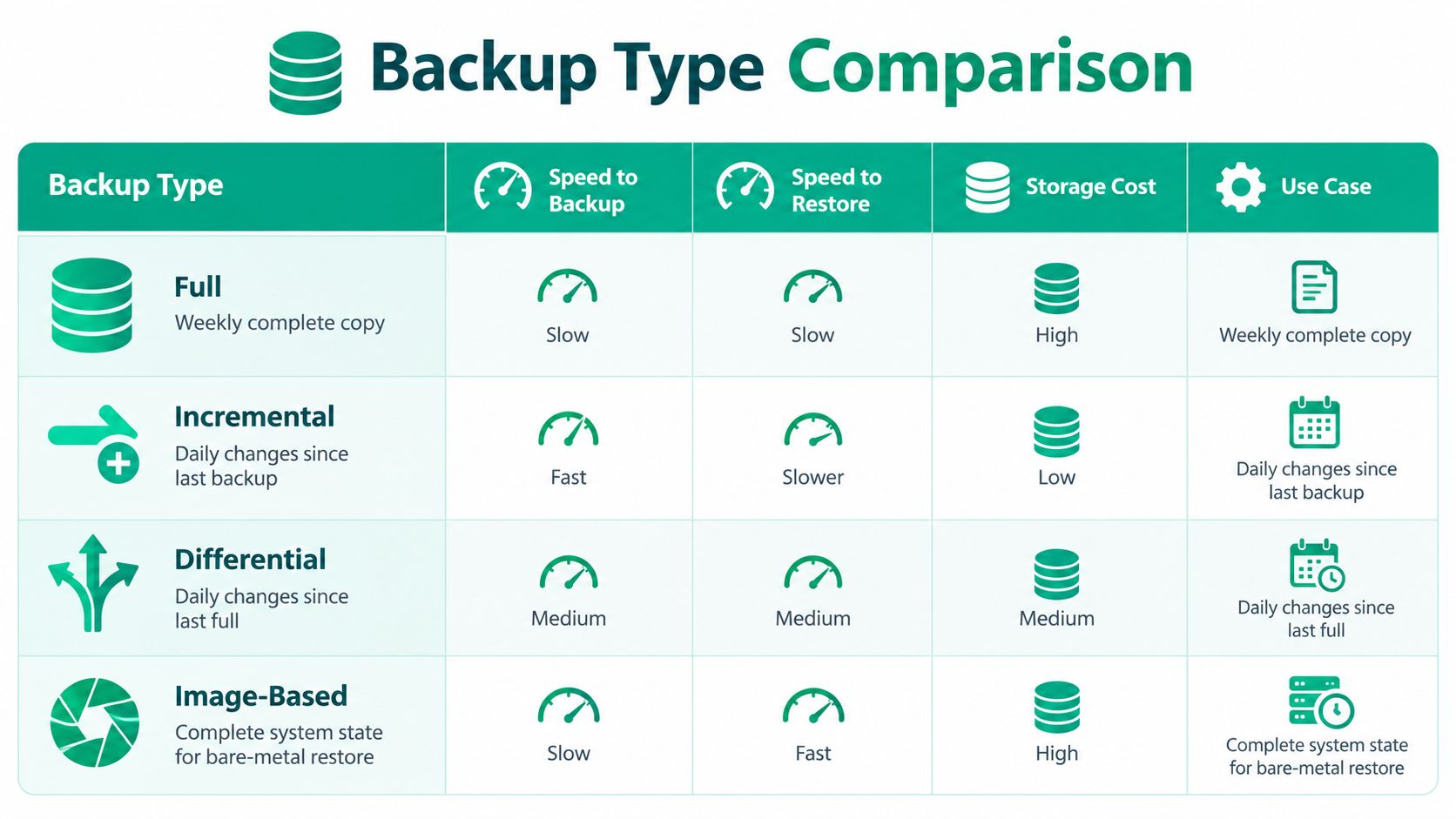
A sensible operating cadence uses a weekly full backup, daily incremental backups, and frequent change-only replication for Tier 1 databases. Keep quarterly archive snapshots where compliance or legal holds require them. The exact schedule must follow the RTO and RPO worksheet, not a generic vendor preset.
Put every storage target in its proper role
- Local NAS or RAID: Use it for fast file and VM restores with short retention. RAID improves availability, but it isn't a backup by itself.
- Off-site private cloud: Use it for longer retention and recovery when the office is inaccessible.
- Immutable cloud object storage: Use object lock or WORM-style retention to prevent deletion or alteration during the protected period. Retention can range from 30 to 365 days when the business requirement supports it.
The baseline 3-2-1 rule requires three copies, two media types, and one off-site copy, as described in NIST ransomware and data-loss guidance. Modern SMB programs should extend that to 3-2-1-1-0: three copies, two media types, one off-site copy, one immutable or air-gapped copy, and zero restore errors verified through testing. Control Monkey's explanation of 3-2-1-1-0 also describes object lock and WORM-style retention as common ways to implement immutability.
For a 5 TB environment, planning ranges often fall around $80 to $250 per month for BaaS, $400 to $1,500 for an appliance plus cloud, and more for fully managed DRaaS, based on AIMultiple's disaster recovery solution benchmarking. Those figures are planning ranges, not quotes. Compare them against the documented cost of downtime and the RTO that leadership approved.
For a detailed product shortlist, review this guide to cloud backup solutions for small business.
Building a Recovery Plan You Will Actually Use
A recovery plan should fit on one page before supporting details expand it. If the document reads like a vendor manual, employees won't use it at 2 a.m. during a ransomware event.
Start with a system inventory, then write the restoration order in plain language:
- Restore identity and authentication.
- Restore core network access and required VPN services.
- Restore file services and shared data.
- Restore line-of-business applications and databases.
- Restore email, collaboration, and peripheral services.
- Confirm business workflows with department owners.
The sequence matters. Restoring an application before its database, identity provider, or licensing server creates a machine that boots but can't serve users.
Assign ownership before the outage
Every workload needs a recovery lead, a backup source, and a person who confirms the application works. Don't assign “IT” as the owner. Assign a named role, such as Infrastructure Lead, Finance Application Owner, or Operations Manager.
| Workload | Tier | RTO/RPO | Recovery Order | Owner | Backup Source |
|---|---|---|---|---|---|
| Identity provider | Tier 1 | 1 to 4 hours, 15 to 60 minutes | 1 | Infrastructure Lead | Immutable image backup |
| File server | Tier 2 | 4 to 8 hours, 2 to 4 hours | 3 | Operations Manager | Local NAS and off-site copy |
| ERP database | Tier 1 | 1 to 4 hours, 15 to 60 minutes | 4 | Finance Application Owner | Frequent database replication |
| Email and collaboration | Tier 1 | 1 to 4 hours, 15 to 60 minutes | 5 | Communications Lead | SaaS backup repository |
Print the call tree. Put phone numbers in a binder stored away from the server room, and keep a copy in the backup provider's documentation portal. Store another version in Microsoft Teams, but don't bury the only copy in an overlooked SharePoint folder.
Record alternate work locations, vendor escalation paths, cyber-insurance contacts, legal contacts, and employee communication templates. Include dependencies such as DNS, VPN, licensing servers, certificate stores, and network segmentation rules.
A disaster recovery plan template for Indiana businesses can provide structure, but leadership still has to approve the RTO, RPO, owners, and communication rules. A template doesn't know which customer commitments your Johnson County operation can't miss.
Testing and Validating Recovery the Right Way
A green backup dashboard is not evidence of recovery. It only tells you that a job completed according to the software's own criteria.
Industry reporting summarized by Unitrends' 2025 state of backup and recovery report says only about 35% of organizations can recover within the time they believe they can, while more than 60% believe they can recover from downtime within hours. The same reporting says 25% test disaster recovery once per year or less, and 51% spend 10 or more hours per week managing backups. That combination creates configuration drift, tired administrators, and untested restore points.
Run a real quarterly drill
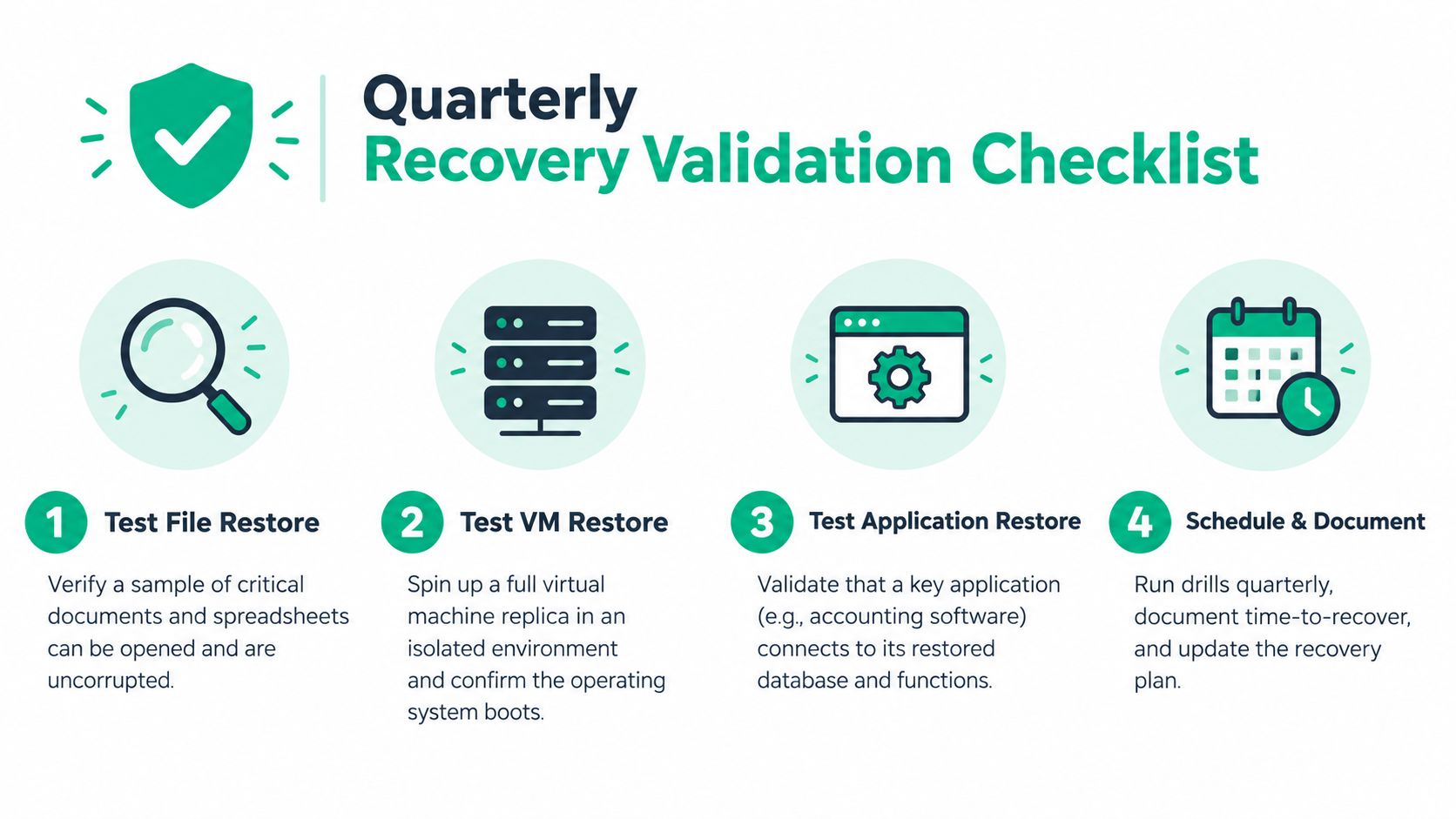
Every quarter, restore representative documents, a complete virtual machine, and at least one application database into an isolated network segment. Confirm that the VM boots, the database opens, permissions work, and a business user can complete a meaningful task.
Use checksum validation, boot checks, application health checks, and file-integrity verification. Log the start time, usable-service time, errors, dependencies, and person who approved the result. Don't rely on log inspection alone.
Independent benchmark reporting describes a lifecycle that installs the agent, creates a clean live-server image, triggers a disaster, restores to separate infrastructure, and verifies the recovered state. In one run set, elapsed recovery times were 73 seconds on Windows and 108 seconds on Linux, followed by later run sets at roughly 94 seconds and 121 seconds, as documented by AIMultiple's disaster recovery benchmarks. Those values don't become your promise. Your own measured, end-to-end test does.
Run a ransomware tabletop twice a year. Start with a clean immutable copy, isolate affected systems, verify credentials, restore into a controlled segment, and finish with production traffic flowing. If recovery time drifts more than 15% from the documented target, redesign the process rather than explaining away the result.
A failed drill is valuable. Record the failure accurately, assign an owner, and retest within 30 days. CISA-aligned recovery guidance treats testing and plan updates as necessary steps for proving that documented RTO goals are achievable.
Security, Compliance, and Vendor Selection
A backup administrator with unrestricted production access can become a single point of compromise. So can a cloud repository that accepts deletion requests from the same credentials used to manage servers.
Require immutable or air-gapped copies, MFA on every backup console, separate administrator roles, encryption in transit and at rest, and exported audit logs. Object lock protects retention rules, but it doesn't replace identity security. Keep backup administration separate from production administration wherever the platform supports it.
Match controls to real threats
- Ransomware encryption: Use immutable storage and isolated recovery infrastructure.
- Credential theft: Enforce MFA, privileged access controls, and separate backup identities.
- Insider deletion: Restrict deletion rights and require retention locks or approval workflows.
- Supply-chain compromise: Review vendor access, support accounts, audit logs, and incident-notification terms.
Healthcare organizations should map the design to HIPAA obligations. Payment environments need PCI controls. Defense contractors should align documentation and access controls with CMMC. General businesses can use the NIST CSF to organize identify, protect, detect, respond, and recover activities. Teams building a broader control program may also find this compliance automation software guide useful for organizing evidence and recurring reviews.
| Criterion | Must-Have | Nice-to-Have | Red Flag |
|---|---|---|---|
| Recovery commitment | Written RTO terms and measured restore process | Service credits tied to recovery | Verbal recovery promises only |
| Security | MFA, encryption, immutable retention | Separate administrative tenants | Shared administrator credentials |
| Data control | Clear residency and export terms | Multiple regional storage options | Vendor won't identify storage location |
| Auditability | Exportable logs and retention records | SIEM integration | No usable audit trail |
| Exit terms | Forensic image and data return process | Assisted migration | No termination or export clause |
Ask where encryption keys live, who can access them, how keys are rotated, and how a forensic image of your data is returned when the contract ends. Review SOC 2 Type II reporting where available, but don't treat a compliance report as proof that your specific restore works.
For vendor selection and service accountability, use this managed service provider selection guide. Compare Veeam, Datto, Axcient, Cove, and Microsoft-native options by tested recovery behavior, not logo familiarity. For Indiana companies, Finchum Fixes IT provides managed backup, data recovery, and infrastructure support as one possible local operating model, including work around secure restores and immutable off-site backups.
Incident Runbooks and Next Steps for Indiana SMBs
When a Greenwood manufacturer calls after ransomware hits, the first ten minutes matter more than a polished policy binder. Staff need short commands, clear ownership, and a verification step before anyone announces that the incident is over.
Four runbooks worth printing
Ransomware containment
Trigger this runbook when file extensions change unexpectedly, ransom notes appear, endpoint alerts show encryption behavior, or users lose access to shared files. In the first ten minutes, isolate affected endpoints, disconnect compromised servers from the network, disable suspected accounts, preserve logs, and call the incident lead. Don't wipe systems before collecting evidence or confirming the recovery source.
Restore from a clean immutable copy into an isolated segment. Verify endpoint protection, identity controls, file integrity, and a representative business workflow before reconnecting production traffic.
SaaS account takeover
Trigger on impossible travel alerts, unauthorized mailbox rules, unexpected MFA prompts, or suspicious administrative activity. Revoke active sessions, reset credentials, reset MFA, remove unknown applications, review audit logs, and notify the service owner. Restore affected SaaS data from an independent backup if an attacker deleted or altered records.
The verification step is a clean sign-in from an approved device, confirmed administrator review, and validation that the recovered records match the known-good state.
Server or workstation failure
Trigger on disk errors, failed boot, RAID alerts, repeated blue screens, or hardware diagnostics. Stop repeated reboot attempts when they could worsen disk damage, record the symptoms, identify the latest clean image, and fail over to replacement hardware or a cloud recovery target.
If a physical disk is failing, use a controlled image or professional bit-level data recovery process rather than casual file copying. Confirm operating-system boot, application access, user permissions, and data recency before returning the system to staff.
Accidental deletion
Trigger when a user or department removes files, folders, records, or a shared mailbox item. Stop additional edits, identify the deletion time, locate the matching point-in-time snapshot, and restore to a separate location first. Compare permissions, filenames, and contents with the business owner before merging anything back.
| Incident Type | Trigger Signal | First 10 Minutes | Owner | Verification |
|---|---|---|---|---|
| Ransomware | Encryption alerts or ransom note | Isolate, disable accounts, preserve evidence | Incident Lead | Clean restore and business workflow |
| SaaS takeover | Unknown sessions or MFA prompts | Revoke sessions, reset MFA, review logs | SaaS Owner | Approved sign-in and record review |
| Hardware failure | Boot, disk, or RAID errors | Stop risky retries, identify image, prepare failover | Infrastructure Lead | System boot and application test |
| File deletion | User reports missing data | Stop edits, locate timestamp, stage restore | Data Owner | Owner confirms contents and permissions |
A 30-60-90 day maturity plan
During the first 30 days, audit RTO and RPO against real workflows. Identify every system that lacks a tested restore and every backup console without MFA.
During the next 60 days, deploy a second immutable copy off-site. Confirm that the copy uses separate credentials and that retention cannot be changed by an ordinary production administrator.
By 90 days, run a full tabletop exercise with a regional peer IT contact. Indiana organizations can also explore support from Purdue MEP, Indiana SBDC cybersecurity advisors, and state MS-ISAC alignment for healthcare and manufacturing SMBs in Indianapolis, Fort Wayne, Evansville, and South Bend.
The best recovery plan isn't the longest one. It's the one a tired employee can follow, a technical lead can test, and a business owner can approve.
Greenwood and Indianapolis businesses can schedule a Free Network Assessment or Security Risk Audit with Finchum Fixes IT to review backup copies, RTO and RPO targets, immutable off-site protection, and restore testing. Get a written recovery action plan that reduces downtime risk, protects billable hours, and gives your team a clear next step.