Disaster Recovery Solutions for Indiana SMBs
Disaster recovery solutions combine immutable backups, automated failover infrastructure, and tested runbooks that restore critical operations within a predefined Recovery Time Objective (RTO), limiting payroll disruption and catastrophic revenue loss. The right design also protects identity, networking, applications, and clean data, not just files sitting in a backup repository.
A Tuesday morning outage in a Greenwood business park rarely begins with dramatic smoke or a cinematic server-room failure. It starts with a database that won't mount, a failed disk in aging hardware, or a firewall that never comes back after a firmware update. Employees wait, customers call, payroll deadlines approach, and the owner discovers that “we have backups” doesn't answer the more important question: can the business operate before cash flow stops?
For Johnson County business owners, disaster recovery is a business continuity discipline. It connects cybersecurity, networking, cloud computing, data recovery, software development dependencies, and IT support into one tested operating plan. In our 17 years of local service, the most reliable programs have been built around recovery priorities, measurable targets, clean copies of data, and regular proof that the plan works.
The Real Cost of Downtime for Local Businesses
A Greenwood manufacturer can lose access to its order system while the physical shop floor remains perfectly intact. The machines are ready, employees are present, and customers still expect shipment updates. Yet a failed server, damaged RAID array, or unavailable identity service can turn a functioning business into an expensive waiting room.
The technical fix isn't just replacing the failed component. A useful disaster recovery solution combines immutable backups, automated failover, and tested runbooks. Those runbooks must explain how to restore applications, user access, DNS, networking, security controls, and third-party services in the correct order. If the business can't invoice, dispatch, communicate, or run payroll, restoring one database won't restore operations.
Downtime can cost up to $9,000 per minute, a figure frequently used in business continuity planning and included here as a risk ceiling rather than a universal invoice. The actual loss depends on revenue, staffing, contractual obligations, customer impact, and the length of the interruption. A short outage may create overtime and missed appointments, while a longer one can damage trust and threaten payroll.
The Southside failure pattern
The familiar local bottleneck is aging server hardware in an older Greenwood facility. Another is spotty Wi-Fi in a brick building where access points were installed without a proper wireless survey. Both problems become recovery problems when staff can't reach cloud applications, scanners, phones, or the systems needed to serve customers.
A managed approach replaces guesswork with monitoring, documented configurations, redundant network paths, and recovery testing. UniFi networking can provide a consistent foundation for switching, wireless access, and segmentation when the design fits the site. Latency-optimized mesh nodes can help in difficult buildings, but they aren't a substitute for wired backhaul where dependable performance matters.
Practical rule: A backup that restores files but leaves employees without identity, routing, or application access isn't a complete recovery.
The financial goal is straightforward. Instead of paying internal staff to hunt through logs, rebuild settings, and improvise during an outage, the business funds planned monitoring, maintenance, backup retention, and test restores through a predictable monthly budget. That turns wasted tech time into productive, billable hours and gives leaders a clearer view of what continuity costs.
Healthcare operators can also benefit from a broader perspective in this healthcare operational resilience playbook, which treats continuity as an operational concern rather than a narrow backup task. For local companies that want to see how monitoring fits into prevention, proactive system monitoring that prevents costly downtime offers a practical companion to recovery planning.
Why Most Small Business Recovery Plans Fail
Many owners believe their business can recover because a backup job reports success. That confidence is understandable, but it doesn't prove that the business can restore applications, authenticate users, route traffic, or pay employees during a prolonged interruption.
Recent U.S. Chamber of Commerce Foundation research found that 94% of small-business leaders believed they could recover from a disaster, while only 31% had a disaster plan. The same research found that 80% had no disaster budget, and 36% could not pay employees for more than one month after a disaster. It also found that owners estimated preparedness would cost about 30% of annual revenue, while the estimated actual cost was closer to 5%. These figures appear in the foundation's research on small-business resilience, optimism, risk, and recovery ability.
That gap creates the payroll cliff. A company may survive a technical outage on paper but fail financially when payroll, rent, insurance, loan payments, and supplier obligations continue while revenue pauses. A recovery plan should therefore record emergency cash requirements, alternate work locations, vendor contacts, customer communications, and the systems needed to keep money moving.
Why backup-only thinking breaks
Network-related problems are the largest single cause of IT service outages in Uptime Institute's 2024 global survey. The same survey reports that 53% of data-center operators experienced an outage during the prior three years, while 54% said their most recent significant outage cost more than $100,000. It also reports a continuing increase in outages exceeding $1 million. These findings are detailed in the 2024 Global Data Center Survey.
For an Indiana SMB, the lesson is practical. A recovery environment must include firewall rules, routing, wireless connectivity, identity services, SaaS access, and critical integrations. A server can boot successfully while the business remains offline because nobody restored the dependencies around it.
What a workable plan contains
A useful plan names the people who authorize recovery, the systems that return first, and the evidence that shows each system is safe. It also measures elapsed recovery time and data currency instead of checking only whether backup software completed its job.
- Business priorities: Identify the applications that protect payroll, revenue, customer service, and regulated records.
- Recovery ownership: Assign staff or providers to identity, networking, applications, communications, and vendor escalation.
- Recovery environment: Maintain a bootable path for priority workloads, with documented dependencies and configuration backups.
- Test evidence: Record whether restored systems work, whether users can sign in, and whether the recovered data is current enough.
Setting RTO and RPO Targets That Actually Work
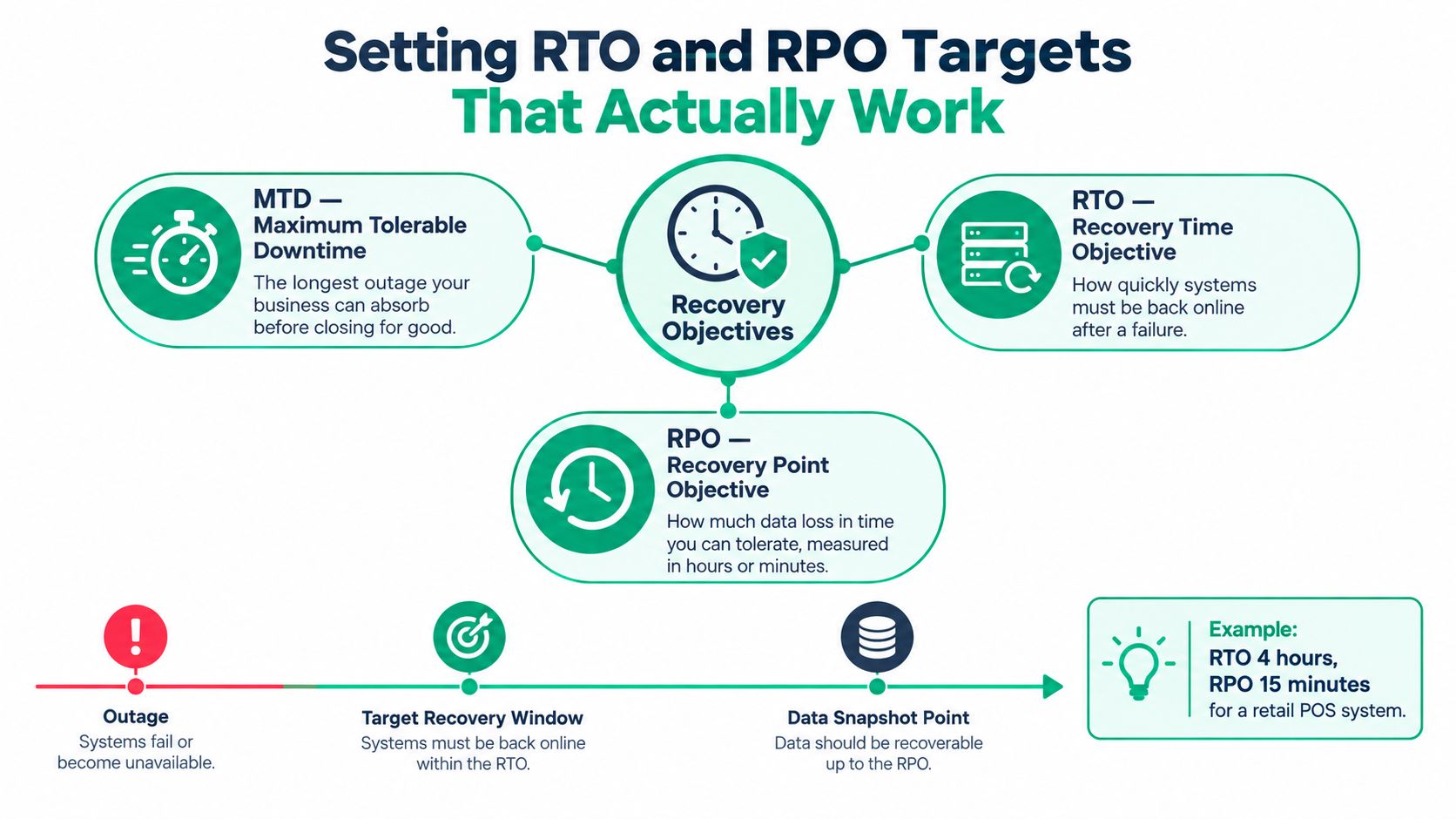
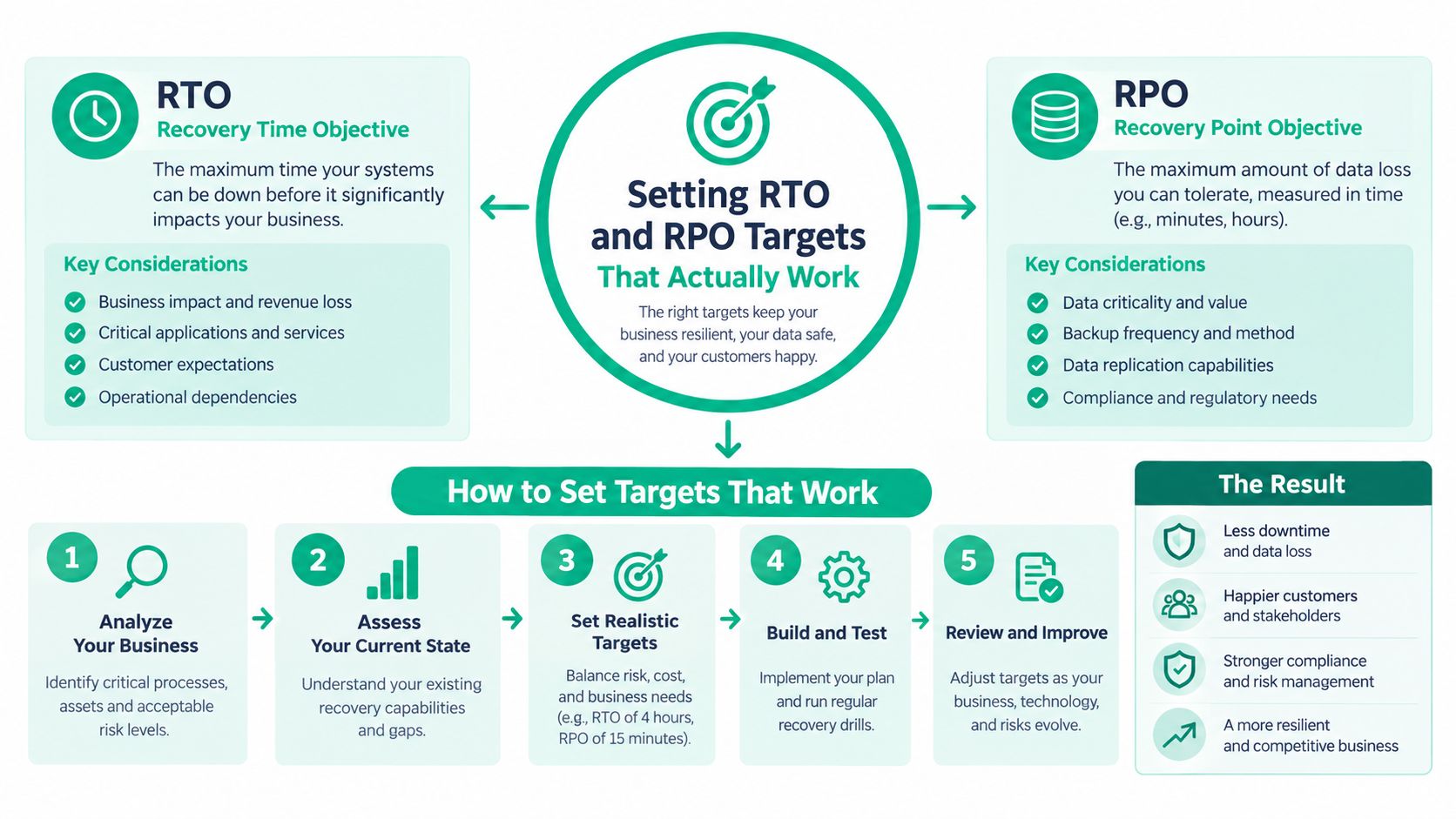
A recovery plan becomes useful when it replaces vague urgency with three measurable limits. Maximum Tolerable Downtime (MTD) is the longest interruption the business process can absorb before the impact becomes unacceptable. Recovery Time Objective (RTO) defines how quickly the system must return, while Recovery Point Objective (RPO) defines the latest recoverable point and therefore the amount of tolerable data loss.
NIST defines RTO as the maximum period a system can remain unavailable before business impact becomes unacceptable. RPO identifies the latest recoverable point before disruption. The definitions and planning guidance appear in NIST Special Publication 800-34 Revision 1.
The targets must be set by workload. One enterprise-wide number either overspends on low-value systems or leaves critical systems under-protected.
Build recovery tiers
Start with a business-impact analysis, then rank applications according to what happens when each one stops.
- Tier the revenue path. An order-processing database might require a sub-four-hour RTO and a 15-minute RPO. That target calls for frequent replication or continuous data protection, plus prebuilt infrastructure and automated orchestration.
- Separate support systems. An archive may accept a 48-hour RTO and a 24-hour RPO. A lower-cost backup-and-restore design may be appropriate if delayed access won't stop payroll or customer commitments.
- Document dependencies. Record identity, DNS, networking, SaaS access, integrations, encryption keys, and administrator permissions beside each workload.
- Test the full chain. Restore the application, sign in as a normal user, validate records, test connected systems, and compare elapsed time with the RTO.
Shorter RTOs generally require ready infrastructure, automation, and tested failover rather than manual restoration. NIST also recommends documenting alternate strategies when planned RTOs cannot be met. That matters for smaller businesses, because an honest fallback plan is safer than an ambitious target nobody can achieve.
A system inventory should hold each workload's MTD, RTO, RPO, owner, backup location, recovery order, and last test result. The explanation of RPO and RTO in disaster recovery can help business leaders turn those terms into questions for their IT provider.
Recovery target test: If nobody can state which system returns first, who approves restoration, and how much data may be lost, the target isn't operational yet.
Comparing On-Premises Cloud and DRaaS Architectures
No single architecture fits every company along the I-65 corridor. A law firm with modest data volumes, a manufacturer dependent on local systems, and a healthcare-adjacent organization handling sensitive records may need different combinations of local recovery, cloud protection, and managed failover.
An on-premises design can restore files and virtual machines quickly when the building remains usable. A local NAS, spare hardware, protected power, and documented configurations reduce dependence on internet availability. UniFi networking can support segmented traffic and consistent management, but local equipment doesn't protect against theft, fire, physical damage, or a compromised administrator account. It needs a separate immutable off-site copy.
Pure cloud backup offers geographic separation and a flexible storage model. Its weakness appears during a large restore, when the business depends on available bandwidth, provider access, download performance, and a clean destination. A cloud copy may be dependable while still taking too long to meet a critical workload's RTO.
Disaster Recovery as a Service, or DRaaS, goes further by maintaining or creating virtual recovery infrastructure in the cloud. It can provide automated orchestration and failover for priority systems, but the monthly cost and operating complexity rise. Someone still has to test application dependencies, validate users, control access, and decide when failover is safe.
| Architecture Type | Recovery Speed | Cost Profile | Best For |
|---|---|---|---|
| On-premises recovery | Fast local recovery when the site and network remain available | Hardware purchase, maintenance, monitoring, and off-site protection | Businesses with local applications and dependable facilities |
| Cloud backup | Depends on bandwidth, restore size, provider access, and destination readiness | Storage and management costs with restore-related planning | Archives, general data protection, and workloads with flexible recovery windows |
| DRaaS | Fast failover when replication, orchestration, and dependencies are tested | Ongoing service cost for replicated workloads and recovery capacity | Critical applications that need a prepared cloud recovery environment |
Choose by consequence, not fashion
A growing Hamilton County company shouldn't buy DRaaS because it sounds modern. It should use it when the cost of interruption justifies replicated infrastructure and when the team can operate the process. A smaller professional firm may get better value from immutable off-site backups, replacement hardware planning, and tested runbooks.
Cloud migration can also expose application and configuration problems that backup alone won't solve. For a useful distinction between moving workloads and improving the way they operate, review what true modernization means. The practical question is whether the architecture supports the business process, compliance obligations, recovery tier, and available skills.
Before selecting products, document SaaS dependencies, local servers, endpoint protection, identity, network equipment, and data retention. This guide to cloud backup solutions for small business is most useful when compared against those requirements rather than treated as a universal shopping list.
Proving Recoverability After a Ransomware Attack
A backup can exist and still fail the business. Attackers may reach connected repositories, delete recovery points, compromise administrative credentials, or encrypt data before anyone notices. Recovery assurance depends on whether the organization can find a clean copy, restore it in isolation, validate it, and return users to work without spreading the incident.
A 2025 ransomware survey reported that 89% of organizations had their backup repositories targeted, an average 34% of repositories were modified or deleted, only 32% used immutable repositories, and just 28% restored data in a sandbox and checked its integrity before production recovery. Separate 2025 research found that only 54% of ransomware-affected organizations restored data from backups. These figures are presented in the referenced Veeam ransomware trends report.
Keep recovery credentials outside the blast radius
Production Active Directory credentials shouldn't control every backup repository. Use separate administrative identities, tightly restricted permissions, multifactor authentication where supported, and an offline or logically isolated copy. CISA recommends offline, encrypted backups and regular testing of availability and integrity during a disaster recovery scenario. Its ransomware protection and recovery guidance also discusses immutable storage, while noting that configuration and regulatory requirements still need careful review.
A sensible sandbox workflow looks like this:
- Contain first. Isolate affected endpoints, preserve forensic evidence, and avoid overwriting logs or suspicious systems.
- Select a known-clean point. Check backup history, anomaly alerts, malware findings, and the time of suspected compromise.
- Restore outside production. Build the recovery environment with trusted images, separate credentials, and restricted network access.
- Scan restored systems. Use endpoint protection such as Bitdefender GravityZone to inspect restored files and systems before broader access.
- Validate operations. Test user sign-in, applications, records, integrations, printing, file access, and expected data currency.
- Reintroduce carefully. Restore systems in dependency order, document decisions, and involve legal counsel, insurers, law enforcement, and customer-notification teams when required.
Test the result, not the checkbox
Ransomware recovery also requires understanding what data should not be restored. A clean database paired with a compromised identity server can reintroduce the attacker. A restored file share without safe user access can delay operations. Bit-level data recovery may help when storage media is damaged, but it doesn't replace incident containment or clean-room validation after a cyberattack.
The most useful test result is concrete: restored files open, applications respond, users authenticate, and the business can perform its essential work. That measured demonstration matters more than a dashboard showing that backup jobs ran. For a practical incident sequence, use this SMB guide to recovering from a ransomware attack.
Aligning Recovery With NIST and Industry Compliance
Recovery planning should satisfy business obligations before it satisfies a software dashboard. A downtown Indy healthcare practice needs to protect patient information and maintain documented safeguards. A defense contractor along the I-65 corridor may need recovery controls that support CMMC expectations. A general manufacturer still needs ownership, evidence, and repeatable procedures even when no industry-specific rule dictates a particular product.
NIST CSF 2.0 gives smaller organizations a practical structure because it applies across organization sizes, sectors, and maturity levels. Its core contains six functions: Govern, Identify, Protect, Detect, Respond, and Recover. NIST released CSF 2.0 on February 26, 2024, and describes the framework in its official CSF 2.0 publication.
Turn Recover into an operating process
The Recover function isn't a synonym for “restore from backup.” It asks the organization to know what must return first, who authorizes restoration, how communications work, and how the business verifies that restored systems are safe.
A managed provider can map practical work to that structure:
- Govern: Assign recovery owners, approval authority, vendor contacts, and review responsibilities.
- Identify: Inventory servers, endpoints, SaaS accounts, applications, sensitive records, and dependencies.
- Protect: Apply segmentation, endpoint security, access controls, retention, encryption, and immutable off-site backups.
- Detect: Monitor backup failures, suspicious authentication, storage changes, and endpoint behavior.
- Respond: Contain incidents, preserve evidence, activate communications, and coordinate with insurers or counsel.
- Recover: Restore clean systems in priority order, validate business functions, and record the actual result.
HIPAA safeguards should be documented separately for healthcare clients, while CMMC requirements need their own control mapping for defense contractors. NIST CSF 2.0 is outcome-based, so it can guide environments using UniFi networking, Bitdefender GravityZone, cloud services, and different backup platforms without prescribing one vendor.
The compliance benefit is evidence. A dated test record, recovery inventory, approved runbook, and exception log show that continuity is managed rather than assumed. That documentation also helps customer conversations, insurance reviews, and internal budgeting.
Your Next Steps for Business Continuity
Start with a short inventory, not a product demo. List payroll, accounting, order processing, customer records, phones, identity, DNS, networking, SaaS applications, and the people who depend on each system. Mark which items must return first, how much data loss is tolerable, and whether your current provider has verified restoration.
Then ask for evidence. A successful recovery review should show the last restore test, elapsed time, recovered data currency, dependency checks, credential separation, and the result of an isolated ransomware scenario. If the answer is only “the backups are running,” your plan is incomplete.
Johnson County business owners can use the Indiana business continuity planning checklist to organize the first review. From there, compare the cost of immutable off-site backups, replacement hardware, network redundancy, managed monitoring, and DRaaS against the payroll and cash-flow risk of a prolonged outage.
Finchum Fixes IT can also fit into that review as a local option for data backup and transfer, advanced data recovery, incident response, networking, cybersecurity, and ongoing IT support. Its work can include failed hard drives, corrupted systems, RAID arrays, cloud storage, email, and databases, with recovery planning tied to the systems the business uses.
Businesses in the Greenwood and Indianapolis area can schedule a Free Network Assessment or Security Risk Audit with Finchum Fixes IT. The review can identify aging hardware, exposed backup credentials, network dependencies, and recovery gaps, then turn the findings into a practical plan for keeping payroll and customer operations moving.