Local IT Support for Small Business: How to Choose Well

Local IT support for small business means having a nearby partner who monitors your network, secures your data, and answers when something breaks. If your Greenwood office keeps losing its server or back-room Wi-Fi, the fix is documented ownership, preventive maintenance, and tested recovery, not another hopeful reboot.
Choosing Between Break-Fix, In-House and Managed Support
Say a 14-person office in a Greenwood business park runs a six-year-old server that reboots every Tuesday. Meanwhile, a downtown Indianapolis office loses Wi-Fi whenever someone takes a laptop into the back room. These are hypothetical offices, but the troubleshooting is concrete: examine server event logs and hardware health, then measure wireless coverage instead of blaming the internet provider.
Neither problem gets resolved by assigning the office manager another restart procedure. Someone needs to own the hardware lifecycle, inspect alerts, and verify that the repair holds.
Local support should combine that technical responsibility with a working relationship. This is what hands-on help looks like when equipment, employees, and business continuity belong in the same conversation.
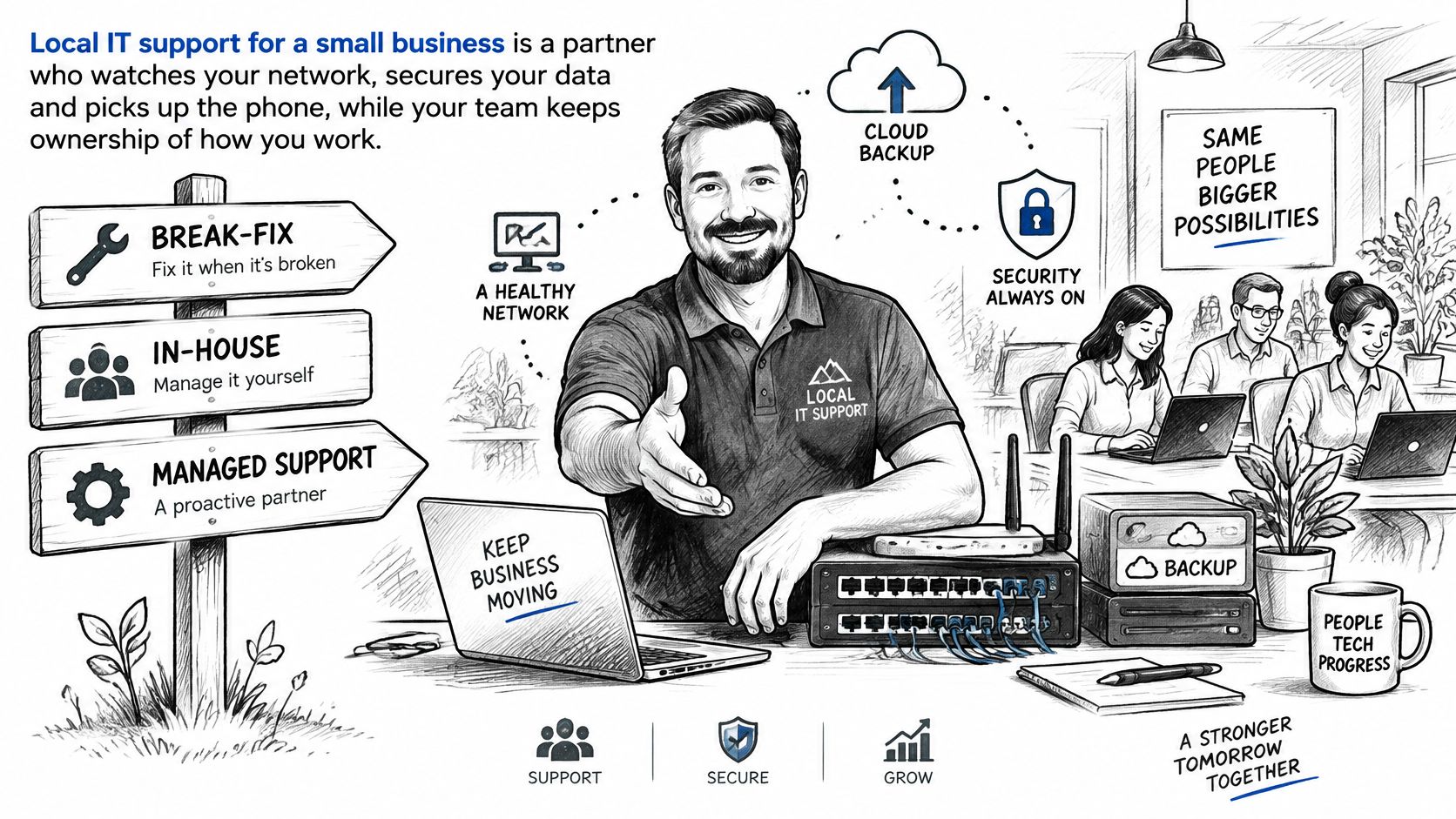
Support models compared
| Model | Cost pattern | Typical response | Best fit | Main downside |
|---|---|---|---|---|
| In-house IT generalist | Fixed salary and benefits | Immediate when available on site; after-hours coverage needs arranging | Offices with enough steady work to justify an employee | A resignation or sick week can leave a coverage gap |
| Break-fix repair | Hourly labor and replacement parts | Queue-based unless emergency service is purchased | Very small offices with stable equipment and tolerable downtime | You pay during outages without necessarily funding prevention |
| Managed local partner | Monthly fee per user or device | Contracted priority targets | Teams needing ongoing monitoring and specialist coverage | Fair value requires clear service levels and exit terms |
The hidden distinction is ownership, not friendliness. A pleasant technician who repairs laptops doesn't automatically own backup failures, account security, or firewall updates.
An internal generalist knows your purchasing quirks and business applications. A managed partner can supplement that knowledge with security monitoring and recovery expertise. Outsourcing everything isn't automatically better, especially when your employee understands the production system nobody else can pronounce.
The managed help desk guide for growing businesses helps distinguish user support from broader infrastructure responsibility.
Decision rule: Buy coverage for the work nobody currently owns, rather than paying twice for work your team already handles well.
For Johnson County business owners along the I-65 corridor, the decision often becomes urgent after a rough quarter. Make it before frustration chooses the contract for you.
Ask three questions: How many users need help? What does an hour of stalled work cost? Does anyone already verify backups and review administrator accounts? Your answers should identify the right model, including whether a hybrid arrangement makes more sense than a complete handoff.
Pricing and Response Times Worth Paying For
Typical IT support pricing models
| Pricing model | Typical range | Usually included | Watch for |
|---|---|---|---|
| Per user per month | Contracted rate multiplied by covered users | Help desk, patching, specified security tools, backup management | Servers, cloud licenses, and backup storage excluded from the headline fee |
| Per device per month | Contracted rate multiplied by covered devices | Endpoint monitoring and patching | Counts that grow with printers, phones, and shared equipment |
| Hourly break-fix | Quoted hourly rate plus applicable surcharges | Repair labor within the agreed scope | Minimum billing blocks and after-hours charges |
| Flat-rate project | Fixed quote after a site survey | Defined network build, Wi-Fi redesign, or server migration | Missing cabling, testing, cleanup, or rollback work |
Treat advertised ranges cautiously. A fee without a device inventory and written scope isn't a meaningful comparison, whether the provider serves Greenwood or downtown Indy tech hubs.
Hourly billing puts the financial risk of a difficult diagnosis on you. It doesn't prove a technician will work slowly, but it gives you little price certainty when a supposedly simple repair uncovers damaged storage.
Per-user billing looks tidier until the server, mailbox backup, and cloud subscriptions arrive on separate invoices. Per-device billing needs an agreed definition of a device. Otherwise, adding conference-room equipment expands the bill.
Flat-rate projects have their own trap: an incomplete scope. A server migration quote should identify application testing, permissions, rollback conditions, and who stays available when employees return.
For useful comparison language, Vight's guide to managed IT fees and service scope provides another way to examine a proposal. Our IT support pricing and negotiation guide can help you turn those questions into contract terms.
Put one bad week on paper
Consider an illustrative budget, not a market quote: 20 users at $100 per user would cost $2,000 monthly, or $24,000 annually. If those employees each cost the business $35 per hour including employment overhead, a full-office outage consumes $700 in idle payroll every hour.
Suppose that office loses an hour each working day during a five-day week. That's 100 staff-hours and $3,500 in idle payroll, before delayed orders, overtime, or missed billing. Substitute your own payroll and outage assumptions before making a purchasing decision.
Avoid dramatic enterprise outage estimates when your own numbers can make the case. Restoring access gives employees the opportunity to return to billable work; it doesn't guarantee every recovered hour becomes revenue.
In 2025, 47% of surveyed small businesses invested in new technologies to improve cybersecurity during the previous year, according to Verizon's Small Business Survey. Buying technology still needs to produce a measurable operating benefit.
Negotiate the clocks separately
Use the following as proposed contract targets, not claims about a provider's standard performance:
- P1 critical: Whole-office or server outage. Request acknowledgement within 15 to 30 minutes and a four-hour restoration objective.
- P2 high: Department-wide disruption. Request acknowledgement within an hour and an eight-hour restoration objective.
- P3 standard: Individual laptop or printer issue. Request response within four business hours and resolution within two business days.
- P4 planning: New-hire setup or an upgrade request. Request next-business-day scheduling acknowledgement.
An active ransomware alert needs immediate security escalation, not a comfortable position in an ordinary department-outage queue. Also distinguish response, workaround, and full restoration. Answering a ticket doesn't restore accounting.
Our support is available 24/7. Put emergency coverage, named escalation contacts, service credits, dependencies, and actual achieved response reporting in writing.
For exposed security flaws, request assessment within 24 hours and immediate mitigation when patching isn't available. That urgency is sensible given the 32-day median remediation time for perimeter-device vulnerabilities reported in Verizon's 2025 DBIR executive summary.
Before signing, get the monthly fee, excluded items, and emergency-call charges on the same page.
The Services That Actually Prevent Downtime
Good support has connected responsibilities, not a shopping cart full of unrelated security subscriptions. This service map shows how preventive work and hands-on response fit together.
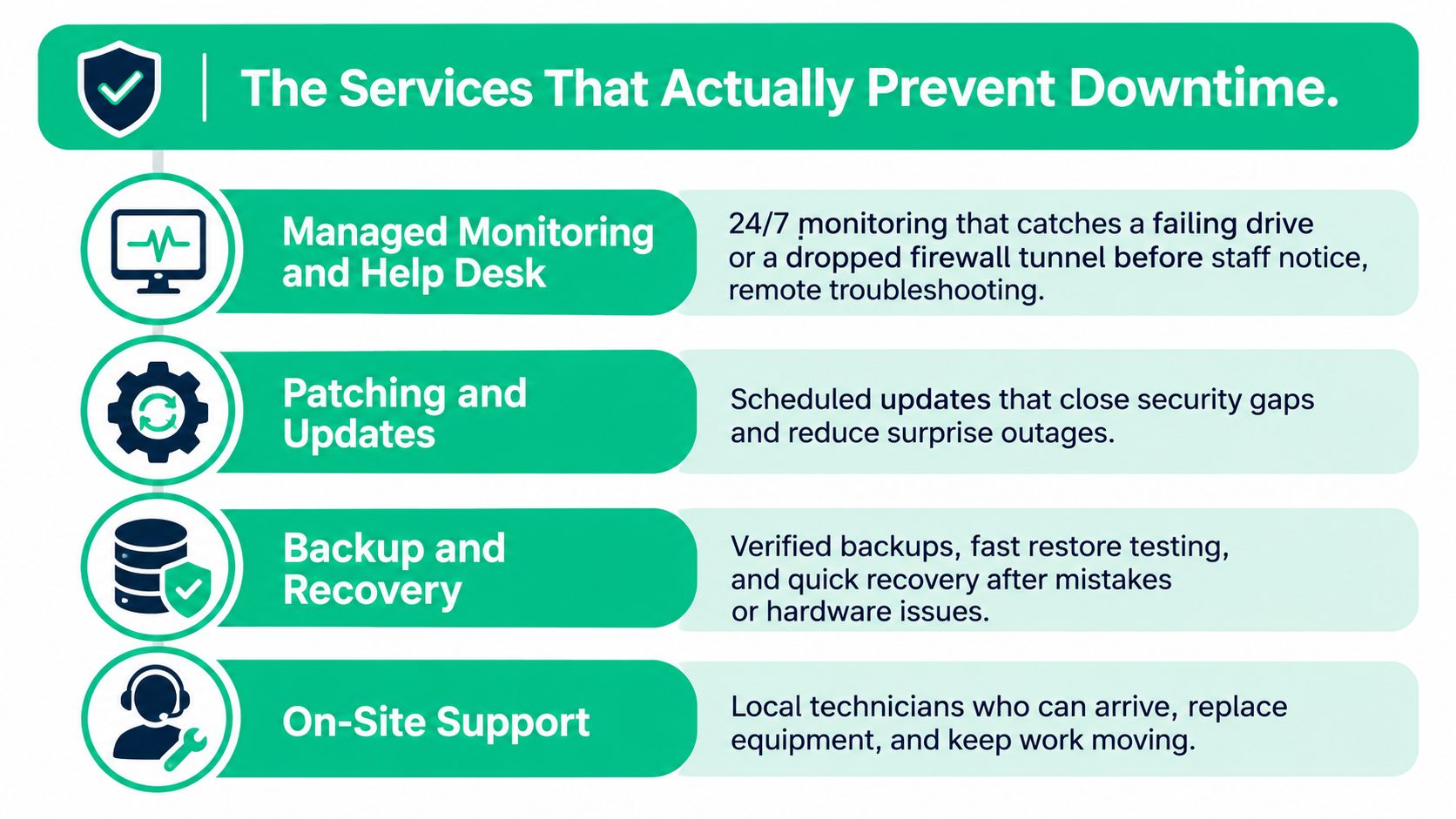
Monitoring and security that lead to action
Managed monitoring and help desk should connect alerts to a technician with instructions. A failing-drive warning or dropped firewall tunnel is useful only if someone investigates, communicates, and records the fix in a ticket history you can read.
Not every failure announces itself. Monitoring reduces avoidable surprises; it isn't a promise that nothing will ever break. Our proactive system monitoring guide explains what deserves attention before employees start losing work.
For cybersecurity, use the six functions of NIST CSF 2.0, Govern, Identify, Protect, Detect, Respond, and Recover, as a practical checklist, as defined by NIST. Assign responsibility, inventory assets, apply safeguards, investigate alerts, contain incidents, and restore operations.
That means multifactor authentication on email and administrative accounts, managed endpoint protection such as Bitdefender GravityZone, and employee training. In 2025, 48% of surveyed small businesses had added or upgraded employee cybersecurity training, according to Verizon's Small Business Survey.
Training should teach a receptionist how to verify a payment-change request, not how to pass a vocabulary exam.
Networking and recovery built around the work
UniFi networking can provide centrally managed access points and switches, but placement still requires a site survey. Separate guest and business traffic using VLANs, logical network boundaries that keep visitor devices away from business systems.
Thick brick walls deserve measurement, not another extender purchased during lunch. Latency-optimized mesh nodes can help where cabling isn't practical, but wired connections between access points are preferable when feasible. Zero Trust architecture means remote access is verified by identity, device condition, and permission rather than trusted because someone connected.
Recovery needs immutable off-site backups, protected copies that can't be changed during their retention period. Restrict administration separately, and prove recovery through restoration tests; CISA's backup guidance specifically recommends testing complete and partial restores.
Bit-level data recovery means imaging readable storage sectors and recovering data from that copy rather than repeatedly stressing a failing original drive. A damaged RAID array needs controlled handling, not an enthusiastic rebuild button.
We back up and protect customers' files during computer repair. We've been Indiana's technology partner for over 20 years, and data protection remains a working responsibility, not an optional flourish.
For another look at the support conversation, watch the video below.
For a Microsoft 365 or Google Workspace migration, test the cutover, protect every tenant administrator with MFA, and establish an immutable backup of mailboxes and shared files before switching.
The hypothetical Greenwood server gets a durable fix through inventory, supported replacement hosts, monitored workloads, and planned replacement before failure. Fewer interruptions preserve billable staff time, while defined recurring maintenance turns emergency spending into a budgetable operating cost.
Vendor Checklist Questions That Separate Pros From Pitches
“Enterprise-grade” and “best-in-class” tell you little without a scope, named tools, and evidence. A polished sales deck can't tell you whether anyone has successfully restored your accounting application.
In 2025, only 47% of SMBs with fewer than 50 employees reported having a cybersecurity plan, according to CrowdStrike's State of SMB Cybersecurity Report. Asking for a written plan is a reasonable test, not procurement theater.
Provider vetting checklist
Score these checkpoints pass or fail, then separately score written response and restoration commitments against your negotiated priority tiers.
| Checkpoint | What good looks like | Red flag |
|---|---|---|
| Backup testing | Monthly test restores with a written report | Jobs run nightly, but nobody has tested recovery |
| Security tooling | Named platform such as Bitdefender GravityZone, with MFA enforced | Unspecified security package and unclear alert ownership |
| Documentation | You own the network diagram, password vault, and runbooks | Records remain locked in the vendor's portal |
| Local presence | Written on-site coverage for your address along the I-65 corridor | Remote-only service without an equipment-replacement option |
| Exit terms | A proposed 30-day notice period and data returned in standard formats | Restrictive renewal terms or withheld credentials |
| Compliance experience | Can map work to applicable NIST CSF 2.0, HIPAA, or CMMC obligations | Familiar acronyms without a defined scope or evidence |
Drop providers that fail documentation or exit terms. Your password vault and network records shouldn't become a retention strategy for somebody else's business.
Ask for a sample monthly report before signing. It should make overdue patches, failed backup tests, unresolved incidents, and pending replacement decisions understandable to an owner.
A provider should be able to explain what happened, what remains exposed, and who owns the next action without making you decode a dashboard.
Match compliance experience to your actual obligations
General businesses can organize security around NIST CSF. Clinics handling electronic protected health information need a different compliance conversation: the HHS HIPAA Security Rule summary describes administrative, physical, and technical safeguards, including risk assessment and access controls.
For defense contractors, require experience with the CMMC requirements applicable to the contract and information involved. Don't accept a claim that installing antivirus makes an organization compliant.
We offer managed IT in Indianapolis. Confirm the on-site scope for your particular address, especially if your business operates across Johnson County and Hamilton County rather than from a single office.
If the proposal includes AI-enabled automation or custom software development, extend your due diligence to data access, approvals, and handover. TekRecruiter's RFP questions for assessing AI vendors provide useful prompts for evaluating those responsibilities.
Use our IT vendor management checklist for Indiana businesses to keep those answers in a record your next provider can understand.
A 30-Day Onboarding Playbook for Indiana Offices
A support handoff should make the office easier to operate, not turn Monday into a scavenger hunt for passwords. Use this proposed onboarding schedule to assign owners, preserve rollback options, and expose missing information early.
The overview below groups the work into weekly milestones. Recovery validation starts before network changes and continues through handover.
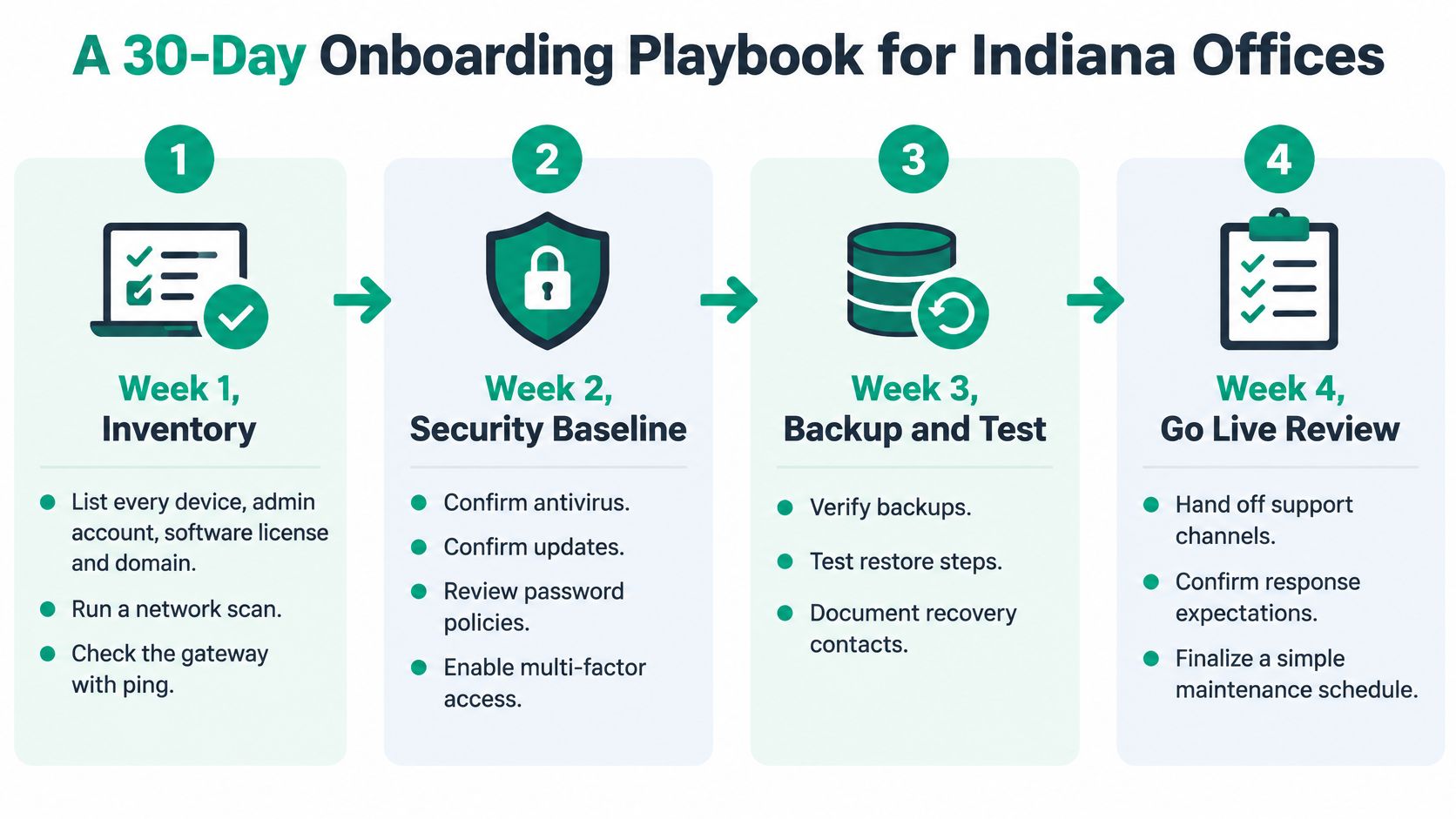
Establish ownership before changing systems
-
Week one, inventory everything. Record devices, administrator accounts, software licenses, domains, warranties, and application owners. Run an authorized network scan, then use Windows
ipconfig /allto identify the active adapter and gateway. Test gateway reachability withTest-Connectionin PowerShell, and compare wired and wireless results. This separates local connection problems from upstream failures; the usual mistake is scanning only the office subnet and missing remote laptops. -
Week one, take control of credentials. Move shared credentials into an organization-owned password vault, replace exposed passwords, and create named administrator accounts. Keep a controlled emergency-access procedure. Sticky notes aren't the only problem: a former contractor's phone can also be the sole recovery method for a critical account.
-
Week two, establish the security baseline. Enforce MFA for Microsoft 365 or Google Workspace, deploy centrally managed endpoint protection, and schedule router and firewall firmware updates. Record installed versions and export configurations before changes. The common slip is updating firmware without checking compatibility or arranging a rollback.
-
Week two, prove the backups. Verify an immutable off-site copy, restore a representative file, and recover a business application into an isolated test environment. Check that the application opens with its database and permissions intact. A green backup notification is not evidence that payroll will run.
Validate the workplace, then hand it over
-
Week three, measure the network. Survey Wi-Fi during normal business activity, position access points, and separate guest traffic from business resources. Test the back room, meeting room, and loading area, not just the desk beside the router. The usual mistake is increasing transmitter power when interference or poor placement is the underlying issue.
-
Week three, train employees. Schedule a practical phishing and password session, using a proposed 45-minute slot. Demonstrate payment-request verification, password-vault use, and the correct incident-reporting channel. Don't embarrass employees with trick questions; teach the behavior you want them to repeat.
-
Week four, execute the controlled cutover. Schedule production changes after hours, publish support contacts, and retain the old environment for a proposed two-week rollback period where safe and compatible. Don't run conflicting security agents side by side, and don't leave obsolete systems exposed merely to preserve a fallback. Obtain written acceptance after employees complete representative tasks.
Handover test: An authorized replacement technician should be able to find the application owner, recovery procedure, and support contact without calling the departing provider.
For custom applications, production deployment also needs release notes, source-code ownership, dependency records, and a tested rollback. Otherwise, the first software update can become a fresh outage.
Our deployment process includes production deployment, user training, documentation, and ongoing support. Assign a named owner to every onboarding step so work doesn't disappear between the developer, technician, and office manager.
Book Your Free Network Assessment Before the Next Outage
Choose support around your user count, the cost of interrupted work, and the responsibilities your staff can realistically own. Demand measurable contract terms and evidence of recovery rather than assuming a monthly invoice means everything is covered.
For Johnson County business owners, the immediate concern may be an aging server. For a company managing Hamilton County growth, it may be inconsistent access between locations. Both need a prioritized plan, not a recommendation to replace every blinking box.
Bring the records you already have
We offer a free IT consultation that includes a thorough IT assessment. Businesses in Greenwood and Indianapolis can use that conversation to identify network weaknesses and scope a Security Risk Audit around actual operations.
Bring these items if they're available:
- Device list: Include office computers, servers, shared equipment, and remote laptops.
- Internet bill: It helps identify the connection, provider, and services you're paying for.
- Backup policy: Include where copies live and any restoration records.
- Last incident: Note what stopped working, who was affected, and how normal work resumed.
Missing records aren't a reason to postpone. They help identify what needs documenting first.
Leave with priorities, not a shopping list
Make a written, risk-ranked action plan the assessment's deliverable: urgent exposures, operational bottlenecks, estimated costs, and a practical first-month sequence. Use our IT infrastructure audit checklist to organize the questions that matter to your office.
For smaller offices, our Small Business Networks support up to 25 devices, including basic firewall protection, WiFi setup, remote support, and email setup, starting at $899. Clarify the scope and any ongoing services before comparing that starting price with a recurring managed-support agreement.
Set aside an afternoon to discuss the systems your employees depend on. The useful discovery isn't whether your server closet looks untidy; it's whether a known failure is waiting without an owner, replacement plan, or working recovery path.
Finchum Fixes IT offers a free consultation with a detailed IT assessment to help Greenwood and Indianapolis businesses identify practical fixes before another outage interrupts work. Visit Finchum Fixes IT and book your Free Network Assessment this week.