10 IT Service Desk Best Practices
TL;DR
- Many Indiana SMBs outgrow the “one IT guy” model fast. A real service desk stops chaos by routing work, documenting fixes, and preventing repeat outages.
- The best it service desk best practices are practical: tiered support, a real ticketing system, clear SLAs, a useful knowledge base, proactive monitoring, and a written incident response process.
- Good communication matters as much as technical skill. Users can handle bad news better than silence.
- Measure the basics that actually affect uptime and budget, then review them regularly.
- For healthcare, manufacturing, legal, and defense-adjacent firms around Greenwood and Indy, your desk should also support HIPAA, CMMC, and NIST CSF requirements.
- The payoff is simple. Less downtime, fewer interruptions, more billable time, and a more predictable monthly IT budget.
Your IT “guy” can’t keep up. You’re not alone.
We see it all the time in Johnson County business parks. There’s a server closet with aging hardware, a tangle of switch cables, maybe an old firewall nobody wants to touch, and one overworked person who somehow owns every password reset, printer meltdown, Wi-Fi complaint, and backup failure. Then one critical system goes down and the whole business stalls. That isn’t just frustrating. It’s revenue walking out the door, and for some businesses downtime can cost up to $9,000 per minute.
Around Greenwood, Southport, and the I-65 corridor, the bottlenecks are usually predictable. Spotty Wi-Fi in an old brick building. A line-of-business app sitting on a tired server. VPN access that breaks every other Monday. Staff wasting chunks of the day waiting for “IT” to call back. That wasted tech time turns into lost billable hours, delayed shipments, slower front-desk service, and managers doing support work instead of running the company.
A proper service desk fixes that. Not a help email nobody monitors. Not a shared inbox. Not sticky notes on a monitor. A real service desk turns support into a system. Issues get categorized, routed, tracked, documented, escalated, and reviewed. That’s how you protect business continuity, keep monthly budgets predictable, and stop small tech issues from turning into all-day outages.
In our 17 years of local service, we’ve had to rebuild this process for companies all over central Indiana. Manufacturers in Greenwood. Medical offices near Indy. Fast-growing firms in Hamilton County that suddenly realized “just text Bob” isn’t a strategy. The playbook below is the version that works in practice.
1. Implement a Tiered Support Structure
If every issue goes to your most senior tech, you’ve already built a slow desk.
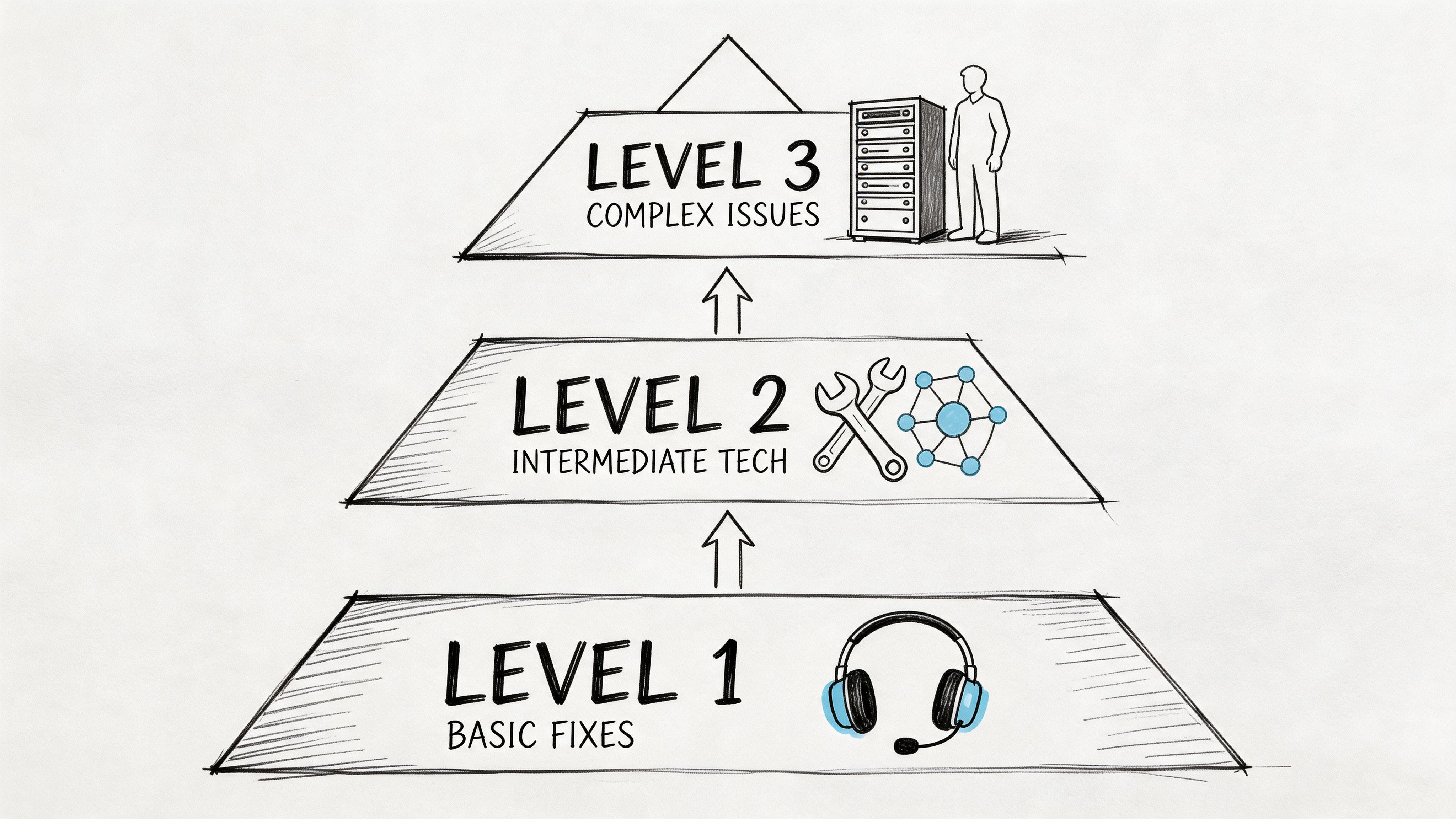
Password resets, Outlook profile issues, printer mapping, and basic UniFi Wi-Fi troubleshooting shouldn’t sit in the same queue as a failed Hyper-V host, a Bitdefender GravityZone policy conflict, or a corrupted RAID volume. Split support into levels. Level 1 handles common user issues. Level 2 takes infrastructure, endpoint, and network problems that need deeper troubleshooting. Level 3 handles the ugly stuff, including servers, cybersecurity incidents, advanced cloud issues, and vendor escalations.
That structure protects your expensive technical talent. It also keeps users from waiting on senior engineers who are busy with a firewall rule review, a Zero Trust architecture rollout, or bit-level data recovery work.
What good escalation looks like
A Greenwood manufacturer might open three tickets before lunch. One is a badge printer issue at the front desk. One is an unstable warehouse access point. One is a production workstation that can’t reach an ERP database. Those should not all land on the same person.
Use triggers that make escalation automatic.
- Time-based trigger: If Level 1 hasn’t resolved it within the defined window, move it up.
- Complexity trigger: If the issue touches servers, line-of-business apps, security controls, or routing, Level 2 or 3 gets it.
- Business impact trigger: If the outage affects revenue, compliance, or operations, skip the usual queue.
The mistake small businesses make is calling this “too corporate.” It isn’t. It’s just triage. A two-person IT team can still work in tiers if they use runbooks, clear ownership, and good ticket notes. If you want a local breakdown of what that frontline layer should handle, this Tier 1 help desk guide for Indy businesses lays it out in plain English.
Practical rule: Don’t escalate because a ticket feels annoying. Escalate because it hit a defined technical or business threshold.
2. Deploy a Robust Ticketing and ITSM System
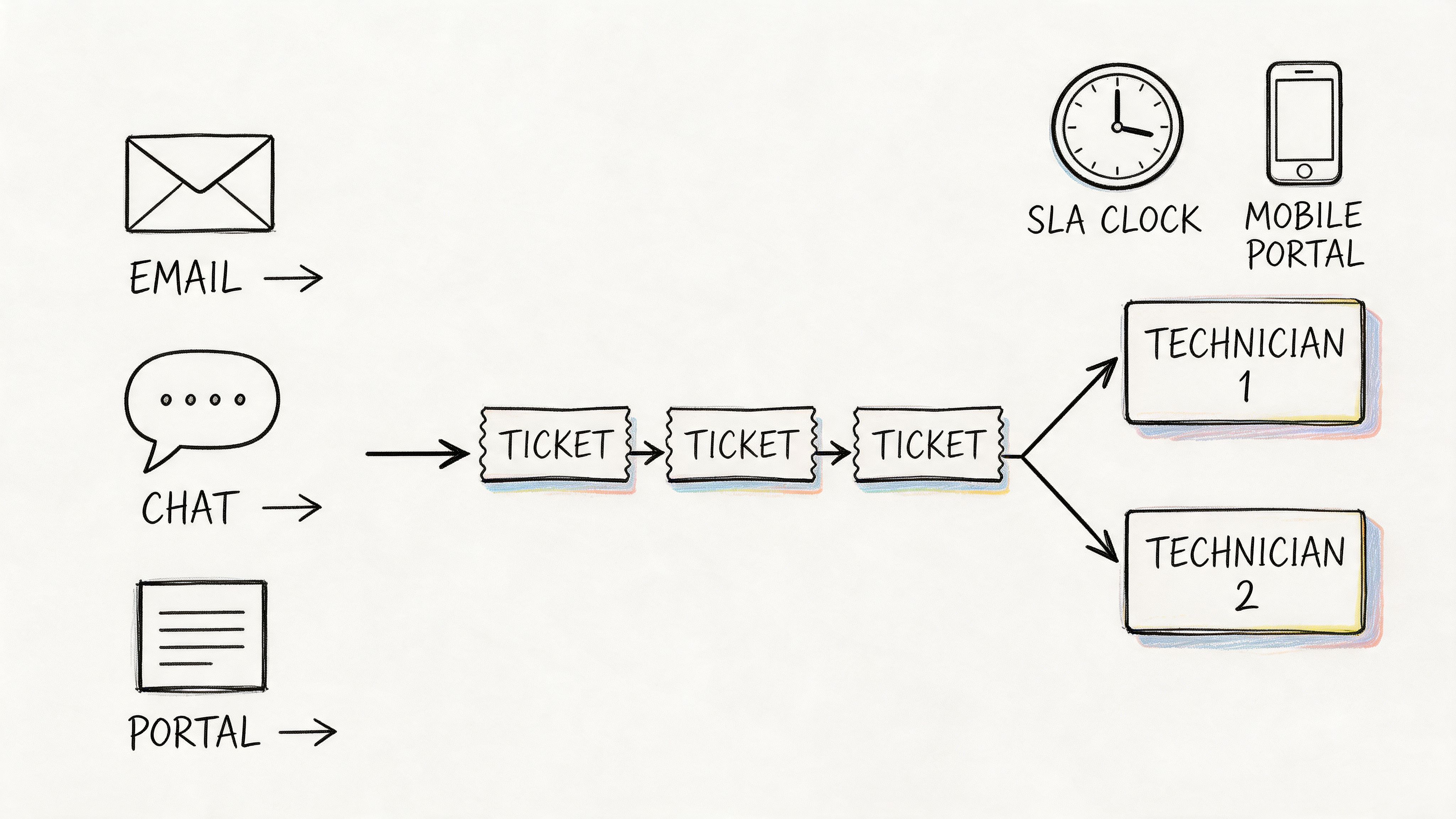
At 8:07 a.m., a Greenwood office manager emails about a dead scanner. By 8:15, a warehouse lead in Whiteland texts about Wi-Fi drops. At 8:22, someone in Carmel calls about a user locked out of Microsoft 365. If those requests live in three different places, your team loses time before anyone even starts fixing the problem.
A ticketing and ITSM system puts every request into one queue with ownership, history, priority, and status. That is the difference between organized support and a pile of interruptions. Industry analysts at Grand View Research expect continued growth in this category, which is one reason small and midsize companies are replacing shared inboxes and side-channel support with formal service workflows (Grand View Research ITSM market analysis).
For Indiana SMBs, the goal is not to copy a Fortune 500 rollout. The goal is to get control. A 40-user CPA firm in Johnson County needs clean intake, response tracking, and basic reporting. A multi-site manufacturer in Hamilton County usually needs more, including asset relationships, location-based routing, and mobile access for onsite techs. ServiceNow, Jira Service Management, and Zendesk can all work. The right choice depends on your environment, your budget, and how much process discipline your team will maintain.
A simple visual helps explain the flow.
Build the system your team will really use
I’ve seen small businesses buy a powerful platform, then bury simple requests under ten required fields, three approval steps, and status codes nobody understands. Adoption drops fast. Techs start handling things in Teams again. Users go back to tapping someone on the shoulder because it feels faster.
Start with a short intake form, a small set of categories, and routing rules that match your real support load.
A practical first build usually includes:
- Clear ticket categories: Hardware, software, access, network, cybersecurity, cloud, and vendor issue.
- Automatic routing: Send Microsoft 365 issues to the right tech. Send firewall and MFA problems to the security side. Send onsite Wi-Fi complaints to the field-capable crew.
- Asset linkage: Tie tickets to devices, users, and locations so repeat failures, aging hardware, and bad patterns show up quickly.
- Alert integration: Monitoring tools should open tickets automatically when a server, switch, backup job, or internet circuit throws a critical event.
Asset linkage matters more than a lot of SMBs realize. If one laptop generates six tickets in four months, that is not a user problem anymore. It is a replacement decision. If you want a practical framework for connecting support activity to lifecycle planning, these IT asset management best practices for Indiana businesses lay it out well.
Automation comes after the basics work. Add approval chains, workflow rules, and AI-assisted intake once your categories, ownership, and ticket hygiene are stable. The same rule applies in adjacent fields. Teams evaluating specialized automation outside core IT operations can see examples on the LegesGPT blog, but the lesson is the same. Clean process first. Automation second.
Here’s a quick walkthrough for teams comparing platforms.
3. Establish Clear Service Level Agreements
Monday at 8:07 a.m., the phones light up. A CPA firm in Johnson County cannot reach its line-of-business app, two users in Greenwood are locked out of Microsoft 365, and someone also wants a new monitor ordered. If the desk has no clear SLA, all three requests compete for attention, and users start judging IT by who complained the loudest.
A good SLA stops that.
It sets response times, resolution targets, priority rules, and communication expectations in language the business can understand. For a manufacturer in Franklin, a plant-floor outage deserves a faster clock than a single display issue in accounting. For a medical practice in Hamilton County, access to the EHR goes straight to the top because downtime affects patient care, billing, and compliance at the same time.
The key is classification by business impact. Ticket volume and user frustration matter, but impact decides priority. One employee with a laptop problem is not in the same lane as a switch failure that takes out a department.
Write SLAs around business risk
Tie each priority to what the company loses while the issue stays open.
- Critical: Revenue stops, operations halt, a security event is active, or compliance exposure exists.
- High: A department is blocked, a core system is degraded, or a major user group cannot work normally.
- Normal: One user is affected, but a workaround exists.
- Low: Service requests, minor issues, or planned changes.
That sounds simple, but the trade-off is real. If everything is marked high priority, nothing is. I have seen Indiana SMBs promise fast response on every ticket, then miss half of them because the desk is buried in password resets and low-value requests. A tighter SLA with fewer true priorities usually performs better than an ambitious one nobody can meet.
Local requirements should shape the wording. A defense supplier near Indianapolis with CMMC obligations needs the SLA to spell out security escalation and containment expectations. A clinic needs access restoration and incident communication that line up with HIPAA responsibilities. A construction company with crews in the field may care more about internet outages, mobile device support, and line-of-business app access than desktop cosmetics.
Industry guidance from HDI on service desk performance measures points teams toward practical metrics such as response time, customer satisfaction, and analyst productivity, instead of chasing one universal target for every ticket type (HDI research and support center resources).
If your SLA says "best effort," users will hear "no promise."
Set targets your team can hit consistently. Then review them against actual demand every quarter. An Indiana SMB with one generalist and one part-time tech should not copy the SLA of a 24/7 enterprise shop in Chicago. The better move is to define realistic windows, document after-hours coverage, and be blunt about what is and is not included. That is how you build trust, protect margins, and keep the desk focused on work that actually affects the business.
4. Maintain a Comprehensive Knowledge Base
At 8:12 on a Monday, somebody in Greenwood cannot get into Microsoft 365, a copier in Franklin stopped scanning to email, and a new hire in Carmel needs MFA set up before payroll. If the only person who knows the fixes is your senior tech, your service desk has a single point of failure.
A knowledge base gives your team a repeatable way to solve common issues without starting from zero every time. It should cover setup steps, recurring fixes, vendor contacts, known issues, screenshots, decision trees, and clear escalation notes. That is how you turn tribal knowledge into something a small Indiana support team can put to use.
Indiana SMBs feel this more than larger shops. One vacation, one resignation, or one bad flu week can slow the whole desk down. Good documentation protects response times, lowers training time for new techs, and keeps billable people working instead of waiting on IT.
Start with the tickets that repeat
Do not try to document everything in month one. That is how these projects stall.
Start with the tickets your team sees every week in Johnson County and Hamilton County offices. Microsoft 365 sign in loops. VPN access for hybrid staff. Printer mapping. MFA enrollment. Scanning to email after a copier firmware update. UniFi controller basics. Restoring a deleted SharePoint file. Reconnecting a workstation after a flaky switch port gets replaced.
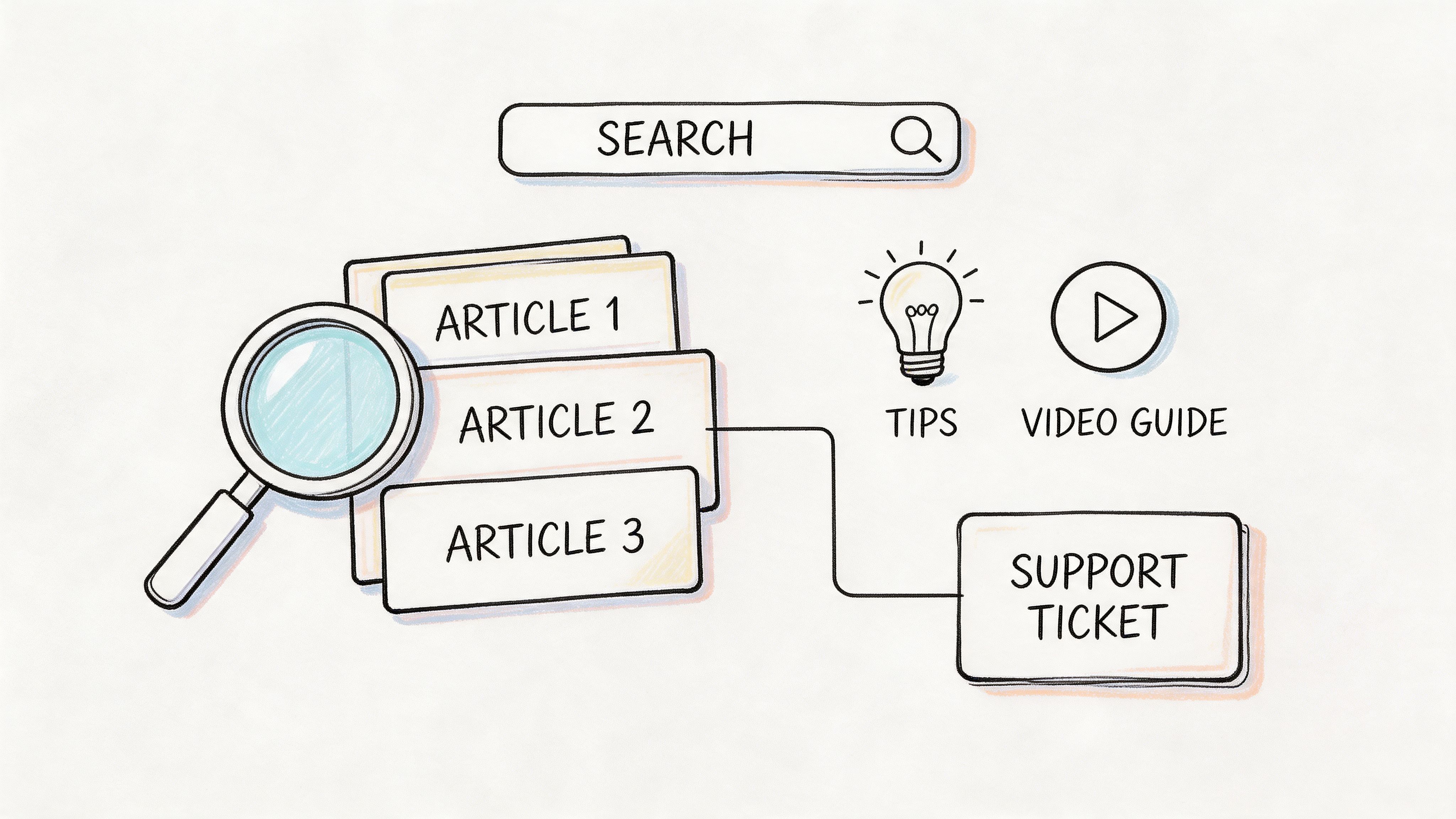
Self-service works when the articles match the questions users ask. Gartner notes that customer service organizations can reduce live support volume when they make self-service easy to use and easy to find (Gartner guidance on customer self-service strategy). For small businesses, that means fewer interruptions for the same low-value fixes and more time for work that affects operations.
What makes a KB worth using
Most weak KBs fail for predictable reasons. The titles are vague, the screenshots are old, or the steps assume too much technical knowledge.
Build articles with a simple format your whole team can follow:
- Plain titles: “How to reconnect to the office VPN on Windows 11” is easier to find than “Remote access troubleshooting.”
- Short steps: Keep one action per line so users do not miss a setting.
- Screenshots that match the current screen: If Microsoft changes the prompt, update the article.
- Escalation notes: State when a Tier 1 tech should stop and hand it off.
- Environment details: Note whether the fix applies to Azure AD, on-prem AD, UniFi, SonicWall, or another platform.
- Owner and review date: Every article needs a named person and a last-reviewed date.
A useful side benefit shows up fast. The same documentation habits that improve ticket handling also make infrastructure support easier. Teams that document recurring issues clearly tend to build better monitoring runbooks too. That matters if you are also tightening up network monitoring best practices for Indiana businesses.
Write for the next tech, not the current expert
Your best technician does not need the article. The next hire does. So does the field tech covering Brownsburg after a server issue in Greenwood ran late.
Write each article so a competent technician can follow it under pressure. Skip insider shorthand. Include the exact path, the expected result, and the point where the issue stops being routine. If a fix carries risk, say so plainly.
A strong KB also protects continuity. When a key employee leaves, the desk keeps the process, the context, and the fix history instead of losing half the team's working knowledge with them.
5. Implement Proactive Monitoring and Alerting
Monday at 8:12 a.m., the phones light up. A clinic in Hamilton County cannot open patient charts. A manufacturer in Johnson County has label printers dropping offline. By the time users report it, the problem has already cost time, payroll, and patience.
Good service desks do not wait for that call. They watch the systems that keep the business running and catch early warning signs before a small fault turns into a queue full of tickets.
Start with the assets that create real operational risk if they fail:
- Core infrastructure: Firewalls, switches, servers, backup jobs, virtualization hosts, and internet circuits.
- Line-of-business endpoints: PCs used for billing, dispatch, scheduling, production, or front-desk intake.
- Security controls: Endpoint detection alerts, failed login spikes, unusual process behavior, and SOC escalations.
- Wireless performance: Signal quality, roaming failures, and congestion in buildings with thick brick walls, metal shelving, or awkward layouts.
A useful local reference is network monitoring best practices for Indiana businesses.
This matters even more as support desks carry heavier ticket loads than they did a few years ago. Surprise failures hit harder when your team is already busy. For Indiana SMBs, that is the difference between a small after-hours fix and a full morning of lost production.
Set alerts around symptoms that give you time to act. Failed backups. Disk growth. WAN packet loss. Reboot loops. High CPU on a server that should be steady. Access points running hot in a warehouse aisle. Security events that need containment before they become an incident. If your team is building response procedures alongside monitoring, tie those alerts to a documented cybersecurity incident response plan template so the first move is already decided.
One rule keeps this practical. Every alert should answer one question: what will the technician do next?
That is where plenty of desks get this wrong. They monitor everything, alert on everything, and train the team to ignore half of it. Noise kills trust fast. Tune thresholds by site, device role, and business hours. A switch closet in Greenwood with poor cooling may need different heat thresholds than a clean office in Carmel. A backup failure on a file server deserves a ticket now. A brief CPU spike on a receptionist PC probably does not.
The best monitoring setup is not the one with the most dashboards. It is the one that helps your team fix the right issue before users ever know it was there.
6. Build a Strong Incident Management and Crisis Response Process
It is 8:07 on a Monday in Greenwood. Users cannot sign in to Microsoft 365, the phones start ringing, and someone in accounting asks whether payroll will run. That is when a service desk finds out whether it has an incident process or just a collection of smart people reacting at once.
Major incidents need a different operating mode than normal ticket work. Ransomware, identity outages, failed line-of-business apps, internet circuit loss, and dead switching gear all create the same immediate problem. Too many people jump in, nobody owns the clock, and business leaders get conflicting answers. A written response process fixes that. It sets authority, escalation paths, containment steps, and recovery order before the pressure hits.
For Indiana SMBs, this matters in very practical ways. A medical office in Johnson County may need to protect patient access and document actions for HIPAA. A manufacturer in Columbus may care more about restoring shop-floor connectivity before email. A law firm in Carmel may need fast decisions on account lockouts and after-hours vendor escalation. The process should match the business, not a generic template copied from an enterprise playbook.
Assign jobs before the bad day
Set clear roles in advance so the team does not debate ownership during the outage:
- Incident commander: Directs the response, sets priorities, and approves major decisions.
- Technical lead: Handles diagnosis, containment, recovery, and validation.
- Communications lead: Sends updates to staff, leadership, and affected clients.
- Vendor coordinator: Works with your ISP, software vendors, cloud providers, and cyber insurance contacts.
The point is speed and clarity. If a core switch fails at a Greenwood warehouse, the technician should know who is working the hardware issue, who is calling the vendor, and who is telling leadership whether shipping will be delayed.
ITIL 4 guidance from AXELOS on incident management supports this approach. Restore service quickly, reduce business impact, and use defined responsibilities instead of ad hoc response.
Write the playbooks your team will use. Keep short templates for ransomware containment, suspicious sign-in activity, internet outages, failed updates, and business application downtime. Include contact lists, escalation thresholds, system priorities, and approval rules for actions like disabling accounts or taking a server offline. If you want a starting point for the security side, use this cybersecurity incident response plan template.
Then test it. A tabletop exercise with your internal team, your MSP, or your line-of-business vendor will expose weak handoffs fast. That is also a good time to tighten your status update workflow and automate customer service for common support scenarios so users get timely messages while engineers stay focused on recovery.
Good incident response is not about having a thick binder on a shelf. It is about helping a small Indiana business protect revenue, keep people informed, and get back to work without wasting the first hour deciding who should do what.
7. Prioritize Customer Communication and Transparency
A silent service desk makes every outage feel worse.
Most users can tolerate a problem for a while if they know three things. Someone saw it. Someone owns it. Someone will update them without being chased. That’s why communication belongs on the same level as technical troubleshooting. You can have excellent engineers and still produce a lousy support experience if nobody explains what’s happening in plain English.
This matters even more for local businesses where relationships are long-term. Johnson County business owners don’t want polished nonsense. They want a straight answer. Is the firewall dead? Is Microsoft 365 the issue? Did the ISP cut a fiber line? Can they keep taking payments while you work around it?
Write updates like a human
Users don’t need a packet capture unless they ask for one. They need clarity, next steps, and timing that sounds like a person wrote it.
Good update habits include:
- Acknowledge business impact: Say you understand what’s blocked.
- State current status: Diagnosing, waiting on vendor, restoring from backup, testing fix.
- Give the next checkpoint: Tell them when they’ll hear from you again.
- Avoid blame language: Focus on action, not defensiveness.
In practical terms, this might mean telling a downtown Indy law office that their document system outage is isolated to authentication, client files appear intact, and the next update is coming in thirty minutes. That message calms people down. Silence does the opposite.
Clear communication buys patience. Vagueness burns it.
Automation can help here too, especially for ticket confirmations, status changes, and follow-up messages. If you’re trying to improve those touchpoints without making them sound robotic, this Indiana SMB customer service automation playbook gives a practical framework.
8. Invest in Continuous Training and Skill Development
A service desk starts slipping the minute the team stops learning.
That happens fast in Indiana SMB environments. A Greenwood manufacturer rolls out new MFA policies in Microsoft 365. A medical office in Johnson County adds stricter backup retention requirements. A Hamilton County firm moves part of its stack into Azure but keeps line-of-business apps on-prem. If the desk is still solving tickets based on last year’s habits, response times slow down, escalations rise, and small mistakes turn into expensive outages.
Training fixes that, but only if it matches the work your team does.
Skip the idea that development means sending everyone to a conference and hoping some of it sticks. The desks that improve usually build training into the week. Short vendor labs. Guided ticket reviews. Certification paths tied to the client stack. Time to document what was learned while it is still fresh. That approach costs less, holds up better under SMB budget pressure, and produces results you can see in fewer repeat tickets and cleaner handoffs.
Build skills around your real stack
A Greenwood office running Microsoft 365, UniFi, Bitdefender GravityZone, and hybrid backups needs a different plan than a SaaS company in Carmel with heavier AWS and identity work. Generic training wastes hours. Targeted training gives technicians useful reps on the systems they touch every day.
A practical training program usually includes:
- Protected learning time: Put it on the schedule during business hours or it gets pushed aside.
- Senior to junior coaching: Shadowing, post-ticket reviews, and lab walkthroughs teach judgment faster than videos alone.
- Cross-training: Help endpoint technicians build basic networking, cloud, and security skills so routine tickets do not stall at every boundary.
- Documentation requirements: New fixes, workarounds, and lessons learned should show up in the knowledge base the same week.
- Lab practice: Let staff test failed backups, broken policies, bad DNS entries, and phishing response steps in a safe environment before they do it on a live client network.
CompTIA A+, Network+, and Security+ still give junior staff a useful base. Vendor training matters too if your clients rely heavily on Microsoft, Cisco, or specific security platforms. The trade-off is simple. Certifications prove exposure. Labs and coached ticket work prove readiness. Strong desks use both.
AXELOS, the steward of ITIL, stresses structured, repeatable service management practices because ad hoc execution creates inconsistent outcomes and weak adoption across teams (ITIL 4 guidance from AXELOS). The same pattern shows up in training. Teams get better faster when learning is planned, reviewed, and tied to real service desk work.
I’ve seen Indiana SMB support teams make big gains without adding headcount. They set aside two hours a week, assign one focused skill per month, review tough tickets together, and expect every technician to leave the desk a little stronger than they were six months earlier. That is how a small service desk starts performing like a much larger one.
9. Establish Effective Performance Metrics and Regular Review
Monday morning in Greenwood. Three technicians are already buried, the owner thinks response times slipped over the weekend, and everyone has a different explanation. Without a short list of metrics and a review rhythm, the desk ends up arguing from memory.
Good service desks measure performance to make decisions. The goal is simple. Spot backlog growth, bad escalations, repeat incidents, and staffing gaps early enough to fix them before a client in Franklin, Fishers, or Carmel feels the hit.
HDI’s 2023 State of Technical Support report found that service desks commonly track response time on non-phone channels, customer satisfaction, and tickets resolved per analyst. Those are useful starting points, but Indiana SMBs usually need one more filter. Every metric should answer one of two questions. Are we protecting the client’s business day, and are we using the team’s time well? HDI publishes ongoing research and benchmark guidance directly through its support center resources at HDI.
Track a short scorecard, not a wall of charts
A crowded dashboard burns time and hides the underlying problem.
For most small and midsize businesses, six measures are enough:
- Response time: How fast the desk acknowledges the issue.
- Resolution time: How long the ticket stays open.
- First contact resolution: How often the team fixes common issues without escalation.
- SLA attainment: Whether the desk met the response and resolution commitments already defined.
- CSAT: Whether the user felt the support was clear and helpful.
- Backlog by type and age: What is piling up, and how long it has been sitting.
If you want one metric that exposes operational health fast, start with backlog age. A pile of two-day-old password resets points to process waste. A pile of eight-day-old firewall or line-of-business app tickets points to skill gaps, vendor drag, or bad ownership rules. Those are different problems. They need different fixes.
Use the scorecard in layers. Review live queue health each day in a 10-minute huddle. Review trends each week with the service lead. Review the last month with ownership or leadership, especially if the desk supports multiple Indiana locations with different business hours and seasonal demand.
The trade-off matters here. If you only push for speed, technicians close easy tickets and park the ugly ones. If you only push for CSAT, the team may spend too long on low-impact requests while higher-risk work waits. A balanced scorecard keeps the desk honest.
Industry guidance from the Service Desk Institute also stresses measuring a mix of efficiency, quality, and customer outcomes rather than relying on a single KPI. Their service desk metrics guidance is a solid reference for building a scorecard that a small team can use: Service Desk Institute on service desk metrics.
One more rule from the field. Do not run the team at full utilization all week. Small Indiana support desks often cover projects, vendor calls, after-hours alerts, and walk-up issues at the same time. Leave room for interruption, or the queue will look fine on paper right up until one outage blows the week apart.
Metrics only help if reviews change behavior. If first contact resolution is slipping, listen to calls and read handoff notes. If resolution time is rising for one category, check ownership, training, and approval bottlenecks. If one client in Johnson County generates the same ticket every Friday, fix the root cause instead of celebrating quick closes. That is how reporting turns into ROI.
10. Foster a Customer-Centric Culture and Service Mindset
A controller in Greenwood calls at 4:42 p.m. on payroll day because direct deposit files will not send. In that moment, the ticket is not a ticket. It is wages, deadlines, and a room full of employees who expect to be paid on time. A customer-focused service desk trains the team to hear that business impact first, then respond with the right mix of urgency, clarity, and judgment.
That mindset matters more in Indiana SMBs than many operators admit. In Johnson County, Hancock County, or Hamilton County, reputation spreads fast. If your technician fixes the issue but talks to the office manager like she caused it, you still lost ground. If your team explains what happened, gives a realistic timeline, and follows through, clients usually give you room to work even during a rough outage.
Customer focus is not a soft skill program. It is a set of operating habits.
Start with language. Ban phrases that blame the user or hide behind process. “You entered it wrong” becomes “I see what happened, and here is the fastest fix.” “That is not our issue” becomes “We own the next step, and I’ll tell you who is taking it.” Small changes in wording lower tension and shorten calls because people stop arguing and start cooperating.
Then fix the desk design. If the portal is clumsy, people will text technicians, email whoever helped last time, or walk down the hall and interrupt someone in the middle of higher-priority work. A clean intake experience gets better adoption and better triage. Microsoft’s guidance on self-service support makes the same point. Portals work when they are easy to search, easy to submit, and tied to clear request paths (Microsoft guidance on self-service and support experiences).
A few changes usually pay off fast:
- Use plain labels: “Email not working” beats “messaging service incident.”
- Ask fewer intake questions: Collect what the technician needs to act, not every field someone might want later.
- Build for phones: Plant managers, field supervisors, and sales staff often submit requests from mobile devices.
- Show status clearly: Users should know who has the ticket, what happens next, and when they will hear back.
- Confirm the outcome: A quick follow-up catches half-fixed issues before they reopen two days later.
There is a trade-off here. Giving users a better experience does not mean saying yes to every request or letting executives skip the queue. It means the process feels fair, the communication is clear, and the business impact is understood. A mature desk can say no to unsafe workarounds, hold the line on change control, and still leave the client feeling supported.
This also affects staffing decisions. Level 1 analysts should have enough authority to reset access, solve common app issues, and use approved scripts without waiting on three layers of approval. HDI’s service desk guidance consistently points to first-contact resolution, communication quality, and analyst ownership as core parts of a high-performing support operation, not add-ons after the technical work is done (HDI resources on service desk operations and customer experience). For a small Indiana business, that often means fewer escalations, less client frustration, and more productive technician time.
The desks that earn trust do one thing well every day. They connect technical work to the customer’s actual job. A locked account is a shipping delay in Plainfield. A printer outage is a patient intake slowdown in Franklin. A VPN problem is a sales rep sitting in a parking lot outside Noblesville trying to send a quote before a meeting. Train your team to hear that context, and service gets better fast.
10 IT Service Desk Best Practices Comparison
For Indiana SMBs, the right move is not copying a Fortune 500 service desk line for line. It is choosing the controls that fit your ticket volume, staff depth, compliance pressure, and growth plan. A 40-person manufacturer in Greenwood does not need the same process stack as a healthcare group with offices from Johnson County to Hamilton County.
Use the table below to decide what to implement first, what can wait, and where the payoff usually shows up fastest.
| Solution | Implementation Complexity 🔄 | Resource Requirements ⚡ | Expected Outcomes 📊⭐ | Ideal Use Cases 💡 | Key Advantages ⭐ |
|---|---|---|---|---|---|
| Implement a Tiered Support Structure (Level 1, 2, and 3) | Medium to High. Requires clear roles, escalation paths, and handoff rules | Moderate. Skilled staff, training, and documented workflows | Faster resolution, better first-contact handling, less senior engineer interruption | Growing businesses, MSPs, and teams supporting mixed infrastructure | Routes work by skill level, controls labor cost, and reduces escalation confusion |
| Deploy a Ticketing and ITSM System | High. Setup often includes workflows, approvals, integrations, and reporting | High. Licensing, implementation time, admin ownership, and user training | Better SLA tracking, stronger audit history, fewer missed or duplicate requests | Higher ticket volume, regulated environments, and multi-channel support | Centralizes work, improves accountability, supports automation, and makes reporting usable |
| Establish Clear Service Level Agreements (SLAs) | Medium. Requires response targets, priority definitions, and escalation rules | Low to Moderate. Monitoring, reporting, and enough coverage to meet targets | Clearer expectations, measurable service performance, and fewer priority disputes | Contract-driven support, internal IT teams with multiple departments, and after-hours coverage needs | Sets response standards, supports staffing decisions, and protects business operations |
| Maintain a Knowledge Base (KB) That Covers Common Fixes, Procedures, and FAQs | Medium. Needs article structure, ownership, review cycles, and search standards | Moderate. Writers, reviewers, and connection to the service desk workflow | Fewer repeat tickets, faster analyst ramp-up, and more self-service success | Repetitive issues, onboarding, remote support, and distributed offices | Keeps know-how in the business, shortens resolution time, and lowers training drag |
| Implement Proactive Monitoring and Alerting | High. Requires tool rollout, threshold tuning, and alert cleanup | High. Monitoring tools, skilled engineers, and maintenance time | Earlier issue detection, less avoidable downtime, and better visibility into system health | Servers, line-of-business apps, backup jobs, network gear, and any site where outages hit revenue | Catches trouble before users report it, reduces fire drills, and supports planning |
| Build Incident Management & Crisis Response Process | High. Involves playbooks, decision roles, communications, and practice runs | Moderate to High. Trained responders, call trees, templates, and exercises | Faster coordinated response, cleaner communication, and less chaos during outages | Security events, ERP outages, internet failures, and regulated operations | Creates order under pressure, speeds recovery, and improves post-incident follow-up |
| Prioritize Customer Communication and Transparency | Low to Medium. Mostly process discipline, templates, and update cadence | Low to Moderate. Staff time, status tools, and communication channels | Better user trust, fewer duplicate calls, and less frustration during delays | Client-facing support desks, outage-prone environments, and executive-facing support | Keeps users informed, reduces anxiety, and improves how service is perceived |
| Invest in Continuous Training & Skill Development | Medium. Requires scheduling, role-based learning paths, and lab time | Moderate to High. Budget, coverage during training, and certification costs | Better technical range, stronger troubleshooting, and improved retention | Teams supporting cloud apps, security tools, Microsoft 365, VoIP, and hybrid environments | Expands team capability, improves service quality, and reduces dependence on one technician |
| Establish Effective Performance Metrics & Regular Review | Medium. KPI selection matters more than dashboard volume | Moderate. Reporting tools, analyst review time, and leadership follow-through | Better staffing decisions, clearer bottleneck visibility, and stronger ROI tracking | Teams trying to reduce backlog, improve response times, or justify process changes | Shows where work stalls, supports course correction, and ties service desk work to business results |
| Foster a Customer-Centric Culture & Service Mindset | High. Leadership has to model it and reinforce it consistently | Moderate. Hiring, coaching, QA reviews, and recognition programs | Better client retention, stronger satisfaction, and more consistent service behavior | MSPs, internal IT teams serving multiple departments, and relationship-driven businesses | Improves trust, strengthens long-term accounts, and makes technical skill more valuable |
One practical rule helps here. Start with the items that create control first: ticketing, SLAs, triage, and documentation. Then add the layers that improve speed and resilience, like monitoring, incident response, and analyst development.
That sequence works well for local SMBs because budget and headcount are usually tight. A shop in Franklin or Whiteland can get real gains from cleaner intake and better routing long before it needs a heavily customized enterprise stack.
From Cost Center to Profit Driver Make Your IT Work for You
Most businesses around Greenwood don’t need a giant enterprise overhaul. They need order. They need fewer surprises in the server room, fewer mystery outages, fewer recurring Wi-Fi complaints, and fewer hours burned chasing the same support problems over and over. That’s what these it service desk best practices deliver when they’re applied with some discipline.
The shift is bigger than support process. It changes how the business experiences IT. Instead of reacting to whatever breaks next, you start running a repeatable operation. Tickets go to the right people. Common fixes get documented. Monitoring catches issues early. Incidents follow a playbook. Users know what to expect. Leadership gets reporting they can use. Budgets get easier to forecast because your environment gets less chaotic.
That matters because downtime is expensive, and not just in the dramatic headline sense. It shows up in payroll waste, delayed invoices, late shipments, idle technicians, missed appointments, and sales staff waiting on systems instead of talking to customers. Every hour your team spends wrestling bad Wi-Fi, failed backups, account lockouts, or ancient hardware is an hour they’re not producing revenue. A mature service desk gives that time back. It converts wasted tech time into productive hours and supports the predictable monthly budgeting that most SMB owners want.
It also strengthens compliance and resilience. A healthcare office needs cleaner access management, stronger documentation, and better incident handling to support HIPAA obligations. A defense-adjacent firm needs tighter controls and response discipline that align with CMMC. Almost every business benefits from a service desk that supports a NIST CSF-style approach to identifying issues, protecting systems, detecting trouble early, responding with structure, and recovering cleanly.
The technical side matters too. Good desks don’t exist in a vacuum. They sit on top of solid infrastructure and a sane operating model. That can mean UniFi networking with latency-optimized mesh nodes in an old building with coverage dead spots. It can mean Bitdefender GravityZone paired with SOC-as-a-Service monitoring for better endpoint visibility. It can mean immutable off-site backups, tested restores, and cloud identity policies that reduce account compromise risk. In a data recovery scenario, it can mean knowing when standard restore procedures are enough and when you’re dealing with media damage that requires bit-level work and careful chain-of-custody handling.
After 17 years of local service, we can say this plainly. Businesses don’t usually fail because one tool was bad. They struggle because the process around the tools was weak. No routing. No standards. No ownership. No documentation. No review. Fix those pieces and the whole environment starts behaving better.
If you’re a Johnson County business owner, or you’re growing along the I-65 corridor and your support process feels duct-taped together, now’s the time to clean it up. You don’t need more noise. You need a desk that protects uptime, supports your staff, and gives leadership confidence that technology won’t derail the day.
Ready to see how this would look in your environment? Schedule a Free Network Assessment or a Security Risk Audit with our Greenwood-based team. We’ll show you where your current support model is leaking time, money, and stability, then give you a clear plan to fix it.
If your business in Greenwood, Indianapolis, Johnson County, or the surrounding metro needs stronger support, better security, and less downtime, talk with Finchum Fixes IT. We provide practical managed IT, cybersecurity, networking, data recovery, and support solutions built for Indiana SMBs that need fast answers and predictable results.