Mobile App Development for Enterprise: An Indiana Guide 2026
A lot of Indiana business owners are stuck in the same mess right now. The office runs on one set of systems, the field runs on another, and the mobile app in the middle drops the ball whenever the signal gets weak, the VPN hiccups, or the old backend server decides it's had enough. In a Greenwood business park, that looks like crews waiting on updates that never sync. In an old brick building near downtown Indy, it looks like spotty Wi-Fi turning a simple approval into a half-hour delay.
That's not a software annoyance. That's a business continuity problem. When your team burns time fighting an app, you're paying for wasted labor, slower billing, customer frustration, and avoidable downtime. And downtime gets expensive fast. For many organizations, the cost of IT downtime caused by a cyberattack or system failure can range from $5,600 to $9,000 per minute.
Old hardware, weak Wi-Fi, bad integrations, and a fragile app usually fail together. Business owners feel it as “tech issues,” but the fix starts with architecture, not band-aids.
Enterprise mobile apps can solve that. But only when they're scoped around real operations in Central Indiana, not built from a generic cloud-first template that assumes perfect connectivity, clean data, and brand-new systems.
Your App Is Failing and It Is Costing You Money
A service manager in Greenwood signs off on a mobile app because the demo looks clean, the monthly price looks manageable, and the vendor promises quick rollout. Two weeks later, field staff are back in their trucks trying to get a work order to load outside Franklin, photos will not sync until they return to the office, and dispatch is calling to confirm details that should already be in the system.
That is how money leaks out of a business. Not in one dramatic outage, but in dozens of small failures that steal labor, delay billing, and push good employees into bad workarounds.
[!NOTE]
- Start with the bottleneck: If your app fails in the field, you don't have a convenience issue. You have a continuity problem.
- Tie every feature to ROI: Offline sync, SSO, and secure integrations should earn their place by saving labor or reducing downtime.
- Security isn't optional: Enterprise apps need Zero Trust thinking, strong encryption, and controlled access.
- Indiana conditions matter: Spotty coverage, old buildings, and legacy systems change how apps must be designed.
- Budget realistically: Simpler apps cost less and launch faster. Deep integrations and offline-first workflows push cost and timeline up.
- Pick a partner who understands operations: Local context matters when the app has to work across Greenwood, Indy, and the I-65 corridor.
A construction manager in Johnson County doesn't care whether an app was built with the trendiest framework on the market. He cares whether his superintendent can pull up punch-list items in a half-finished concrete structure with lousy signal and still get photos, notes, and approvals saved correctly.
That is the Southside version of enterprise mobility. The problem usually starts with an off-the-shelf app that looked cheap and fast at signup. Then crews start using it on real jobs, with dead zones, old tablets, crowded Wi-Fi, and a backend system that still lives on a server nobody wants to touch. By the time somebody in the office sees the issue, a job update is missing, an invoice is delayed, and the owner is paying skilled people to babysit a loading spinner.

Why this has become a bigger deal
Businesses depend on mobile software for work that used to stay at a desk. Approvals happen from job sites. Inventory gets updated from a warehouse aisle. Nurses, drivers, estimators, and technicians enter data where the work happens, not after the fact. That shift raises the cost of a weak app.
That doesn't mean every business needs a custom app. It means more Indiana companies have reached the point where a bad fit costs more than the subscription fee suggests.
For local companies, the pain usually shows up in four places:
- Field work slows down: Construction, logistics, healthcare, and service teams lose time when forms freeze, updates fail, or records disappear after a weak connection.
- Legacy systems stay in control: The mobile interface may look modern, but the old ERP, CRM, accounting package, or file share still decides whether the process works.
- Security gets messy fast: Staff start texting screenshots, saving files on personal phones, or using consumer apps because the approved system is unreliable.
- Support costs accrue unnoticed: What looked like a software issue turns into help desk tickets, duplicate entry, cleanup work, and manager time spent chasing status.
I see this pattern all the time with Indiana businesses running older line-of-business systems. The app gets blamed first, but the root cause is usually a stack of smaller problems. Weak integration logic, poor offline behavior, stale device management, and backend assumptions that only hold up inside the office.
A good enterprise app also has to fit your response process when something breaks. If your escalation path is fuzzy, the Tekk.coach incident management blog gives a useful framework for handling outages, ownership, and communication before a mobile issue turns into a customer issue.
What better looks like
A better app does not just look cleaner. It reduces repeated entry, stores data safely when the signal drops, syncs in a controlled way, and respects the systems you already rely on. It gives field teams a tool they will keep using on a bad day, in a mechanical room, on a rural road, or inside an old building with terrible reception.
That kind of result starts with business priorities, not screen mockups. Owners who get the best outcome usually treat app planning as part of a larger IT budget planning approach for ROI and resilience, because the app, the integrations, the security controls, and the support model all affect the final cost.
If your app only works under perfect conditions, it is not supporting operations. It is draining them.
Scoping Your Enterprise App from Napkin Sketch to Blueprint
A shop owner in Indiana sketches an app idea on a legal pad. The first version usually sounds simple. “Our team needs mobile access.” A month later, more substantial questions emerge. Mobile access to what. For which role. In what order. On whose device. With what happens if the signal drops outside Terre Haute or in the back corner of a plant with thick concrete walls.
That is where projects either get clear or get expensive.
I have seen solid app ideas go sideways because the scope never got past broad goals. “Help the field team.” “Speed up approvals.” “Modernize operations.” None of that gives a developer, project manager, or business owner enough to make good decisions. A usable scope names the exact job, the exact user, and the exact conditions the app has to survive in.
Start with the problem that costs you every week
Build cost matters, but operating pain should drive the conversation first. If your team is re-entering tickets at the office, calling dispatch to confirm parts, or losing notes because a connection dropped mid-job, that waste is already in your payroll and customer experience.
Write down the current failure points in plain language:
- What breaks now: delayed approvals, duplicate entry, lost notes, unreadable photos, missing status updates
- Who gets stuck first: field techs, dispatch, warehouse staff, project managers, clinicians, office admins
- What causes the slowdown: old ERP screens, shared spreadsheets, paper forms, weak Wi-Fi, VPN disconnects, poor cellular coverage
- What improvement looks like: fewer handoffs, faster closeout, cleaner records, less rework, fewer support calls
Turn vague requests into testable requirements
A Hamilton County company might ask for “mobile inventory access.” That sounds reasonable, but it is still too loose to estimate, design, or test. A scoped requirement is specific enough that a supervisor and a developer would picture the same task.
A better version looks like this. Warehouse staff need to scan an item, confirm quantity, attach a photo if there is damage, save the record without service, and sync once the device reconnects. Managers need an approval queue. The office team needs the update pushed into the existing inventory system without retyping it.
That level of detail changes the project in practical ways. It affects local data storage, sync logic, permissions, testing, training, and support. It also keeps scope creep in check because every new request has to earn its place in phase one.
Scope around workflows, not screens
Screen mockups are useful, but workflow mapping usually identifies key risks sooner. For Indiana businesses, that often means following a job from the office to the truck to the customer site to the billing system. The pain is rarely just on the phone screen. It is in the handoff between old systems, people, and unreliable connectivity.
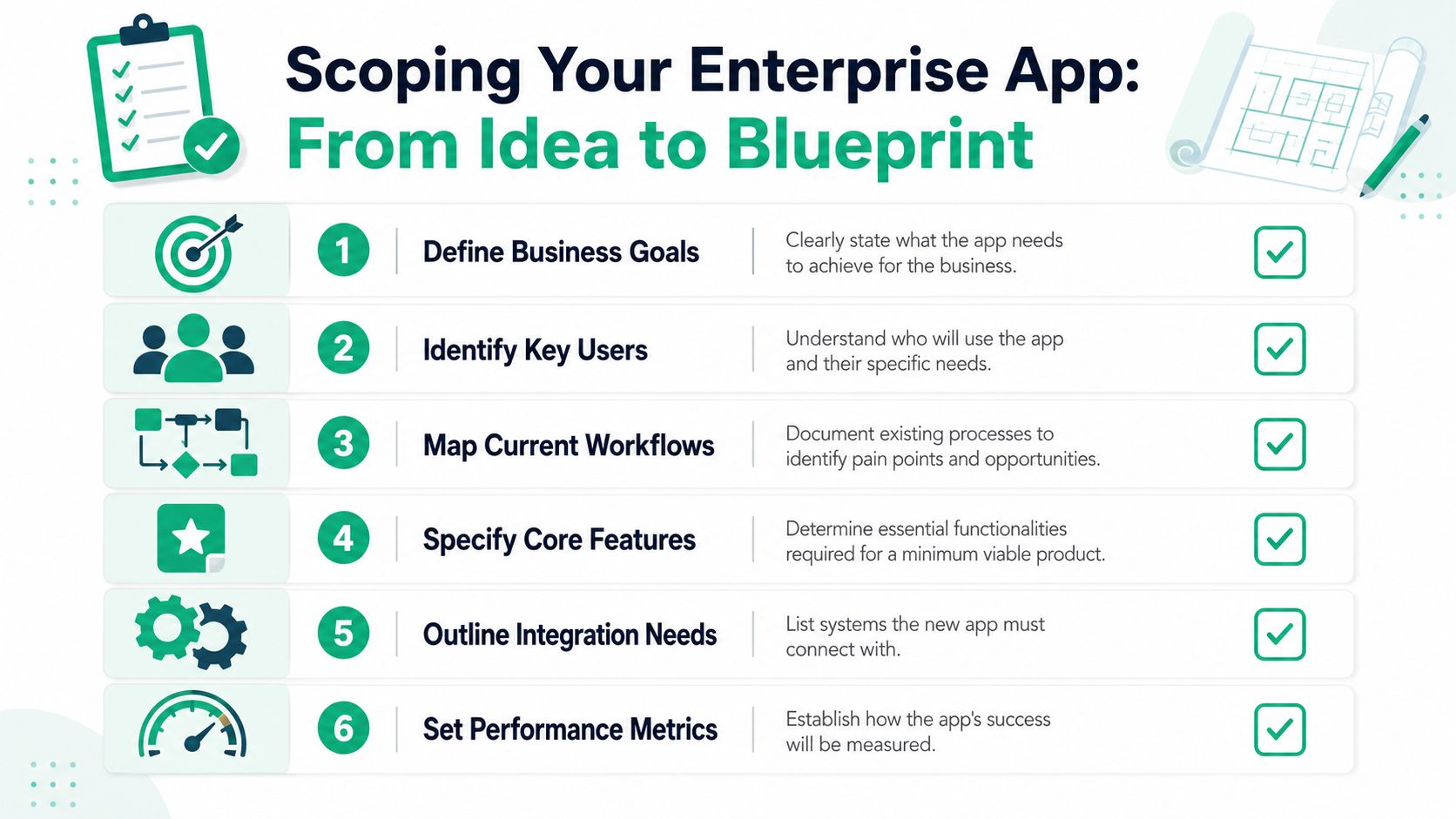
A sound scoping process should answer these questions:
- What business outcome has to improve first. Shorter approval times, faster field documentation, less paper handling, fewer dispatch calls.
- Which users matter on day one. Field crews, supervisors, warehouse staff, sales reps, office admins, subcontractors.
- What the current workflow looks like. Where it stalls, where data gets lost, where someone has to re-enter the same information.
- Which systems the app must touch. ERP, CRM, accounting platform, HRMS, file storage, identity provider, service desk.
- What risk controls apply. Access rules, device policies, audit trails, regulated data handling.
- How success will be measured. Less re-entry, cleaner records, faster closeout, fewer exceptions, lower support load.
Practical rule: If a feature cannot be tied to time saved, risk reduced, or revenue protected, it belongs on the later-phase list.
The blueprint should be plain and boring
That is a good sign.
A strong blueprint reads more like an operations document than a pitch deck. It should explain who uses the app, what they do in it, what systems it depends on, what happens when the connection fails, and who supports it after launch. Fancy language hides weak thinking. Clear requirements expose it.
A lot of owners want to approve screens first because they are easier to react to. I get it. But in enterprise work, ugly early diagrams often save more money than polished mockups because they force the hard conversations early.
A lot of owners benefit from seeing the process visually before signing off. This walkthrough is a good primer:
The planning process matters as much as the feature list. A clear software development life cycle model for Indiana business projects helps match the delivery method to the risk, budget, and complexity of the app.
What should be approved before coding starts
Before production code begins, get these decisions in writing:
| Decision area | What needs to be clear |
|---|---|
| Primary business outcome | The operational problem the app must solve first |
| Core users | Who uses it, where they work, and what conditions they deal with |
| Must-have workflows | The few tasks the app has to do well from day one |
| System integrations | Which business systems it connects to and who owns them |
| Data handling rules | What gets stored on-device, what syncs later, and what must stay protected |
| Support model | Who handles updates, incidents, devices, and user issues after launch |
When this work is done well, estimates get tighter, testing gets easier, and fewer surprises show up halfway through the build.
Choosing the Right Architecture and Tech Stack
Picking an app architecture is a little like choosing how to build a building. Native apps are custom-built houses. Cross-platform apps are high-quality modular builds. Progressive Web Apps are well-designed storefront renovations that work surprisingly well for the right use case, but they aren't the same as a purpose-built facility.
Native vs cross-platform vs PWA
For mobile app development for enterprise, the right answer depends on the work being done.
| Approach | Best fit | Trade-off |
|---|---|---|
| Native | High-performance apps, deep camera use, device sensors, advanced background tasks | Higher development effort across iOS and Android |
| Cross-platform | Internal business apps that need broad coverage and reasonable speed to market | Some edge-case device behavior may need extra attention |
| PWA | Lightweight workflows, portals, approvals, simple access from a browser | More limited device integration and offline behavior compared with native approaches |
A downtown Indy tech hub building a polished customer-facing app may need native performance and tight control over device features. A logistics team along the I-65 corridor may be better served by a cross-platform app that works across mixed devices and puts more budget into backend integration, offline handling, and support.
What matters more than the framework name
Owners get hung up on tool names. Flutter, React Native, Swift, Kotlin, .NET, Node, Azure, AWS. Those matter, but not as much as the design choices behind them.
A solid enterprise stack answers practical questions:
- Can it scale cleanly? If more users, more locations, or more workflows come online, does the backend stay stable?
- Can it integrate with old systems? Modern mobile front ends often live or die based on old databases and line-of-business software.
- Can it be monitored? You need logs, alerts, audit trails, and support visibility.
- Can it be secured properly? Identity, access, encryption, session handling, and device trust all need to be built in.
The impact of cloud computing and networking decisions becomes apparent. If the app depends on poor Wi-Fi in an old warehouse or overloaded VPN tunnels between sites, users blame the app. In reality, the app may be fine while the network is the weak link. Better UniFi networking design, cleaner segmentation, and latency-optimized mesh nodes often make the difference between “the app is broken” and “the app works.”
The front end gets the complaints. The backend usually deserves them.
Don't build a mansion for a clipboard problem
Some apps need deep architecture. Some don't. If all you need is approvals, simple forms, and light reporting, a heavyweight mobile stack can waste money and drag out delivery. On the other hand, if the app has to manage field records, scan assets, handle role-based permissions, and sync with ERP and CRM systems, a shortcut build will punish you later.
That's why modernization matters before architecture gets locked in. If your operation still depends on brittle old software, legacy system modernization strategies that drive business growth can help frame what should be replaced, wrapped, or left alone.
A practical stack mindset
The best enterprise stack isn't the newest one. It's the one that fits the workflow, survives bad conditions, and doesn't create support chaos.
For most Indiana businesses, that means:
- Choosing reliability over trendiness
- Investing in integration before visual polish
- Designing around the actual network environment
- Planning support, updates, and security from day one
That's how you avoid becoming the company with a slick app demo and a miserable production rollout.
Integrating with Your Existing Systems Securely
Most established businesses in Central Indiana don't get to start fresh. They already have an ERP, a CRM, a file share, maybe a homegrown database, and one Windows server in a closet that everyone is afraid to reboot. The app doesn't replace that reality. It has to work with it.
The wrong way to connect old and new
The worst approach is direct exposure. Don't let a mobile app talk straight to a legacy database or an aging internal system just because it seems simpler. That creates security holes, brittle dependencies, and support headaches the minute something changes.
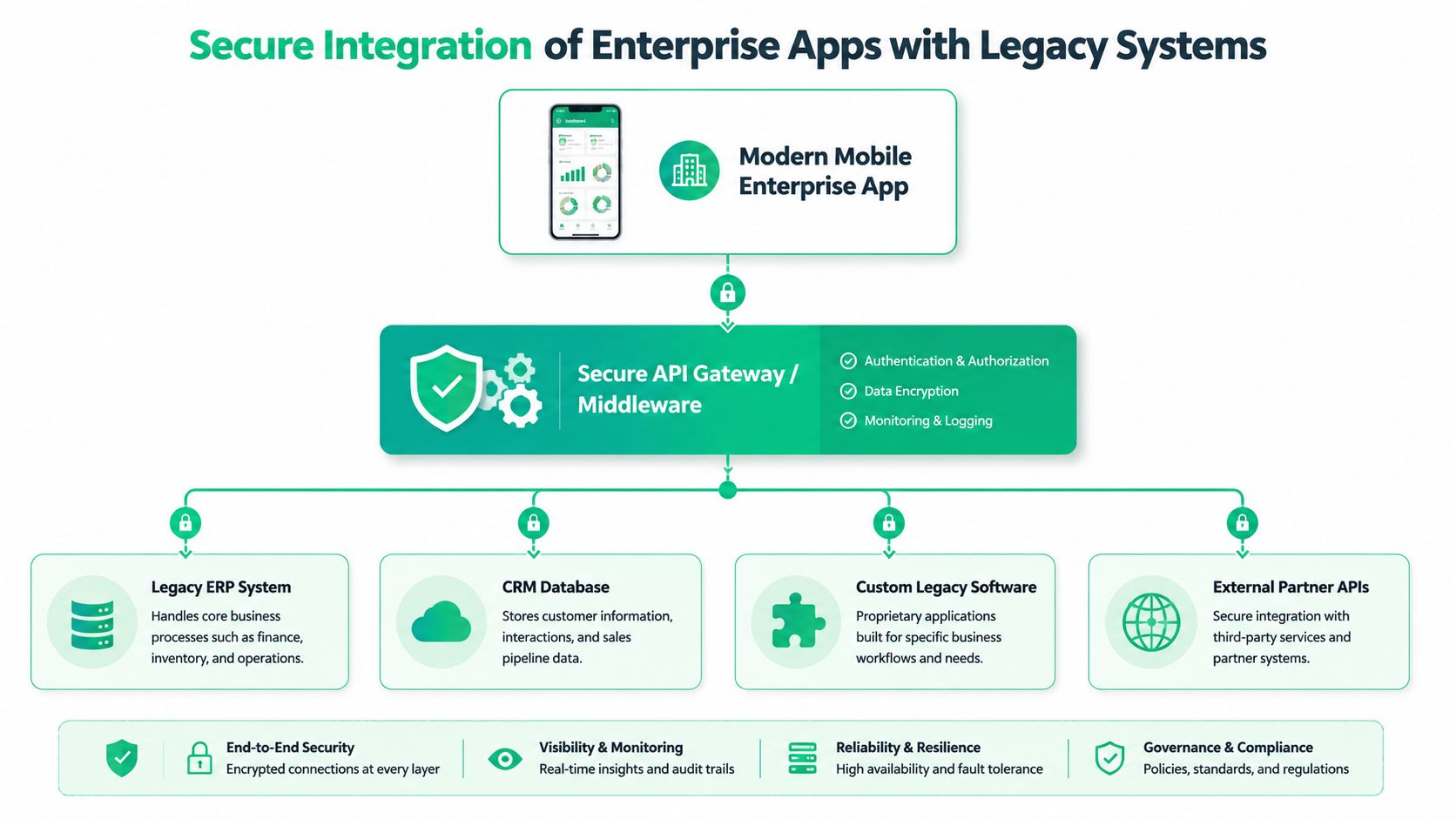
When we connected a new mobile inventory app to a client's aging on-prem environment in the Plainfield area, the fix wasn't “open more access.” The fix was building a secure middleware layer so the app could request only what it needed, with logging, authentication, and policy checks in the middle. That's how you protect a legacy system without forcing the business to replace it overnight.
If you need a clear visual language for mapping these connections before development starts, this guide to data architecture diagrams from SigOS is useful for turning hand-wavy system talk into something technical teams can build from.
Zero Trust is not optional
For enterprise mobile apps, Zero Trust architecture is the baseline. A proper Zero Trust architecture mandates that all data is encrypted with AES-256 and all API communication uses TLS 1.3 with certificate pinning, while secrets are fetched dynamically instead of being hard-coded into the app binary, according to Pavans Group's enterprise mobile security overview.
That matters because devices get lost. Users install junk. Networks get abused. Credentials get harvested. If the app stores sensitive data in plain text, trusts every network, or ships with embedded secrets, the app becomes a breach waiting to happen.
A secure integration pattern usually includes:
- Identity and access control: Tie the app to centralized identity, strong authentication, and role enforcement.
- API gateway or middleware: Broker traffic instead of exposing old systems directly.
- Encrypted storage and transport: Protect data at rest and in transit.
- Auditability: Keep logs that support investigations, compliance, and troubleshooting.
- Secrets management: Pull sensitive values at runtime from secure vaulting systems.
For businesses working under HIPAA, CMMC, or a broader NIST CSF program, those controls also help with compliance discipline. They won't solve compliance by themselves, but they give your mobile layer a much stronger foundation.
Integration isn't just a coding task
It's a security project, a networking project, and an operations project too. If your users sign in across Microsoft 365, line-of-business apps, and mobile tools, identity design starts carrying a lot of weight. That's where understanding identity and access management tools becomes useful, especially when single sign-on and role-based access need to work across old and new systems.
A mobile app should extend your business systems, not expose them.
The businesses that handle this well don't chase a “rip and replace everything” fantasy. They build a secure bridge, control access tightly, and modernize in layers.
Building for the Real World Offline First and Always On
A lot of software teams still design mobile apps as if everyone works in a glass office with perfect Wi-Fi. That's not how Indiana works. Crews lose signal in rural stretches, basements, steel buildings, warehouses, mechanical rooms, and old brick properties all over Greenwood and Indianapolis.
Online-only is a bad assumption
A 2025 Gartner study found that 68% of field service employees experience daily network interruptions, but only 22% of enterprise apps have reliable offline synchronization, leading to a 35% increase in data errors, as cited by HokuApps' enterprise mobility strategy guide.
That stat lines up with what field-heavy businesses already know. The app that works beautifully in the conference room often falls apart on a jobsite.
Offline-first means the app treats poor connectivity as normal, not as an exception. It stores the right data locally, lets the user keep working, tracks changes carefully, and syncs when the network comes back.
What offline-first actually requires
This is more than a checkbox labeled “offline mode.” It changes the architecture.
Here's what has to happen behind the scenes:
- Local data storage: The app keeps the records needed for active work on the device.
- Queueing actions: New entries, edits, photos, signatures, and updates are staged safely until they can sync.
- Conflict resolution: If the same record changes in two places, the app needs rules for how to reconcile it.
- User visibility: People need to know what synced, what didn't, and what needs attention.
- Selective sync: Not every file and record belongs on every device. Good apps cache only what the user needs.
That's where software development meets cybersecurity and support. If you cache business data locally, it must be encrypted and governed properly. If sync fails, support needs enough telemetry to diagnose the issue without guessing. If devices roam between networks, the app has to recover gracefully.
Build for weak signal first. Strong signal takes care of itself.
Who needs this most
Offline-first matters most for:
| Business type | Why offline-first matters |
|---|---|
| Construction | Jobsite connectivity is inconsistent and crews need immediate access to plans, checklists, and updates |
| Field service | Techs can't stop work because a ticket won't load |
| Logistics and warehousing | Buildings and routes create dead spots that interrupt scanning and status updates |
| Healthcare mobility | Clinicians and staff need access to records and task flows without workflow breaks |
| Inspection teams | Reports, images, and notes need to save immediately, not “maybe later” |
This is also where networking matters again. Better Wi-Fi design, stronger roaming behavior, and properly placed access points reduce failure, but they don't eliminate it. Even with UniFi networking dialed in and mesh nodes placed well, an app still needs to survive bad conditions.
What doesn't work
A lot of vendors fake offline support by caching a screen or storing a few temporary values. That's not offline-first. That's a fragile workaround. When the sync logic is weak, users create side systems. Paper notes, text messages, photos on personal phones, and spreadsheet re-entry become the backup plan.
Once teams start making their own workarounds, the app stops being a system of record. Then reporting gets messy, billing gets delayed, and management starts losing trust in the data.
Estimating Costs Timelines and Choosing a Partner
Business owners usually ask the cost question early, and that's fair. You need a realistic range before you commit. The trick is knowing what drives the number up and what should stay in phase one.
According to Appinventiv's enterprise mobile app cost guide, enterprise mobile app development can range from $50,000 for simple apps with a 3 to 6 month timeline to over $300,000 for complex solutions with multiple backend integrations and a 9 to 12 month timeline. Costs are tied directly to feature complexity, including things like SSO and offline modes.
A realistic budget table
| App complexity | Typical budget | Typical timeline | Usually includes |
|---|---|---|---|
| Simple | $50,000 to $85,000 | 3 to 6 months | Basic workflows, simple data entry, limited integrations |
| Medium complexity | $90,000 to $200,000 | 7 to 8 months | Multi-role access, CRM integration, more business logic |
| Highly complex | $220,000 to $300,000 | 9 to 12 months | Deep backend integrations, advanced workflows, enterprise-grade controls |
That doesn't mean every Indiana business needs the high end. A Johnson County company replacing paper forms may fit in the lower band. A multi-site operation with ERP, CRM, identity, offline sync, and compliance requirements won't.
What pushes cost higher
Some features are expensive for good reason. They touch core architecture, not just the screen design.
Common cost drivers include:
- Complex integrations: ERP, HRMS, accounting systems, and old custom databases
- Identity and access: SSO, RBAC, and directory integration
- Offline-first workflows: Local storage, sync logic, and conflict handling
- Compliance controls: HIPAA safeguards, CMMC alignment, auditability, and retention rules
- Support expectations: App store submission, device compatibility testing, maintenance, and incident handling
In our 17 years of local service, one lesson keeps showing up. Being able to drive to a client's office, inspect the environment, look at the actual Wi-Fi behavior, and talk to the people doing the work changes project quality. Remote-only vendors often miss details that become expensive later.
How to vet a development partner
Don't choose based on the nicest mockup. Choose based on whether they understand operations, support, and risk.
Ask questions like these:
- How do you handle legacy integrations? If the answer is vague, expect pain.
- How do you design for weak or lost connectivity? If they treat offline as an add-on, keep looking.
- What's your security baseline? You want a clear answer around Zero Trust, encryption, secrets management, and access control.
- How do you test in production-like conditions? Office Wi-Fi is not the field.
- Who supports the app after launch? Bugs, updates, OS changes, and security events don't stop after deployment.
- Can you work with our existing IT stack? Hardware, Wi-Fi, endpoint protection, cloud services, and line-of-business software all matter.
A strong local checklist helps here. This Indy guide for choosing a software development company lays out what owners should ask before signing anything.
If a partner only talks about features and never talks about support, security, or failure scenarios, they're selling a demo, not a business system.
Deployment Maintenance and Proving Your ROI
Launch day is important. It just isn't the finish line.
A healthy enterprise app needs disciplined deployment, ongoing testing, and maintenance that keeps pace with operating system changes, security threats, backend updates, and user feedback. That usually means CI/CD pipelines, staged rollouts, automated testing, and a support plan that catches issues before users start opening angry tickets.
Launch and forget is how apps rot
The businesses that struggle after launch usually make one mistake. They treat the app like a one-time project instead of a living operational system.
A better long-term setup includes:
- Release management: Controlled updates instead of random changes
- Security monitoring: SOC-as-a-Service monitoring, alerting, and response workflows
- Endpoint protection: Tools such as Bitdefender GravityZone where appropriate on managed devices
- Backup discipline: Immutable off-site backups for critical supporting systems and data stores
- Support telemetry: Logging and diagnostics that help identify sync failures, crashes, and integration errors
- Recovery planning: Data recovery procedures, including bit-level data recovery when hardware failures hit the systems feeding the app
I've seen teams obsess over launch screens and ignore support visibility. Then a backend service changes, sync jobs start failing, and nobody notices until accounting asks why records are missing.
How ROI actually gets proven
ROI isn't just app adoption. It's operational improvement. You prove it by measuring whether the app reduced wasted tech time, cut duplicate work, stabilized workflows, improved continuity, and made spending more predictable.
For some organizations, the strongest ROI case is prevention. Downtime is expensive. So are breaches, manual workarounds, and after-hours cleanup. For teams exploring smarter product behavior and AI-assisted features after the core app is stable, this look at AI's role in product growth from Dokly is a useful strategic read.
A reliable enterprise app also makes budgeting easier. Instead of surprise emergency work, owners can plan around maintenance windows, support contracts, device refreshes, and security services. That's what turns chaotic IT spending into a predictable monthly budget.
Good mobile systems don't just help people work faster. They make the whole business easier to run.
If your app supports field teams, office staff, and customer service without constant babysitting, it's doing its job. If it needs daily excuses, it isn't.
If you're a business owner in Greenwood or the greater Indianapolis area and you're tired of fighting aging systems, weak Wi-Fi, or mobile apps that don't stand up to everyday use, Finchum Fixes IT can help you sort out what is broken and what to do next. Start with a Free Network Assessment or a Security Risk Audit to see how your current environment stacks up, where downtime risk is hiding, and what it would take to build a mobile system that supports business continuity instead of threatening it.