Benefits of Custom Software Development for Indy Businesses
TL;DR
- Custom software fits your workflow instead of forcing your team into awkward workarounds.
- It can improve ROI over time by cutting recurring license fees, reducing manual entry, and avoiding expensive platform migrations.
- Integration is the big win for many Indiana SMBs. A custom app can connect ERP, CRM, billing, dispatch, and support tools around your actual data flow.
- It's often the smarter call for compliance-heavy work such as HIPAA, CMMC, and NIST CSF-aligned operations.
- It can reduce project risk when off-the-shelf software doesn't match how your company really runs.
- It also prepares your business for AI by giving you tighter control over data, permissions, and audit trails.
A lot of businesses around Greenwood and the I-65 corridor are paying for software they don't even like.
One subscription handles inventory. Another runs dispatch. A third does billing. None of them talk cleanly to each other, so someone in the office retypes the same data three times before lunch. Then a customer calls because an invoice is wrong, a delivery is late, or a work order vanished between systems. That isn't just annoying. It burns hours, creates downtime, and turns skilled staff into expensive copy-and-paste machines.
For Indiana SMBs, that's usually the core software problem. Not a lack of features. A lack of fit.
Businesses don't buy another SaaS tool because they love software. They buy it because they need a job done. But when the tool adds friction, your team spends more time feeding systems than serving customers. That's where a custom app starts to make sense. Not as a flashy tech project, but as a practical way to stop wasting time and protect continuity when growth starts exposing every crack in your stack.
If you're mapping bigger IT decisions for the next cycle, this Indiana business IT roadmap for 2026 is a good companion read.
Introduction Is Your Software Working For You or Against You
A growing logistics company in a Greenwood business park usually doesn't fail because people aren't working hard enough. It struggles because the software stack got stitched together one urgent purchase at a time.
At first, that patchwork feels manageable. One platform for quoting. One for scheduling. One for invoices. A few spreadsheets to fill the gaps. Then the company adds more drivers, more service calls, more inventory locations, and maybe another office up the I-65 corridor. Suddenly every process depends on human memory.
The Southside bottleneck
Old brick buildings in Indy and Southside industrial spaces create enough headaches on the network side already. Spotty Wi-Fi, aging switches, and old server hardware can turn a normal day into a support ticket parade. When the software layer is just as fragmented, the whole operation gets fragile.
Custom software matters most when it removes that fragility.
A business continuity problem doesn't always look like a ransomware event. Sometimes it looks like a receptionist re-entering the same customer record into three systems while the phones keep ringing.
That wasted tech time has a real cost. It slows quoting, delays invoicing, and drags cash flow. It also makes downtime worse because when one tool fails, nobody knows which spreadsheet, inbox, or browser tab has the latest answer.
Why this conversation has changed
The benefits of custom software development used to sound like something only large enterprises talked about. That isn't true anymore. More Indiana businesses are looking at custom apps because they need software that matches their workflow, their compliance obligations, and their budget reality over time.
A custom system won't solve every problem. If your process is standard and your team needs something live tomorrow, packaged software may still be the right call. But if your people spend half their week working around software instead of using it, the problem isn't training. It's fit.
What Custom Software Actually Means for Your Business
Custom software doesn't mean building a giant, mysterious system from scratch just because "custom" sounds impressive. It means building the parts your business needs around the way your team already works.
An off-the-rack suit might be fine for a quick event. But if you wear it every day, every bad fit gets annoying fast. Shoulders pull. Sleeves bunch. You adjust it all day. Custom software is the bespoke version. It fits the process, the data, the users, and the rules your business already lives with.

Not everything should be custom
In our 17 years of local service, we've seen plenty of businesses along the I-65 corridor do well with standard tools for standard jobs. Payroll is often a good example. Basic accounting too. You don't need a custom hammer to hang one picture.
But you should pay attention when your core workflow keeps fighting the software.
That usually shows up in a few ways:
- Your team exports and re-uploads data constantly because the apps don't share the same structure.
- People keep using side spreadsheets because the system can't handle an important real-world exception.
- Training takes too long because the software's logic doesn't match how the job is done.
- Growth creates more friction because every new user, location, or process adds another workaround.
What businesses are really buying
The shift toward custom development is no longer niche. Software Mind's overview of custom software growth notes that the global custom software development market is projected to reach USD 146.18 billion by 2030, up from USD 43.16 billion in 2024. That tracks with what many SMBs are learning the hard way. Generic software is cheap only when it fits.
Custom software became a serious business strategy because companies realized they could reduce recurring license fees and manual work by building around core workflows instead of forcing the business to adapt.
Practical rule: If the software sits close to your core workflow, core data, and core constraints, fit matters more than feature count.
Sometimes the right move isn't even a full application. It might be a custom web app, a portal, an internal dashboard, or a connector between systems. If you're sorting out whether you need a website, a web app, or something in between, Circle Monkeys' guide to web choices is a useful primer.
If you want a more technical look at building software iteratively instead of betting everything on one giant rollout, this guide to adaptive software development in Indiana is worth reading.
The Core Benefits Automation Productivity and Integration
The best benefits of custom software development are rarely flashy. They're operational.
A custom app stops your staff from doing machine work. It removes duplicate entry, reduces reconciliation headaches, and keeps one bad handoff from turning into a billing problem two days later. That's the kind of improvement that creates more billable time without hiring just to keep up with admin clutter.
Automation that reflects real work
A lot of automation projects fail because the automation doesn't match the actual sequence of the job. A sales rep enters one thing. Ops changes it. Accounting needs a different field. Support needs status visibility. The software assumes everything flows in a neat line, but the actual business doesn't.
Custom software fixes that by modeling the actual process.
For a field service company in Johnson County, that might mean taking an alert from a UniFi networking monitor, turning it into an internal ticket, assigning it by region, and pushing the status into the client portal without someone forwarding emails all day. For a downtown Indy support team, it might mean syncing ticket status with inventory availability and technician scheduling so customers stop getting three different answers from three different systems.
Why integration works better
Keyhole Software's explanation of custom integration advantages gets to the heart of it. Custom software provides stronger integration reliability because it's designed around your organization's specific data models and workflows. That lets developers implement event-driven sync and system-specific validation rules across ERP, CRM, help desk, and other tools, which reduces data duplication and manual work.
That matters more than most owners expect.
When developers control the workflow logic, they can build:
- Event-driven sync so data moves when something changes, not when someone remembers to click export.
- Role-based access controls so accounting, ops, and leadership see the right data without exposing everything to everyone.
- Validation rules that match your process, like requiring a job code before dispatch or checking billing status before closure.
- API-level handoffs between tools so your team works from one source of truth instead of competing versions.
A compliance-heavy example
Take a Hamilton County healthcare provider. The clinical system may hold patient records, while billing lives elsewhere and scheduling lives somewhere else again. A generic connector might pass basic data, but it often struggles with the messy parts. Permission boundaries, exception handling, audit logging, and workflow-specific validation.
A custom layer can be built so the handoff respects HIPAA needs, follows the provider's internal approval path, and logs what changed and when. That's very different from buying another connector and hoping it behaves.
If you're looking for practical automation ideas before you commit to a larger build, these business process automation examples for Indiana companies show where custom logic often makes the biggest difference.
If your staff spends the day reconciling mismatched records, you don't have an employee problem. You have an architecture problem.
The Financial Case Custom vs Off the Shelf Software
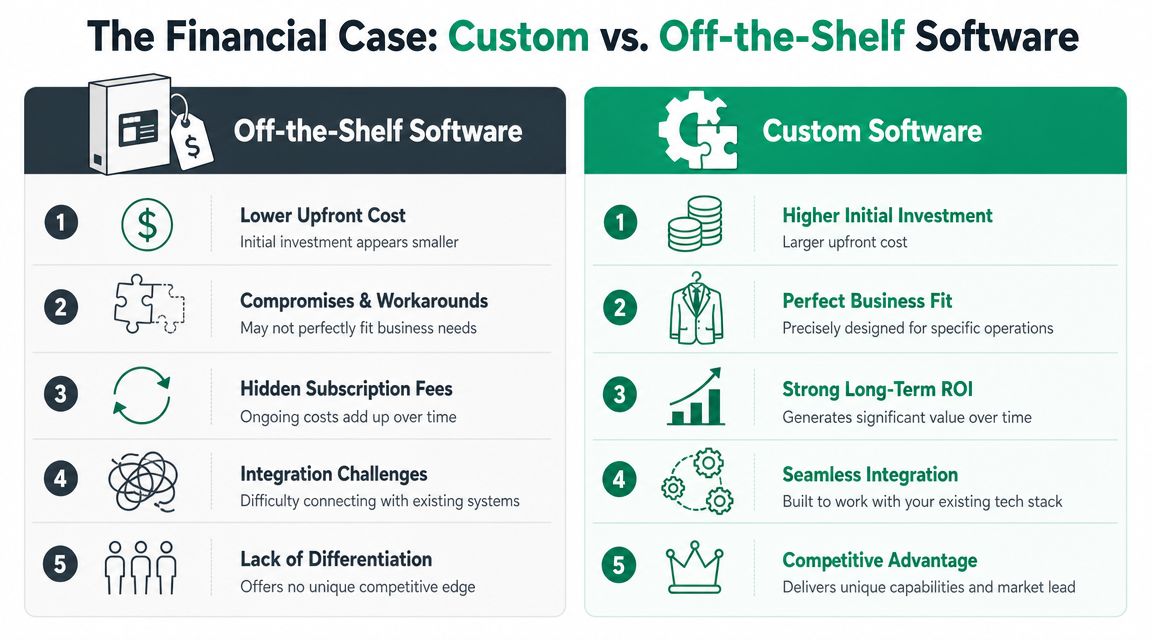
Let's deal with the objection first. Custom software usually costs more upfront.
That's true, and pretending otherwise wastes everybody's time. But the cheaper-looking option on day one often becomes the more expensive option over the life of the system. Subscription creep, per-user pricing, forced upgrades, training overhead, and integration middleware can pile up subtly until nobody can explain what the software stack costs.
The hidden bill inside SaaS
Off-the-shelf software wins on speed and convenience. It often loses on fit and long-term control.
A Johnson County business owner usually feels those costs in familiar places:
| Consideration | Off-the-Shelf Software (SaaS) | Custom Software |
|---|---|---|
| Initial spend | Lower entry cost | Higher upfront investment |
| Monthly budgeting | Recurring subscription fees and add-ons | More predictable once deployed and supported |
| Workflow fit | Often requires compromises | Built around your actual operation |
| Integration | Depends on vendor APIs and connector limits | Designed for your systems and data model |
| Scalability | Tied to vendor tiers and packaging | Built around actual usage and demand |
| Ownership | Vendor controls roadmap and platform changes | Business controls priorities, code access, and evolution |
| Downtime risk | Vendor updates can disrupt workflows | Updates can be planned around your schedule |
Downtime deserves special attention. A broken workflow doesn't need a full network outage to hurt revenue. If a vendor update changes a form, breaks an integration, or blocks a critical approval path, the office can stall fast. That kind of wasted tech time pulls employees off customer work and into cleanup.
Why custom can win financially
Zartis on custom software ROI and operating cost reports that custom software can reduce operational costs by 20% and deliver 15 to 20% higher ROI versus off-the-shelf alternatives. The article ties that to eliminating recurring license fees and engineering capacity around actual demand rather than vendor pricing tiers.
That's the part many SMBs miss. With a custom platform, you can scale the parts under load instead of paying for bloated bundles you don't use. Modular services, selective feature deployment, and cloud-native autoscaling all support cleaner economics when the application is built well.
A short explainer helps frame the decision:
Custom isn't automatically cheaper. It becomes financially smarter when the software touches revenue, scheduling, fulfillment, compliance, or any process your staff can't afford to babysit.
If CRM is where your workflow bottlenecks live, this look at custom CRM software development for business growth gives a concrete example of where ownership and fit matter.
Making the Right Choice for Your Hamilton County Business
A lot of owners assume off-the-shelf software is the safer choice because it feels established. Big vendor, polished UI, lots of logos on the website. But safer for whom?
Sometimes packaged software is safer. Sometimes it's the thing creating the risk.
When custom is the lower-risk option
Velvetech's article on project failure risk in digital transformation notes that about 70% of digital transformations fail to meet their objectives. That's a useful reality check. Failure often has less to do with coding and more to do with mismatch. The software doesn't fit the process, so teams build workarounds, leaders lose trust in the system, and the project turns into rework.
That changes the usual custom-versus-SaaS conversation.
If your process is your secret sauce, forcing it into a generic product may create more risk than building the right thing. The same goes for businesses where auditability, access control, and exception handling aren't optional.
Good candidates for custom
Custom software is often the smarter choice when one or more of these are true:
- Your workflow creates competitive advantage. A logistics, manufacturing, or service business may win because it schedules, routes, quotes, or fulfills work differently.
- You operate under strict compliance rules. A defense contractor near Crane may need CMMC-aware workflows. A medical practice or lab may need HIPAA-centered data handling. Many businesses should align broader security governance with NIST CSF.
- You have too many workarounds. If people rely on side spreadsheets, repeated exports, and inbox gymnastics, your software stack is already telling you it doesn't fit.
- Your team needs control over process changes. When business rules shift, you can't wait for a vendor roadmap that may never prioritize your use case.
When custom is the wrong move
Not every company needs a custom app.
If your need is commodity-grade, your timeline is immediate, and the process isn't central to how you make money, a standard platform can be perfectly fine. The mistake is assuming that because something is popular, it's automatically safer for your business model.
The safer option is the one your staff can actually use without bending the business around it.
From Idea to Launch A Practical Process Overview
Most bad software projects don't fail in the coding phase. They fail much earlier, when nobody nails down the workflow, ownership, security boundaries, and success criteria.
A professional custom build should feel structured from the start. Not chaotic. Not magical. Not dependent on one developer's memory.
What a solid process looks like
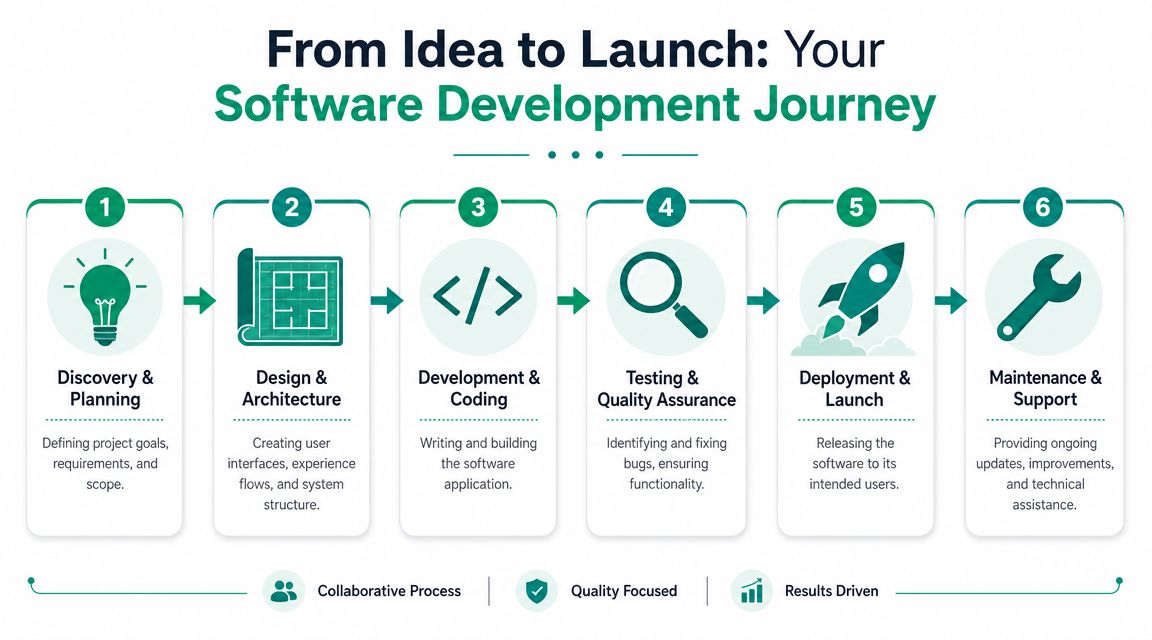
A practical engagement usually follows a sequence like this:
-
Discovery and planning The team maps goals, users, system constraints, compliance needs, and failure points. During this phase, you learn whether the problem is a full application, a portal, an integration layer, or a phased rollout.
-
Design and architecture
Before anybody writes serious code, the workflow gets modeled. Screens, approvals, data movement, permissions, and reporting paths all need definition. Good architecture also plans for resilience, backup strategy, and secure API behavior. -
Development and testing
This is where technical discipline matters. Separate staging and production environments. Role testing. Regression checks. Validation of integrations. Security controls based on Zero Trust principles, not broad trust by default. -
Deployment and support
Go-live should be controlled, not dramatic. The right partner stages rollout, monitors performance, and handles support with a clear SLA instead of disappearing after launch.
Building for AI without losing control
This part is newer, but it's becoming a real factor in buying decisions. Senla's article on AI-ready custom software and security notes that 65% of organizations were regularly using generative AI in 2024, and it also cites an average data breach cost of USD 4.88 million.
That combination matters. Businesses want AI features, but they don't want to spray sensitive operational data across a pile of third-party tools with weak governance.
A well-built custom application can expose the right data and workflows to AI systems under controlled conditions. That means cleaner auditability, tighter permissions, and better decisions about what data leaves the environment. It also makes room for future features like internal copilots, customer service automation, predictive maintenance, or document classification without handing your company's brain to every SaaS vendor that promises an AI sidebar.
AI readiness isn't about adding a chatbot. It's about controlling the data, permission model, and workflow hooks that AI will depend on later.
The underlying technical work might include API design, queue-based processing, encrypted storage, immutable off-site backups, and SOC-as-a-Service monitoring around production systems. That's how you future-proof without cutting corners.
Finding the Right Development Partner in Central Indiana
The wrong development partner will talk about code before they understand your business. The right one will ask how work moves, where it stalls, what can't go down, and which compliance rules can ruin your week if they aren't handled correctly.
That matters more in Central Indiana than many firms admit. A cheap offshore build may look attractive in a proposal, but it usually won't reflect the realities of a Johnson County service business, a healthcare office in Hamilton County, or a defense-adjacent manufacturer with CMMC pressure. Local context changes the requirements.

What to look for
A good partner should bring more than programmers.
Look for these signals:
- Security maturity. They should speak comfortably about Zero Trust architecture, least-privilege access, logging, backup design, and secure deployment practices.
- Operational accountability. Ask about support windows, SLAs, escalation paths, and what happens when an integration breaks on a Tuesday morning.
- Compliance fluency. They don't need to be your attorney, but they should understand why HIPAA, CMMC, and NIST CSF shape technical decisions.
- Infrastructure awareness. Software doesn't run in a vacuum. The team should understand endpoint security, cloud hosting, Wi-Fi reliability, VLAN design, and how latency affects user experience in the field.
- Plain communication. If they can't explain trade-offs in normal English, the project will get expensive fast.
What experienced teams do differently
In our 17 years, we've learned that successful software projects are built on communication long before they're built on frameworks. The best engagements include discovery sessions with the people doing the work, not just leadership. They test assumptions early. They don't hide complexity, but they don't manufacture it either.
They also think about continuity. If a custom app becomes central to your operation, it needs support discipline behind it. That can include documented recovery procedures, monitored backups, version control, staging environments, and clear ownership over updates.
If you're evaluating options, this guide to hiring a custom application developer in Indiana will help you ask better questions before you sign anything.
Good software partners don't just ship features. They reduce operational risk.
If you're tired of fighting with software that slows your team down, Finchum Fixes IT can help. For businesses in the Greenwood and Indianapolis area, a Free Network Assessment or Security Risk Audit is a practical first step. It will show where disconnected systems, weak integrations, aging infrastructure, or compliance gaps are costing you time and creating avoidable downtime.