Secure Data Migration: A Greenwood Guide to Moving Data
A nine-year-old tower server in a Greenwood business park off the I-65 corridor starts warning about its RAID 5 array. The owner wants the files moved before the next failure, but nobody can say which folders the accounting application uses or whether last night's backup restores cleanly.
Secure data migration moves data through six phases, and each phase ends with an exit check that proves the data arrived intact. The work includes planning, encrypted transfer, validation, and a tested rollback path. That turns a risky copy job into a scheduled change, with evidence that staff can keep working if something goes wrong.
Table of Contents
- The Six Phases of a Secure Migration
- Map Your Risk and Compliance Before Cutover
- How to Run the Transfer With Encryption Intact
- Validate Before Cutover and Keep a Rollback Path
- Fix the Problems That Derail Migrations
- Book a Free Network Assessment Before the Move
The Six Phases of a Secure Migration
The first decision isn't which cable or cloud service to use. It's what must move, who owns it, and which systems depend on it. For that aging Greenwood server, the inventory needs to include shared folders, databases, user permissions, application links, backup sets, and any scheduled jobs that write to the machine overnight.
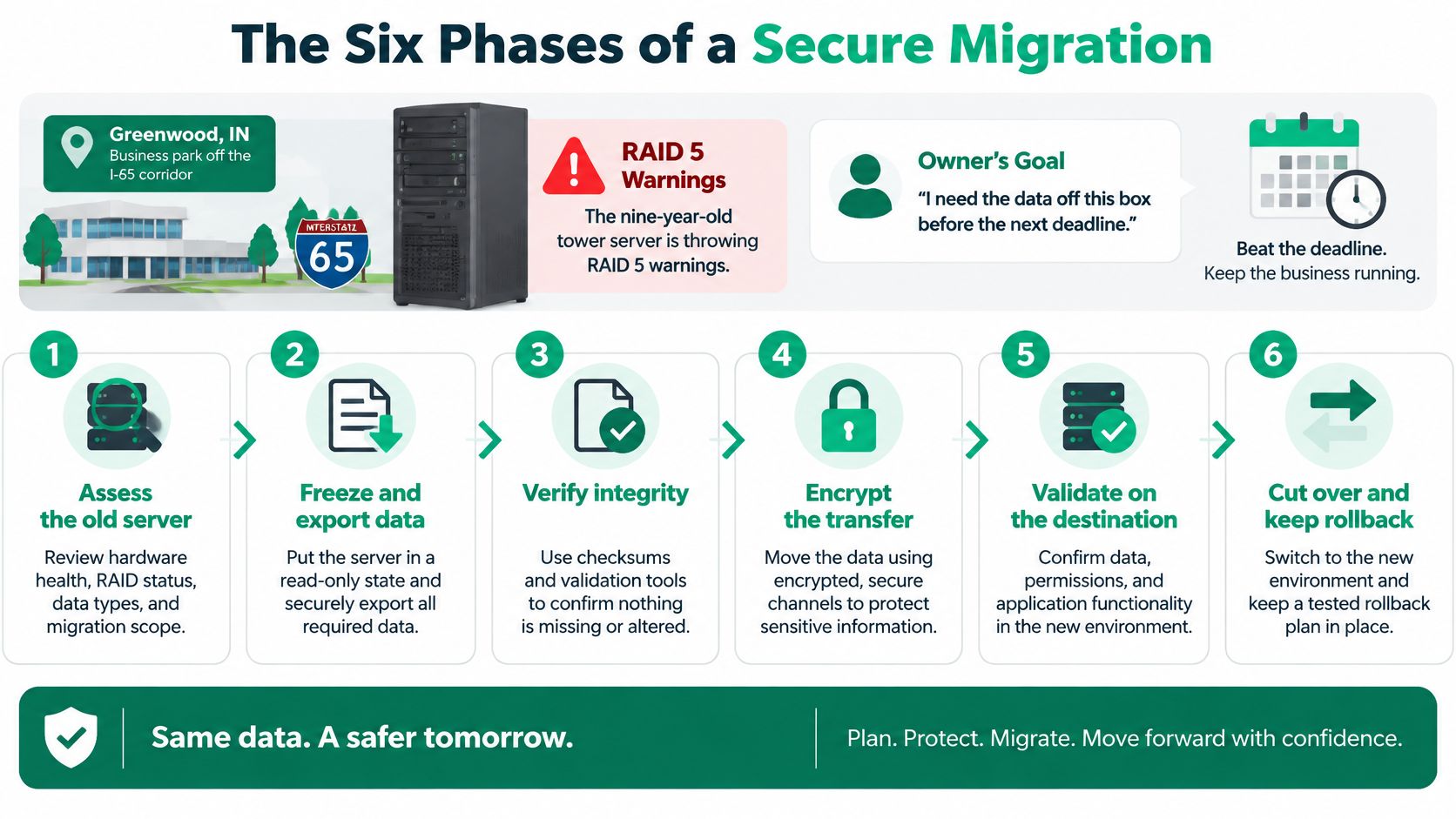
The process has six steps: assessment and planning, migration strategy, pre-migration testing, data migration, validation and testing, and go-live and support. Each step ends with a check that must pass before the next one begins. The table below makes those handoffs explicit.
| Phase | What Happens | Exit Check |
|---|---|---|
| Assessment and planning | Inventory every system, classify data, and map dependencies | Signed inventory with named data owners |
| Migration strategy | Choose waves or cutover method and write the rollback plan | Approved plan with timeline and rollback steps |
| Pre-migration testing | Run the migration in an isolated copy of the environment | Zero unexplained errors in the isolated run |
| Data migration | Encrypted transfer, initial copy, and replication of changed records | Row counts and checksums match on critical objects |
| Validation and testing | Reconcile totals, test restores, and run user acceptance | Zero unexplained variance and signed sign-off |
| Go-live and support | Cut over, monitor closely, and keep the rollback snapshot | Stabilization period ends with no open rollback trigger |
Put an exit check on every handoff
In assessment, map the source server, applications, file shares, and network path. Commands such as du -sh /srv/* help size directories, while find /srv -type f | wc -l gives a basic file count. For PostgreSQL, psql -l lists databases. These are discovery aids, not a substitute for naming the person responsible for each dataset.
The migration strategy sets the order of work and the rollback procedure. The test migration runs against an isolated copy, so a missing permission or database dependency can be fixed before it becomes a live outage. During transfer, UniFi switching can provide a stable local network path, while Bitdefender GravityZone can scan endpoints before and after the move.
Practical rule: Don't call a phase complete because the copy command returned success. Close it with the evidence in the exit-check column.
For general business security, the NIST Cybersecurity Framework 1.1 quick-start guide organizes controls around Identify, Protect, Detect, Respond, and Recover. Its Protect guidance recommends regular backups and keeping one frequently backed-up copy offline. That supports a practical migration workflow: record assets, confirm the backup, validate the transfer, and test restoration. Teams comparing process models can also consult data migration best practices for CEFs as a reference point.
The cost of getting the sequence wrong is more than a messy weekend. Unplanned downtime interrupts sales, payroll, scheduling, and customer service; a planned cutover gives staff a window they can prepare around. Count your servers and shared folders this week. That's the first inventory task, and it's more useful than guessing what the old box contains.
Map Your Risk and Compliance Before Cutover
The risk is not just that a file transfer fails. It's that the migration temporarily creates more places for sensitive data to sit and more accounts that can reach it. IBM's 2025 Cost of a Data Breach research, which analyzed 600 organizations across 17 industries worldwide that experienced breaches between March 2024 and February 2025, found that breaches involving data across public clouds, private clouds, and on-premises systems cost an average of $5.05 million, compared with $4.01 million for breaches involving on-premises data alone, according to IBM's 2025 report.
Migrations create that kind of spread when teams make temporary copies, grant broad administrator access, expose transfer endpoints, or forget to remove exports from the legacy server. Make a location-and-access inventory before moving anything. Record every production copy, replica, log, support snapshot, backup set, and staging folder, then note where it physically resides and who can access it, including outside support personnel.
Turn requirements into checks
The right migration proof depends on the data and the business. Use this table as a starting point, then map each application and dataset to its owner and evidence.
| Business Case | Standard | What the Migration Must Prove |
|---|---|---|
| Healthcare with ePHI | HIPAA Security Rule contingency planning | Exact retrievable backups and tested restores |
| Defense contractor handling CUI | CMMC Level 2 mapped to NIST SP 800-171 | Transfers and access logs stay inside the assessed boundary |
| General business | NIST Cybersecurity Framework | Evidence across identify, protect, detect, respond, and recover |
| Customers in the EU or UK | GDPR | Known storage locations and deletion tested on every replica |
For healthcare, the HHS HIPAA ransomware guidance identifies contingency-plan elements including data backup, disaster recovery, emergency-mode operations, testing and revision, and analysis of application and data criticality. In practice, identify systems tied to patient care, preserve exact retrievable copies, and test restoration rather than assuming that a backup file is usable.
For defense work, define the assessed boundary before transfer and verify that accounts, services, logs, and data flows remain within it. For general business, document how asset inventory, access restrictions, monitoring, response, and recovery controls apply to the migration. If customers are in the EU or UK, map data storage and support access by jurisdiction, and test deletion across replicas rather than treating the primary cloud region as the whole story.
A survey of UK IT leaders on data sovereignty found that only 35% had full visibility into the jurisdiction hosting their organization's data. A domestic cloud region alone doesn't answer who can access support snapshots, operate encryption keys, or reach backups. Record the provider, subcontractors, regional support limits, key operator, and deletion process. For a practical classification workflow before migration, use this data classification framework setup guide. A platform-specific planning reference, particularly for online stores, is Presidio's ecommerce migration roadmap.
Then set a risk tier. Regulated or sensitive data gets a staged migration, with checkpoints and a rollback route. Low-risk archives may fit one planned offline window, provided the transfer is encrypted and the result is verified. The faster option isn't automatically the cheaper one if it leaves copies, access, or jurisdiction unanswered.
How to Run the Transfer With Encryption Intact
Encryption needs to cover the whole route: source, staging area, transport, destination, credentials, and logs. A secure cloud destination doesn't protect a plaintext export sitting in a temporary folder, and encryption in transit won't fix an account that has excessive permissions. A multinational Ponemon study covering 4,140 business and IT managers found that only 37% encrypted data in motion, 31% encrypted it persistently before transfer and within the cloud, and 52% of SaaS users didn't know what protections providers applied to confidential data, according to Ponemon's cloud encryption study.
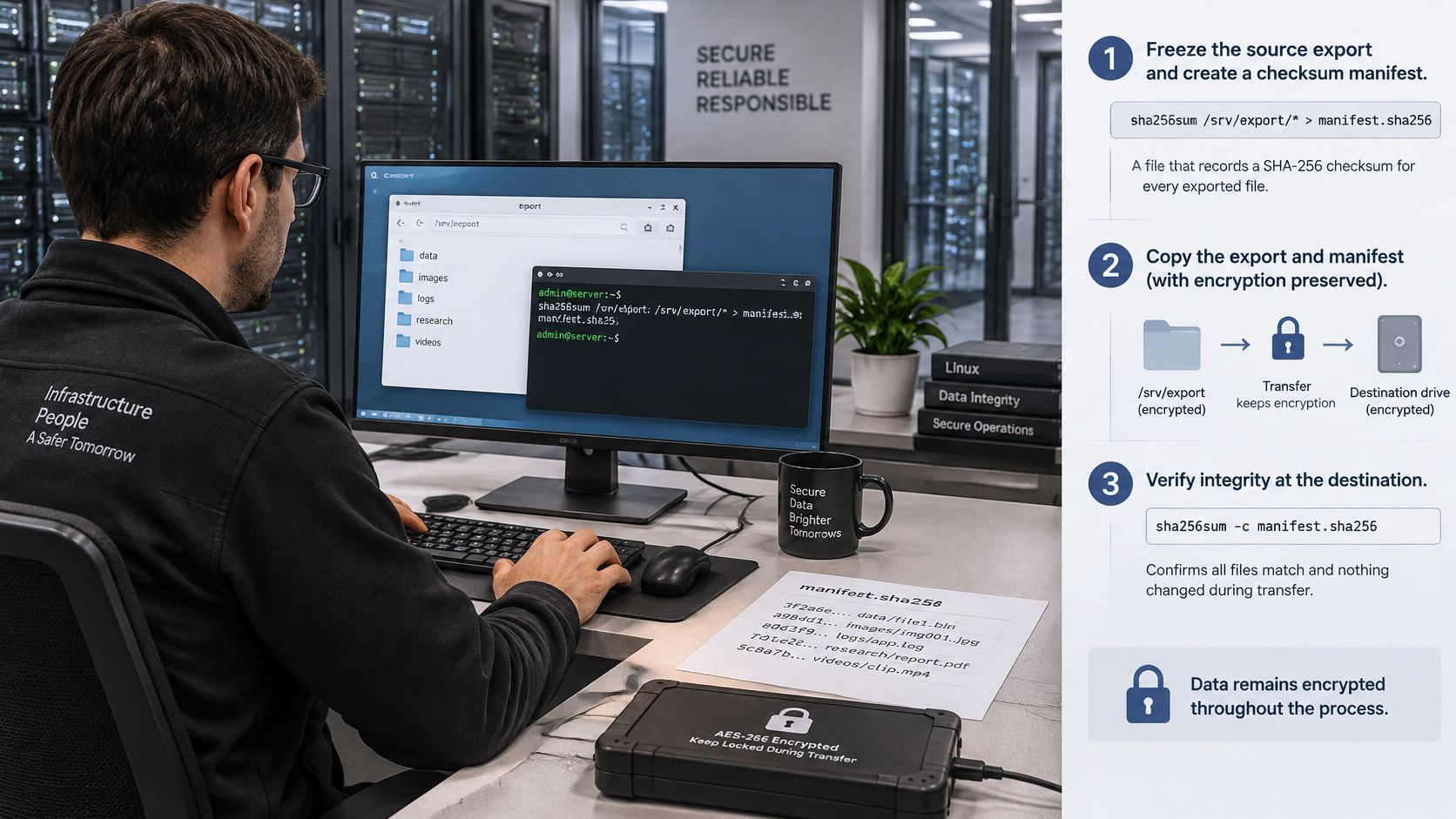
Run the transfer in a controlled sequence
-
Freeze the export and create a checksum manifest. Stop writes to the export or take a consistent snapshot, then run
sha256sum /srv/export/* > manifest.sha256. The manifest proves whether files changed; the common slip is generating it while an application is still updating files. -
Encrypt the destination at rest. Configure AES-256 storage encryption and use customer-managed keys in the cloud key service when the sensitivity of the data warrants that control. Don't assume provider defaults meet your policy, and don't give every migration operator permission to administer the keys.
-
Confirm the transport handshake. Run
openssl s_client -connect dest.example.internal:443 -tls1_3and confirm the connection negotiates TLS 1.3. A successful command isn't the whole security review, so also confirm the endpoint is the intended destination and the certificate is valid. -
Transfer through a logged session. Use
rsync -avz -e ssh /srv/export/ migrate@dest:/vault/import/and capture the session output in the migration record. The common slip is running as a shared administrator or leaving a long-lived credential behind; use a named, least-privilege account and short-lived credentials where available. -
Verify files at the destination. Place the manifest where its paths resolve correctly, then run
sha256sum -c manifest.sha256against the imported files. Investigate every mismatch instead of treating a small number as harmless noise. -
Scan staging for exposed secrets. Run
trufflehog filesystem /srv/stagingand review migration logs and temporary folders for tokens, passwords, or private keys. Don't erase exports or intermediary media until reconciliation, backup, and rollback obligations are complete.
Choose the transfer route to fit the workload
| Method | Best Fit | Downtime | Encryption Requirement |
|---|---|---|---|
| Encrypted network transfer | Databases and file shares on a stable link | Planned cutover window | TLS 1.3 in transit and encrypted destination storage |
| Continuous replication | Systems that cannot go offline | Near zero at cutover | Encrypted replication channel and longer setup |
| Offline encrypted drive | Large archives or air-gapped sets | Planned window | Full-disk encryption with keys sent separately |
| Wave-based migration | Mixed workloads across many systems | Per wave | Encryption and reconciliation repeated each wave |
Choose based on sensitivity, downtime tolerance, ransomware exposure, and the cost of running both environments during dual operation. Continuous replication can keep a source online, but it takes extra setup and close reconciliation. A guide to secure data transfer for Indiana businesses can help teams think through the route before choosing tools.
Treat the provider boundary as something to prove. Get written evidence of provider controls, define separate administrative roles, and test key rotation and access revocation before trusting the arrangement. Keep immutable audit logs. For highly sensitive records, consider client-side or pre-transfer encryption, and scan logs and staging folders for secrets before cleanup.
Validate Before Cutover and Keep a Rollback Path
At 2 a.m. on cutover night, the destination shows every file present and the row count off by a few thousand. That is not a completed migration. Files can exist while rows are missing, permissions are wrong, application totals fail to reconcile, or a restore dead-ends. Validation is the first real recovery test. It runs in layers: initial copy, replication when the source must stay live, count and checksum reconciliation, schema and permission checks, business-user acceptance, and a rollback snapshot held through the agreed stabilization period.
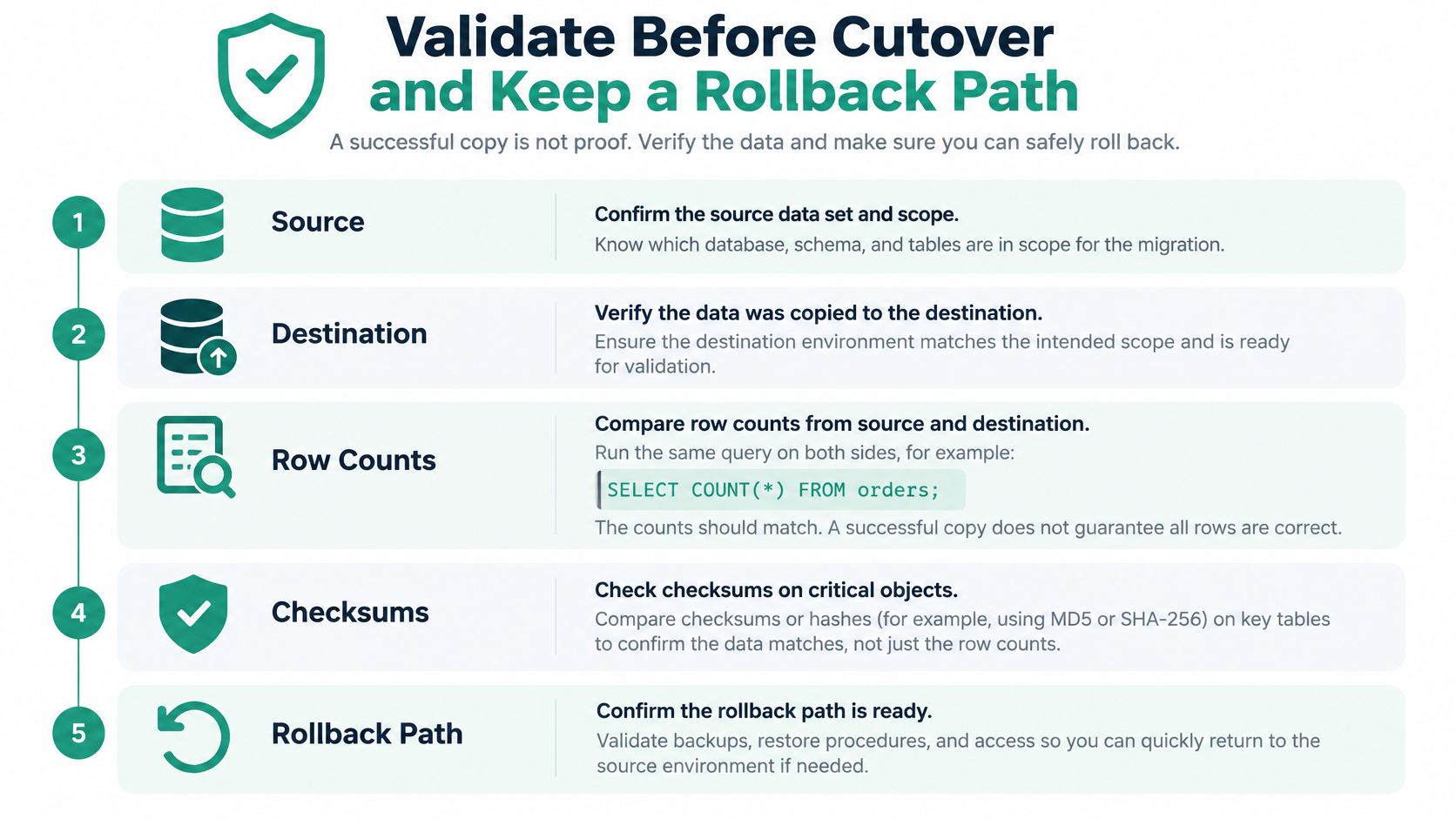
Reconcile in layers
Start with a like-for-like count. Run SELECT COUNT(*) FROM orders; on source and destination at the same snapshot point. A matching count is useful and still weak evidence, because rows can match in number and differ in values. Compare checksums on critical objects and validate schemas.
Then compare business totals. For an accounting system, confirm open invoice balances and other application-level totals against the source. Compare permissions on representative folders, open sample files from the destination, and verify that the application can reach the data it needs. A file that exists but won't open for the right staff member has not passed.
Restore a backup into an isolated environment. Test that the restored system has the correct permissions, application dependencies, and business context. Migration data also gets tested in an isolated environment before the production move, with a custom timeline, risk assessment, and rollback procedures in the strategy. Finchum Fixes IT builds that isolated test into its migration process and guarantees a complete and accurate transfer with 100% data integrity.
Database dependency mapping deserves a formal gate on the schedule. When an application writes to several databases or services, map those dependencies and allow realistic time for replication setup and reconciliation. A straight copy can look finished while the application still depends on a linked database, a scheduled job, or a service account that no one migrated.
Require sign-off before retirement
Give business users a real acceptance test: open the files they use, run normal workflows, and confirm reports and totals. The application owner and data owner both sign off. Architecture and handoff criteria matter here, and this guide to plan validation before migration cutover covers both.
The rollback plan names the person who can initiate it, the exact steps to switch back, and the conditions that trigger the decision. Keep the rollback snapshot until the agreed stabilization period ends. If replication is running, document how writes will be reconciled before switching systems so the fallback doesn't discard new work. I treat the old system as still in production jurisdiction until a restore from the rollback snapshot has passed and both owners have signed off.
For teams setting recovery procedures alongside migration validation, this backup and recovery playbook for SMBs offers a useful operational reference. The migration exit checklist is short: zero unexplained record-count variance, verified checksums for critical objects, successful restore testing, and sign-off from both the application owner and data owner. Retire the old system only after all four pass.
Here's a short visual walkthrough of the validation and rollback mindset:
Fix the Problems That Derail Migrations
A cutover that fails usually fails without notice. The destination is short a few thousand rows, one share out of forty disagrees on checksums, and nobody notices until payroll runs on Monday. The usual causes are a filter that excluded records, a timeout that killed the transfer mid-stream, or writes that landed on the source while the copy was still moving. Freeze writes or identify the missing interval, replay the delta, rerun reconciliation. Hand-patching the destination gives you a second version of the truth, which is harder to untangle than the gap you started with.
Treat the migration as a jurisdiction question: what data is allowed to move where, who holds the keys, and what happens when the old system is gone. In one survey, 38% of organizations strongly agreed that migrations raise security-threat and vulnerability concerns, according to the 451 Alliance analysis of data migration and sovereignty. That is enough reason to scan endpoints with Bitdefender GravityZone before and after cutover and to keep migration credentials scoped to the transfer window.
| Symptom | Likely Cause | Fix |
|---|---|---|
| Row counts short after copy | Filter, timeout, or writes during copy | Replay the delta and rerun reconciliation |
| Checksums mismatch after replication | Files changed during transfer | Freeze writes, then copy the changed objects again |
| Permissions broken after cutover | ACLs not captured or mapped | Restore ACLs from the pre-cutover capture and retest |
| Application slow after cutover | Cross-region latency or missing indexes | Check query plans with EXPLAIN ANALYZE and rebuild indexes |
| Stale copies on legacy hardware | No disposal step in the plan | Cryptographic erase only after sign-off |
Match the fix to the failure
On Windows shares, capture access control lists with icacls before cutover, restore them on representative folders, then log in as an ordinary user to confirm. For PostgreSQL 16 performance problems, EXPLAIN ANALYZE shows whether a missing or unused index sits behind the slowdown. When application traffic crosses regions, check latency and available bandwidth before blaming the database; this guide to network throughput for SMBs covers where the bottleneck usually sits.
Old buildings bring their own failure mode. A Greenwood office with brick walls and sparse cabling turns a routine transfer into a string of retries. Properly placed UniFi access points in a mesh layout, with latency-optimized mesh nodes where the design calls for them, fix coverage so the cutover doesn't stall whenever a link drops. Check the wired path and access point placement first. Mesh cannot rescue a poor upstream connection, and no amount of tuning compensates for a saturated uplink.
A backup that hasn't been restored is only a hopeful file. Keep an immutable or isolated recovery copy and prove it restores with the permissions and dependencies the business needs. Zero Trust architecture limits migration access to the identities and systems that require it, and SOC-as-a-Service monitoring supplies oversight of alerts and account activity while the change window is open. If the old RAID array dies before a clean copy exists, bit-level data recovery may be the only way to preserve what remains. Hold the cryptographic erase on legacy hardware until owners sign off and the rollback requirement is formally closed.
Speed is a trade-off you choose, not a property the tool hands you. A staged move means paying to run two environments for a while, and that bill buys a controlled stop, a reconcile, or a rollback. All-or-nothing cutovers are cheaper right up until the night they aren't.
Book a Free Network Assessment Before the Move
Start by counting every server, shared folder, and SaaS export. Mark which datasets hold regulated or sensitive information, then record where each copy lives: replicas, logs, backup sets. If nobody can name a data owner or find an export, put that gap on the list before scheduling anything. This inventory is your jurisdiction map. It defines what must stay in bounds, what must be encrypted, and what has to be recoverable if cutover goes wrong.
If the move touches regulated data, a network security assessment guide for Indiana SMBs can help frame the questions. Finchum Fixes IT's free migration assessment and custom migration strategy turn that inventory into a written plan with a timeline, risk assessment, rollback procedures, and named data owners. The assessment also confirms that migration data is tested in an isolated environment before production changes. That is where stale service accounts, undocumented exports, and single-person encryption keys surface.
Downtime for an Indiana business means more than an offline server. It means staff waiting instead of handling customers, processing orders, or completing billable work. A planned cutover protects continuity and turns scattered troubleshooting into productive hours and predictable monthly budgets.
Retire the old system only after the rollback path is proven, not when the new system first accepts a login.
Finchum Fixes IT provides secure data migration with a service guarantee of complete and accurate transfer with 100% data integrity. The service covers cloud, database, server, and storage migration, plus legacy system upgrades, with zero data loss and minimal downtime. Book the free migration assessment with Finchum Fixes IT in Greenwood before the next hardware failure makes the decision for you. Visit Finchum Fixes IT to schedule the assessment and get the custom migration strategy in writing.