Cloud Migration Solutions: A Guide for Indianapolis Businesses
TL;DR: Key Takeaways
- Your aging on-premise server is a business risk. When it fails, downtime can cost your business up to $9,000 per minute. Cloud migration converts this risk into a predictable monthly cost, boosting ROI.
- Moving to the cloud prevents downtime and turns "wasted tech time" into billable hours. This is how you achieve true business continuity and predictable IT budgets.
- A professionally managed cloud environment is far more secure. It uses a Zero Trust architecture and immutable off-site backups to protect against ransomware and helps meet compliance standards like HIPAA and CMMC.
- Local expertise matters. A partner who understands the Greenwood and Indianapolis landscape ensures a smooth migration, avoiding common pitfalls with hardware like UniFi networking or software like Bitdefender GravityZone.
Your Aging Server Is a Ticking Time Bomb
Let’s talk about that server humming away in your Johnson County office closet. You know the one. Its fan whirs a little louder each week, and it groans when you need it most. For many businesses in the Indy metro area, this aging hardware isn't just an IT nuisance; it's a crisis waiting to happen. That machine is the single point of failure your entire operation hangs on.
Every minute that box is down isn't just an inconvenience. When you hear that downtime can cost a business up to $9,000 per minute, you realize that piece of hardware isn’t just old—it's a financial time bomb aimed at your bottom line.
For any business up and down the I-65 corridor, this translates into daily sluggishness and a frustrated team. Think about all the "wasted tech time" your people burn waiting for slow apps to load or rebooting a frozen system. Those are billable hours vanishing, all because you’re wrestling with ancient tech.
The Permanent Fix for Hardware Headaches
This is exactly where cloud migration solutions stop being a buzzword and start being a permanent fix. Instead of getting hit with a massive, five-figure bill to replace that server in a Greenwood business park every few years, you transition that unpredictable capital expense into a stable, predictable monthly operational cost. Your IT budget suddenly becomes a manageable line item you can actually plan for, a key part of ensuring business continuity.
The older your infrastructure gets, the more the risks stack up. This isn’t just about servers. It’s the same story with old phone systems, where a seamless landline to VoIP migration can patch up similar vulnerabilities. The point is to build a more resilient company.
In our 17 years helping businesses right here in Greenwood, we’ve seen it countless times: a great company completely held back by its on-premise hardware. A smart migration doesn’t just eliminate that single point of failure; it converts that wasted tech time directly into measurable ROI.
It's Time to Operate Smarter
There's a reason the global cloud migration market is set to hit an estimated USD 234.28 billion by 2035. Small and medium-sized Indiana businesses are making the move because the ROI is clear—we’re talking about cutting IT costs by 30-40% with pay-as-you-go pricing and getting 99.99% uptime you can count on. If you're curious, you can explore the latest market growth insights on precedenceresearch.com.
This isn't just about swapping out old tech. It's about building a business that can weather any storm. By ditching failure-prone hardware, you’re investing in true business continuity. Smart techniques like server virtualization are a huge part of making this happen smoothly. You can learn the nuts and bolts by reading our guide on what server virtualization means for Indiana businesses.
Ultimately, it’s time to stop losing sleep over that aging server and start focusing on growing your business.
The 3 Flavors of Cloud Migration
So, you’re ready to ditch that server closet and stop worrying about aging hardware. But how do you actually get to the cloud? It’s not a one-size-fits-all process. Think of it like moving your business from an old brick building downtown to a new facility—you have a few ways to get there.
Nailing down the right cloud migration strategy from the start is the key to a smooth project. There are three main routes, and the best one for your Johnson County business boils down to your goals, your budget, and how fast you need to move.
Comparing Cloud Migration Strategies for Your Business
To make sense of these options, it helps to see them side-by-side. Each approach offers a different balance of speed, cost, and long-term benefit.
| Strategy | Analogy | Cost & Time | Risk Level | Best For |
|---|---|---|---|---|
| Lift-and-Shift | The Quick Move-In | Low & Fast | Low | Businesses needing to escape failing hardware fast or with a tight budget. |
| Replatforming | The Minor Renovation | Medium | Medium | Companies wanting immediate performance gains without a complete overhaul. |
| Refactoring | The Full Gut-Job | High & Slow | High | Organizations aiming for maximum cloud performance, scalability, and long-term ROI. |
Let's unpack what each of these really means for your day-to-day operations.
1. Rehosting, or "Lift-and-Shift"
This is your fast and straightforward option. We call it Rehosting, but everyone in the industry knows it as "Lift-and-Shift." It's like calling movers to pack up everything in your current office—desks, chairs, computers, files—and drop it all into a new, more secure building. You’re not changing a thing, just the location.
We essentially take a perfect copy of your existing servers—applications, data, the whole nine yards—and spin it up on cloud infrastructure. It’s a direct clone, with minimal changes to how your software is built. The big win here is speed. If you need to get off failing hardware yesterday, this is your escape hatch.
The trade-off is you're not fully taking advantage of the new environment. Your apps won't magically run better just because they're in the cloud. It’s a solid first step, but often just the beginning of a bigger journey. This move can set the stage for future upgrades, which you can read about in our guide to legacy system modernization strategies that drive business growth.
2. Replatforming, or "Tweak-and-Move"
Next up is Replatforming, which we call the "Tweak-and-Move." Back to our moving analogy, this is where you move your old office furniture but make a few smart upgrades. Maybe you swap out clunky filing cabinets for a modern storage system or upgrade the building's internet connection. You’re making small changes that give you a real benefit.
For instance, we helped a Greenwood distribution company move its logistics software to the cloud (the lift) but switched their old, manually-managed database to a fully managed cloud database service (the tweak). That one small change slashed their maintenance overhead and boosted performance, freeing up their team to focus on bigger things and converting wasted tech time into profit.
After 17 years serving local businesses, we've seen that Replatforming often hits the sweet spot. It strikes a fantastic balance between cost, effort, and getting real, tangible performance improvements right away, directly contributing to a better ROI.
3. Refactoring, or "The Full Remodel"
Finally, we have Refactoring. This is the big one—the full gut-renovation. Instead of just moving things over, you're rebuilding your applications from scratch to be "cloud-native." This means designing them to tap into all the powerful features the cloud offers, like automatic scaling or serverless functions that only run when needed.
It's the most intensive and expensive route, but it delivers maximum long-term ROI. You end up with systems that are incredibly efficient, resilient, and ready for future growth.
This handy decision tree can help you visualize which path makes the most sense based on what you’re trying to achieve.

As you can see, if you just need to move fast, Lift-and-Shift is your go-to. If you’re hunting for the best possible performance and long-term value, Refactoring is the ultimate goal. For most businesses in the Indy metro area, Replatforming offers a balanced, high-impact middle ground.
Boosting Your Business with Cloud Migration
Let's get right to the point: How does moving to the cloud actually help your bottom line? It's not about shiny new tech. It's about building a smarter, more resilient, and more profitable company by getting out of the hardware-buying game.
For a growing business in Hamilton County, this is a game-changer for your budget. Instead of bracing for a massive, five-figure hardware refresh every few years (a capital expense, or CapEx), you switch to a predictable monthly cloud bill (an operational expense, or OpEx). Suddenly, your cash flow is predictable, and you've freed up capital to pour back into your actual business.
That financial stability is a huge win, but the real magic is what it does for your business continuity. A professionally managed cloud setup is built for uptime, preventing the kind of disastrous outage that can bring a company to a halt and cost thousands per minute.
In our 17 years working with local Indiana firms, we've seen it time and again: a well-planned cloud migration cuts down on those frantic, middle-of-the-day emergency IT calls by over 70%. Think of all that "wasted tech time" your team gets back when they stop fighting IT fires and start focusing on billable work. That’s direct ROI.
From Cost Center to Strategic Asset
Imagine your IT infrastructure working for you instead of against you. A proper cloud architecture has automated failovers baked right in. That means if one part of the system stumbles, your operations instantly and automatically switch to a healthy backup. No one even notices.
Now, compare that to the poor soul with a server closet in a Greenwood business park. A single hardware failure can stop their business cold for hours. This is about turning IT from a reactive cost center into a proactive, strategic advantage that improves ROI.
- Kill Unexpected Costs: Say goodbye to surprise repair bills and the dreaded hardware replacement cycle.
- Boost Team Productivity: When systems are fast and always on, your people spend less time on tech issues and more time on revenue-generating tasks.
- Grow on Your Terms: Need more power for a busy season? Scale up in minutes. Things slow down? Scale back just as easily, without being stuck with a server you don't need.
The Financial Impact of a Smart Move
Companies are moving to the cloud for a reason. The cost savings and flexibility are undeniable. Globally, companies are slashing their capital spending by 30-50% and gaining the ability to scale on a dime.
For an SMB in Indiana, that translates into real-world results. We've seen a local business migrate its UniFi networking to the cloud to support ten times the user growth without buying a single new piece of equipment. We've watched another deploy custom apps 60% faster because they were built on cloud-native platforms. You can see more data on the cloud's financial impact on Mordor Intelligence.
A strategic cloud migration is one of the smartest moves to secure your company’s future. It’s how you build a more efficient, tough, and competitive business that’s ready for anything.
Securing Your Data and Meeting Compliance
For many business owners, the word "cloud" can sound risky, like launching your company's most sensitive files into the unknown. We hear this concern all the time from folks in downtown Indy tech hubs.
Here’s the reality: a professionally managed cloud setup is almost always light-years more secure than that server humming away in your office closet.
Think of your on-premise server like a safe in your office. It's protected by your building's locks. A major cloud provider, on the other hand, is like Fort Knox. We're talking multi-layered physical security, redundant power systems, and a whole army of experts watching over it 24/7. Which one would you rather bet your business on?
From Perimeter Guards to Zero Trust
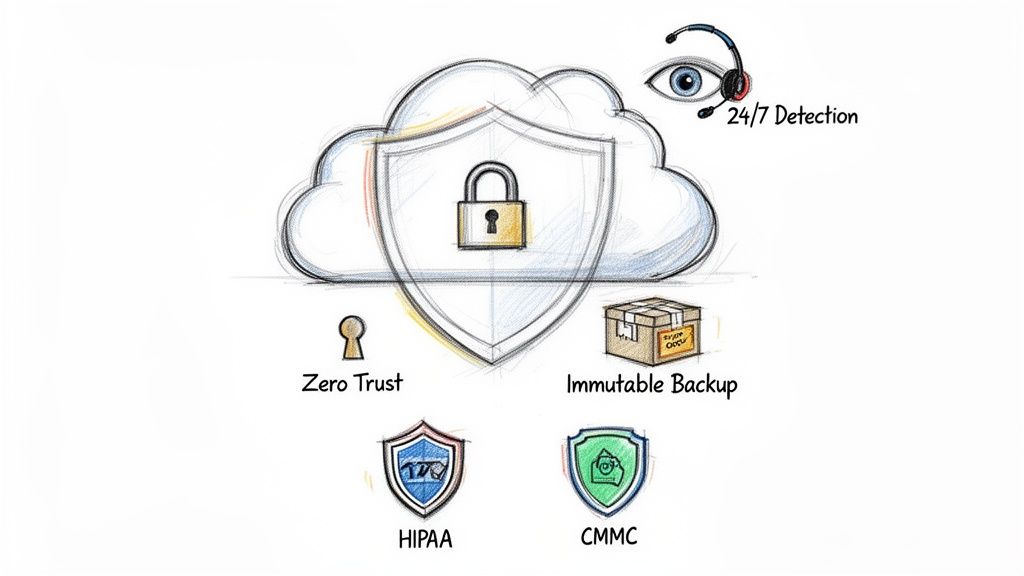
Old-school security was all about building a bigger wall around your network. The problem? Once a bad guy gets past the gate, they have free rein. That’s why we build our clients’ cloud environments on a Zero Trust architecture.
The principle is simple but powerful: never trust, always verify.
Instead of just guarding the front door, this model puts a security checkpoint at every single door inside. It challenges every request to access data, regardless of where it's coming from. This approach dramatically shrinks the chance of an intruder moving freely if they ever breach initial defenses. This is a core component of modern business continuity.
Across the US, stronger security is a huge driver for cloud migration. In fact, 60% of projects are driven by the need for compliance features like Zero Trust. Most companies (80%) also migrate in phases to keep daily operations running smoothly. You can read more about how cybersecurity is shaping US cloud trends on omrglobal.com.
Meeting Indiana’s Compliance Demands
For businesses across Central Indiana, compliance isn't just a suggestion—it's a requirement. We have deep, hands-on experience configuring cloud environments to meet the toughest industry standards.
- HIPAA: For healthcare providers in Indianapolis, we design systems that lock down protected health information (ePHI) with iron-clad access controls and detailed audit trails.
- CMMC: For defense contractors along the I-69 corridor, we build cloud environments that satisfy the Department of Defense's strict Cybersecurity Maturity Model Certification.
- NIST CSF: We align your security strategy with the National Institute of Standards and Technology Cybersecurity Framework, the gold standard for managing risk for any business.
Your Ultimate Defense Against Ransomware
One of the biggest fears for any Johnson County business owner is ransomware. It’s a nightmare scenario. This is where immutable off-site backups become your best friend.
Think of an immutable backup as a photograph of your data that can't be altered. Once it’s taken, ransomware can’t encrypt, change, or delete it. When we dissembled a similar client’s failing RAID array after an attack, it was this immutable copy that saved them. It’s your get-out-of-jail-free card.
In our 17 years of service, we’ve restored countless systems from these unchangeable backups, getting clients back up and running in hours, not weeks. We implement these protections using top-tier tools like Bitdefender GravityZone and watch over your systems with 24/7 threat detection from our SOC-as-a-Service monitoring.
For a deeper dive, check out our guide on the 10 data migration best practices that secure Indiana businesses. This layered defense makes your business far more resilient.
Your Cloud Migration Readiness Plan
Jumping into a cloud migration without a solid plan is a recipe for disaster. For Indiana businesses, a thoughtful readiness plan is the single most important factor for a smooth, cost-effective transition that maximizes ROI.
This isn’t about a hundred-page document that gathers dust. It’s a practical, step-by-step playbook. After spending over 17 years helping local companies navigate this process, we’ve learned it all comes down to asking the right questions before a single file gets moved.

Step 1: Assess Your Applications and Infrastructure
First, we pop the hood. This means a complete inventory of every application, server, and piece of data you rely on. Think of it like a home inspector checking the foundation before a renovation—you have to know what’s solid, what’s outdated, and where the hidden dependencies are.
We'll help you sort everything into key buckets:
- Mission-Critical Apps: The heavy hitters your business can't operate without. Your CRM, accounting software, or main operational platform.
- Legacy Systems: An old, custom-built application that’s been chugging along for a decade? It might need special attention.
- Low-Hanging Fruit: Perfect candidates for a pilot migration. Think internal file shares or development servers that let us test the waters safely.
This audit is where we uncover potential showstoppers. Finding them now saves a world of headaches and budget overruns later.
Step 2: Choose the Right Cloud Model
With a map of your setup, the next decision is where you’re going. The type of cloud impacts cost, security, and control.
- Public Cloud (e.g., AWS, Azure): The go-to for most businesses. You get incredible power and a flexible, pay-as-you-go model perfect for Indianapolis-area companies looking to scale.
- Private Cloud: An environment built exclusively for you. It offers ultimate control and security, a must for organizations with strict compliance mandates like local defense contractors needing CMMC certification.
- Hybrid Cloud: The best of both worlds. Keep sensitive data on a private server while running your website and sales tools on the public cloud.
Step 3: Select Your Migration Strategy
Here, we match each application from Step 1 to one of the "3 Flavors" we covered: Rehosting, Replatforming, or Refactoring.
A rookie mistake is treating every application the same. The most successful cloud migration solutions always use a blended approach. For example, when we helped a Greenwood manufacturing firm, we used a "Lift-and-Shift" to quickly move archived data, but "Replatformed" their core ERP system to get immediate performance gains and ROI.
This methodical, risk-averse strategy is our signature. We start small, moving non-critical workloads first to prove the process and build confidence before touching the systems that make you money.
Step 4: Plan Your Data Migration
Moving your data is the most delicate part of the operation. Our number one priority is getting your information to its new home securely, with zero disruption to your team, ensuring business continuity.
This means meticulously planning for data integrity, locking down security during transit, and scheduling the final cutover with precision. We typically run major data syncs after hours or over a weekend, so when your team logs in on Monday, it's business as usual.
Step 5: Optimize Post-Migration
Getting to the cloud isn't the finish line. Once your systems are running, our focus shifts to optimization.
We actively monitor your new setup to fine-tune performance and control costs. By tracking resource usage, we make sure you aren't paying for cloud capacity you don't need. This final step transforms a one-time project into a lasting competitive advantage.
Why Local Expertise Matters for Your Cloud Journey
When you're tackling something as important as a cloud migration, your choice of partner can make or break the project. You could go with a big, faceless national company, but you become just another ticket in a queue.
At Finchum Fixes IT, we do things differently. We're your neighbors, with a deep understanding of the Central Indiana business scene.
If your network dies in a Greenwood business park, we don't put you on hold. We're local, which means we can guarantee a response time of under two hours for emergencies. We’ve seen it all—from the spotty Wi-Fi in old downtown Indy brick buildings to the connectivity demands of booming businesses in Hamilton County.
More Than Just a Geek with a Screwdriver
Anyone can plug in a cable. True IT support is about a strategic partnership that helps your business grow and improve ROI. Our team has years of hands-on experience with the exact technology your business depends on, backed by credentials from Microsoft, CompTIA, and Cisco.
Over our 17 years of serving the local community, we've learned one crucial lesson: technical skill without local context is practically useless. We’ve set up countless UniFi networking systems and secured dozens of Indiana businesses with Bitdefender GravityZone. This isn’t theory from a textbook; it’s expertise earned in the trenches with businesses just like yours.
We don’t hand out one-size-fits-all cloud migration solutions. We design a plan that fits your operational needs and budget. Because we know the local landscape, we spot potential problems before they start, making your move to the cloud feel smooth instead of disruptive.
Want to learn more about this partnership approach? Check out our guide on how to grow with managed IT services for small business.
Choosing a local expert means picking a partner invested in your success. We bring top-tier know-how to your doorstep, with the rapid response only a neighbor can offer. It’s time to stop letting outdated tech and slow support hold you back.
Contact us today for a Free Network Assessment and see what a cloud solution built specifically for your Greenwood or Indianapolis-area business can do for you.
Got Questions About Moving to the Cloud? We've Got Answers.
The thought of moving your entire business to the cloud can be intimidating. After 17 years of helping businesses around Indianapolis make the switch, we've heard every question.
Let's skip the jargon and get right to what you really want to know.
"How Much Downtime Are We Talking About Here?"
This is always the first question, and for good reason! Your business can't afford to be offline, as downtime can cost up to $9,000 per minute. The short answer? With a smart plan, you should expect next to zero downtime.
A proper cloud migration isn't flipping a giant switch. It’s a carefully choreographed performance. We work in phases, and for the main event, we schedule the final cutover for when you're not working—like overnight or over a weekend.
We did this for a logistics company in Greenwood. We spent a week syncing their data quietly in the background. The final switch took place on a Saturday night. When their team walked in Monday morning, they didn't notice a thing—except that everything was running faster. That’s business continuity in action.
"Isn't the Cloud More Expensive Than My Old Server?"
A monthly cloud payment might seem like a new expense compared to the server you paid for. But what about the real cost of that box in the closet? We're talking about its Total Cost of Ownership (TCO).
That server isn't free to run. You're constantly paying for:
- The power it eats up 24/7.
- The looming, expensive hardware replacement every 3-5 years.
- Costly calls for emergency repairs when it finally dies.
- The hours your own staff wastes on "wasted tech time."
When you add it all up, that single, predictable cloud fee almost always wins. It takes all those budget-wrecking surprises and turns them into one smooth, manageable operational cost, giving you a better ROI.
A well-planned move to the cloud isn't about adding a bill. It's about getting rid of several unpredictable, hidden costs. You trade the constant drain of paying for hardware, emergency fixes, and wasted electricity for one clear price that buys you performance and peace of mind.
"What About My Data Security and HIPAA Rules?"
This is a huge one, especially for our clients in healthcare or anyone handling sensitive data. Here’s the truth: a professionally configured cloud environment is miles more secure than that server under your desk.
Big-name platforms like Microsoft Azure and AWS are built with Fort Knox-level security. They’re already certified for major compliance standards like HIPAA and NIST CSF.
The secret is the setup. We don't just move your data; we build a fortress around it. We implement a Zero Trust architecture (trust no one, verify everything) and set up immutable off-site backups that make your data untouchable to ransomware. For a defense contractor, we ensure the environment meets CMMC standards. Your data is safer, and your compliance is locked down tight.
Ready to stop letting outdated tech dictate your budget and productivity? Finchum Fixes IT provides tailored cloud migration solutions for businesses across the Greenwood and Indianapolis area. Contact us today for a Free Network Assessment to discover how a secure, efficient cloud setup can transform your operations. Find out more at https://finchumfixesit.com.