Top 10 Web Application Security Best Practices for Indiana Businesses in 2026
TL;DR: Key Takeaways
- Prevent Downtime: Your custom web application can be a major source of downtime, costing up to $9,000 per minute. Implementing web application security best practices like a Web Application Firewall (WAF), secure authentication (MFA), and patch management directly prevents breaches that take your business offline.
- Meet Compliance: For healthcare (HIPAA), defense (CMMC), or general business (NIST CSF), these security measures are non-negotiable. Proper security turns compliance from a headache into a competitive advantage.
- Protect Your Revenue: A single breach can destroy customer trust. By securing your application with HTTPS, input validation, and regular security testing, you protect the data that drives your revenue and reputation across the I-65 corridor.
- Convert Tech Waste to ROI: Time spent cleaning up a breach is time you're not billing. A managed security approach with tools like Bitdefender GravityZone and SOC-as-a-Service monitoring provides a predictable monthly cost and ensures your team stays focused on productive work, not digital fire-fighting.
Your custom web application is the engine driving your business, connecting with customers from downtown Indy to the growing suburbs of Hamilton County. But left unsecured, it’s a digital time bomb, ticking down to a data breach that could cost you up to $9,000 per minute in downtime and cripple your reputation. We've seen this happen—a Greenwood business with aging server hardware hosting their app found their entire customer list exposed due to a simple SQL injection flaw. It was a costly, avoidable disaster.
For small and medium-sized businesses along the I-65 corridor, the consequences are devastating. You don’t have a mega-corporation's budget to absorb the financial hit or the PR team to manage the fallout. You need practical security that ensures business continuity. Ignoring these risks is like leaving the front door of your Greenwood office wide open overnight. To effectively defuse this threat, it's crucial to recognize the signs you've been hacked and malware removal procedures.
This guide is your step-by-step defusal manual. We’re handing you a prioritized, actionable toolkit of web application security best practices specifically for businesses like yours. We'll break down ten critical security layers, explaining what they are, why they matter, and how to implement them. This is how you convert wasted tech time into billable hours and protect your bottom line.
1. Implement Web Application Firewalls (WAF)
Think of a Web Application Firewall, or WAF, as a security guard for your website. It inspects every single request trying to access your web application. Unlike a traditional firewall, a WAF understands web traffic. It analyzes HTTP/S requests to find and block attacks like SQL injection and cross-site scripting (XSS) before they can ever touch your application's code. This is part of a Zero Trust architecture—don't trust any request by default.
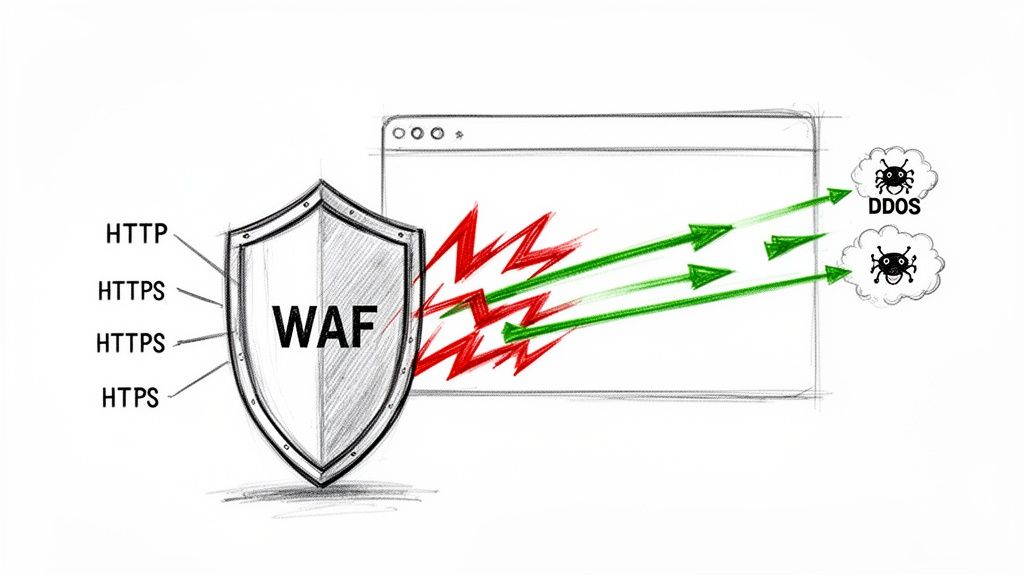
For a growing business in Johnson County with a custom e-commerce platform or a patient portal, a WAF is a critical defense. It's one of the most effective web application security best practices because it stops common attacks without forcing you to constantly rewrite your application's code, a massive time-saver. It prevents the kind of downtime that costs you money and turns "wasted tech time" into a predictable monthly security budget.
WAF Implementation: Quick Wins & Pro Tips
Getting a WAF up and running doesn't have to be a headache. Modern cloud-based WAFs like AWS WAF and Cloudflare can be activated in minutes.
- Start with the Basics: Begin with a pre-configured rule set, like the OWASP ModSecurity Core Rule Set (CRS). This gives you instant protection against the most common threats.
- Tune, Don't Tune Out: A WAF can sometimes block legitimate traffic (a false positive). Set aside time weekly to review blocked requests and fine-tune rule sensitivity.
- Log Everything: Enable detailed logging. If a breach occurs, these logs are your first and best source for forensic analysis.
- Integrate Your Alerts: Connect your WAF's alerting system to your primary monitoring tool or SIEM. You can't respond to threats you don't see.
Expert Take: Based on our 17 years of local service, we've seen Indiana businesses get hit with DDoS attacks that a properly configured WAF could have absorbed without any downtime. Don’t treat it as an optional add-on; treat it as essential infrastructure, just like your UniFi networking gear.
How Finchum Fixes IT Implements WAFs
We don't just "turn on" a WAF. We deploy it as part of a Zero Trust architecture, starting with a full audit of your web application's traffic patterns. We then deploy and meticulously tune a solution like Bitdefender GravityZone or a cloud-native WAF, integrating it directly with our SOC-as-a-Service for 24/7 monitoring. This ensures your web presence along the I-65 corridor is protected, compliant, and always online, maximizing your billable hours.
2. Enforce HTTPS/TLS Encryption for All Data in Transit
If a WAF is the guard for your website, then think of HTTPS encryption as the armored truck carrying all communications. Without it, your data travels in the open, visible to anyone with the tools to look. Enforcing HTTPS with modern Transport Layer Security (TLS) wraps every piece of data—from login credentials to customer payment details—in a layer of cryptographic protection. This prevents man-in-the-middle attackers from intercepting or altering the information as it moves between a user's browser and your server.
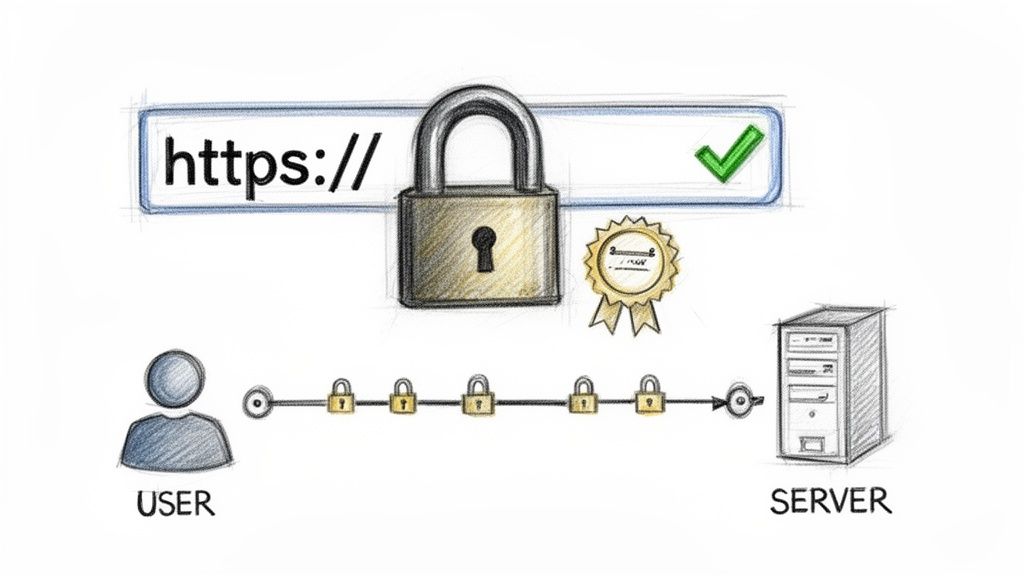
For any Indiana business handling sensitive information, whether it's a Carmel healthcare provider with patient data (a HIPAA requirement) or a Greenwood e-commerce shop processing credit cards (a PCI DSS requirement), HTTPS is not optional. It is a fundamental web application security best practice. Major search engines also penalize sites that don't use it, directly impacting your visibility and customer trust.
HTTPS/TLS Implementation: Quick Wins & Pro Tips
Securing your site with HTTPS is more accessible than ever, but proper implementation is key.
- Disable Outdated Protocols: Immediately turn off support for SSL 3.0, TLS 1.0, and TLS 1.1 on your server. These have known vulnerabilities. Your configuration should require TLS 1.2 at a minimum, with TLS 1.3 preferred.
- Implement HSTS: Add the
Strict-Transport-Security(HSTS) header. This tells browsers to only communicate with your site over HTTPS, preventing downgrade attacks. - Automate Certificate Management: Certificates expire. Use automated tools to monitor expiration dates and renew them on time to avoid service outages. For a deeper dive, you can learn more about how to generate certificates using OpenSSL commands.
- Audit Your Configuration: Regularly use a free tool like Qualys SSL Labs to scan your site. It will give you a detailed report card on your configuration.
Expert Take: We’ve seen businesses assume their hosting provider "handled" SSL, only to find their contact forms were sending customer data in plain text. Don't assume; verify. A missing certificate is a red flag for compliance auditors under standards like NIST CSF.
How Finchum Fixes IT Implements Encryption
We treat data in transit as a critical control point. Our process begins with a full audit of your application's data flows. We then deploy and manage certificates from trusted authorities, enforcing modern cipher suites across your web servers. By integrating certificate lifecycle management into our managed services, we ensure your encryption is never a point of failure, keeping your data secure, your business along the I-65 corridor compliant, and your uptime protected.
3. Implement Secure Authentication and Authorization (OAuth 2.0, MFA)
Think of authentication and authorization as a high-tech security checkpoint. Authentication asks, "Who are you?" while authorization asks, "What are you allowed to do?" Relying on just a password is like using a simple key lock on a bank vault. Modern web application security best practices demand a more robust system using protocols like OAuth 2.0 and, most critically, multi-factor authentication (MFA). MFA requires something you have (a phone app) in addition to something you know (a password).
For a defense contractor in the I-65 corridor managing CMMC compliance or a healthcare provider in Greenwood protecting patient data under HIPAA, secure authentication is non-negotiable. Even if a cybercriminal steals a password, MFA acts as a deadbolt, stopping them cold. It is one of the most effective controls for preventing unauthorized access and the costly business disruption that follows.
Secure Auth Implementation: Quick Wins & Pro Tips
Deploying modern authentication is accessible for any business.
- Mandate MFA for Admins First: Before anything else, enforce MFA on all accounts with administrative access. This immediately protects your most sensitive functions.
- Offer Smart MFA Choices: When rolling out MFA to all users, provide multiple options. Authenticator apps (like Google Authenticator) and FIDO2 hardware keys are far more secure than SMS-based codes.
- Lock Down After Failed Logins: Implement an account lockout policy that temporarily freezes an account after a set number of failed login attempts to thwart brute-force attacks.
- Integrate and Monitor Logs: Pipe all authentication logs (successful and failed) into your central security monitoring system. You can't stop an attack you can't see.
Expert Take: We've seen Johnson County businesses lose access to critical accounts because of a single compromised password. Activating MFA is often a simple change, but the protection it provides is immense. It's the difference between a minor issue and a full-blown data breach. Good authentication also complements the 10 best practices for password management you should know.
How Finchum Fixes IT Implements Secure Authentication
We treat identity as the new security perimeter. Our approach begins by auditing your existing authentication methods. We then deploy and configure a modern identity solution like Microsoft Azure AD, tailored to your business needs. We integrate these systems with our SOC-as-a-Service, providing 24/7 monitoring of authentication events to detect and respond to threats in real-time, ensuring your Indianapolis business remains secure and productive.
4. Perform Regular Security Testing (SAST, DAST, Penetration Testing)
Think of security testing as your in-house spy team, finding weaknesses before real-world adversaries do. This proactive approach is a vital web application security best practice because it shifts you from a reactive, "clean up the mess" posture to actively hunting for trouble. The process involves multiple tactics: analyzing source code (SAST), testing the live application (DAST), and hiring ethical hackers to simulate an attack (penetration testing).
For a growing Indiana business developing custom software, whether for logistics or healthcare, security testing isn't optional. Integrating these tests into your development pipeline catches vulnerabilities when they are cheapest to fix, preventing future downtime and rework. It's the difference between patching a blueprint versus rebuilding a foundation.
Security Testing Implementation: Quick Wins & Pro Tips
You don't need a massive budget to start finding and fixing bugs.
- Start Free, Then Scale: Begin with open-source tools. Use SonarQube for SAST to scan code. Run OWASP ZAP (DAST) against your staging environment to find runtime issues.
- Automate in Your Pipeline: Integrate automated SAST and DAST scans into your CI/CD pipeline. This makes security a constant, automatic check.
- Prioritize, Don't Panic: Your first scan will find a lot. Use a risk-based approach to prioritize fixes. A critical SQL injection flaw is more important than a low-risk issue on a static page.
- Schedule a Professional Pen Test: At least once a year, hire a professional team for a penetration test. This human-led assessment finds complex flaws automated tools miss, a requirement for standards like HIPAA and CMMC.
Expert Take: We’ve seen local tech companies push code to production with database credentials hard-coded right into the source. A simple, free SAST scan would have caught that instantly. Don't assume your developers are security experts; give them the tools to succeed.
How Finchum Fixes IT Implements Security Testing
We integrate security testing directly into the software development lifecycle. Our approach starts by building a threat model specific to your application, informed by our work with businesses across the I-65 corridor. We then deploy and configure a mix of SAST and DAST tools, feeding the results into our SOC-as-a-Service to track remediation. This helps you build a strong security foundation, a critical step before conducting a formal cyber security risk assessment for your Indiana business.
5. Implement Secure API Design and API Gateway Protection
If your web application is a restaurant, APIs (Application Programming Interfaces) are the waiters shuttling data between the kitchen and the dining room. They are the engine behind modern apps. But if a waiter can be tricked into giving away secrets, you have a problem. Securing your APIs is one of the most critical web application security best practices because it protects the very pathways your data travels.
For a growing Indiana company with a custom mobile app, unsecured APIs are an open invitation for disaster. Attackers can exploit them to steal sensitive customer data, manipulate transactions, or bring your entire service down, causing costly downtime. Protecting these endpoints with secure design and an API Gateway is like having a manager who verifies every single order.
Secure API Implementation: Quick Wins & Pro Tips
Locking down your APIs starts with treating them like a priority.
- Authenticate Everything: Use a strong, standardized authentication method like OAuth 2.0 for every API call to know exactly who is making the request.
- Rate Limit Aggressively: Implement rate limiting to prevent a single user or bot from overwhelming your system with requests, a common denial-of-service attack.
- Validate All Inputs: Never trust data coming into your API. Validate all incoming information against a strict schema to block malicious payloads.
- Use Proper Versioning: As your application evolves, so will your APIs. Use versioning (e.g.,
/api/v1/users,/api/v2/users) to manage changes without breaking integrations.
Expert Take: We've seen local tech hubs in downtown Indy build incredible applications that were later compromised through a forgotten, unauthenticated "v1" API endpoint. An API Gateway is a non-negotiable control point for any business that relies on API-driven data exchange.
How Finchum Fixes IT Secures APIs
We build secure digital supply chains. Our approach to API security involves deploying and configuring a robust API Gateway as a central enforcement point. We implement strict OAuth 2.0 and JWT token policies, establish tight rate limits, and ensure all traffic is logged and monitored through our SOC-as-a-Service. This proactive defense means your application's data, whether serving customers in Hamilton County or partners across the globe, is protected by design.
6. Apply Input Validation and Output Encoding (Prevent Injection Attacks)
Imagine your web application form is a secure vault door. Input validation is the guard checking that only authorized items can be put inside. Output encoding is the guard on the way out, ensuring anything displayed to a user is wrapped safely so it can't be used as a weapon. This two-part process is a cornerstone of web application security best practices, designed to shut down injection attacks like SQL injection and cross-site scripting (XSS).
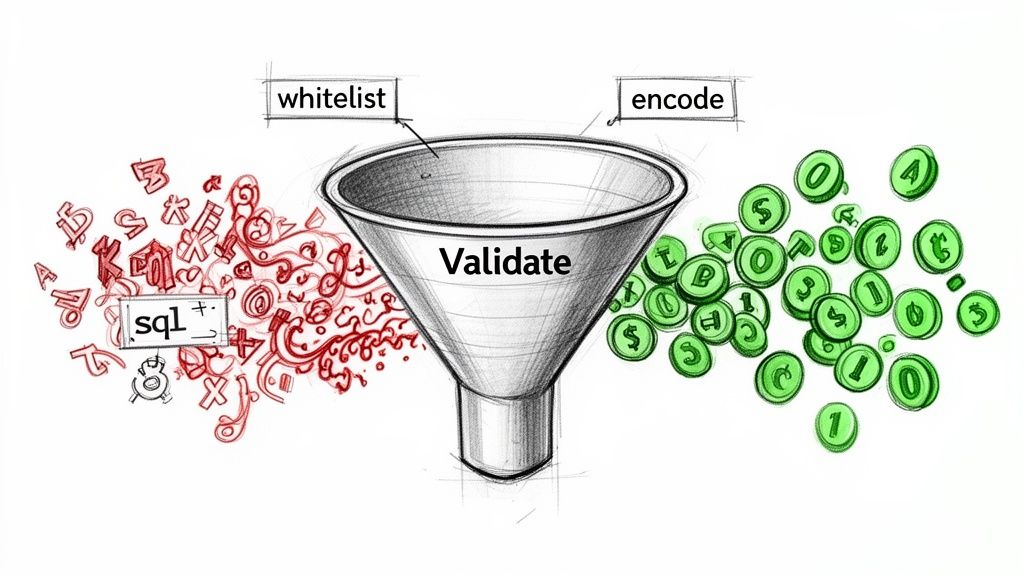
For a business in Hamilton County with a custom web app, failing to validate and encode is a major risk. A clever attacker could type a database command into the "First Name" field, potentially leaking sensitive HIPAA data. Properly handling all user-supplied data is your primary defense against a massive category of devastating cyberattacks that lead to business-crippling downtime.
Input/Output Handling: Quick Wins & Pro Tips
Modern frameworks and libraries make these fundamental protections much easier.
- Trust No One: The golden rule is to never trust client-side validation. All critical validation must happen on the server.
- Whitelist, Don't Blacklist: Create a strict list of allowed characters and patterns for every input field. It's much safer to only permit known "good" ones.
- Use Parameterized Queries: Never build database queries by sticking strings together. Use prepared statements for all database interactions. This is your single best defense against SQL injection.
- Encode for Context: When displaying user data, encode it for the specific context (HTML, JavaScript, URL). Libraries like OWASP's ESAPI can handle this automatically.
Expert Take: In our 17 years of service, we’ve seen local e-commerce sites crippled by XSS attacks that stole customer credentials during checkout. A simple output encoding rule would have rendered the malicious script harmless. This isn't an advanced tactic; it's basic application hygiene.
How Finchum Fixes IT Implements Secure Coding
We build secure applications from the ground up. During a code audit, we hunt for vulnerabilities like improper input handling with a fine-toothed comb. For our Johnson County clients, we integrate security libraries and enforce strict coding standards, then conduct penetration tests that simulate real-world injection attacks. This ensures your custom application isn't just functional, but fundamentally secure against the web's most persistent threats.
7. Manage Dependencies and Keep Software Updated (Patch Management)
Imagine building a custom race car but using off-the-shelf tires and brakes from a dozen different suppliers. Your application is that car. The third-party libraries it uses are those components. If a supplier discovers a flaw in their brake pads, you need to swap them out immediately. Patch management is the digital equivalent, ensuring every piece of code your application depends on is secure and up-to-date.
The Log4j vulnerability was a brutal lesson for businesses everywhere, from downtown Indy tech hubs to manufacturing plants in Greenwood. A single, flawed library allowed attackers to take complete control of servers. This is a core web application security best practice because attackers actively scan for outdated dependencies. Failing to patch is leaving your front door wide open, threatening your business continuity.
Dependency Management: Quick Wins & Pro Tips
Automating your update process is key to staying ahead of threats.
- Automate Scanning: Enable automated dependency scanning in your code repository (GitHub, GitLab) or use a tool like Snyk. These tools check your project against known vulnerability databases.
- Lock It Down: Use dependency lock files (
package-lock.json,Gemfile.lock) to ensure every developer and your production server uses the exact same version of each library. - Automate Minor Updates: Configure tools like Dependabot to automatically create pull requests for minor and patch-level updates.
- Test Before You Deploy: Always run your automated test suite against any updated dependencies in a staging environment to catch breaking changes before they hit customers.
Expert Take: We've seen Johnson County businesses grind to a halt because a single vulnerable npm package opened the door for a ransomware attack. Patch management isn't just an IT chore; it's a critical business continuity function that directly impacts your ROI.
How Finchum Fixes IT Manages Dependencies
We integrate dependency management directly into our CI/CD pipelines. We configure automated tools like Snyk and Dependabot to constantly monitor for vulnerabilities in your software supply chain. For our clients, this means we proactively test and apply patches as part of our managed services, ensuring your custom application remains secure, compliant with standards like NIST CSF, and ready for business along the I-65 corridor.
8. Implement Secure Error Handling and Logging
Think of your web application's error messages as its reaction to being poked. If it screams out detailed technical secrets, you’re handing attackers a blueprint. Secure error handling shows users a simple, generic error message while logging the detailed technical data on the backend where only authorized staff can see it. This prevents exposing information like database schemas or file paths.
Simultaneously, secure logging is the process of recording what happened, who did it, and when, creating a detailed security diary. This is a fundamental web application security best practice because it provides the forensic evidence needed to investigate a breach and demonstrates compliance with regulations like HIPAA or CMMC. It’s like a silent, always-on security camera system for your code.
Error Handling & Logging: Quick Wins & Pro Tips
Properly configuring error handling and logging captures the right information in a secure way.
- Vague for Them, Detailed for You: Never display stack traces or database errors to the end-user. Show a generic error page with a reference ID, but log the full error server-side.
- Sanitize Your Logs: Never log sensitive data in plain text, like passwords, PII, or credit card numbers. This is a one-way ticket to a compliance nightmare.
- Use Structured Logging: Use a structured format like JSON. This makes logs machine-readable for tools like Splunk to easily analyze them.
- Centralize and Protect: Aggregate logs into a single, secured system. We often recommend using immutable off-site backups for log data to ensure its integrity for forensic purposes.
Expert Take: We’ve seen Johnson County businesses accidentally expose their entire database structure through a single, unhandled SQL error. When we dissembled a similar client’s failing RAID array for bit-level data recovery, their logs were the only thing that told us how the initial compromise occurred. Without good logs, you're flying blind.
How Finchum Fixes IT Implements Logging
We build an intelligence-gathering system. We configure your applications to use structured JSON logging and pipe that data into a centralized SIEM platform, integrated with our SOC-as-a-Service. We then create custom alerts to monitor for suspicious patterns in real-time—like a spike in failed logins. This proactive monitoring turns your logs from a passive record into an active defense mechanism for your Indianapolis-based business.
9. Secure Session Management and CSRF Protection
If your web application is a private club, a user's session is their membership card. Secure session management ensures that this card can't be stolen or copied. Poor management is like leaving blank membership cards lying around, inviting attackers to impersonate legitimate users through attacks like Cross-Site Request Forgery (CSRF).
This is a critical web application security best practice because a compromised session gives an attacker the keys to the kingdom. For a Johnson County healthcare provider, a stolen session could lead to a catastrophic HIPAA breach and halt business operations. CSRF protection prevents an attacker from tricking a logged-in user into unknowingly changing their password just by clicking a malicious link.
Session Security: Quick Wins & Pro Tips
Modern web frameworks have excellent built-in protections, but you need to configure them correctly.
- Set Secure Cookie Flags: Always set the
HttpOnlyflag on session cookies to prevent access by client-side scripts. Also, set theSecureflag to ensure cookies are only sent over HTTPS. - Use Strong Session Tokens: Your session IDs must be long, random, and unpredictable.
- Enforce Timeouts: Automatically log users out after a short period of inactivity (15-30 minutes is standard) to limit the window of opportunity for an attacker.
- Leverage SameSite Cookies: Set the
SameSiteattribute on your cookies toLaxorStrict. This is a powerful, browser-level defense against most CSRF attacks. - Invalidate, Don't Just Forget: When a user logs out, their session must be completely destroyed on the server-side.
Expert Take: We’ve seen CSRF vulnerabilities in custom-built applications for Indiana businesses that could have allowed an attacker to completely take over an admin account. The fix is often as simple as enabling the built-in CSRF token protection that the development framework already provides. Don't assume it's on by default.
How Finchum Fixes IT Manages Sessions
Our development process prioritizes security from the first line of code. When building custom applications for clients along the I-65 corridor, we implement a defense-in-depth approach to session security. This includes configuring framework-level protections and binding sessions to user-specific data. We then validate these controls through rigorous penetration testing, ensuring your application is secure before it ever goes live.
10. Implement Security Headers and Content Security Policy (CSP)
Think of HTTP Security Headers as a set of strict instructions you give to your visitor's web browser. They tell the browser exactly what it is and isn't allowed to do, creating a defense-in-depth layer against attacks like cross-site scripting (XSS) and clickjacking. They are simple to set up and have a big impact.
The star of this show is the Content Security Policy (CSP). CSP lets you define a whitelist of sources from which the browser is allowed to load resources like scripts and images. If a malicious script tries to inject itself from an unapproved domain, the browser, following your rules, refuses to run it. This is one of the most effective web application security best practices for neutralizing XSS attacks, a constant threat to any Indiana business.
Security Header Implementation: Quick Wins & Pro Tips
You can add these headers to your web server configuration in minutes for an immediate security boost.
- Start CSP in Report-Only: Begin by setting your CSP to
Content-Security-Policy-Report-Only. This tells the browser to report violations without blocking anything, letting you refine your rules safely. - Block Clickjacking: Set the
X-Frame-Optionsheader toDENYorSAMEORIGIN. This prevents other sites from embedding your website in an iframe. - Stop MIME-Sniffing: Use the
X-Content-Type-Options: nosniffheader. This stops the browser from trying to guess the content type of a resource, which can be exploited. - Enforce HTTPS: Enable HTTP Strict Transport Security (HSTS) with
Strict-Transport-Security: max-age=31536000; includeSubDomains. This forces browsers to communicate with your site only over a secure HTTPS connection. - Test Your Configuration: Use a free online tool like SecurityHeaders.com to instantly scan your website and get a grade on your header implementation.
Expert Take: We’ve seen many custom-built applications for Johnson County businesses that were vulnerable to XSS. Implementing a strong CSP would have stopped the attack before it even started. Don't rely solely on input sanitization; tell the browser what to trust. It's a foundational security control.
How Finchum Fixes IT Implements Security Headers
We don't just paste in a generic template. Our process starts by analyzing your application's resource dependencies. We then build a tailored Content Security Policy, starting in report-only mode to avoid disrupting your operations. We configure HSTS, X-Frame-Options, and other critical headers as part of our standard web application hardening process. This ensures your web presence, whether serving customers in Hamilton County or across the country, is fortified against browser-based attacks.
Web App Security: 10 Best Practices Comparison
| Control | 🔄 Implementation Complexity | ⚡ Resource Requirements & Speed | 📊 Expected Outcomes | Ideal Use Cases | ⭐ Key Advantages / 💡 Tip |
|---|---|---|---|---|---|
| Implement Web Application Firewalls (WAF) | Medium → High (initial tuning required) | Moderate resources; fast protection when cloud-based | Blocks OWASP attacks, rate limits, DDoS mitigation | Custom web apps, e‑commerce, legacy apps | Protects without code changes; start with OWASP CRS and monitor false positives |
| Enforce HTTPS/TLS Encryption for All Data in Transit | Low (configuration + cert mgmt) | Low cost; rapid gains (Let’s Encrypt) | Confidentiality, MITM protection, compliance boost | All public-facing services, payment and health portals | Essential baseline; enable HSTS and automate certificate renewal |
| Implement Secure Authentication and Authorization (OAuth 2.0, MFA) | High (integration + legacy support) | Moderate to high (IDP/MFA tooling); variable rollout speed | Significantly reduces unauthorized access; supports SSO/RBAC | Admins, distributed teams, third‑party integrations | Mandate MFA for privileged accounts; prefer authenticator apps/hardware keys |
| Perform Regular Security Testing (SAST, DAST, Penetration Testing) | Medium → High (automated + manual) | Moderate to high (tools + expert time); continuous cadence | Early vulnerability discovery; lower remediation cost | Development pipelines, pre‑prod releases, regulated apps | Integrate scans into CI; schedule annual pentests and track MTTR |
| Implement Secure API Design and API Gateway Protection | Medium → High (design & gateway config) | Moderate resources; may add latency | Prevents API abuse, centralizes auth/policies, analytics | Mobile backends, microservices, public APIs | Use OAuth/JWT, validate schemas, apply rate limiting and logging |
| Apply Input Validation and Output Encoding (Prevent Injection Attacks) | Medium (requires discipline across codebase) | Low resources; immediate protection once implemented | Prevents injection/XSS; foundational risk reduction | All applications, especially data‑driven apps | Use parameterized queries, whitelist validation, encode by context |
| Manage Dependencies and Keep Software Updated (Patch Management) | Low → Medium (ongoing process) | Low–moderate (SCA tools + testing); continuous effort | Reduces known vulnerability exposure and supply‑chain risk | Projects with many third‑party libs, long‑lived apps | Enable automated scanning/PRs, use lockfiles, test updates in staging |
| Implement Secure Error Handling and Logging | Low → Medium (policy + tooling) | Moderate (centralized logging infra); fast ROI | Prevents info disclosure; enables incident response and audits | Applications requiring forensics/compliance | Never log PII/keys, use structured logs and centralized aggregation |
| Secure Session Management and CSRF Protection | Medium (correct tokens/cookie settings) | Low resources; quick to deploy with frameworks | Prevents session hijack, fixation, and CSRF attacks | Stateful web apps, admin consoles, form actions | Set HttpOnly/Secure/SameSite, use CSRF tokens and session timeouts |
| Implement Security Headers and Content Security Policy (CSP) | Low → Medium (CSP tuning may be complex) | Low resources; immediate browser-enforced benefits | Mitigates XSS, clickjacking, MIME sniffing with minimal cost | Public web apps, single‑page apps, sites embedding third parties | Start CSP in report‑only mode, use nonces and test thoroughly |
Stop Guessing and Secure Your Application for Good
So, we've walked through ten essential rules of modern web application security. It’s a lot to take in, from the shield of a Web Application Firewall (WAF) to the precision of secure session management. You’ve seen how something as simple as enforcing HTTPS can stop snoops and how a rigorous security testing schedule is the only way to find vulnerabilities before the bad guys do.
This isn't just about checking boxes on a compliance sheet. Each practice is a critical layer in a defense-in-depth strategy that protects your business from downtime. Think of it like securing a physical building. You wouldn’t just lock the front door; you’d have cameras, reinforced windows, and an alarm. These web application security best practices work the same way, creating a barrier that protects your data, your customers, and your reputation.
Key Takeaways for Your Business
For a business owner in Johnson County or anywhere along the I-65 corridor, the real takeaway is this: ignoring web application security is leaving your cash register wide open. A single breach isn’t just an IT headache; it's a direct hit to your bottom line. Downtime costs thousands per minute, and the damage from a data leak can permanently ruin client relationships.
Here are the most critical points to act on immediately:
- Authentication is Your Gatekeeper: Start with Multi-Factor Authentication (MFA). It is one of the most effective changes you can make today to stop unauthorized access and prevent costly downtime.
- Trust No Input: Assume every piece of data coming into your application is hostile. Implementing strict input validation and output encoding is your frontline defense against injection attacks.
- Patch, Patch, and Patch Again: Your application is only as secure as its weakest, unpatched dependency. A formal patch management process is essential for closing known security holes.
The goal is to shift from a reactive, "break-fix" mentality to a proactive, security-first culture. Mastering these web application security best practices means you stop guessing and start building a resilient, trustworthy platform. It means that when a healthcare provider needs to know you're HIPAA-compliant or a partner asks about your NIST CSF alignment, you have a confident answer. This is how you convert wasted time spent fighting digital fires into productive, billable hours with a predictable monthly IT budget.
Feeling overwhelmed by the sheer number of security tasks? You don’t have to go it alone. The experts at Finchum Fixes IT have spent over 17 years implementing these exact web application security best practices for businesses across Indianapolis. Schedule your Free Network Assessment today and let us build a rock-solid security posture for your application, so you can focus on running your Greenwood/Indianapolis area business.