10 Data Loss Prevention Best Practices to Protect Your Indiana Business
In the world of business, your data—customer lists, financial records, proprietary information—is as valuable as the cash in your vault. Yet, many small and medium-sized businesses in the Indianapolis area treat data security like a forgotten lock on a back door. A single slip-up, whether from a well-meaning employee accidentally emailing a sensitive file or a sophisticated cyberattack, can lead to devastating consequences: financial loss, reputational damage, and regulatory fines.
Data Loss Prevention (DLP) isn't just an enterprise-level buzzword; it's a critical set of strategies and tools that form a proactive shield around your most important assets. Hoping for the best is not a strategy. True protection comes from a deliberate, layered approach. To strengthen your defense and understand proactive strategies for safeguarding your valuable information, you can find further insights on how to prevent data loss. This is where a robust plan becomes non-negotiable.
This guide cuts through the technical jargon to give you a no-nonsense, prioritized roundup of the most effective data loss prevention best practices you can implement today. We’ll skip the fluff and get straight to actionable advice that works for businesses on Main Street, not just Wall Street. From classifying your data and locking down access to deploying endpoint protection and creating a bulletproof backup plan, this list is your playbook. As your local IT partner who understands the unique challenges facing businesses right here in Central Indiana, we're here to turn complex security concepts into simple, powerful actions that protect your bottom line. Let's get started.
1. Data Classification and Inventory Management
You can't protect what you don't know you have. Think of it like a chaotic stockroom: if you don’t know whether a box contains priceless vintage action figures or a pile of packing peanuts, you'll probably treat them both the same. This is where data classification and inventory management step in. It’s the foundational practice of figuring out what data you have, where it lives, and how important it is.
This process involves systematically labeling your data into categories based on sensitivity. A common framework includes levels like Public, Internal, Confidential, and Restricted. By knowing exactly what's what, you can apply the right level of security, ensuring your most critical information gets Fort Knox-level protection while your public marketing materials can be shared freely. This is a core data loss prevention best practice because it makes security targeted and efficient.
Why It's a Game-Changer
Implementing a data classification policy isn't just busywork; it's a strategic move. A local healthcare provider in Greenwood, for instance, uses it to separate protected health information (PHI)—the sensitive patient data regulated by law—from general administrative files. This ensures they apply stringent HIPAA controls only where needed, saving money and reducing complexity. Similarly, a financial services firm in Indianapolis might classify client PII and payment data as "Restricted," triggering automated alerts if someone tries to email it outside the company.
Actionable Pro-Tips
- Pro-Tip: Start Small, Win Big. Don't try to boil the ocean. Begin by identifying your most valuable and high-risk data, like customer lists, financial records, or intellectual property. Classifying these "crown jewels" first delivers the biggest security impact and builds momentum for the rest of the project.
- Pro-Tip: Automate, Don't Agonize. Manually classifying every single file is a recipe for a headache. Leverage tools like Microsoft Information Protection that can automatically scan and apply labels to documents and emails based on keywords and content patterns. This saves countless hours and reduces human error.
- Pro-Tip: Assign an Owner. Every data type needs a designated "owner" within the business. This person is responsible for deciding its classification level and reviewing access rights. This creates clear accountability and ensures decisions are made by those who understand the data's context best.
2. Endpoint Data Loss Prevention (DLP) Software Deployment
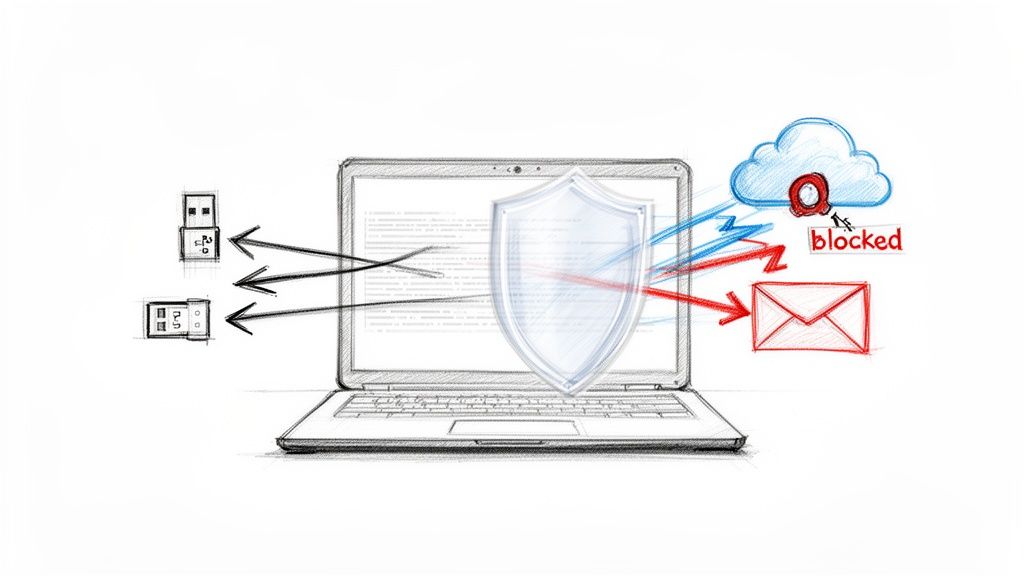
If data classification is about knowing what's in your stockroom, then endpoint DLP is the high-tech security guard stationed at every exit. This practice involves installing specialized software on all your company devices like laptops, desktops, and even mobile phones. This software acts as a digital bouncer, constantly monitoring for attempts to move sensitive data to unauthorized places.
This software is designed to catch risky behaviors in real-time. Think of an employee trying to copy a customer list to a personal USB drive, upload a confidential blueprint to a public cloud service, or email a financial spreadsheet to their personal Gmail. The endpoint DLP solution can automatically block the action, pop up an alert for the user, and notify an administrator. This is a crucial data loss prevention best practice because it protects your data at its most vulnerable point: the user's device.
Why It's a Game-Changer
Endpoint DLP isn't just about stopping malicious insiders; it's a powerful tool against everyday mistakes. For example, a law firm in Fishers might deploy a solution like Microsoft Purview DLP to prevent the accidental emailing of case files containing PII (Personally Identifiable Information). The system can scan outgoing attachments, identify sensitive legal terms or client numbers, and automatically block the email, preventing a costly data breach. It turns every device into a smart checkpoint for your critical information, a core principle detailed in our guide to endpoint security best practices for Indianapolis SMBs.
Actionable Pro-Tips
- Pro-Tip: Audit First, Block Later. Roll out your DLP policies in "audit-only" or "monitoring" mode initially. This lets you see what actions the software would have blocked without disrupting workflows. You'll gain valuable insight into how your team handles data, allowing you to fine-tune rules and avoid a flood of false positives before you go live.
- Pro-Tip: Target Your High-Risk Groups. Instead of a company-wide rollout, start with a pilot program for departments that handle the most sensitive data, like finance, HR, or your executive team. This focused approach makes it easier to manage user feedback, adjust policies, and demonstrate the value of the tool quickly.
- Pro-Tip: Craft Clear Incident Response Plans. Know exactly what happens when the DLP tool flags a violation. Who gets the alert? What are the immediate steps? Is it a "coach the user" moment or a full-blown security investigation? Having a clear, documented plan ensures a consistent and effective response every single time.
3. User Access Controls and Least Privilege Implementation
Imagine giving every employee a master key that opens every door in your building, from the supply closet to the CEO's office. It’s convenient, sure, but it's a security nightmare waiting to happen. This is exactly what you do digitally when you don't control user access. Implementing the principle of least privilege (PoLP) is like issuing keys that only open the specific doors an employee needs to do their job, and nothing more.
This critical data loss prevention best practice involves granting users the absolute minimum permissions required for their role. When combined with role-based access control (RBAC), you create a security posture where even if an employee's account is compromised, the potential damage is drastically contained. The hacker gets a key to the breakroom, not the vault.
Why It's a Game-Changer
Strong access control isn't just for big corporations; it's a vital defense for any business. A medical practice in Central Indiana, for example, uses RBAC to ensure only clinicians and billers can access patient health records (PHI), while administrative staff can only see scheduling information. This simple separation is a cornerstone of HIPAA compliance. Similarly, a local law firm uses privileged access management (PAM) to tightly control who can access sensitive case files, logging every single action for a clear audit trail.
Actionable Pro-Tips
- Quick Fix: Map and Document Roles. Start by creating a matrix that maps every job role in your company to the specific systems and data they need. Document this in a central place. This clarity is the foundation for building effective role-based access controls within systems like Microsoft 365 or your server.
- Pro-Tip: Conduct Regular Access Reviews. Don't "set it and forget it." Schedule semi-annual or quarterly reviews of everyone's access rights. People change roles, and projects end. These reviews ensure permissions stay current and you revoke access that’s no longer needed, a process known as eliminating "privilege creep."
- Pro-Tip: Automate Your Offboarding. The moment an employee leaves, their access should be terminated. Use identity platforms like Azure Active Directory or Okta to automate deprovisioning workflows, ensuring all access is revoked within hours of termination, not days or weeks. This closes a major security gap that many businesses overlook.
4. Employee Training and Security Awareness Programs
Your sophisticated firewalls and encrypted servers are fantastic, but they have one glaring weakness: a well-meaning employee who clicks on a shady link. The human element is often the final, most unpredictable line of defense. This is why comprehensive employee training isn't just a "nice-to-have" item on a checklist; it's one of the most critical data loss prevention best practices you can implement.
This practice involves creating an ongoing security culture, not just a one-time lecture. It's about educating your team on data protection policies, how to spot phishing attacks (scam emails designed to steal credentials), safe data handling practices, and understanding the vital role they play. A well-trained team transforms your biggest potential vulnerability into your most vigilant security asset, actively safeguarding the company's sensitive information from daily threats.
Why It's a Game-Changer
Human error is the gremlin in the machine, responsible for a huge percentage of data breaches. A manufacturing company in Fishers, Indiana, dramatically reduced its malware incidents by running quarterly simulated phishing campaigns. When employees learned to spot and report suspicious emails instead of clicking, they effectively slammed the door on a major entry point for attackers. Similarly, healthcare clinics in Greenwood use mandatory HIPAA privacy training to ensure every team member, from reception to billing, handles patient data with the required level of care, preventing costly compliance violations.
Actionable Pro-Tips
- Pro-Tip: Make It Relatable, Not Robotic. Ditch the dry, generic training modules. Use real-world examples and stories of security incidents (anonymized, of course) that happened to similar local businesses. When your team sees how a simple mistake could directly impact their company, the lesson sticks.
- Quick Fix: Fish for Phishers Regularly. Don't wait for the real thing. Use a platform like KnowBe4 to send simulated phishing emails to your staff at least quarterly. This keeps their threat-spotting skills sharp and provides clear metrics on who might need a bit more coaching, turning a potential disaster into a valuable teaching moment.
- Pro-Tip: Foster a "See Something, Say Something" Culture. Employees must feel completely safe reporting a mistake, like clicking a bad link or accidentally emailing a sensitive file. A non-punitive reporting culture means your IT team learns about a potential breach in minutes, not days, which can be the difference between a minor hiccup and a full-blown crisis.
5. Secure Data Backup and Recovery Procedures
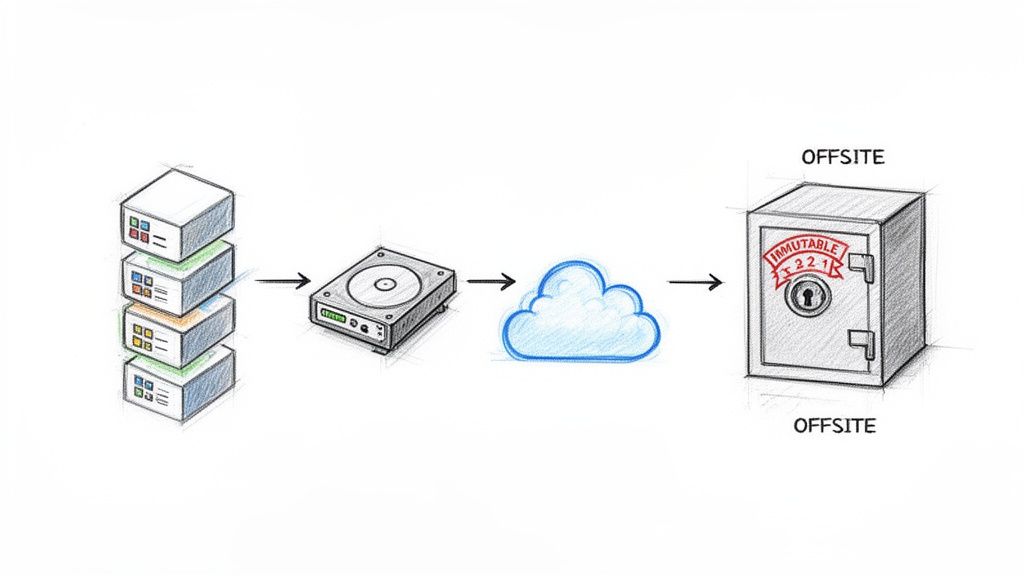
Hoping for the best but preparing for the worst isn't pessimism; it's a solid business strategy. When a ransomware attack locks your files or a server simply gives up the ghost, a resilient backup is your ultimate "undo" button. This practice involves creating multiple copies of your critical data and storing them securely, ensuring you can restore operations quickly after any data loss event, from accidental deletion to a full-blown disaster.
Think of it as your digital get-out-of-jail-free card. By having recent, unchangeable copies of your data stashed away, you're not just protecting files; you're protecting your business's very ability to function. This is a non-negotiable data loss prevention best practice because it provides the final line of defense when all other security measures have failed.
Why It's a Game-Changer
A robust backup and recovery plan is what separates a business-ending catastrophe from a recoverable inconvenience. The infamous Colonial Pipeline attack underscored this when robust backups were key to restoring operations. Locally, we've seen Greenwood healthcare providers use immutable archives with tools like Veeam to ensure patient data is safe from ransomware that tries to delete or encrypt backups. This makes paying a ransom a non-starter. Similarly, a Zionsville financial firm can use air-gapped backups (kept completely offline) to guarantee their most sensitive client data is insulated from any network compromise.
Actionable Pro-Tips
- Pro-Tip: Follow the 3-2-1 Rule. This is the gold standard for a reason. Keep at least three copies of your data on two different types of media, with one copy stored off-site. This diversification drastically reduces the risk of losing everything at once.
- Pro-Tip: Make Your Backups Unchangeable. Use modern backup solutions like AWS Backup or Microsoft Azure Backup to create "immutable" backups. This feature makes the backup data read-only for a set period, preventing even a cybercriminal with admin credentials from deleting or encrypting your recovery files. For a deeper dive, check out our expert guide on how to recover deleted files from a computer for Indianapolis businesses.
- Quick Fix: Test Your Recovery Plan. A backup you've never tested is just a hopeful theory. At least once a quarter, perform a test restoration of a critical system. Document how long it takes and identify any roadblocks. This ensures that when disaster strikes, you know exactly what to do and how long it will take to get back on your feet.
6. Network Segmentation and Data Isolation
Imagine your company network is a massive, open-plan office. If one person catches a cold (or in this case, a cyberattack), it spreads like wildfire to everyone. Network segmentation is like building walls and secure doors between departments. It divides your network into smaller, isolated sub-networks, so if a breach happens in one area, it’s contained and can't easily spread to your most critical systems.
This strategy involves using tools like firewalls and Virtual LANs (VLANs) to create barriers that control the flow of traffic. By isolating sensitive data, like your financial records or customer information, in its own highly-protected segment, you drastically reduce the attack surface. This is a foundational data loss prevention best practice because it assumes a breach will eventually happen and focuses on limiting the blast radius.
Why It's a Game-Changer
Segmentation isn't just for massive corporations; it’s a powerful tool for local businesses. A hospital network in Central Indiana, for example, would use it to keep its electronic health record (EHR) systems completely separate from its guest Wi-Fi network. This ensures a visitor checking their email can't accidentally (or intentionally) access protected patient data. Similarly, a Greenwood retail shop must segment the network handling credit card payments to meet PCI-DSS compliance, protecting both its customers and its reputation.
Actionable Pro-Tips
- Pro-Tip: Start with Logic, Not Wires. You don't need to physically rewire your office to get started. Begin with logical segmentation using VLANs, which can be configured on most modern network switches. This allows you to group devices by function (e.g., HR, Sales, Guest Wi-Fi) without major hardware changes.
- Pro-Tip: Embrace Zero Trust Principles. Don't just trust traffic because it's already inside your network. Implement a "never trust, always verify" approach. This means requiring verification and authentication for any device or user trying to access resources, even if they're moving between internal segments.
- Pro-Tip: Audit Your Firewall Rules Regularly. Your firewall rules are the gatekeepers between segments. Review them at least quarterly to remove outdated, unnecessary, or overly permissive rules. A forgotten "allow all" rule from a temporary project can leave a gaping hole in your defenses.
7. Encryption of Data in Transit and at Rest
If your data were cash, you wouldn't leave it sitting on a park bench or send it through the mail in a clear envelope. Encryption is the digital equivalent of an armored truck and a locked safe. It scrambles your sensitive data into an unreadable mess, making it completely useless to anyone who doesn't have the secret key to unlock it. This protection applies whether the data is being stored (at rest) on a laptop's solid-state drive (SSD) or a server, or being sent across the internet (in transit) in an email.
This is a non-negotiable data loss prevention best practice because it acts as your last line of defense. If a cybercriminal bypasses your firewall and steals a hard drive, or intercepts a file transfer, properly encrypted data remains worthless to them. It effectively neutralizes the threat of a physical or digital breach by rendering the stolen information unusable.
Why It's a Game-Changer
Encryption is the bedrock of modern data security and compliance. A law firm in Carmel, for instance, uses BitLocker on all company laptops to protect confidential case files. If a device is lost or stolen, they have peace of mind knowing the client data is secure. Likewise, a local e-commerce business uses TLS encryption for its website, ensuring customer payment information is protected from snoops during checkout. This not only prevents data loss but also builds critical customer trust. For comprehensive data security, explore the ultimate guide to understanding how to protect your server by encrypting VPS data with full disk encryption.
Actionable Pro-Tips
- Pro-Tip: Set Strong Standards. Don't just "turn on" encryption; define what kind. Mandate AES-256 for data at rest (like files on your server) and TLS 1.2 or higher for data in transit (like website traffic). Document these standards in your IT policy so there's no guesswork.
- Pro-Tip: Centralize Your Keys. Managing encryption keys can be a nightmare if they're scattered everywhere. Use a centralized key management system like AWS KMS or Azure Key Vault to securely create, store, and rotate keys. This gives you control and an audit trail, which is crucial for compliance.
- Pro-Tip: Encrypt End-to-End. Remember that data moves. Just encrypting the server isn't enough if the data is sent unencrypted over the network. Implement end-to-end encryption for sensitive communications and file transfers to protect data at every step of its journey. You can dive deeper with this no-nonsense guide to secure data transfer.
8. Monitoring and Auditing of Data Access Activities
If a tree falls in a forest and no one is around to hear it, does it make a sound? More importantly, if a rogue employee copies your entire customer database to a USB drive at 3 a.m. and no system logs it, did it even happen? You bet it did, and you’re about to have a very bad day. This is why monitoring and auditing are non-negotiable. It’s the digital equivalent of a security camera system, recording who accesses what, when, and from where.
This practice involves implementing systems that create a detailed, unchangeable audit trail of all data-related activities. Think of it as a flight data recorder for your network. By using tools like Security Information and Event Management (SIEM) or User Behavior Analytics (UBA), you can spot suspicious patterns, detect insider threats, and shut down policy violations before they escalate into a full-blown crisis. It's a critical data loss prevention best practice because it shifts your security from passive to active.
Why It's a Game-Changer
Monitoring isn't just about catching the bad guys; it's about proving you're one of the good guys. A financial advisor in Carmel uses their SIEM system to track database access, generating automated reports that make regulatory compliance audits a breeze. Meanwhile, a healthcare clinic in Fishers uses it to monitor access to electronic health records (EHR), receiving instant alerts if a user accesses patient files unrelated to their job duties, which is a massive step in preventing HIPAA violations.
Actionable Pro-Tips
- Pro-Tip: Establish a Baseline. You can't spot weird behavior if you don't know what normal looks like. Use monitoring tools to analyze data access patterns for a few weeks to establish a baseline. Then, configure alerts for any significant deviations, like a user suddenly accessing hundreds of files they've never touched before.
- Pro-Tip: Focus on the Crown Jewels. Don't try to monitor every single click on your network; you'll drown in alerts. Start by focusing your most intense monitoring on your highest-risk data (the "Restricted" category from tip #1) and your most powerful users (like system administrators). This provides the biggest security bang for your buck.
- Pro-Tip: Integrate and Automate. Your monitoring system shouldn't be a lonely island. Integrate its alerts with your incident response plan. For example, an alert for a potential data leak could automatically create a ticket, notify the security team, and even temporarily disable the user's account to stop the bleeding. This is where having a local IT partner in Indianapolis can make all the difference, helping you fine-tune these complex systems.
9. Incident Response Planning and Data Breach Procedures
Even with the best defenses, a data breach is still a real possibility. Having a game plan for when things go wrong is the difference between a manageable incident and a full-blown business catastrophe. Think of it as having a fire drill for your data; you don’t want to be figuring out where the exits are when the building is already smoking. This is a critical data loss prevention best practice because it prepares you to contain damage and recover quickly.
An incident response (IR) plan is a detailed, documented set of instructions for detecting, responding to, and limiting the consequences of a security incident. It outlines who does what, when, and how, from the first sign of trouble to the final post-mortem analysis. This proactive approach minimizes downtime, reduces financial losses, and protects your reputation when a crisis hits.
Why It's a Game-Changer
A solid IR plan turns panic into a procedure. When Equifax suffered its massive breach in 2017, their delayed and confusing response amplified the damage to their reputation. Conversely, a logistics company in Plainfield, Indiana, used its pre-defined ransomware playbook to isolate affected systems within minutes, restore from backups, and avoid paying a ransom, all thanks to regular drills. The plan provides a clear roadmap, ensuring a calm, efficient, and effective response.
Actionable Pro-Tips
- Pro-Tip: Build Your "A-Team". Assemble an incident response committee with key players before you need them. Include representatives from IT, security, legal, HR, and communications. Having a local IT partner in Greenwood on speed dial for technical and forensic support is also a smart move for fast on-site help.
- Pro-Tip: Create Scenario Playbooks. Don't just have one generic plan. Develop specific "playbooks" for the most likely threats to your business, like a ransomware attack, an insider data leak, or a lost company laptop. Outline the step-by-step actions for each scenario to eliminate guesswork under pressure.
- Pro-Tip: Practice, Practice, Practice. A plan that just sits on a shelf is useless. Conduct "tabletop exercises" at least twice a year where you walk through a simulated incident. This helps your team identify gaps in the plan and builds the muscle memory needed to act decisively during a real event.
10. Third-Party Risk Management and Vendor Data Security Requirements
Your business doesn’t operate in a vacuum; you rely on vendors for everything from payroll to cloud hosting. But what happens when their security weakness becomes your data breach? Treating your vendors like an extension of your own team is a critical data loss prevention best practice. It means you're only as strong as your weakest link, and you can't afford to have a supplier leave your digital back door wide open.
This is all about implementing controls to manage the risks your partners and suppliers introduce. It involves vetting them before you sign a contract, making them agree to your security standards, and continuously monitoring them to ensure they're not letting you down. A breach that starts with a vendor is still your breach, and your customers won't care how it happened when their data is leaked.
Why It's a Game-Changer
Vendor-related breaches are devastatingly common. The infamous 2013 Target breach started with credentials stolen from their HVAC vendor. More recently, supply chain attacks like the SolarWinds incident showed how a single compromised software provider can impact thousands of companies. A logistics company in Plainfield, Indiana, learned this the hard way when their outsourced accounting firm suffered a ransomware attack, exposing employee financial data. Now, they require all critical vendors to provide a SOC 2 report, a third-party audit of their security controls.
Actionable Pro-Tips
- Pro-Tip: Tier Your Vendors. Don't use a one-size-fits-all approach. Categorize vendors based on the sensitivity of the data they access: critical, high, medium, or low. This lets you focus your most intense security assessments on the partners that pose the biggest risk, saving time and resources.
- Pro-Tip: Put It in Writing. Your security expectations must be embedded in your vendor contracts before any data changes hands. Insist on a Data Processing Agreement (DPA) that clearly defines their responsibilities, requires them to notify you of a breach within 24-48 hours, and gives you the right to audit their controls.
- Pro-Tip: Trust, But Verify Annually. A vendor's security posture isn't static. Require them to complete an annual security questionnaire, like the Cloud Security Alliance's CAIQ, and provide evidence of their controls. For critical vendors, review their third-party audit reports (like SOC 2 or ISO 27001) to verify their claims.
DLP Best Practices — 10-Point Comparison
| Title | 🔄 Implementation Complexity | 💡 Resource Requirements | ⭐ Expected Effectiveness | 📊 Expected Outcomes | Ideal Use Cases |
|---|---|---|---|---|---|
| Data Classification and Inventory Management | High — multi-phase discovery and ongoing re-classification | Medium–High — discovery tools, CMDB, audit cycles | ⭐⭐⭐⭐ — strong foundational value | 📊 Full-data visibility, prioritized protections, smoother audits | Large data estates, regulated industries (finance, healthcare) |
| Endpoint Data Loss Prevention (DLP) Software Deployment | High — agent/policy tuning and rollout | High — licensing, endpoint agents, support staff | ⭐⭐⭐⭐ — effective at preventing exfiltration when tuned | 📊 Reduced data exfiltration, forensic logs, compliance support | Knowledge workers with sensitive files, finance, HR, legal |
| User Access Controls & Least Privilege Implementation | Medium–High — role mapping, PAM/JIT setup | Medium — identity platform, governance processes | ⭐⭐⭐⭐⭐ — high impact on limiting breach blast radius | 📊 Reduced lateral movement, clearer audit trails, faster IR | Organizations with privileged accounts, regulated environments |
| Employee Training & Security Awareness Programs | Medium — ongoing program management and simulations | Low–Medium — training platforms, time for staff | ⭐⭐⭐ — improves human defenses but variable results | 📊 Lower phishing click rates, better incident reporting | All organizations; especially where human error is risk factor |
| Secure Data Backup & Recovery Procedures | Medium — design, immutable config, and recovery testing | High — storage, offsite/immutable copies, testing resources | ⭐⭐⭐⭐⭐ — critical for recovery from ransomware/data loss | 📊 Rapid restore capability, business continuity, compliance | All orgs; mission-critical systems and ransomware risk profiles |
| Network Segmentation & Data Isolation | High — architecture redesign, firewall/VLAN rules | Medium–High — network devices, monitoring, testing | ⭐⭐⭐⭐ — effective at containing breaches and limiting access | 📊 Contained incidents, improved network control, compliance | Environments with mixed trust zones (OT/IT, guest vs internal) |
| Encryption of Data in Transit and at Rest | Low–Medium — implement TLS, disk/db/file encryption | Low–Medium — tools, key management, HSMs for scale | ⭐⭐⭐⭐ — strong protection when keys are managed correctly | 📊 Reduced exposure from interception or lost devices, compliance | Remote work, cloud storage, regulated data (PII/PHI/PCI) |
| Monitoring & Auditing of Data Access Activities | High — SIEM/UEBA/DAM deployment and tuning | High — log storage, analytics, skilled analysts | ⭐⭐⭐⭐ — excellent for detection and forensics if tuned | 📊 Faster detection, auditability, insider threat deterrence | Regulated firms, high-value data repositories, 24/7 ops |
| Incident Response Planning & Data Breach Procedures | Medium — playbooks, roles, drills, and integrations | Medium — tabletop exercises, IR tooling, retainers | ⭐⭐⭐⭐ — reduces MTTD/MTTR and supports compliant notifications | 📊 Faster containment/recovery, documented breach handling | All orgs; required for breach-prone sectors and compliance |
| Third-Party Risk Management & Vendor Data Security Requirements | Medium–High — assessments, contracts, ongoing monitoring | Medium — questionnaires, audits, legal and procurement effort | ⭐⭐⭐ — reduces vendor-origin risks but enforcement limits exist | 📊 Better vendor visibility, contractual protections, risk scoring | Organizations with many vendors or critical supply-chain links |
Putting Your Data Loss Prevention Plan into Action
We've just navigated the digital minefield of data loss prevention best practices, and if your head is spinning a little, that's completely normal. From classifying your data like a master librarian to implementing endpoint protection that acts like a digital bouncer, the journey to a secure business is packed with critical steps. We've untangled the web of user access controls, shined a light on the power of employee training, and laid out the blueprints for solid backup and recovery plans. Think of this guide not as a final exam, but as your personalized playbook for protecting your company’s crown jewels.
The central theme weaving through every tip, from network segmentation to encryption, is simple: proactive defense beats reactive panic every time. Waiting for a data breach to happen before you take security seriously is like waiting for your business to flood before you buy insurance. It’s a gamble you can’t afford to take, especially when the trust of your clients and the future of your business are on the line.
Your Immediate Action Plan: Three Steps to Take This Week
Feeling overwhelmed? Don't be. True progress comes from taking small, consistent steps. Instead of trying to boil the ocean, focus on what you can achieve right now.
- Quick Fix - The "Who Has the Keys?" Audit: Grab a spreadsheet and a strong cup of coffee. Go through your most critical systems (think financial software, CRM, cloud storage) and list every single person who has access. Ask the tough question: "Does this person absolutely need this level of access to do their job?" If the answer is no, revoke or downgrade their permissions immediately. This single action drastically reduces your attack surface.
- Pro-Tip - Schedule Your First Phishing Drill: You don't need a massive budget for this. There are plenty of free or low-cost tools that let you send a simulated phishing email to your team. The goal isn't to shame anyone who clicks; it's to open a conversation. Use the results as a launchpad for a quick, 15-minute team huddle about spotting suspicious emails.
- Smart Move - Verify Your Backups: When was the last time you actually tried to restore a file from your backup? Not just checked if the backup ran, but performed a test restore? Go do it now. Pick a non-critical file, delete it from its original location, and restore it from your backup system. If it doesn't work, you've just uncovered a huge vulnerability you can fix before a real disaster strikes.
The Bigger Picture: DLP as a Business Superpower
Mastering these data loss prevention best practices isn't just about avoiding fines or negative headlines. It's about building a resilient, trustworthy, and more efficient business. When you know where your data is, who can access it, and that it's protected, you can operate with confidence. This strong security posture becomes a competitive advantage, reassuring clients in Central Indiana that you take their privacy seriously.
Ultimately, a robust DLP strategy is an ongoing commitment, not a one-and-done project. It requires vigilance, adaptation, and the right expertise. Having a local IT partner here in the Indianapolis and Greenwood area means you're not going it alone. You have a team ready for on-site support, immediate incident response, and strategic guidance tailored to the unique challenges faced by small and medium-sized businesses. It’s about having a real person to call when things get complicated.
Ready to transform your data security from a source of anxiety into a pillar of strength? We can help you build a custom data loss prevention strategy that protects your business without getting in the way. Reach out for a consultation if you need hands-on help.