10 Essential Cybersecurity Tips for Small Business Owners in Indiana for 2026
For a Johnson County business owner, a single minute of IT downtime can cost up to $9,000. That’s not just a statistic; it’s a potential business-ending event triggered by a single click on a phishing email or an unpatched server sitting in a back office. Many small businesses along the I-65 corridor operate on aging hardware or with makeshift Wi-Fi in old brick buildings, creating perfect entry points for cybercriminals who know SMBs are high-value, low-difficulty targets. They see you as an easy payday, and hoping for the best is a losing bet.
This guide isn't about fear. It’s about providing 10 specific, actionable cybersecurity tips for small business owners that convert wasted tech time into billable hours. We’ll skip the generic advice and give you the same direct playbook we’ve used for over 17 years to help Indianapolis-area businesses secure their operations, meet compliance standards like HIPAA or CMMC, and build a predictable IT budget. You'll learn the how and the why behind crucial defenses, from deploying Managed Endpoint Detection and Response (EDR) like Bitdefender GravityZone to implementing a rock-solid 3-2-1 backup strategy with immutable off-site copies.
We'll cover everything from hardening your network and training your team to establishing a formal incident response plan. While our focus is on your internal operations, the security of your public-facing assets is just as critical. For a comprehensive overview of fortifying your digital presence, explore an expert guide on how to make a website secure to ensure your customer-facing platforms are just as protected as your internal network. Think of this as your no-nonsense checklist for transforming your company from a soft target into a hardened fortress. Let's get started.
1. Implement Strong Password Policies and Multi-Factor Authentication (MFA)
If your passwords are the front door lock to your digital kingdom, MFA is the laser grid, the moat full of cyber-gators, and the security guard who asks for a secret handshake. Relying on just a password, no matter how complex you think "GoColts!2024!" is, is like leaving the keys under the welcome mat. Modern credential-stealing tools can crack simple passwords in seconds. This is why a strong password policy combined with MFA is one of the most effective cybersecurity tips for small business owners, creating multiple, formidable barriers against attack.
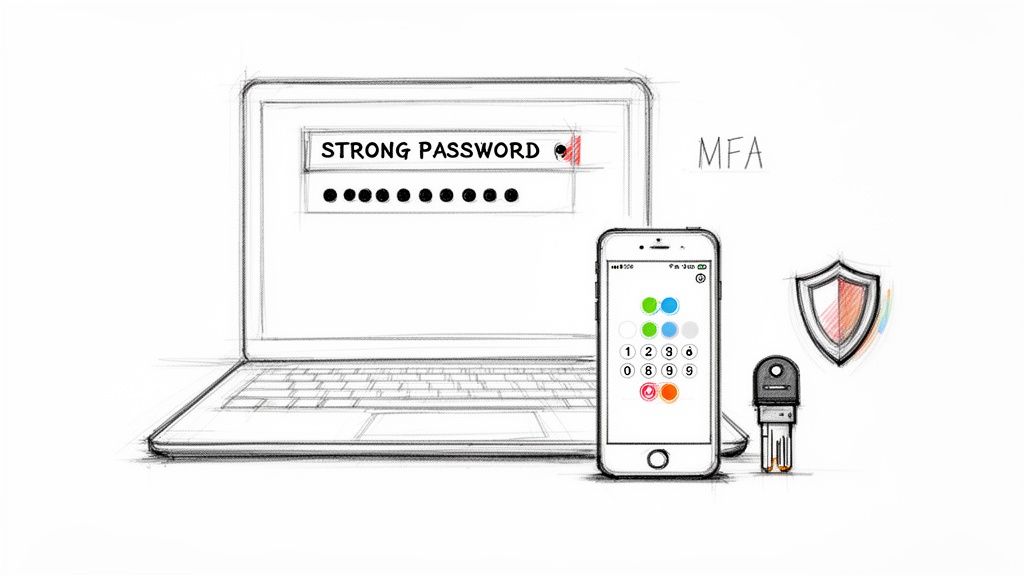
MFA requires anyone logging in to provide a second piece of evidence (a factor) to prove their identity, even if a cybercriminal has their password. Think of it as needing both your ATM card and your PIN; one without the other is useless. This second factor is typically something you have, like a code from an authenticator app on your phone, or something you are, like a fingerprint scan.
Why This is Your First Line of Defense
For a Johnson County business owner, enforcing MFA on their Microsoft 365 accounts is the difference between a normal Tuesday and a catastrophic business email compromise that wires company funds to an offshore account. It’s a foundational element of a Zero Trust architecture, where no user is trusted by default. We've seen countless Indiana businesses, from law firms in downtown Indy using YubiKeys to protect executive email, to manufacturing plants along the I-65 corridor securing remote access with Microsoft Authenticator, stop attacks cold simply by having MFA enabled.
Actionable Steps for Implementation:
- Start with Critical Assets: Don't boil the ocean. Roll out MFA on your most critical accounts first: administrators, executives, and anyone with access to financial or sensitive client data.
- Prioritize App-Based MFA: While SMS text codes are better than nothing, they can be intercepted. Push your team to use more secure authenticator apps like Google Authenticator, Microsoft Authenticator, or Authy.
- Set Clear Password Rules: Mandate a minimum of 12-16 characters, including a mix of uppercase letters, lowercase letters, numbers, and symbols. A password manager is your best friend here.
- Use Conditional Access: Configure your systems (like Microsoft Entra ID) to automatically require MFA when a login attempt comes from an unfamiliar location or network. This adds a layer of intelligent, automated protection without bothering your team at the office.
2. Deploy Managed Endpoint Detection and Response (EDR)
If antivirus is the bouncer at the front door checking IDs, Endpoint Detection and Response (EDR) is the elite security team roaming the entire venue, spotting trouble before it starts. Traditional antivirus is reactive; it recognizes known bad guys. EDR is proactive; it analyzes behavior, like someone loitering near the VIP room, to identify and neutralize threats that have never been seen before. This makes it an indispensable cybersecurity tip for any small business serious about stopping modern attacks like ransomware and zero-day exploits.
EDR solutions like CrowdStrike Falcon or Microsoft Defender for Endpoint act as a 24/7 security operations center (SOC) for every PC, laptop, and server in your network. It doesn't just block a malicious file; it identifies how the file got there, what it tried to do, and which other machines it communicated with. This forensic data is gold, allowing for rapid, complete incident response instead of a weeks-long game of digital whack-a-mole.
Why This is Your Proactive Shield
For a Hamilton County accounting firm, deploying a managed EDR like Bitdefender GravityZone is the difference between their systems automatically isolating a compromised laptop and a supply-chain attack encrypting every client tax return. We've seen EDR in action for a Johnson County healthcare provider, where it identified lateral movement attempts from a compromised workstation, preventing a potential HIPAA data breach that would have been catastrophic. It provides the high-level, real-time visibility that turns your endpoints from liabilities into fortified assets. To learn more about fortifying these assets, explore some endpoint security best practices for Indianapolis SMBs.
Actionable Steps for Implementation:
- Establish a Baseline: Before going live, let the EDR tool run in a monitoring-only mode. This helps it learn your network’s normal behavior, reducing false positives once full protection is enabled.
- Configure Automated Responses: Work with your IT partner to create automated playbooks. For instance, set a rule to automatically isolate any endpoint where a known ransomware signature is detected.
- Integrate with Your SOC: Ensure your EDR platform feeds alerts directly into your managed security provider’s monitoring system. This enables their team to investigate and respond to threats in real-time on your behalf.
- Review Threat Intelligence: Regularly review the threat intelligence feeds provided by your EDR vendor. This keeps you aware of emerging threats targeting businesses in the Indianapolis area and helps fine-tune your defensive posture.
3. Establish Regular Data Backups with 3-2-1 Strategy
If MFA is your front door security, a solid backup strategy is the fireproof vault inside your digital fortress. When ransomware hits or a server finally gives up the ghost, your ability to recover is everything. The 3-2-1 strategy isn't just a good idea; it's the gold standard for business continuity, ensuring that a single point of failure-be it a hardware crash, a malicious attack, or a clumsy employee-doesn't become an extinction-level event for your company. This is one of the most vital cybersecurity tips for small business owners who lack a six-figure recovery budget.
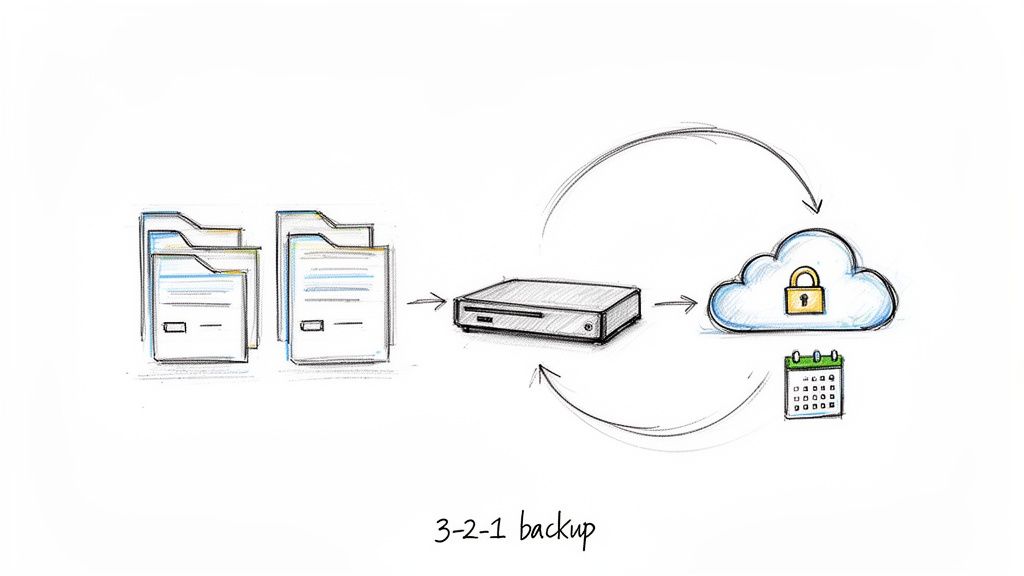
The rule is elegantly simple: maintain three copies of your data on two different types of media, with at least one of those copies stored off-site. This creates layers of redundancy. If your local server is encrypted by ransomware, your local backup on a separate device is ready. If a fire or flood hits your office in Greenwood, your encrypted, off-site cloud backup is completely safe and accessible.
Why This is Your Get-Out-of-Jail-Free Card
We’ve seen the 3-2-1 rule in action. A law firm in Johnson County was hit with a ransomware attack that encrypted every single file on their main server. Because we had implemented an immutable, air-gapped backup with Acronis Cyber Protect, the criminals couldn't touch their recovery point. Instead of paying a ransom, they were back to billing hours within a few hours. That's the difference between a minor inconvenience and a catastrophic business failure. Understanding and implementing these data loss prediction best practices is non-negotiable.
Actionable Steps for Implementation:
- Automate Everything: Manual backups are missed backups. Use professional software like Veeam or Acronis to schedule automated daily backups of your critical systems.
- Embrace Immutability: Your off-site backup (copy #3) must be immutable, meaning it cannot be altered or deleted by anyone, even if an attacker gains administrator credentials. This is your ultimate defense against ransomware.
- Test Your Restores: A backup you haven't tested is just a prayer. We schedule monthly or quarterly restore tests for our clients to verify data integrity and confirm we can recover systems within their required timeframes.
- Encrypt Backups: Ensure all your backups, both local and cloud-based, are encrypted. This protects your data even if the backup media itself is stolen, a critical component for meeting HIPAA or CMMC compliance.
4. Conduct Regular Security Awareness Training
Your firewall, EDR, and MFA can be the most advanced system on the planet, but it only takes one distracted employee clicking on a convincing fake invoice to bring the whole fortress down. Human error is the skeleton key cybercriminals use to bypass even the most robust technical defenses. This is why security awareness training is one of the most critical cybersecurity tips for small business owners; it transforms your team from potential liabilities into a vigilant, proactive human firewall.
Security awareness training isn't just a boring slideshow about not writing your password on a sticky note. Modern training, powered by platforms like KnowBe4, uses engaging videos and simulated phishing attacks to teach employees how to spot, avoid, and report real-world threats like social engineering, business email compromise, and malicious attachments. It's the difference between memorizing a rule and developing a reflex.
Why This Turns Your Team into a Human Firewall
We’ve seen it firsthand with our clients. A financial services firm in Carmel went from losing nearly $40,000 to phishing scams to near-zero incidents after implementing quarterly, mandatory training. Another client, a manufacturing plant in a Greenwood business park, foiled a six-figure wire transfer fraud because a well-trained accounts payable clerk recognized the subtle signs of a C-level email impersonation. This isn't just theory; it’s a proven strategy for building a resilient defense.
Actionable Steps for Implementation:
- Start with Phishing Simulations: Don't just tell them, show them. Use a service to send safe, simulated phishing emails to your staff. It’s a powerful wake-up call and provides a baseline to measure improvement.
- Make Training Mandatory and Ongoing: Cybersecurity isn't a one-and-done event. Threats evolve, so training must be a continuous, mandatory process for everyone, including the C-suite who are often prime targets.
- Create a No-Blame Reporting Culture: Your goal is to encourage reporting. Celebrate employees who flag suspicious emails, even if they're false alarms. A culture of fear leads to people hiding mistakes, which allows threats to fester.
- Keep Content Fresh and Relevant: Use real-world examples, especially from recent Indiana-based attacks if possible. Tie the training directly to the threats your business and industry actually face, whether it's HIPAA for a healthcare provider or CMMC for a defense contractor.
5. Secure Wi-Fi Networks with WPA3 and Network Segmentation
Treating your business Wi-Fi as one big, happy, open network is like hosting a block party in your server room. Every device, from the CEO's laptop to a customer's smartphone on the guest network, gets a backstage pass to your entire digital infrastructure. A single compromised device could pivot and attack critical systems. Securing your wireless environment with modern encryption like WPA3 and smart network segmentation is a crucial cybersecurity tip for small business owners who want to keep their data locked down.
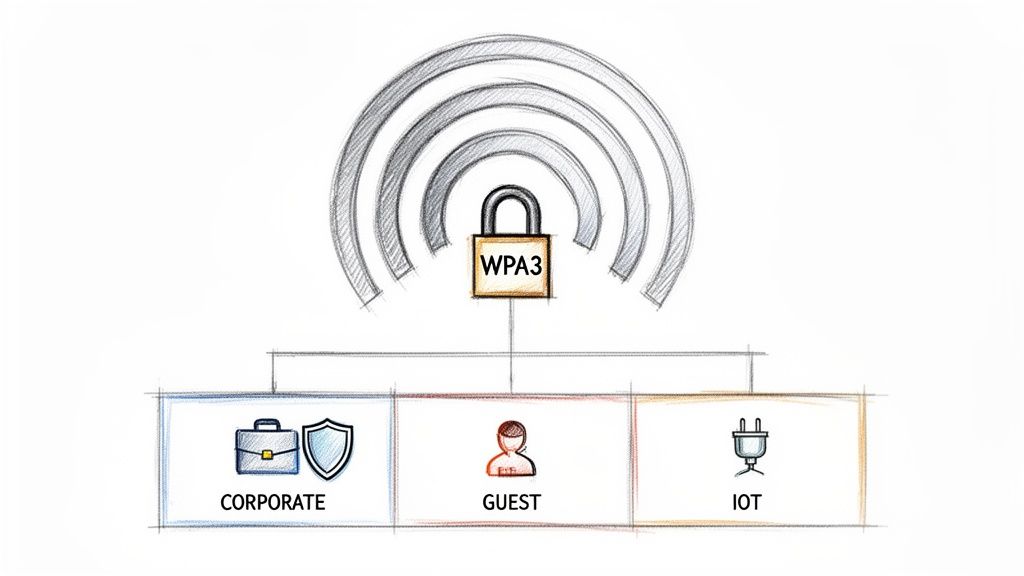
This strategy involves two key components. First, using WPA3 encryption, the latest security standard, makes it significantly harder for attackers to crack your Wi-Fi password. Second, network segmentation uses Virtual LANs (VLANs) to create separate, isolated "mini-networks" on the same physical hardware. This ensures that a device on the guest Wi-Fi can't even see, let alone access, your point-of-sale system or internal file server.
Why This is Your Digital Perimeter
For a medical practice in Greenwood, this isn't just a good idea; it's a HIPAA requirement. We implement this by creating one VLAN for patient data and EMR systems, another for staff devices, and a completely isolated guest network. An attacker who compromises a visitor's phone has no path to protected health information. Similarly, a manufacturing plant along the I-65 corridor can segment its sensitive Operational Technology (OT) network from the corporate network, preventing a phishing attack on an office computer from shutting down the production line.
Actionable Steps for Implementation:
- Change Default Credentials: The first thing you should do with any new router or access point is change the default administrative username and password. This is the lowest-hanging fruit for hackers.
- Create Segmented VLANs: Using networking hardware from brands like UniFi networking, create separate networks for different purposes: Corporate, Guest, IoT devices (like smart thermostats or security cameras), and Management.
- Deploy WPA3 Encryption: Upgrade your access points if necessary and configure all your private networks to use WPA3. It provides superior protection against password-guessing attacks compared to the older WPA2 standard.
- Disable WPS: Wi-Fi Protected Setup (WPS) is a known vulnerability. Disable it on all your access points to close an easy entry point for attackers. Your IT provider can verify this setting is disabled during a routine check.
6. Implement Role-Based Access Control (RBAC) and Least Privilege
Giving every employee the master key to your digital kingdom is a recipe for disaster. If your marketing intern has the same system access as your CFO, you’re not just trusting the intern, you’re trusting every scammer who targets them with a phishing email. This is where the principle of least privilege comes in. It’s a simple but powerful idea: users should only have access to the information and systems absolutely necessary to do their jobs. Nothing more.
Role-Based Access Control (RBAC) is the system that makes this principle a reality. It organizes permissions by job function, not by individual. This means instead of manually assigning permissions to every new hire, you assign them a pre-defined role, like “Sales Associate” or “HR Manager,” and they automatically inherit the exact access they need. It’s one of the most critical cybersecurity tips for small business owners because it drastically shrinks your attack surface.
Why This is a Silent Guardian
For a healthcare provider in Hamilton County, properly configured RBAC is a cornerstone of HIPAA compliance, preventing a receptionist from accessing sensitive patient diagnostic records. We’ve seen a law firm in downtown Indy use RBAC within their document management system to compartmentalize client files, ensuring that attorneys on one case cannot access privileged information from another. This segmentation is crucial; if one set of credentials is stolen, the damage is contained to that specific role, not your entire network.
Actionable Steps for Implementation:
- Map Your Roles: Before touching any settings, document every job function in your business and list the specific applications, folders, and data they need to access.
- Implement Just-in-Time (JIT) Access: For high-level tasks, use systems that grant temporary administrative rights that expire automatically. This prevents "privilege creep," where users accumulate unnecessary permissions over time.
- Conduct Quarterly Access Reviews: Make it a recurring calendar event. Review who has access to what and revoke any permissions that are no longer required due to role changes or departures.
- Secure Service Accounts: Don’t forget non-human accounts used by applications. These are often overly permissive and forgotten. Apply the same least privilege principles to them.
7. Use Email Security Solutions with Anti-Phishing Protection
If your network is a fortress, your email inbox is the bustling main gate where vendors, clients, and Trojan horses arrive daily. Without a modern security guard, you're essentially letting anyone with a convincing disguise walk right in. Standard spam filters are no match for today's sophisticated phishing attacks, which use social engineering to trick your team into revealing credentials or wiring funds. This is why a dedicated email security solution is one of the most critical cybersecurity tips for small business owners; it’s the high-tech scanner that spots the impostors before they ever reach your employees.
These platforms, like Microsoft Defender for Office 365 or Proofpoint, act as an intelligent gateway. They use machine learning and threat intelligence to analyze incoming emails for malicious links, weaponized attachments, and signs of impersonation, quarantining threats before they can do any damage. This is your frontline defense against the single most common attack vector targeting businesses today.
Why This is Your Digital Bouncer
For a Hamilton County accounting firm, an advanced email security solution is the difference between a routine tax season and a devastating ransomware attack initiated by a single click on a fake invoice. We've seen Johnson County healthcare providers use these tools to stop credential harvesting attacks targeting clinical staff, protecting sensitive patient data and ensuring HIPAA compliance. It's not just about blocking spam; it's about preventing business email compromise that could trick your controller into paying a fraudulent six-figure invoice.
Actionable Steps for Implementation:
- Authenticate Your Domain: Immediately enable DMARC, SPF, and DKIM. These email authentication protocols are like a digital signature that prevents criminals from spoofing your domain to phish your clients and partners.
- Train Users to Report, Not Delete: Your employees are a human firewall. Use the built-in reporting tools (like the "Report Phish" button in Outlook) to train them to flag suspicious emails. This feeds intelligence back into the system, making it smarter.
- Implement Advanced Threat Protection: Enable features that scan and detonate links and attachments in a safe, virtual environment before they are delivered to the user. This is your best defense against zero-day malware.
- Configure Outbound Rules: Prevent data exfiltration by disabling automatic external email forwarding for most users. An attacker who gains access to one mailbox shouldn't be able to siphon years of data to an outside account. If you're serious about protecting your business, learn more about how to protect against phishing attacks and calculate the clear ROI.
8. Monitor and Update Software, Patches, and System Firmware
Running unpatched software is like posting an open invitation for every digital burglar on the block to come test your locks. That outdated version of Windows, the forgotten plugin on your website, or the old firmware on your network router are well-documented, publicly known entry points. Cybercriminals use automated scanners to find these weak spots, making it a matter of when, not if, you’ll be targeted. Establishing a rigorous patch management program is one of the most critical cybersecurity tips for small business owners, as it systematically slams these digital windows shut before an attacker can climb through.
Outdated systems are low-hanging fruit. A single known vulnerability in a common application like Adobe Reader or a web browser can be enough to compromise your entire network. Patch management is the ongoing process of identifying, testing, and deploying these crucial security updates to your operating systems, applications, and hardware firmware, effectively neutralizing threats before they can be weaponized against you.
Why This is Your Proactive Shield
For a manufacturing facility along the I-65 corridor, a timely patch to their server's operating system is the difference between normal production and a ransomware attack that halts the line for a week, costing millions. It’s a core component of maintaining cyber hygiene and a requirement for compliance frameworks like HIPAA and CMMC. We've seen Johnson County healthcare providers maintain compliance and protect patient data simply by having a documented, automated schedule for updating everything from their firewall firmware to their practice management software.
Actionable Steps for Implementation:
- Create a Patching Cadence: Establish a routine, such as the second Tuesday of every month ("Patch Tuesday"), to deploy non-critical updates. This creates predictability and minimizes disruption.
- Prioritize Ruthlessly: When a critical or "zero-day" vulnerability is announced, you must have a plan to deploy the patch within 24-48 hours. Subscribe to vendor security bulletins to get these alerts immediately.
- Test Before You Deploy: Whenever possible, apply patches to a non-production system or a small, low-impact group of computers first. This helps identify any conflicts before they can cause a company-wide outage.
- Retire End-of-Life (EOL) Systems: Maintain an inventory of all your hardware and software. If a system no longer receives security updates from the vendor, it must be retired or completely isolated from the main network to prevent it from becoming a security liability.
9. Deploy Network Firewalls and Intrusion Detection/Prevention Systems (IDS/IPS)
If your business network is a castle, the firewall is the towering stone wall, the drawbridge, and the gatekeeper all in one. It’s your digital bouncer, inspecting every packet of data trying to get in or out and deciding if it’s on the guest list. An Intrusion Detection/Prevention System (IDS/IPS) acts as the vigilant guards on that wall, actively looking for suspicious behavior and neutralizing threats before they can breach your defenses. Without them, your network is an open field, welcoming every digital marauder that comes along.
A firewall works by enforcing a set of security rules to control traffic, while an IDS/IPS monitors that traffic for malicious patterns and known attack signatures. Modern next-generation firewalls (NGFWs) from vendors like Fortinet or Palo Alto Networks combine these functions, offering a powerful, unified defense. This technology is a cornerstone among cybersecurity tips for small business because it establishes a strong, defensible perimeter.
Why This is Your Digital Gatekeeper
For a manufacturing plant on the I-65 corridor, segmenting the office network (IT) from the factory floor network (OT) with a firewall is critical to prevent a ransomware attack from shutting down production. We’ve seen a Hamilton County healthcare provider use their Cisco Firepower system to block malicious traffic targeting HIPAA-protected patient records, preventing a data breach that could have resulted in massive fines and reputational damage. It’s a foundational piece of network security architecture.
Actionable Steps for Implementation:
- Segment Your Network: Use your firewall to create separate zones (VLANs) for different functions. Isolate your guest Wi-Fi, your point-of-sale systems, and your critical servers from each other so a breach in one area can’t spread.
- Build "Allow" Rules: Instead of just blocking known bad things, configure your firewall to only allow pre-approved, necessary traffic. This "default deny" posture is a core principle of a Zero Trust model.
- Keep Signatures Updated: Your firewall's and IPS's ability to spot new threats depends on its threat intelligence. Ensure you have active subscriptions and that it updates its attack signatures automatically.
- Enable Secure VPN with MFA: Configure your firewall's VPN for remote employees using strong encryption and require Multi-Factor Authentication for access. This creates a secure tunnel into your network from anywhere. For more details, explore our guide on network security best practices for Indianapolis businesses.
10. Conduct Regular Vulnerability Assessments, Penetration Testing, and Establish Incident Response & Cyber Insurance
If your defenses are the fortress walls, regular testing is the inspector general checking for cracks, while an incident response plan is your fire drill for when a dragon actually breaches the gate. Hoping your defenses are perfect is a recipe for disaster. You need to actively probe for weaknesses with vulnerability assessments and penetration tests, then have a rock-solid, practiced plan for what to do when (not if) an incident occurs. This proactive approach separates resilient businesses from cautionary tales.
A vulnerability assessment is an automated scan, like using a stud finder on your network to find weak points. Penetration testing is hiring an ethical hacker to try and actually break through those weak points, proving whether they're just cosmetic cracks or a gaping hole. Your Incident Response Plan (IRP) is the step-by-step playbook your team follows the moment a breach is detected, and cyber insurance is the financial safety net to help cover the catastrophic costs.
Why This Prepares You for the Inevitable
For a healthcare provider in Hamilton County, a vulnerability assessment might uncover an unpatched server, preventing a HIPAA violation and a massive fine. We've seen a manufacturing business along the I-65 corridor recover from a ransomware attack in under 48 hours because they had a documented IRP and tested it quarterly. Beyond technical defenses, a comprehensive cybersecurity strategy for small businesses also includes financial protection, such as securing the right insurance to cover potential cyber liability. This combination of testing, planning, and insurance creates true cyber resilience.
Actionable Steps for Implementation:
- Schedule Regular Testing: Conduct vulnerability scans at least quarterly and a full penetration test annually. Don’t just set it and forget it; use a tool like Tenable Nessus or Qualys to automate scanning.
- Build a Practical Incident Response Plan: Document everything. Assign clear roles (Incident Commander, Communications Lead), create step-by-step checklists, and include contact info for your legal counsel, forensic firm, and insurance carrier.
- Practice Your Plan: Run tabletop exercises with your team. Walk through a simulated ransomware attack or data breach to find gaps in your plan before a real crisis hits.
- Verify Your Cyber Insurance: Don't just buy a policy; read the fine print. Ensure it covers your specific risks, from business email compromise to regulatory fines, and understand the requirements for making a claim. You can review your entire infrastructure's readiness by following a comprehensive IT infrastructure audit checklist.
10-Point Small Business Cybersecurity Comparison
| Security Measure | Implementation Complexity 🔄 | Resource Requirements ⚡ | Expected Effectiveness ⭐ | Ideal Use Cases 📊 | Key Advantages / Tips 💡 |
|---|---|---|---|---|---|
| Implement Strong Password Policies and Multi-Factor Authentication (MFA) | Low–Medium: policy updates + rollout and training | Low–Medium: identity platform, authenticator apps/hardware keys | ⭐⭐⭐⭐⭐ Blocks majority of credential-based attacks | Remote access, cloud apps, admin/financial accounts | Enforce MFA for remote/cloud first; prefer TOTP over SMS; provide secure backup codes |
| Deploy Managed Endpoint Detection and Response (EDR) | Medium–High: tuning, SOC/monitoring integration | High: per-endpoint licenses, monitoring/response staff or MSSP | ⭐⭐⭐⭐⭐ Detects advanced threats; reduces MTTD dramatically | Environments with many endpoints or high threat exposure | Baseline profiles before deployment; automate responses and integrate with SIEM |
| Establish Regular Data Backups with 3-2-1 Strategy | Medium: design 3-2-1, immutable/offsite setup and testing | Medium: storage, backup software, bandwidth, retention | ⭐⭐⭐⭐⭐ Ensures recovery from ransomware, failures, disasters | Any business requiring continuity and regulatory retention | Test restores monthly; keep immutable/air‑gapped offsite copy; encrypt backups |
| Conduct Regular Security Awareness Training | Low–Medium: ongoing program and simulations | Low: training platform and admin time | ⭐⭐⭐⭐ Significantly reduces phishing click rates and human risk | All organizations, especially small businesses with limited security teams | Run quarterly phishing sims; include executives; track completion and reward reporting |
| Secure Wi‑Fi Networks with WPA3 and Network Segmentation | Medium: network redesign, VLANs, certificate auth | Medium: WPA3-capable APs, controllers, certificate infrastructure | ⭐⭐⭐⭐ Prevents eavesdropping and limits lateral access over wireless | Mobile workforce, guest Wi‑Fi, BYOD environments | Create VLANs (Guest/Corp/IoT), disable WPS, update AP firmware and change admin credentials |
| Implement Role‑Based Access Control (RBAC) and Least Privilege | High: role mapping, policy design, PAM integration | Medium–High: IAM/PAM tools, admin effort, workflows | ⭐⭐⭐⭐⭐ Minimizes insider risk and limits blast radius of compromises | Organizations with sensitive data or regulatory requirements | Use Just‑In‑Time access, quarterly access reviews, require multi-approval for elevation |
| Use Email Security Solutions with Anti‑Phishing Protection | Low–Medium: deploy filters, tune policies, enable auth protocols | Low–Medium: per-user licensing, sandboxing, integration | ⭐⭐⭐⭐⭐ Blocks most phishing and reduces malware/ransomware delivery | Email-heavy orgs and those targeted by BEC/phishing | Enable DMARC/SPF/DKIM, review quarantine regularly, train users to report suspicious mail |
| Monitor and Update Software, Patches, and System Firmware | Medium: patch windows, testing and rollback procedures | Medium: patch tooling, test environments, maintenance windows | ⭐⭐⭐⭐⭐ Eliminates a large portion of known vulnerabilities | All environments; critical for systems exposed externally or running legacy software | Prioritize critical patches (24–48h), test in non‑prod, maintain inventory and EOL plans |
| Deploy Network Firewalls and IDS/IPS | High: rule design, IDS tuning, HA and segmentation | High: hardware/software costs and skilled administrators | ⭐⭐⭐⭐ Prevents and detects network-based attacks in real time | Multi-site networks, regulated industries, remote access needs | Use explicit allow rules, enable logging/forensics, segment networks and secure VPN with MFA |
| Conduct Vulnerability Assessments, Pen Tests, Incident Response & Cyber Insurance | Very High: scheduling, testing, IR plan development, insurance procurement | High: external testers, forensics, tabletop exercises, insurance premiums | ⭐⭐⭐⭐⭐ Identifies exploitability, validates controls, reduces financial/operational impact | Organizations needing assurance, compliance, or high-risk profiles | Run quarterly assessments, maintain documented IR playbooks, verify insurance coverage and limits |
Turn Your Tech from a Liability into an Asset
We’ve covered a lot of ground, from the fundamentals of strong passwords and Multi-Factor Authentication to the more advanced strategies of network segmentation and penetration testing. It can feel like a mountain of tasks, especially when you’re already busy running your business somewhere along the I-65 corridor. But here’s the reality: ignoring these cybersecurity tips for small business doesn’t make the threats go away. It just makes your business an easier target.
The good news is that you don’t have to become a cybersecurity expert overnight. The goal is to shift your mindset. Stop thinking of your technology as a fragile, unpredictable expense and start viewing it as a resilient, strategic asset. This transformation begins by implementing the core principles we’ve discussed. Think of it less as a checklist and more as building a digital fortress, one solid, well-placed stone at a time.
From Reactive Panic to Proactive Power
Let's boil it all down. The most critical takeaways from this guide aren't just about the tech; they're about the approach.
- Defense in Depth is Non-Negotiable: A single firewall isn’t enough. You need multiple, overlapping layers of security. This means combining strong endpoint protection like Bitdefender GravityZone, smart network design using UniFi hardware, rigorous employee training, and a rock-solid backup plan. When one layer fails, another is there to catch the threat.
- Your People Are Your First and Last Line of Defense: You can have the best tech in the world, but one click on a phishing email can bring it all down. Consistent, engaging security awareness training is one of the highest ROI investments you can make. It transforms your team from a potential vulnerability into a human firewall.
- Backups Are Your Ultimate Safety Net: When all else fails, a verified, immutable off-site backup is what separates a minor inconvenience from a business-ending catastrophe. The 3-2-1 strategy isn’t just a best practice; it's the foundation of true business continuity. In our 17 years of local service, we’ve seen businesses in Johnson County bounce back from ransomware in hours, not weeks, because they had this system in place.
Mastering these concepts fundamentally changes your operational reality. You stop losing sleep over whether your aging server in that Greenwood business park will finally give up the ghost. You stop wasting billable hours trying to fix recurring IT gremlins. Instead, you get predictable uptime, a stable monthly IT budget, and the peace of mind that comes from knowing your critical data is secure and recoverable.
Implementing a Zero Trust architecture or deploying SOC-as-a-Service monitoring isn't just about preventing a data breach; it's about building a business that can withstand modern threats and keep running, no matter what. It’s about ensuring that your technology actively supports your growth, rather than holding it back.
The next step is to move from reading to doing. Don't wait for a suspicious email or a server failure to force your hand. Be proactive. Take an honest look at your current security posture. Where are the gaps? Are your backups being tested? When was your team last trained? Answering these questions now is infinitely better than trying to find answers in the middle of a crisis.
Ready to get a clear, no-nonsense picture of your business's cybersecurity health? As a dedicated partner to businesses across the Indianapolis area, Finchum Fixes IT specializes in transforming tech liabilities into strategic assets. Schedule your complimentary, no-obligation Security Risk Audit today and let our experts show you exactly where your vulnerabilities lie and how to fix them for good.