The Top 10 Network Security Best Practices for Indianapolis Businesses in 2026
Let's cut to the chase: what you don't know can hurt your business, especially when it comes to cybersecurity. For small and medium-sized businesses here in the Indianapolis and Greenwood area, the digital threats are real, but the solutions don't need to be wrapped in confusing tech-speak. Forget the scare tactics and dry, academic lectures. This is your practical, no-nonsense guide to the most impactful network security best practices you can implement right now to protect your company's data, reputation, and bottom line.
Think of this as your priority checklist, built by a local Central Indiana IT team that's in the trenches every day. We've seen what works and what gets businesses into hot water. We’re talking about the foundational defenses that stop cybercriminals cold. This isn't just theory; it's about action. To dive deeper into the overarching strategies for protecting your digital assets, explore this guide on the Top network security best practices for 2025.
In this article, we'll break down ten critical areas, from Multi-Factor Authentication (MFA) to employee training and incident response planning. For each one, we’ll explain why it matters in simple terms, give you quick fixes you can tackle today, and provide clear signs that it’s time to call in a local professional for hands-on help. Let's get your network locked down, so you can focus on running your business.
1. Multi-Factor Authentication (MFA)
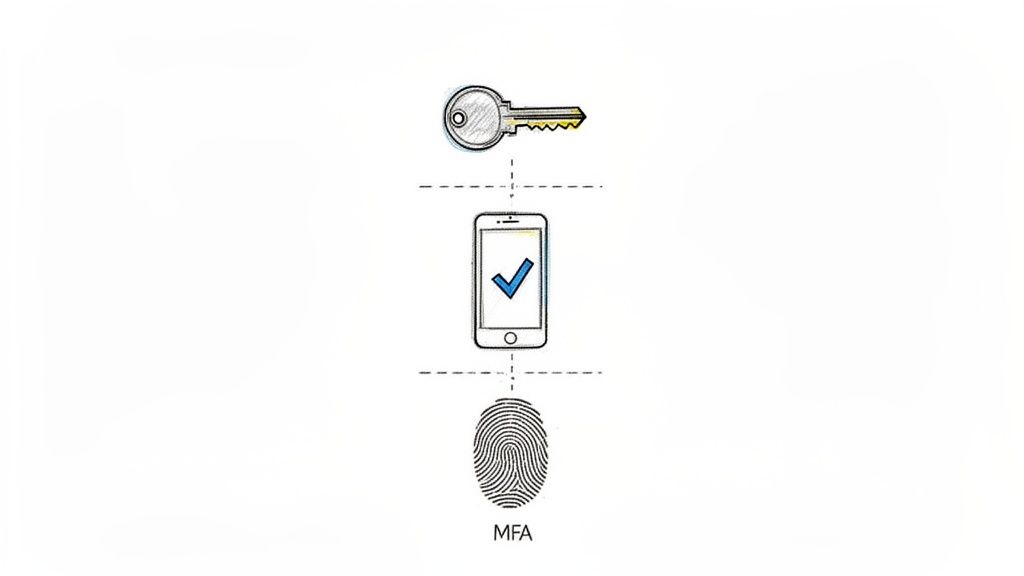
Think of your password as the flimsy lock on a storage unit. Sure, it keeps honest people out, but a determined thief is getting in. Multi-Factor Authentication (MFA) is your digital deadbolt, security camera, and alarm system all rolled into one. It demands that anyone trying to access your accounts prove their identity with two or more credentials.
MFA works by layering different types of proof: something you know (your password), something you have (your phone), and sometimes something you are (your fingerprint). Even if a cybercriminal steals your password, they can't log in without also having your physical phone. For Indiana businesses handling sensitive client data, this isn't just a "nice-to-have," it's a foundational network security best practice.
Why It's a Top Priority
MFA single-handedly neutralizes the most common attack vector: stolen passwords. According to Verizon's Data Breach Investigations Report, compromised credentials are a primary cause of security breaches. By implementing MFA, you slam that door shut. It's the highest-impact, lowest-cost security upgrade you can make.
Pro-Tip: Quick Fixes
- Protect the Crown Jewels First: Don't try to enable MFA for everyone all at once. Start with your high-value targets: administrator accounts, executive email, and anyone with financial access. This immediately protects your most critical assets.
- Use Apps, Not Texts: While text message codes are better than nothing, they can be intercepted. Use more secure authenticator apps like Google Authenticator or Microsoft Authenticator for a stronger defense.
- Secure Your Recovery Codes: When you set up MFA, you'll get backup codes in case you lose your phone. Don't store a screenshot of them on the same phone. Print them out and lock them in a safe or use a secure password manager.
When to Call Finchum Fixes IT
You should call us if you're unsure how to deploy MFA across your entire organization without causing a revolt. We can help you implement it seamlessly, configure smart policies (like requiring MFA only when staff log in from outside the office), and manage the process so it doesn't disrupt your daily operations. Having a local partner in Central Indiana means we can be on-site to help with a smooth rollout.
2. Regular Security Patching and Updates
Imagine your business software is a brand-new car. When it rolls off the lot, it's perfect. But soon, the manufacturer discovers a flaw in the brake line. They issue a recall to fix it. Ignoring that recall is like ignoring a security patch; you're knowingly driving around with a dangerous, exploitable vulnerability that criminals are actively looking for.
Security patching is the process of applying these "recalls" to your digital assets—operating systems, applications, and hardware. Hackers and malware, like the infamous WannaCry ransomware that crippled businesses worldwide, thrive on finding and exploiting these unpatched flaws. For an Indiana business, staying on top of updates is one of the most fundamental network security best practices for locking down your digital infrastructure.
Why It's a Top Priority
Unpatched vulnerabilities are the low-hanging fruit for cybercriminals. They are publicly known weaknesses, and attackers use automated tools that constantly scan the internet for systems that haven't been updated. The 2017 Equifax breach, which exposed the data of nearly 150 million people, was caused by a single unpatched web application. This isn't a complex, spy-movie hack; it's often as simple as someone forgetting to install a critical update.
Pro-Tip: Quick Fixes
- Automate Everything You Can: Manually updating every computer is a recipe for missed patches. Use built-in tools like Windows Update for Business or more robust patch management systems to automate the deployment of updates across your entire network, often during off-hours to minimize disruption.
- Create a Patching Calendar: Don't leave updates to chance. Schedule a recurring time for patching, like the third Tuesday of the month, to coincide with major releases like Microsoft's "Patch Tuesday." This turns a reactive scramble into a proactive routine.
- Prioritize and Test: Not all patches are created equal. Focus on critical security updates first, aiming to deploy them within 30 days. Before rolling a major update out to everyone, test it on a small, non-critical group of computers to ensure it doesn't break essential business software.
When to Call Finchum Fixes IT
Give us a call when you're tired of chasing updates or worried that a patch might bring your operations to a screeching halt. We can implement a fully managed, automated patch management system that keeps your business protected without you ever having to think about it. We handle the testing, scheduling, and deployment, ensuring your network security is always up to date.
3. Firewall Implementation and Configuration
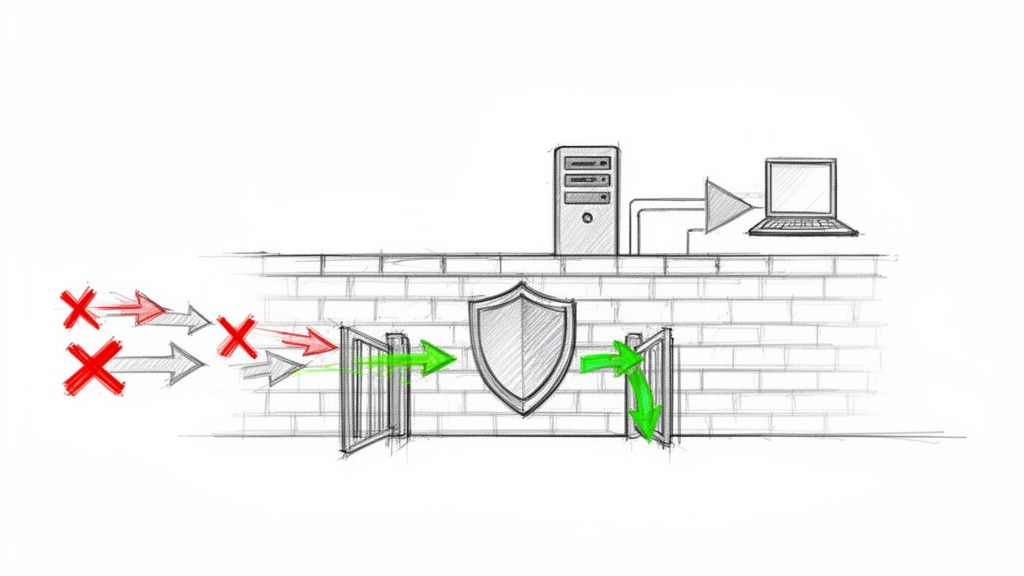
Think of your business network as a private club. Your firewall is the bouncer at the velvet rope, checking every single ID before letting anyone in or out. It's your primary barrier, standing guard between your trusted internal network and the wild, untrusted internet. A properly configured firewall scrutinizes all incoming and outgoing traffic, blocking malicious connections and enforcing your security rules 24/7.
Modern firewalls have evolved from simple gatekeepers into intelligent security hubs. They can now identify specific applications, prevent intrusions, and even use global threat intelligence to block new threats. For any Indiana business, a well-managed firewall isn’t just a piece of hardware; it’s the cornerstone of a robust network security best practices strategy.
Why It's a Top Priority
A firewall is your non-negotiable frontline defender. It stops automated attacks and opportunistic hackers in their tracks. Without one, your network is essentially a house with the front door wide open. Properly configuring it ensures that only legitimate, necessary traffic can pass, dramatically reducing your attack surface.
Pro-Tip: Quick Fixes
- Start with 'Deny All': The strongest security posture begins with a 'deny by default' rule. This means the firewall blocks everything unless you create a specific rule to allow it. This prevents accidental exposure from forgotten or misconfigured services.
- Segment Your Network: Don't just protect the perimeter. Use your firewall to create internal zones. For example, keep your public Wi-Fi network completely separate from the network that handles your financial data. This contains a potential breach to a less critical area.
- Review and Prune Rules Regularly: Firewall rules accumulate over time. Conduct a quarterly audit to remove outdated or unnecessary rules that were created for temporary projects. Each unnecessary rule is a potential security hole.
When to Call Finchum Fixes IT
You should call us when you need to go beyond the basic firewall included with your internet router. We can help you select, deploy, and manage a next-generation firewall tailored to your business needs, ensuring its rules align perfectly with your operations. We'll also help you actively monitor its logs, a key component of effective network monitoring best practices, to spot and stop threats proactively.
4. Network Segmentation and VLANs
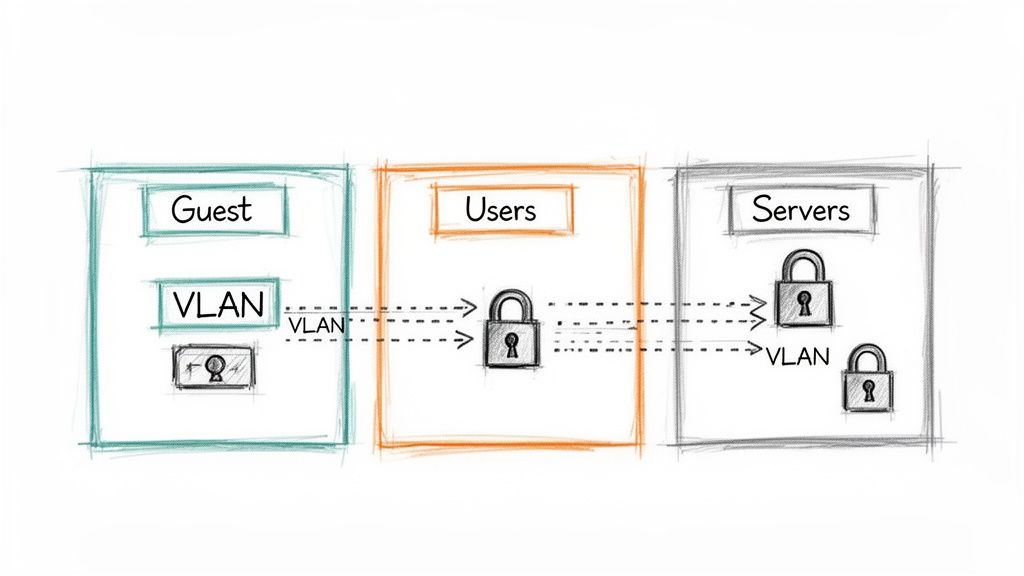
Imagine your office network is a wide-open warehouse. If a fire starts in one corner (say, a compromised guest laptop), it can quickly spread and burn the whole place down. Network segmentation is like building fireproof walls inside that warehouse, creating smaller, contained rooms. It divides your network into isolated subnetworks, so a problem in one area doesn't become a catastrophe for the entire business.
This practice is a cornerstone of modern network security best practices, especially for Indiana businesses handling protected information. Using Virtual Local Area Networks (VLANs), we can create these digital walls without needing separate physical hardware. This ensures that even if a hacker gets onto your guest Wi-Fi, they can't snoop around on your server network where all the critical company data is stored.
Why It's a Top Priority
Segmentation drastically limits an attacker's "lateral movement." Most cyberattacks don't just hit their initial target and stop; they land on a vulnerable computer and then spread across the network to find valuable assets. By segmenting, you contain the breach to its initial point of entry, minimizing the potential damage and giving you a chance to neutralize the threat before it reaches your crown jewels.
Pro-Tip: Quick Fixes
- Create the "Big Three" Segments: If you're just starting, create at least three basic VLANs: one for your main corporate users, one for your servers and critical data, and a completely separate one for Guest Wi-Fi and untrusted devices (like smart speakers or thermostats).
- Firewall Between Segments: Simply creating VLANs isn't enough. You must place a firewall between them and write specific rules that only allow necessary traffic to pass. For example, your guest network should never be allowed to communicate with your server network.
- Map Your Data Flow First: Before building walls, you need a blueprint. Spend time understanding which user groups need access to which data. This map will inform a logical and effective segmentation strategy that doesn't disrupt productivity.
When to Call Finchum Fixes IT
You should call us when you look at your network and just see one big, flat digital space. Designing and implementing a segmentation strategy that works for your specific business without accidentally blocking critical operations is a complex job. We can analyze your data flow, design a secure and efficient VLAN architecture, and configure the firewall rules to lock it all down.
5. Strong Password Policies and Management
Relying on employees to create strong passwords without clear rules is like handing out blank checks and hoping for the best. A weak, reused password is the digital equivalent of leaving your front door wide open with a "Welcome!" mat out for cybercriminals. A Strong Password Policy is the set of rules your business enforces for creating these critical keys, while a password manager provides a secure vault to store them.
This one-two punch tackles a massive security vulnerability head-on. Instead of forcing users into creating complex but forgettable passwords like P@ssw0rd1!, modern policies advocate for long but memorable passphrases. Think four-happy-green-staplers. This approach is far more resistant to brute-force attacks and is something a human can actually remember, reducing the temptation to write it on a sticky note. For Indiana businesses, implementing this is a foundational network security best practice.
Why It's a Top Priority
Passwords are the first line of defense for nearly every digital asset you own. A weak password policy directly leads to credential stuffing attacks, where criminals use lists of stolen passwords from other breaches to try and access your systems. Enforcing strong, unique passwords for every service makes this tactic useless and dramatically shrinks your attack surface.
Pro-Tip: Quick Fixes
- Embrace the Passphrase: Ditch the old
!@#$complexity rules. Enforce a minimum length of 12-16 characters and encourage employees to use four or more random words. It's exponentially more secure and easier to remember. - Deploy a Password Manager: Don't just recommend one, provide and mandate its use. Business plans for tools like 1Password or Dashlane give you central control and ensure every employee has a secure place to store unique passwords for every login.
- Block Known Bad Passwords: Implement tools that check new passwords against databases of those exposed in public breaches. This prevents an employee from using a password that's already in a hacker's toolkit.
When to Call Finchum Fixes IT
Give us a call when you're ready to move beyond just telling people to "use a good password." We can help you configure and enforce these policies at the server level, deploy and manage a business-wide password manager, and train your team on how to use these tools effectively. We'll make sure your first line of defense is a brick wall, not a screen door.
6. Data Encryption (In Transit and At Rest)
Imagine your company’s sensitive data is a pile of cash. Leaving it unencrypted is like leaving that cash sitting on a park bench. Encryption is the digital equivalent of an armored truck, transforming your readable data into a complex, unreadable code that is useless to anyone without the specific key to unlock it. It protects information both when it's moving across the internet (in transit) and when it's sitting on a server or hard drive (at rest).
Encryption works by using sophisticated algorithms to scramble data into ciphertext. Whether it's a customer's credit card number flying to a payment processor or an employee's health records stored on a laptop, this process makes the information unreadable to eavesdroppers and thieves. For Indiana businesses handling any kind of private information, this isn't just a smart move; it’s a non-negotiable component of modern network security best practices and often a legal requirement.
Why It's a Top Priority
Unencrypted data is a goldmine for cybercriminals. A single lost laptop or intercepted network packet could lead to a catastrophic data breach, regulatory fines, and a complete loss of customer trust. Implementing strong encryption standards effectively devalues your data to attackers. Even if they manage to steal it, they can't use it, turning a potential disaster into a minor incident.
Pro-Tip: Quick Fixes
- Activate Full-Disk Encryption: This is a low-hanging fruit. Turn on BitLocker (Windows) or FileVault (Mac) on every single company laptop and desktop. It takes minutes to enable and protects all the data on the device if it's ever lost or stolen.
- Enforce HTTPS Everywhere: Ensure your website and all web applications use HTTPS, which encrypts data between your customer's browser and your server. Use tools to automatically redirect all HTTP traffic to HTTPS so no connection is left unsecured. Dive deeper into why this is critical with our guide to secure data transfer for Indiana businesses.
- Encrypt Your Backups: Backups are a prime target for theft. Don't just back up your data; back it up in an encrypted format. Assume that your backup drive or cloud storage could be compromised and make sure the data on it is unreadable without the proper keys.
When to Call Finchum Fixes IT
Give us a ring if you're struggling to implement encryption across your databases, servers, and cloud environments. We can help you manage encryption keys, automate certificate renewals, and deploy a comprehensive data protection strategy that meets compliance standards like HIPAA or PCI DSS without bogging down your systems.
7. Employee Security Awareness Training
Your firewall and antivirus are like a state-of-the-art bank vault. But what happens when an employee unknowingly holds the door open for a robber disguised as a pizza delivery guy? That's the risk of an untrained workforce. Employee Security Awareness Training turns your team from potential liabilities into a vigilant, human firewall. It’s about arming them with the knowledge to spot, avoid, and report cyber threats.
This training transforms your staff into a proactive defense layer. Instead of just reacting to breaches, they learn to recognize phishing emails, question suspicious requests, and practice good data hygiene. Given that a staggering 82% of breaches involve a human element, according to Verizon, training your Indiana team isn't just another item on a checklist; it’s one of the most effective network security best practices you can deploy.
Why It's a Top Priority
Technology alone cannot stop every threat. Cybercriminals are masters of manipulation, preying on human curiosity, urgency, and trust. A single employee mistake can bypass millions of dollars in security hardware. Regular, engaging training hardens your biggest potential vulnerability: your people. It builds a culture of security where everyone understands they play a vital role in protecting the business.
Pro-Tip: Quick Fixes
- Simulate, Don't Just Lecture: Start with a baseline phishing simulation. Seeing who clicks gives you a real-world starting point. Then, run these tests quarterly to track improvement and keep staff on their toes. It can even be a bit of fun.
- Make it Bite-Sized and Relevant: Ditch the hour-long, once-a-year snoozefest. Implement short, 15-minute training modules focused on specific topics like password security or identifying social engineering. Tailor content to different roles; what your finance team needs to know is different from your sales team.
- Create a "See Something, Say Something" Channel: Make it incredibly easy for employees to report suspicious emails or activities without fear of blame. A simple, dedicated email address like "security@yourcompany.com" or a Microsoft Teams channel works wonders. The goal is to encourage reporting, not punish mistakes.
When to Call Finchum Fixes IT
You should call us when you're ready to move beyond generic training videos and implement a managed security awareness program that actually works. We can design and run targeted phishing simulations, deploy an effective training curriculum, and provide detailed reporting to show real improvement over time, building a stronger security posture from the inside out.
8. Incident Response Planning and Procedures
Imagine a fire breaks out in your office. You wouldn't start googling "how to use a fire extinguisher" as the flames lick the walls. You'd have a plan: fire alarms, exit routes, and a designated meeting spot. An Incident Response (IR) Plan is the exact same concept for a cyberattack. It's the pre-written playbook that tells your team exactly what to do when a security breach happens, turning panic and chaos into a coordinated, effective defense.
This plan outlines who to call, what systems to shut down, how to preserve evidence, and when to notify customers or regulators. Without one, a small security incident can quickly spiral into a business-ending catastrophe. For Indiana businesses, having a clear, tested plan is a core network security best practice that minimizes downtime and protects your reputation when the worst happens.
Why It's a Top Priority
When a breach occurs, the clock starts ticking. A well-rehearsed IR plan dramatically reduces the time it takes to detect, contain, and recover from an attack, significantly limiting data loss and financial impact. It prevents costly mistakes made under pressure and demonstrates to clients and regulators that you take security seriously. In short, it’s the difference between a controlled burn and a wildfire.
Pro-Tip: Quick Fixes
- Build Your "Cyber Fire Department": Assemble your Incident Response Team before you need them. Include key people from IT, management, legal, and communications. Make a contact sheet with their 24/7 information and print it out. Digital-only copies are useless if your network is down.
- Run Tabletop Exercises: You don't need a full-blown simulated attack to start. Once a quarter, get your IR team in a room and walk through a scenario verbally. "Okay, we've just detected ransomware on the main server. What's step one? Who calls who?" This simple exercise reveals huge gaps in your plan.
- Prepare Your "Break Glass" Kit: Identify third-party experts you might need, like a forensic investigator or a public relations firm. Have their contact information and retainers sorted out ahead of time so you aren't scrambling to find help during a crisis.
When to Call Finchum Fixes IT
You should call us if your "incident response plan" is just a vague idea in your head. We specialize in creating and testing practical IR plans tailored for businesses right here in Central Indiana. We can help you build your response team, run effective drills, and ensure you have the tools and procedures in place to handle a security incident with confidence. To learn more, explore our comprehensive cyber security services.
9. Endpoint Protection and Anti-Malware Solutions
If your network is a fortress, every laptop, server, and smartphone is a potential entry point. Leaving any of them unprotected is like leaving the postern gate wide open. Endpoint Protection and Anti-Malware solutions are your digital sentinels, standing guard on every device to identify and neutralize threats like ransomware, spyware, and viruses before they can storm the castle.
These modern solutions go way beyond the simple "antivirus" of yesterday. They use advanced techniques like behavioral analysis to spot malicious activity, even from brand-new threats. For Indiana businesses with employees working from home, the office, or the local coffee shop, having robust endpoint protection is a non-negotiable network security best practice. It ensures every device that touches your data is a fortified position, not a vulnerability.
Why It's a Top Priority
Malware doesn't just knock politely; it kicks down the door. A single infected laptop can quickly spread ransomware across your entire network, encrypting critical files and bringing your operations to a grinding halt. Effective endpoint protection is your first and last line of defense directly on the device, containing threats at the source before they can cause catastrophic damage.
Pro-Tip: Quick Fixes
- Centralize and Standardize: Don't let employees use a mishmash of free antivirus tools. Deploy a single, business-grade solution across all company devices (Windows, macOS, and mobile) and manage them from a central console. This ensures consistent policies and complete visibility.
- Enable Behavioral Detection: Signature-based scanning is good, but it can't catch everything. Make sure your solution's behavioral threat detection and machine learning features are turned on. This allows it to identify suspicious actions (like a Word document trying to encrypt files) and shut them down instantly.
- Automate Everything: Your endpoint protection is only as good as its latest update. Configure your software to automatically download new malware definitions at least daily and to install software updates as soon as they are available. Never allow users to disable or snooze these critical functions.
When to Call Finchum Fixes IT
Give us a call when you're tired of chasing alerts and want a unified security posture. We can help you select, deploy, and manage a powerful endpoint detection and response (EDR) solution that fits your business. We'll configure it to maximize protection, ensuring your entire fleet of devices is locked down and monitored by local experts right here in Central Indiana.
10. Access Control and the Principle of Least Privilege
Imagine you gave every employee a master key to every room in your building, from the server closet to the CEO's office. It sounds insane, but that’s exactly what many businesses do with their digital access. The Principle of Least Privilege (PoLP) is the digital equivalent of giving people keys only to the rooms they absolutely need to do their job. It’s a foundational network security best practice that limits the potential damage from a compromised account.
PoLP works by granting users the bare-minimum permissions required to perform their specific function, and nothing more. If a hacker compromises a sales representative's account, they can only access sales files, not the entire company’s financial records. For Indiana businesses that need to protect customer data and trade secrets, this isn't just a suggestion; it's a critical strategy to contain threats and minimize the blast radius of any security incident.
Why It's a Top Priority
Unrestricted access is a ticking time bomb. A single compromised account with excessive permissions can lead to a catastrophic breach or ransomware deployment across your entire network. Implementing the Principle of Least Privilege dramatically shrinks your attack surface. It makes it exponentially harder for an attacker to move laterally through your network to find valuable data, effectively trapping them in a digital dead-end.
Pro-Tip: Quick Fixes
- Map Roles to Resources: Start by defining roles within your company (e.g., "Accounts Payable," "Marketing Intern") and meticulously list the specific files and applications each role needs. Use this map as your blueprint for assigning permissions, not individual whims.
- Use Groups, Not Individuals: Instead of assigning permissions one-by-one to each user, create role-based security groups in your system. When a new employee joins the finance team, you just add them to the "Finance" group, and they automatically get the correct, pre-defined access. This is simpler, more consistent, and less prone to error.
- Implement "Just-in-Time" Admin Access: No one needs administrator rights 24/7. Use tools that grant temporary, elevated permissions only for the specific time a task requires it. This prevents a powerful admin account from sitting idle, waiting to be hijacked.
When to Call Finchum Fixes IT
Give us a call when you look at your current user permissions and see a tangled mess of "Everyone" having "Full Control." We can help you untangle that web, conduct a full access audit, and design a practical, role-based access control structure. We’ll implement the tools and policies to enforce least privilege without grinding your business operations to a halt.
Network Security: 10 Best Practices Comparison
| Item | 🔄 Implementation Complexity | ⚡ Resource Requirements | ⭐ Effectiveness / Key Advantages | 📊 Expected Outcomes | 💡 Ideal Use Cases & Tips |
|---|---|---|---|---|---|
| Multi-Factor Authentication (MFA) | Medium — integration with AD/cloud and user onboarding | Low–Medium — authenticator apps, tokens, admin time | ⭐⭐⭐⭐⭐ — strong protection against credential compromise | Greatly reduces account takeover (Microsoft: ~99.9% blocked) and improves compliance | Apply first to admins/executives, prefer authenticator apps over SMS, add conditional access |
| Regular Security Patching & Updates | Medium — scheduling, testing, rollback processes | Moderate — patch management tools, test environments, IT time | ⭐⭐⭐⭐ — removes known exploitable flaws quickly | Eliminates many common attack vectors; can reduce breach risk significantly (~80% for many attacks) | Prioritize critical patches, automate deployments, test in staging before rollout |
| Firewall Implementation & Configuration | Medium–High — rule design, ongoing tuning, segmentation | Moderate–High — appliances/software, skilled network admin | ⭐⭐⭐⭐ — strong perimeter control and traffic visibility | Blocks unauthorized access, limits egress/data exfiltration, aids compliance | Start with deny-all, maintain change control, enable threat feeds and internal segmentation |
| Network Segmentation & VLANs | High — planning, IP design, inter-VLAN policies | Moderate — managed switches, routing, NAC | ⭐⭐⭐⭐ — reduces lateral movement and blast radius | Limits scope of breaches, improves performance and compliance segmentation | Map data flows, use NAC to place devices, enforce inter-segment firewall rules |
| Strong Password Policies & Management | Low–Medium — policy settings and enforcement | Low — password managers, SSO, admin config | ⭐⭐⭐ — foundational but less robust than MFA | Reduces brute-force/reuse risks and improves credential hygiene | Favor long passphrases (12–16+ chars), deploy company password manager, block known-breached passwords |
| Data Encryption (In Transit & At Rest) | Medium–High — certificate/key management and rollout | Moderate–High — PKI, HSMs, encryption services | ⭐⭐⭐⭐ — makes stolen data unusable; supports compliance | Protects confidentiality of stored and transmitted data; reduces regulatory risk | Enforce TLS 1.2+, HTTPS everywhere, separate key storage and rotate keys regularly |
| Employee Security Awareness Training | Low — program setup; ongoing maintenance required | Low–Moderate — training platform, time for employees | ⭐⭐⭐⭐ — reduces human-factor incidents (phishing) | Lowers phishing click rates and increases incident reporting; measurable cultural improvement | Combine baseline annual training with frequent phishing simulations and role-specific modules |
| Incident Response Planning & Procedures | High — roles, playbooks, testing and forensic readiness | Moderate–High — IR team, tools, tabletop/drill time | ⭐⭐⭐⭐ — limits impact and speeds recovery when incidents occur | Shortens MTTR, reduces financial/reputational damage, aids regulatory response | Build IR team, run quarterly tabletop exercises, document communication templates and escalation paths |
| Endpoint Protection & Anti‑Malware Solutions | Medium — agent deployment and policy tuning | Moderate — licenses, central management console | ⭐⭐⭐⭐ — prevents most malware and aids detection/response | Fewer infections, ransomware mitigation, better endpoint visibility for investigations | Use EDR with behavioral detection, enforce auto-updates, centralize policy management |
| Access Control & Least Privilege Principle | High — role mapping, IAM/PAM integration, reviews | Moderate — IAM/PAM tools, periodic review effort | ⭐⭐⭐⭐⭐ — drastically reduces damage from compromised accounts | Limits lateral movement and unauthorized access; strengthens compliance posture | Implement RBAC & JIT, automate access reviews, separate duties and log all privilege changes |
Ready to Build Your Digital Fortress?
Whew. We've just covered a mountain of network security best practices, from MFA that slams the door on hackers to Incident Response Plans that act as your fire escape. It’s a lot to take in, and if your head is spinning faster than an old hard drive, that’s perfectly normal.
The digital landscape for businesses in Indianapolis and Greenwood is filled with opportunity, but it’s also littered with pitfalls. The threats are real, sophisticated, and they love targeting small businesses they assume are easy pickings. The good news? After reading this guide, you are no longer an easy target. You are armed with a strategic blueprint to build a formidable defense.
From Information Overload to Actionable Strategy
Let's distill this down. If you walk away with nothing else, remember these principles:
- Layering is Everything: A single lock is easily picked. True security comes from layering your defenses. A strong firewall, combined with endpoint protection, enforced by MFA, and backed by employee training, creates a multi-layered barrier that is exponentially harder for cybercriminals to breach.
- Proactive Beats Reactive, Every Time: Waiting for a breach to happen before you take action is like waiting for your building to be on fire before installing smoke detectors. Implementing these network security best practices now is an investment in your business’s future.
- People are Your Greatest Asset (and Biggest Variable): Technology is only half the equation. Your team is on the front lines every day. Consistent, engaging security awareness training transforms your employees from potential liabilities into a vigilant human firewall.
Your Next Move: Don't Just Plan, Execute
Reading this article is a fantastic first step. But knowledge without action is just trivia. The real value comes from implementation. You don't have to tackle all ten items by next Tuesday. The key is to start.
Pro-Tip: Pick the "Quick Fixes" from three of the sections we covered. Can you enforce MFA on your primary email accounts this week? Can you schedule a team-wide phishing simulation for next month? Small, consistent steps build powerful momentum.
Building a truly secure network isn't a one-time project; it's an ongoing commitment. For business owners here in Central Indiana, this journey doesn't have to be a solo one. Having a local IT partner means you get a strategic ally who understands the local business environment and can be on-site when you need them most.
Feeling overwhelmed or just want an expert to handle the heavy lifting? The team at Finchum Fixes IT specializes in implementing these exact network security best practices for businesses across Indiana. Let us transform your security from a source of stress into your greatest competitive advantage. Schedule a no-obligation consultation today and let's get to work.