Best Help Desk Software for Small Business in Indiana 2026
The usual small business help desk starts as a pile of good intentions. One inbox. A few sticky notes. A tech who “just knows” where things stand. Then somebody in Greenwood misses a customer email, an accounting PC goes down during payroll, and the owner is burning half the morning figuring out who touched what.
That's where the mess turns expensive. Downtime can cost up to $9,000 per minute. Even if your business never hits that kind of worst-case number, you already know the smaller version of the same problem. Staff stop working. Customers wait. Your team chases updates instead of doing revenue-producing work.

TL;DR
- Best budget pick: Zoho Desk is a strong fit for cost-sensitive teams that need real ticketing, omnichannel support, and room to grow.
- Best CRM-centered option: HubSpot Service Hub makes sense when support, sales, and customer records need to live together.
- Best for scale: Zendesk suits businesses that need deeper workflows, heavier routing, and more structure.
- What matters most: Don't buy on price alone. Judge security, compliance support, workflow fit, and how well the platform reduces downtime.
- AI matters when it saves time: Faster routing, better triage, and fewer repetitive tickets are where ROI shows up.
- For Indiana SMBs: The right help desk is a business continuity tool, not just a support inbox.
- Helpful next read: small business IT consulting services
Your Guide to Choosing the Best Help Desk Software
A lot of Johnson County business owners ask the wrong opening question. They ask, “What's the cheapest help desk?” The better question is, “Which system keeps my people working when the pressure hits?”
If your office is in an older brick building off the Southside, you may already deal with flaky Wi-Fi, aging desktops, odd printer issues, and line-of-business software that nobody wants to touch. Add customer support requests, internal IT tickets, password resets, compliance paperwork, and after-hours alerts, and a shared mailbox won't hold the line for long.
What a help desk actually fixes
The best help desk software for small business does three practical things well.
- It centralizes requests so email, chat, phone, and internal issues stop living in five places.
- It creates accountability with ownership, status tracking, and an audit trail.
- It protects continuity by making urgent issues visible before they spiral into downtime.
That last piece matters more than most owners realize. If one user reports “internet is slow,” that might be a one-off. If six users report it in ten minutes, you may have a switch problem, a failing access point, a DHCP issue, or a carrier outage along the I-65 corridor. A proper help desk helps your team spot patterns fast.
What doesn't work
Some setups look cheap but cost more over time.
Sticky-note support works right up until the one person who remembers everything goes on vacation.
Email-only support breaks once volume climbs. Spreadsheet tracking breaks when urgency matters. Text-message support breaks when you need an audit trail for HIPAA, CMMC, or even basic internal accountability. And “just call Mike” breaks the first time Mike's already in the middle of a server issue.
A good help desk won't solve bad process by itself. But it gives your business the structure to route, document, escalate, and close issues without drama. That means less wasted tech time, fewer dropped requests, and a cleaner path to predictable support costs.
Key Criteria for Your Small Business Software Selection
Most software demos are designed to impress you in ten minutes. Real selection work starts after the demo, when you ask how the tool behaves on a bad day. That's where Indiana business owners separate a shiny app from a system that can support operations.
Cost isn't just the subscription
Sticker price matters, but total cost of ownership matters more. A cheaper platform can still become the expensive option if it needs manual workarounds, third-party add-ons, or constant babysitting from your office manager.
Look at the full picture.
- License cost: The monthly or annual fee is only one layer.
- Setup burden: Can your team configure forms, queues, automations, and SLAs without hiring outside specialists?
- Training drag: If the interface is clunky, your staff will work around it instead of inside it.
- Reporting gaps: If you can't see ticket trends, aging requests, or ownership, problems stay hidden longer.
A small team in downtown Indy usually needs software that's easy to stand up and easy to keep tidy. If it takes a full-time admin to keep the system usable, that's not a small business tool. That's a second job.
Security and compliance have to be part of the conversation
Many owners struggle with this specific issue. They prioritize convenience during the purchase, only to later find that the system lacks the necessary records, controls, or workflows required for their operations.
If you're in healthcare, think HIPAA. If you supply defense work, think CMMC. For almost everyone else, NIST CSF is still a solid baseline for how you think about protection, detection, response, and recovery. Your help desk won't create compliance on its own, but it should support it with permissions, audit trails, documented workflows, and clean issue history.
Practical rule: If the software can't help you document who did what, when they did it, and how the issue was resolved, it creates risk instead of reducing it.
The same goes for cybersecurity operations. Security alerts, endpoint issues, failed backups, phishing reports, and suspicious login complaints all need a structured path. If your help desk can't separate routine requests from urgent security work, your incident response gets sloppy fast.
For deeper workflow planning, service desk best practices for small teams is worth reviewing before you sit through vendor demos.
Growth and continuity matter more than feature count
A business in Greenwood today may open a second site in Columbus or add staff in Hamilton County next year. Your help desk should scale with that growth without turning into a rewrite project.
Here's the test I like. Ask whether the platform can support:
| Evaluation area | What to look for |
|---|---|
| Scalability | More users, more sites, more queues, and better routing without confusion |
| Business continuity | Clear prioritization, escalation paths, and visibility into outages |
| Workflow fit | Ticket types for IT, customer service, facilities, security, and onboarding |
| Operational discipline | SLA controls, business hours, categories, and reporting that managers will actually use |
The wrong platform creates friction at the exact moment you need order. The right one becomes the operational hub for support, compliance evidence, and fast response.
The Top Help Desk Contenders for Indiana Businesses
Not every Indiana company needs the same kind of help desk. A Greenwood medical office, a machine shop in Johnson County, and a logistics team near the airport all work differently. The best platform is the one that fits your workflow, your staffing reality, and your appetite for complexity.
Here's the short version first.
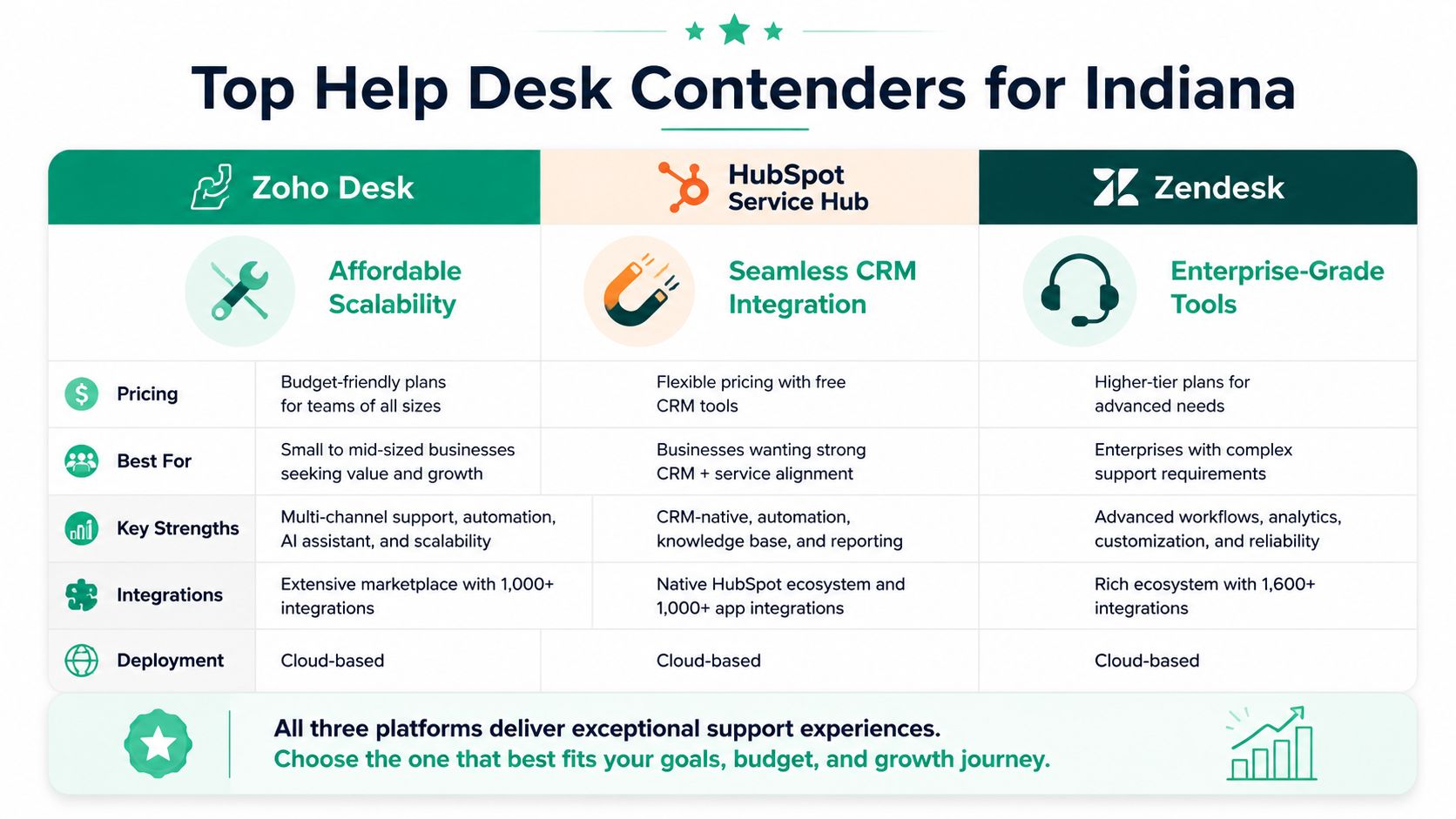
| Platform | Best fit | Main strength | Main trade-off |
|---|---|---|---|
| Zoho Desk | Budget-conscious SMBs | Strong value and broad channel support | Best experience often comes when you already use Zoho tools |
| HubSpot Service Hub | Sales-and-support alignment | Customer context inside the CRM | Can feel CRM-first if you mainly need IT-style support |
| Zendesk | Teams planning for scale | Mature workflows and structured support operations | More setup discipline, and often more than very small teams need |
Zoho Desk
If you want the best help desk software for small business on a tighter budget, Zoho Desk deserves a hard look. In a 2026 evaluation from Featurebase, Zoho Desk ranked #2 overall, offers a free plan for up to 3 users, and paid plans start at $7 per user per month. The same evaluation points to its balanced ticket management, omnichannel support, and reports that SMBs saw 40% response time improvements after implementation, according to Featurebase's 2026 help desk review.
That combination is hard to ignore for startups, family-owned businesses, and local service companies that don't want enterprise pricing.
Zoho Desk makes sense when you need:
- Real multichannel intake across email, chat, social, and phone
- Structured ticketing without a heavy implementation
- A sensible entry point for a small team
- Tighter alignment if you already use Zoho CRM or Zoho Invoice
Where it works well in Indiana: a growing office near the I-65 corridor that needs discipline without hiring a dedicated help desk manager. It also fits small teams that are moving out of a shared Gmail inbox and finally need ownership, queues, and response standards.
Where it can fall short: if your environment is highly specialized and significantly process-heavy, you may eventually want more advanced workflow depth or broader ecosystem preferences outside Zoho.
A low monthly cost only helps if your team actually uses the system. Zoho's strongest advantage is that it gives small businesses enough structure without feeling like an enterprise project.
HubSpot Service Hub
HubSpot Service Hub is the pick for organizations that care about the full customer relationship. If sales, support, marketing, and account history all need to sit in one place, HubSpot has a real advantage. You're not just looking at a ticket. You're looking at the customer behind the ticket.
That matters in businesses where support quality affects renewals, referrals, and account growth. A commercial services firm in Central Indiana might want every service issue visible next to deal history and client communication. A professional practice may want smoother handoff between front office staff, account managers, and support.
HubSpot tends to work best when:
- CRM visibility is central to how you serve clients
- Customer success and support overlap
- You want support teams tied closely to revenue teams
- Your workflows are more relationship-driven than purely technical
The trade-off is straightforward. If your biggest pain is internal IT operations, asset issues, endpoint tickets, or infrastructure incidents, HubSpot can feel less natural than a platform designed around classic support operations. It's a strong business tool, but not every business needs a CRM-led support motion.
For Indiana SMBs, I usually see HubSpot make the most sense in service businesses, B2B firms, and teams where account context matters as much as the fix itself.
Zendesk
Zendesk is the heavyweight in this group. It's the option you consider when your business expects more channels, more automation, stricter routing, and a support operation that's likely to become more formal over time.
This is often a better fit for companies that are growing fast, serving multiple customer groups, or managing more complex support flows. Think larger field service teams, regional distributors, or a company that already knows its volume and complexity are headed up.
Zendesk stands out when you need:
- More advanced workflow control
- Stronger routing and SLA discipline
- A platform built for scale
- A mature support environment rather than a lightweight starter setup
The cost of that power is complexity. Smaller teams sometimes buy Zendesk because they've heard the name, then use a fraction of what they paid for. If your support operation still runs on three people and a handful of ticket categories, Zendesk can feel like bringing a full server rack to power a desk lamp.
Still, for businesses with serious growth plans, it can be the right call. A logistics company moving across multiple Indiana sites, or a support team handling external and internal requests with different priorities, may appreciate the extra structure.
Which one fits which Indiana business
Here's the practical lens I'd use over coffee at Strange Brew.
- Choose Zoho Desk if budget matters, you need solid fundamentals, and you want a system that won't punish a small team for being small.
- Choose HubSpot Service Hub if support is tightly tied to sales, retention, and customer relationship data.
- Choose Zendesk if you already know your operation needs stronger workflow muscle and room to scale.
If your team also needs a clean separation between front-line request handling and deeper escalation work, an Indy-focused guide to Helpdesk Tier 1 structure helps clarify what your software must support operationally.
SaaS vs On-Prem vs Managed Service for Your Indy Business
Buying software is one decision. Deciding how you want that system delivered and supported is another. A lot of SMBs along the Southside often get tripped up at this stage.
An owner says, “We need a help desk.” What they often mean is, “We need fewer dropped issues, less downtime, and no surprise IT fire drills.” Those are not always solved by the same delivery model.
SaaS is the easiest on-ramp
Most small businesses start with SaaS because it's fast. You subscribe, configure queues and forms, connect email, and get moving. For many teams, that simplicity is exactly the point.
SaaS usually fits when:
- You don't want server overhead
- You need remote access
- Your team spans multiple sites or home offices
- You prefer operating expense over infrastructure buildout
The catch is that convenience doesn't remove responsibility. You still need to think through permissions, retention, workflow design, vendor outage tolerance, and compliance implications. If your internet is unstable, cloud software can feel less magical. That's especially true for outlying areas, so businesses outside dense metro coverage should compare internet providers for rural businesses before committing fully to browser-based support operations.
On-prem gives you control and chores
Some companies still prefer on-premise deployments because they want tighter control. In the right environment, that's reasonable. If you already maintain server infrastructure, have internal technical depth, and need custom handling around data or integrations, on-prem can work.
But this is the model that most often gets romanticized.
The old server humming in a Greenwood business park closet is not a strategy. It's a maintenance schedule waiting to become an emergency.
On-prem means patching, storage planning, backups, uptime monitoring, hardware lifecycle management, and recovery planning. If the box fails, your help desk may fail with it. If your RAID starts throwing errors, now your support platform is part of the outage.
That's fine for teams with strong internal IT maturity. It's rough for companies that already struggle to keep switches, backups, and endpoint protection in line.
Managed service is usually the best business decision
For many Indiana SMBs, managed service is the model that makes the most financial sense. Not because it's trendy, but because it turns scattered technical labor into a defined operating process.
A managed model helps when you want:
- Predictable monthly budgeting instead of surprise capital spend
- Support operations tied to business continuity
- Professional configuration around security, access, and escalation
- Room to grow without building an internal bench for every specialty
This is especially important when help desk software sits beside broader operations such as UniFi networking, Bitdefender GravityZone, immutable off-site backups, or SOC-as-a-Service monitoring. Those systems work better when ticketing, alerts, and response workflows are coordinated instead of improvised.
If you're weighing internal staffing against outside expertise, managed service versus staff augmentation for Indiana businesses is a useful reality check.
The plain truth is this. Most small businesses don't need total control. They need reliable outcomes.
How AI Automation Drives Real ROI in IT Support
AI in help desk software is useful when it handles boring work correctly. That's the standard. Not flashy demos. Not robot buzzwords. Just less manual triage, faster response, and fewer tickets bouncing around your office.
According to monday service's 2026 benchmarks, its AI automates 28% of ticket routing and cuts first response time to 12 minutes. The same benchmark notes that Zendesk's AI chatbots deflect 30% of common networking issues before a ticket is created. For local firms trying to hit strict urgent-response goals, those are meaningful operational gains, as outlined in monday service's small business help desk analysis.
Where AI helps in the real world
The best use cases are not mysterious. They're repetitive.
- Routing work fast: Password resets, VPN trouble, printer problems, and access requests go to the right queue without a person babysitting the inbox.
- Categorizing security issues: Phishing reports, suspicious endpoint behavior, and login anomalies can be tagged and prioritized faster.
- Deflecting common questions: Wi-Fi instructions, MFA setup steps, and software install requests can be answered through a knowledge base or bot before they become tickets.
- Summarizing history: Engineers don't need to dig through a long thread just to see what changed.
That matters when you're trying to support Zero Trust architecture or SOC-as-a-Service monitoring. The faster the system classifies and routes, the less time your staff spends playing dispatcher.
Where AI does not help
Bad process plus AI still equals bad process. If your categories are sloppy, your permissions are loose, and your knowledge base is outdated, automation just speeds up confusion.
Good automation starts with clean workflows, clear ownership, and a knowledge base your staff trusts.
Multilingual support is another area worth considering. If your staff or customer base spans multiple languages, resources like breaking language barriers with Translate AI can help you think through language handling before you pile that problem onto your ticket queue.
A quick demo helps show what modern automation should look like in practice.
For small teams, the ROI shows up in saved labor, cleaner handoffs, and tighter SLA performance. If you want a broader view of workflow automation beyond help desk software, AI automation for small business operations is worth a read.
Your Practical Evaluation Checklist and Decision Matrix
A software demo can make almost anything look organized. The true measure of success is whether your team can use it on a Monday morning when phones are ringing, Wi-Fi is spotty, and somebody from accounting can't print checks.
Demo checklist for serious buyers
Use this list when you sit through demos or trial accounts.
- Ticket intake: Can it pull requests from the channels your team already uses without forcing everyone into a brand-new habit?
- Queue control: Can you separate customer issues, internal IT work, cybersecurity events, and vendor requests?
- Business hours: Can you stop the SLA clock outside support hours so your reports reflect reality?
- Escalation path: Can urgent issues jump the line and reach the right technician fast?
- Audit trail: Does every ticket keep a clean history of updates, ownership changes, and resolution notes?
- Permissions: Can you restrict sensitive tickets, especially around HR, security, finance, or compliance?
- Knowledge base: Can your team publish simple how-to articles without needing a web developer?
- Reporting: Can a manager quickly see backlog, aging tickets, repeat issues, and bottlenecks?
- Mobile use: If you have field staff or multiple sites, is the mobile experience effective?
- Integration fit: Will it work with your CRM, accounting tools, identity systems, or email stack?
- Exit plan: If you leave later, can you export your data cleanly?
A sample decision matrix
Say you run a small manufacturing company in Johnson County. You're aiming for CMMC-readiness, you have a lean office team, and production can't stop because one workstation, one switch, or one permission set goes sideways.
You might score platforms like this.
| Criteria | Weight | Zoho Desk | HubSpot Service Hub | Zendesk |
|---|---|---|---|---|
| Compliance support needs | High | Good | Good | Strong |
| Ease of use for small team | High | Strong | Strong | Moderate |
| Customer relationship visibility | Medium | Moderate | Strong | Good |
| Internal IT workflow fit | High | Strong | Moderate | Strong |
| Budget sensitivity | High | Strong | Moderate | Moderate |
| Room for more complexity later | Medium | Good | Good | Strong |
That matrix doesn't hand you a universal winner. It does something more useful. It forces your business to pick based on operational priorities instead of vendor charm.
What usually tips the decision
For most SMBs, the final decision comes down to three questions:
- Will the team use it every day?
- Will it reduce downtime and confusion during urgent issues?
- Will it support the compliance and reporting burden your industry already carries?
If a tool fails any one of those, keep shopping.
The Finchum Fixes IT Partnership From Choice to Operations
Choosing software is only half the job. The other half is implementation, secure configuration, workflow design, admin hygiene, and ongoing support discipline. That's where many small businesses stall out. They buy a good platform, then run it like a messy inbox with nicer colors.
In our 17 years serving Central Indiana, we've seen the same pattern over and over. A well-run help desk becomes the central nervous system for support, compliance documentation, asset visibility, and response accountability. A poorly run one becomes another tool people avoid.
The difference usually comes down to operations. Categories need to mean something. Escalations need to map to real people. Security tickets need tighter handling than routine requests. Backup failures, endpoint alerts, failed logins, and Wi-Fi outages need a clean path into action. That's true whether you're dealing with Zero Trust policy enforcement, UniFi networking issues, Bitdefender GravityZone alerts, or immutable off-site backup verification.
There's also a deeper business continuity angle. When a team stops wasting hours hunting through email, forwarding screenshots, or wondering who owns an issue, that time goes back into productive work. That's the ROI most owners feel first. Less confusion. Faster response. More predictable support costs.
The best help desk setup doesn't feel “advanced” to the user. It feels clear, fast, and reliable.
For Greenwood and Indianapolis area businesses, the right next step isn't guessing. It's assessing the environment, the workflow, and the risk before buying another subscription.
Frequently Asked Questions
Can help desk software integrate with my existing tools like QuickBooks or my CRM
Often, yes. But “integrates” can mean anything from a clean two-way workflow to a flimsy connector that only passes basic contact info. During evaluation, ask what syncs, who maintains the integration, and whether your staff will still need manual re-entry.
For many small businesses, the practical win is connecting help desk activity with customer records, email, and identity tools. If accounting or quoting systems matter to your workflow, test that early instead of assuming it will be smooth later.
How does help desk software help with HIPAA or CMMC work
It helps by creating structure. You get ticket history, ownership records, controlled access, documented response steps, and clearer audit trails. That supports compliance work, especially when you need to show how issues were reported, reviewed, escalated, and resolved.
It does not replace compliance controls by itself. You still need policy, endpoint protection, backups, access management, and sound security architecture built around frameworks like NIST CSF.
We're a very small team. Is help desk software overkill
Usually, no. Small teams benefit a lot because they have less room for mistakes. One missed email in a two-person office is a bigger operational problem than one missed email in a fifty-person company.
A lightweight help desk gives even a tiny team a shared queue, accountability, and better follow-through. That's often enough to stop requests from living in somebody's memory.
What's the biggest mistake small businesses make when picking a platform
They buy based on feature count or brand name instead of fit. A platform that looks impressive can still be wrong for your team if it's too complex, too rigid, or disconnected from your actual workflow.
The better approach is simpler. Choose the system your team will use consistently, that supports your security and compliance needs, and that helps keep the business running when something breaks.
If your business is in Greenwood, Indianapolis, or anywhere along the Central Indiana corridor, Finchum Fixes IT can help you sort through the options with a practical Free Network Assessment or Security Risk Audit. If your current support process feels scattered, slow, or risky, this is the right time to tighten it up before the next outage makes the decision for you.