IT Support Pricing: Models, Costs, & Negotiation Tips
Managed IT averages $145 per user per month, while break/fix support commonly runs $75 to $300 per hour. The gap reflects a clear market shift toward security-inclusive packages, where monitoring, backup, compliance, and response coverage matter as much as fixing a failed laptop.
A Greenwood office with aging server hardware, or a brick building near the I-65 corridor with unreliable Wi-Fi, can lose productive hours long before anyone calls a technician. That wasted time becomes expensive when staff can't reach applications, customers can't get answers, or a sales team loses access to shared files. Managed IT pricing makes sense only when you connect the monthly fee to continuity, risk, and the work your employees can keep billing.
Introduction and Core Answer
For most Indiana small businesses, managed IT support is priced per user, while break/fix work is billed hourly. A fully managed plan commonly averages $145 per user per month, with most plans between $110 and $185, while co-managed service averages $85 per user per month according to a 2026 benchmark covering 412 MSPs. Break/fix support commonly falls between $75 and $300 per hour, depending on urgency, region, and technical complexity, as outlined in this small-business IT support cost benchmark.
The number on a quote isn't the whole answer. You need to know whether the provider is covering Microsoft 365 administration, endpoint security, cloud systems, backups, network equipment, compliance documentation, onsite work, and after-hours incidents. A low rate can become costly when those items appear later as separate charges.
This guide gives you a practical way to compare per-user, per-device, and hybrid pricing, identify the hidden cost drivers, and judge quotes against the realities of Indiana operations. A law office near downtown Indy has different needs from a distributor in Hamilton County or a manufacturer with multiple sites along I-65.
You'll also see how compliance standards such as HIPAA, CMMC, and NIST CSF affect scope, why 24/7 coverage raises the bill, and how local infrastructure changes the work required. For broader planning, use this Indiana small-business IT support guide as a companion resource.
Understanding IT Support Pricing Models
The pricing model decides what counts as a billable unit. Choose poorly and you may pay for coverage you do not use, or face a higher monthly bill whenever staff, devices, or locations increase.
Per-user pricing
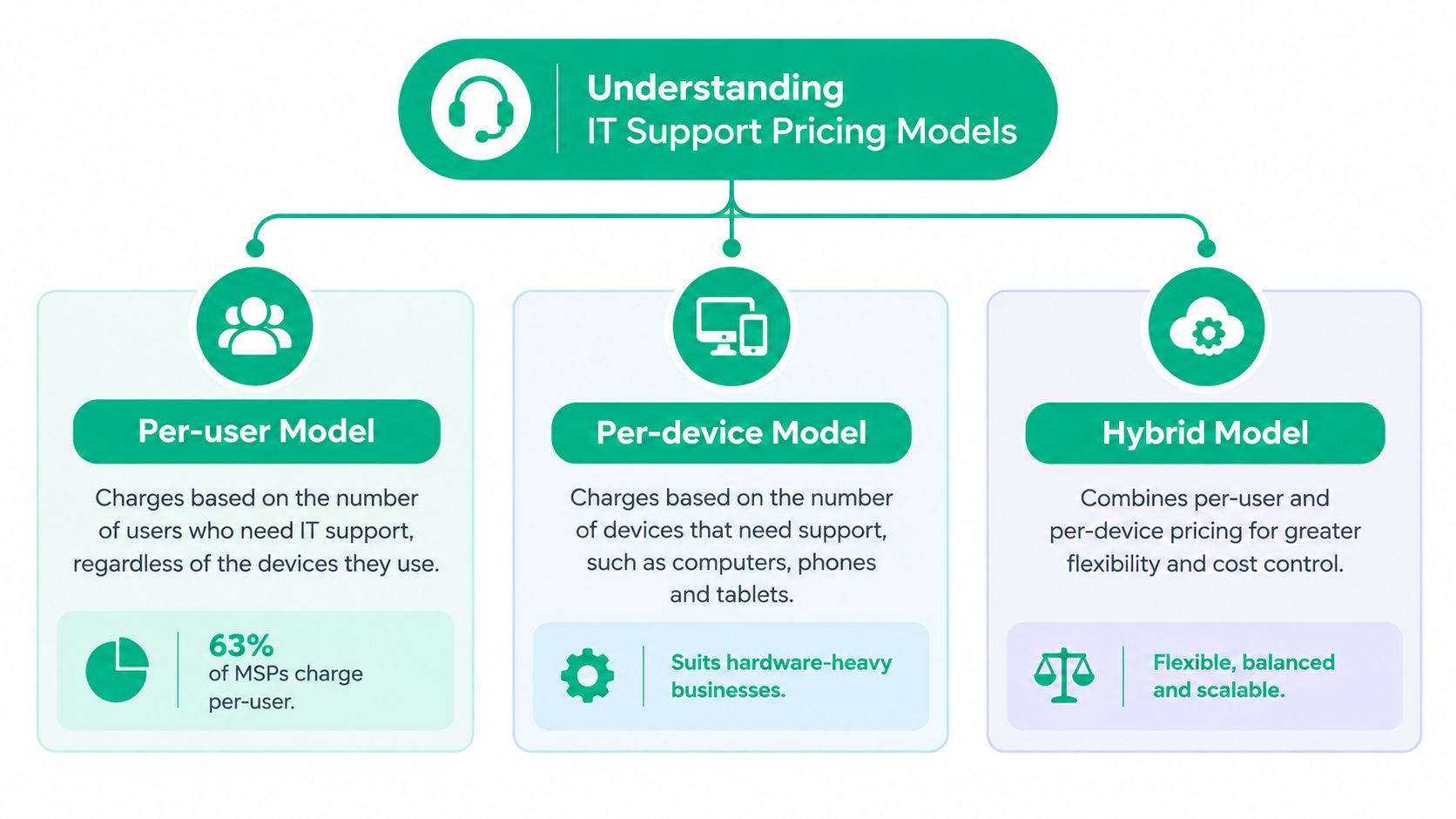
Per-user pricing organizes support around employees instead of hardware. One employee may use a laptop, desktop, phone, and tablet while the fee stays tied mainly to that person. It fits professional offices where staff need consistent help with identity, email, applications, and security across several devices.
A 2026 benchmark covering 412 MSPs found fully managed IT averaged $145 per user per month, with plans commonly ranging from $110 to $185. Co-managed IT averaged $85 per user per month. The benchmark also found 63% of MSPs use per-user pricing, compared with 24% using per-device pricing, indicating that user-based packaging is now common. The managed IT pricing benchmark provides the underlying figures.
Per-device pricing
Per-device pricing charges for each covered workstation, server, firewall, access point, or other asset. It can suit warehouses, clinics, and production facilities with shared terminals and fewer individual users. For hardware-heavy operations along the I-65 corridor, the inventory gives you a clear way to audit the invoice.
The tradeoff is less predictable user support. A new laptop, replacement firewall, or added site can create another charge. Some contracts also separate workstation monitoring from helpdesk labor, so ask for both items in writing.
Hybrid pricing
Hybrid agreements combine a base fee for users or locations with separate charges for devices, servers, projects, or onsite work. This arrangement can fit a company with an internal IT employee, several UniFi networking devices, or a mix of cloud and on-premises systems.
Ask exactly what the base covers. Confirm whether it includes remote support, project work, after-hours response, hardware replacement, and compliance reporting. For employee and customer technology requests, businesses can also borrow process ideas from this comprehensive guide for customer support, particularly when internal teams need clear routing rules.
Before signing, compare your device count with your headcount. Mark users who need advanced support, then check how the agreement handles compliance work, 24/7 coverage, and onsite visits between Indianapolis, Greenwood, Columbus, and other I-65 locations. Use this managed service provider selection guide to test whether the model fits your operating structure.
Key Factors That Affect IT Support Pricing
A quote rises when the provider must monitor more systems, meet tighter response commitments, document controls, or maintain backup capacity. The monthly price reflects the work behind the promise, not just the person answering the phone.
Service scope
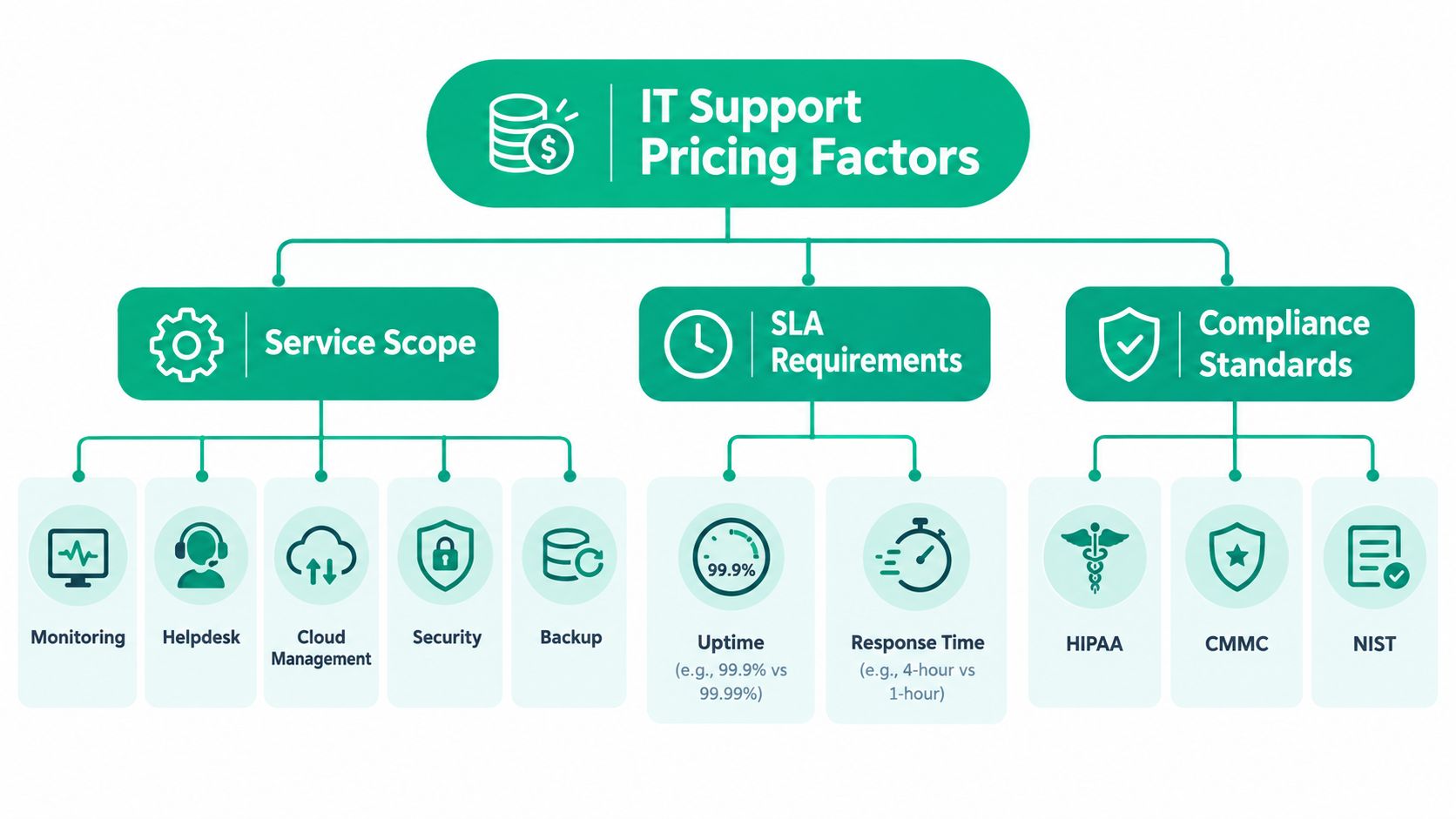
Basic remote monitoring is a different service from an agreement that includes cloud administration, cybersecurity, backup oversight, compliance work, and 24/7 coverage. Those broader packages require specialized staff, security tooling, documented procedures, and operational redundancy, as explained in this managed services pricing analysis.
Look for specific technologies in the quote:
- Endpoint protection: Bitdefender GravityZone or comparable endpoint detection should be named, not hidden under “ antivirus.”
- Backup oversight: Confirm that the provider checks backup jobs and performs recovery testing, not merely installs backup software.
- Network management: UniFi networking may be straightforward in one office, but multiple switches, access points, VLANs, and firewalls require ongoing monitoring.
- Security operations: SOC-as-a-Service monitoring adds human review and escalation for suspicious activity.
- Recovery design: Immutable off-site backups reduce the chance that ransomware can alter both production data and its backup copies.
A Zero Trust architecture can also expand the work because access decisions rely on identity, device posture, and application permissions rather than a simple office-network boundary.
SLAs and coverage
A demanding SLA costs more because the provider must reserve capacity, maintain escalation paths, and keep backup resources available. A 1-hour response commitment requires a different operating model from best-effort support during business hours. The same applies to guaranteed uptime, overnight monitoring, and emergency onsite service.
Don't confuse response time with resolution time. Ask when the clock starts, what qualifies as a critical incident, and whether the guarantee covers weekends and holidays.
Compliance and location
HIPAA-covered healthcare businesses need documented safeguards and appropriate handling of protected health information. Defense contractors may need controls aligned with CMMC, while general businesses can use the NIST CSF to organize security work. Compliance doesn't just add a line to an invoice. It creates recurring requirements for access reviews, evidence, reporting, policy work, and incident preparation.
A single Greenwood office is easier to support than locations spread through the I-65 corridor. Travel, inconsistent cabling, aging switches, old brick construction, and weak wireless coverage all increase troubleshooting time. Hamilton County growth also means some firms add locations quickly, making standardization important before every site develops its own network habits.
Practical rule: If a quote doesn't identify the systems, response commitments, and compliance tasks included, it isn't detailed enough to compare.
Typical Cost Ranges and Example Scenarios
The broad pricing bands below are useful for orientation, not automatic purchasing decisions. A basic package may be appropriate for a low-risk office with internal technical ownership, while a premium package may be justified where downtime, regulatory exposure, or security incidents threaten revenue.
| Service Tier | Price Range Per User/Month |
|---|---|
| Basic managed services | $50 to $85 |
| Standard managed support | $110 to $185 |
| Premium security-heavy packages | $185 to $325 |
These ranges come from the 2026 MSP pricing summary. The source also reports an average SMB contract value of $9,250 per month for a 50-user company, or $111,000 per year, and says per-user pricing rose 8.3% in 2025. Security-inclusive packages carried a 42% premium over non-security bundles. Treat those figures as market benchmarks, then test what each provider includes.
Scenario one, a downtown Indy law firm
A 20-user law firm near a downtown Indy tech hub may need secure identity management, email protection, endpoint controls, reliable document access, and documented procedures. If healthcare clients or protected health information are involved, HIPAA considerations can increase the required governance. A standard plan at $110 to $185 per user per month would place the recurring budget between $2,200 and $3,700 per month, or $26,400 to $44,400 per year.
That calculation excludes any separately quoted onboarding, project, hardware, or compliance work. The firm should ask whether the agreement includes incident response, legal hold support, backup validation, and after-hours escalation.
Scenario two, a Hamilton County distributor
A 50-user distributor with hybrid cloud and on-premises systems may need server monitoring, warehouse connectivity, cloud administration, endpoint security, and support for shared devices. At the benchmark average of $145 per user per month, the managed service portion would be $7,250 per month, or $87,000 per year. That is lower than the cited average contract value of $9,250 per month for a 50-user company, so the difference must be explained by scope, security, projects, or other contract components.
The distributor should map every site, switch, access point, server, and cloud workload before comparing quotes. A cheap per-user offer may omit shared warehouse devices or network management.
Scenario three, an aging Greenwood server
An office park business with failing server hardware needs more than routine helpdesk coverage. The provider may need to stabilize the system, plan migration, and perform bit-level data recovery if storage degradation threatens files. That work should be priced as a defined project, not implicitly included in a recurring support fee.
Downtime estimates vary widely by business size and exposure, but one widely cited benchmark places the cost near $9,000 per minute, while small-business estimates can be much lower. Review the range and its assumptions in this cost of downtime analysis.
The right question is whether the recurring plan prevents repeated emergencies. Use this Indiana managed IT services cost guide to frame the budget, then request a separate recovery and modernization plan for the server.
How to Evaluate and Negotiate IT Support Quotes
Most pricing pages stop at the headline rate. That misses the details that make two similar quotes behave very differently. One benchmark-style analysis notes that packages can range from about $35 to $320 per user per month, with buyers often unsure which essential services a low rate excludes. Review the SMB IT support pricing discussion for that comparison.
Read the quote in this order
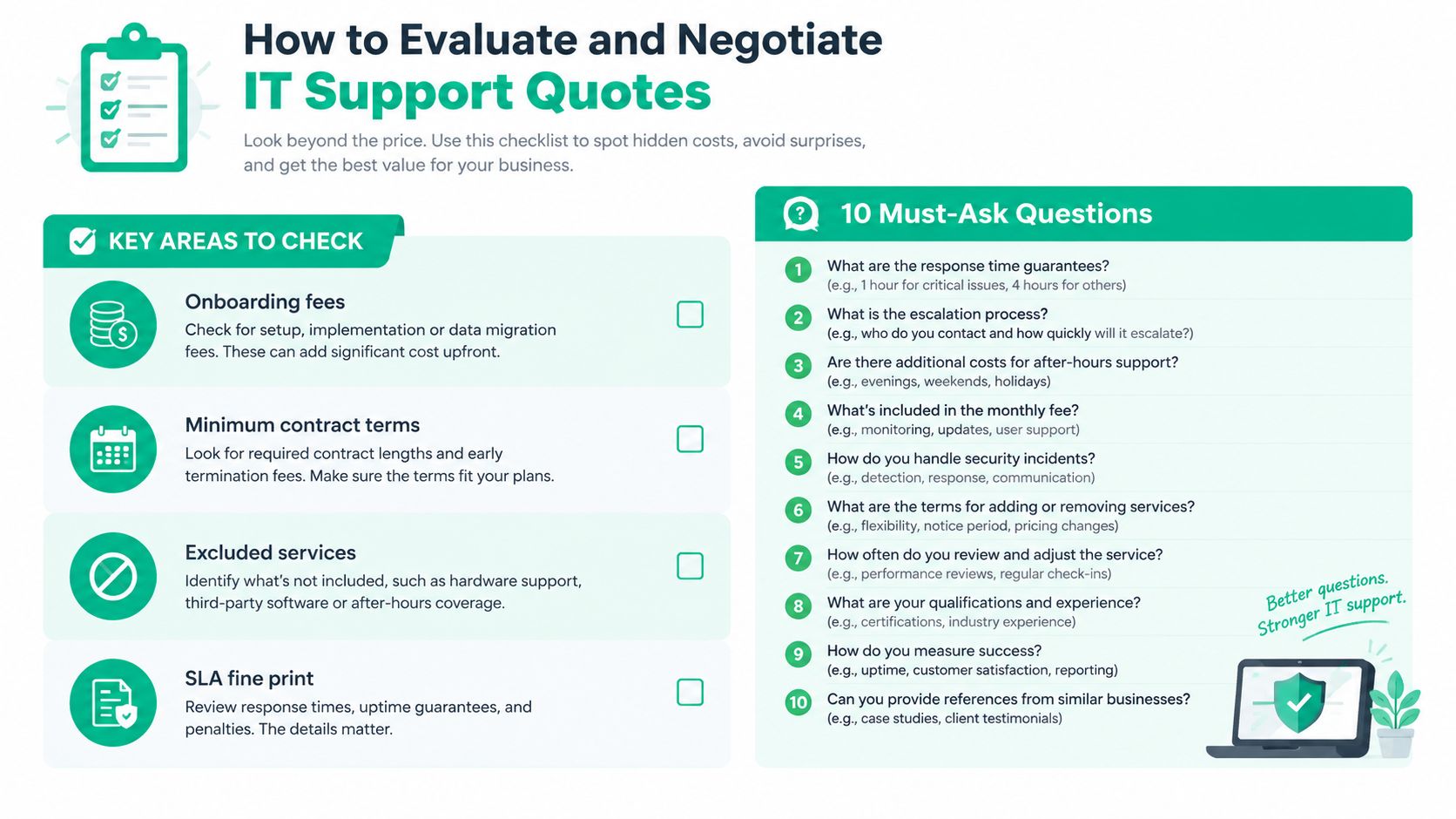
Start with the service inventory, then examine exclusions, contract terms, and the SLA. Ask the provider to separate recurring support, security licensing, projects, hardware, onsite work, and emergency labor.
Use these ten questions:
- What response time is guaranteed for critical incidents?
- When does the SLA clock start?
- What escalation process applies if the first technician can't resolve the issue?
- How many onsite visits are included?
- What does an additional onsite visit cost?
- Are Microsoft 365, cloud administration, and application support included?
- Which security tools are included, such as Bitdefender GravityZone or email protection?
- How often are backups validated and recovery procedures tested?
- What compliance reporting supports HIPAA, CMMC, or NIST CSF work?
- What onboarding fees, minimum terms, renewal rules, and termination costs apply?
A provider should answer these in writing. If “backup” means only software licensing, the quote isn't comparable to one that includes monitoring, immutable off-site copies, and recovery testing.
Negotiate the outcome, not just the rate
Use plain language: “Keep the monthly fee within our budget, but show us what changes if we remove after-hours coverage, onsite visits, or compliance reporting.” That forces a useful tradeoff instead of an arbitrary discount.
You can also say, “We want a written critical-incident response guarantee, backup validation, and a defined escalation path. If those are included, can you combine the security and support fees into one predictable invoice?” Ask for a side-by-side version showing the original scope and the revised scope.
Clear estimates help everyone. Businesses preparing their own procurement documents can review these professional estimate designs for businesses to make recurring services, project labor, and exclusions easier to read.
For contract language, use this managed services agreement template guide. A solid agreement should state ownership, access rights, security responsibilities, data handling, service boundaries, and what happens when the relationship ends.
Conclusion and Next Steps
IT support pricing should reflect the cost of keeping your business operating, not just the cost of answering tickets. A managed approach turns wasted troubleshooting time into productive, billable hours and gives owners a predictable budget for maintenance, security, recovery, and support.
Choose per-user pricing when employees use several devices and need broad coverage. Choose per-device or hybrid pricing when shared hardware, servers, warehouses, or multiple locations dominate the environment. Then negotiate the details that protect continuity, including response guarantees, backup validation, onsite limits, and compliance reporting.
Downtime can cost up to $9,000 per minute under a widely cited business benchmark, so continuity deserves a place in your ROI calculation. This IT budget planning guide can help connect technical spending to resilience and business results.
Finchum Fixes IT provides managed IT support, network assessments, cybersecurity reviews, data recovery, and infrastructure planning for businesses in Greenwood and Indianapolis. Visit Finchum Fixes IT to schedule a Free Network Assessment or Security Risk Audit and get a clear view of what your current environment needs before you sign another support contract.