Access Control Systems Explained for Indiana Businesses
Access control systems are layered procedures and controls that limit or detect access to doors, data, and networks, using software, biometrics, or physical mechanisms to enforce who can enter or access what. They've grown into a major security market, estimated at USD 13.4668 billion in 2024 and projected at USD 21.0284 billion by 2030. Grand View Research
You're probably not thinking about market forecasts while standing beside a failing server in a Greenwood business park. You're thinking about the employee who still has a key, the visitor who followed someone through a secured door, or the office Wi-Fi that drops whenever somebody walks past an old brick wall along the I-65 corridor. Those problems look separate. They often share the same root issue, access is being granted without enough control, visibility, or recovery planning.
What Access Control Systems Really Do for Your Business
A commercial access control system decides who can enter a place, use a service, or reach information. That place might be a front door, server room, warehouse, or medication cabinet. That service might be Microsoft 365, a line-of-business application, or a remote network connection. That information might be a patient record, financial file, or controlled technical document.
NIST describes access control as procedures and controls that limit or detect access to critical information resources. Those controls can use software, biometric devices, or physical mechanisms, so access control isn't just a badge reader bolted beside a door. It's a policy system connected to hardware, identities, applications, and audit records. NIST guidance on access control
The Southside problem
A small manufacturer near the I-65 corridor may have a server that's old enough to remember when everyone used physical keys. An employee leaves, the key stays unaccounted for, and their Windows account remains active because nobody owns the offboarding process. Meanwhile, spotty Wi-Fi in an old brick building delays cloud authentication and frustrates staff who just need to get work done.
A managed approach connects the pieces. Door permissions can follow job roles. User accounts can be created, adjusted, and revoked through a defined process. Network access can be segmented so a compromised workstation doesn't automatically provide a path to every system. A local controller can preserve essential door decisions if the internet connection fails, while the management platform provides centralized oversight when connectivity returns.
Practical rule: If you can't explain who gets access, why they get it, when it expires, and how you revoke it, you don't have an access policy. You have a collection of guesses.
Physical and logical controls should support each other, but they shouldn't be treated as identical. A receptionist may need the lobby and scheduling application, while a technician needs the equipment room and diagnostic tools. A finance employee may need accounting data but not the server closet. Role-based permissions make those distinctions manageable.
For a broader business-oriented overview, the complete business guide to access control is a useful companion. Indiana owners can also review door access system security considerations before changing hardware.
That matters for continuity. A system that prevents unauthorized entry, limits lateral movement, and preserves local operation during an outage protects revenue as well as equipment. It turns access control from a security expense into part of the operating plan.
How Access Control Systems Work Behind the Scenes
The easiest way to understand an access control system is to follow one access attempt. A person presents something, the system identifies it, verifies it, checks the permission, makes a decision, and records the result.
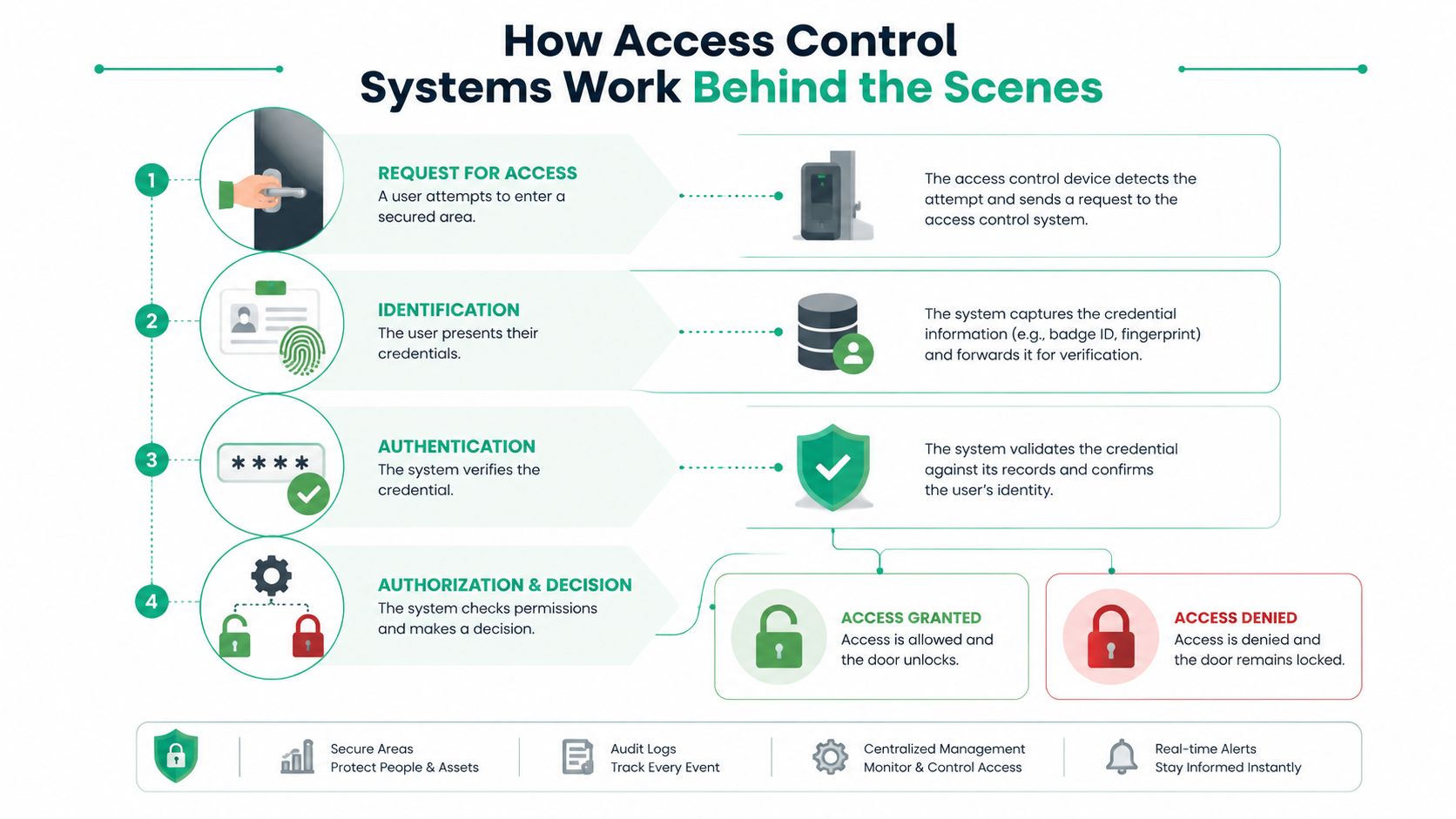
Four decisions happen in sequence
Identification answers, “Who or what is requesting access?” The request might come from a card, PIN, mobile credential, fingerprint, service account, or device identity.
Authentication checks whether that identity is genuine. A reader may validate a credential against a controller, while an application may verify a password, security key, or certificate.
Authorization answers, “Is this identity allowed to reach this door, application, data set, or network segment right now?” A valid identity doesn't automatically deserve every permission.
Audit records the event. The log should show the identity, target, decision, and relevant time or policy context. That record supports investigation, operational review, and compliance evidence.
NIST SP 800-53 Rev. 5 gives this model practical structure. AC-2, Account Management, covers account lifecycle handling, including automated temporary and emergency accounts. AC-3, Access Enforcement, focuses on enforcing access between active entities and passive objects in organizational systems. In plain English, the business needs a repeatable way to create, manage, revoke, and enforce permissions, not merely a written policy. NIST SP 800-53 Rev. 5
Think of permissions as keys with labels
A traditional key often opens more than one person needs. Role-based access control works like issuing labeled keys. The “warehouse supervisor” role opens the loading area during approved hours. The “bookkeeper” role reaches the accounting application but not the production floor. The “contractor” role might expire after a project.
Zero Trust architecture applies the same discipline to networks and applications. It doesn't assume that a device or user is trustworthy just because they're already inside the building. Each request should be evaluated against identity, authorization, device condition, location, or other relevant rules.
Least privilege narrows the permission set further. A user receives the minimum access needed to perform their job, then loses it when the role changes. That approach reduces the damage a stolen credential or misconfigured account can cause.
For a practical explanation focused on business networks, this guide to network access control for Indy SMBs connects the same identity model to switches, wireless networks, and connected devices.
The controller is the local decision-maker for many physical systems. Readers collect credentials, controllers evaluate rules, locks respond, and management software maintains users and logs. If any one layer is poorly configured, the polished dashboard won't fix the underlying gap.
Types of Access Control Systems You Will Actually Encounter
Businesses usually choose a combination of credential types and deployment models. The right choice depends on the door, the people using it, the risk involved, and what must continue working during an internet outage.
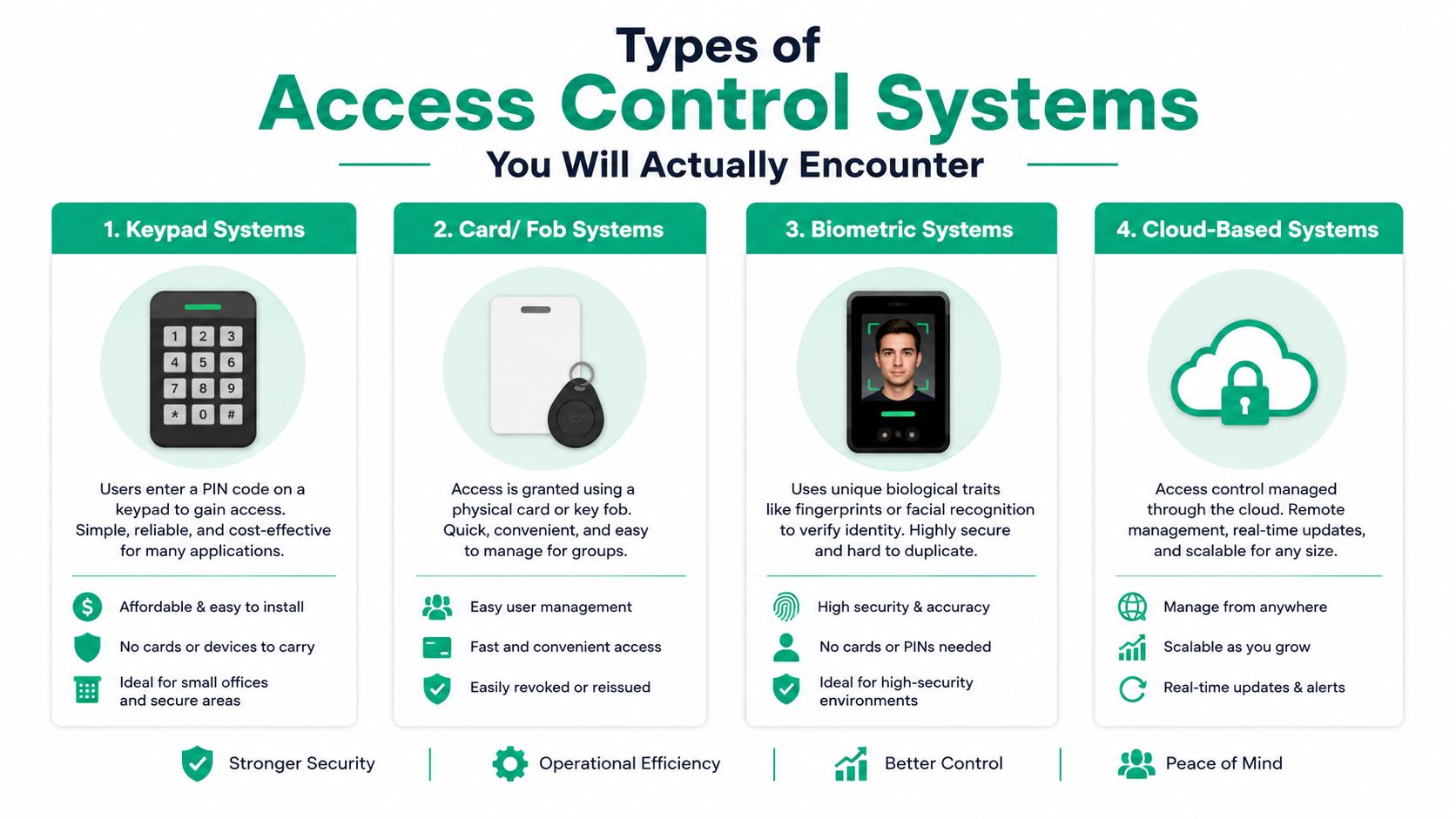
Credential choices
Keypads are straightforward for shared areas, service entrances, and smaller teams. They remove physical keys, but a shared PIN can spread beyond the people who should know it. Individual codes and scheduled changes improve accountability.
Cards and fobs work well where employees need frequent, quick entry. Administrators can revoke a lost card without replacing a lock. The weakness is simple, a card can be loaned or stolen, so sensitive areas may need a second factor.
Mobile credentials use a phone as the credential. They can simplify provisioning and removal, but the business must account for dead batteries, lost devices, personal-phone policies, and fallback access.
Biometrics use a physical characteristic such as a fingerprint or facial feature. They reduce the problem of shared credentials, but they introduce privacy, accessibility, enrollment, and threshold-tuning responsibilities.
Deployment models
On-premises systems keep core management and decision-making local. They can suit a single facility with strong local IT support or a site where internet independence is central.
Cloud systems make remote administration easier and can reduce the need for an on-site management server. They suit distributed teams, multiple facilities, and businesses that want centralized provisioning.
Hybrid systems keep local autonomy for critical decisions while using cloud management for oversight, updates, and multi-site administration. This model often fits SMBs that want remote control without making every door dependent on a live internet connection.
A recent industry summary projects fully cloud-based deployments to rise from 18% to 34% over five years, while also identifying hybrid architecture as safer where latency, uptime, and local failover matter. Avigilon's access control trend summary The useful question isn't “Is cloud modern?” Ask instead, “What still works if the circuit fails, and who can get through the door?”
For biometric systems, False Acceptance Rate, or FAR, measures the percentage of instances in which a false biometric acceptance occurs. The UK NCSC explains that a false match can incorrectly grant access to an unenrolled person. Tightening a threshold can reduce false acceptance, but it may also reject legitimate users more often, so the operating point must account for throughput and fallback capacity. British Security Industry Association biometric guidance
Businesses comparing hosted options can use this cloud-based access control guide for Indiana businesses to frame questions around local failover, controller maintenance, licensing, and integration.
Compliance Risk and Security Considerations That Matter in Indiana
Compliance doesn't care whether your access system looks impressive in the lobby. Auditors and assessors want to know whether authorized people can reach the right resources, whether unauthorized people are blocked, and whether the business can prove what happened.
That concern is especially sharp for healthcare practices, defense suppliers, and growing companies around Johnson County, Hamilton County, and the I-65 corridor.
HIPAA puts access mechanics on paper
HIPAA's technical safeguards define access control for electronic protected health information, or ePHI, as policies and procedures that allow access only to people or software programs granted access rights under information access management. The rule requires unique user identification and emergency access procedures. Automatic logoff and encryption or decryption are addressable specifications, which means the organization must assess and implement them when appropriate for its environment. HIPAA technical safeguards
A clinic shouldn't use one shared account for a front desk team if it needs to determine which person viewed a record. It should document normal access, define a break-glass process for emergencies, and review whether permissions still match each employee's duties.
CMMC makes authorization testable
CMMC Level 2 includes AC.L2-3.1.1, Authorized Access Control, which requires organizations to limit system access to authorized users, processes acting on behalf of authorized users, and devices. The assessment guide frames that practice as something assessors can test while protecting controlled unclassified information, or CUI. CMMC Level 2 Assessment Guide
That changes the conversation for defense contractors. “We trust our staff” isn't a control. The organization needs defined accounts, device restrictions, permission records, and evidence that access is enforced.
NIST CSF needs an operational layer
The NIST Cybersecurity Framework gives general businesses a useful risk structure, while NIST access-control guidance provides the mechanics underneath it. Least privilege means the employee, application, or device receives only the access necessary for its task. HHS technical safeguards guidance
For a growing Hamilton County firm, that might mean separate roles for sales, finance, engineering, and administrators. It also means reviewing inherited permissions rather than allowing every new hire to accumulate access forever.
Audit-ready access control: Unique identities, documented exceptions, timely revocation, usable logs, and tested emergency access matter more than a flashy reader.
Biometrics need extra care. The business must evaluate FAR alongside legitimate-user rejection, fallback procedures, privacy handling, and accessibility. A biometric deployment that creates queues or locks out authorized staff isn't secure in practice. It has moved the failure to the front door.
This Indiana SMB compliance and security guide can help owners connect physical entry, identity management, endpoint security, and documentation into one risk conversation.
Choosing and Installing the Right System Without the Headaches
Buying readers before mapping the building is how businesses end up with expensive hardware that doesn't match the workflow. Start with the site, not the product brochure.
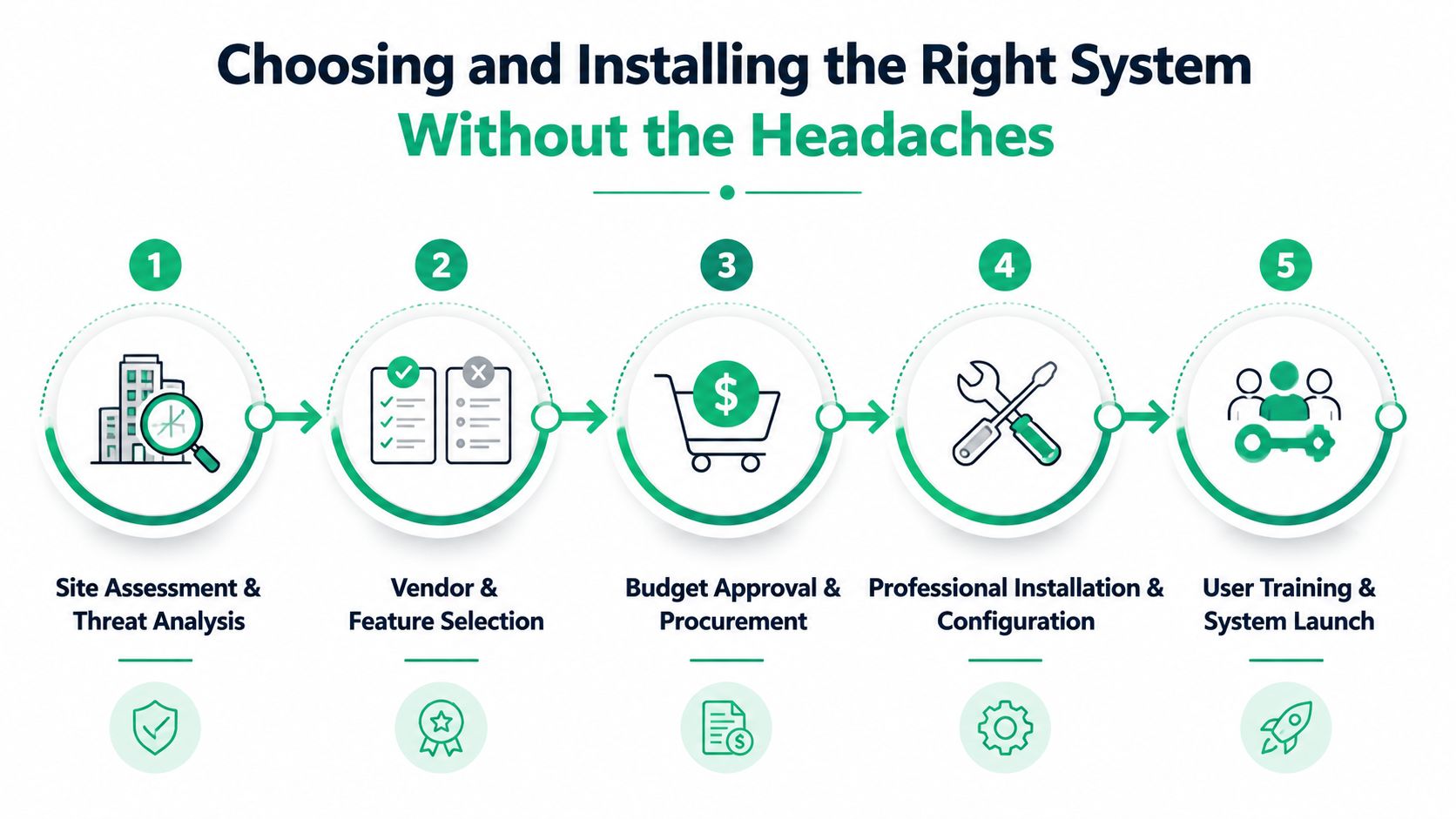
A practical rollout sequence
-
Map the site and threats. List doors, gates, server rooms, shared spaces, emergency exits, delivery paths, and visitor routes. Note existing strikes, magnetic locks, door contacts, power supplies, cabling, and fire-system dependencies.
-
Define roles and integrations. Decide which groups need which doors and applications. Check whether the platform can connect to your HR directory, identity provider, video system, alarm panel, and visitor workflow.
-
Choose the architecture. A one-site office may not need an elaborate centralized platform. A business with locations across the I-65 corridor may benefit from cloud administration. A facility with unreliable connectivity may need hybrid controllers and local decision-making.
-
Build the network properly. UniFi networking can provide segmented switching and wireless management when configured for the access system's needs. In an old brick building, latency-optimized mesh nodes may improve coverage, but mesh doesn't replace a wired connection for every controller that needs predictable availability.
-
Test before handoff. Verify normal entry, denied entry, lost credentials, schedules, emergency override, power loss behavior, network interruption, door-held-open alerts, and audit records. Train at least two administrators, then document who owns changes.
Endpoint security belongs in the same project. Bitdefender GravityZone can protect the workstations and servers that administer access, but endpoint protection doesn't fix a misconfigured door controller. Immutable off-site backups protect configuration records, logs, and related business data from destructive incidents. They won't make a door open during an outage, but they can shorten recovery when a management server or database fails.
The physical installation deserves the same care as the software. Cable paths, lock power, battery backup, fire egress, and weather exposure all affect reliability. This card-reader buyer's guide for SMBs is useful when comparing credential formats and reader capabilities.
A good installer also writes down the rollback plan. If a firmware update fails or an integration behaves badly, staff should know how to preserve safe building operation without improvising at the front desk.
What Access Control Really Costs and Why It Pays Back Fast
A Greenwood business can lose more than a door's purchase price when access fails. Owners should budget for readers, credentials, controllers, locks, wiring, licensing, cloud fees, battery backup, installation, training, maintenance, and integration work.
The cheaper quote can become expensive if staff must change users manually, enter the same information twice, troubleshoot recurring faults, or manage each location through a separate process. A managed system may convert those tasks into a predictable monthly expense when monitoring, updates, access reviews, and support are included.
Cloud management can simplify administration, but resilience deserves equal attention. A cloud-only design depends on internet access and the provider's availability. A hybrid setup can keep selected doors and credentials operating locally while sending administration and records to the cloud. That choice affects continuity during an outage, not just convenience.
Downtime changes the calculation. Business interruption can cost up to $9,000 per minute, a figure used in the supplied business-continuity planning context. It is not a universal bill for every Indiana company. It does show why owners should price a failed controller, unavailable server room, locked-out staff, or delayed recovery instead of judging the project by hardware alone.
ROI question: What does one preventable access incident cost in labor, missed production, customer confidence, and recovery time?
Access control also returns staff time. A manager should not spend an afternoon collecting a departing employee's keys, updating several systems, or searching incomplete entry records. A defined provisioning and revocation workflow puts those hours back into customer work, production, or billable projects.
The market's growth supports long-term budgeting, but it is not a reason to buy the largest system available. For Central Indiana SMBs, the better question is whether the design supports continuity and the controls required by HIPAA, CMMC, or NIST CSF work.
In our 17 years of local service, the strongest purchases have addressed a real operating problem. If a system cannot reduce interruptions, clarify responsibility, support compliance evidence, or shorten recovery, improve the design before increasing the budget.
Keeping Your System Healthy and Getting Local Help When You Need It
Installation is the beginning of the maintenance cycle. Controllers need firmware review, credentials need lifecycle management, logs need retention decisions, and administrators need periodic access reviews. A door can still open every morning while the management server, backup battery, or audit trail gradually deteriorates.
A sensible maintenance routine includes:
- Review identities: Remove former employees, stale contractors, duplicate accounts, and unnecessary administrator privileges.
- Test break-glass access: Confirm emergency procedures work, then record the result without leaving permanent emergency credentials active.
- Check controllers and locks: Inspect power, door contacts, relay behavior, firmware status, and communications.
- Validate logs: Confirm access events are recorded, searchable, time-consistent, and retained according to business and compliance needs.
- Monitor the environment: SOC-as-a-Service monitoring can connect suspicious account activity, endpoint alerts, network events, and unusual door activity for faster investigation.
The same discipline applies to data protection. Bit-level data recovery is different from restoring a file someone accidentally deleted. If a failed storage device holds access databases or configuration records, technicians may need to work at the sector level without making the source media worse. When we dissembled a similar client's failing RAID array, the priority wasn't “try a repair and hope.” It was preserving the original disks, documenting the array structure, and creating a safe recovery path.
Physical infrastructure can fail too. Door power, low-voltage wiring, and electrical faults deserve qualified attention, especially where life-safety systems and emergency egress are involved. A commercial electrical repair specialist can address building-side electrical problems while the IT team handles controllers, networks, credentials, and software. Commercial electrical repair support can be a useful part of that response plan.
Downtown Indy tech hubs, Greenwood offices, and Johnson County facilities don't all have the same needs. A single-site professional services firm may need simple local resilience and clean quarterly reviews. A multi-site company may need centralized administration, SOC-as-a-Service monitoring, and documented change control across every location.
Maintenance habit: Schedule access reviews before an audit or incident forces the issue. Clean permissions are easier to maintain than to reconstruct.
For businesses in Greenwood and Indianapolis, request a Free Network Assessment or Security Risk Audit focused on doors, identity, controllers, Wi-Fi, endpoint security, and continuity. Finchum Fixes IT can review your current access model, identify failure points, and design a practical path that protects uptime without burying your team in unnecessary technology.
Finchum Fixes IT helps Greenwood and Indianapolis businesses assess, secure, and maintain access control systems alongside their networks, endpoints, and recovery plans. Visit Finchum Fixes IT to schedule a Free Network Assessment or Security Risk Audit and turn access control into a dependable business-continuity system.