Network Security for Small Business: Indy Guide
A Greenwood office in an old brick building can have fast internet and still carry serious risk. Aging servers, unmanaged laptops, weak Wi-Fi separation, and forgotten vendor accounts create openings that a larger firewall alone won't close. The practical answer is network security for small business built around inventory, identity controls, segmented traffic, monitored endpoints, tested backups, and clear ownership.
What Ignoring Network Security Actually Costs
A business park near Greenwood can hide serious exposure behind ordinary routines. The server starts each morning, employees work around warehouse Wi-Fi dead spots, and a lobby thermostat shares a network with accounting workstations. The owner sees inconvenience. An attacker sees unpatched hardware, excessive permissions, and a possible route into business data.
Network security for small business is an operating discipline. It controls who and what can connect, limits traffic between systems, identifies suspicious activity, and helps the company restore work when prevention fails. Technology supports that process, but ownership and follow-through determine whether it works. A firewall nobody reviews, backups nobody tests, and accounts nobody audits create false confidence.
Exposure is common, not exceptional
A major 2025 UK government survey reported that 43% of businesses experienced a cyber security breach or attack during the previous 12 months, compared with 32% in 2023 and 50% in 2024. It also recorded 3% of businesses experiencing a ransomware breach or attack in 2025. Ransomware was less frequent than general attacks, yet it remains a distinct threat requiring recovery planning, controlled access, and tested backups. (Cyber Security Breaches Survey 2025/2026)
Separate UK government survey reporting placed the small-business cyberattack rate at 49%, with incidents occurring every 7 seconds and average losses of $254,000 per breach. It also stated that 60% of attacked companies close within 6 months. (UK government survey reporting)
Those figures frame security as an operating survival issue, not a decorative line on an IT checklist.
Practical rule: A security tool without an assigned owner is an unchecked task, not a control.
Downtime turns technical problems into financial problems
A short outage can stop payment processing, delay field work, block production files, and leave employees waiting instead of serving customers. Pingdom's analysis puts the small-business cost at about $427 per minute, while larger organizations can reach about $9,000 per minute. Its calculation multiplies downtime minutes by the cost per minute. (Pingdom downtime cost analysis)
Atlassian uses the same basic calculation and notes that the effect varies by company size and business model. Patching, monitoring, and recovery planning reduce wasted technical time and make monthly IT spending easier to predict.
Continuity and recovery solve different problems. Finchum Fixes IT explains business continuity versus disaster recovery: continuity keeps critical work moving during disruption, while recovery restores systems afterward. A practical plan needs both, with clear decisions about which services must continue and which can wait.
Building Your Baseline with NIST CSF 2.0
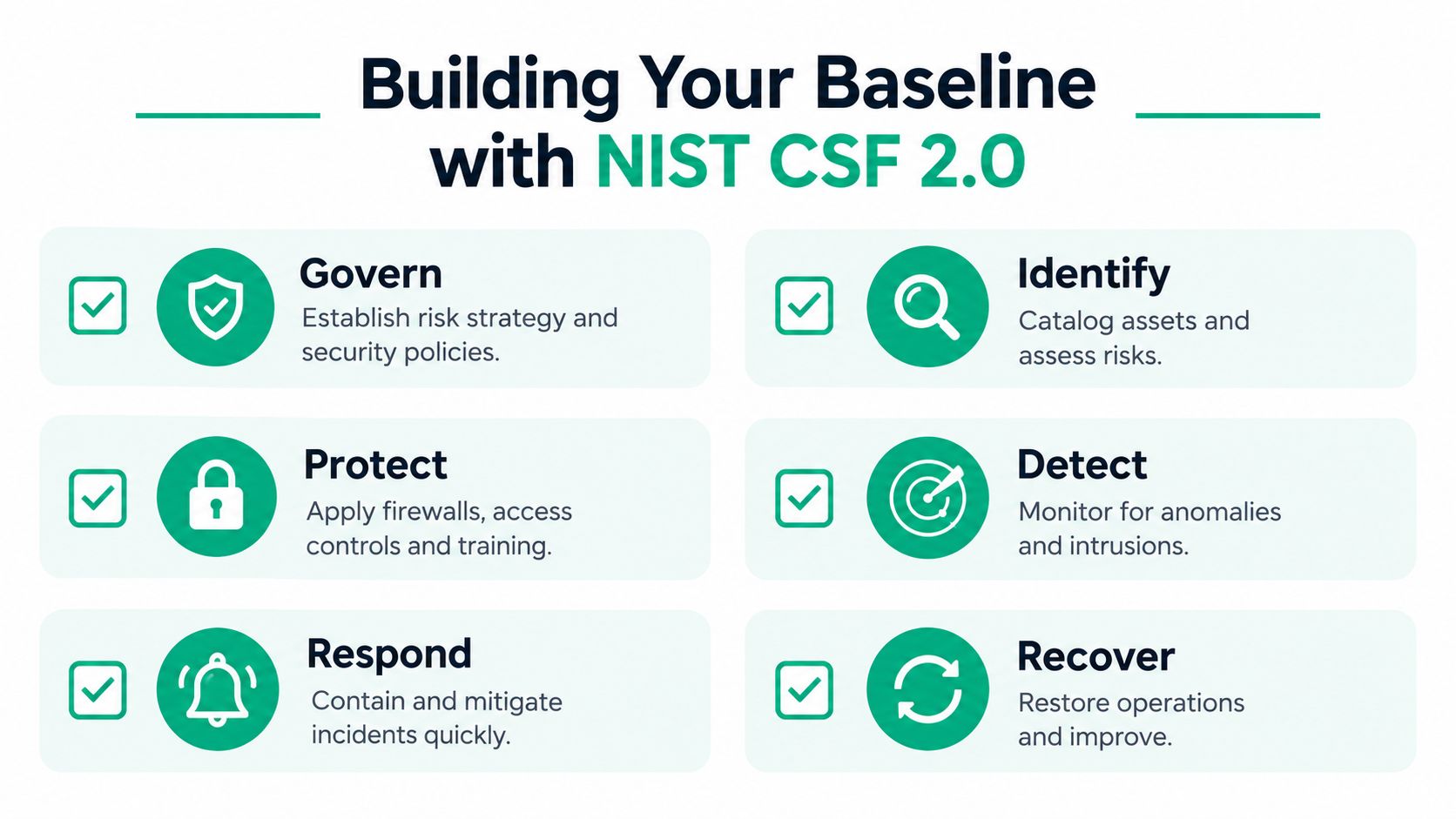
A five-person office can own a firewall, antivirus, and cloud backup yet still have no workable security plan. The gap is usually operational: nobody has confirmed which systems matter, who owns each decision, or what work gets done first. NIST's CSF 2.0 small-business quick-start guide provides a practical baseline for identifying critical systems and data, mapping threats and weaknesses, assigning owners, and ranking work by business impact.
Turn the framework into a working exercise
Begin with an inventory, not a purchase order. List laptops, desktops, servers, switches, access points, cloud applications, printers, cameras, phones, backup systems, and every other device that handles company information. Record each system's business owner, purpose, location, and the work that would stop if it failed.
Use that list to map risks:
- Critical applications: Identify accounting, scheduling, customer relationship management, electronic health records, design files, and production tools.
- Access paths: Record remote access, vendor tools, cloud administrators, wireless networks, and shared accounts.
- Weaknesses: Mark unsupported operating systems, inconsistent patching, exposed management interfaces, and devices without monitoring.
- Business impact: Rank systems by the effect of an outage, data loss, unauthorized access, or delayed recovery.
NIST's small-business fundamentals guidance also emphasizes disciplined patching, strong passwords, careful software downloads, and an inventory of technology that interacts with business information. These findings should become a short worklist tied to continuity targets, such as which service must return first and how long staff can work without it.
A Johnson County clinic should connect its baseline to HIPAA safeguards and patient-data workflows. A defense supplier along the I-65 corridor should map controls to CMMC expectations and contract obligations. Other companies can use NIST CSF to document sensible practices without turning the exercise into compliance theater.
Assign responsibility before an incident
The owner may approve priorities, an office manager may review access, and an IT provider may handle patching, endpoint alerts, and firewall changes. Write those assignments down. NIST describes cybersecurity as understanding, assessing, prioritizing, and communicating risk across the business, rather than leaving it solely with IT. (NIST Cybersecurity Framework 2.0 small-business resource)
A concise cybersecurity risk assessment template for Indiana businesses can organize the inventory, owners, risks, and next actions. The useful result is a prioritized worklist that someone reviews and updates, not a binder left untouched after an audit.
Hardening the Perimeter and Internal Traffic
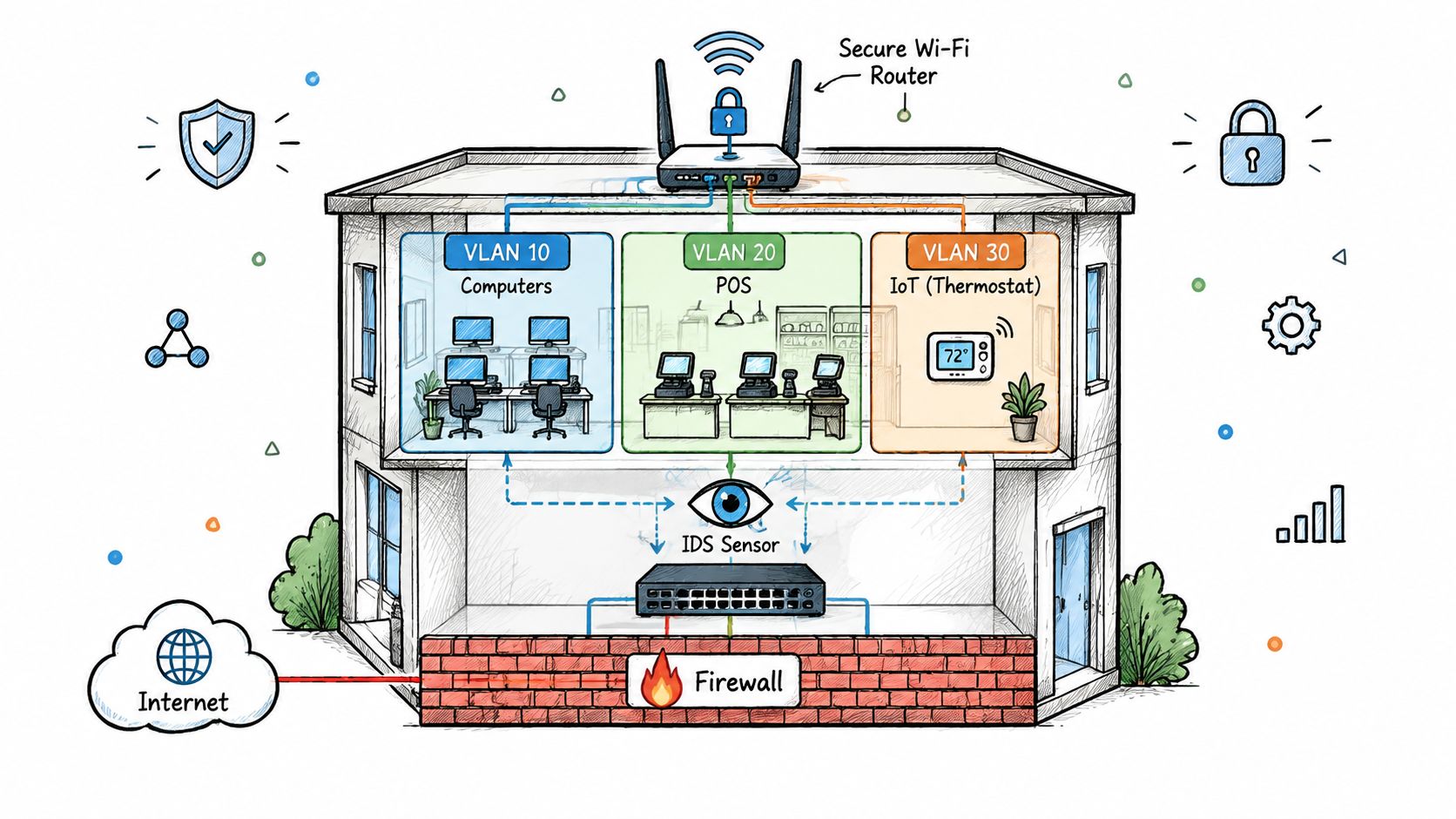
An Indiana office can lose access to accounting, phones, or scheduling after one infected workstation reaches the wrong system. A perimeter firewall still matters, but it must support an operating plan. Use a managed firewall to filter inbound and outbound traffic, block known malicious patterns, record administrative changes, and provide secure remote access. Then divide internal traffic so one compromised device cannot reach every business system.
Separate traffic by purpose
With UniFi networking, create separate VLANs for staff computers, servers, voice devices, guests, cameras, building controls, and network administration. Permit only the communication each group requires. Guest Wi-Fi should reach the internet, not accounting systems. A camera should send video to its recorder, not browse employee laptops. A smart thermostat should have no route to a file server.
Use this implementation sequence:
- Map dependencies: Confirm which applications need servers, printers, phones, and cloud services.
- Create VLANs: Assign each device category to its own logical network.
- Write deny-by-default rules: Permit approved business traffic, then block unnecessary east-west movement.
- Secure administration: Restrict switch, firewall, and access-point management to an administrator network.
- Validate behavior: Test guest isolation, printer access, remote work, application performance, and failover.
In an old brick building, wireless design affects both security and continuity. Place access points correctly, and use latency-optimized mesh nodes where cabling is difficult. A site survey still matters. Thick walls, metal shelving, neighboring wireless networks, and poorly placed repeaters can create unstable connections, leading employees to use personal hotspots or bypass approved controls.
The guide to network segmentation explains how separate zones limit the impact of a compromised device. Segmentation will not stop every attack, but it reduces lateral movement and narrows the systems staff must investigate.
Apply Zero Trust inside the office
Zero Trust architecture requires validation for each access request, including requests from inside the building. The firewall, identity provider, endpoint platform, and application permissions should work together. A managed laptop may reach a scheduling system, while an unknown device or unusual location is denied.
Deploy Bitdefender GravityZone or a comparable managed endpoint platform across supported laptops and servers. Configure malware prevention, behavioral detection, device control, alert forwarding, and policy enforcement. Full-disk encryption protects business data if a laptop or tablet is lost, so include it in the endpoint configuration and verify that it remains enabled.
Connected equipment also needs a clear owner and restricted placement. Document vendor access, administration methods, and required network permissions. A cellular device such as a GSM gate opener may solve a facilities problem, but it still belongs in the asset inventory and should sit in a restricted zone.
Locking Down Identity and Third-Party Access
A stolen Microsoft 365 password can give an attacker more useful access than a compromised office workstation. Remote-support credentials, vendor logins, and cloud administrator accounts all deserve the same attention as firewall rules. Treat each administrator account as a direct route into business systems, whether its owner works in Greenwood or from an Indy office.
Make access conditional
Enable multi-factor authentication for email, cloud storage, accounting platforms, remote desktop alternatives, firewall administration, backup consoles, and vendor portals. Use authenticator applications or hardware security keys instead of text messages when the platform supports them. Require managed devices for sensitive applications, and block sign-ins that fail the organization's conditions. A conditional access policy guide can help translate those requirements into practical cloud rules.
Keep separate administrator accounts for privileged work. Routine email and web browsing should use a standard account, not one that can alter firewall rules, delete backups, or create users. Apply least privilege, then review permissions after a role change or departure. The control is simple, but it depends on someone owning the review and recording the decision.
Password training works best when it connects to an everyday mistake. Explain password reuse with examples employees can recognize, including these 8 password examples to secure accounts. A password manager, unique credentials, and MFA provide the technical control. Training supports those measures, but it cannot enforce them by itself.
Treat vendors as connected systems
Payroll providers, copier technicians, software consultants, and managed application vendors may need legitimate access to company systems. Give each account a named owner, documented purpose, expiration process, and activity record. Ask vendors how they enforce MFA, patch remote tools, separate customer environments, and respond to suspected compromise.
Review access with five practical questions:
- Who has access: List named users, service accounts, vendor accounts, and emergency accounts.
- What they can reach: Separate application permissions from network access.
- Why access exists: Tie each permission to a current business task.
- When it expires: Remove temporary access after the work ends.
- What gets logged: Forward authentication and administrative events for review.
Software vulnerabilities and third-party exposure require direct attention. Analysts cited by the Cyber Readiness Institute reported that software vulnerability exploitation surpassed stolen credentials as the leading initial access method for the first time. The same reporting found supply-chain and third-party-related breaches rising 60% year over year and reaching 48% of total breaches. (Cyber Readiness Institute reporting on Verizon DBIR 2026)
VPN access still has a place for specific remote work. Require MFA, current clients, device checks, narrow permissions, and logging. A VPN that places every remote user on a flat internal network only relocates the perimeter. It does not create Zero Trust.
Bulletproof Backups and Rapid Data Recovery
A backup job can report success while the business remains unable to operate. The true test comes after ransomware, accidental deletion, hardware failure, or a cloud-account problem: can the company restore the right files, applications, permissions, and procedures in a usable order?
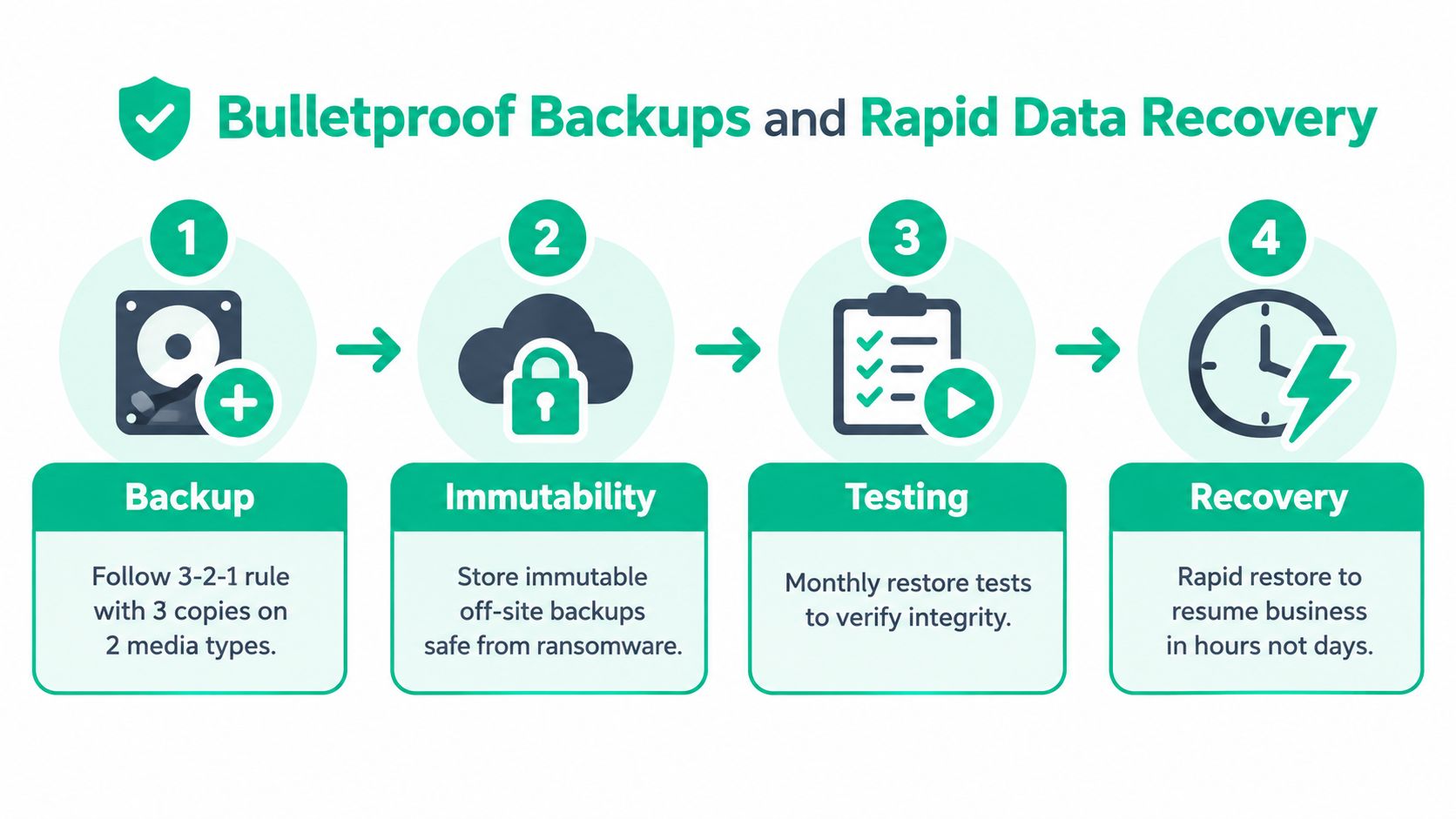
For an Indiana business growing faster than its internal processes, recovery planning starts with separation. Keep backup administration apart from ordinary user access, encrypt the backup data, and store at least one copy outside the production environment. The NIST small-business recovery guidance supports encrypted endpoints and tested off-site backups as part of protection and recovery planning.
Build recovery around restore points
Use encrypted backups with retention rules that protect against accidental deletion and ransomware encryption. Where the platform supports it, configure immutable off-site backups so ordinary administrative credentials cannot alter or delete protected restore points during the retention period.
Document five parts of the design:
- Production data: Files, databases, SaaS exports, configurations, and application data the business needs.
- Recovery order: The systems required first for phones, billing, scheduling, production, and customer service.
- Credentials and keys: Secure recovery information separately from the systems it provides access to.
- Restore destination: A clean server, replacement workstation, cloud environment, or isolated recovery network.
- Business decisions: The person who can declare an incident and approve the recovery sequence.
The commonly used 3-2-1 approach keeps three copies on two media types, with one copy off-site. Treat it as a design principle, not evidence that recovery will work. A successful restore test supplies that evidence.
Test the part people skip
Run a controlled restore of a representative file, then test application or system recovery. Check permissions, timestamps, database consistency, encryption keys, and whether employees can resume their actual workflows. Record the time required for each step, and revise the procedure whenever software or staff changes.
Bit-level data recovery is a separate stage. A physically failed storage device may require specialists to work from sectors and underlying media rather than a normal file copy. Recovery is not guaranteed, and repeated DIY attempts can overwrite evidence or worsen mechanical damage. Shut down a failing device, preserve it, and seek specialist help before running repair utilities.
Downtime affects transactions, staff time, service commitments, and customer confidence, not only files. A recovery plan therefore needs a tested sequence, clear ownership, and restore points that remain available when production systems are compromised.
A practical cloud backup guide for small business can help compare storage, retention, encryption, and recovery requirements without confusing synchronization with backup.
Monitoring, Incident Response, and Expert Support
Configured firewalls and backup jobs still need supervision. Someone must review alerts, investigate unusual sign-ins, confirm endpoint reporting, check that protection remains enabled, and respond when a system behaves differently at 2 AM than it did yesterday.
SOC-as-a-Service monitoring can provide that coverage without requiring a small company to hire a complete internal security team. Before signing, ask who triages alerts, which events trigger escalation, how the provider isolates a device, and what the business receives after an incident. An alert dashboard alone does not show whether anyone is acting on the warning.
Create a response plan people can follow
A response plan should assign people and decisions. Keep a current contact list for the owner, IT administrator, managed provider, cyber-insurance carrier, legal counsel, and any required regulatory contacts.
Use a short sequence:
- Confirm: Decide whether the alert indicates malicious activity, a misconfiguration, or a false positive.
- Contain: Isolate affected endpoints, disable compromised accounts, and restrict suspicious network paths.
- Preserve: Protect logs, relevant files, timestamps, and other evidence before rebuilding systems.
- Communicate: Tell employees what to stop doing, then provide accurate updates to customers or partners when necessary.
- Recover: Restore clean systems from verified backups and watch for recurring activity.
- Improve: Document the cause, close the gap, and update training or access rules.
State what staff must not do. They should not keep logging into a suspected compromised account, delete suspicious messages, reconnect an isolated laptop, or wipe a device before evidence is preserved.
Know when DIY has stopped working
The operational gap appears when patches depend on memory, former employees retain access, backup alerts go unread, or the owner is the only person who understands the network. Recent SMB reporting found that only 47% of micro-businesses have a cybersecurity plan, more than half spend less than 1% of total budget on security, and just 7% say their security budget is definitely sufficient. (CrowdStrike SMB cybersecurity report)
A small company does not need every enterprise product. It needs assigned ownership, usable documentation, consistent monitoring, and recovery procedures that someone has tested. NIST CSF 2.0 supplies a practical structure, while a managed provider can maintain controls across laptops, servers, UniFi networking, cloud accounts, and remote access.
In our 17 years of local service, the practical lesson is clear. A low-budget plan with MFA, disciplined patching, segmented Wi-Fi, endpoint protection, encrypted laptops, immutable off-site backups, and an incident procedure provides more protection than disconnected tools nobody maintains. Finchum Fixes IT provides managed IT, cybersecurity, networking, computer repair, data recovery, and technical support for Indiana organizations that need those controls operated, not merely purchased.
For a Greenwood or Indianapolis business with aging equipment, unstable Wi-Fi, unreviewed vendor access, or untested backups, schedule a Free Network Assessment or Security Risk Audit before the next outage interrupts work.
Finchum Fixes IT can assess your Greenwood or Indianapolis network, document its risks, and build a practical security and recovery plan around your budget, compliance needs, and daily workflow. Visit Finchum Fixes IT to request a Free Network Assessment or Security Risk Audit and turn recurring technology interruptions into predictable support.