Data Transfer Network Explained for Indiana SMBs
A Central Indiana office can look connected while work grinds to a halt. In an older Greenwood brick building, employees may see full Wi-Fi bars while cloud files stall, calls break up, and backups run into the workday. Near the I-65 corridor, aging servers can create the same result. The connection is there. The billable work is not moving.
A data transfer network combines hardware, links, and protocols to move information between devices, offices, data centers, and cloud services. It is the road system behind those files and calls: connections provide the roads, network devices direct traffic, and protocols establish how data travels and arrives intact.
The practical fix rarely starts with a faster internet plan. A managed design reviews Wi-Fi coverage, switching, routing, storage, security, and recovery as one working system. That gives Johnson County SMBs a clearer path from wasted technology time to billable hours and a predictable monthly budget. Since downtime is commonly estimated at up to $9,000 per minute depending on company size and industry, network planning belongs in the business continuity conversation. Atlassian's downtime cost overview explains the financial impact of outages.
Latency affects interactive work, throughput affects large transfers, and Zero Trust controls limit damage when access is misused. This guide connects those technical choices to daily operations, compliance, backups, recovery, and migration planning for Central Indiana SMBs. For a foundation on how names become online destinations, Finchum Fixes IT explains what DNS does and how it works.

Why packet switching changed networking
A foundational moment arrived in October 1969, when UCLA graduate students working under Leonard Kleinrock sent the first packet-switched message over ARPANET. On 25 July 1973, ARPANET achieved its first transatlantic link between University College London and a computer in California. Britannica's ARPANET history describes these milestones as important steps toward modern networking.
The practical lesson still applies to an office in Greenwood. A network shouldn't depend on one fragile path, one overloaded switch, or one aging server. Distributed routing and redundant links give traffic more options when equipment fails or demand rises.
At the application layer, protocols define how systems communicate. TCP/IP handles addressing and reliable transport, while application protocols support services such as file transfer, web access, email, and cloud synchronization. The network's job isn't merely to move bits quickly. It must deliver the right data, to the right destination, with enough control to preserve performance and trust.
Common Architectures and Protocols That Move Your Data
Architecture determines where traffic travels. Protocols determine how devices exchange it. A small Greenwood office might use a LAN for printers and workstations, a WLAN for employee devices, and a WAN connection to reach cloud applications or a second location.
LAN, or local area network, covers a building or compact site. WLAN adds wireless access, often through centrally managed systems such as UniFi networking. WAN connects offices over longer distances. SD-WAN adds policy-based path selection, which can direct voice, backup, and business application traffic over the link that best fits each workload.
Cloud interconnects deserve special attention. A direct or private connection to a cloud environment can improve predictability, but it may introduce contract, port, cross-site, and egress costs. Hamilton County growth firms often outgrow a simple internet-only model when design files, databases, voice systems, and cloud backups all compete for the same path.
| Architecture Protocol | Best For | Tradeoff to Watch |
|---|---|---|
| LAN and Ethernet | Wired office devices, servers, switches | Requires structured cabling and careful capacity planning |
| WLAN and Wi-Fi 6 | Mobile workers, conference rooms, guest access | Walls, interference, and access-point placement affect quality |
| WAN and TCP/IP | Office-to-office and cloud communication | Distance and packet loss can raise transfer time |
| UniFi networking | Managed SMB Wi-Fi and switching | Needs proper radio planning, segmentation, and monitoring |
| SD-WAN | Multiple links and application-aware routing | Adds policy and monitoring complexity |
| 400G/800G Ethernet | Large data center and AI-driven east-west traffic | Usually excessive for an ordinary office and costly to deploy |
For a business transferring files, an FTP explanation such as UpTime Web Hosting's FTP protocol guide can clarify the difference between a transfer protocol and the underlying network that carries it. FTP, secure alternatives, and cloud sync tools all still depend on routing, storage, authentication, and available capacity.
Security belongs in the design
Zero Trust architecture treats identity, device health, application access, and network context as conditions to verify, rather than assuming that anything inside the office is automatically safe. Segmentation can keep guest Wi-Fi, payment systems, voice devices, servers, and employee laptops in separate logical zones.
For organizations that need continuous oversight, SOC-as-a-Service monitoring can review alerts and suspicious activity outside normal office hours. A private point-to-point design may also suit a company that needs a controlled route between locations. The point-to-point networking guide offers a practical comparison for businesses evaluating that option.
Performance That Actually Matters for Transfers
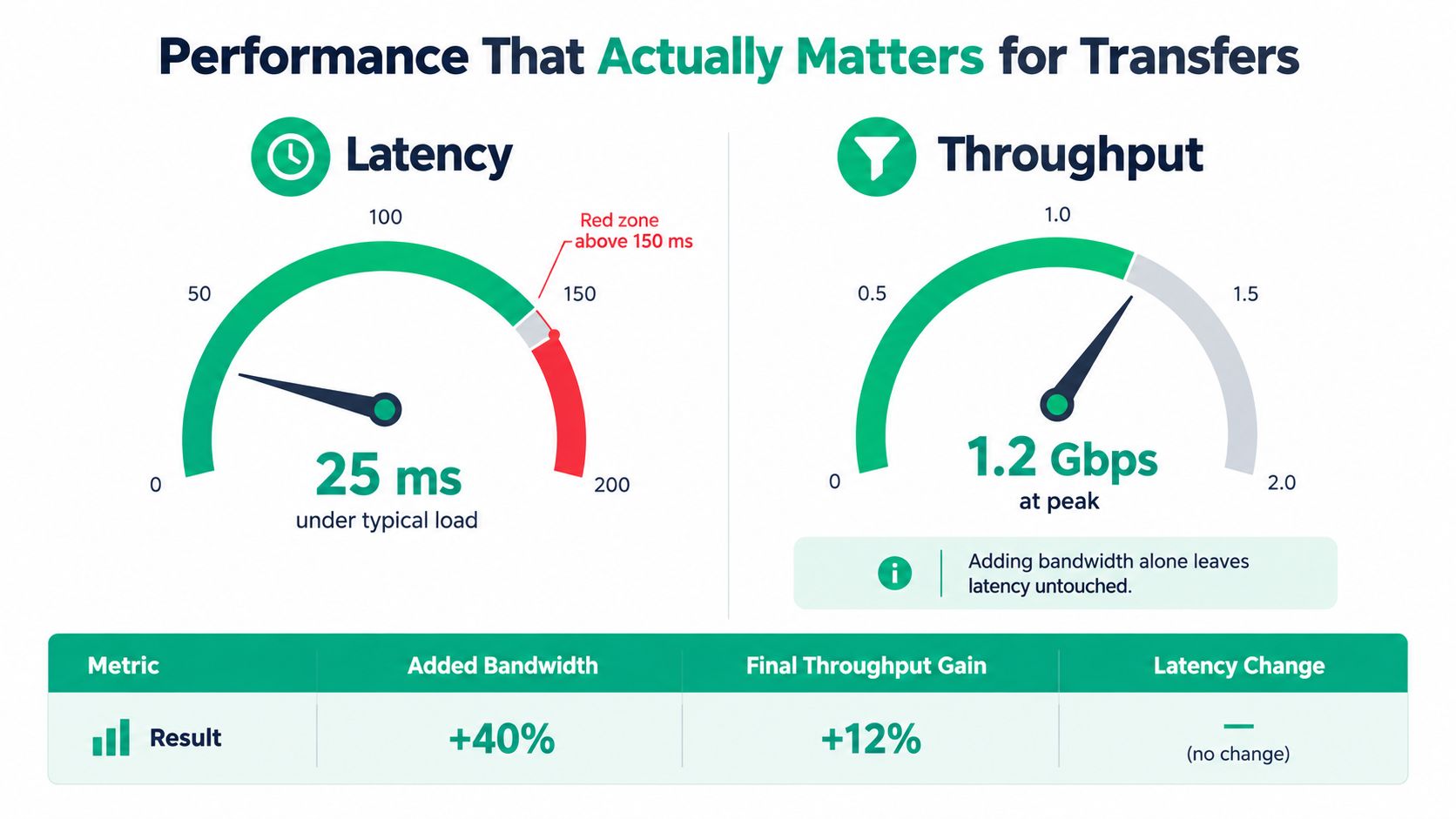
A Greenwood office can buy a faster internet circuit and still watch a client backup crawl. The reason is simple: bandwidth is the size of the pipe, throughput is how much data gets through, and latency is the time data takes to travel end to end. For a concise definition, see what is network latency. These measures describe different problems, so one cannot stand in for another.
A faster link will not automatically make a distant backup feel fast. Transport protocols wait for acknowledgments, and high round-trip delay can leave available capacity unused. Packet loss adds retransmissions, consuming capacity and interrupting the transfer. IBM's explanation of latency and network performance covers the distinction clearly.
What long-distance transfers reveal
A transpacific study measured about 150 ms RTT between Atlanta and Tokyo. On a 100 Gbps link, asynchronous I/O reached 98.56 Gbps, direct I/O reached 97.60 Gbps, and buffered I/O reached only 8.96 Gbps. The study also reported a single 1 TB file moving disk to disk at 90.08 Gbps with asynchronous I/O. These figures come from the study of I/O behavior on high-latency paths.
Central Indiana SMBs do not need those rates to learn the lesson. Storage and application behavior can waste an expensive connection. Large transfers may need parallelism, direct I/O, suitable buffer settings, and congestion-aware transport. A cloud backup appliance with slow disks can become the bottleneck before the internet circuit reaches its advertised speed, leaving staff waiting instead of serving customers.
Run this diagnostic workflow before buying more bandwidth:
- Measure latency: Test the path during normal work and backups.
- Check packet loss: Look for loss on the local network, WAN, and cloud route.
- Compare throughput: Test sustained transfer performance, not only a short speed test.
- Inspect storage I/O: Confirm that disks, backup agents, and file systems can feed the link.
- Review application behavior: Check whether software uses parallel transfers or waits on one stream.
- Separate traffic: Apply QoS to voice and critical cloud applications before large sync jobs.
Practical rule: Tune the entire path, from storage and application buffers to routing and congestion control. A bigger circuit cannot repair a slow disk or a high-delay route.
The broader internet is carrying more traffic. TeleGeography reports 2,259 Tbps of international internet bandwidth in 2026, following 23% growth in that year, with a 23% four-year compound annual growth rate. Average and peak international traffic each grew at a 24% compounded annual rate between 2022 and 2026. Mobile devices represented 51.6% of global web traffic, and 96.2% of internet users went online with a mobile phone at least some of the time, according to TeleGeography's international bandwidth data. A local office still feels that cloud-heavy demand through shared services and remote users.
For a deeper SMB checklist, see how to optimize network performance for SMBs in 2026. Fixing the actual bottleneck can protect billable hours and reduce downtime without paying for capacity the rest of the path cannot use.
Security Compliance and Business Continuity Essentials
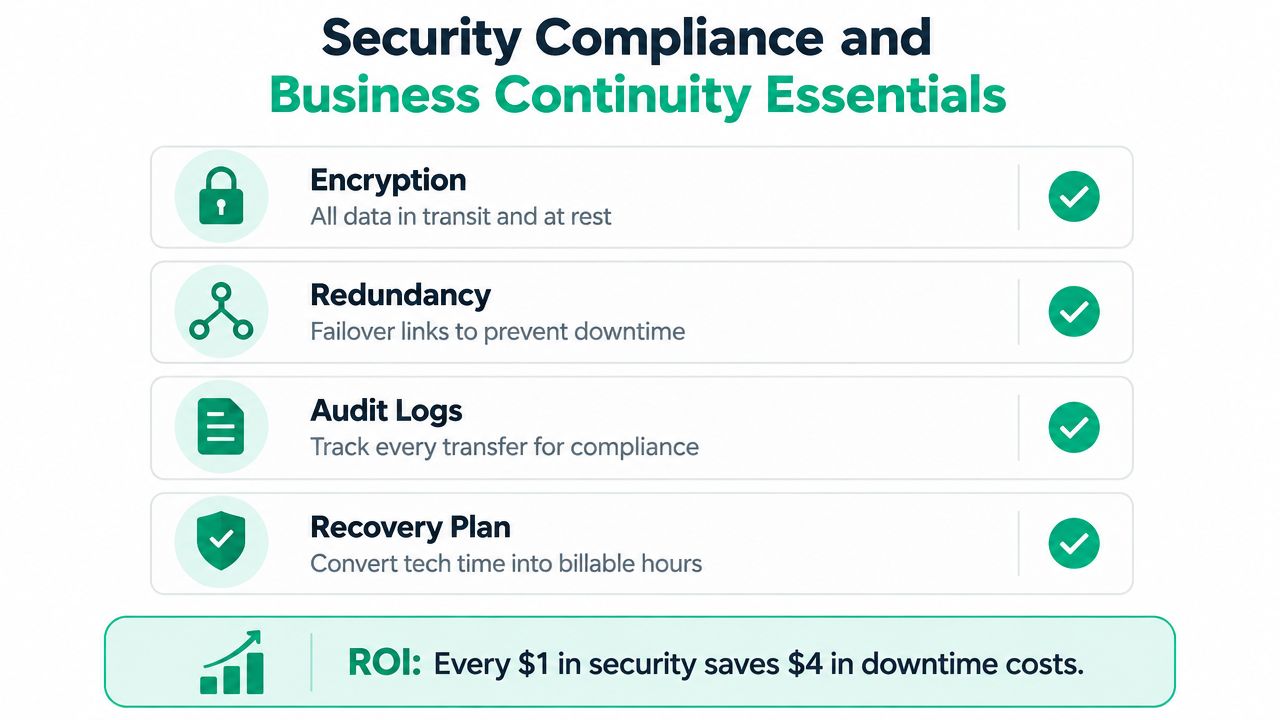
A Greenwood contractor can lose a morning of billable work when ransomware locks project files or a failed link blocks customer records. A secure data transfer network protects those records, contracts, intellectual property, recovery copies, and the employee time that keeps Central Indiana businesses operating.
For general business security, NIST CSF provides a voluntary framework built around six functions: Identify, Protect, Detect, Respond, Recover, and Govern. It does not replace obligations such as HIPAA or CMMC. Healthcare organizations handling protected health information must address HIPAA, while defense contractors may need to meet CMMC requirements. A useful overview appears in this NIST CSF compliance guide. Teams evaluating audit-readiness tooling can also review this in-depth SOC 2 software guide.
Match controls to the actual risk
A healthcare practice needs controlled access, audit trails, encryption, and recovery procedures for protected health information. A defense supplier must understand its contract obligations and controlled information environment. A professional-services firm still needs identity controls, endpoint protection, logging, and recovery planning.
Bitdefender GravityZone can provide centrally managed endpoint security within a broader design. Network segmentation and Zero Trust policies limit what a compromised account or device can reach. SOC-as-a-Service monitoring adds human review for alerts that might otherwise wait until the next workday.
NIST CSF and HIPAA serve different purposes. One compliance guide notes that no official HIPAA-to-CSF 2.0 crosswalk exists and recommends NIST SP 800-53 Rev. 5 as an intermediate bridge before reviewing the official 800-53 to CSF 2.0 crosswalk. This comparison of NIST CSF and other frameworks explains the distinction.
Recovery is part of the network plan
Immutable off-site backups cannot be modified or deleted during a defined retention period. After ransomware, hardware failure, natural disaster, or accidental deletion, the recovery source remains dependable. HPE explains how immutable backups support recovery and reduce RTO.
In our 17 years of local service, we've seen teams treat backups as a checkbox until a failing RAID array makes the lesson expensive. When we disassembled a similar client's failing RAID array, bit-level data recovery required careful imaging and validation rather than a quick drive swap. That work is a fallback, not a recovery plan. A tested, immutable backup is the better operating choice.
A recovery design can include redundant links where justified, documented restoration steps, and regular verification. Each measure reduces the chance that employees lose hours waiting on a broken system. With downtime estimates reaching nearly $9,000 per minute, the business case for outage prevention connects directly to revenue, payroll, and customer commitments.
For secure transfer practices suited to Indiana organizations, use this secure data transfer guide for Indiana businesses.
Design Optimization and Migration Playbook for Indiana SMBs
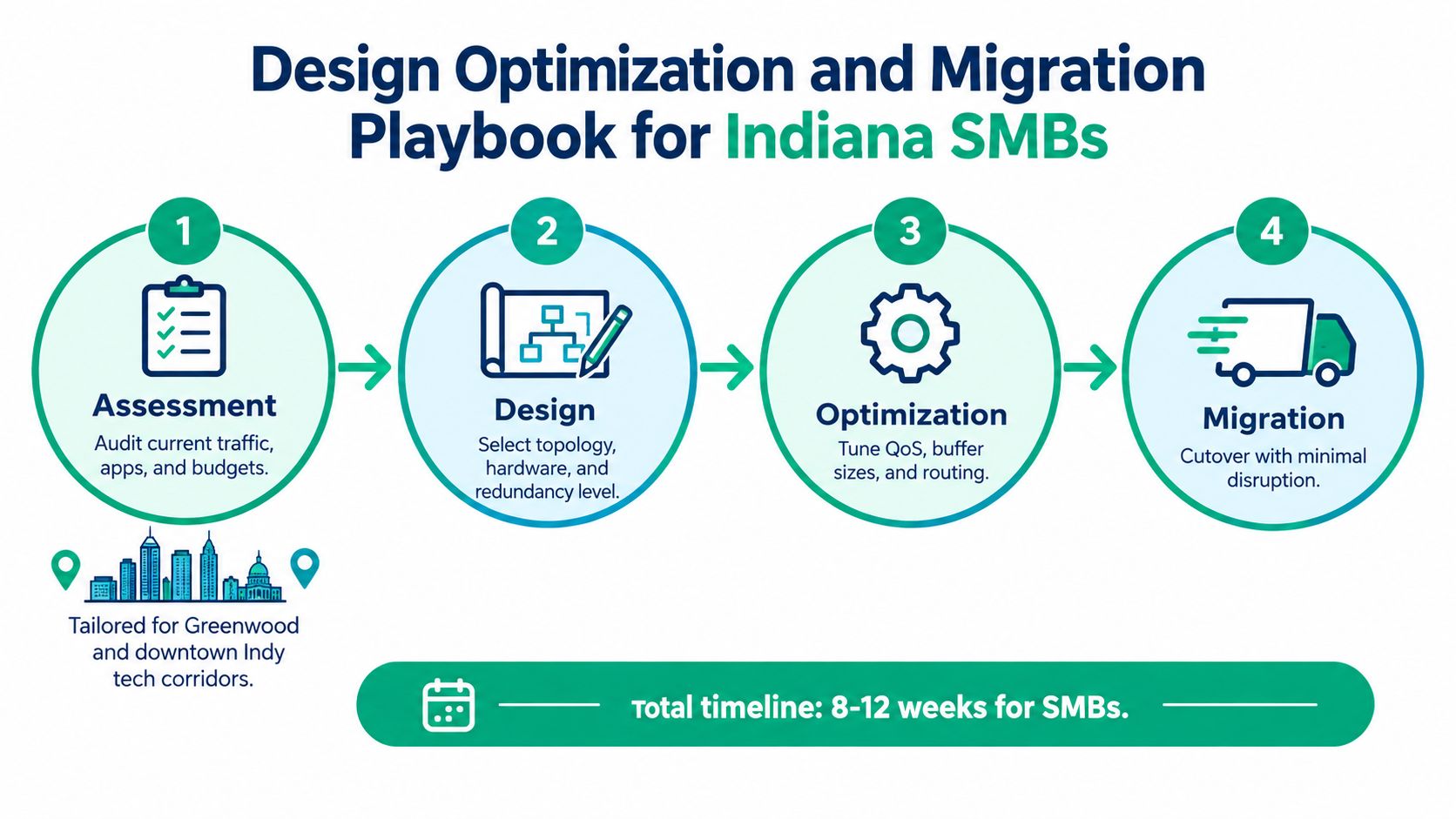
A sound upgrade starts with evidence. A Greenwood office shouldn't copy a downtown Indy tech hub's design, and a growing Hamilton County firm shouldn't plan only for today's traffic. The I-65 corridor brings different building layouts, provider choices, staffing patterns, and cloud dependencies.
Start with an evidence-based assessment
Inventory switches, access points, firewalls, servers, backup appliances, cloud applications, and critical workflows. Map where traffic starts and ends. Identify which systems need low delay, which can tolerate scheduling, and which transfers create cloud egress or cross-site charges.
Review logs and performance during ordinary work, large file movement, voice calls, and backup windows. The verification step is simple: document the current baseline so the team can compare the proposed design against real business workloads.
Design for coverage and separation
In an old brick building, access-point placement matters as much as the wireless standard. Use a site survey, place latency-optimized mesh nodes only where a wired connection isn't practical, and separate employee, guest, voice, IoT, and administrative traffic. UniFi networking can provide a manageable platform for SMB wireless and switching, but the design still needs proper radio planning and VLAN policy.
Apply QoS to voice and time-sensitive cloud applications. Choose redundant connectivity when an outage would stop revenue-producing work. Verify the result by walking the floor, testing calls in weak areas, and confirming that guest devices can't reach business systems.
Optimize before migrating
Tune routing, transfer concurrency, storage I/O, and backup schedules before moving a large workload. A faster internet plan may increase the bill without fixing egress charges, cross-site traffic, a slow storage target, or an application that uses one transfer stream.
Network-as-a-Service, or NaaS, can make infrastructure feel more like a cloud service, with recurring costs and managed operations instead of a large one-time project. It still requires contract review, service-level clarity, and a close look at data movement costs. Verify the plan with a test migration and a restore test, not a vendor promise.
Cut over with a rollback plan
Stage equipment, preserve the old route long enough to recover, and migrate in defined workloads. Keep stakeholders informed about the cutover window and the validation checks. A practical cloud data migration playbook for Indiana SMBs can help organize that work.
Verification means users can authenticate, applications respond, files arrive intact, backups complete, logs show expected traffic, and the recovery procedure works. Only then should the old path be retired.
Real World Use Cases and Your Next Step in Central Indiana
A Hamilton County growth firm moving large design files to the cloud may need sustained throughput and storage-aware transfers more than a larger internet headline. Parallel transfer settings, QoS, and a cloud cost review can keep creative staff working while the business expands.
A Johnson County healthcare practice has a different concern. Its data transfer network must support controlled access, audit records, encryption, and recovery procedures that align with HIPAA obligations. Segmentation, endpoint protection, and immutable off-site backups address operational risk without treating compliance as a substitute for sound engineering.
A Greenwood business park with aging hardware may need a staged replacement rather than a risky weekend cutover. Redundant switching, managed Wi-Fi, monitored backups, and a tested rollback path can prevent a failing server or overloaded access point from consuming the workday.
These examples share one lesson. The right design connects latency, throughput, security, storage, and recovery to the work people perform along the I-65 corridor, in downtown Indy tech hubs, and across Central Indiana. Finchum Fixes IT provides networking, Wi-Fi coverage expansion, troubleshooting, secure migration, data recovery, and managed support, with urgent response averaging under two hours according to the publisher's service information.
For businesses in the Greenwood and Indianapolis area, Finchum Fixes IT can perform a Free Network Assessment or Security Risk Audit focused on transfer performance, segmentation, backups, and downtime exposure. Visit Finchum Fixes IT to schedule a practical review and turn an unreliable data transfer network into a predictable business system.