Hiring a Custom Application Developer in Indiana: A Guide
A lot of Greenwood businesses are running a surprisingly important part of the company on spreadsheets, email chains, and one person’s memory.
It usually starts small. A distributor near the I-65 corridor exports orders from one system, rekeys customer details into another, then updates a third sheet so accounting can invoice correctly. A medical office in Johnson County copies intake data between systems because the old platform won’t talk to the newer one. A service company keeps a “master spreadsheet” on a shared drive because nobody trusts the software stack they already bought.
That patchwork works right up until someone’s out sick, a file gets overwritten, Wi-Fi drops in an old brick building, or a line-of-business app hangs during the middle of the day. Downtime hits revenue fast, and business owners feel it even faster when staff are burning paid hours on manual work instead of billable work. The fix usually isn’t “buy another random app.” It’s building the right connection point between the systems you already depend on, with security, documentation, and support baked in.
Coffee-shop truth: Most small businesses don’t need “more software.” They need fewer manual handoffs.
- Start with the bottleneck: Map where staff re-enter data, wait on approvals, or bounce between systems.
- Decide if custom is justified: Sometimes integration, low-code, or workflow cleanup solves the problem faster.
- Write a real RFP: Clear requirements are your main defense against rework and budget drift.
- Hire for business fit, not code talk: Ask about security, support, documentation, and change control.
- Manage the rollout: Set milestones, testing rules, ownership terms, and maintenance expectations early.
- Think continuity: A custom app should reduce downtime, tighten process control, and turn wasted tech time into productive hours.
Custom development is no longer some exotic enterprise-only project. The global market for custom software development was estimated at USD 43.16 billion in 2024 and is projected to reach USD 146.18 billion by 2030, with a 22.6% CAGR from 2025 to 2030, according to Grand View Research’s custom software development market report. That matters because it signals a shift in how companies compete. Businesses are using custom apps to automate process bottlenecks, reduce operational drag, and clean up disconnected workflows.
For Indiana owners, the practical question isn’t whether custom software is trendy. It’s whether a custom application developer can remove a specific drag on operations without creating a new support headache. If your office manager spends half the week doing digital duct tape, that’s where the ROI conversation begins. If you want examples of what that cleanup can look like, these business process automation examples for Indiana companies show the kind of repetitive work that should never stay manual.
Introduction Why Your Greenwood Business Runs on Spreadsheets and How to Fix It
A spreadsheet isn’t the enemy. The problem starts when the spreadsheet becomes the system.
That happens all over Central Indiana. A company grows, adds QuickBooks, a CRM, a scheduling tool, maybe an industry-specific platform, then discovers none of them share data cleanly. Staff compensate by exporting CSVs, emailing approvals, and keeping backup notes in Excel. That creates silent risk. One wrong version, one missed update, one machine failure, and your process stalls.
The Southside bottleneck
In older office parks around Greenwood and along the south side of Indy, I still see businesses relying on aging server hardware, legacy desktop apps, and spotty wireless coverage that turns routine tasks into delays. The software pain often looks like an IT issue, but it’s really an operations issue. If staff can’t trust data to move from one system to another, they build workarounds.
Those workarounds cost time, and time becomes payroll burn.
A custom application can fix that, but only when it’s aimed at the actual bottleneck. Sometimes that means a secure internal dashboard. Sometimes it means a mobile form for field staff. Sometimes it means a web app that acts as a bridge between a legacy ERP and a cloud CRM so people stop retyping the same information all day.
What a good fix actually does
A useful custom app should do three things well:
- Remove duplicate effort: It should cut out manual copying, status chasing, and side spreadsheets.
- Protect continuity: It should reduce the number of single points of failure tied to one employee or one old machine.
- Fit your environment: It should work with the network, security controls, and compliance expectations you already have, whether that means HIPAA safeguards, CMMC-sensitive workflows, or a broader NIST CSF security posture.
That last point matters more than most developers admit. If the app sits on top of shaky Wi-Fi, no backup plan, or no endpoint protection, you haven’t solved the business problem. You’ve just dressed it up. Custom software should sit inside a larger IT strategy that includes basics like access control, patching, logging, immutable off-site backups, and reliable infrastructure.
First Step Is a Custom App Your Real Solution
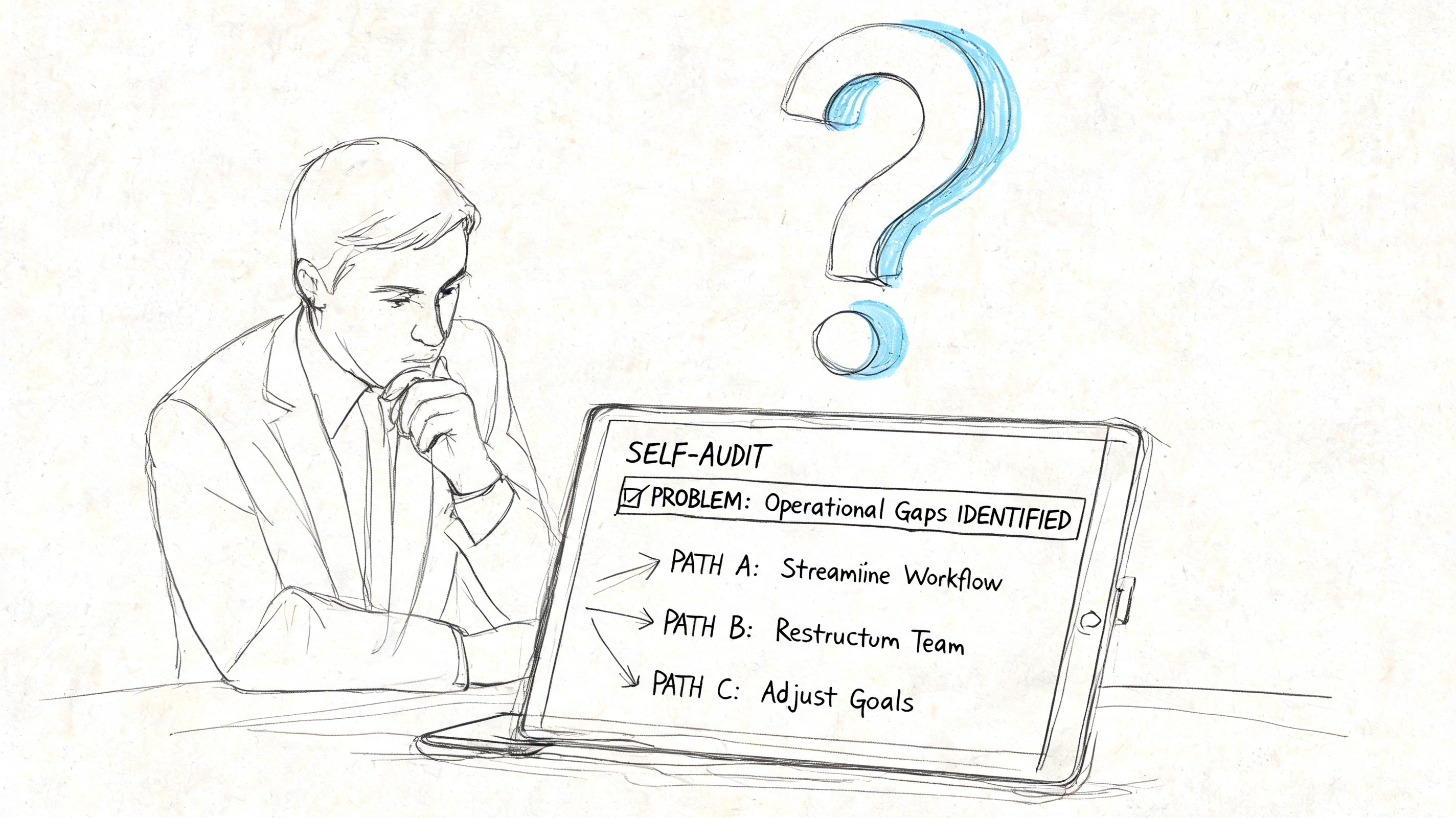
Before you hire a custom application developer, slow down and audit the pain.
The wrong starting point is, “We need an app.” The right starting point is, “What keeps breaking, where does work stall, and what would a cleaner process look like?” A lot of Indiana companies don’t need a full greenfield build. They need an integration layer, a low-code workflow, or a better front end for data already living in several systems.
Audit the workflow before you audit vendors
Sit down with the people doing the work. Not just department heads. The actual staff who open the tickets, enter the orders, chase signatures, and fix exceptions.
Ask questions like these:
- Where do you type the same information twice?
- Which process stops when one person is out?
- What step causes the most “Where are we on this?” emails?
- Which system is the source of truth, and which systems are just coping mechanisms?
- What happens if the internet, server, or line-of-business app is unavailable for a stretch?
That last question gets ignored too often. Business continuity isn’t just backups and cybersecurity. It also means the process itself can survive interruptions. If your workflow depends on one brittle handoff, you’ve built a downtime problem into the operation.
Custom apps should connect systems, not become another silo
One point that a lot of online articles miss is that custom apps work best as an integration strategy, not as isolated software. For Indiana businesses with older systems, a custom app can connect old and new software and modernize operations without a full replacement, as described in Experion’s custom application development overview.
That’s why I push owners to think in terms of bridges. A Plainfield warehouse may still depend on an older ERP. A professional services firm in downtown Indy might live inside Microsoft 365. A manufacturing shop in Johnson County may need data to move between quoting, scheduling, and production systems. A good custom app sits between those environments and handles validation, permissions, and workflow logic.
If you’re already weighing a larger business platform decision, DynamicsHub’s Dynamics 365 guide is a useful primer on what implementation complexity looks like before you commit to a giant replacement project.
Signs you may not need a full custom build
Sometimes the best decision is smaller and cheaper.
- Your process is messy, not your software: If every department does the work differently, new code won’t save that.
- A low-code tool can handle it: Low-code platforms are often a strong fit for forms, approvals, and internal dashboards.
- You need CRM cleanup first: If sales data is incomplete or duplicated, fix that foundation before building around it.
If customer tracking and follow-up are part of the problem, this guide to custom CRM software development for business growth is a solid next step because CRM gaps often expose the process problems that owners first notice.
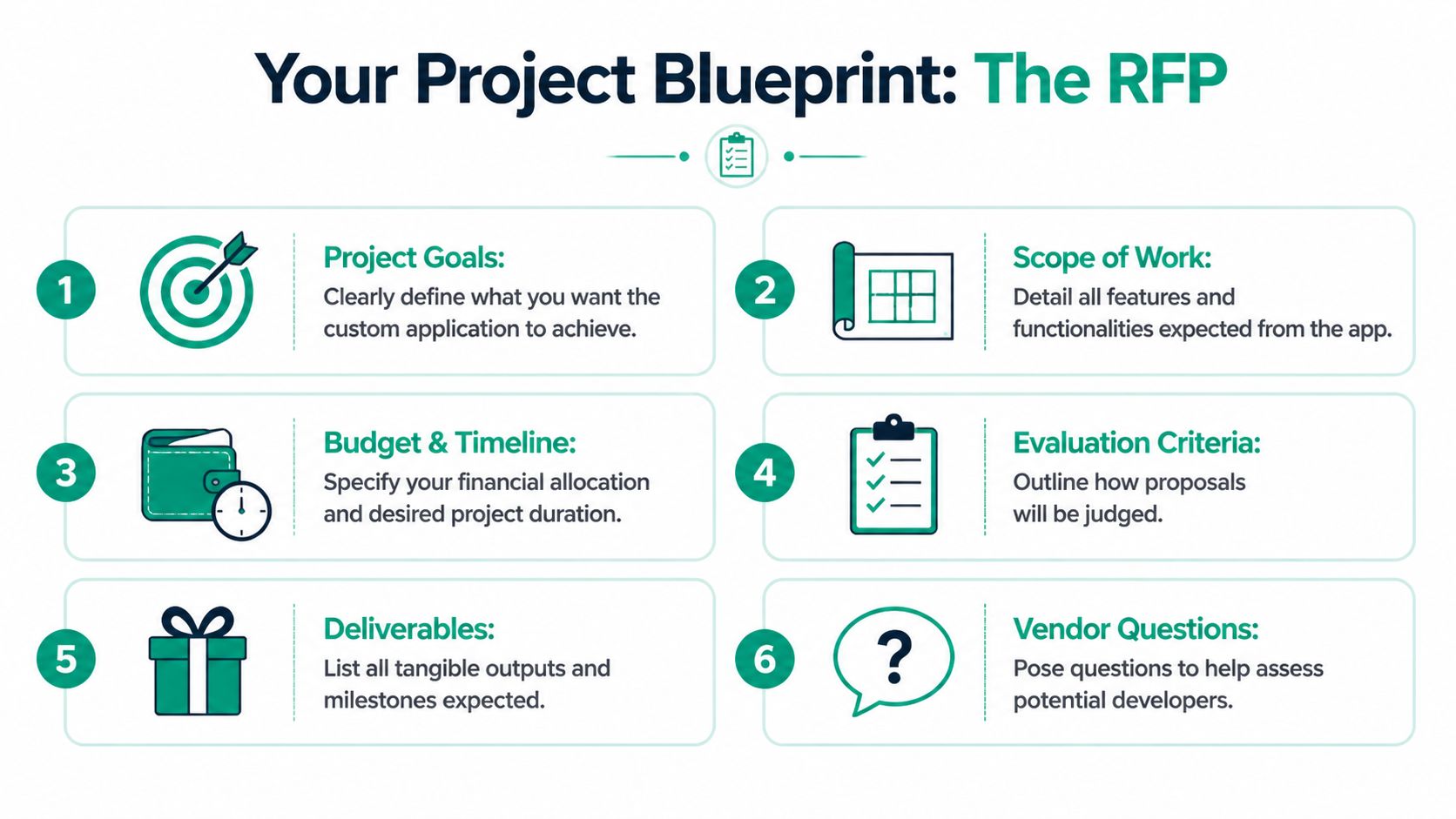
Creating Your Project Blueprint The RFP
If you skip the RFP or phone it in, you’re gambling.
Projects with clearly documented requirements are 97% more likely to succeed, and 48% of software defects originate from mistakes made during requirements analysis, according to this report summary on project failure and requirements quality. For a non-technical owner, that’s the main point. Your requirements document is not paperwork. It’s your first line of defense against rework, missed expectations, and ugly change orders.
In our 17 years serving Central Indiana, we’ve seen projects fail not from bad code, but from a vague, one-page RFP.
What belongs in the RFP
A useful RFP is plain English with enough detail to remove guesswork. It should include:
- Business overview: What your company does, who uses the system, and what business problem is forcing change.
- Problem statement: Describe the current workflow and the exact bottleneck. “We re-enter order data into three systems” is better than “we need efficiency.”
- Scope of work: State what the app must do. Then list what it will not do. Out-of-scope items save arguments later.
- Users and roles: Note who uses it, who approves actions, and who needs reporting access.
- Technical environment: Mention on-prem servers, Microsoft 365, cloud apps, mobile devices, network dependencies, compliance requirements, and any must-have integrations.
- Security expectations: Call out access controls, audit trails, encryption expectations, backup requirements, and whether you need Zero Trust-style role separation or SOC-as-a-Service monitoring tied into the environment.
- Acceptance criteria: Define how you’ll know the project is done and usable.
- Support expectations: Spell out documentation, training, bug handling, and who owns maintenance after launch.
The hiring angle inside the RFP
The RFP also helps you compare providers. Not every option fits the same risk profile.
| Hiring path | Good fit | Watch out for |
|---|---|---|
| Freelancer | Small, contained tool with stable requirements | Limited coverage for security, support, testing, and continuity |
| Local agency | Multi-system integration, compliance needs, long-term support | Process can feel heavier if your project is very small |
| In-house hire | Ongoing internal product roadmap | Recruiting, retention, and skill gaps outside one developer’s specialty |
A strong RFP makes those trade-offs easier to evaluate because vendors have to respond to the same document. You’re no longer comparing vibes. You’re comparing thinking.
If you need a practical read on how process choices affect delivery once requirements are defined, this article on software development life cycle models for Indiana businesses helps frame the next decision without drowning you in jargon.
A quick sanity check before you send it out
Use this short checklist before you hand the RFP to anyone:
- Can a stranger understand the pain?
- Did you list systems that must integrate?
- Did you identify who approves scope changes?
- Did you include security and compliance needs?
- Did you define what success looks like in business terms?
If those answers are fuzzy, the proposals will be fuzzy too.
Finding Your Developer Freelancers vs Agencies in Indiana
A resume won’t tell you whether someone can deliver a stable business system. It only tells you they can talk about one.
Indiana owners usually look at three options. Hire a freelancer. Work with a local agency. Bring someone in-house. The right choice depends on project size, risk, support needs, and whether this app will touch business-critical data.
Hiring Model Comparison Freelancer vs. Agency vs. In-House
| Criteria | Freelancer | Local Agency (like Finchum) | In-House Developer |
|---|---|---|---|
| Cost structure | Lower upfront for small builds | Higher upfront, broader included capability | Salary, benefits, tools, recruiting overhead |
| Speed to start | Fast if availability lines up | Moderate, usually includes discovery and planning | Slowest because hiring takes time |
| Breadth of skills | Often strong in one or two areas | Broader bench across UI, backend, security, testing, infrastructure | Depends on one person’s experience |
| Scalability | Harder to expand if scope grows | Easier to add design, QA, integrations, support | Limited unless you build a team |
| Accountability | Personal, but fragile if they disappear | Process-driven, documentation is usually stronger | High internal visibility, but single-employee risk |
| Security and compliance | Varies widely | More likely to support HIPAA, CMMC, and NIST CSF alignment | Depends on your internal leadership |
| Long-term maintenance | Can become inconsistent | Usually easier to structure under support terms | Possible, but you own all continuity risk |
What works in the real world
Freelancers can be a smart choice for a contained internal tool with clear requirements and few integrations. If you need a secure app that touches customer records, accounting workflows, or regulated data, the conversation changes fast. You need architecture review, testing discipline, patch planning, logging, role-based access, and a support path when something breaks on a Tuesday afternoon.
That’s where local agencies tend to earn their keep. You’re not just buying coding hours. You’re buying process, redundancy, and a wider skill set. A firm like Finchum Fixes IT, for example, can cover custom software work alongside the surrounding infrastructure concerns such as network reliability, endpoint security, backup strategy, and ongoing IT support. That matters when your app depends on real-world conditions like UniFi networking performance, secure remote access, or Bitdefender GravityZone-protected endpoints.
How to find better candidates around Indy
If you’re searching in the downtown Indy tech hubs or around the Hamilton County growth corridor, don’t stop at LinkedIn keyword matching. Ask who has shipped business systems, not just who has built side projects.
Useful channels include:
- Founder and operator referrals: Ask your CPA, MSP, or business attorney who they’ve seen finish projects cleanly.
- Local tech communities: Indy meetups and startup circles can surface strong talent, but still verify business delivery experience.
- Structured hiring frameworks: If you want a sharper process for evaluating technical candidates, Underdog.io’s hiring success playbook has practical guidance for sorting signal from noise.
A lot of owners also confuse staff augmentation with project ownership. They’re not the same. This breakdown of managed service vs staff augmentation for Indy business owners helps clarify whether you need extra hands or a partner who owns outcomes.
A developer who says “yes” to every request during the sales call usually hasn’t thought hard enough about risk.
The Vetting Process How to Spot a Pro
The biggest hidden cost in custom development for SMBs is managing complexity without technical leadership. Standard guides often mention that code quality and process oversight are hard for non-technical owners, but the deeper problem is scope creep and rework when nobody can translate business needs into technical reality, as discussed in CloudApper’s write-up on custom application development challenges.
That’s why vetting matters so much. You are not hiring someone to “build an app.” You are hiring someone to make hundreds of judgment calls without putting your operations at risk.
Questions that reveal real competence
Don’t ask only which languages they use. Ask how they think.
Try these:
- When requirements changed mid-project, what did you do?
Good answers mention impact review, change control, timeline resets, and documented approval. Weak answers sound like “we just stayed flexible.” - How do you secure user access?
Good answers mention role-based access, least privilege, MFA support, logging, and practical Zero Trust architecture principles. - How do you handle compliance-sensitive work?
If you’re in healthcare, ask about HIPAA safeguards. If you’re in defense manufacturing, ask about CMMC-aware design. For general business security, ask how they align with NIST CSF-style controls and audit readiness. - What does testing look like before launch?
You want to hear about functional testing, user acceptance testing, edge cases, permission testing, and rollback plans. - What documentation do we keep if the relationship ends?
The answer should include source code access, architecture notes, deployment steps, credentials handling, and support handoff documentation.
What a red flag sounds like
A lot of business owners miss warning signs because the developer sounds confident.
Watch for these patterns:
| Red flag | Why it matters |
|---|---|
| “We’ll figure it out as we go.” | Usually means weak requirements discipline |
| “Security can come later.” | Security bolted on later is expensive and fragile |
| “Only I can manage this stack.” | That creates dependency and continuity risk |
| “We don’t need much documentation.” | You’re being locked into tribal knowledge |
| “Testing is part of development.” | True, but too vague unless they define the process |
Portfolio review means more than screenshots
Ask to see examples of systems with similar complexity. Not the same industry necessarily, but the same kind of challenge. Multi-user workflow. Legacy integration. Sensitive data handling. Mobile access. Audit logging.
Then ask for references and call them.
Ask those references:
- Did the developer communicate clearly when trade-offs came up?
- Were change requests handled in writing?
- Did post-launch support match what was promised?
- If something broke, how quickly did they respond and how well did they diagnose it?
If the answers sound fuzzy, assume the project experience was fuzzy too.
For a practical checklist on delivery discipline, this guide to software development best practices that drive growth is worth reading before interviews. It helps owners separate polished sales talk from mature engineering habits.
The best custom application developer will sometimes push back. That’s not friction. That’s judgment.
Managing the Project Onboarding Timelines and Budget
Once the contract is signed, the project succeeds or fails on communication rhythm and scope control.
A lot of owners think methodology is the big decision. It matters, but not the way internet arguments make it sound. Research from Boston Consulting Group found there’s no single best methodology, and while Agile has a 64% success rate compared with Waterfall’s 49%, the real issue is matching the process to the project’s risk profile, as outlined in BCG’s software project analysis. Regulated or business-critical systems need more upfront structure. Internal tools and evolving workflows can tolerate more iteration.
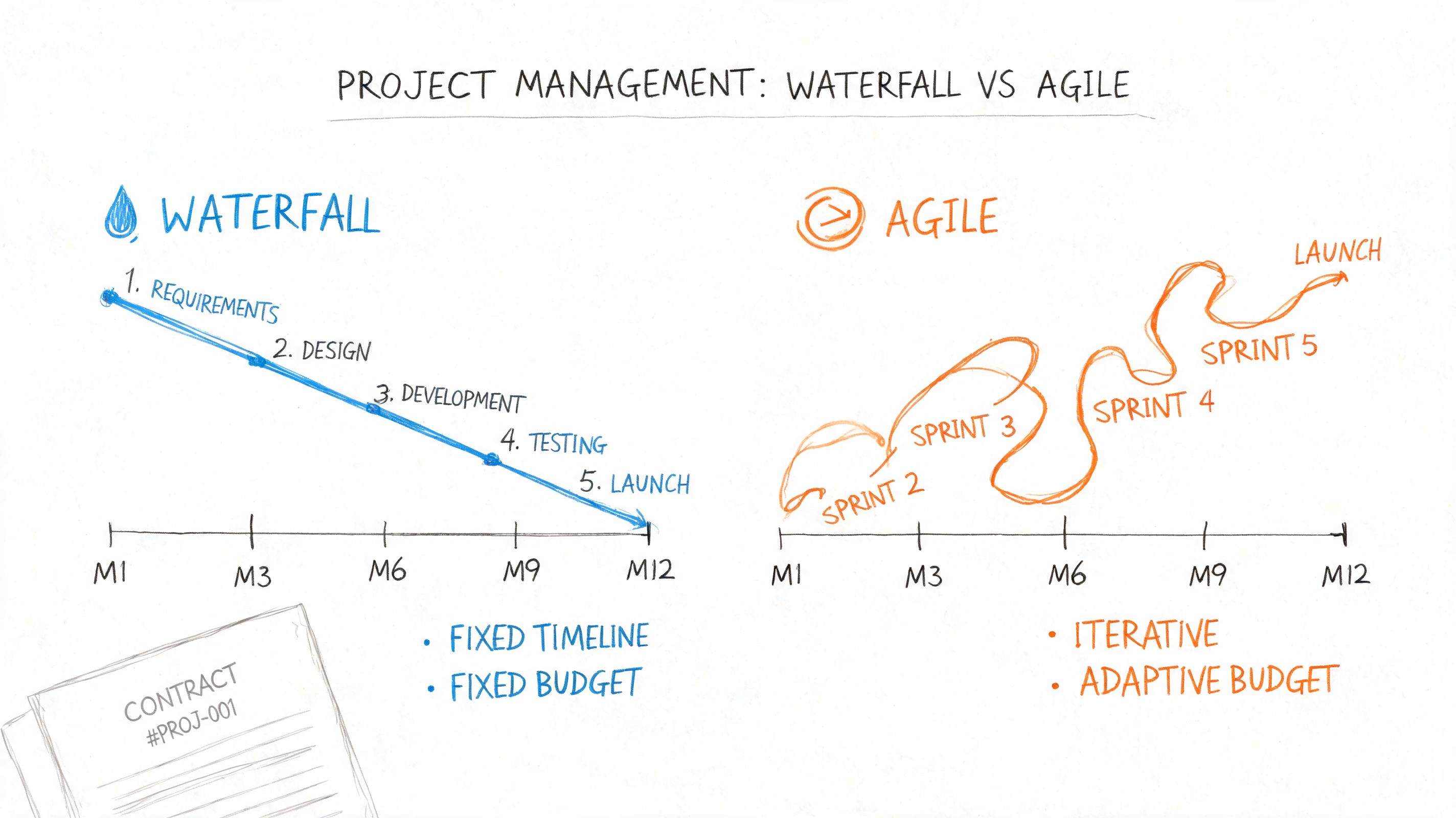
Use a hybrid model if you’re a normal business
For most SMBs in Greenwood, Franklin, and the broader Indianapolis area, a hybrid approach works best.
Think of it this way:
- Waterfall mindset for foundations: requirements, architecture, security rules, integrations, and compliance expectations should be nailed down early.
- Agile mindset for refinement: screens, reports, approval flows, and user experience details can evolve through review cycles.
That gives you structure without turning the project into a rigid brick.
Set rules before work starts
You need a few operating rules in writing:
- Weekly check-ins: Keep them short. Review progress, blockers, decisions, and pending approvals.
- Named decision-makers: One person from your side should approve scope, not five people with opinions.
- Milestones with demos: Don’t wait until the end to see working software.
- Change-order process: If a request changes scope, it gets documented with impact on budget and timeline.
- Testing window: Real users need time to validate the app in realistic conditions.
This short explainer is useful if your team needs a plain-English overview of project flow before kickoff:
Don’t forget the legal and operational details
Owners often focus on features and ignore the terms that matter six months later.
Confirm these before launch:
- IP ownership: Your agreement should clearly state who owns the source code and related work product.
- Repository access: Make sure code is stored somewhere your business can access if the vendor relationship changes.
- Maintenance terms: Clarify who applies patches, updates dependencies, and monitors uptime.
- Support expectations: Define response times, escalation paths, and what qualifies as emergency support.
- Backup and recovery: If the app holds business-critical data, tie it into your broader recovery plan, not just the developer’s laptop.
That’s where software ROI gets real. Predictable maintenance beats surprise outages. Clean ownership beats hostage situations. Good onboarding prevents the kind of avoidable downtime that steals productive hours from the whole office.
FAQs Your Top Questions Answered
Who owns the source code and IP
You should. The contract should say the work is created for your business and that you retain rights to the delivered code, documentation, and related assets once payment terms are met. If ownership stays vague, fix that before work begins.
What ongoing costs should I expect
Think in categories, not mystery invoices. Most custom apps need hosting, security patching, dependency updates, backups, user support, and occasional feature improvements. If the app handles sensitive data, you may also need logging review, endpoint security coordination, and periodic access audits. Predictable monthly support is usually better than waiting for something to break.
What if my developer disappears
That risk is real, especially with solo providers. Protect yourself by requiring access to the code repository, admin accounts, deployment documentation, integration notes, and vendor credentials. If the app matters to operations, your MSP or IT partner should understand the environment well enough to help stabilize it if there’s a handoff.
A custom app should make your business less fragile, not more.
If your team is still stuck between spreadsheets, disconnected software, and too much manual re-entry, Finchum Fixes IT can help you sort out whether you need a custom application, a smarter integration plan, or a broader infrastructure cleanup first. For businesses in the Greenwood and Indianapolis area, a Free Network Assessment or Security Risk Audit is the fastest way to find the bottlenecks that are wasting staff time and putting continuity at risk.