Best Ransomware Protection Software for Indiana SMBs
The best ransomware protection for an Indiana SMB is a layered stack, not one antivirus product: behavioral EDR, immutable off-site backups, and isolated administrator accounts. Verizon found ransomware in 44% of reviewed breaches, including 88% of SMB breaches, so recovery readiness deserves equal weight with detection.
A familiar Southside failure starts with an aging server in a Greenwood business park. One employee opens a convincing attachment, a privileged account gets abused, and the file server begins encrypting shared folders while everyone is focused on getting production back online. UniFi networking, Microsoft 365, and a modern endpoint agent help, but none can restore a clean business system if attackers also reach the backup console.
That's the practical standard I use after rebuilding infected servers for Johnson County manufacturers and walking Hamilton County clinics through HIPAA-grade restore drills. The right platform must interrupt suspicious behavior, expose credential abuse and lateral movement, isolate affected hosts, and preserve a recovery point attackers can't alter. It must also fit the staff, budget, and operational tolerance of a real company along the I-65 corridor.
The technical goal is simple: less downtime, fewer emergency rebuilds, and predictable monthly IT spending. Downtime can cost up to $9,000 per minute, so ransomware protection is a business-continuity control, not just another security subscription.
What Indiana SMBs Actually Need to Stop Ransomware
The best ransomware protection for small and medium-sized businesses combines behavioral endpoint detection, identity protection, exploit prevention, and immutable off-site backups. A single antivirus application may block known malware, but it won't reliably stop stolen credentials, script-based execution, lateral movement, backup deletion, or data theft without encryption.
A defensible stack starts with the endpoint. Behavioral analysis watches for actions such as rapid file modification, unauthorized encryption, suspicious PowerShell activity, and abnormal remote execution. EDR then records the attack chain so an administrator can see what happened, isolate the host, terminate the process, and investigate related accounts.
Identity controls close the next gap. Enforce multifactor authentication, separate daily user accounts from administrator accounts, remove unnecessary privileges, and protect remote access. Verizon's 2025 Data Breach Investigations Report found credential abuse in 22% of breaches and vulnerability exploitation in 20%, which is why endpoint scanning alone isn't enough.
The stack I expect before comparing brands
- Behavioral EDR: Detects suspicious encryption and hands-on-keyboard activity rather than matching only known signatures.
- Identity protection: Limits what a stolen password can do through MFA, privileged access controls, and account monitoring.
- Patch and exploit management: Reduces the vulnerable software paths attackers use to enter.
- Email and browser safeguards: Blocks malicious attachments, links, and credential-harvesting pages.
- Network containment: Uses segmentation, controlled remote access, and reliable UniFi networking policies to slow lateral movement.
- Immutable off-site backups: Preserves clean data outside the reach of production credentials.
- Managed response: Gives someone responsibility for triage, isolation, and escalation when the alert arrives overnight.
For a practical hardening baseline, review security hardening that actually stops attacks. The best product is the one your team can configure correctly, monitor consistently, and connect to a tested restore process.
Why Ransomware Hits SMBs Harder Than the Headlines Suggest
Ransomware is no longer an occasional malware nuisance. The FBI's Internet Crime Complaint Center recorded 859,532 complaints and $16.6 billion in reported losses during 2024, with losses increasing 33% from 2023. The same FBI IC3 2024 report documented 67 newly recognized ransomware variants, including FOG, Lynx, Cicada 3301, DragonForce, and Frag.
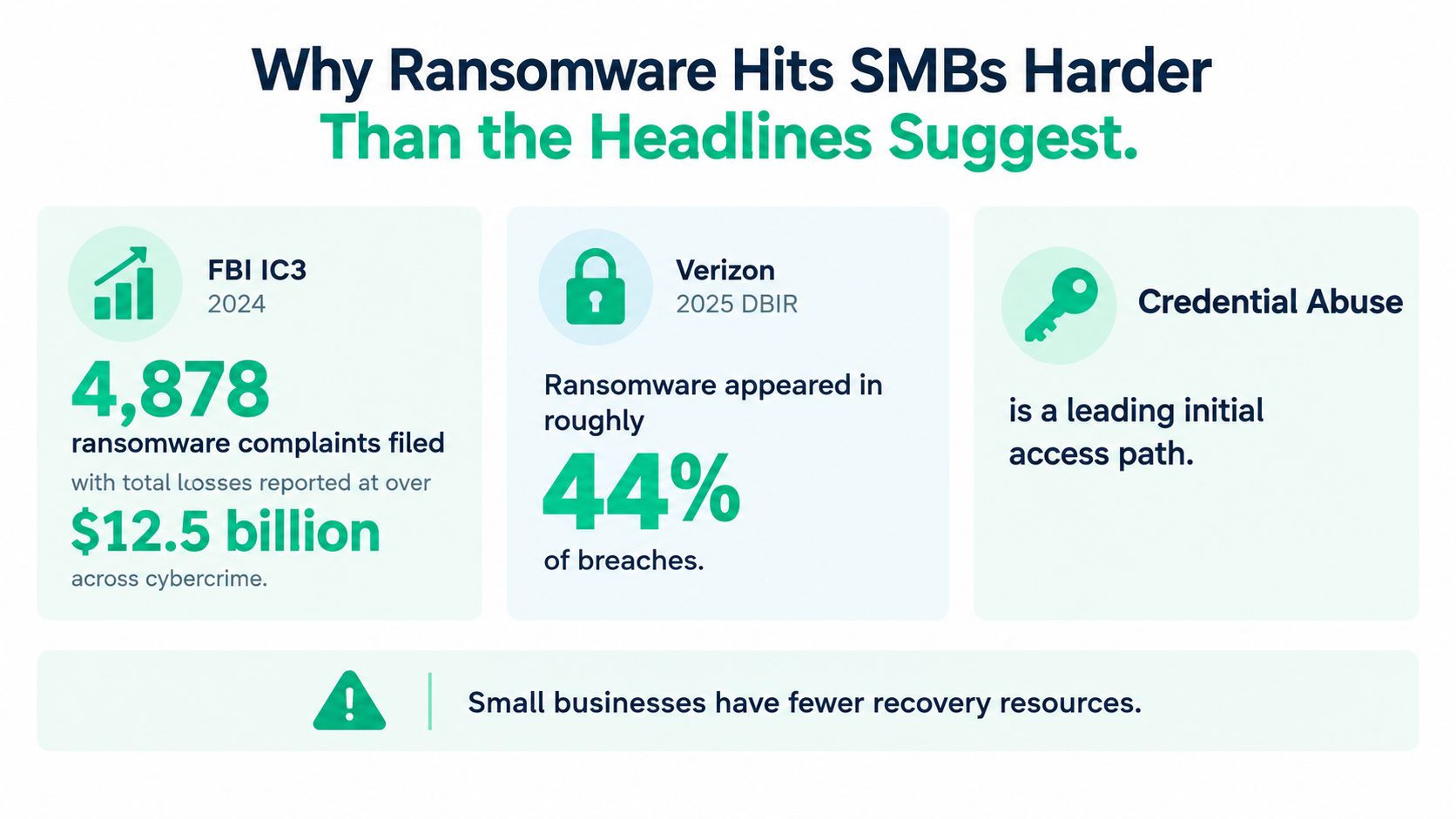
The FBI's total covers internet crime broadly, not ransomware alone, and reported complaints don't capture every incident. Still, the operational message is clear. New variants continue to appear, and an Indiana business that relies on a six-year-old signature antivirus product is asking that product to recognize behavior it may never have seen.
Verizon analyzed more than 22,000 security incidents, including 12,195 confirmed breaches, in its 2025 report. Ransomware appeared in 44% of all reviewed breaches, up from 32% the previous year, a 37% increase. The exposure was especially sharp for small businesses, where ransomware appeared in 88% of breaches, compared with 39% at larger organizations.
What those numbers mean in a Greenwood office
A 25-seat manufacturer doesn't need a military-style security operation, but it does need protection that assumes attackers will target weak credentials, exposed software, remote access, and shared storage. A Hamilton County dental practice has the same technical problem with a different consequence, because unavailable records, scheduling, billing, and clinical systems create both operational and compliance pressure.
The median ransom paid declined from $150,000 to $115,000, while 64% of victim organizations did not pay, up from 50% two years earlier, according to Verizon's report. The lesson isn't that ransom demands are becoming harmless. It's that organizations increasingly need a recovery plan strong enough to refuse payment and restore operations from clean systems.
Top Ransomware Protection Platforms Compared Side by Side
No platform wins every environment. The table below scores practical capability rather than marketing polish. “Strong” means the product can provide the capability directly or through a mature integration. Backup integration still needs validation during a pilot.
Ransomware Protection Platforms at a Glance
| Platform | Detection Method | EDR Depth | Backup Integration | Best Fit |
|---|---|---|---|---|
| Bitdefender GravityZone Business Security | Behavioral analysis, exploit prevention, anti-malware | Strong endpoint visibility and response | Requires a separate immutable backup design | SMBs wanting a familiar endpoint platform |
| Microsoft Defender for Business with Microsoft 365 | Behavioral EDR, identity signals, attack-surface reduction | Strong inside the Microsoft ecosystem | SharePoint and Microsoft 365 recovery controls need separate validation | Microsoft 365-centered businesses |
| CrowdStrike Falcon Go and Pro | Cloud-assisted behavior detection and threat intelligence | Deep attack-chain investigation and isolation | Separate backup platform required | Businesses prioritizing endpoint telemetry |
| Sophos Intercept X with Sophos MDR | Behavioral prevention, exploit protection, managed response | Strong when MDR is included | Separate immutable off-site backup required | Lean teams needing response coverage |
| Managed backup plus EDR bundle | Integrated endpoint monitoring, response, and recovery workflow | Varies by provider and engine | Can include immutable off-site backups and restore testing | SMBs without an internal security team |
Bitdefender GravityZone Business Security is a sensible fit when you want centralized policy management, behavioral detection, exploit prevention, and endpoint control without building a large security team. Its limitation is architectural: endpoint protection doesn't automatically make a backup immutable. Your provider still needs to protect backup credentials, isolate repositories, and test restoration.
Microsoft Defender for Business is compelling for a Microsoft 365 shop that already uses Entra identity, SharePoint, OneDrive, and Windows endpoints. It can reduce tool sprawl and connect identity, endpoint, and email signals. It won't replace a recovery architecture for local servers, NAS devices, or cloud data that isn't covered by the chosen Microsoft retention and backup controls.
CrowdStrike Falcon Go and Pro offer deep endpoint telemetry and strong investigation workflows. That depth is useful when you need to trace remote execution, persistence, or movement between hosts. The trade-off is operational. A small office may buy excellent visibility and still miss important alerts if nobody owns the console after business hours.
Sophos Intercept X becomes more practical for an SMB when paired with Sophos Managed Detection and Response. The managed layer helps a lean team act on detections rather than collect them. It still needs an independent backup design, and aggressive prevention policies should be piloted against manufacturing software and medical workflows.
A managed backup-plus-EDR bundle is often the most defensible choice for a business without security staff. Ask what engine is underneath, who responds, how quickly they isolate a host, and whether immutable backups and restore drills are included. This Indiana SMB guide to endpoint protection services is useful context when comparing a product purchase with a managed operating model.
How Independent Labs Actually Test Ransomware Protection
A vendor's impressive malware-blocking result doesn't necessarily prove that it can detect a real intrusion. Independent testing matters because it separates simple delivery scenarios from attack chains that include credential abuse, persistence, remote execution, and lateral movement.
SE Labs distinguishes direct attacks from deep attacks. Direct attacks use shorter chains involving broad malware distribution. Deep attacks model an attacker progressing through an organization, including lateral movement, while protection controls may be disabled to test endpoint detection. That difference matters to a Johnson County accounting firm with Microsoft 365, a file server, and remote users.
Read the result behind the headline
A product can block a malicious file and still provide weak visibility into what happened before execution. If an attacker uses a valid account, a remote-management tool, or a script interpreter, the event may not look like traditional malware.
Use the SE Labs ransomware testing methodology to ask vendors for separate outcomes on direct protection and deep-attack detection. Then score each finalist against these controls:
- Behavioral detection: Can it identify suspicious encryption, credential theft, and abnormal process activity?
- Attack-chain telemetry: Can an administrator reconstruct the sequence across users, endpoints, and servers?
- Host isolation: Can the console cut a compromised endpoint off without taking down the entire office?
- Rollback and recovery integration: Can it connect an alert to clean file or system restoration?
- Investigation timeline: Does it preserve enough context for an engineer to determine the initial access path?
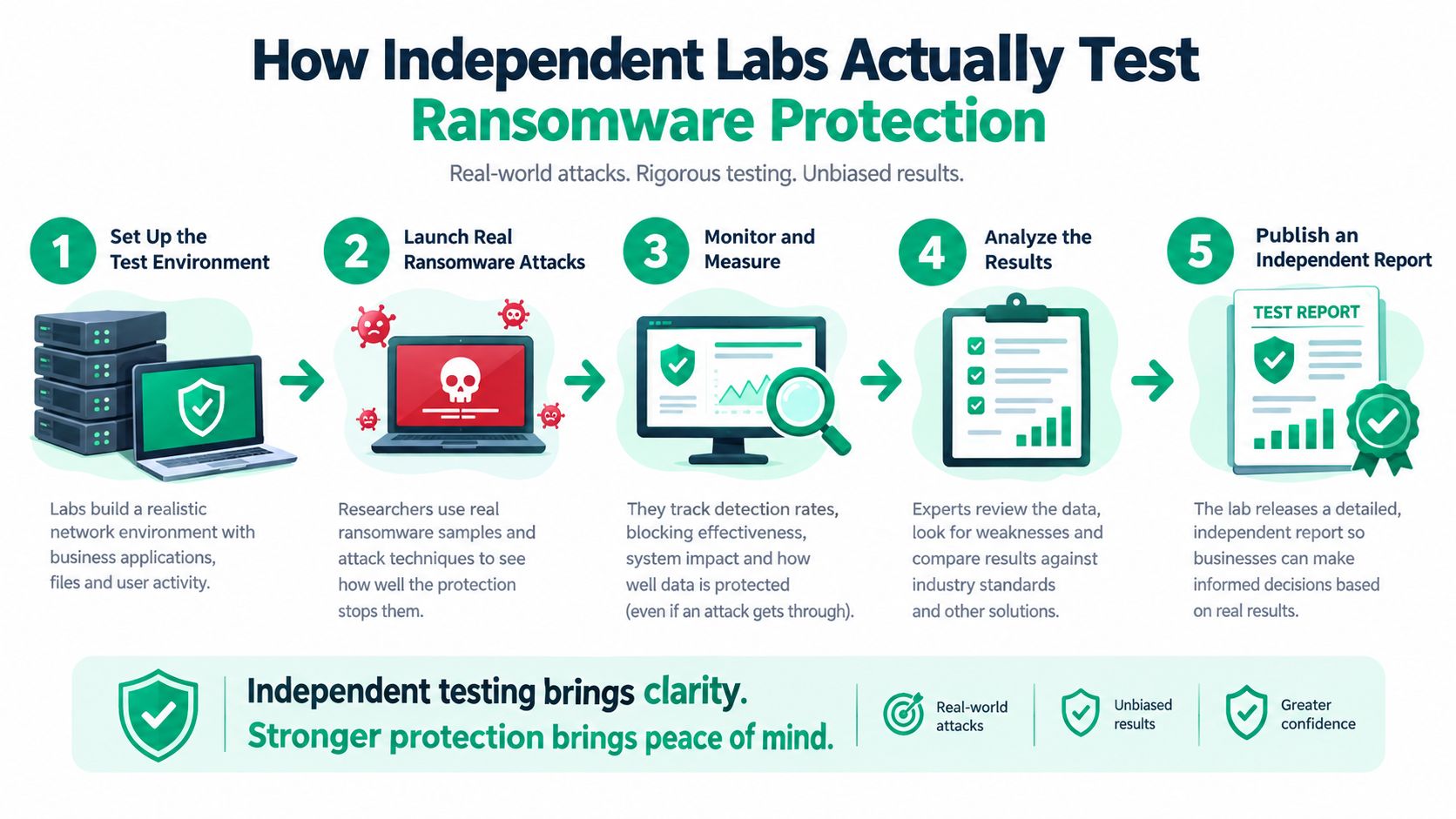
AV-TEST evaluated 26 security products, including 12 consumer and 14 business solutions, against 10 real-world ransomware scenarios on Windows 10. Its Advanced Threat Protection evaluation reinforces a useful buying rule: evaluate delivery prevention, behavior detection, encryption interruption, and post-compromise response as separate layers.
Lab results don't measure deployment friction, endpoint CPU impact, recovery time, or backup integrity under load. Run a pilot on representative workstations, servers, line-of-business applications, and remote endpoints. Then trigger a controlled restore, not just a dashboard demonstration.
Backups and Recovery Architecture That Survive a Real Attack
A ransomware product that detects encryption but leaves you with no clean recovery point is only half a solution. Attackers increasingly reach backup systems because backup consoles, NAS devices, and service accounts often share the same trust relationships as production systems.
Independent reporting found attackers attempted to compromise victim backups in 94% of incidents and succeeded in 57% of those attempts. Only 53% of victims recovered by restoring from backups, down from 73% the previous year, according to the small-business ransomware reporting summarized by DreamHost's 2025 survey. Those figures explain why I score recovery equally with detection.
Build the recovery layer deliberately
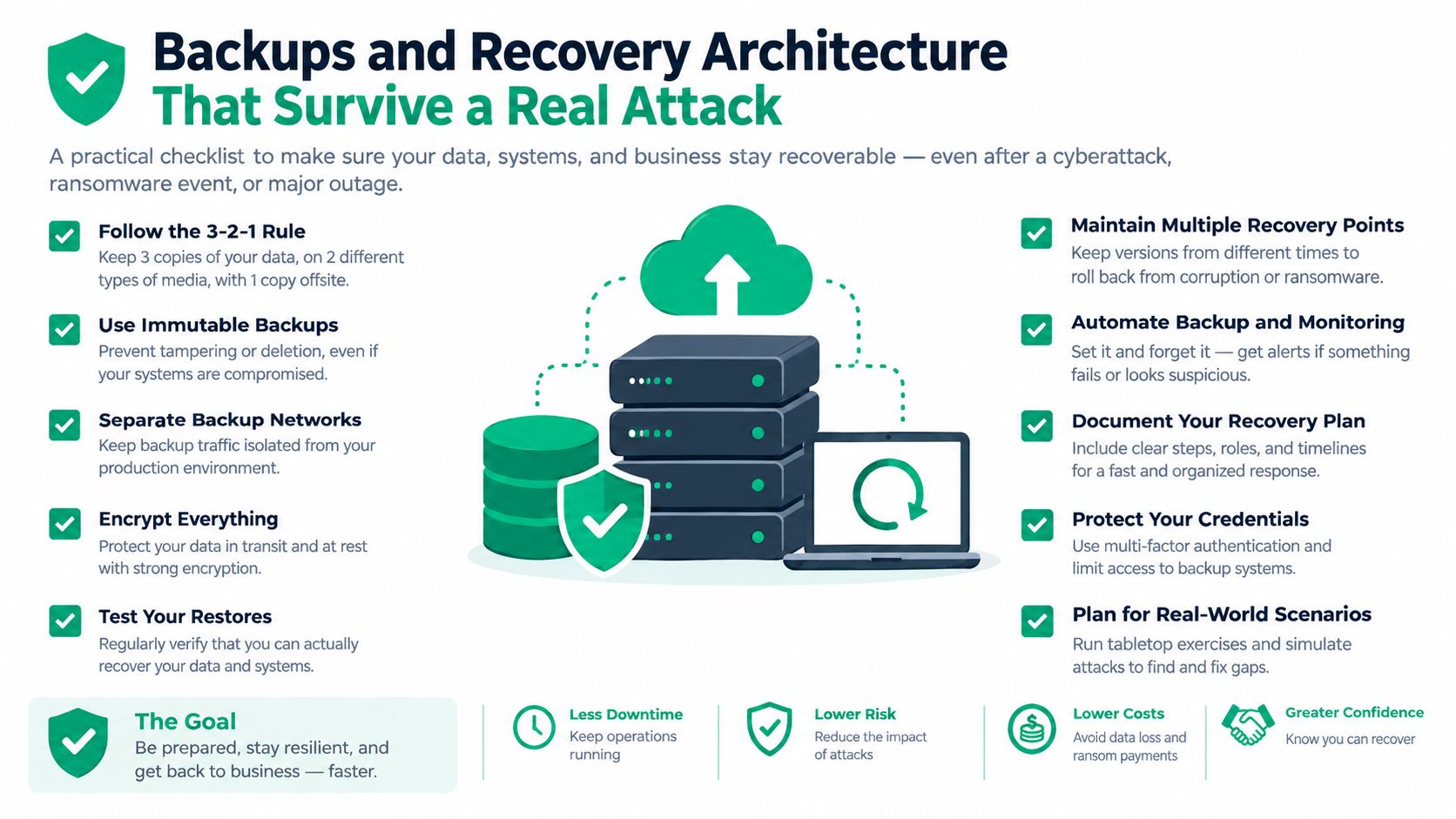
CISA and HHS use the 3-2-1 backup model: keep three copies of important data, use two different media types, and store at least one copy off-site. NIST recommends securing and isolating backups and identifies immutable storage as a way to preserve older versions that newer data cannot automatically overwrite.
For a Greenwood file server, that could mean production storage, a local recovery copy, and an immutable off-site repository. The backup administrator should use a separate account with MFA, limited permissions, and no routine access from ordinary workstations. If ransomware can sign into the backup console with the same credentials used for daily work, the recovery plan is exposed.
Businesses that need a practical overview of how to protect your critical data should focus on isolation, retention controls, and restoration evidence rather than the word “cloud” alone. Cloud storage isn't automatically immutable, and a successful backup job isn't proof that a usable restore exists.
Run a restore drill in a controlled order
- Identify critical systems: List file servers, accounting applications, production databases, Microsoft 365 data, NAS devices, and systems containing protected health information.
- Set restoration priority: Decide which systems must return first and record the dependencies between identity, networking, applications, and data.
- Review backup evidence: Check job logs, retention status, immutability settings, and whether backup credentials remain separate from production administration.
- Restore representative data: Recover files or systems into an isolated environment. Don't overwrite production during the first test.
- Validate integrity: Open representative documents, launch applications, verify permissions, and confirm that restored data isn't merely present but usable.
- Document recovery time: Record who performed each action, how long it took, and what blocked progress.
NIST's ransomware guidance on isolated and immutable backups supports this approach. Healthcare organizations should also follow HHS guidance on contingency planning, periodic testing, offline copies, and recovery of systems containing electronic protected health information. The related HIPAA ransomware fact sheet makes restore testing part of a practical Security Rule program, not an optional exercise.
For the full operational sequence, use this backup and recovery playbook for SMBs.
Matching the Right Stack to Your Indiana Business
The “best” platform changes with the business. A manufacturer with a local file server has different failure modes from a cloud-native startup, even when both use Microsoft 365.
Greenwood manufacturer
A 40-employee shop running UniFi networking, Windows workstations, and line-of-business production software needs fast containment without breaking legitimate automation. Sophos Intercept X with Sophos MDR, segmented server access, and immutable off-site backups is a strong starting point.
The MDR team can investigate suspicious activity while production managers keep working. The backup design should protect the file server and application data separately, with a restore drill that proves the business can recover drawings, job files, and accounting records in a controlled sequence.
Hamilton County pediatric practice
A pediatric practice needs HIPAA Security Rule contingency planning, not just endpoint antivirus. Microsoft Defender for Business can cover Windows and Microsoft 365 signals, while a separate immutable backup service protects critical systems and supports scheduled test restorations.
Use Zero Trust architecture for administrative access, require MFA, and document which applications return first. HHS specifically calls for backup planning, disaster recovery, emergency operations, criticality analysis, and periodic testing, so the restore record belongs in the practice's risk and contingency documentation.
Johnson County accounting firm
An accounting firm with Microsoft 365 and heavy document workflows benefits from Microsoft Defender for Business, identity protection, email controls, and protected SharePoint and OneDrive recovery. Add immutable off-site backup for systems that Microsoft 365 retention alone doesn't cover.
The key trade-off is administrative simplicity versus coverage. Microsoft-native controls reduce console switching, but an engineer still needs to validate tenant recovery, permissions, shared libraries, endpoints, and any local tax or payroll software.
Downtown Indy technology startup
A cloud-native startup with few on-premises servers should prioritize identity protection, endpoint detection, cloud logging, SaaS backup, and recovery of infrastructure configuration. Defender for Business can fit a Microsoft-centered environment, while a separate cloud configuration backup protects the settings that data recovery assumes still exist.
Network design should favor controlled access and latency-optimized mesh nodes where offices need reliable wireless connectivity, not a pile of unmanaged consumer access points. CMMC requirements may apply to defense contractors, while the NIST CSF offers a practical general-business structure for identifying, protecting, detecting, responding, and recovering.
Why Managed Detection Usually Beats Self-Managed EDR for SMBs
EDR is powerful, but a console doesn't respond to an alert by itself. A small business can deploy an excellent agent and still lose time because nobody reviews detections, understands attack-chain telemetry, or knows whether isolating a host will interrupt production.
Alert fatigue creates the first problem. A busy office generates endpoint, identity, email, patch, and backup events, and a generalist may not recognize which combination signals credential theft followed by remote execution. The second problem arrives at 2 a.m., when a human decision is needed and the company has no security operations center.
Practical rule: Buy self-managed EDR only when someone owns the queue, the escalation path, and the response runbook every day.
SOC-as-a-Service monitoring adds triage, threat hunting, and defined escalation. Managed detection and response doesn't make an endpoint agent magically better, and it costs more than a license alone. It can, however, shorten the time between a suspicious event and host isolation when internal staff are handling production, billing, or patient care.
Put response obligations in writing
A managed contract should state:
- Response timing: Define how quickly the provider reviews and escalates a high-confidence ransomware alert.
- Containment authority: Clarify whether the provider can isolate endpoints or disable accounts without waiting for an owner.
- Backup coordination: Require documented integration with the backup platform and immutable storage controls.
- Runbook ownership: Confirm who preserves logs, resets credentials, rebuilds systems, and communicates with leadership.
- Restore validation: Schedule periodic recovery tests instead of accepting backup dashboards as proof.
A self-managed EDR can work for a company with a capable internal administrator, documented coverage, and reliable after-hours escalation. For most SMBs in the I-65 corridor, a managed layer is the more realistic way to turn detection into action. This Indiana guide to managed detection and response explains the operating model in practical terms.
Your Ransomware Defense Checklist and Next Step
Use this checklist in your next IT planning meeting. Each item should have an owner, a date, and evidence that the control works.
- Behavioral EDR deployed: Confirm coverage for workstations, servers, remote devices, and unmanaged systems that can access business data.
- Administrator accounts isolated: Separate daily accounts from privileged accounts, enforce MFA, and protect backup administration.
- Multifactor authentication enforced: Cover Microsoft 365, remote access, backup consoles, cloud services, and other privileged entry points.
- Immutable off-site backups verified: Confirm retention protection, offline or isolated access, separate credentials, and successful job logs.
- Restore drill scheduled this quarter: Restore representative files or systems into isolation, validate usability, and record recovery time.
- SOC or MDR ownership decided: Establish who investigates alerts, isolates devices, preserves evidence, and contacts leadership.
Use the Indiana ransomware prevention guide to turn those controls into a working program. The business case is straightforward. A tested restore limits downtime, reduces emergency labor, and lets employees spend time serving customers instead of waiting on a server rebuild. That converts wasted tech time into billable hours and makes the IT budget more predictable.
A senior engineer should also verify the physical and network dependencies. That may include a failing RAID array, aging server hardware, poorly segmented Wi-Fi, or a backup appliance connected with excessive privileges. Bit-level data recovery may be necessary when a storage failure predates the ransomware event, while Zero Trust architecture and SOC-as-a-Service monitoring reduce the chance that one stolen password becomes a full-office outage.
Finchum Fixes IT provides endpoint protection, behavioral anti-malware, email and link safeguards, 24/7 security monitoring, networking support, and secure backup planning for Indiana businesses. Schedule a Free Network Assessment or Security Risk Audit for your Greenwood or Indianapolis-area business, and turn your ransomware plan into a tested path to recovery.