Best VoIP Devices for Your Indiana Business in 2026

The best VoIP devices are the ones that deliver reliability, security, and a clear return on investment. For most Indiana businesses, that means enterprise-grade desk phones like the Yealink T46W or Poly models, paired with a strong cloud platform such as Microsoft Teams Phone, on a network built and tuned for voice traffic.
If your office is in a Greenwood business park, an old brick building off Main Street, or a growing operation along the I-65 corridor, you've probably heard the symptoms already. Words clipping out. Calls sounding robotic. Front desk staff repeating themselves. Sales calls dropping right when money is on the line. That isn't a minor annoyance. It's a business continuity problem.
In our 17 years of local service, we've seen the same pattern over and over. Owners blame the handset. The actual culprit is usually the whole stack: weak switching, flat Wi-Fi, no QoS, cheap phones, stale firmware, and a provider mismatch. If you want the best VoIP devices, start thinking like an IT director, not a shopper scrolling a marketplace.
Stop Dropping Calls and Start Driving ROI
A lot of Johnson County business owners are still running phone systems like it's 2014. Aging PBX gear in a back closet. Random cordless phones. Maybe a cable modem/router combo trying to carry voice, guest Wi-Fi, and file sync all at once. Then they wonder why calls get choppy every afternoon when the office gets busy.
That setup burns money. A cloud provider like Nextiva advertises 99.999% uptime, and the company says downtime can cost businesses up to $9,000 per minute. That's why reliable voice service isn't just a telecom choice. It's a business continuity decision that protects revenue and keeps staff working instead of apologizing for bad calls (Nextiva cloud VoIP uptime and downtime cost context).
What bad calls actually cost you
When your phones are unreliable, your team wastes time in small ugly chunks:
- Front desk drag: Staff repeat names, numbers, and appointment times.
- Sales friction: Reps lose momentum and trust when prospects hear clipping or dead air.
- Support backlog: Customers call back because the first call didn't solve anything.
- IT distraction: Somebody in-house keeps rebooting gear instead of doing actual work.
That's how “wasted tech time” turns into lost billable hours and unpredictable monthly costs.
Practical rule: If your staff talks about the phones every week, the issue isn't user error. Your communications stack is unstable.
A modern VoIP system fixes more than voice quality. It moves you to a predictable monthly budget, cuts the mess of aging on-prem hardware, and gives your team mobility when they're moving between Greenwood, downtown Indy, and client sites across Central Indiana. Businesses that switch to VoIP can see average cost savings between 50% and 75% compared to traditional landline systems, and annual savings typically range between 30% and 50% according to Tech.co's VoIP statistics roundup.
Why this matters in Central Indiana
A lot of Southside buildings weren't designed for modern traffic. Thick walls, patched-on additions, and “temporary” networking that became permanent. If you're in one of those spaces, your phone quality depends on whether your network was engineered or just accumulated over time.
Your phone system also has to fit your communication habits. If your team handles client handoffs, service dispatch, patient scheduling, or project updates, clean internal call flow matters. A good communication plan helps with avoiding mixed messages, but the plan falls apart fast when the underlying phone system can't deliver a stable call.
If your network hasn't been tuned for modern traffic, start with network performance planning for SMBs. Good VoIP is never just “buy better phones.” It's the whole environment.
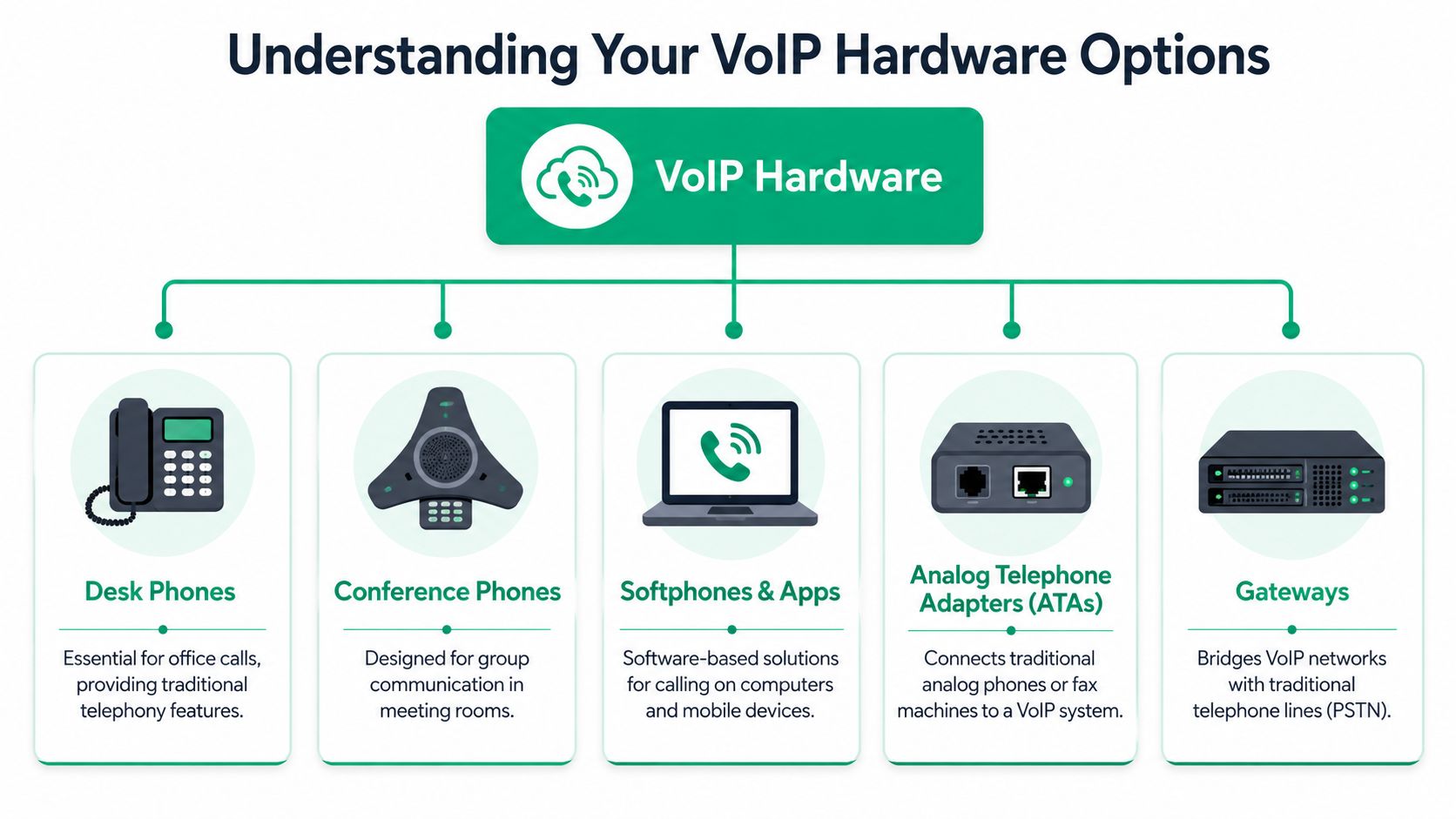
Understanding Your VoIP Hardware Options
Most “best VoIP devices” lists make this too simple. They throw ten desk phones at you and call it a day. That's not how real businesses buy. You need the right mix of endpoints for the people doing the work.
Desk phones for people who live on the phone
A proper IP desk phone is still the anchor device for receptionists, office managers, legal staff, healthcare scheduling teams, and anyone who needs muscle memory, line presence, transfer buttons, and a dependable handset. In a real office, that still matters.
Then you've got softphones and mobile apps. Those are perfect for hybrid workers, field managers, and owners who split time between the office, home, and the road. This is part of why software-defined calling has taken over. In the first half of 2025, Microsoft Teams Phone held about 21.7% of global UCaaS seats, ahead of Cisco at 15.1%, Zoom at 8.8%, and RingCentral at 6.4%, according to Fortune Business Insights on the VoIP market and UCaaS share. That tells you where the ecosystem is headed. The phone on the desk is important, but the platform behind it matters just as much.
The devices people forget until they need them
Some hardware categories don't get enough attention:
- Conference phones: Best for meeting rooms where remote and in-person staff need to hear each other clearly.
- DECT or Wi-Fi handsets: Useful in warehouses, clinics, shops, and larger properties where staff move constantly.
- ATAs: Handy when you still need to keep a legacy analog device online, like an older fax workflow.
- Gateways: These bridge modern VoIP networks with traditional lines when a phased migration makes more sense than a hard cutover.
A warehouse in Whiteland doesn't need the same phone footprint as a CPA firm in Greenwood or a healthcare office near downtown Indy.
One more point that gets skipped. Your phone number strategy matters too. If you're expanding into surrounding counties or want local presence without adding more physical offices, this overview of choosing a virtual phone number is worth a read.
For a broader migration picture, this Indiana PBX and VoIP guide lays out where each device type fits in a real business rollout.
What to Look for Beyond the Price Tag
Cheap VoIP hardware is expensive once it starts failing. The difference between a consumer-friendly phone and an enterprise-grade endpoint shows up in power design, codec support, firmware discipline, and security controls.
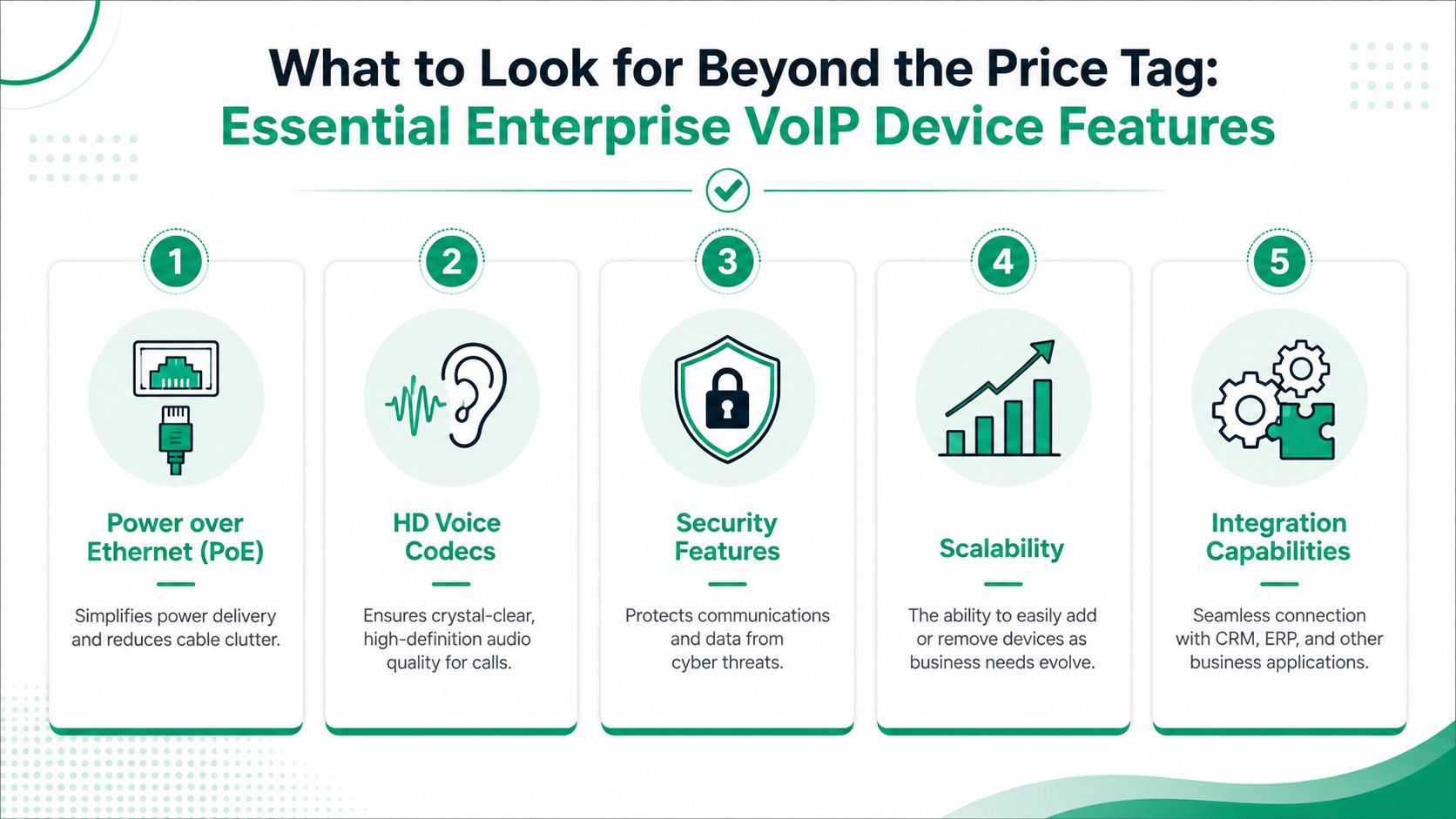
The features that actually matter
Here's the short list I'd care about if I were buying for a business in Greenwood, Franklin, or the north side of Indy:
- PoE support: Power over Ethernet keeps desks cleaner, makes deployment easier, and lets your switch and UPS strategy carry the load.
- HD voice: Better codecs mean cleaner conversations and less fatigue during all-day calling.
- TLS and SRTP support: Your signaling and media need encryption. This isn't optional.
- Secure boot and managed firmware: If the device can't protect its own integrity, it doesn't belong on your network.
- Integration support: Teams Phone, CRM connectors, analytics, and call routing tools should fit the rest of your workflow.
The security piece deserves plain language. Enterprise-grade VoIP endpoints with built-in cybersecurity features like TLS 1.3 encryption and secure boot are critical, as 68% of VoIP-related breaches in 2024–2025 occurred on unencrypted or firmware-weak devices in SMB networks. That's exactly why I push clients away from bargain-bin hardware and toward devices that fit a real security program.
Compliance is built into the hardware choice
If you run a healthcare office in Hamilton County, your phone environment can't fight your HIPAA obligations. If you support defense work along the I-65 corridor, your stack should align with CMMC expectations. For general business security, I'd map voice systems into your NIST CSF controls and your broader Zero Trust architecture.
That means:
- segmenting voice VLANs,
- controlling device provisioning,
- keeping firmware current,
- monitoring registrations and anomalies,
- and tying the whole thing into endpoint and identity policy.
If you're serious about cybersecurity, tools like Bitdefender GravityZone and SOC-as-a-Service monitoring should sit around the VoIP environment, not off to the side pretending voice is somebody else's problem.
Here's a solid walkthrough on the basics of business-grade endpoint features:
Buy the phone that your security team can live with for years, not the one that looks cheapest on day one.
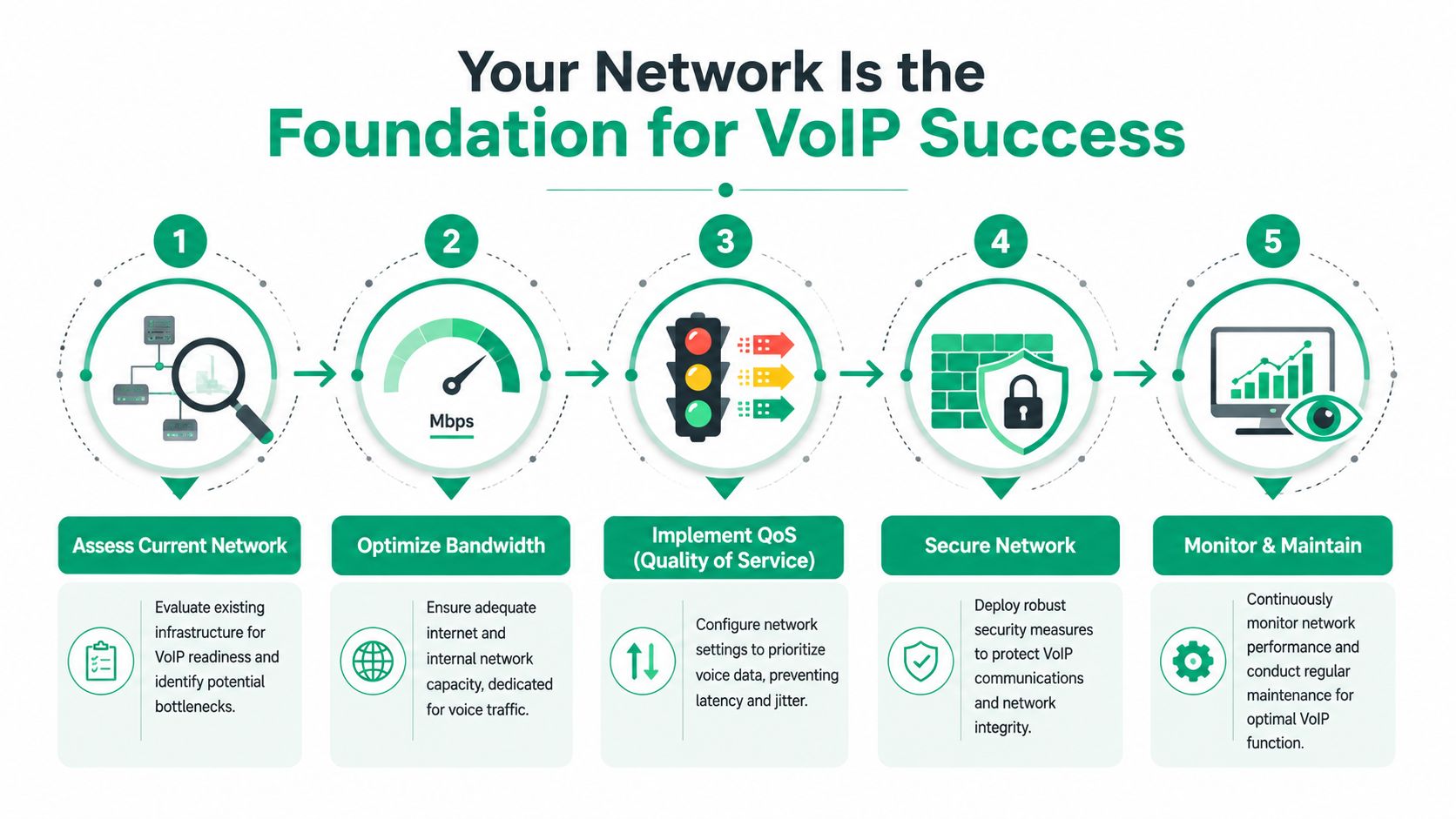
Your Network Is the Foundation for VoIP Success
A great handset on a bad network still sounds terrible. We've seen that for years in older Southside buildings, especially where somebody added a few unmanaged switches, scattered access points, and a “good enough” firewall. Voice traffic hates that kind of chaos.
Start with bandwidth math
This part is simple. Each simultaneous VoIP call requires approximately 85–100 Kbps of bandwidth. A business with 10 concurrent calls needs at least 1 Mbps of dedicated, prioritized bandwidth to avoid packet loss and audio degradation, according to Phone.com's bandwidth guidance for small-team VoIP.
That doesn't mean your office only needs 1 Mbps total. It means voice needs protected space. If users are moving files to cloud storage, syncing email, uploading design assets, or pushing updates at the same time, your network has to prioritize voice packets or your calls will suffer.
QoS is not a nice extra
Quality of Service, or QoS, is the traffic cop. It tells your switches and routers that voice goes first. Without it, your call audio gets stuck behind bulk data transfers. That's when you hear jitter, clipping, delayed speech, and robotic audio.
A practical SMB VoIP checklist looks like this:
-
Check switch capability
Use managed PoE switches, not whatever was cheapest online five years ago. -
Separate voice traffic
Put phones on their own VLAN where possible. That helps performance and security. -
Prioritize SIP and RTP traffic
Your firewall and switches should know voice gets priority treatment. -
Review Wi-Fi carefully
If staff use wireless handsets or softphones, your access point placement matters. Old brick walls in Indy offices are brutal on weak Wi-Fi. -
Monitor continuously
VoIP shouldn't be “set it and forget it.” Watch latency, jitter, and registration behavior.
A real diagnostic workflow
When a business owner says, “Our phones sound bad,” I don't start by swapping handsets. I start with a structured test.
- Step one: verify whether the issue affects all users or only certain desks.
- Step two: identify whether the bad calls are internal, external, or both.
- Step three: check switch port health, PoE delivery, and VLAN assignment.
- Step four: inspect QoS policy on the gateway and core switch.
- Step five: test the endpoint registration and codec negotiation.
- Step six: validate Wi-Fi signal quality if any voice devices roam wirelessly.
If I'm on a Linux-based network appliance or doing packet capture work, I may use commands like ping, traceroute, ip a, tcpdump, or mtr to isolate latency behavior and packet handling. On managed gear, I'm looking at interface errors, queue behavior, and priority policy. On UniFi networking, that means checking client association, switch profiles, and traffic management settings. In larger spaces, latency-optimized mesh nodes can help, but only when they're designed correctly. Mesh doesn't fix bad architecture.
We've even had cases where a phone problem led us to a deeper issue. When we dissembled a similar client's failing RAID array during a broader outage, the immediate complaint was “phones and apps are weird today.” The root cause was shared infrastructure under stress. That's why serious IT support looks at the whole environment, not just the ring tone.
If your current environment is old, patched together, or growing faster than the wiring plan, this network infrastructure upgrade guide for Indiana SMBs is the right next read.
Our Top VoIP Device Picks for 2026
A receptionist in Carmel misses two calls during the Monday rush. A project manager in Greenwood hears clipped audio on a transfer. A clinic in Franklin has to explain why a voicemail never reached the care team. That is not a phone problem alone. It is lost revenue, slower operations, and unnecessary compliance risk.
My recommendation is simple. Match the endpoint to the job, and make sure the network, provisioning model, and security policy can support it. A great handset on a weak voice environment still produces bad calls. The right device on a properly segmented and prioritized network gives you cleaner audio, fewer tickets, and less downtime.
The best picks by real business use
For the typical Johnson County office, the Yealink T46W is still the safest desk phone choice. It fits legal, accounting, construction admin, operations, and front office roles because it is easy to standardize, easy to provision, and easy to replace when you need spares on the shelf. If you want one model that covers most desks without creating support headaches, start here.
For busy call handling, choose the Grandstream GXP2170. This is the better fit for reception, dispatch, service coordinators, and any desk that lives on transfers, parked calls, extension monitoring, and burst traffic. More line capacity matters when the front desk is juggling vendors, customers, and internal handoffs all day.
If your business already runs on Microsoft 365, Microsoft Teams Phone with approved desk endpoints makes more sense than forcing a separate calling stack. That matters in hybrid offices across Central Indiana where staff move between conference rooms, home offices, laptops, and mobile devices. Teams also gives IT one identity and policy plane to manage instead of another silo.
For healthcare and any business with tighter security controls, platform fit matters as much as handset fit. Emitrr deserves a look for HIPAA-oriented workflows and secure communications. Dialpad is a smart option for firms that want transcription and tighter documentation inside the calling workflow, especially for service teams and internal follow-up.
One rule I give clients all the time. If you handle protected health information or defense-related data, do not treat voice as a side purchase. The device, firmware path, admin controls, and call platform all need to line up with HIPAA or CMMC requirements.
Recommended VoIP Devices by Business Need
| Device Model | Best For | Key Features | Budget Tier |
|---|---|---|---|
| Yealink T46W | Professional offices, front office staff, general business users | Reliable desk deployment, straightforward provisioning, good fit for standardization | Mid |
| Grandstream GXP2170 | Reception, dispatch, call-heavy offices | High line capacity, strong fit for transfers and busy desks | Mid |
| Microsoft Teams Phone with enterprise desk endpoints | Microsoft-centered firms, hybrid offices | Native Microsoft 365 calling workflow, centralized policy and identity management | Mid to High |
| Emitrr with compatible secure endpoints | Healthcare clinics, medical offices | Better alignment with HIPAA-sensitive communication workflows | Mid to High |
| Dialpad with supported endpoints or apps | Service teams, tech-forward SMBs | Built-in transcription and workflow support for documented communication | Mid |
There is no single "best VoIP device" for every office in Greenwood, Whiteland, or New Whiteland. The best choice is the one your team can support, your network can prioritize, and your compliance program can defend.
Sales teams have their own requirements. If phone performance is tied directly to pipeline activity, this guide to business VoIP for lead conversion is worth reading because it treats calling as part of revenue operations, not just telecom.
If you are comparing handset costs against monthly platform costs, read this hosted PBX cost guide for Indiana businesses in 2026 before you buy. It will help you price the full system, including support, licensing, and replacement planning, instead of fixating on the desk phone alone.
Smart Procurement and Future-Proofing Your Investment
Buying VoIP gear from an anonymous online seller is how businesses end up with unsupported firmware, odd provisioning issues, and hardware that reached end of life before it hit your desk. That's not savings. That's deferred pain.
What smart buyers check first
In our 17 years of local service, the businesses that get the best long-term result usually do three things well:
- They verify lifecycle status: If a model is close to EOL, skip it.
- They standardize firmware management: Mixed firmware creates weird bugs and security gaps.
- They match hardware to policy: The phone should fit your support model, not the other way around.
If your business handles regulated data, your procurement process should also align with your compliance posture. That includes HIPAA, CMMC, and the practical controls in NIST CSF. Voice endpoints are still endpoints. They need patching, policy, and monitoring like everything else on the network.
Think in refresh cycles, not one-time purchases
Good procurement also means planning replacement before failure. Build a refresh schedule. Keep spare units. Track provisioning credentials. Document switch port assignments and handset profiles. If you're preserving a number of analog devices during migration, make sure those adapters and gateways are accounted for in the same lifecycle plan.
The cheapest phone often becomes the most expensive device in the building when nobody can support it.
For many SMBs, a service model makes more sense than owning every piece outright. Hardware as a Service for Indiana SMBs is worth considering if you want predictable monthly budgeting and cleaner refresh planning.
Let Finchum Handle Your VoIP Deployment
Monday at 8:07 a.m., your front desk is already hearing, “Can you repeat that?” Sales calls clip out. The medical office across town cannot hear a patient confirm an appointment. A manufacturer in Whiteland misses a call from a supplier because the handset registered fine, but the network underneath it did not. That is not a phone problem. That is revenue loss, service disruption, and in regulated environments, a compliance risk.
VoIP devices only perform as well as the network carrying their traffic. In Greenwood, Franklin, and across the south side of Indy, we see the same failure points over and over. Aging switch stacks. Flat networks with no voice VLANs. Bad QoS rules. ISP handoffs crammed into old telecom closets with heat, dust, and patchwork cabling from three different eras. Put premium handsets on top of that mess and you still get jitter, one-way audio, failed registrations, and dropped calls.
Finchum fixes the foundation first. That includes properly sized switching, PoE budget validation, voice segmentation, firewall policy review, encrypted provisioning, endpoint hardening, and monitoring that catches packet loss before your staff starts apologizing to customers. If your phones tie into scheduling, dispatch, EHR workflows, or custom business software, we treat voice as part of your production environment because that is exactly what it is.
Security is part of deployment, not an add-on. Businesses handling protected health information need VoIP setups that support HIPAA requirements for access control, encryption, auditability, and vendor accountability. Manufacturers and defense-adjacent firms working toward CMMC need the same discipline applied to voice endpoints, management interfaces, and network access. A poorly managed desk phone is still an endpoint on your network. It can expose credentials, create lateral movement paths, and complicate an audit if nobody owns patching and policy.
We also plan for failure. Internet circuit redundancy, call routing backups, survivable configurations for key users, secure migration off legacy gear, and recovery options for the systems around the phone platform all matter. If your office loses connectivity during a storm rolling through Johnson County, you still need inbound calls routed somewhere useful.
Finchum Fixes IT helps Greenwood and Indianapolis area businesses stop treating choppy calls like a minor annoyance and start fixing the technical cause. Schedule a Free Network Assessment or a Security Risk Audit and get a direct answer on what is breaking your calls, what systems are at risk, and what it will take to fix it for good.