Cost of Hosted PBX for Indiana Businesses in 2026
A lot of Indiana business owners start looking at the cost of hosted PBX after something breaks. A storm hits. The old key system starts dropping calls. The front desk says transfers are failing again. Sales staff on the road can't reliably answer the main line. Then the essential question shows up: what is this phone system costing the business every month, every outage, and every fire drill?
That's the wrong moment to learn the difference between a cheap monthly quote and total cost of ownership.
For companies along the I-65 corridor, especially in older Greenwood and Indianapolis buildings, the phone upgrade itself usually isn't the hard part. The hard part is budgeting for everything around it. Internet quality. Call routing. Compliance. Support. Number porting. Remote work. Whether your network can carry voice traffic cleanly without mangling every customer conversation.
Your Old Phone System Is Costing You More Than You Think
A Greenwood business owner usually does not start this conversation while everything is running well. It starts at 8:15 on a Monday, when calls are stacking up, the receptionist cannot transfer cleanly, and the person who still knows the old PBX has been gone for three years. The repair bill gets attention. The lost calls, staff disruption, and scramble to keep the front office working cost more.
That is the part online price calculators miss. They show a monthly seat price. They do not show the cost of one missed new-patient call, one sales inquiry that goes to voicemail, or two hours of your office manager acting as a phone technician instead of doing her job.
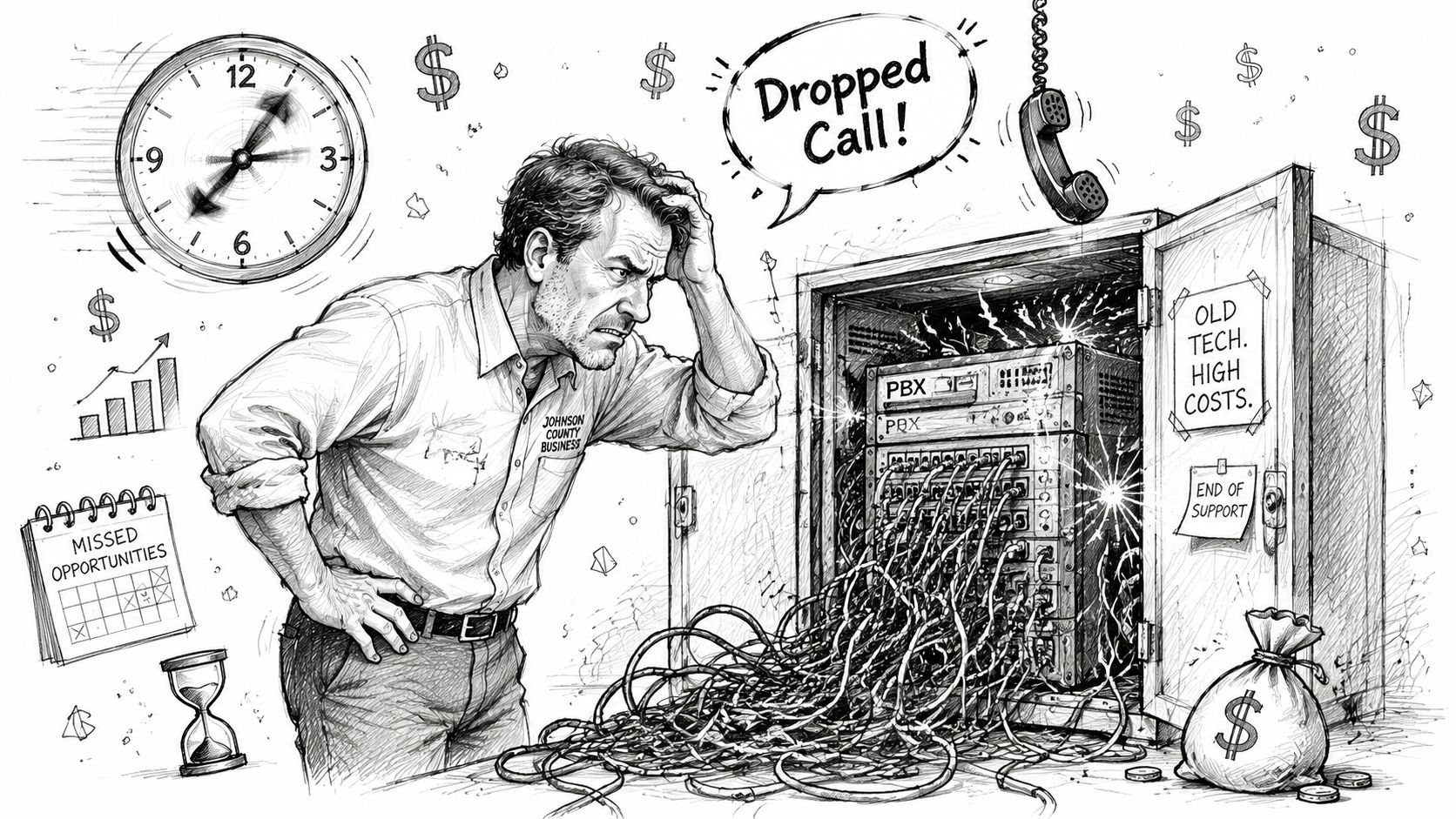
For Indiana SMBs, the core issue is total cost of ownership. An older phone system often carries costs that never show up on the phone bill. Staff time spent rebooting handsets. Emergency service calls. Replacement parts for aging hardware. Inconsistent remote access. Customer frustration when calls drop or ring the wrong extension. If the system fails during a power issue or internet outage, the phone problem becomes a continuity problem fast.
Older buildings around Greenwood, South Indy, and the I-65 corridor add another layer. I see the same pattern often. The PBX may be old, but the network around it is usually part of the problem too. Aging switches, weak cabling, poor Wi-Fi coverage, and no voice prioritization can all raise the true cost of a hosted PBX rollout if nobody checks readiness up front. The monthly subscription may be reasonable. The cleanup work to support reliable voice is where budgets can get off track.
Compliance can raise costs too, especially for healthcare, legal, and service firms handling sensitive information over the phone. If AI answering, transcription, or call summaries are part of the plan, review the Simbie AI HIPAA BAA guide before tying those tools into protected workflows.
A smart phone upgrade is not just a telecom purchase. It is part of a broader IT budget planning and resilience strategy. The businesses that budget for call continuity, network readiness, user training, and support usually spend more predictably and recover the investment faster.
Old phone systems rarely fail at a convenient time. They fail when your front desk is busiest and your customers are trying to reach you.
What Exactly Is a Hosted PBX System
A hosted PBX is still your business phone system. The difference is where the brains live.
With a traditional PBX, the control system sits in your office. With hosted PBX, that control layer runs in the provider's environment instead. Your handsets, softphones, mobile apps, and call flows connect over the internet using VoIP and SIP-based calling. In plain English, your company stops depending on a single physical box in a closet.
Think of it like moving from an on-site mail server to Microsoft 365
That analogy usually clicks fast for business owners. Years ago, lots of companies ran email on local hardware. Then they got tired of babysitting storage, uptime, patches, spam controls, and hardware failures. So they moved to cloud platforms.
Hosted PBX is the phone version of that shift.
Your auto-attendant, ring groups, extensions, voicemail routing, and business-hour rules still exist. They're just managed in a platform built for redundancy instead of hanging off equipment in a broom closet next to a battery backup that nobody tested this year.
A good cloud architecture also removes the office as the main single point of failure. If the building loses power, your calls can still route to mobile devices, laptops, or another location. That's a meaningful improvement for continuity.
What changes for your staff
The user experience usually gets simpler, not more technical:
- Front desk staff can transfer, park, and route calls through a cleaner interface.
- Sales teams can answer the company number from a mobile app without exposing personal cell numbers.
- Managers can adjust schedules, greetings, and call routing without waiting for old-school telecom programming.
- Remote staff can work like they're in the office, assuming the network and endpoint setup are done right.
That's why a hosted PBX project often overlaps with broader cloud planning. If your company is already modernizing line-of-business apps or replacing local servers, a phone migration fits naturally into that move toward cloud migration for Indianapolis businesses.
Practical rule: If your current phone system depends on one aging appliance in one building, you don't have much resilience. You have one failure point with a dial tone.
The technical layer matters too. Voice traffic is sensitive to latency, jitter, and packet loss in ways ordinary web browsing isn't. That's why experienced teams look at switch capacity, VLAN design, Wi-Fi behavior, firewall policy, and QoS before promising perfect call quality. This isn't just plugging in new phones and hoping for the best.
Decoding Hosted PBX Pricing Structures
Hosted PBX pricing gets messy fast because vendors charge for different things under the same label. One quote may be built around users. Another may bundle features into tiers. A third may keep the seat price low and recover margin through add-ons, support fees, or metered usage.
That is why two Indiana businesses with similar headcounts can get very different proposals and both be told they are receiving a competitive rate. The monthly number on page one rarely reflects the full cost of ownership.
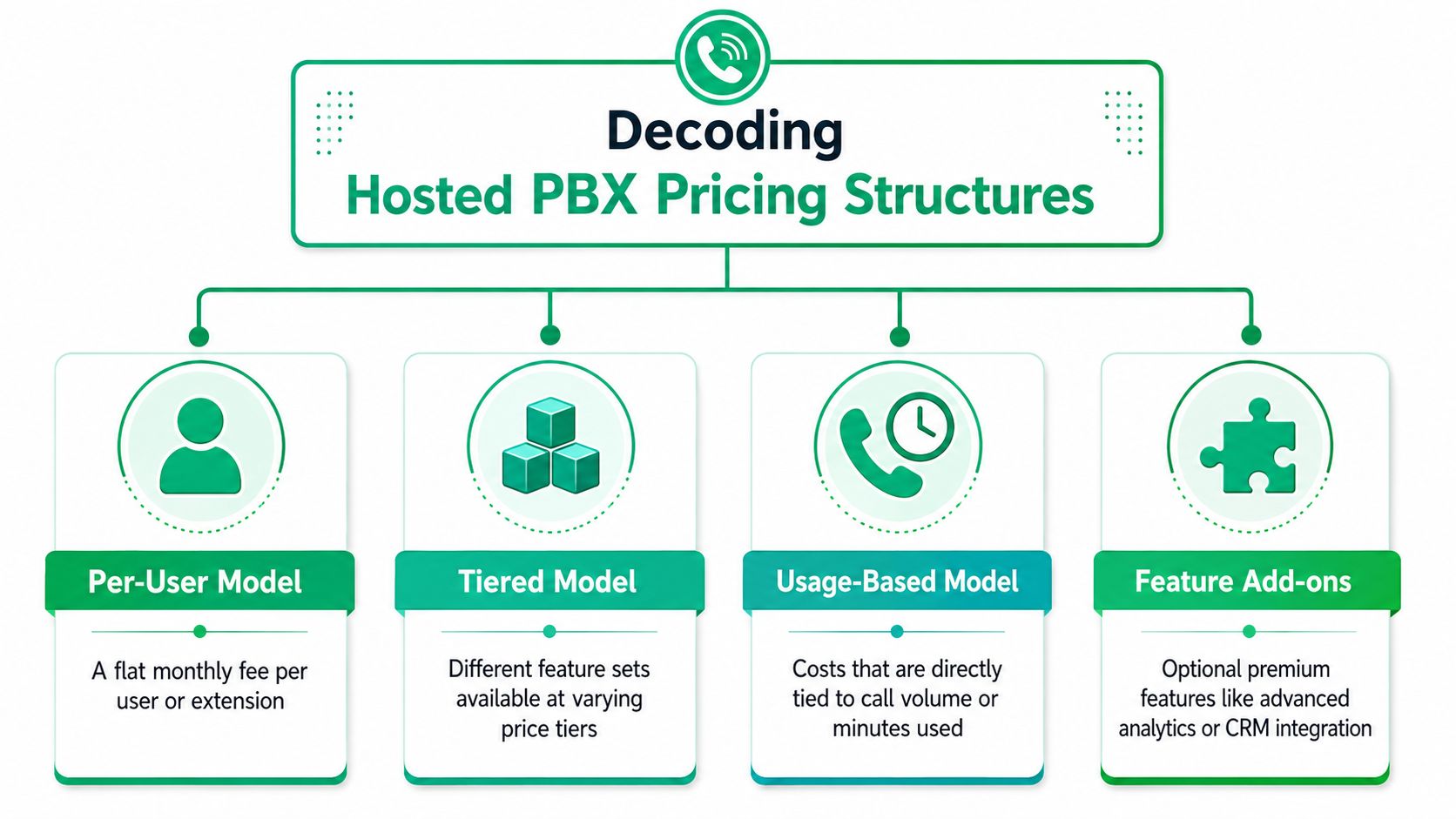
The pricing models you will actually see
Per-user monthly plans
This is the cleanest structure to read. You pay a set amount for each user or extension, usually on a monthly contract or annual term.
For a small office, that simplicity has real value. It makes budgeting easier, and it helps when staffing changes month to month. But buyers still need to check what a “user” includes. Some providers count common-area phones, warehouse handsets, conference phones, and reception consoles differently from standard employees.
Tiered packages
Tiered pricing looks simple until the feature list matters.
A basic plan may cover calling, voicemail, mobile app access, and an auto-attendant. The next tier may add call recording, queue reporting, CRM integration, or more advanced routing rules. If your business needs those functions to operate properly, the lower advertised rate is not your real rate. A medical office, multi-location retailer, or field service company usually finds that out quickly.
Usage-based or metered setups
Metered models can work for businesses with light or uneven call volume. They can also create billing surprises if the provider does not explain what is billable.
Outbound calling, toll-free minutes, international destinations, call recording storage, and extra numbers are common places where invoices drift upward. For owners trying to control operating costs, unpredictability is its own cost.
What changes the price more than buyers expect
The base plan is only part of the bill. The quote often shifts once these items are added:
- Feature licensing for recording, analytics, contact center tools, or CRM connectors
- Phone choices such as desk phones, conference units, cordless sets, or softphones only
- Implementation and training if onboarding is not included
- Support terms for after-hours help, account management, or faster response times
- Contract structure including annual commitments, auto-renewals, and early termination charges
- Taxes and telecom fees that can push the invoice above the advertised seat price
I have seen local companies compare providers by the headline monthly rate and miss the fact that one proposal included onboarding, handset provisioning, and admin training while the cheaper quote left all three out. The lower rate stopped looking cheaper once the project started.
This is also where financing strategy matters. If a provider expects you to replace every handset at once, the monthly service cost is only one part of the decision. Many Indiana SMBs handle that better by treating endpoints as a lifecycle expense through options such as hardware as a service for Indiana SMBs, instead of buying everything upfront and hoping the phones last through the next contract term.
Price shopping without TCO is how budgets get blown
Online calculators usually stop at seats and maybe a few feature toggles. They do not ask whether your switches support PoE, whether your internet circuit has enough headroom for voice, whether call recording retention creates compliance exposure, or whether your front desk needs a sidecar and failover routing.
Those are not edge cases for Indiana SMBs. They are normal project costs.
A good hosted PBX quote should show what is included, what is optional, what is billed one time, and what can rise after go-live. If it does not, you are not looking at a finished price. You are looking at an opening number.
The Real Cost Drivers Beyond the Monthly Fee
A lot of “cost of hosted PBX” articles stop at the seat price. That's where bad buying decisions begin.
The bigger cost drivers usually sit underneath the quote. Some are technical. Some are contractual. Some show up only after the system is installed and your team is already committed.
Seats and call paths are not the same thing
One of the most overlooked pricing details is the difference between a user seat and a call path.
Independent commentary notes that some cloud PBX offerings run around $18 to $20 per user under a straightforward model, while others may drop to $5 to $10 per user if simultaneous calling capacity is billed separately, with $15 to $40 per call path added depending on usage, as discussed in this cloud PBX pricing breakdown.
That matters more than most buyers realize.
If you have a business with lots of employees but only a smaller number of people on calls at the same time, a bundled per-seat plan can be fine, or it can be wasteful. On the other hand, if your office has bursts of heavy call traffic, a low seat price plus thin call capacity can become a bottleneck fast.
Don't compare hosted PBX quotes line by line until you know whether you're buying people, simultaneous calls, or both.
Network readiness is where many budgets go sideways
Voice over IP is unforgiving when the network is sloppy. A hosted PBX can look cheap until the installer discovers old switching hardware, poor Wi-Fi coverage, no VLAN separation, and internet service that was never designed for real-time voice.
That's common in older brick buildings around Indianapolis and Greenwood. Plenty of offices can run cloud apps all day and still sound terrible on voice because browsing and voice don't behave the same way. Clean calling requires traffic prioritization, stable latency, and competent QoS.
Here's the practical view from the field:
-
Internet quality matters more than raw marketing speed A business may have “fast” service on paper and still deliver choppy calls if the connection is inconsistent.
-
Wi-Fi is not automatically voice-ready If staff will use softphones on laptops or mobile devices, coverage design matters. Latency-optimized mesh nodes and properly tuned access points make a difference. In these situations, UniFi networking, when deployed correctly, can help clean up roaming and coverage issues.
-
Switching and segmentation matter Managed switches, VLAN planning, and voice QoS are not optional in a busier office. They reduce collisions between voice traffic and ordinary business traffic.
Implementation costs aren't glamorous, but they're real
Beyond the network, there's the migration itself. A project may need new desk phones, headset replacements, receptionist console changes, after-hours routing design, voicemail migration, and user training. Some companies can run mostly on softphones. Others still need physical handsets at front desks, exam rooms, warehouses, or service counters.
Security and compliance can add another layer. A healthcare office may need stronger controls around recorded calls and voicemail access to support HIPAA obligations. A defense-adjacent manufacturer might review communications controls inside a broader CMMC program. More mature companies often map voice and identity controls back to NIST CSF and a Zero Trust architecture so that call access, admin rights, and mobile endpoints aren't loosely managed.
If you're trying to estimate the bigger picture, voice belongs in the same conversation as the real managed IT services cost in Indiana. It's part of the same operational stack, not a disconnected utility bill.
On-Premise vs Hosted A TCO Showdown
The cleanest way to compare phone systems is to stop asking, “What's the monthly rate?” and start asking, “What will this cost the business to own and operate?”
Hosted PBX and on-premise PBX are really two different financial models. One leans toward capital expense. The other leans toward operating expense.
A traditional system may require roughly $3,000 to $5,000 just for a server plus software or cards, and installed costs for smaller deployments can reach $13,000 to $50,000 upfront, according to this hosted phone system vs PBX cost comparison. Hosted PBX removes that server purchase and maintenance burden, but replaces it with recurring subscription costs.
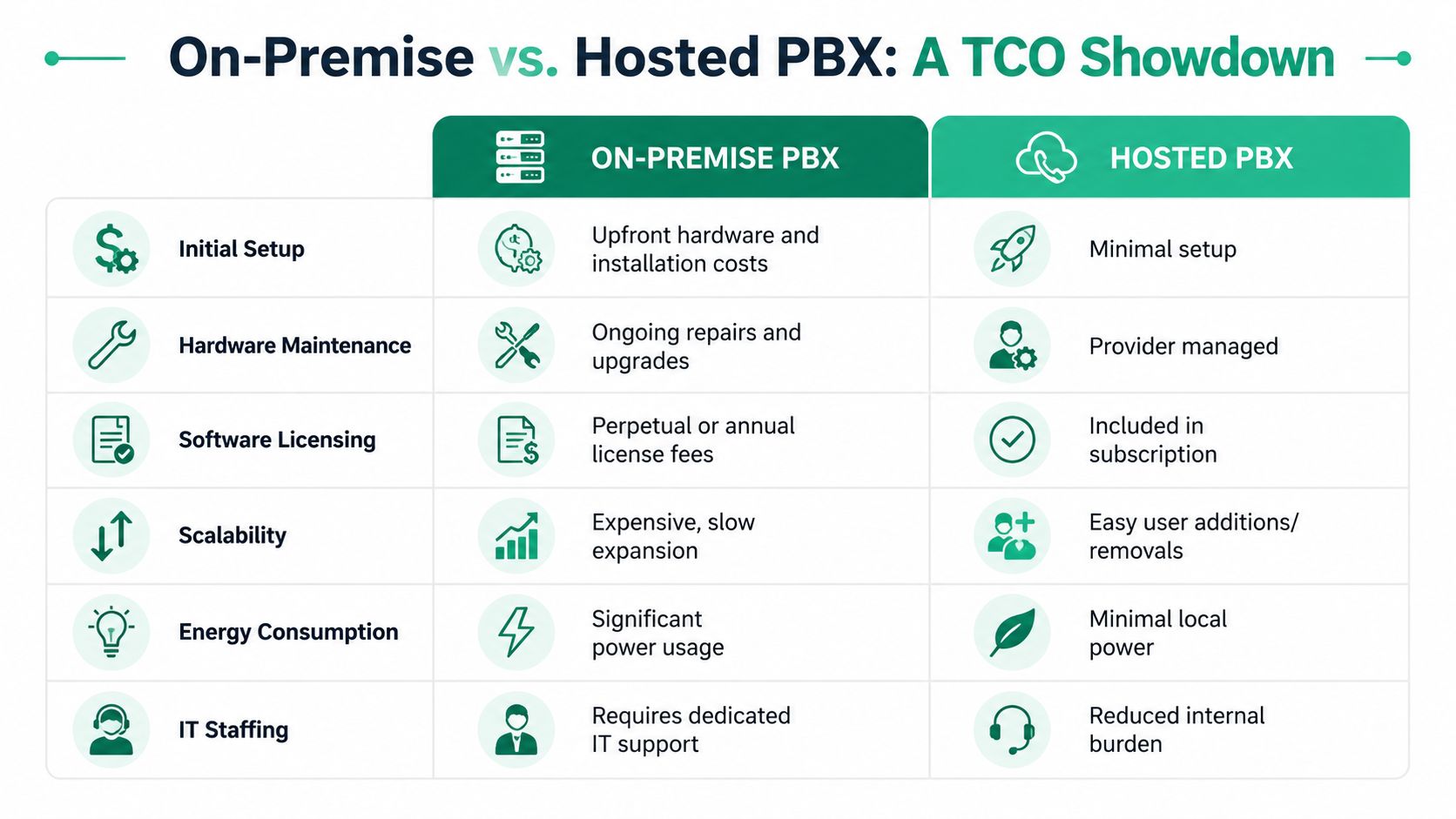
For a local business owner, that shift matters because budget pain shows up differently. On-premise systems punish you in chunks. Hosted systems usually spread the cost into something more predictable.
A practical five-year view
Here's how that comparison often looks for a 25-user Indiana SMB. The point isn't to force fake precision. The point is to show where the money goes.
| Cost Factor | On-Premise PBX | Hosted PBX |
|---|---|---|
| Initial setup | Large upfront hardware and installation spend | Lower upfront entry, mostly onboarding and endpoints |
| Hardware maintenance | You own repairs, replacements, and lifecycle planning | Provider manages the PBX platform |
| Software licensing | Separate licensing and upgrade decisions | Often bundled into the subscription |
| Scalability | Expansion may require hardware planning | Add or remove users more easily |
| Energy and space | Equipment consumes office power and rack space | Minimal local infrastructure |
| Internal IT time | Staff or vendor spends time troubleshooting system hardware | Less day-to-day PBX babysitting |
That operational relief is easy to underestimate. Every hour your internal team spends nursing a phone server is an hour not spent on security, backups, endpoint health, or line-of-business systems.
Hosted PBX doesn't erase cost. It changes where the cost lands and whether the business can plan for it.
A lot of companies moving away from local infrastructure notice this same pattern in other projects, which is why the logic overlaps with broader cloud migration ROI for Indiana businesses.
A short video can help if you want a visual summary of the TCO trade-offs:
What usually works better
Hosted PBX usually fits best when the business wants predictable budgeting, easier remote work, and less dependence on office hardware.
On-premise still has a place in certain environments with unusual control requirements, legacy integrations, or sites where cloud connectivity is a poor fit. But for most SMBs in Johnson County, the hidden labor cost of maintaining old telecom gear is the part that gets ignored until something fails.
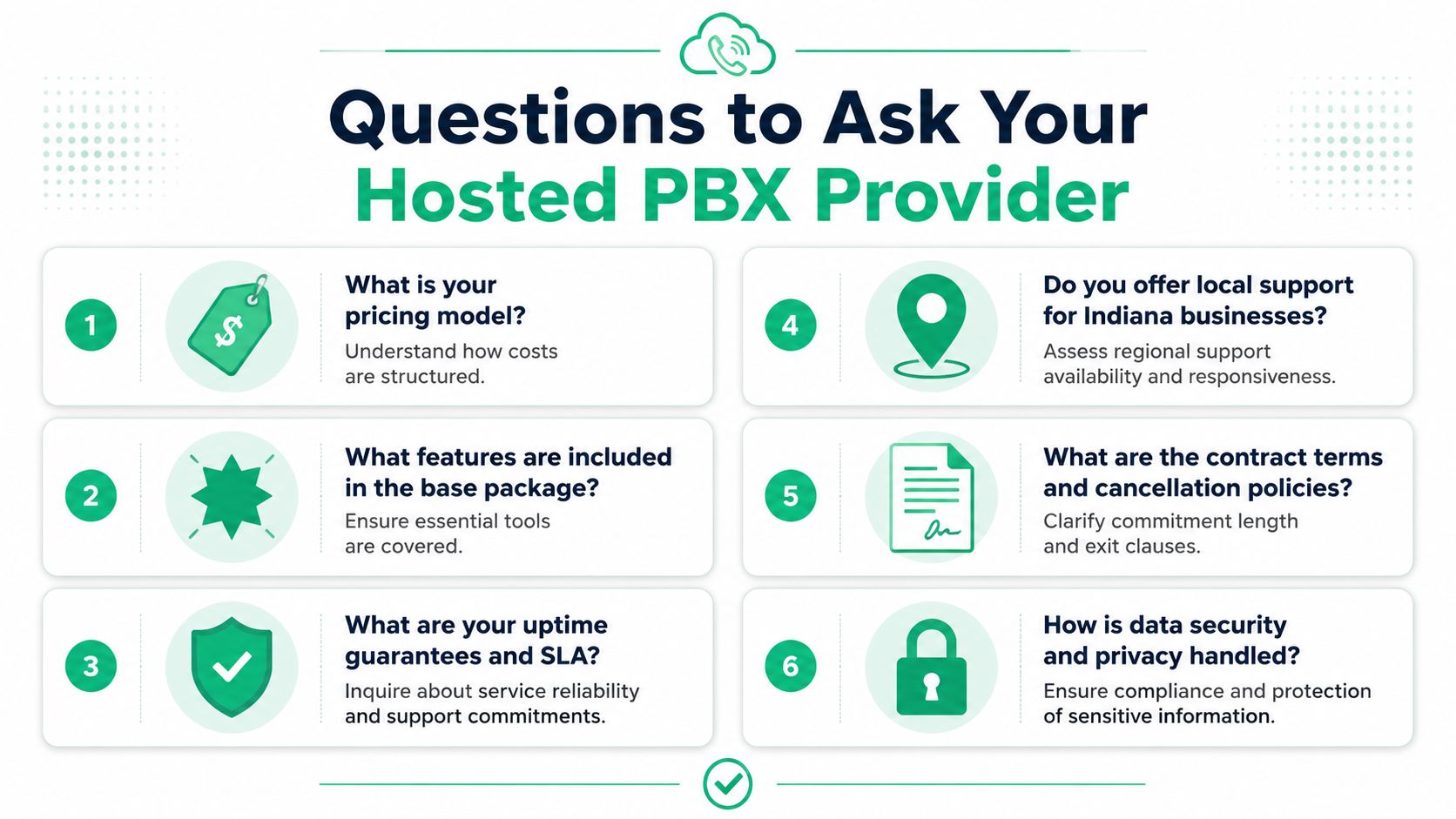
Questions to Ask Any Hosted PBX Provider
A provider who only wants to talk about monthly price is telling you something. Usually not something good.
The better conversation covers resilience, migration, support, compliance, and exactly who will own the ugly parts when something breaks at a bad time.
A 2025 buyer's guide notes that replacing a legacy PBX can require up to $14,500 upfront for 20 users and about $48,000 over two years, while hosted PBX can reduce the two-year total to about $16,400. The same guide also says businesses need at least 100 kbps symmetric bandwidth per concurrent call plus a 20% buffer, and that number porting takes 5 to 7 business days, which is why migration planning matters as much as service pricing in this hosted PBX buyer's guide.
The shortlist of questions that exposes weak vendors
-
How is your pricing structured?
Ask whether the quote is based on seats, call paths, bundled minutes, feature tiers, or some combination. If they can't explain the invoice clearly, the billing will become a headache later. -
What's included before add-ons start appearing?
You want the base package defined in writing. Auto-attendant, mobile apps, voicemail-to-email, admin controls, and support shouldn't be a guessing game. -
What does migration look like for our office? Ask about network assessment, handset deployment, staged cutover, user training, and number port timing. If the answer sounds casual, that's a warning sign.
Ask the security questions most buyers skip
Many businesses tend to get too polite. Don't.
-
How do you handle security and identity? Ask about admin access, MFA, auditability, and how they fit into a Zero Trust architecture.
-
Can your service support our compliance environment? Healthcare groups should ask directly about HIPAA-related handling. Defense manufacturers and subcontractors should ask how voice systems fit into broader CMMC expectations. General business security should align with sensible controls mapped to NIST CSF.
-
What protections exist around recordings, voicemail, and mobile access? This matters when phones become apps and calls move across laptops and personal devices.
If a provider talks only about features and never about cutover risk, they haven't done enough migrations.
Local support still matters
For many Indiana businesses, this question separates a vendor from a partner: can someone help when the issue is partly telecom, partly switching, partly Wi-Fi, and partly user confusion?
Remote support has its place. But there are moments when you need a person who can walk into the office, test the handset, inspect the switch stack, check QoS, and sort out whether the problem is voice routing or local infrastructure. That's especially true in mixed environments with UniFi gear, aging cabling, softphones, and branch offices.
The Right Phone System Is a Competitive Advantage
The cost of hosted PBX isn't just a telecom line item. It's an operating model decision.
The right system reduces the chance that one hardware failure in one building knocks out customer communication. It gives owners a cleaner monthly budget. It makes remote and hybrid work less clumsy. It cuts down the wasted tech time that piles up when staff keep fighting with old equipment, failed transfers, and mystery outages.
In our 17 years of local service, we've seen the same pattern from Greenwood to Hamilton County to downtown Indy tech hubs. Businesses rarely regret moving away from brittle, aging infrastructure. They regret waiting until the old system fails during a busy week. The companies that plan the migration well usually come out ahead because they treat phones as part of the network, part of security, and part of continuity.
What smart buyers focus on
A strong hosted PBX decision usually comes down to four things:
-
Continuity first
Calls need to keep moving when the office has trouble. -
Predictable spending
Owners want fewer surprise invoices and fewer capex spikes. -
Infrastructure fit
Voice quality depends on the network underneath it. -
Compliance and control
The system has to make sense inside your HIPAA, CMMC, or broader security posture.
That's why the best projects don't start with a shopping cart. They start with a network review, a call-flow review, and a realistic look at how your team works.
If your phones are tied to a shaky closet server, underpowered switching, or a building with spotty Wi-Fi, that problem won't fix itself. A modern phone platform, backed by solid networking, security controls like Bitdefender GravityZone on endpoints, SOC-as-a-Service monitoring where appropriate, and resilient design such as immutable off-site backups for the rest of the business stack, gives you a stronger operational baseline.
If your business in Greenwood or the Indianapolis area is weighing a phone system upgrade, Finchum Fixes IT can help you sort out the actual costs before you sign a contract. A Free Network Assessment will show whether your switches, Wi-Fi, bandwidth, and security posture are ready for hosted voice, and where hidden migration costs are likely to show up.