PBX and VoIP: A 2026 Guide for Indiana Businesses

PBX and VoIP aren't the same thing, and most Indiana businesses shouldn't treat them like an either-or decision. The global VoIP market reached $95 billion in 2024, 83% of businesses now use VoIP exclusively or as a primary method, and traditional PBX operating costs can run up to 60% higher than VoIP, but the right answer often includes a hybrid path instead of a full rip-and-replace.
A PBX is the private, on-site hardware that directs calls, while VoIP is the internet-based technology used to make those calls. Modern systems merge these, using VoIP technology on either cloud-based Hosted PBX or on-site IP-PBX hardware.
If you own a business in Greenwood, along the I-65 corridor, or anywhere around downtown Indy, you've probably felt this already. The old phone closet keeps limping along. Calls get static. A desk phone dies and nobody wants to touch the wiring. Someone on your team works from home two days a week, but the phone system still acts like it's 2008.
That problem usually shows up next to other infrastructure issues too. Aging server hardware in a Greenwood business park. Spotty Wi-Fi in an old brick building. A switch stack with no clean documentation. Phone systems rarely fail alone. They fail as part of a wider networking, cybersecurity, cloud computing, and IT support problem. If that foundation is shaky, calls drop, staff waste time, and downtime starts eating into revenue. Business continuity matters because even short outages can get expensive fast, especially when downtime can cost up to $9,000 per minute.
Is Your Old Phone System Costing You Business
In our 17 years of local service, we've seen outdated phone systems become the single biggest point of failure in otherwise healthy companies across Johnson County. A Greenwood office will tolerate a lot. Slow file shares. An old copier. A cranky printer. But when customers can't reach sales, support, or dispatch, the pain is immediate.
The common Southside story goes like this. A business owner has a legacy PBX tucked in a back room. It still works, mostly. Then one card starts failing. Voicemail gets weird. Remote forwarding is clunky. Mobile staff start giving out personal cell numbers because the office line can't keep up.
That's not just annoying. It changes how customers judge your company.
What the shift in the market tells us
The move to modern phone systems accelerated when remote work became mandatory, with VoIP and video conferencing usage surging by over 212% between 2020 and subsequent years according to Ring4's history of VoIP. That tracks with what many Johnson County business owners saw firsthand. The companies that adapted fast kept answering calls. The ones tied to a single closet full of hardware struggled.
Practical rule: If your phone system breaks your workflow every time someone works off-site, you don't have a phone problem alone. You have a continuity problem.
That same continuity issue shows up in other industries too. If you want a useful example of how call routing and automation fit into real operations, this look at modern AI for moving companies is worth your time because it shows how phone trees, routing logic, and customer response speed affect day-to-day execution.
What usually fails first
Most owners don't call because they want “better telephony.” They call because one of these breaks first:
- Call quality gets ugly: Static, clipping, and dropped transfers start showing up during busy periods.
- Mobility falls apart: Staff can't answer from a mobile app or laptop without odd workarounds.
- Hardware becomes a hostage: One aging cabinet or proprietary handset line controls the entire office.
- Support turns reactive: Every small change needs a specialist, and every specialist invoice feels like punishment.
If that sounds familiar, it helps to step back and look at the larger modernization path, not just the phone bill. This broader guide to legacy system modernization strategies that drive business growth lines up with what we see across Central Indiana. Old systems rarely need panic. They need a plan.
PBX vs VoIP The Core Technologies Explained
A lot of confusion comes from comparing a system to a transport method. PBX and VoIP aren't direct substitutes in the clean way most sales pages present them.
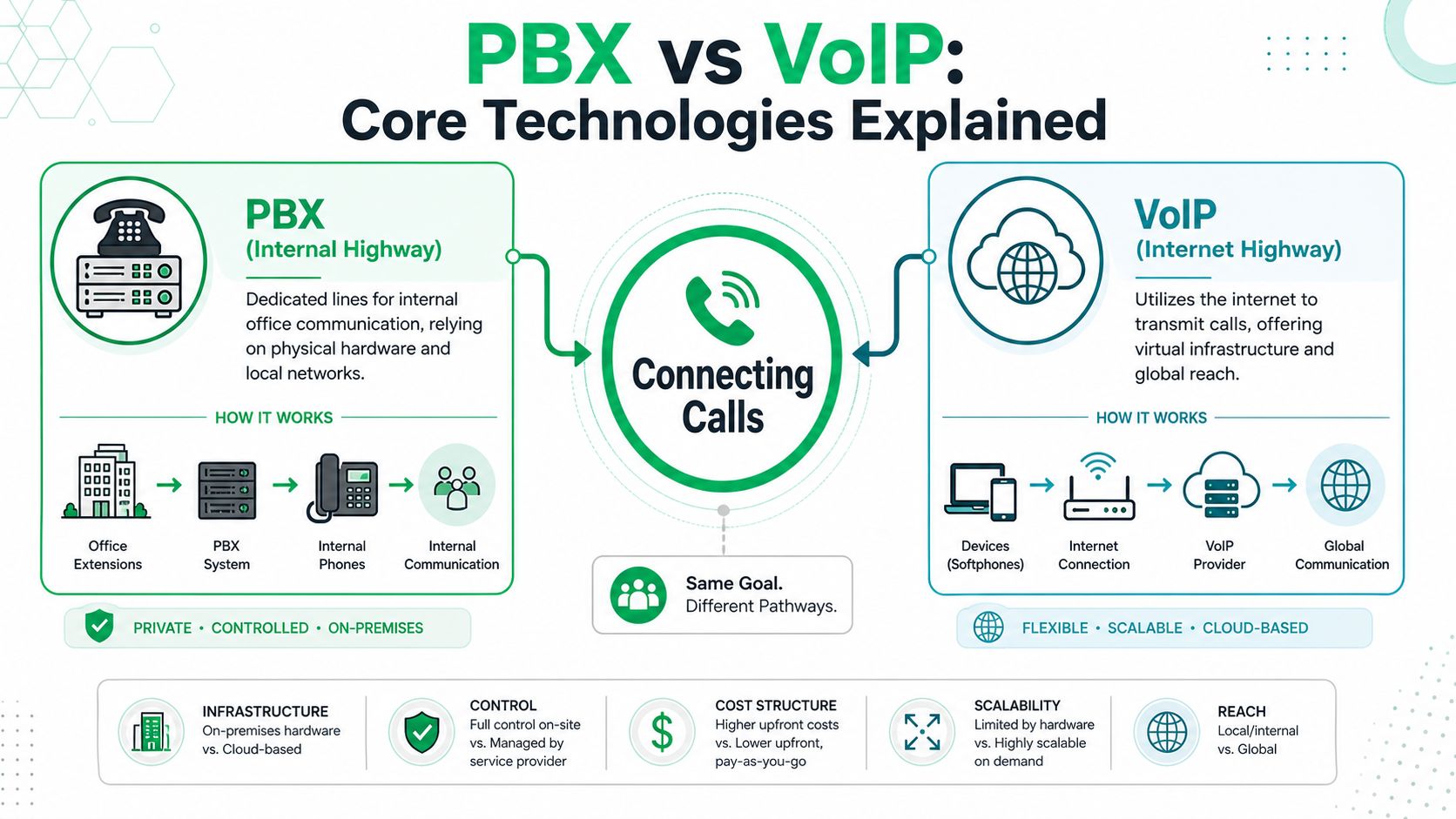
PBX is the call traffic manager
Think of a PBX as your office's internal road system for phone calls. It decides where inbound calls go, how extensions talk to each other, which phones ring, when voicemail kicks in, and how call queues behave. In traditional setups, that logic lives in on-site hardware.
That hardware can be old-school analog, or it can be an IP-PBX, which still lives on-site but routes calls over your data network. That distinction matters because an IP-PBX can often keep some of your existing investment in handsets, cabling, or call flow design.
VoIP is how the voice travels
VoIP is the method that turns voice into digital packets and sends those packets over your network and internet connection instead of dedicated copper lines. It's the delivery mechanism, not the switchboard itself.
This is one place where networking competence matters. Voice traffic behaves differently from bulk data. If your switches, VLAN design, QoS policy, and Wi-Fi coverage are sloppy, users blame “the phones” when the actual problem lives in the network. That's why good phone work often starts with IP planning, VLAN cleanup, and switch review. If your team needs that layer cleaned up, this post on mastering IP address management for Indianapolis businesses covers the groundwork.
PBX tells the call where to go. VoIP decides how the audio gets there.
Why the terms get mixed together
Modern systems combine both. Here's the practical breakdown:
| Term | What it means in plain English | Where it usually lives |
|---|---|---|
| Traditional PBX | On-site phone hardware using older line methods | Your building |
| IP-PBX | On-site PBX using internet protocol internally | Your building |
| Hosted PBX | PBX features delivered from the cloud | Provider data center |
| VoIP | The technology carrying the voice | Across your network and internet |
A quick diagnostic workflow makes the difference obvious:
- Check registration status on the handset or softphone.
- Ping the gateway from the voice VLAN to verify local path health.
- Run
tracertto the provider edge if remote call setup is failing. - Capture signaling with
tcpdumpor Wireshark when extensions won't register. - Review latency, jitter, and packet loss before replacing any hardware.
That's the difference between real troubleshooting and guesswork. A smart consultant doesn't start with “buy a new system.” They start with what's broken.
Your Three Main Choices On-Prem Hosted and Hybrid
Most Indiana businesses choosing between PBX and VoIP really have three practical paths. Keep the system on-site. Move to a fully hosted model. Or bridge the gap with a hybrid setup that keeps some existing gear while modernizing how calls connect.
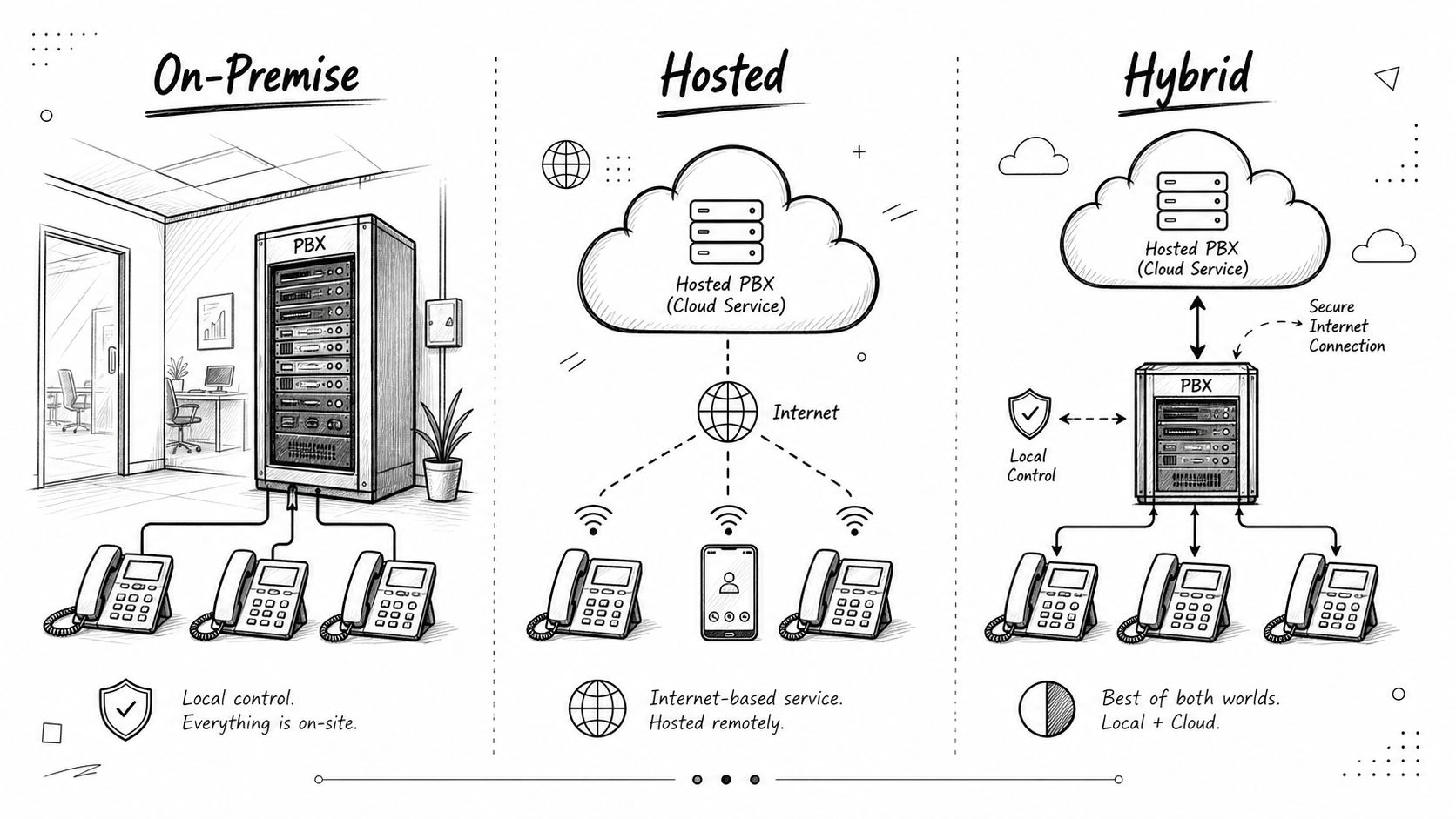
Option one keeps control in your building
An on-prem IP-PBX makes sense when a company wants direct control over hardware, call routing, and integration behavior. This comes up in healthcare, manufacturing, and some compliance-heavy environments where local control still matters.
You own the gear. You patch it. You maintain it. If the UPS, switch, or voice server goes sideways, your team owns the recovery path too.
Option two shifts the burden to the provider
A hosted PBX moves the PBX layer into the cloud. The market is clearly moving this direction. The hosted PBX market was valued at $12.8 billion in 2024 and is projected to reach $30.4 billion by 2030, while IT leaders projected a 90% cessation of on-premise communication tools, according to Brightlio's VoIP statistics roundup.
That doesn't mean every business in Greenwood should sprint to cloud-only. It means hosted systems now dominate because they reduce the burden of maintaining aging communication hardware.
Option three is often the smartest middle path
A hybrid approach usually means keeping an on-site PBX or IP-PBX while connecting it to modern SIP services and mobility features. This is the least glamorous choice. It's also often the most rational one.
For a company with acceptable handsets, decent switching, and stable call handling logic, hybrid lets you modernize without throwing away everything that still works.
| Model | Best fit | Main upside | Main trade-off |
|---|---|---|---|
| On-prem IP-PBX | Firms needing local control | Strong customization and ownership | More maintenance burden |
| Hosted PBX | Companies wanting simple management | Predictable operations and easy remote work | Less infrastructure control |
| Hybrid IP-PBX with SIP | Businesses with usable existing hardware | Better total cost control during transition | Requires thoughtful design |
A lot of Hamilton County growth firms land in hybrid first. They want cloud features, but they don't want to scrap functioning infrastructure in one shot. That's especially true when phone changes coincide with broader cloud work, Microsoft 365 cleanup, endpoint standardization, or Wi-Fi upgrades. If your roadmap includes all of that, this guide to Indiana cloud migration plans with a step-by-step playbook aligns with the sequencing.
A quick visual can help if you're sorting options with your office manager or operations lead:
What works and what does not
- Hosted works well when your team is mobile, your internal IT bench is thin, and your internet is stable.
- On-prem works well when you have strict routing, integration, or compliance demands and someone competent can maintain it.
- Hybrid works well when the existing environment is good enough to keep, but not good enough to leave untouched.
A phone system decision is usually an operations decision wearing an IT label.
The Hidden ROI When to Keep Your On-Prem PBX
A lot of vendors push a cloud-only story because it's simple to sell. Rip out the old system. Ship new phones. Start monthly licensing. Clean pitch. Easy deck.
Real life in Central Indiana is messier than that.
Sunk cost is not a dirty phrase
Some businesses along the I-65 corridor have already paid for decent cabinets, handsets, structured cabling, battery backup, and call flow configuration. If the core hardware is stable, replacing it all immediately can be the wrong move.
That's why the usual PBX and VoIP debate misses the mark. JustCall's comparison notes that most content frames PBX vs. VoIP as a binary choice, but a more nuanced approach exists for organizations with sunk costs in legacy hardware, where an on-premise IP-PBX upgrade can offer a better Total Cost of Ownership than a full cloud overhaul.
When keeping the box makes sense
There are situations where I'd tell a Greenwood business owner to keep the on-prem gear for now:
- The hardware is still healthy: No chronic failure pattern, no parts panic, no mystery outages.
- Your call flows are specialized: Front desk routing, paging, warehouse phones, overhead integrations, or analog edge cases still matter.
- Compliance needs are tighter: Local control can support policy requirements tied to HIPAA, CMMC, or internal governance.
- Capital is tight: A phased migration protects cash while still fixing existing pain points.
That path usually looks like this. Keep the PBX core. Move to SIP trunks. Replace only dead or limiting endpoints. Add mobile apps where needed. Clean up switching. Segment voice traffic. Improve resilience with better backups, cleaner UPS coverage, and documented failover.
Keep what still creates value. Replace what causes risk.
What does not make sense
Keeping on-prem hardware is a bad idea when the system has become a museum piece. If the vendor is gone, firmware is stale, replacement cards come from auction sites, and every change depends on one retired contractor who sometimes answers his phone, you're not preserving value. You're preserving fragility.
This same discipline shows up in other IT work too. In data recovery, for example, we don't throw away a RAID set before checking whether bit-level data recovery can salvage what matters. But we also don't pretend a failing array should stay in production after recovery. The phone closet deserves the same honesty.
Cost ROI and Scaling Your Phone System
Most owners ask one blunt question. Which option costs less?
That's the right question, but only if you count the whole problem. Monthly licensing matters. So do support labor, downtime risk, hardware replacement, training time, and how many staff hours disappear into avoidable friction.
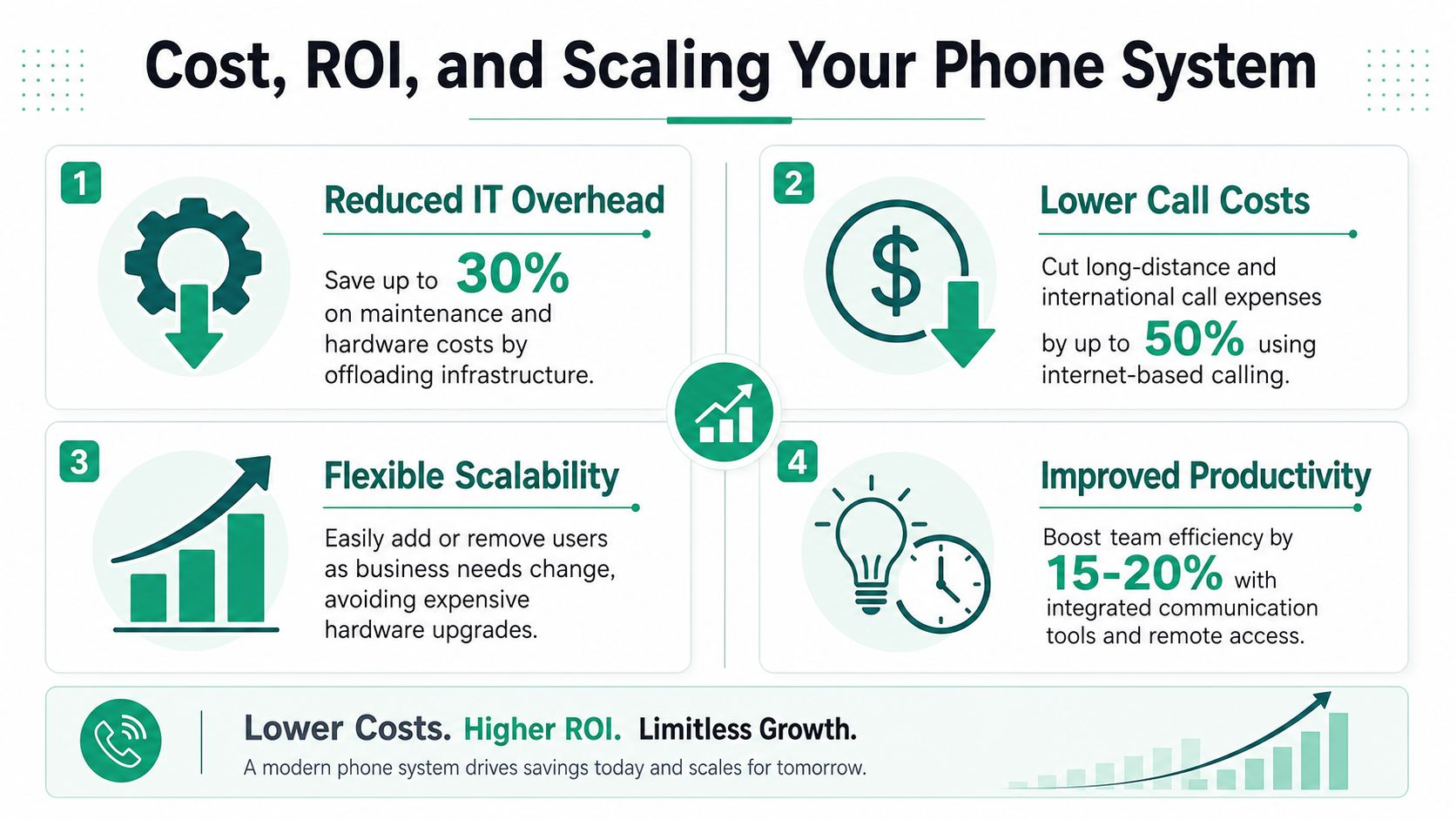
The cost difference is real
Traditional PBX systems relying on physical copper lines incur ongoing operational costs up to 60% higher than VoIP solutions, according to Nextiva's PBX vs. VoIP comparison. The reason is practical. VoIP sends voice as digital packets over existing internet infrastructure instead of dedicated circuits, line charges, and more specialized hardware dependency.
That's where ROI starts. Less line overhead. Less proprietary maintenance. Less truck-roll support.
ROI is mostly about wasted time
When a phone system is clumsy, staff lose billable time in tiny chunks all day:
- Missed calls because routing is wrong or mobile handoff is poor
- Manual workarounds when users text from personal phones instead of business systems
- Slow changes that require vendor tickets for simple extension updates
- Long outage windows because the environment has no documented recovery path
For a service business in Greenwood, that wasted time turns into delayed estimates, missed dispatch windows, and slower collections. For a healthcare office, it can affect patient coordination and HIPAA-sensitive communication controls. For a defense-adjacent contractor, CMMC expectations make sloppy communication workflows even riskier. For general business security, aligning voice systems with NIST CSF thinking helps because it forces teams to identify, protect, detect, respond, and recover.
Field note: Predictable monthly spend is good. Predictable uptime is better.
How the three models usually land financially
| Model | Cost pattern | ROI strength | Scaling behavior |
|---|---|---|---|
| On-prem IP-PBX | Higher upfront, lower recurring if stable | Strong if hardware is healthy and well-managed | Slower, more manual |
| Hosted PBX | Lower upfront, recurring monthly spend | Strong where simplicity and mobility matter most | Fast and clean |
| Hybrid | Moderate upfront, mixed ongoing cost | Strong when preserving usable assets | Good transitional flexibility |
Hosted systems are attractive when an owner wants a stable operating budget. Hybrid wins when the old system still has life left. On-prem can still win if the company needs local control and has disciplined IT support behind it.
Broader stack decisions are important. If your network is built on UniFi networking, if your endpoints are protected with Bitdefender GravityZone, and if your continuity plan includes immutable off-site backups, your phone platform becomes part of a larger business continuity strategy instead of a disconnected expense line. If you want a pricing-oriented breakdown, this article on the cost of hosted PBX for Indiana businesses in 2026 is a useful next read.
Downtime is the hidden multiplier here. If your communication system is down while sales, service, or dispatch is active, the damage stacks fast. That's why I treat PBX and VoIP projects as continuity projects first and telecom projects second.
Securing Your Communications From Toll Fraud to HIPAA
A business phone system is part of your attack surface. If it touches the internet, stores voicemail, routes external calls, or exposes remote admin access, someone can abuse it.
The ugly version is toll fraud. An attacker gets into the system, pushes outbound calls through your platform, and leaves you holding the bill. The quieter version is just as bad. Weak signaling security, broad media port exposure, flat network design, and stale credentials create openings for eavesdropping or service abuse.
The controls that actually matter
For VoIP security, it's critical to segment voice traffic from data traffic using VLANs, encrypt SIP signaling via SIP over TLS on port 5061, and narrow RTP media ports to reduce the attack surface, as outlined in ITU Online's VoIP security guidance.
That's not theory. It's a practical build standard.
- Separate the voice VLAN: Don't dump phones and workstations into the same flat network.
- Use SIP over TLS: If signaling is unencrypted, you're inviting trouble.
- Constrain RTP ranges: Huge open media ranges create unnecessary exposure.
- Apply Zero Trust architecture: Verify device role, user access, and management boundaries instead of assuming the LAN is safe.
Simple anti-fraud steps most businesses skip
The basics still matter. A lot.
The CIRCL telecom security recommendations advise organizations to define specific time ranges for outbound calls, protect conference rooms with strong and renewed PIN codes, restrict international outbound calls to only required countries, set warning bill thresholds with telecom operators, and review call logs regularly.
That checklist catches problems early. It also stops the common “we never thought to disable that” failure.
If your phone admin password hasn't changed since the installer left, the system is not secure.
Compliance is part of the design
Healthcare groups around Indianapolis need controls that support HIPAA. Defense contractors and suppliers need to think in terms of CMMC. Everyone else should still map voice security into NIST CSF because the framework forces disciplined risk thinking.
Mature IT practices integrate voice security with endpoint controls, firewall policy, MFA, log review, and SOC-as-a-Service monitoring. If a provider can't talk competently about VLANs, TLS, switch policy, logging, retention, and incident response, they're not ready to touch a modern phone environment. If you need a broader look at where your gaps sit today, this guide to a network security assessment for Indiana SMBs is a good starting point.
Migration Checklist and Finding Local Support
Most failed phone projects fail before the first number ports. The network isn't ready. The old extensions aren't documented. The owner assumes every handset can stay. Nobody tests Wi-Fi coverage in the warehouse. Then cutover day turns into chaos.
A clean migration is boring in the best way. It follows a checklist.
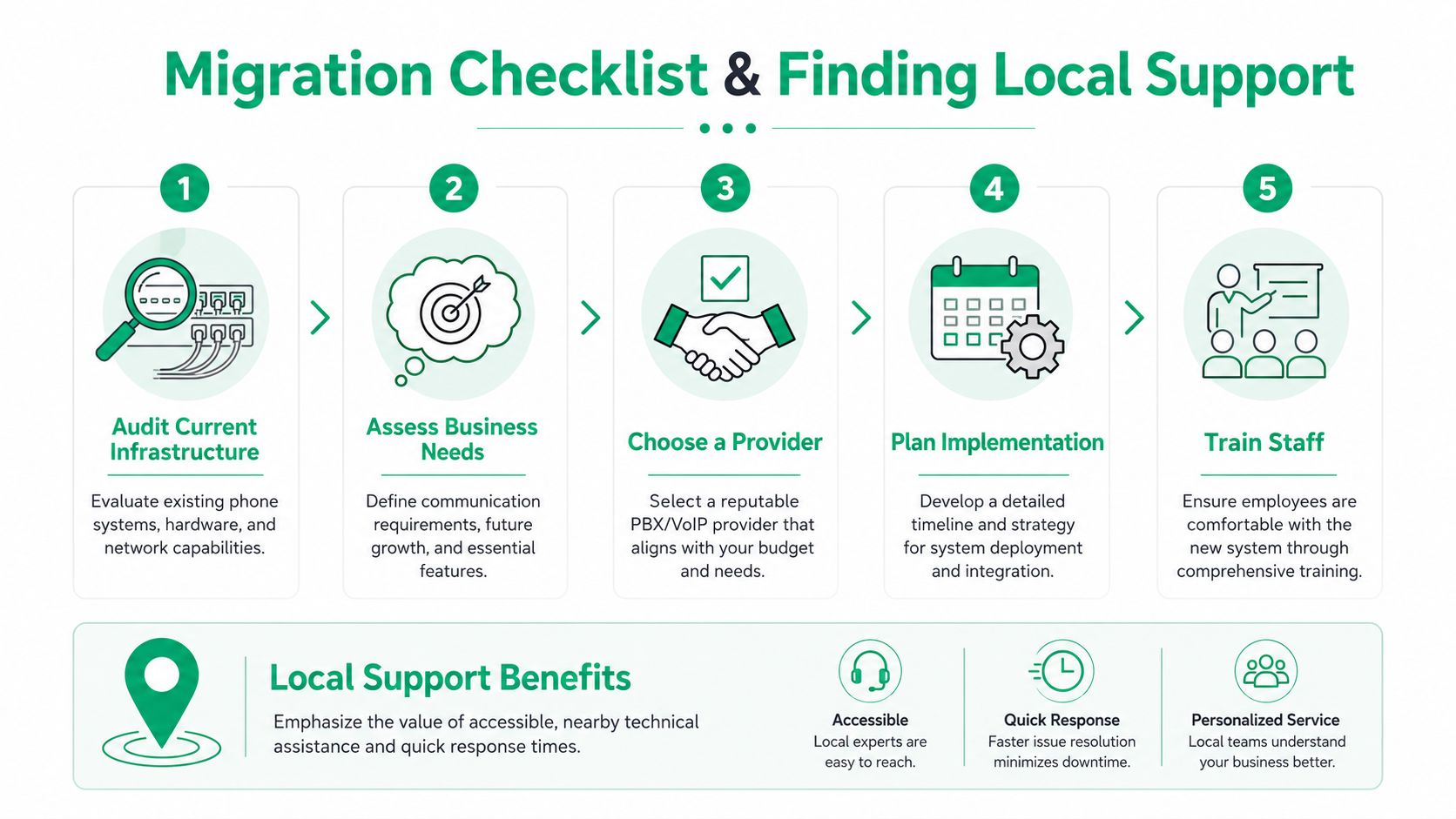
The checklist I'd use for a Greenwood business
- Audit what you already own. Inventory handsets, PBX modules, switches, UPS units, cabling, voicemail behavior, hunt groups, paging, and fax or analog dependencies.
- Test the network before choosing the platform. Run
iperf3across the LAN, review switch errors, confirm VLAN design, and check whether old APs can support latency-sensitive voice traffic. In older brick buildings around downtown Indy or the Southside, I also check whether latency-optimized mesh nodes are masking deeper cabling trouble. - Document the call flow. Main number, after-hours routing, holiday schedules, ring groups, failover rules, and emergency call handling all need written validation.
- Pilot with a small user group. Front desk, sales, and one remote user usually expose key issues fastest.
- Train staff like adults, not lab rats. Show them the app, desk phone, voicemail, transfer methods, and fallback process during an outage.
Why local support matters
A national telecom queue doesn't know your building, your switch closet, or the weird dead zone near the rear warehouse wall. Local support does. That matters when a cutover slips, a cordless handset won't roam properly, or an old MDF panel throws a surprise.
When we dissembled a similar client's failing RAID array during a separate recovery project, the lesson was the same as phone work. Fast help comes from people who can get on-site, read the environment, and solve the actual problem instead of escalating a ticket three layers deep.
Johnson County business owners usually don't need flashy. They need reliable. They need someone who can handle networking, cybersecurity, cloud cleanup, software integration, and the occasional ugly surprise hidden behind a locked closet door.
If your business in Greenwood or Indianapolis is weighing PBX and VoIP options, get a Free Network Assessment from Finchum Fixes IT. We'll look at your network, voice readiness, security gaps, and continuity risks so you can choose the right path without wasting money on the wrong phone system.