Boost ROI with Knowledge Base Creation for Indiana SMBs

TL;DR
- Repetitive questions are expensive: when your best people keep answering the same Wi-Fi, software, and process questions, you lose productive time and expose the business to downtime risk.
- Knowledge base creation is a continuity tool: it turns tribal knowledge into a searchable asset that protects operations.
- Start with governance: ownership, review dates, version control, and security matter more than fancy software.
- Make it easy to find answers: clean categories, consistent templates, and strong search beat giant folders every time.
- Measure what works: track search success, usefulness ratings, and “no results” queries.
- Secure the whole stack: pair your knowledge base with Zero Trust, solid networking, and immutable off-site backups.
It's a Tuesday morning in Greenwood. Your office manager can't print. A sales rep forgot the VPN steps again. Someone in accounting needs the procedure for resetting a cloud app password. Your sharpest employee gets pulled away, again, to answer questions they've already answered ten times.
That's not a people problem. It's a systems problem.
For Johnson County business owners, this is one of the most common hidden drains on margin. The interruptions feel small, but they pile up fast. In shops along the I-65 corridor, I've seen “quick tech questions” chew through hours that should've gone to customer work, quoting, scheduling, compliance prep, or actual revenue-producing tasks.
A proper knowledge base fixes that. Not a junk drawer full of Word files. Not a forgotten SharePoint folder. A real system that gives staff and customers the answer without hunting, guessing, or waiting on the one person who “just knows how it works.”
Stop Wasting Time on Repetitive Questions
A lot of Indiana SMBs treat documentation like a side project. They mean to get to it after the firewall upgrade, after the Microsoft 365 cleanup, after the Wi-Fi issues in the old brick building are sorted out. Then months pass, and the same questions keep bouncing around Teams, email, and hallway conversations.

That pattern costs real money. A 2016 Ponemon-based breakdown summarized by Atlassian put average IT downtime at nearly $9,000 per minute, with small businesses seeing costs between $137 and $427 per minute depending on size and industry. Even if your issue never becomes a full outage, the same logic applies. Wasted tech time is still lost operating time.
Tribal knowledge is fragile
One Greenwood business park scenario comes up over and over. A company has aging server hardware in a back room. The Wi-Fi uses old access points that barely reach the warehouse. The line-of-business software has “special steps” that only one long-time employee remembers. When that person is sick, on vacation, or out on a client call, work stalls.
The knowledge base becomes your pressure relief valve.
Instead of this:
- Ask Mike: “How do I reconnect the scanner?”
- Ask Sarah: “Which VPN profile do I use from home?”
- Ask accounting: “What's the process if Bitdefender GravityZone flags a file?”
- Ask IT again: “Where's the checklist for recovering from a failed workstation?”
You move to this:
- Search once: “Warehouse scanner reconnect”
- Open one article: screenshots, steps, owner, last review date
- Resolve fast: no waiting around
- Escalate only if needed: support handles the unusual issue, not the routine one
Practical rule: If a question shows up more than once, it deserves a documented answer.
That's why knowledge base creation belongs in the same conversation as cybersecurity, networking, cloud computing, data recovery, software development, and IT support. It's not just admin work. It keeps operations moving when the person with the answer isn't available.
Why self-service matters
Customers and employees both want answers now. HubSpot notes that 67% of consumers prefer to solve issues on their own rather than contacting support, which is why self-service content matters so much for reducing ticket load and operating costs in a well-built knowledge base. The same behavior shows up inside businesses. Staff would rather solve the issue in two minutes than wait for a callback.
If you're already trying to reduce repetitive support load, this pairs nicely with practical service automation work like this Indiana SMB customer service automation playbook.
For local owners, the ROI is simple. Every repeat question you eliminate gives time back to billable work, quoting, production, patient care, or customer service. It also lowers the odds that a small issue turns into a bigger outage.
The Blueprint Planning and Governance First
Most failed knowledge bases don't fail because the search engine was weak. They fail because nobody owned the content.
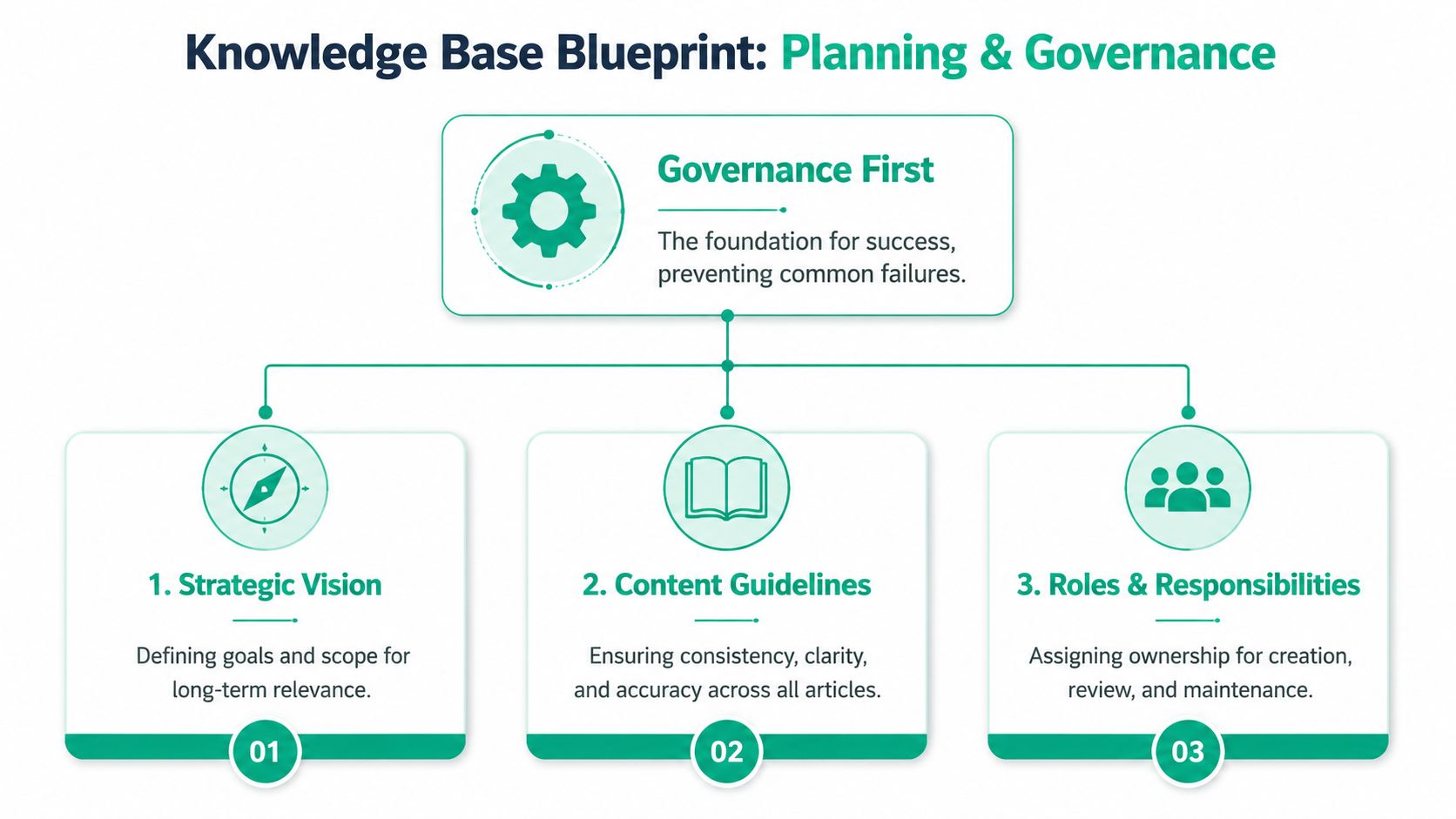
If you skip governance, you build a digital junkyard. Old PDFs sit next to current procedures. The wrong version of a policy gets reused. Someone uploads a screenshot from a retired firewall. Then your team stops trusting the system, and they go back to tapping the same three people on the shoulder.
That's why planning comes first.
Governance beats gadget chasing
For businesses in Greenwood, Carmel, downtown Indy, and the broader Southside, governance sounds boring until the first bad answer creates a real problem. If you handle patient records, HIPAA matters. If you support a defense supplier near the I-65 corridor, CMMC matters. For everybody else, NIST CSF is a solid frame for sensible security and process discipline.
This gets even more important when AI enters the mix. Tutorials Dojo reports that 78% of RAG failures stem from poor data quality or outdated content. That tracks with what practitioners see every day. Bad input produces bad output. Fancy retrieval won't save stale policies.
A lot of owners jump straight to chatbots, Copilot pilots, or vector search. That's backwards. Start with content ownership, review dates, and clear access rules.
Later, if you want to boost collaboration with ECM solutions, your content foundation will already be clean enough to support it.
The minimum governance model that works
In our 17 years of local service, the simple model below has held up far better than giant committees and “we'll all keep it updated” promises.
-
Assign one owner per category
Networking, security, cloud apps, onboarding, and line-of-business software each need a named owner. Not a department. A person. -
Set a review rhythm
Some articles need faster review than others. Password reset instructions, Bitdefender GravityZone incident steps, UniFi networking changes, and backup recovery procedures deserve tighter attention than office supply FAQs. -
Separate internal from external knowledge
Internal staff articles can include workflow details, vendor notes, and escalation logic. Customer-facing help should be cleaner and narrower. -
Control access by role
A Zero Trust architecture mindset helps here. People should see the knowledge they need, not everything the company has ever written down.
Governance isn't paperwork for its own sake. It's how you stop wrong answers from spreading.
A business impact lens helps. If you haven't mapped which systems and procedures matter most, use a practical business impact analysis template for SMB planning. It makes content priority much clearer.
A short explainer on planning is worth watching before you choose tools:
What governance should cover
| Area | What to define | Why it matters |
|---|---|---|
| Ownership | Who writes, approves, and retires content | Stops “someone should update that” from meaning nobody will |
| Accuracy | Source of truth and review date | Keeps stale procedures out of daily use |
| Security | Who can read or edit what | Protects sensitive operational and compliance content |
| Format | Standard templates and naming rules | Makes search results easier to scan |
| Escalation | When an article is not enough | Prevents false confidence during incidents |
If you get this part right, the rest of knowledge base creation becomes easier. If you get it wrong, the nicest platform in the world turns into clutter.
Designing a Findable Information Structure
A knowledge base should work like a good front desk. You ask a clear question and get pointed to the right place fast.
That doesn't happen when everything sits in one giant “Documentation” folder with subfolders named Misc, Old, Archive, Final, and Final-2. I've seen that exact mess in businesses from Greenwood to Hamilton County. It confuses staff, slows onboarding, and makes search feel broken even when the answer technically exists.
Build categories around jobs, not departments
The best structure mirrors how people look for help. A manufacturer in Greenwood doesn't think, “I need the ontology object for endpoint procedure.” They think, “My scanner dropped off Wi-Fi,” or “The shipping station won't print labels.”
That's where taxonomy matters. Ontotext describes modern knowledge bases as interlinked entity descriptions with a semantic model using classes and relationships, which supports semantic search that can return conceptually similar answers, not just exact keyword matches in a modern knowledge base. In plain English, your system should understand that “wireless issue in warehouse” is probably related to “UniFi access point roaming problem.”
A workable top-level structure for an Indiana SMB often looks like this:
-
People and onboarding
New hire setup, account access, device standards, MFA steps -
Infrastructure and networking
UniFi networking, ISP failover notes, printer setup, switch closet basics -
Security and compliance
Bitdefender GravityZone alerts, HIPAA handling reminders, CMMC document controls, NIST CSF policies -
Applications and workflows
Microsoft 365, ERP steps, CRM procedures, custom software usage -
Recovery and continuity
Immutable off-site backups, recovery checklists, incident contacts, bit-level data recovery escalation rules
Use templates that force clarity
You don't want every author making up a format on the fly. A short template fixes that.
How-to article template
- Problem: what the user is trying to do
- Applies to: location, team, software, device type
- Steps: numbered and plain
- Expected result: what success looks like
- If it fails: when to escalate
- Owner and review date: who keeps it current
FAQ article template
- Short question as title
- One direct answer first
- Optional detail below
- Related links to deeper procedures
Policy article template
- Policy statement
- Who it applies to
- Required actions
- Exceptions and approval path
If users say “I can't find anything,” the problem is usually structure, naming, or both.
For support-heavy environments, these IT service desk best practices for small teams line up well with a findable knowledge structure. The less guesswork your team does, the fewer tickets bounce around.
One more rule from the field. Keep article titles task-based. “Reconnect Zebra Scanner to Warehouse Wi-Fi” beats “Wireless Device Procedure.” Every time.
Building Content and Choosing Your Tools
Tool shopping is where owners often get stuck. They compare platforms for weeks and still haven't written the ten articles that would save them the most time.
Start with content. Then choose the tool that supports the way your business operates.
Document the interruptions first
The fastest win in knowledge base creation is simple. Write down the questions that interrupt your team most often. Not the grand strategic questions. The annoying repeaters.
A practical shortlist usually includes:
- Access problems like password resets, MFA re-enrollment, VPN login, shared mailbox setup
- Network headaches such as spotty Wi-Fi, printer mapping, conference room connectivity, and UniFi networking basics
- Security responses including what to do when Bitdefender GravityZone quarantines a file or a user reports a phishing email
- Recovery steps for restoring a file from immutable off-site backups or escalating a device for repair
- Business app procedures inside Microsoft 365, QuickBooks, ERP, CRM, scheduling, or custom software
Rezolve.ai outlines a six-step incremental framework: audit existing content, standardize structure, convert high-frequency topics, tighten governance, integrate with AI workflows, and enable automation. That order matters. It keeps you from ripping everything out at once and replacing it with chaos.
Don't migrate junk
When we dissembled a similar client's failing RAID array to recover data at the bit level, the painful part wasn't the hardware. It was discovering that critical procedures lived in random files with no owner, no dates, and conflicting versions. Bit-level data recovery can rescue files. It can't tell you which document is correct.
So before you migrate old content:
- Keep what is current
- Rewrite what is useful but messy
- Retire what references old systems
- Flag anything that needs compliance review
That's especially true if you're connecting the knowledge base to AI search later. Clean content beats bigger content.
For teams evaluating support stack options, this guide to help desk software for small businesses in Indiana is a good companion read because ticketing and knowledge should work together, not in separate worlds.
Pick tooling by workflow, not hype
Here's the plain-English version of the tech.
A standard knowledge base stores articles and makes them searchable. An AI-ready one may also use embeddings and a vector database so the system can retrieve meaning, not just matching words. That helps when users type vague questions. Security still matters, so access control should follow Zero Trust architecture principles. If the system touches sensitive procedures, role-based access is not optional.
Ideas around memory and context become useful. If you're comparing note systems and AI-friendly knowledge workflows, Iwo Szapar's AI memory insights offer a thoughtful way to think about how tools retain and surface information over time.
Knowledge Base Tooling Approaches for SMBs
| Tool Type | Best For | Example | Typical Cost |
|---|---|---|---|
| Built-in help desk knowledge base | Support teams that want tickets and articles in one place | Help desk suite with article publishing | Subscription-based |
| Document platform with permissions | Internal SOPs, HR, operations, and cross-team docs | SharePoint or Confluence-style setup | Subscription-based |
| Wiki-style workspace | Fast drafting, linking concepts, and lighter internal docs | Notion or Obsidian-style workflow | Free to subscription-based |
| AI-enabled enterprise search layer | Teams with large scattered content and stronger retrieval needs | Search plus vector-backed retrieval stack | Higher and variable |
| Custom portal | Businesses with unique workflows or client-facing software needs | Bespoke web knowledge hub | Project-based plus maintenance |
Buy the simplest tool your team will actually maintain.
If you're a Southside company with one office, one warehouse, and one lean admin team, a clean internal wiki with strong permissions may be enough. If you've got multiple sites, compliance pressure, and custom apps, a more structured platform makes sense.
The wrong move is paying for advanced retrieval while your content still says “updated soon.”
Maintenance and Optimization for Real ROI
Most knowledge bases decay. Nobody notices at first. Then a new employee follows an old process, a technician uses the wrong checklist, or a customer article points to a screen that no longer exists.
That's when owners start saying documentation “doesn't work.” Usually, the actual problem is that nobody maintained it.
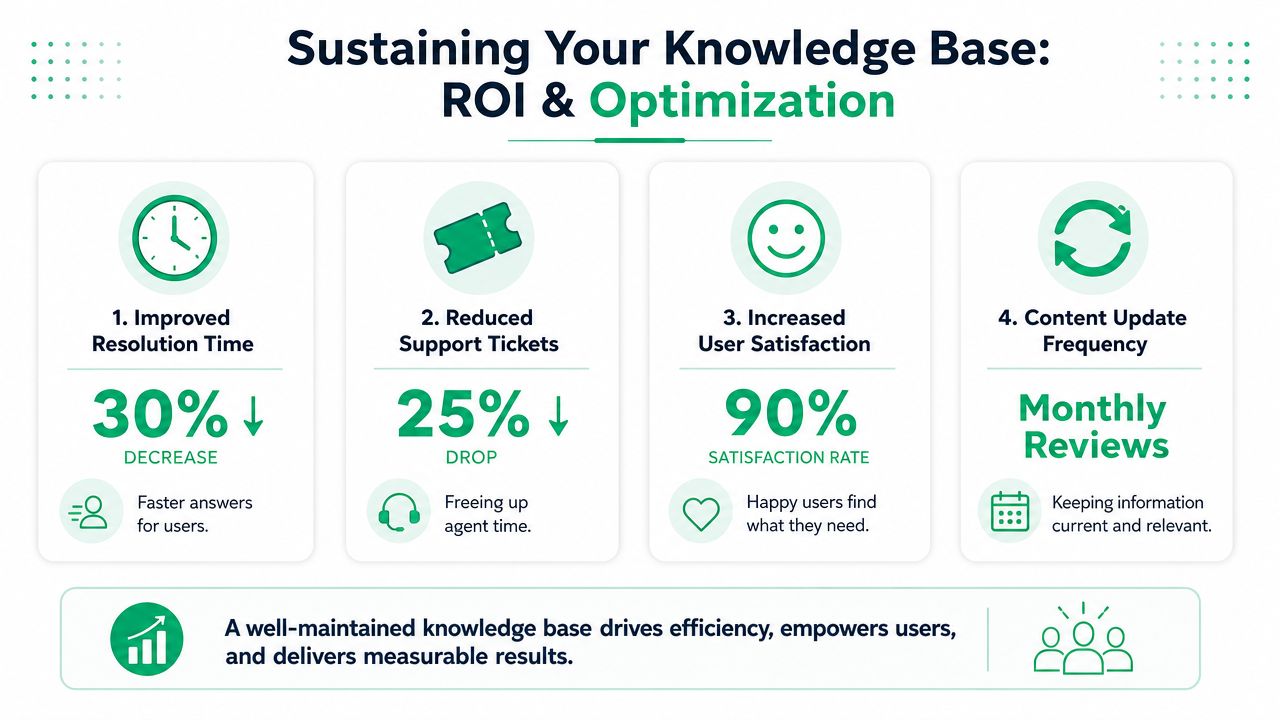
Track the signals that matter
You do not need an expensive analytics suite to know whether your knowledge base is helping. Start with behavior you can observe.
The strongest baseline KPIs are the ones Zendesk highlights: search query success rates and article usefulness ratings. Organizations that implement those kinds of KPIs achieve 25% higher self-service adoption, while neglecting feedback loops can cause resolution rates to drop by 30% to 40% according to Zendesk's knowledge base design guidance.
That matters because self-service only pays off if people solve the issue.
A small business in Hamilton County or along the Southside can track useful signals without a dashboard circus:
-
Searches with no results
These show content gaps fast. -
Articles with low usefulness votes
Usually means outdated screenshots, weak titles, or missing steps. -
Repeat tickets after article publication
If the same question still hits your inbox, the article may be hard to find or too vague. -
Permission-related dead ends
Good from a security angle, bad if staff can't access what they need.
Tune it like operations, not like marketing
Think of your knowledge base the way you think about networking gear or backups. It needs upkeep.
For a practical cadence:
| Review Item | What to check | Good outcome |
|---|---|---|
| High-use articles | Accuracy, screenshots, owners, broken links | Staff can finish the task without escalation |
| Security content | Policy fit, role access, compliance alignment | Supports HIPAA, CMMC, or NIST CSF requirements |
| Recovery procedures | Backup steps, restore contacts, escalation path | Faster response during incidents |
| Search logs | Missed phrases and weak queries | Better titles, tags, and synonyms |
You can even use low-cost testing methods. Run a small set of real user questions monthly. If the answer is hard to find, fix the title, tags, or structure. If the answer is wrong, fix ownership and review controls.
For owners who want to tie this back to dollars, this explainer on how to calculate ROI is useful. The model is straightforward. Compare time saved, ticket deflection, and reduced interruption cost against the software and maintenance effort.
That same budgeting discipline applies across the full environment, which is why practical IT budget planning for ROI and resilience should sit beside your documentation strategy.
A knowledge base earns its keep when it cuts interruption time, reduces avoidable tickets, and helps your team recover faster when systems wobble.
For Indiana SMBs, that's the ROI story. Not vanity metrics. Fewer slowdowns. More productive hours. Better continuity.
Launch Your Knowledge Base and Secure Your Operations
Launch day doesn't need to be dramatic. It needs to be clear.
If you've done the hard parts right, rollout is mostly about behavior. Show people where the knowledge base lives, what it's for, and when they're expected to use it before asking for help. Then reinforce the habit.

A clean launch checklist
-
Start with the highest-friction tasks
Publish the answers people need every week, not the dream library you'll build someday. -
Train managers first
If supervisors and team leads use the system, everybody else follows faster. -
Put it inside daily workflow
Link articles in Teams, your help desk, onboarding docs, and email signatures where appropriate. -
Set escalation rules
Staff should know when to keep searching and when to call for help. -
Protect sensitive content
Use role-based access, especially around HR, security, client environments, and recovery procedures.
Your knowledge base is one layer of resilience
A solid knowledge base reduces wasted time. It also supports business continuity by making recovery steps, security processes, and support procedures easier to execute under pressure.
That matters when the broader stack has weak points. Spotty Wi-Fi in an older brick building can still kill productivity if the network design is poor. Aging switches can still create outages. A weak backup process can still hurt you during ransomware recovery. Knowledge helps people respond, but the environment still needs to be built correctly.
That's why smart businesses pair documentation with stronger technical controls:
- Latency-optimized mesh nodes for coverage in hard-to-wire spaces
- SOC-as-a-Service monitoring for around-the-clock visibility
- Zero Trust architecture for access control
- Immutable off-site backups for recovery confidence
- Bit-level data recovery capability when hardware fails and the stakes are high
One final point. A long outage can be existential for a smaller company. Truleap cites studies indicating that 93% of companies experiencing prolonged downtime go out of business within one year in its discussion of business downtime risk. That's a brutal reminder that continuity planning isn't optional.
If your business in Greenwood or the greater Indianapolis area is tired of losing money to repeat questions, flaky systems, weak documentation, or hidden security gaps, Finchum Fixes IT can help. Start with a Free Network Assessment or a Security Risk Audit and get a clear look at where your operations are exposed, where your team is wasting time, and what to fix first.