IT Infrastructure Solution: Boost ROI & Secure Business
It usually starts on a normal workday in Central Indiana. The office opens, a few people cannot get on Wi-Fi, the printer drops again, and somebody says the server is taking forever. Then the timing gets expensive. Payroll needs to run. A customer order has to ship. A doctor’s office needs access to records. A law firm has documents due by noon.
That is what weak infrastructure costs a business. Not just one repair bill. Lost staff time, delayed jobs, security exposure, and constant interruptions that pull owners back into tech problems instead of sales, hiring, or operations.
TL;DR
- An IT infrastructure solution is the system behind your business operations. It includes internet, networking, devices, servers, cloud platforms, security controls, backups, and support processes that work together.
- Small failures create real business loss. Slow connections, aging hardware, poor documentation, and weak backup routines waste time and increase outage risk.
- For many Central Indiana SMBs, hybrid setups make the most sense. Some workloads belong in the cloud. Some still run better on-site because of software limits, compliance needs, or internet dependency.
- The goal is not more technology. The goal is fewer points of failure, lower support overhead, and a setup your team can rely on every day.
- A good local IT partner should assess, plan, implement, and maintain the environment. Ask how they handle response times, backups, security standards, vendor coordination, and business continuity.
Businesses are treating infrastructure like core operating equipment because downtime and security incidents hit revenue fast. Analysts at CompTIA’s IT Industry Outlook 2025 found IT spending continues to rise, which reflects a simple business reality. Companies are putting money into systems that keep people productive and reduce avoidable risk.
In practice, I see the same pattern across Greenwood, Franklin, Whiteland, and the south side of Indianapolis. Owners rarely call because they want shiny new gear. They call because staff is losing time, a line-of-business app keeps stalling, cyber insurance requirements are getting stricter, or nobody trusts the backup to restore cleanly.
For a local manufacturer, professional office, contractor, or medical practice, an IT infrastructure solution should do three things well. Keep people working. Protect data. Make costs predictable enough that you can plan around them instead of reacting to the next surprise.
If you want a practical baseline before making changes, start with this 10-point IT infrastructure audit checklist for 2026.
Introduction The Hidden Costs of Bad Tech in Your Business
The businesses that struggle most with IT usually don’t have one big problem. They have ten small ones. A flaky firewall. Old switches. No clean documentation. Shared passwords. Backups that “should be running.” A line-of-business app hosted on a server nobody wants to touch because it might not come back.
That pileup creates a substantial cost. Employees burn time waiting on files to open, reconnecting to printers, redoing work after sync errors, and chasing down support. Owners feel it as frustration first, then margin pressure.
What local owners usually notice first
In Greenwood business parks and older Southside buildings, the warning signs are rarely glamorous:
- Wi-Fi dead zones: Conference rooms, warehouse corners, or front offices lose coverage because old access points were dropped in wherever power happened to be.
- Server anxiety: Staff avoids rebooting anything because one restart could turn into a day-long outage.
- Random slowdowns: Cloud apps lag because the internal network, ISP handoff, and endpoint health were never designed as one system.
- Security gaps: Antivirus exists, but policy control, MFA enforcement, user permissions, and monitored response don’t.
A business doesn’t need “more tech.” It needs fewer points of failure.
Why the cost keeps growing
When infrastructure is stitched together over time, every change gets harder. New software exposes old hardware limits. Remote work stresses a VPN that was fine for five users but not for twenty-five. A compliance request arrives, and nobody can clearly show how data is protected, retained, and restored.
Often, the phrase it infrastructure solution is misunderstood. It isn’t a server refresh by itself. It isn’t moving one app to the cloud. It’s the design and support model behind the whole environment.
A good setup gives you stability first. Then it gives you speed.
What an IT Infrastructure Solution Really Is
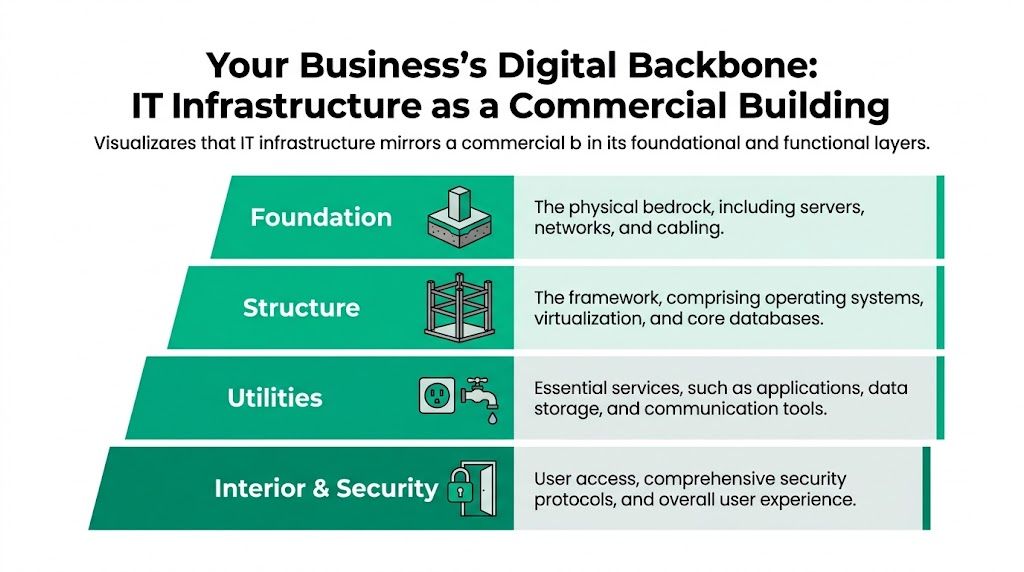
Think of your business like a commercial building. If the foundation is uneven, the doors stick, the lights flicker, and plumbing fails in weird places. IT works the same way. When the underlying systems are wrong, every app, laptop, camera, and phone call suffers.
An it infrastructure solution is the complete stack that keeps your business usable day after day.
The parts that have to work together
Here’s the practical version.
| Layer | What it includes | What happens when it’s weak |
|---|---|---|
| Foundation | Cabling, switches, firewalls, Wi-Fi, internet circuits, power protection | Calls drop, devices disconnect, remote access fails |
| Core systems | Servers, virtualization, storage, directory services, core databases | Apps slow down, file access breaks, recovery gets messy |
| Service layer | Microsoft 365, cloud apps, file sharing, line-of-business software | Teams invent workarounds and duplicate data |
| Control layer | Security policies, MFA, endpoint protection, backups, monitoring, user access | Small issues become breaches or outages |
A Johnson County owner doesn’t need to memorize every layer. But you do need to know whether someone designed them to fit together.
Why piecemeal buying usually fails
Buying one more router, one more NAS, or one more SaaS subscription feels cheaper in the moment. It often creates a maintenance mess later. Different vendors point fingers. Nobody owns the full result. Backups don’t match retention needs. Security tools overlap in one area and leave a hole in another.
That same issue shows up on the public side too. If your website, hosting, forms, and integrations aren’t managed carefully, the site becomes another weak point in your infrastructure. For companies that need help keeping their web presence maintained without adding internal overhead, managed website services can fit into the broader IT picture.
The Southside version of the problem
A common Indy-area setup looks like this. The office added cloud apps over time but kept an old on-prem file server, a consumer-grade Wi-Fi setup, and ad hoc backups. It works until staff grows, remote access matters, or compliance enters the picture.
A real solution cleans that up by answering a few basic questions:
- Where should workloads live? On-prem, cloud, or hybrid.
- How is access controlled? Through least privilege, MFA, and audited identity management.
- What happens if hardware dies? Failover, restore process, recovery targets, and tested backups.
- Who is watching the environment? Someone has to monitor performance, patching, and alerts.
If those answers are fuzzy, the infrastructure isn’t a solution yet. It’s just equipment.
The Core Components Your Indiana Business Needs
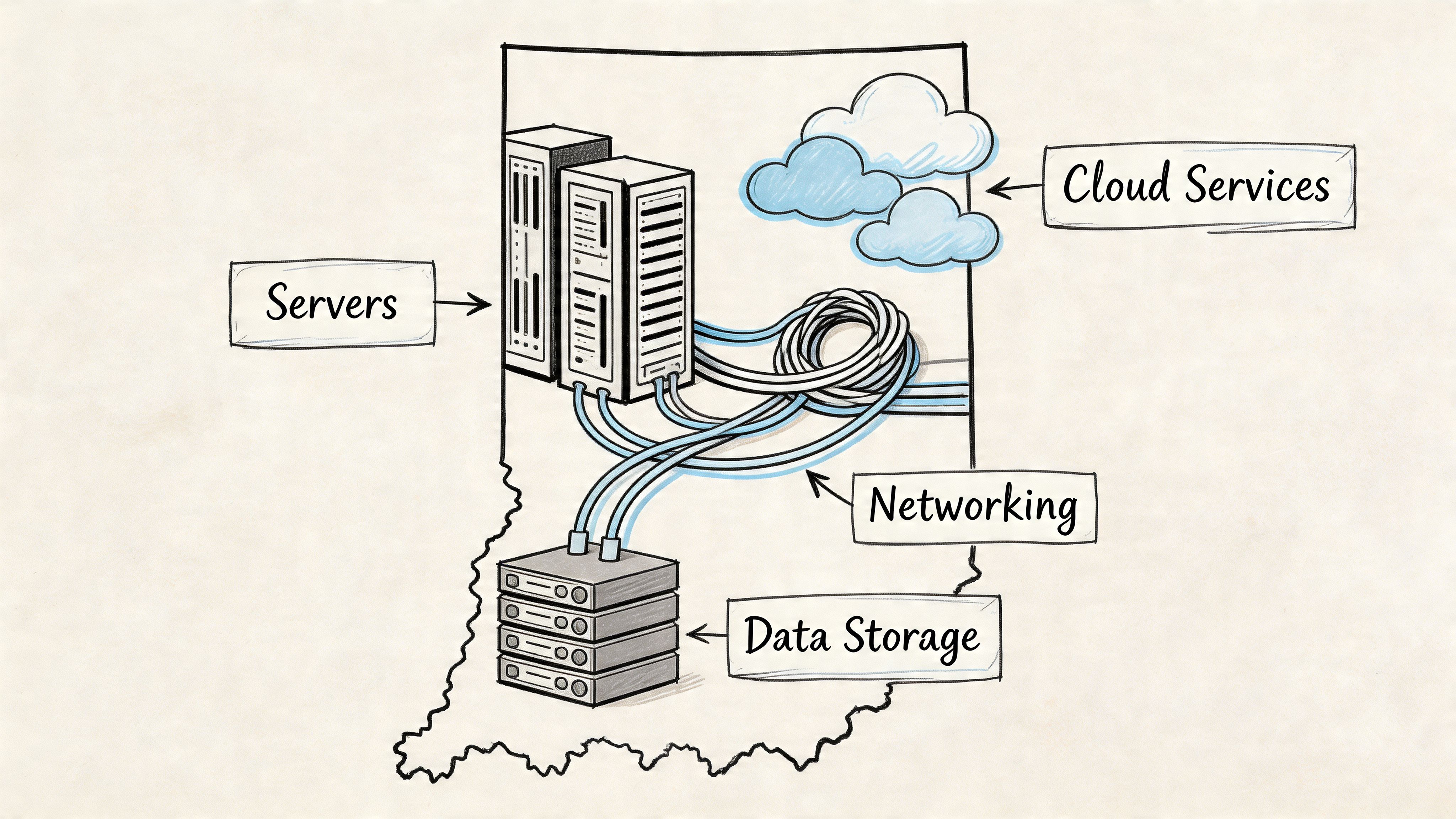
A solid IT infrastructure for a Central Indiana business usually comes down to five parts. The network. The systems that run your core apps and files. The right mix of cloud services. Security controls that match your risk. Backups you can restore.
Every company needs those categories. The right setup changes based on the building, the staff, the software, and how expensive downtime is. A dental office in Greenwood, a distributor in Plainfield, and a machine shop in Hamilton County should not buy the same stack just because a vendor put it in a brochure.
Networking that matches the building, not the brochure
Older buildings around downtown Indy and the Southside create network problems that look like user complaints. Brick walls kill signal. Poor cabling adds random disconnects. A single all-in-one router gets overloaded once phones, laptops, TVs, printers, and cameras all pile on.
Good networking starts with the floor plan and the way people work. That means proper switch capacity, business-grade firewall rules, VLANs for separation, and access points placed where the signal is needed, not where the installer found an easy ceiling tile. In many offices, UniFi networking is a practical fit because it gives centralized management and visibility without stitching together five different interfaces.
A simple standard works well here:
- Weak setup: One oversized router covering the whole office
- Better setup: Multiple access points, clean guest Wi-Fi separation, documented cabling
- Reliable long-term setup: Monitoring, firmware management, and performance baselines
If staff lose Wi-Fi in the same hallway, office, or back room every week, the problem is design.
Servers and on-prem systems that don’t eat your week
A lot of small businesses around Carmel, Greenwood, and Fishers still have one server doing too much. It handles logins, file storage, maybe QuickBooks, maybe an older line-of-business app nobody wants to touch because it still works. Until it doesn’t.
Separating those workloads gives you more control and makes recovery easier. Virtualization is often the cleanest step because it lets one physical host run multiple isolated server roles instead of piling everything onto one operating system. For a plain-English breakdown, this guide to server virtualization for Indianapolis businesses explains where it fits.
For some Indiana SMBs, hyperconverged systems also make sense. They reduce the number of separate pieces to manage, which matters when you do not have a full internal IT team. The trade-off is cost and fit. A smaller office with a single simple app may not need that level of platform. A growing company with several locations, heavier uptime needs, or limited in-house support often benefits from the simpler management.
Cloud that supports reality, not slogans
The all-cloud pitch sounds clean. So does the all-local argument. In practice, most Central Indiana businesses do better with a hybrid setup.
Keep workloads on site when they need local speed, direct connection to devices, or tighter control. Use cloud services for email, collaboration, remote access, and selected applications where reduced maintenance and easier access matter more than owning the hardware. That balance usually gives owners the best mix of cost, flexibility, and control.
For many businesses, the cloud works well for:
- Email and collaboration: Microsoft 365 or Google Workspace
- Disaster recovery targets: Off-site replicas and recovery environments
- Selected application hosting: Especially for remote teams or multi-site operations
- File sharing with controls: Version history, permissions, and secure outside access
A bad server moved into a cloud subscription is still a bad server. The mess just gets a monthly invoice.
Security that fits how Indiana businesses actually operate
Security planning needs to account for more than company size. It has to match how the business runs. A manufacturer with shared floor terminals has different risks than a medical office with regulated patient data. A rural company with one office manager wearing six hats needs simpler controls and outside monitoring more than a giant menu of tools.
A practical stack for many SMBs includes:
- Endpoint protection: Tools such as Bitdefender GravityZone
- Identity controls: MFA, password policy, conditional access, and role-based permissions
- Access rules based on verification: Users and devices should be checked before they get into business systems
- Monitoring and response support: Someone needs to review alerts and act on them
- Security awareness habits: Especially for phishing, invoice fraud, and password reuse
Compliance matters here too. Healthcare groups should map systems to HIPAA requirements. Defense-adjacent firms should examine CMMC obligations early, before a contract forces the issue. Many other companies can use NIST CSF as a practical framework even if nobody is asking for formal certification.
Backup and recovery that assumes something will fail
Backups are where a lot of businesses think they are covered and are not. I have seen plenty of Indiana offices with backup software installed, green checkmarks on a dashboard, and no proven restore process. That is not protection. It is optimism.
A backup plan needs local restore speed, off-site copies for a building loss, retention that matches business and legal needs, and immutable copies that ransomware cannot rewrite. It also needs written recovery steps. If one former employee or one outside vendor holds all the knowledge, recovery will be slower and riskier than it should be.
The strongest backup plans can answer these questions without guessing:
| Question | Weak answer | Strong answer |
|---|---|---|
| Can we restore a single file? | “Probably” | Documented and tested |
| Can we recover the full server? | “Maybe with vendor support” | Planned recovery workflow |
| What if the office is down? | “We’ll figure it out” | Off-site recovery path exists |
| What if ransomware hits backups too? | “Hope the antivirus catches it” | Immutable off-site copy exists |
Local performance still matters
Central Indiana manufacturers, retailers, and logistics companies often have systems that cannot wait on a distant round trip. Barcode scanning, shop-floor devices, camera systems, and machine data all work better when some processing stays close to the work.
That does not mean every workload belongs on site. It means the design should respect response time, internet reliability, and the cost of delays. For a warehouse in Plainfield or a production floor near Anderson, a few seconds of lag repeated all day turns into real labor cost and missed throughput.
One option businesses in the area consider is Finchum Fixes IT, which provides networking, cybersecurity, support, recovery, and infrastructure planning for local organizations that need one team to connect those pieces. The important point is ownership. Someone needs to be responsible for how the whole environment performs, not just for closing isolated tickets.
From Cost Center to Profit Driver Calculating Your IT ROI
A Carmel office with 18 employees can lose more money to small tech delays in a month than to one obvious outage. Ten minutes lost here, fifteen there, a printer that drops offline before invoices go out, a line-of-business app that freezes during busy hours. The owner sees payroll, but the true cost is buried in wasted labor, slower customer response, and work that slips into tomorrow.
That is why ROI matters. Indiana business owners do not need abstract IT promises. They need to know what better systems change on the P&L.
A practical way to measure the cost of bad IT
Start with time.
Count the employees who regularly get interrupted by slow devices, login problems, Wi-Fi drops, file access issues, or repeat support tickets. Estimate the hours those problems eat each month. Then multiply that by each employee’s loaded hourly cost, not just wage, but taxes, benefits, and the value of the work that should have been completed.
Then add the costs owners usually miss:
- Emergency repair invoices
- Rush hardware purchases
- Delayed billing or shipping
- Manager time spent chasing vendors and workarounds
- Customer frustration when your team cannot respond on time
That total is your bad infrastructure tax.
For a distributor in Plainfield or a small manufacturer near Muncie, the loss rarely shows up as one dramatic event. It shows up as daily friction. Staff wait on shared systems. Orders get keyed twice because sync fails. Equipment gets replaced one piece at a time because nobody planned a refresh cycle. Cash leaves the business in small amounts, every week.
Where the return shows up
A good infrastructure project earns its keep in a few predictable ways:
- Labor gets more productive. Faster logins, stable systems, and fewer interruptions give hours back to your team.
- Budgeting gets cleaner. Planned replacement cycles cost less than panic buying after a failure.
- Support work drops. Standardized systems take less time to maintain than a patchwork of old hardware and one-off fixes.
- Downtime gets shorter. Problems still happen, but they stop taking half a day to sort out.
I have seen small Indiana businesses get solid returns without adding fancy tools. In many cases, the win came from cleaning up what they already had, standardizing devices, fixing weak network design, and moving the right workloads to platforms that were easier to maintain.
Simpler architecture matters here too. As noted earlier, hyperconverged setups can reduce long-term ownership costs for some businesses because they combine compute, storage, and virtualization into a platform with fewer moving parts. That matters even more for SMBs that do not have in-house specialists to babysit servers.
If your current environment depends on one employee who “just knows how it works,” the risk is already costing you.
Predictable spend usually beats surprise spend
Many owners resist monthly IT costs because they look like a new bill. I get that. But random capital hits are usually worse. A managed approach shifts spending toward planned maintenance, monitored systems, documented standards, and scheduled refresh decisions.
That does not mean every business should move everything to the cloud. Some Central Indiana companies still need local performance for production, warehousing, or specialty software. The better question is which workloads belong where, and what setup gives you the best mix of reliability, speed, and cost. This article on cloud migration benefits that deliver real ROI for Indiana businesses breaks that down further.
Communication systems affect ROI too. If sales quotes, support replies, or invoices are delayed because email authentication is misconfigured, the business feels it fast. A good reference on that side of the equation is mastering DNS for email deliverability.
The best ROI question is simple. What is bad IT already costing your business every month, and what would you gain by fixing the pattern instead of paying for the symptoms?
Preventing Disaster Common Risks to Your Business Operations
A Carmel office manager clicks an invoice that looks legitimate at 8:12 a.m. By 9:00, staff cannot open shared files, customers are waiting on answers, and the owner is asking the same question I hear all over Central Indiana. How did one small mistake shut down the whole day?

Data loss hits operations first and reputation right after
Owners usually find out their backup plan was weak during the worst possible week. The backup ran, but nobody checked whether it could restore. The files were copied, but only on-site. The retention window looked fine until someone needed a version from six weeks ago.
I have seen this play out with law offices in Indianapolis, medical practices in Hamilton County, and manufacturers west of town. The technical problem is different in each case. The business pain is not. Missed deadlines, broken scheduling, delayed production, and hard conversations with customers all start fast.
A safer setup usually includes a few plain requirements:
- Restore testing on a schedule: Backups only matter if recovery works
- Off-site copies that cannot be overwritten easily: So one ransomware event does not wipe out the backup too
- Clear recovery order: Payroll, line-of-business apps, file access, phones, and email should not all compete during a crisis
- Tighter permissions: Fewer people should have the ability to delete, encrypt, or broadly change shared data
If a company cannot answer how long it would take to restore accounting, quoting, and shared files, it does not have a recovery plan yet.
Security problems usually start with access
Ransomware gets the headlines, but weak identity controls cause many of the incidents that hurt small and mid-sized businesses. One reused password, one former employee account left active, or one person with broad admin rights can create a much bigger mess than outdated hardware.
That is why I usually start with the basics. Multi-factor authentication, limited admin access, endpoint protection, email filtering, and log review give Indiana businesses a stronger footing than buying one flashy security tool and hoping for the best. The trade-off is simple. These controls add a little friction for users, but that friction is cheaper than a day of downtime or a wire fraud loss.
Email creates quieter failures too. Quotes, invoices, and support replies can disappear into spam or fail authentication if domain records are wrong. Owners who want a practical explanation should read this guide on mastering DNS for email deliverability.
Good security starts with controlled access, tested backups, and someone paying attention to alerts.
Compliance problems show up after the damage starts
A lot of businesses in Central Indiana do not worry about compliance until a hospital client sends a security questionnaire, a defense-related customer asks about CMMC, or cyber insurance renewals get stricter. By then, every missing policy, undocumented system, and shared password becomes expensive.
HIPAA matters for healthcare practices. CMMC matters for contractors and suppliers tied to defense work. NIST CSF is a practical baseline for many other SMBs because it forces discipline around identifying risk, protecting systems, detecting issues, responding clearly, and recovering in a controlled way.
For owners who need a practical place to start, this business continuity planning checklist for Indiana companies pairs well with infrastructure planning.
Slow systems create their own kind of outage
Not every failure looks dramatic. In warehouses, retail floors, and production environments, lag creates errors, workarounds, and delays that chip away at margin every week. Barcode scanners pause. Camera feeds stutter. Machine interfaces respond too slowly. Staff stop trusting the system and start writing things down on paper.
For some Indiana businesses, keeping part of the workload close to the operation solves that problem better than pushing everything to a distant cloud platform. Local processing can improve response time for scanners, sensors, cameras, and shop-floor applications. The right answer depends on the building, the internet connection, the software, and how expensive each minute of delay is to the business.
Here’s a short overview that helps non-technical owners understand the resilience side of modern infrastructure:
Weak infrastructure causes two kinds of loss. The obvious kind shows up during outages. The more expensive kind shows up in small daily delays, preventable mistakes, and staff time wasted working around systems that should be helping them.
Your Simple Roadmap for a Modern IT Infrastructure
A good infrastructure plan should make your next 12 to 36 months easier, not give you a stack of diagrams that never get used. For most Central Indiana businesses, the right roadmap starts with how the company runs day to day. A machine shop in Anderson, a medical office in Muncie, and a multi-location retailer in Indianapolis will not make the same choices, even if they use some of the same tools.
Start with operational reality
Begin with a practical review of what the business depends on every day. That includes users, devices, vendors, licenses, internet circuits, wireless coverage, line-of-business software, backup status, and the age of key hardware. It also means identifying where work slows down, where staff create workarounds, and which systems would stop revenue if they failed at 10:00 on a Tuesday.
The first pass should answer four basic questions.
- What has to stay up? Sales systems, scheduling, production tools, phones, file access, or payment processing
- What are the hard constraints? HIPAA, CMMC, insurance requirements, customer contract terms
- What does the building allow? Old cabling, weak Wi-Fi zones, detached offices, rural internet limits
- What can the business support financially? Monthly service spend, phased upgrades, or a larger capital refresh
This part matters because owners often get sold a technical fix before anyone defines the business problem.
Build for the hybrid setup you will probably keep
As noted earlier, many companies now operate with a mix of cloud services and local systems. That matches what I see across Central Indiana. Businesses want the flexibility of cloud email, file sharing, and remote access, but they also need local performance for shop-floor applications, phones, cameras, specialty software, or large files that do not behave well over a weak connection.
A useful roadmap makes those choices on purpose.
| Decision area | What to decide |
|---|---|
| Applications | Which systems stay local for speed, equipment compatibility, or compliance |
| Cloud services | Which tools move out of the server room because they are easier to maintain there |
| Security controls | How user access, device protection, firewall rules, and monitoring work together |
| Recovery | How the business restores files, servers, internet access, and core operations after a failure |
For a lot of Indiana SMBs, the best answer is not "all cloud" or "keep everything in-house." It is a clean hybrid model with clear reasons behind each decision.
Roll out changes in stages
Good projects feel controlled. Equipment is configured before it arrives. Internet cutovers happen during planned windows. Staff know what changes Monday morning and what stays the same. Old systems stay available until testing is finished and rollback steps are documented.
That approach lowers business risk.
Ask any IT provider how they handle cutovers, user communication, after-hours work, and rollback plans. If the answers are fuzzy, the project will probably get expensive fast. This is also the point where the service agreement matters. A clear managed services agreement template for small business IT support helps spell out who owns what after the project ends.
Set the rules for ongoing ownership
Modern infrastructure does not stay healthy on its own. Someone has to review backups, approve patches, replace aging hardware before it fails, track warranties, update firewall settings, handle vendor tickets, and keep documentation current.
Numerous roadmaps fail at this point. The install gets finished, everybody feels relieved, and six months later no one is checking the basics. Then the business is right back in reactive mode.
Roadmaps that hold up in practice are simple. Standardize what you can. Replace the unstable pieces first. Document the environment. Review it every quarter. Tie each step to a business result, less downtime, faster workflows, lower support load, or fewer security gaps. That is how infrastructure starts paying for itself instead of draining time and margin.
Choosing the Right IT Partner in Central Indiana
A lot of business owners have already tried the “guy who helps with computers.” Sometimes that works for a home office. It usually falls apart once compliance, multi-user systems, security monitoring, or business continuity are on the table.

The difference between a fixer and a partner
Here’s the blunt version.
| Type | What they do | What you get |
|---|---|---|
| Reactive fixer | Resets passwords, swaps parts, shows up when things break | Short-term relief, no long-term plan |
| Strategic IT partner | Assesses risk, standardizes systems, manages security, documents recovery, supports growth | Stability, accountability, predictable budgeting |
You want the second one.
Questions worth asking before you sign anything
Don’t ask only about price. Ask how they think.
- Response and escalation: How fast do urgent issues get handled, and what happens after hours?
- Security stack: What endpoint, identity, monitoring, and backup tools do you standardize on?
- Compliance experience: Can you support HIPAA, CMMC, or a NIST CSF-aligned program?
- Documentation: Will you maintain network diagrams, asset records, and vendor credentials?
- Business continuity: How do you test restores and define recovery priorities?
- Local support: Can someone be on-site in Greenwood, Indianapolis, Johnson County, or along the I-65 corridor when needed?
One more good sign is contract clarity. If you want to know what a strong managed relationship should spell out, this guide to a bulletproof managed services agreement template is worth reading.
Red flags that should make you pause
A few things should put you on alert fast:
- They talk only about tools: Good providers talk about operations, risk, and continuity too.
- No standards: If every client gets a random stack, support gets messy.
- No backup testing: Backup without restore testing is theater.
- No compliance language: If they can’t discuss HIPAA, CMMC, or NIST CSF in practical terms, they may not be ready for your environment.
- No local accountability: Remote-only support can work for some tasks, but many Indiana SMBs still need boots on the ground.
Plain advice: choose the team that can explain your environment in business terms, not just technical terms.
For Central Indiana companies, local context matters. Old buildings, mixed internet quality, warehouse Wi-Fi, branch locations, and industry-specific software all change the answer. A partner who understands those conditions will usually design better systems and solve issues faster.
Conclusion Stop Fixing Tech and Start Growing Your Business
A strong it infrastructure solution doesn’t exist to impress anyone. It exists so your team can work, your data stays protected, and your business doesn’t lose momentum every time a switch, server, account, or backup misbehaves.
Indiana business owners already have enough to manage. Technology shouldn’t be the daily fire. It should be the stable platform underneath payroll, production, customer service, and growth. When the network is solid, the security stack is layered, and recovery is tested, you stop reacting and start operating.
If your company is in Greenwood, Indianapolis, or the surrounding area, Finchum Fixes IT offers a Free Network Assessment or Security Risk Audit to help you find the weak points before they turn into downtime.