Card Readers for Access Control: A Buyer's Guide for SMBs
If your office doors still depend on a keypad that half the staff hates, you're already paying for the wrong thing. Card readers for access control are the practical middle ground for most SMBs in Greenwood and along the I-65 corridor, because they control entry without turning every door into a science project. The question isn't “reader or no reader,” it's which credential mix fits your risk, compliance, and budget.
A 40-person office near County Line Road usually doesn't need a heavyweight security platform on day one. It needs reliable entry control, a clean audit trail, and hardware that won't force a replacement six months later because someone picked the wrong protocol.
What Card Readers for Access Control Actually Do
A card reader is the front end of a larger physical access control system. It reads a badge or credential, sends that identifier to a controller, and the controller checks it against an authorized record before the lock opens for a short window. Think of the reader as the person at the door and the panel as the bouncer checking the guest list.
That's the part business owners miss. The reader itself doesn't decide who gets in, it only captures the credential and hands the data off to the system that enforces the rule. A physical access control setup is really a coordinated network of ID cards, electronic readers, databases, software, and computers that monitor and control traffic through access points, so the door device is only one piece of the chain. See the broader system view in this Indiana access-control guide.
Practical rule: if someone sells you a reader without explaining the controller, the credential type, and the management software, they're not selling a system. They're selling a box.
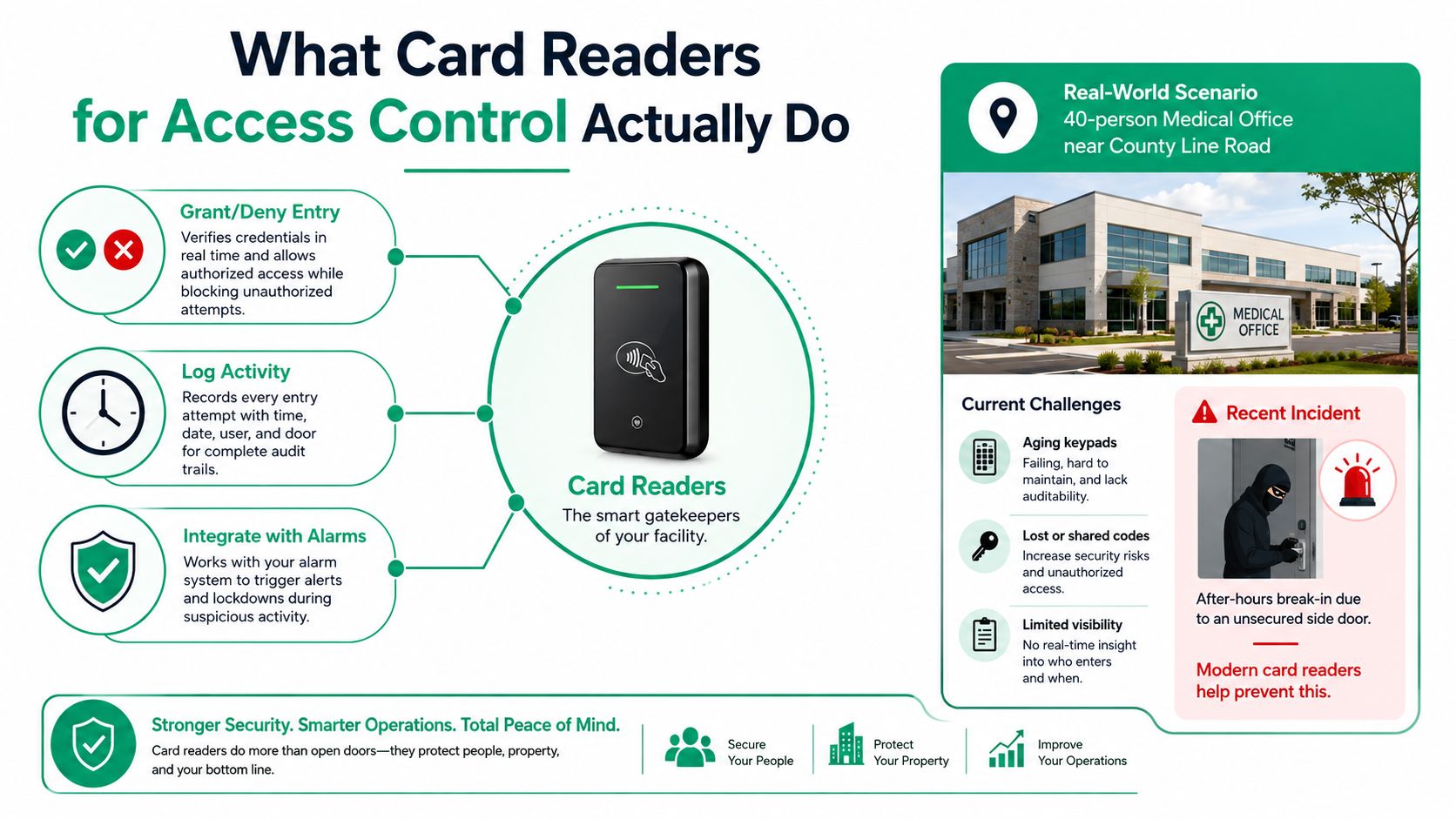
A clean mental model helps. The credential is what the user carries, the reader captures it, the controller decides yes or no, and the management software handles permissions, logs, and reporting. If your vendor can't separate those four pieces in plain English, keep shopping.
If you want a compliance-minded reference for reader selection, the WA compliant card reader tips resource is a useful way to think about policy, placement, and user flow. The details differ by market, but the buying logic is the same. Good access control starts with matching the door to the workflow, not with chasing shiny hardware.
The Three Reader Generations You Will See in the Wild
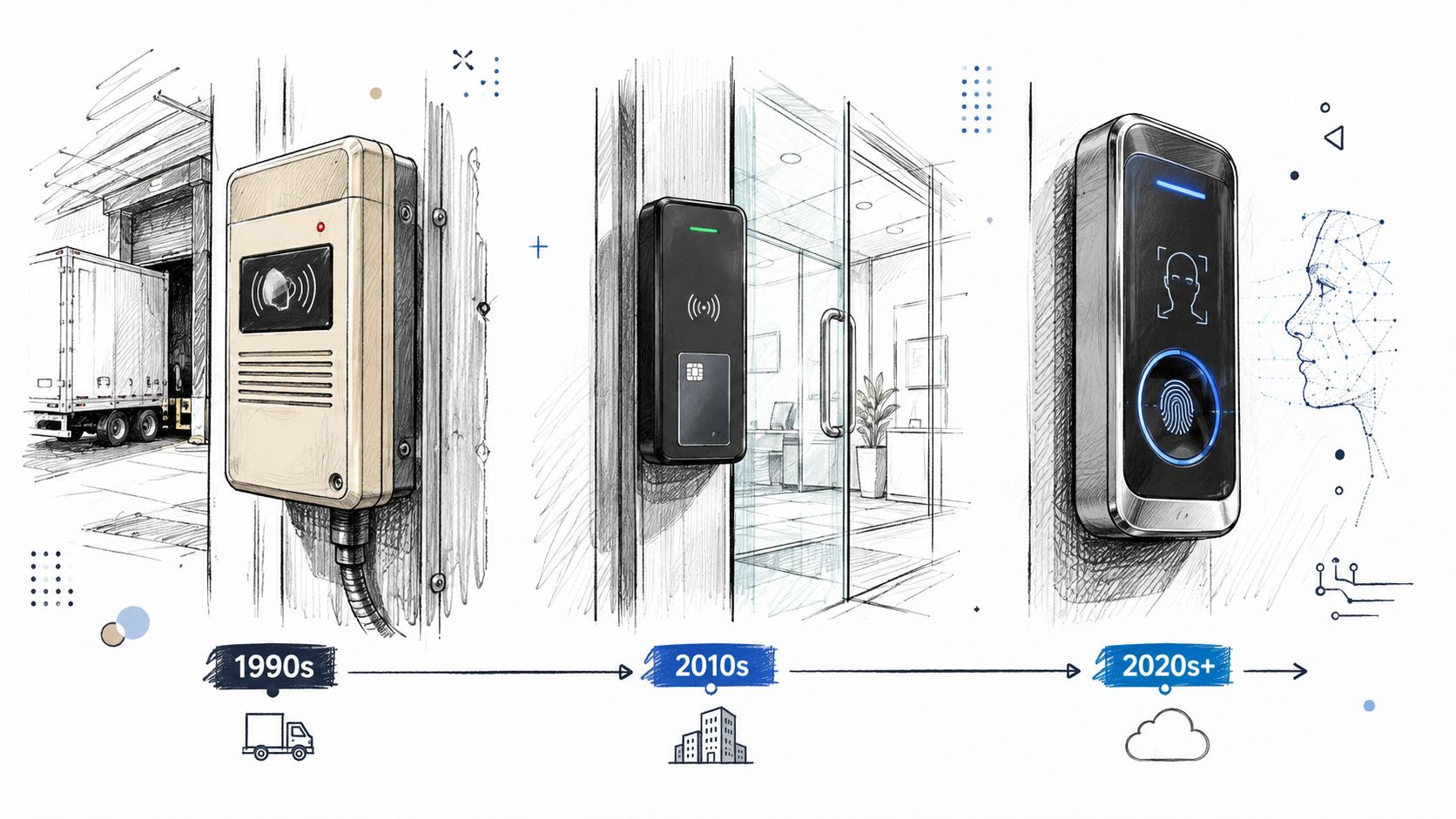
A lot of Central Indiana buildings are running mixed fleets, and that is normal. You will see an old proximity reader on the dock, a smarter unit at the front door, and maybe a legacy keypad on a side entrance nobody likes to talk about. That mix tells you more about budget history than about security maturity.
A lot of owners ask what generation they should buy, and the answer is usually already on the wall. Card readers are part of a credential-mix decision, not a hardware-only purchase. If your building has HIPAA concerns, CMMC obligations, or a NIST CSF program to support, the reader choice has to fit the way you issue credentials, track access, and handle staff turnover. A reader that works fine for a low-risk warehouse door can be the wrong call for a clinic, a contractor handling federal work, or an office that needs cleaner audit trails.
The timeline matters because each generation solved a different problem. Magnetic stripe cards were first tested by IBM for access control in 1960, and by the 1980s they had already pushed out earlier punch-card systems. Proximity cards reached the U.S. market in the early 1970s and became the dominant access method for nearly 20 years in the 1990s because they were cheap and hard to counterfeit. Contactless smart cards emerged in the late 1990s to around 2000, which is why they are the modern baseline in better-managed environments. Locksmith Ledger
What each generation means in plain English
- Magnetic stripe: cheap and old, but easy to outgrow.
- Proximity: practical and simple, still common on side doors and older retrofits.
- Contactless smart card: better for modern control, especially when you care about harder-to-clone credentials and cleaner auditing.
The problem with old prox gear is not that it stops working. It keeps working right up until somebody copies a badge, hands it around, or reuses a credential that should have been retired. I have seen that happen in real buildings, and it is rarely a dramatic breach. It is usually a basic access-control mistake that no one bothered to clean up because the door still granted entry.
A mixed fleet is not the problem. Extending the life of the weakest reader is. If the front entrance got upgraded and the loading dock did not, attackers will look for the softer door first. If you are also weighing stronger identity methods, the password and biometrics guide for Central Indiana businesses is a useful reference for how cards fit alongside other credentials.
Credential Types and What They Cost You in Friction
Owners usually ask which credential is “best,” but the better question is which credential your staff will use without creating problems at the door. A credential that looks stronger on paper but is annoying in daily use creates backups, tailgating, and workarounds. That is not security. It is a bad habit with hardware attached.
Read range is part of the user experience
125 kHz proximity credentials are typically read at around 10 cm Academic OUP. 13.56 MHz smart cards such as MIFARE and iCLASS are often read at about 6 to 9 cm Sourcesecurity.com. DESFire encrypted credentials often require only 1 to 2 cm for secure authentication.
That short range is deliberate. It cuts down on accidental reads and makes people tap on purpose. It also means door mullion placement, mounting height, and card orientation matter more than many business owners expect. If the reader is mounted poorly, your “simple” door turns into a daily nuisance.
In a Central Indiana office, warehouse, or clinic, that nuisance shows up fast. Front desk staff get tired of coaching people through a reader that only works at one angle, and employees start propping doors or holding the card out like they are trying to catch a signal. That is where the credential mix matters as much as the reader itself, because HIPAA, CMMC, and NIST CSF all reward tighter access control and cleaner accountability. If you are also trying to reduce badge sharing and lost-card chaos, these access-control MFA best practices line up with the way I would design a system for a Greenwood business.
The trade-off table worth keeping
| Credential Type | Typical Frequency | Read Range | Security Level |
|---|---|---|---|
| Proximity badge | 125 kHz | About 10 cm | Basic, legacy |
| Smart card | 13.56 MHz | About 6 to 9 cm | Better, modern baseline |
| Encrypted smart card | 13.56 MHz class | About 1 to 2 cm | Stronger, tighter control |
| Bluetooth or mobile credential | Varies by platform | Depends on policy and device behavior | Flexible, policy-driven |
Mobile credentials and Bluetooth readers make sense when you want fewer physical badges and tighter revocation control. They also fit better when you have staff who already carry phones all day and you do not want another plastic card to track. They are not magic, though. A weak network or sloppy policy gives you the same old mistakes, just in a shinier wrapper.
The decision is friction versus control. Proximity badges are easy, but they age poorly. Smart cards give you a better baseline for modern access control. Encrypted smart cards tighten the door further and make more sense where auditability matters, especially in healthcare, defense work, or anywhere a lost credential cannot be shrugged off as a minor annoyance. Mobile credentials can be a good fit, but only if your people keep their devices updated and your access rules are disciplined.
Wiegand vs OSDP and Why Your Installer Should Care
A reader choice is a wiring choice, a security choice, and a support choice. If a vendor is still pushing Wiegand for a new install, they are selling you yesterday's compromise. OSDP gives you a two-way encrypted path, and that matters the moment you want better supervision, cleaner troubleshooting, or a system that does not collapse into a cable-guessing contest later.
The distance and protocol problem
Legacy Wiegand outputs are commonly limited to about 152 m Anixter PDF. RS-485-based reader links can run much farther, and one multi-technology reader family lists RS-485/GE F/2F systems at up to 914 m at 12 VDC in the same reference. That spread matters in the world, especially in larger buildings, retrofit runs, and older installs where voltage drop, extra cable, and panel location all change the bill.
In Central Indiana, that shows up fast. A warehouse in Johnson County, a clinic on the south side, or a multi-tenant office near downtown Indy can all turn a simple reader swap into a cabling problem if the installer picked the wrong protocol from the start. Distance is not trivia. It decides whether the reader stays where it belongs or gets moved, rewired, or replaced before it should.
Why OSDP is the smarter default
OSDP supports encrypted communication between the reader and panel, which closes the sniffing weakness that makes Wiegand easy to intercept. This is the primary reason to care. If you are buying new hardware today, it should be OSDP-ready even if the panel still has legacy Wiegand ports. Otherwise, you are locking yourself into a short-term install that will cost more when the rest of the system catches up.
For a business owner, this is not about chasing the newest label on a product sheet. It is about avoiding a dead-end protocol that forces a future rip-and-replace. If you are trying to stay aligned with HIPAA, CMMC, or even a sensible NIST CSF posture, the reader has to fit into a system that can support access logs, tighter control over credentials, and cleaner handoff to IT. That is where the cable plant matters too, because the reader and the wiring have to work together. A solid structured cabling plan helps the door hardware behave like part of the network, not a random add-on that nobody wants to troubleshoot later. You can see the physical side of that in this structured cabling guide.
The cheapest reader is expensive if it traps you into a dead-end protocol.
Choosing the Right Reader for Your Compliance and Risk Profile
A reader choice is a compliance choice whether people like that or not. A Greenwood dental practice handling ePHI should care about audit trails, encrypted credentials, and who can change access rights. A south side defense subcontractor needs a different mindset, because CMMC pushes the conversation toward controlled access, documented logs, and tighter role-based permissions.
Start with the door that matters most
- Count the doors: Don't buy for the whole building before you know which doors need control.
- Identify the high-risk point: Server rooms, records storage, chemical closets, loading docks, and side entries usually matter more than the lobby.
- Match credential type to risk: A front office can often stay simple, while sensitive spaces deserve encrypted credentials or stronger authentication.
- Confirm panel compatibility: If the reader doesn't speak the panel's language, the install will be a future headache.
- Tie in IT policy: Directory services, access logs, and network segmentation should support the physical system, not sit beside it like an afterthought.
If you're reviewing full security stacks, the browse security systems page from systec POS-Technology GmbH is a good reminder that access control is part of a bigger facility-security picture, not a stand-alone gadget. That's the right lens for NIST CSF thinking too, because access control, logging, and recovery all support the same risk-reduction goal.
A manufacturer in Hamilton County may not need the same credential strength as a medical office, but it still needs to stop tailgating and preserve a usable attendance record. That's where UniFi networking for IP-based access controllers and Bitdefender GravityZone on the IT side start to matter, because physical access and endpoint security reinforce each other. If the network is weak, access events become just another blind spot.
For Indiana SMBs, the smartest move is rarely “buy the fanciest reader.” It's “buy the reader that fits the risk, the panel, and the compliance pressure you live with.” For more on how local firms should think about policy and controls, this compliance guide for Indiana SMBs lines up with the way I'd map access decisions to business risk.
Installation, Integration, and the Mistakes That Wreck SMB Budgets
Most reader failures aren't caused by bad hardware. They come from lazy installation, wrong assumptions about the door, or no one thinking through the system after the box gets mounted. That's why I trust a managed deployment more than a weekend DIY job for almost every SMB I've worked with in the Indianapolis area.
Where installs go sideways
Door mullion placement, mounting height, and card orientation directly affect read failures. Exterior doors on loading docks and gates also need weather and vandal protection, because Indiana freeze-thaw cycles punish cheap plastic and sloppy mounting. If the reader isn't protected and aligned correctly, you'll get intermittent failures that sound random but aren't.
In our 17 years of local service, the most common post-install call we get is a reader that worked on the bench but not on the door. It's almost always cable distance or a panel protocol mismatch. That's not bad luck, it's a planning failure.
The install sequence that actually works
- Cable run gets verified before anything is mounted.
- Panel location gets checked for access, power, and serviceability.
- Reader mount gets aligned to the hand position, not the drawing.
- Commissioning confirms the reader talks to the panel correctly.
- Credential enrollment happens after the system proves it can grant and deny access.
Integration is where most SMBs underinvest. The access system should connect to HR onboarding, directory services, and off-site backups of the access database. If a former employee still has a valid credential because nobody cleaned up the records, the reader did its job and the process failed.
For a deeper take on physical security integration, this guide to deploying integrated access control is a solid reference point. The big lesson is simple. A reader that isn't integrated into the business process becomes a nice-looking hole in the wall.
Costs, ROI, and When to Bring in a Managed IT Partner
People get sticker shock from access control, then spend three times as much cleaning up the mess after a bad install. That's the wrong place to save money. The smarter view is total cost of ownership, because a cheap reader that causes downtime, rework, or security gaps is a bad purchase no matter what the invoice says.
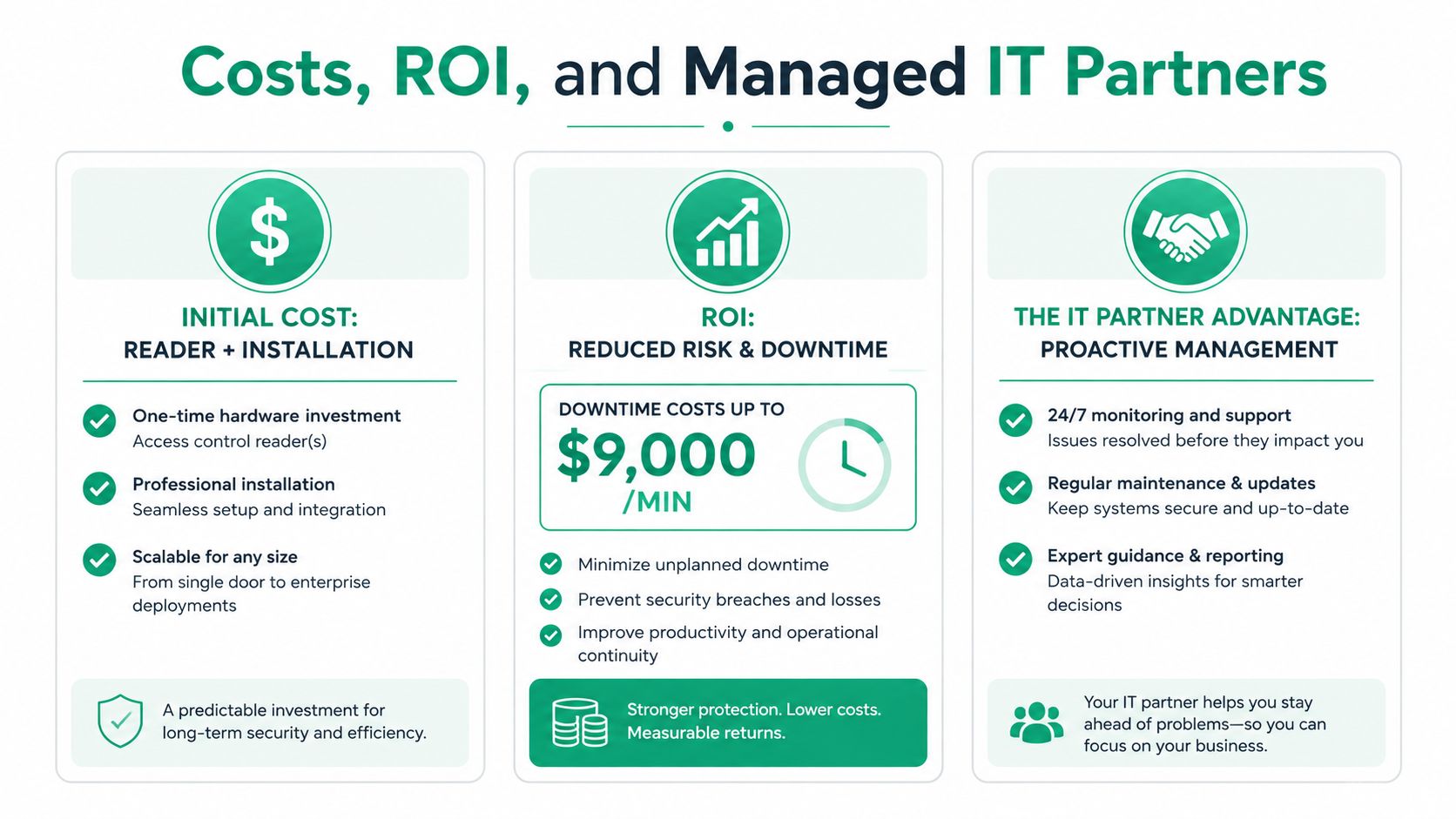
Downtime can cost up to $9,000 per minute for mid-sized operations, according to the business continuity figures in the brief. That number should change how you think about a reader outage on a busy Monday morning in a downtown Indy tech hub. If a door system locks out staff, delays deliveries, or blocks patient flow, the “savings” from DIY vanish fast.
What SMBs really pay for
Reader hardware itself is only one part of the bill. You also pay for cabling, labor, panel work, credential enrollment, integration, and cleanup when the first install isn't right. The managed-IT question is whether you want to treat that as a one-time guess or as a controlled, documented deployment with someone accountable when the door doesn't behave.
That's where the ROI gets obvious. A professional install lowers risk, reduces wasted tech time, and turns the system into a predictable monthly support line instead of an emergency repair. It also means the access database, backup plan, and credential policy are handled with the same discipline you'd expect from Zero Trust architecture in the broader environment.
My take: if a door controls payroll, patient flow, records, or equipment, don't let a bargain install decide your risk profile.
There's also a recovery angle most owners overlook. If the access database gets corrupted, you may need bit-level data recovery work, not just a reinstall. Pair that with SOC-as-a-Service monitoring and you've got a real operational posture, not a pile of disconnected tools.
If you're in Greenwood or anywhere in the Indianapolis area, the right next step is a Free Network Assessment or Security Risk Audit before you buy hardware. Finchum Fixes IT can help you map door risk, network health, and access-control compatibility so you don't waste money on the wrong reader or the wrong install. Visit Finchum Fixes IT and get the project scoped before the first cable gets pulled.
Finchum Fixes IT helps Greenwood and Indianapolis businesses choose the right access control setup, tighten network security, and avoid the kind of downtime that turns a cheap install into an expensive mess. If you want a straight answer on readers, credentials, and integration, reach out for a Free Network Assessment or Security Risk Audit and get the plan before you buy the hardware.