AI Threat Detection: A Guide for Indiana Businesses
A lot of Indiana business owners still think cyber risk looks like a dramatic movie scene. A hooded attacker. A giant company. A million alerts flying across a wall of screens.
Real life is less cinematic. It's a Greenwood office park with an aging Windows server humming in a closet. It's a law office in an older brick building near downtown Indy with patchy Wi-Fi and a staff that's too busy to second-guess every email. It's a manufacturer off the I-65 corridor that can't afford even a short outage because production, shipping, payroll, and vendor communication all ride on the same network.
That's why AI threat detection matters now. Not because it sounds advanced, but because small and midsize businesses already face the same kinds of attack pressure as larger firms, just without the same bench depth.
Your Business Is a Target But AI Can Fight Back
A Greenwood shop owner comes in on Monday and finds the scheduling system lagging, shared files acting strange, and one employee unable to log in. It does not look like a headline-making cyberattack. It looks like a normal IT problem, right up until the phones start failing, invoices stall, and staff cannot get work done.
That is how many incidents start for Indiana small businesses. In Johnson County, Hamilton County, and across the south side of Indy, attackers usually are not picking targets for prestige. They look for companies that rely on a handful of systems to keep work moving, have limited in-house security coverage, and cannot afford much downtime.
A dental office, machine shop, accounting firm, or local contractor can be just as profitable to disrupt as a larger company. Sometimes more so, because smaller teams often do not have anyone watching after-hours login activity, unusual file access, or endpoint alerts piling up over the weekend.
Downtime is the part owners feel first.
If dispatch software is unavailable, trucks sit. If QuickBooks or your ERP is locked up, billing stops. If Microsoft 365 accounts are hijacked, email turns into a liability instead of a tool. I have seen businesses focus on replacing a bad switch or cleaning up Wi-Fi issues, only to miss the bigger risk sitting behind those distractions: no one is checking whether user behavior, device activity, and cloud logins still make sense.
That is the practical case for AI threat detection. It gives smaller businesses a way to spot suspicious activity earlier, before a stolen password, malicious inbox rule, or infected laptop turns into a full outage. For SMBs around Greenwood, Franklin, or Noblesville, that matters more than any buzzword. The goal is to keep operations running and contain trouble while it is still small.
Why old defenses miss the new reality
Attackers now move faster, test more angles, and blend in better than the old antivirus model was built to catch. A file can look harmless. A login can use the right password. A user account can technically have permission to open a folder it should never touch at 2:13 a.m.
Traditional tools still have value, but they usually answer a narrow question: is this known to be bad? Many current threats do not present themselves that way. They show up as abnormal patterns across email, endpoints, firewalls, Microsoft 365, VPN, and cloud apps. That is where smaller companies get hurt. The signals were there, but no one had time to connect them.
If you want a baseline before adding smarter detection, start with this small business cybersecurity checklist for 2026.
Security staff who want to build deeper technical judgment around Microsoft cloud controls can also prepare for your AZ-500 certification.
What this changes for SMBs
AI threat detection improves triage first. That matters for a business with one IT manager, a part-time provider, or no security analyst at all.
- It flags behavior that does not fit your normal environment, such as an office manager account pulling large volumes of data after hours.
- It helps sort high-risk alerts from routine noise, so your team is not chasing every failed login or harmless script.
- It adapts to how your business actually works, which is important in mixed environments with on-prem servers, remote laptops, Microsoft 365, and line-of-business apps that were never designed to work neatly together.
There is a trade-off, and owners should hear it plainly. AI does not remove the need for good policies, patching, MFA, backups, or human review. It improves detection and prioritization. It does not fix weak admin practices or a neglected network closet by itself.
For Indiana SMBs, that is still a major step forward. A small business rarely gets into trouble because it lacked one more dashboard. It gets into trouble because suspicious activity blended into routine IT noise until the business was already down.
Beyond Antivirus How AI Security Actually Works
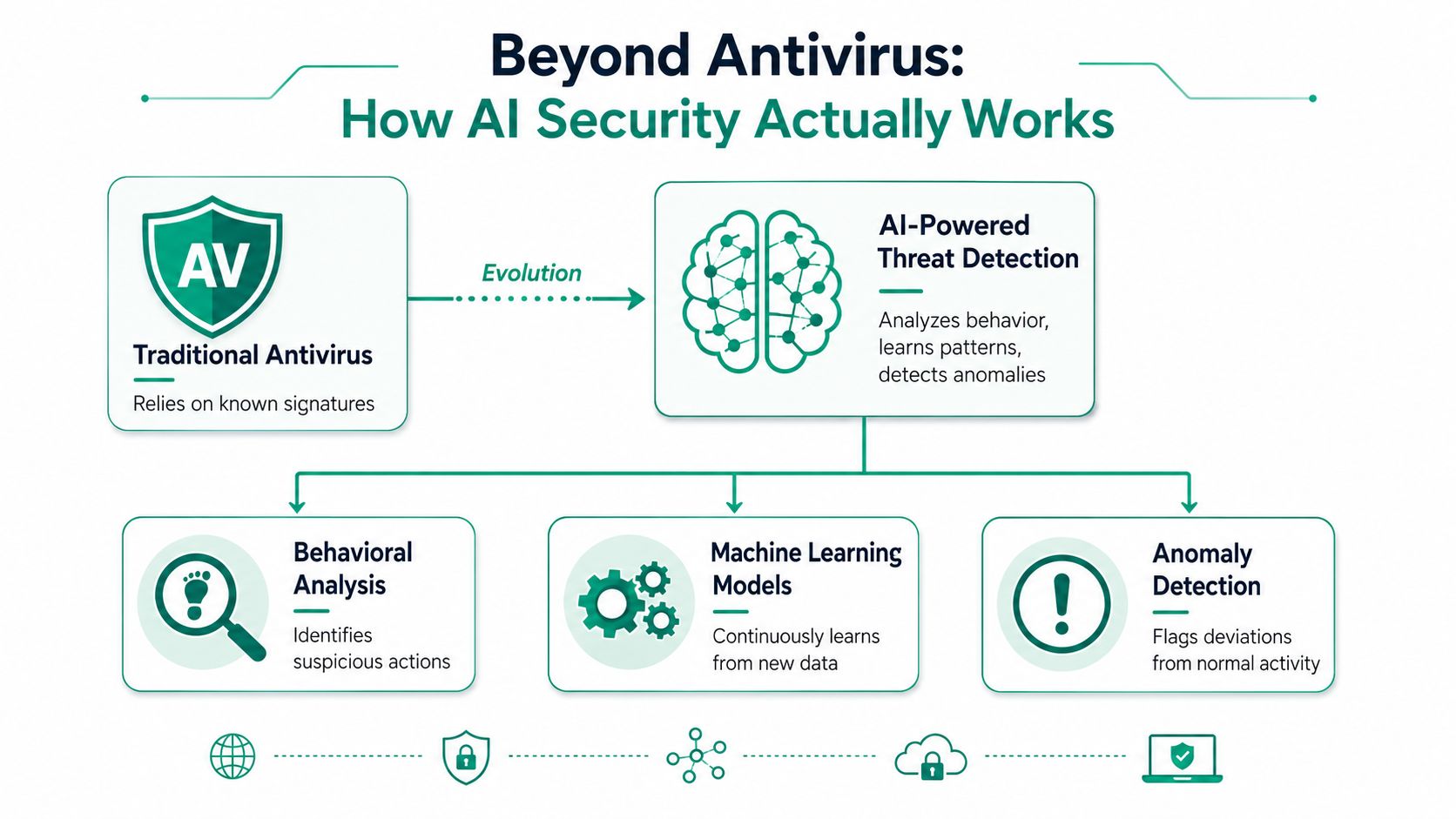
Traditional antivirus is like a front desk guard with a binder full of mugshots. If the bad file matches something in the binder, it gets stopped. If it looks new, altered, or slightly disguised, it often slips through.
AI threat detection works more like an experienced floor manager who knows the building's routines. It notices when an accounting laptop suddenly starts making odd outbound connections late at night. It notices when a user account signs in from an unusual pattern, then touches systems it normally never uses. It pays attention to behavior, not just file fingerprints.
The shift from signatures to behavior
A core milestone in this field is the move from static, signature-based tools toward continuous learning systems that can identify previously unseen threats, including zero-day activity, by flagging deviations from normal behavior (Palo Alto Networks on AI in threat detection).
That sounds technical, but the business meaning is simple. Your environment produces too much data for manual review. User logins, endpoint events, firewall traffic, SaaS access, cloud workload activity, and email telemetry create a constant stream. AI systems compare that live stream to a baseline and surface what looks off.
The main pieces that matter
A business owner doesn't need to become a data scientist to understand the moving parts. These are the pieces worth knowing:
- Behavioral analytics watches your network's habits. It learns who usually accesses what, from where, and when.
- Anomaly detection flags the odd event. That could be an impossible travel sign-in, unexpected privilege use, or a workstation reaching into systems it normally ignores.
- Machine learning models sort through patterns across logs and endpoints that a human analyst would never catch quickly enough.
- Natural language processing helps systems inspect email content, security reports, and text-heavy logs for intent, tone, and suspicious context.
What works and what doesn't
What works is feeding the system clean, useful telemetry from endpoints, identity tools, firewalls, email, and cloud platforms. What doesn't work is turning on “AI” inside one isolated product and expecting it to understand your whole environment.
That's why architecture matters. If your team wants to understand the security side of Microsoft cloud controls more thoroughly, especially around identities, workloads, and protection models, it helps to prepare for your AZ-500 certification with hands-on practice instead of only reading vendor brochures.
For a more business-focused view of how these systems fit broader operations, this guide to machine learning business applications for Indiana companies connects the technical side to practical deployment.
Making Your EDR and SIEM Smarter Not Noisier
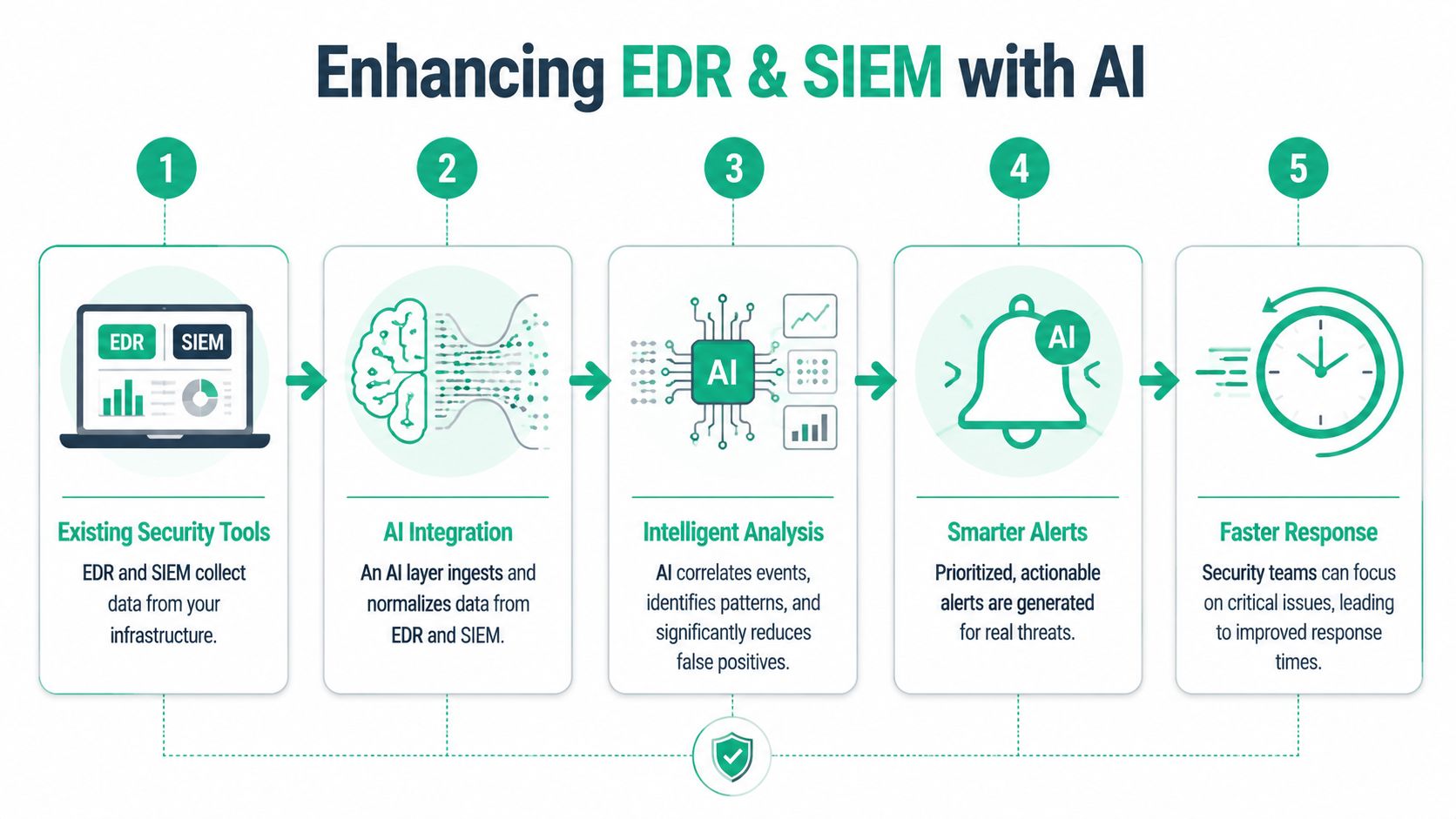
Some Indiana companies already have decent tooling. They may run Bitdefender GravityZone on endpoints, collect logs from Microsoft 365, and pipe firewall events from UniFi or Meraki gear into a SIEM. The problem usually isn't missing data. The problem is too much of it.
That's where AI threat detection earns its keep. It acts as the intelligence layer that sits above existing telemetry and helps separate “interesting” from “urgent.”
Why alert fatigue wastes money
A noisy security stack burns time in two ways. First, internal staff chase harmless anomalies while real work piles up. Second, they start ignoring alerts because the signal-to-noise ratio gets ugly.
For a growing company in Hamilton County or along the I-65 corridor, that turns tech labor into overhead instead of productive output. Every hour spent sorting junk alerts is an hour not spent supporting users, improving systems, or keeping client-facing operations stable.
Practical rule: If your tools create more confusion than clarity, the issue usually isn't that you need more dashboards. It's that your environment lacks correlation, tuning, and context.
How AI improves tools you already own
AI can make EDR and SIEM platforms more useful by doing a few things well:
| Need | Without AI context | With AI context |
|---|---|---|
| Endpoint events | Large stream of isolated detections | Related actions tied into a single incident path |
| Firewall logs | Connection data without business meaning | Suspicious traffic patterns grouped and prioritized |
| Identity alerts | Login anomalies reviewed one by one | User behavior analyzed across systems |
| Analyst workflow | Manual triage and repetition | Faster focus on the alerts that matter most |
A well-built stack doesn't replace your EDR or SIEM. It makes them worth the subscription.
There's a useful primer on architecting SIEM for modern infrastructure if you want to understand how log pipelines, normalization, and detection logic fit together before adding an AI layer.
This is also where managed monitoring becomes valuable. A small company usually doesn't need a full in-house SOC. It needs smart tooling, solid playbooks, and experts who can interpret what the system sees. If you're weighing that model, this explanation of managed detection and response for Indiana businesses lays out the trade-offs clearly.
A quick visual on the workflow helps:
Faster Responses and Honest Limitations
Speed matters in security because attackers count on delay. They know most small organizations won't notice credential abuse, unusual lateral movement, or suspicious data access immediately. AI threat detection can change that, but only if it's deployed with discipline.
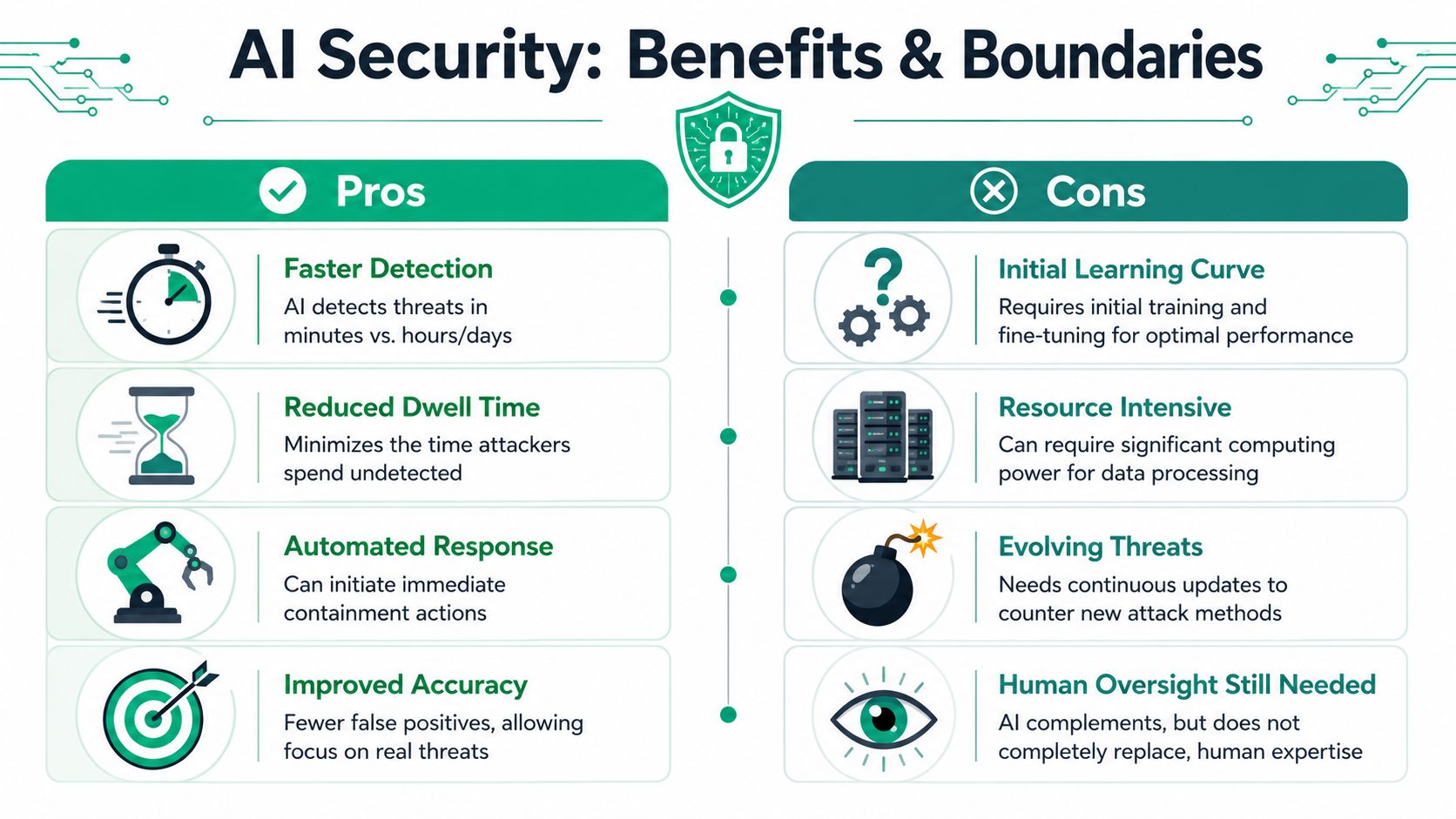
In high-risk environments, AI-led systems can achieve up to 98% threat detection and 70% faster incident response (Proofpoint on AI threat detection). Those results get attention for a reason. Better prioritization gives teams a chance to contain threats before they turn into a long outage, legal mess, or backup restore exercise.
Where the value shows up
For SMBs, the upside usually shows up in very practical places:
- Earlier containment means fewer systems get touched before the account or endpoint is isolated.
- Better triage means your IT team stops wasting mornings on harmless noise.
- Shorter disruption windows protect production schedules, appointments, billing cycles, and client response times.
- More predictable operations make it easier to budget monthly instead of getting blindsided by emergency remediation work.
In plain terms, this is how wasted tech time turns back into productive time. Your staff can work. Your support team can focus on business systems. Leadership gets fewer ugly surprises.
Where people get burned
AI security isn't “set it and forget it.” It can fail in boring ways.
If the system ingests poor-quality logs, missing timestamps, or badly configured endpoint data, the model learns a distorted baseline. If nobody tunes it when your company adds remote staff, opens a second location, changes ERP platforms, or migrates workloads to Azure, false positives climb and trust drops. If nobody writes a response plan, great detections still die in a ticket queue.
Good AI security starts as a data problem before it becomes a detection success.
That's why local context matters. A logistics firm in Hamilton County behaves differently from a dental practice in Greenwood or a machine shop near Shelbyville. Normal traffic, user movement, vendor access, and after-hours activity vary by business model. Tuning has to reflect that.
The human piece still matters
The strongest setups pair AI with people who can validate, contain, and communicate. Zero Trust architecture, proper segmentation, endpoint controls, email security, and immutable off-site backups still matter. AI improves your visibility. It doesn't erase the need for layered defense.
That's also why incident response planning stays on the table even with better tooling. If you haven't mapped out who isolates devices, who talks to staff, who contacts legal counsel or cyber insurance, and how systems get restored, this guide to incident response planning for Indy SMBs is worth your time.
An AI Security Plan for Johnson County SMBs
Most Johnson County SMBs don't need a giant security data lake on day one. They need a sane rollout that fits the business they run.
Start with the systems that already tell the truth about what's happening. Endpoint events from laptops and desktops. Firewall and gateway traffic. Identity data from Microsoft 365 or Google Workspace. Server logs. Cloud workload telemetry if you use Azure or AWS. Email security events. Those are the inputs that help an AI model understand your environment's normal rhythm.
A practical rollout path
A workable plan usually looks like this:
-
Map the crown jewels first
Identify what causes real pain if it goes down. File shares, ERP, QuickBooks access, scheduling, VoIP, manufacturing systems, line-of-business apps, remote desktop infrastructure. -
Pull telemetry from existing tools
Many SMBs already own useful parts of the puzzle. EDR, firewalls, switches, cloud identities, backup platforms, and email security all generate data worth using. -
Pick deployment based on staffing and risk
Cloud-based AI detection is often easier to manage and faster to roll out. On-prem or hybrid approaches can make sense when latency, privacy, or specific operational controls matter more. -
Tune to the environment
A shop floor kiosk, an executive laptop, and a bookkeeper's workstation should not all have the same behavior profile.
Cloud versus on-prem for Indiana SMBs
Here's the short version:
- Cloud-based platforms fit businesses that want lower maintenance, faster deployment, and easier scaling.
- On-prem or hybrid models fit environments with tighter data handling rules, legacy applications, or highly predictable internal traffic patterns.
- Mixed environments are common. A lot of Indiana firms have one foot in Microsoft 365 and one foot on an older server that still runs something critical.
Integration matters more than branding
The best AI threat detection platform is usually the one that integrates cleanly with what you already have. If your network runs UniFi switching and wireless, your firewall comes from SonicWall, your endpoints use Bitdefender GravityZone, and your backups are immutable off-site replicas, the AI layer needs to ingest those signals without creating another management headache.
If a vendor can't explain how their platform handles your current stack, they're selling a demo, not a deployment.
A good first move is a formal risk review. This cyber security risk assessment template for Indiana businesses helps structure that conversation around business impact instead of gadget shopping.
Staying Compliant with HIPAA CMMC and NIST
Compliance-driven organizations usually hear “AI” and think “new audit problem.” That's understandable. If you handle patient information, defense-related project data, financial records, or sensitive client files, your first question isn't whether the detection engine is smart. It's whether the rollout creates new exposure.
Used correctly, AI threat detection can support compliance work instead of complicating it.
Why compliance teams should care
HIPAA, CMMC, and the NIST CSF all push organizations toward better visibility, stronger access control, logging, and quicker response. AI-driven monitoring helps by improving how security teams spot odd behavior across users, endpoints, networks, and cloud services. It can also create cleaner evidence trails for audits and internal reviews.
For teams trying to tighten policy around identities and system access, a practical guide to NIST for security teams is a useful reference point.
The privacy question is real
The sticking point is data centralization. A medical office in Greenwood or a defense supplier near the Indy metro may not want sensitive logs copied into a giant shared analytics pool.
One useful answer is federated learning, which allows AI models to be trained on local data without centralizing sensitive logs, making it relevant for organizations working under privacy rules such as HIPAA or CMMC (Oligo Security on AI threat detection applications).
That's important because it changes the architecture discussion. Instead of asking, “Do we have to ship everything somewhere else?” you can ask, “How do we preserve local control while still detecting subtle threats?”
What this looks like in practice
For regulated SMBs, smart deployment usually includes:
- Local data handling rules for protected systems
- Role-based access controls around who sees alerts and raw evidence
- Documented retention policies for logs and investigation artifacts
- Security review of AI vendors before any rollout
- Alignment with your broader framework, whether that's HIPAA safeguards, CMMC maturity requirements, or NIST CSF controls
That approach gives compliance officers and business owners the same thing they both want. Better proof of due care without losing control of sensitive information.
Finding the Right AI Security Partner
Most businesses in Greenwood or Indianapolis shouldn't try to judge AI security tools by marketing language. Every vendor says their platform is intelligent. That's not the primary question.
The question is whether the tool, the deployment model, and the people behind it can protect your business without creating more noise, cost, and downtime.
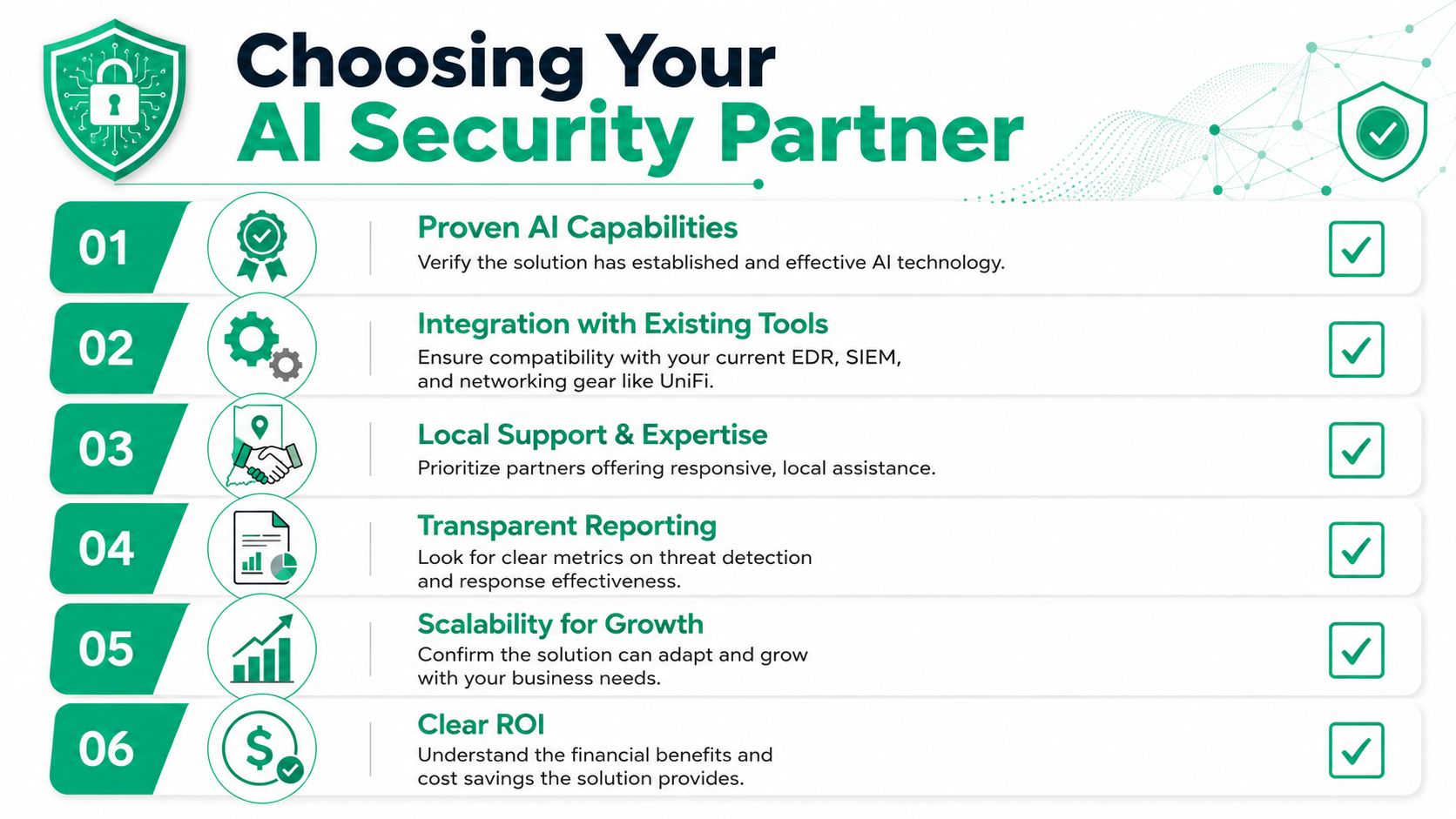
Questions worth asking before you sign anything
Use this checklist when you evaluate providers:
-
Does it fit my current stack
Ask how the system integrates with your EDR, SIEM, Microsoft 365 tenant, firewall, switches, wireless, backup platform, and cloud workloads. -
Who tunes the models over time
AI models drift when user behavior, business hours, locations, and applications change. Somebody has to own that. -
What happens when a real threat appears
Detection is only half the job. Ask who validates it, who isolates the endpoint, who contacts your team, and what the escalation path looks like. -
How do you reduce false alarms
If the answer is vague, expect alert fatigue. -
Can the reporting help leadership
Owners and operations managers need reporting they can understand. Not just security teams. -
Will this support continuity, not just compliance
The right system should help keep production moving, staff working, and revenue flowing during a bad day.
Local support still matters
This is one area where local expertise beats generic onboarding. Indiana businesses have odd building layouts, mixed infrastructure, old line-of-business apps, and plenty of environments where a single outage disrupts the whole office. A provider that understands old brick downtown spaces, suburban office parks, warehouse Wi-Fi dead zones, latency-sensitive VoIP, and hybrid server-cloud setups will tune the system better from the start.
That matters even more when your security posture intersects with networking, backup strategy, and recovery planning. Sometimes the underlying issue isn't the malware alert. It's the flat network, the weak admin controls, or the backup process that looked fine until a restore was required.
A strong partner should be able to talk about Zero Trust architecture, SOC-as-a-Service monitoring, latency-optimized mesh nodes, immutable off-site backups, and, when recovery goes sideways, the difference between routine restore work and true bit-level data recovery. That's how you know you're dealing with people who've spent time in real environments, not just sales demos.
If your business is in Greenwood, Indianapolis, Johnson County, or anywhere along the I-65 corridor, Finchum Fixes IT can help you sort out what's real, what's noise, and what needs fixing first. Schedule a Free Network Assessment or Security Risk Audit to see whether AI threat detection fits your environment, your compliance needs, and your budget before downtime makes the decision for you.