Cybersecurity Risk Management for Indiana SMBs
A Greenwood business owner usually doesn't need a lecture. They need the server back online, the phones ringing again, and the payroll files intact. Cybersecurity risk management is the discipline that keeps a phishing click from turning into an outage, a compliance mess, and a month of lost billable time.
Why Indiana SMBs Can No Longer Wing Their Security
Monday morning hits fast in Johnson County. A manufacturing shop opens the shop-floor system, finds the back-office server encrypted, and learns the weekend click came from a phishing email nobody challenged. The owner thought the business had “antivirus,” which is where a lot of Indy metro SMBs get fooled, because antivirus is a tool, not a program.
The problem is business continuity. IBM's 2024 data put the average cost of a data breach at $4.88 million, up 10% from 2023, and Quantivate says the average time to identify and contain a breach is 279 days (Kiteworks summary of 2024 cybersecurity landscape statistics). That kind of dwell time is why risk management can't stop at prevention. If detection and response lag, loss size grows while staff sit idle and production stalls.
Practical rule: If a security tool doesn't help you detect faster, recover cleaner, or decide sooner, it's not reducing business risk.
From reactive cleanup to repeatable control
The I-65 corridor is packed with growing SMBs, and most of them can't afford random security decisions. Quantivate reports that 87% of organizations still treat technology risk management as siloed and reactive, and only 18% use automated processes for IT risk data collection and reporting. That's why so many owners end up paying for one-off fixes instead of building a budget they can predict.
Cybersecurity risk management means identifying, analyzing, evaluating, and addressing threats as an ongoing process, not a one-time checklist. That's the business shift. A structured program turns wasted tech time into billable hours, fewer emergency calls, and monthly spending that doesn't jump every time a vendor email gets ignored over the weekend.
For a quick companion read on the basics, keep these cybersecurity tips for small business owners in Indiana handy when you're talking with your IT provider.
Defining Your Scope and Mapping Critical Assets
A 30-person accounting firm in Greenwood once thought its risk was mostly “the server in the closet.” Then someone inventoried the environment and found cloud tools scattered across personal email accounts, admin rights in the wrong hands, and no clear owner for vendor access. That's not a tech problem first, it's a scope problem.
Start with business goals, not devices
NIST's enterprise guidance says cyber risk should be integrated with enterprise risk management, with risk framing, assessment, response, and monitoring tied to business decisions (NIST IR 8286). In plain English, that means you need to know which systems move money, store regulated data, or keep the lights on. A file server, a cloud accounting app, and a payroll vendor don't get equal treatment just because they're all “IT.”
Build a simple asset register with these buckets:
- Endpoints and laptops, because lost or unmanaged devices often become the first entry point.
- Servers and storage, including the aging box in the back office and any virtualization hosts.
- Cloud accounts and SaaS tools, especially anything with admin access or invoice approval rights.
- Vendor integrations, because third-party access can outgrow internal controls.
- Sensitive data classes, such as customer records, health information, payment data, or defense-related information.
Once that inventory exists, tag each item by business criticality and sensitivity. HIPAA matters for healthcare clients, CMMC matters for defense contractors, and a general business still needs NIST CSF 2.0 because it gives leadership a shared language for what matters and what can wait.
If you need a practical starting point, this business impact analysis template helps map systems to revenue, downtime, and recovery priorities.
Shadow IT usually hides in plain sight, in a finance inbox, a department head's browser bookmarks, or a vendor portal nobody documented.
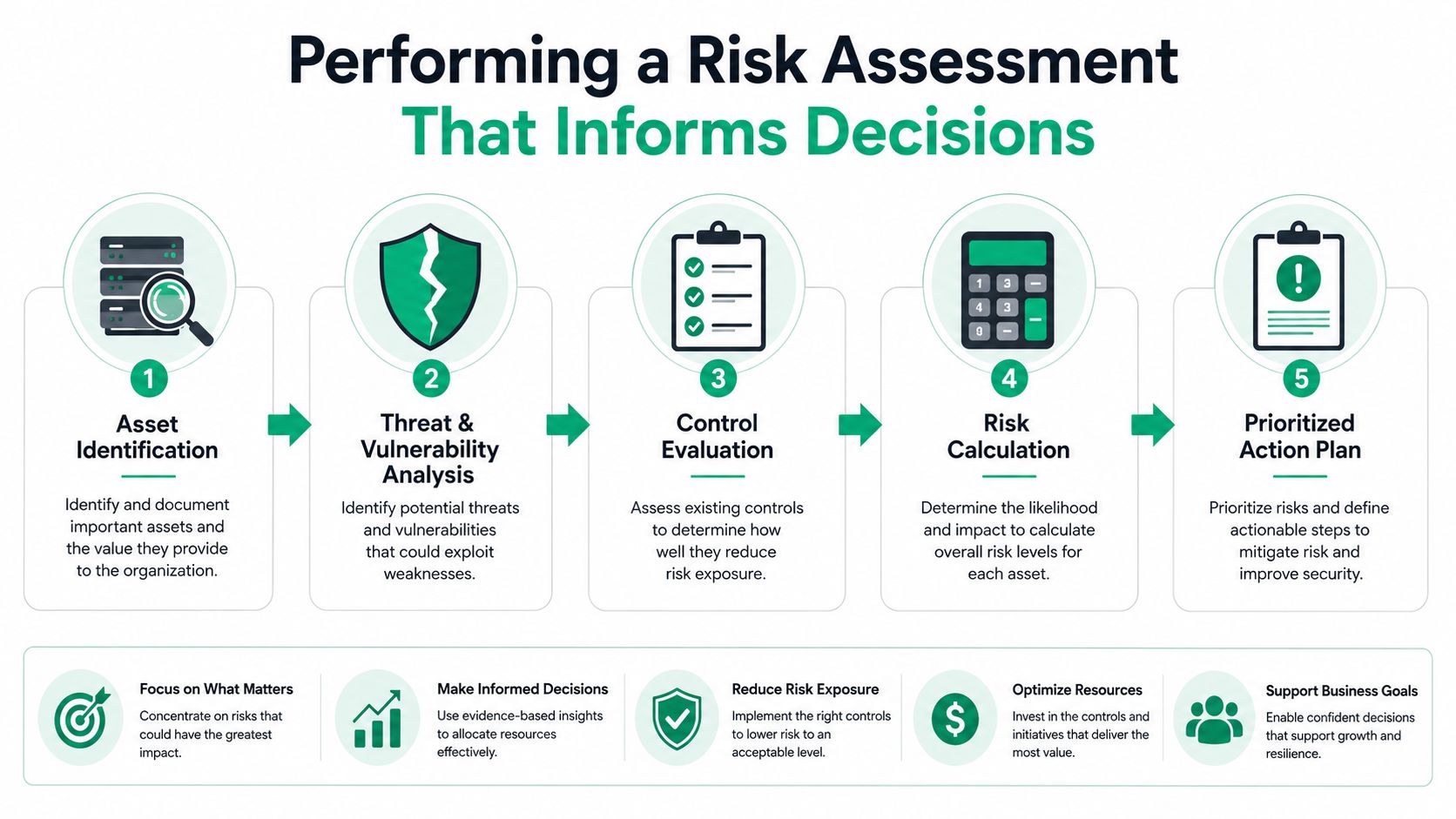
Performing a Risk Assessment That Actually Informs Decisions
A good assessment doesn't end as a PDF nobody opens. It ends as a short list of decisions: what to fix now, what to accept, and what to watch. The organizations that get this right keep the conversation tied to outage risk, data exposure, and who has budget authority.
Use simple scoring the business can understand
NIST's risk guidance for enterprise systems says security risk should be framed, assessed, responded to, and monitored so leaders can make risk-informed decisions across the organization (NIST IR 8286). That works best when likelihood and impact are kept simple enough for non-technical stakeholders to discuss without zoning out. I've had better luck with a three-tier scale, low, medium, high, than with fancy scoring that only the security team understands.
A useful way to think about it is this:
- Primary file server down for 48 hours, which can stop production, scheduling, billing, and customer service.
- Email compromised for a week, which can trigger phishing, invoice fraud, and legal cleanup.
- Vendor SaaS exposure, where access looks harmless until it becomes the path into payroll, tax, or customer records.
The point isn't to create drama. The point is to compare each scenario against your risk tolerance, then show where the business can absorb pain and where it can't. If the exposure crosses your tolerance, it's a treatment issue, not a theoretical concern.
Make the heat map useful, not decorative
A heat map only matters if the CEO, controller, or plant manager can glance at it and know what's urgent. Put risks into a matrix, then attach an owner, a due date, and the next action. If a risk sits in the red zone and nobody owns it, that's not a score, that's a liability.
For a practical worksheet, this cybersecurity risk assessment template for Indiana businesses keeps the process grounded in real operations instead of security theater.
Selecting and Implementing Controls Mapped to NIST CSF 2.0
NIST Cybersecurity Framework 2.0 adds Govern as a sixth core function, alongside Identify, Protect, Detect, Respond, and Recover (NIST CSF 2.0). That matters because security stops being a pure IT chore and becomes an executive discipline. For Indiana SMBs, that shift keeps the budget tied to business continuity, not panic spending after an incident.
Match controls to the job they do
A control only earns its keep if it reduces a specific risk you already identified. Zero Trust architecture helps when remote users connect from unmanaged networks. UniFi networking with proper VLAN segmentation helps separate guest Wi-Fi, office endpoints, and production devices so one compromised laptop doesn't roam everywhere.
For detection, SOC-as-a-Service monitoring and endpoint security like Bitdefender GravityZone give smaller teams a way to see alerts without staffing a full security operations center. For recovery, immutable off-site backups matter because they give you a clean copy when encryption or deletion hits the primary environment. NIST's updated risk-treatment guidance also gives a concrete example of improving the diversity of backup solutions so attackers have a harder time corrupting recovery media, along with patching under a formal vulnerability management policy such as POL-VM-001 (NIST IR 8286B-1).
If you want a practical companion for identity controls, these MFA best practices for 2026 fit neatly into a CSF 2.0 rollout.
Keep the controls auditable
Don't buy a tool and call it done. Document who owns it, what it protects, how it's tested, and what happens when it fails. If you're building toward broader maturity, step-by-step ISO 27001 guidance is useful because it reinforces the same habits, asset ownership, evidence, and repeatable review, without pretending documentation is the same thing as security.
| NIST CSF 2.0 Function | Control Category | SMB Implementation Example |
|---|---|---|
| Govern | Executive oversight | Quarterly risk review with owner assignments and budget approval |
| Identify | Asset and risk inventory | Register endpoints, SaaS tools, vendors, and regulated data |
| Protect | Access and data protection | MFA, encryption, segmentation, immutable backups |
| Detect | Monitoring | Bitdefender GravityZone plus SOC-as-a-Service alerting |
| Respond | Incident handling | Written playbooks, contact trees, and escalation steps |
| Recover | Continuity | Restore testing, documented RTO targets, and backup validation |
Continuous Monitoring and Vendor Risk Lifecycle Management
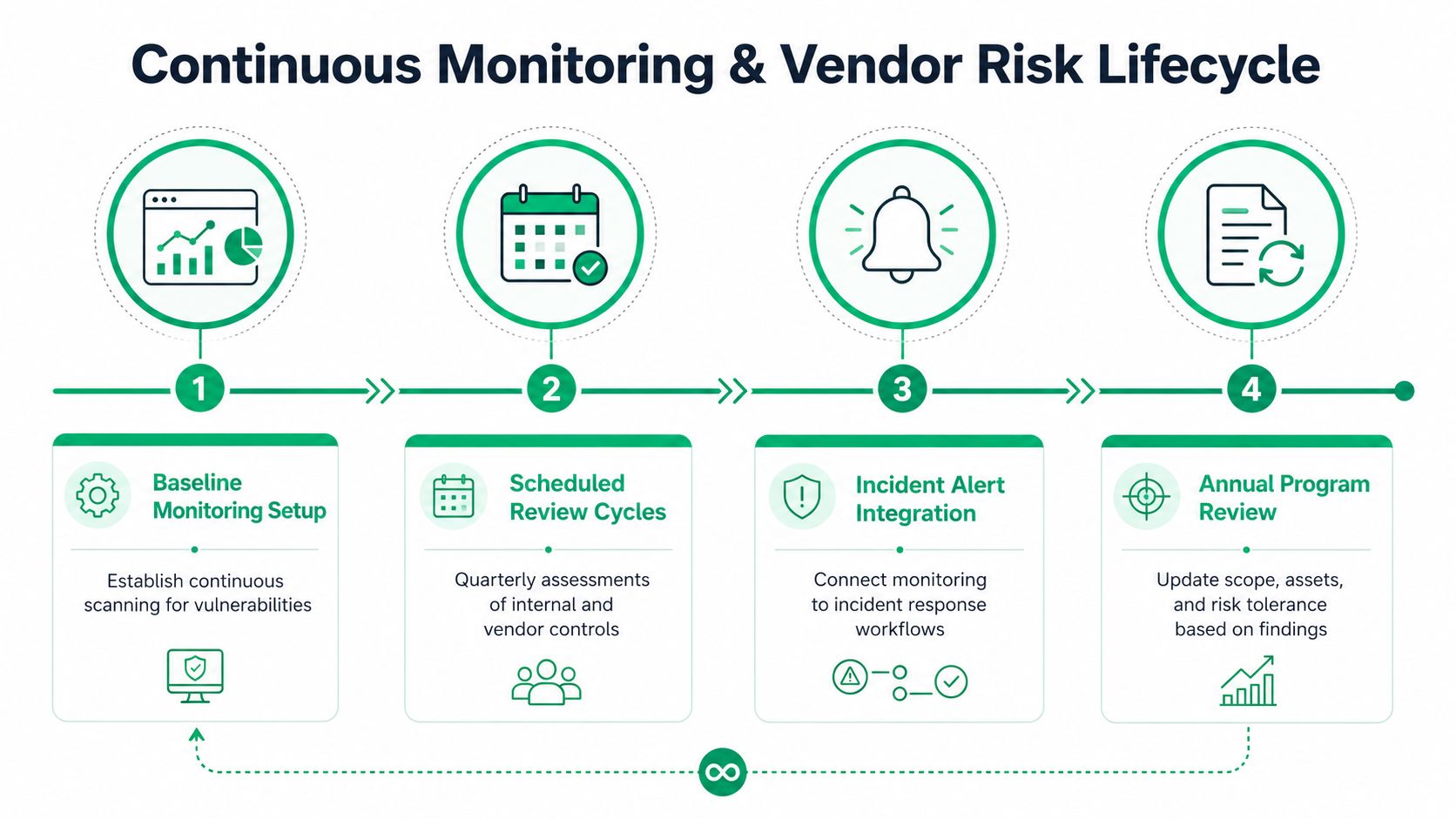
Security programs die when they turn into once-a-year paperwork. The better model is a loop, baseline, review, alert, revise. Microsoft's risk-management approach uses recurring review, a centralized risk register, and ongoing monitoring so mitigations don't get forgotten after launch. That's the right mindset for smaller Indiana firms too, just trimmed to their size.
Monitor what matters, not everything
Quantivate says only 13% of organizations consistently use key risk indicators to manage IT risk, which explains why so many owners get flooded with alerts but still miss the issues that matter. Build a short list of KRIs and KPIs that answer practical questions, like whether privileged accounts are being reviewed, whether critical patches are overdue, and whether backups have been tested. When the numbers trend the wrong way, the business needs to know before a breach does.
A Hamilton County professional services firm learned the hard way that vendor risk is not theoretical. Their payroll provider stored employee SSNs in an unencrypted database for two years, and nobody on the client side had asked for a fresh review. That's the blind spot. Third parties often get more trust than internal users, then sit outside the normal monitoring rhythm.
If you're building that vendor process, these vendor management best practices help turn “we trust them” into actual oversight.
Practical rule: If a vendor can touch payroll, email, identity, or backups, it needs a named owner, a review date, and an exit plan.
Test the response before the fire
Tabletop exercises are where the glossy incident-response binder either proves itself or falls apart. Run through who calls the bank, who notifies customers, who isolates endpoints, and who makes the restore decision. Then update the plan based on what your team got wrong, because the first failure in a tabletop is cheaper than the first failure during a real outage.
For another useful vendor-focused reference, vendor insight from Freeform Company shows how third-party lifecycle management fits into an operational security routine.

Your 90-Day Cybersecurity Risk Management Rollout Checklist
A small business does not need a giant security department. It needs a disciplined 90-day plan, plus a provider who can keep it moving without disrupting daily work. Finchum Fixes IT does this kind of work from Greenwood with the kind of judgment that comes from 17 years of local service, not from slide decks.
Days 1 to 30, build the foundation
- Inventory everything, endpoints, servers, cloud services, backup targets, and vendor access.
- Define scope and risk tolerance, so everyone agrees what is critical and what can wait.
- Document the first assessment, using the systems that matter most to revenue, operations, and compliance.
- Assign owners, because a risk without a name attached does not get fixed.
- Use a simple checklist and template, such as this 90-day small business cybersecurity checklist, so the rollout stays grounded in something your team can follow.
Days 31 to 60, put controls in place
- Deploy priority protections, MFA, segmentation, encryption, and immutable off-site backups.
- Write the policies, including incident response, patching, and vendor review steps.
- Launch monitoring, whether that is SOC-as-a-Service, endpoint detection, or both.
- Train staff, especially finance, HR, and anyone who approves payments or handles regulated data.
Days 61 to 90, validate and stabilize
- Test restores, not just backup jobs.
- Run a tabletop exercise, then tighten the playbook where people hesitated.
- Reassess vendors, especially any third party with identity, payroll, or data access.
- Review the results, then set a quarterly rhythm so the program does not drift.
The local shops that hold up in the Indy metro area are the ones that stop improvising after a scare and treat risk like a routine business process. A Greenwood or Indianapolis business that wants a practical Free Network Assessment or Security Risk Audit can use Finchum Fixes IT to map the gaps, tighten the controls, and build a program that fits the staff and the budget.