Cat 6 Cables: A Complete Guide for Indiana Businesses
Your office network doesn't have to be slow to be expensive. If video calls freeze in a Greenwood suite, cloud apps drag on the I-65 corridor, or PoE access points keep dropping in an older brick building, Cat 6 cables are often the cleanest upgrade path, because they give Indiana businesses solid gigabit performance without forcing a full rip-and-replace.
Why Cat 6 Cables Matter for Indiana Businesses
A lot of Central Indiana owners first notice the problem in the same place every morning, on the first Teams call of the day. One person's webcam stutters, another can't open the file share fast enough, and the help desk gets blamed for a network that's really choking on old cabling in the walls. In a Greenwood office park, that usually means the network isn't failing everywhere, it's failing at the edge where aging Cat 5e, growing cloud traffic, and PoE devices start competing for the same bandwidth.
Cat 6 became the practical upgrade path because it was standardized in 2002 and pushed twisted-pair Ethernet from 100 MHz to 250 MHz, which gave installers a much better handle on crosstalk and noise HELU's Cat 6 overview. In plain English, that meant businesses could keep their structured cabling and get a real performance bump without rebuilding the whole office from scratch. It also stayed backward compatible with Cat 5, Cat 5e, and Cat 3, which mattered in mixed buildings where not every drop got replaced on the same schedule Category 6 cable reference.

For many Johnson County business owners, that compatibility is the key win. You can phase in upgrades, keep the printers and phones alive, and stop the network from becoming the bottleneck while the rest of the business moves to cloud software, VoIP, and Wi‑Fi gear that expects cleaner copper than the building currently offers. If you're planning lead capture campaigns and want the cabling side to support better response times, a practical long-tail strategy can also improve qualified lead generation without making your stack harder to support.
Practical rule: if your users only notice the network when it breaks, you're already paying for more downtime than the cable upgrade would cost in frustration.
That's why Cat 6 still shows up in offices, retail spaces, and light industrial sites across the Indianapolis area. It's the middle ground that keeps operations moving now and leaves room for later.
For a deeper look at how the cable plant fits into the rest of the building, see what structured cabling means for day-to-day business operations.
Cat 6 Specifications and Distance Limits Explained
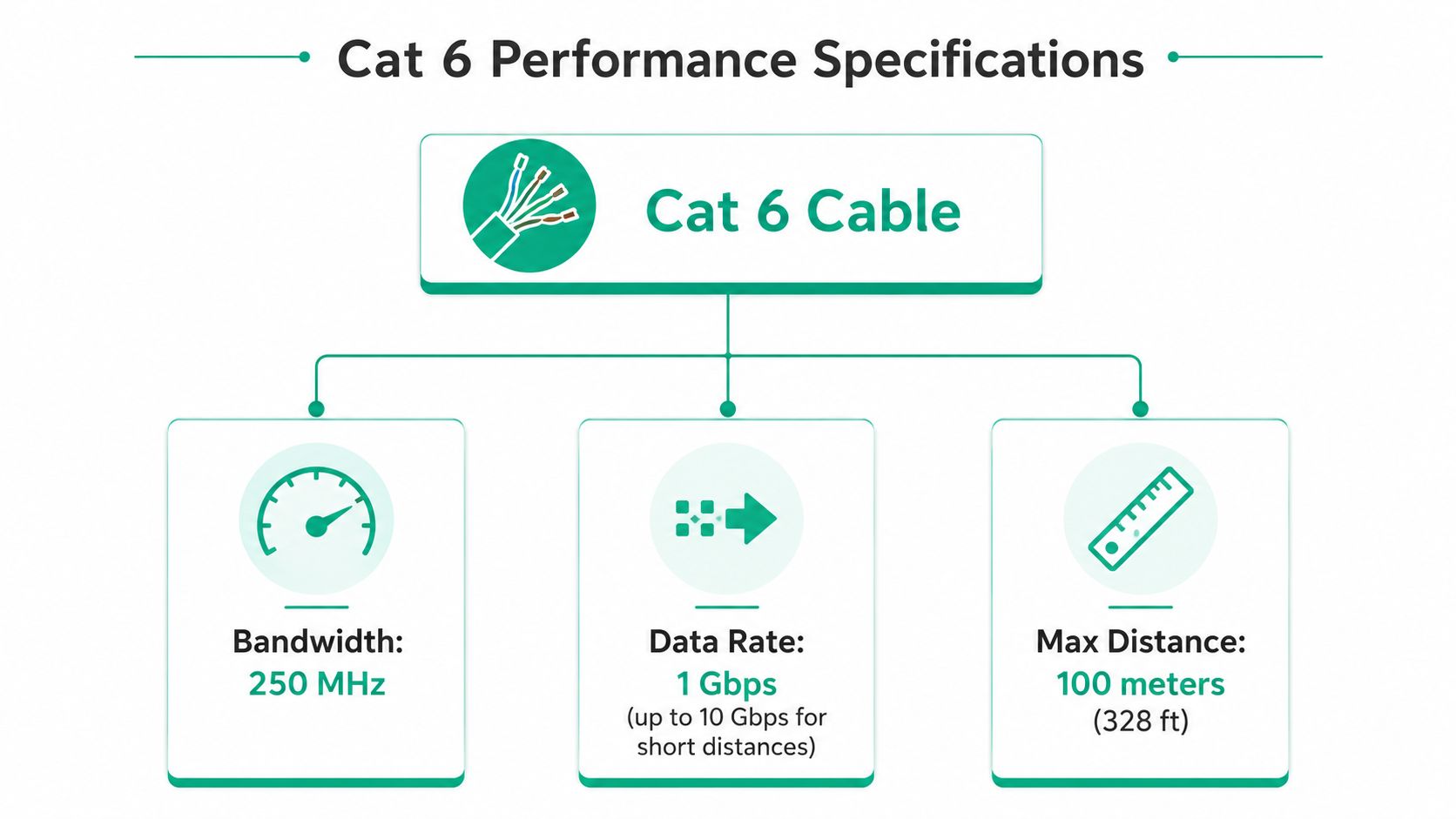
The spec sheet matters because it tells you where Cat 6 shines and where it stops helping. The cable is commonly rated for 1 Gbps at 100 meters, and it can support 10 Gbps on shorter runs, typically around 55 meters or less under good conditions HELU Cat 6 cabling data. That gap is the whole game for office design, because a cabling route that looks short on a floor plan can become a lot longer once it leaves the closet, climbs a riser, and snakes around a conference room wall.
What the 250 MHz rating means in practice
The 250 MHz bandwidth rating isn't marketing fluff. It means the cable can handle tighter signal control than Cat 5e, which is why Cat 6 is a better fit for businesses running cloud apps, file sync, and video meetings at the same time HELU Cat 6 cabling data. I've seen plenty of offices where the actual complaint wasn't “the internet is slow,” it was “the office feels fine until everyone joins the same meeting,” and that's usually a cabling plus switching problem, not a single bad laptop.
The common hardware details also matter. Cat 6 products are often built around 23 AWG conductors and RJ45 modular plugs, with variants that can be shielded or unshielded depending on the environment Cat 6 specification summary. The naming can look fussy, but it tells you whether the cable is suited to a clean office, a noisy utility path, or a high-density telecom room.
How to read the distance limit without guessing
The 55-meter limit for 10 Gbps is the number that changes planning, especially in campus-style office layouts and larger buildings near downtown Indy. If you need speed at full length across a long run, Cat 6 stops being the safe bet and Cat 6A starts making more sense HELU Cat 6 cabling data. If the goal is standard gigabit service with room for growth, Cat 6 stays in the sweet spot.
Practical rule: design for the longest real cable path, not the straight-line distance on paper. Hallways, vertical runs, and patching eat headroom fast.
The other part people miss is compliance. Cabling built to named standards such as ANSI/TIA-568.2-D and ISO/IEC 11801 gives you a better shot at getting predictable performance and cleaner installation records specification summary. That matters when you're documenting a network for audits, future troubleshooting, or a phased refresh that has to survive more than one budget cycle.
For visual learners, the embedded spec graphic above is the fast way to explain Cat 6 to a non-technical manager without turning it into a whiteboard lecture.
Choosing Between UTP vs STP and Jacket Ratings
The wrong cable jacket can turn a good install into a code problem. I've seen business owners in older downtown brick buildings order whatever looks cheapest, then get burned when the inspector, the fire marshal, or the low-voltage crew catches a mismatch between the cable path and the jacket rating. That's not a networking issue, that's a building systems issue, and it costs time you don't get back.
Shielding only helps when the environment needs it
Cat 6 comes in several builds, including U/UTP, F/UTP, SF/UTP, F/FTP, and S/FTP configurations Cat 6 specification summary. Unshielded cable is usually the default in normal office spaces, because it's simpler to terminate and easier to route through crowded conduits. Shielding earns its keep in places with strong electromagnetic interference, like manufacturing zones or utility-heavy paths where noisy equipment sits close to the cable run.
Practical rule: don't buy shielding because it sounds tougher. Buy it when the environment is actually tough.
That same source also shows the jacket choices that affect deployment. PVC is common for general use, LSZH makes sense where smoke and fumes are a concern, plenum belongs in air-handling spaces, and riser is used for vertical runs between floors Cat 6 specification summary. In older Central Indiana office stock, the jacket is often the detail that decides whether a job passes cleanly or gets ripped back open.
| Jacket Type | Fire Rating | Best Use Case | Relative Cost |
|---|---|---|---|
| PVC | General-purpose | Standard office runs outside special air spaces | Lower |
| LSZH | Low smoke, zero halogen | Occupied spaces where fumes matter more | Varies |
| Plenum | Air-handling rated | Above ceilings and return-air spaces | Higher |
| Riser | Vertical pathway rated | Between floors and shafts | Moderate |
What to pick in real buildings
If you're wiring a Greenwood business park suite, plain office UTP with the correct jacket is often enough. If you're in a plant, a warehouse with heavy equipment, or a retrofit where the path runs near interference sources, shielded Cat 6 can be worth the extra effort. The key is matching the cable to the route, not just the device on the desk.
For a broader look at how cable sizing decisions affect the rest of the electrical and data path, this Brisbane cable sizing guide is a useful reminder that the right conductor choice depends on the environment, not just the label. The logic carries over cleanly to low-voltage work in Indiana.
You can also compare this with network cabling services that fit an Indy business environment if you're trying to align the cabling type with your support model.
Cat 6 vs Cat 5e vs Cat 6a for Business Networks
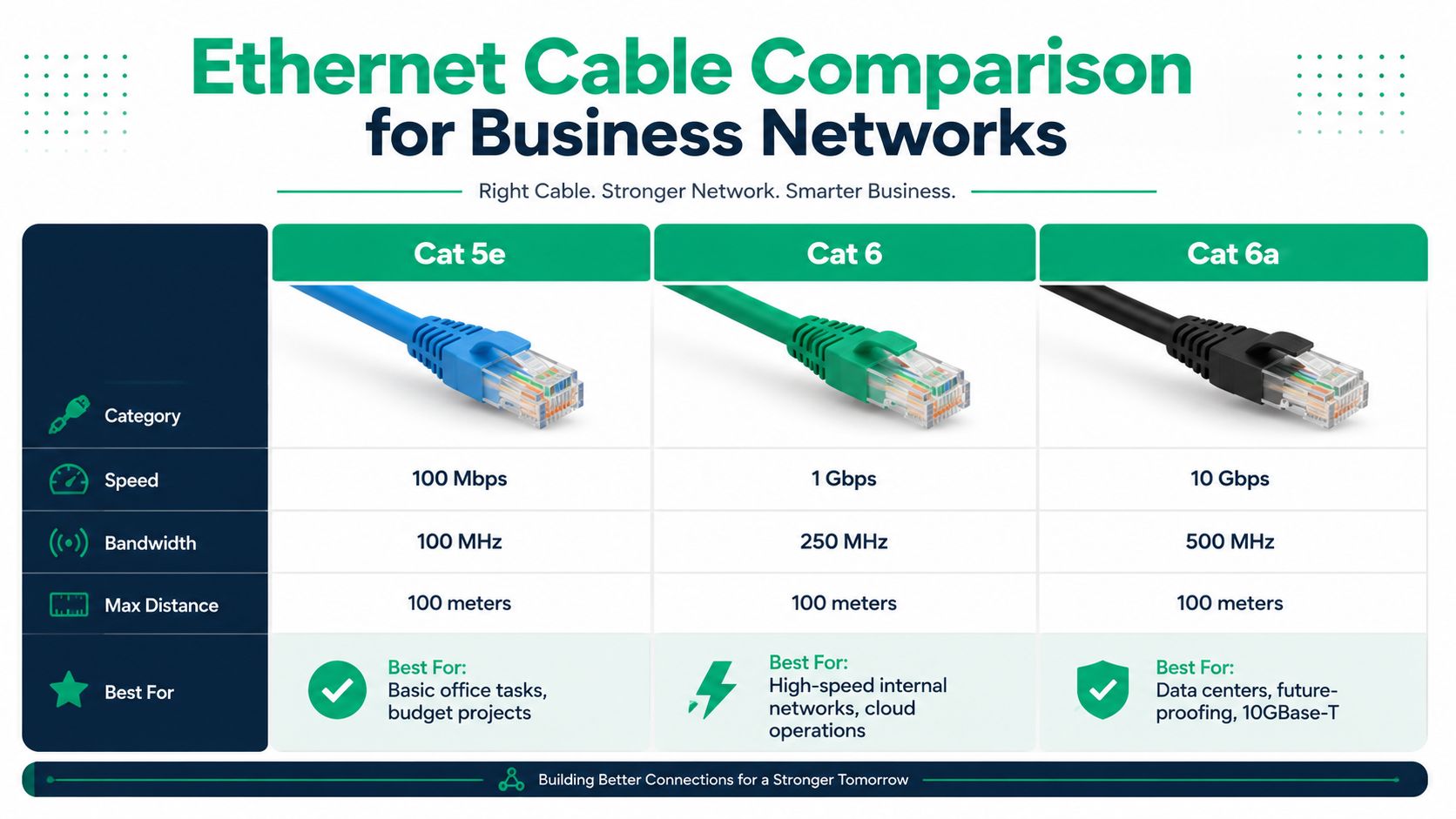
The key question isn't which cable sounds newest. It's which one fits your building, your growth plan, and your tolerance for rework. Cat 5e still has a place in stable, low-demand environments, but once cloud workloads, VoIP, and Wi‑Fi access points start stacking up, Cat 6 becomes the cleaner upgrade because it offers more headroom without the stiffness and termination headaches of higher-category cable.
Where Cat 5e still makes sense
Cat 5e is fine when the current network is already stable and the business is mostly doing basic office work. If the office has a handful of users, low device churn, and no near-term plan to push multi-gig access to every desk, there's no need to tear out cabling just to chase a badge on the jacket. That's especially true in older installations where the cost of access, not the cable itself, drives the project.
Why Cat 6 fits most SMB upgrades
Cat 6 hits the better middle ground. It keeps 1 Gbps over 100 meters in play, can handle 10 Gbps on shorter runs, and is easier to terminate than higher-category cable HELU Cat 6 cabling data. For many Indiana SMBs, that means a phased upgrade path, new switch ports where needed, better wireless backhaul for access points, and less pressure to rip out working infrastructure.
When Cat 6A earns the extra effort
Cat 6A is the safer choice when a business needs 10 Gbps at 100 meters across longer runs or wants more breathing room in denser, noisier environments technical Cat 6 vs Cat 6A reference. It's thicker, less flexible, and more annoying to pull through tight spaces, so the install takes more care. That trade-off makes sense for data-heavy spaces and new construction, but not every office needs to pay that penalty.
Practical rule: if you're not sure whether you need Cat 6A, count the longest run and the noisiest path first. Those two numbers usually answer the question faster than any sales pitch.
A lot of offices near Hamilton County growth corridors are also trying to support 2.5G and 5G multi-gig gear without gutting the whole building. Cat 6 is often the practical bridge for that kind of phased rollout, because it lets you upgrade switch ports and access points in stages while keeping the rest of the plant intact.
For a broader planning lens, the Indiana SMB infrastructure upgrade guide pairs well with this decision because it frames cabling as part of the whole refresh, not a one-off purchase.
Termination Testing and Installation Best Practices
A clean cable run can still fail if the termination is sloppy. The easiest mistakes are the ones that look fine on day one, then turn into intermittent problems three months later when someone plugs in a conference room phone and the link flaps under load. That's why the work behind the wall matters more than the label on the spool.
What a professional termination actually looks like
Keep the twist rate tight right up to the termination point. That's not a cosmetic preference, it protects the signal pair geometry that makes Cat 6 worth installing in the first place. Use certified Cat 6 connectors and tools, terminate consistently to T568B, and don't rely on bargain crimp tools that bite unevenly or shave too much jacket.
A proper workflow starts at the patch panel, moves to the wall jack, and ends with a test you can keep on file. If a run fails, you want the data to tell you whether the issue is the jack, the cable path, or the patching after the fact. That's how you avoid tearing open finished walls just to find a bad keystone.
- Use the right termination gear: certified Cat 6 connectors and tools reduce the chance of a weak punch or loose pin.
- Keep the pair geometry intact: untwist only as much as the termination requires, nothing more.
- Test every drop: a cable certifier shows whether the run meets the expected standard, not just whether it “sort of works.”
- Document the run: length, location, and test result make later troubleshooting a lot faster.
Testing catches the stuff users complain about later
The good crews don't trust a green light from a laptop alone. They use certifiers, then save the result so the next tech can trace the problem without guessing. That's especially important in businesses that run HIPAA-sensitive workflows, CMMC-bound environments, or general NIST CSF-aligned security programs where infrastructure documentation is part of keeping the operation clean.
If you ever need to splice or repair a run without causing extra downtime, this guide to splicing network cable without downtime is a useful reference point, because rushed field fixes are where many “mystery” problems start.
Cost ROI and When to Hire Professional Network Services
The cable itself is only part of the cost. Labor, testing, route access, and cleanup make up the rest, and that's before you count the time lost when users are stuck waiting for a flaky link to recover. In businesses that depend on cloud systems and real-time communication, downtime can get ugly fast, and the primary cost is often user paralysis, not the replacement parts.
ROI comes from avoiding repeat work
A clean Cat 6 upgrade pays off in fewer tickets, fewer mystery disconnects, and less time spent chasing “bad Wi‑Fi” complaints that really trace back to the wire feeding the access point. That's where managed IT and structured cabling work start to overlap, because the business gets predictable monthly planning instead of emergency disruption. The worst network jobs I've seen weren't expensive because of the cable, they were expensive because the wrong person touched the same drop three times.
Practical rule: if one bad cable run can stall sales, dispatch, or clinical work, the ROI case is already bigger than the material quote.
DIY versus professional work
DIY can make sense for patch cable swaps, single-desk changes, or a small office add-on where the path is short and the risk is low. Professional network services make more sense when the job touches fire-rated space, multiple floors, compliance requirements, or any environment where failed testing means rework. That's where the business pays for design, code awareness, certification, and a documented result instead of hoping the signal behaves.
For Indiana owners comparing support options, what managed IT services cost in Indiana gives a useful lens for how cabling projects fit into broader IT spend. The right cabling job should reduce wasted tech time and turn it into billable hours, not create more of it.
If the network is central to cloud apps, VOIP, or PoE-heavy gear, bringing in pros usually beats trial and error. That's even more true in downtown Indy tech hubs and in the office parks along the interstate where uptime matters more than saving a few hours on installation.
Your Cat 6 Upgrade Action Plan
Start with the symptoms. Frequent disconnects, poor conference call quality, failing PoE devices, and trouble supporting new Wi‑Fi 6 access points all point to a cabling path that's falling behind the business. If the environment also has HIPAA, CMMC, or other documentation pressure, the upgrade should include testing and records, not just new cable in the wall.
Then map the building. Measure the longest practical runs, identify any plenum or riser paths, and decide whether the space needs UTP or a shielded variant. If the project is just a few patch leads, keep it simple. If it's a floor refresh, a multi-room rollout, or anything tied to uptime-sensitive operations, the safer move is a professional install with certification testing.
Best move: treat cabling like infrastructure, not a one-time purchase. If the job has to work for years, build it like it has to survive years.
For Johnson County business owners and companies across the Greenwood and Indianapolis area, that's usually the point where a Free Network Assessment starts saving money before a single cable is pulled. Finchum Fixes IT brings 17 years of local service experience, and the value is in getting the network sorted before it turns into downtime, complaints, or compliance headaches.
If your business in Greenwood or Indianapolis is dealing with flaky links, old cabling, or a network that can't keep up with cloud work, Finchum Fixes IT can help with a Free Network Assessment that shows exactly where Cat 6 makes sense and where your current setup is holding you back. Visit Finchum Fixes IT to get practical help from a local team that knows how to keep Indiana businesses online and moving.