Network Infrastructure Upgrade: Indiana SMB Guide
If you're running a business in Greenwood, along the I-65 corridor, or in one of those old brick buildings closer to downtown Indy, you probably already know the feeling. Wi-Fi drops in the back office. The credit card terminal hangs at the front desk. A file sync stalls right when someone needs an invoice out the door. People call it an IT issue, but it hits the business first.
That's why a network infrastructure upgrade has to start with continuity, not gear lust. If the network goes down, work stops. Customers wait. Staff burns time on workarounds instead of revenue work.
Your Network Infrastructure Upgrade Roadmap
TL;DR
- Downtime is expensive: business downtime can cost up to $9,000 per minute on average, and large enterprises can lose more than $15,000 per minute according to Agility Recovery's business continuity analysis.
- A network upgrade is a business continuity project: done right, it protects billable hours, reduces wasted tech time, and turns surprise outages into predictable planning.
- Local buildings create local problems: old brick walls, long warehouse runs, and patched-together closets across the Indy metro need different designs.
- The practical path is simple: assess bottlenecks, budget for the full project, choose secure gear, then roll out in phases with a rollback plan.
- Modernization beats patching: these legacy system modernization strategies line up with what works in real upgrades.
- Start with a written plan: this Indiana business IT roadmap for 2026 is a useful next step.

A Johnson County owner usually doesn't call and say, “I need a cleaner Layer 2 design.” They say their phones cut out, QuickBooks crawls, cameras lag, or guest Wi-Fi is wrecking the office network. Same root problem. The network wasn't built for what the business became.
What this looks like on the Southside
A Greenwood office park setup often starts small. One internet circuit. A switch added later. Consumer Wi-Fi that somehow became “production.” A firewall no one wants to touch because nobody remembers how it was configured. Then the company adds cloud apps, remote staff, VoIP, cameras, and a second location.
Now every weak spot shows up at once.
A network that barely worked for ten people won't quietly scale to support phones, cloud apps, security tools, remote access, and warehouse handhelds.
The fix isn't buying random boxes because a vendor ran a special. The fix is mapping what the business needs to stay online, then upgrading in the right order. Usually that means stabilizing old gear, cleaning up cabling and switching, improving wireless coverage, tightening security, and making sure backups and failover effectively support the way your team works.
ROI starts with fewer interruptions
Owners often get stuck. They see the invoice for a network overhaul and compare it to doing nothing. That's the wrong comparison. The accurate comparison is upgrade cost versus the cost of recurring slowdowns, emergency repairs, lost staff time, and outages that hit customer trust.
A proper network upgrade doesn't just make things faster. It gives you a way to budget technology on purpose instead of reacting every time a weak point breaks.
Spotting the Cracks Before the Walls Cave In
Most failing networks announce themselves long before a switch dies. The clues show up in business complaints first. That's why the right starting point is assessment, not shopping.
A sound upgrade process begins with a detailed assessment to identify bottlenecks and traffic patterns, then clear business goals and technology choices that fit budget and timeline before a phased rollout, as outlined in Mushroom Networks' guidance on network upgrade best practices.
The symptoms owners hear every week
If you own a business in the Indianapolis metro, ask yourself these questions:
- Front desk delays: Does the card terminal lag, does the phone system stutter, or does staff blame “the internet” several times a day?
- Warehouse dead zones: Do handhelds or laptops lose signal in the back half of the building, especially in metal-heavy or wide-open spaces?
- Conference room chaos: Do Teams or Zoom calls break up when more than a few people join from the office?
- Random printer drama: Do network printers vanish and reappear depending on who rebooted what?
- Cloud app complaints: Does Microsoft 365, your ERP, or line-of-business software feel sluggish at certain times every day?
- Security blind spots: Are there old devices, unmanaged access points, or mystery ports nobody can confidently identify?
Those are network symptoms. They just don't sound technical when they land on your desk.
What we look for during a real audit
When we audited a similar client's failing network in a Johnson County business park, the issue wasn't one bad device. It was three smaller problems stacked together. Old switching. Wi-Fi placed where it was easy to mount, not where coverage was needed. No segmentation between office traffic, guest access, and cameras.
That's common around the Southside.
Use a checklist like this 10-point IT infrastructure audit for 2026 and review your environment as a business system, not a pile of equipment. The accounting team, shipping desk, inventory scanners, surveillance system, and remote users all depend on the same foundation.
Field note: If your staff has learned a daily workaround for “how the network behaves,” that workaround is part of your outage cost.
The business-first assessment
A useful assessment answers four questions:
-
What must stay online first?
Phones, order systems, EMR access, manufacturing screens, or remote desktop may rank differently by business type. -
Where does work slow down?
Not every bottleneck is dramatic. Sometimes it's the constant friction that eats hours every week. -
What can't fail for compliance?
A healthcare clinic has different exposure than a defense subcontractor. HIPAA, CMMC, and broader security frameworks like NIST CSF all shape network design choices. -
What's already too old to trust?
Aging switches, firewalls, UPS units, and server hardware usually don't fail at convenient times.
Owners in Hamilton County growth corridors often have the opposite problem. Their network isn't ancient. It's undersized for how fast they expanded. Different story, same result. The network starts dictating how the business can operate.
Drafting the Blueprint for Budget and Timeline
Once you know where the pain is, budgeting gets clearer. A network project is easier to approve when leadership sees the whole picture instead of one line item for “new equipment.”
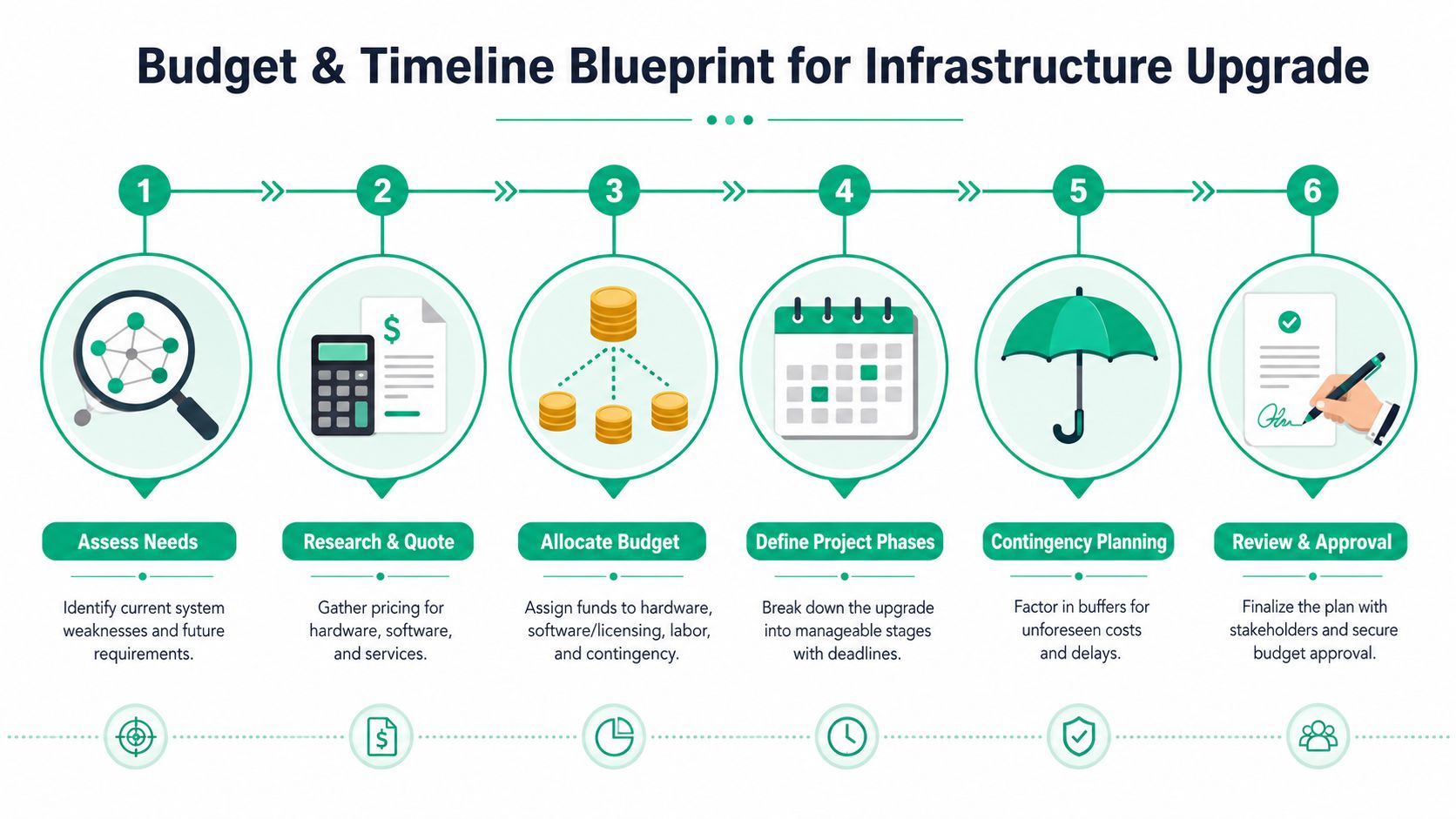
The spending trend is real. Global SMB IT spending is projected to reach $1.18 trillion in 2026, and for a medium-sized office, a reliable and secure network upgrade can start around $8,000–$10,000, scaling with redundancy and security needs, which makes a 3–5 year strategic plan essential, according to this SMB network infrastructure spending breakdown.
What belongs in the budget
Owners usually focus on switches, firewalls, and access points because those are visible. Fair enough. But the budget also needs to include licensing, labor, testing time, structured cabling fixes, monitoring, and the support needed after cutover.
If you skip those pieces, the project looks cheaper on paper and more painful in real life.
Here's a practical planning resource on IT budget planning for ROI and resilience that lines up with how Indiana SMBs usually build these projects.
Sample Network Upgrade Budget Template for SMBs
| Expense Category | Example Items | Estimated Cost Range |
|---|---|---|
| Hardware | Switches, firewall, Wi-Fi 6 or 6E access points, rack cleanup gear, UPS units | Qualitatively varies by site size and redundancy needs |
| Software and Licensing | Firewall subscriptions, endpoint security, cloud management, monitoring tools | Qualitatively varies by vendor stack and retention requirements |
| Labor and Implementation | Site survey, staging, cutover, testing, documentation, training | Qualitatively varies by complexity, hours, and number of locations |
| Cabling and Physical Layer | Structured cabling repairs, patch panels, labeling, fiber or copper uplinks | Qualitatively varies by building condition and layout |
| Resilience and Backup | Secondary connectivity, immutable off-site backups, failover setup | Qualitatively varies by continuity requirements |
| Ongoing Support | Managed monitoring, patching, vendor coordination, SOC-as-a-Service monitoring | Qualitatively varies by support model |
Timeline that doesn't wreck operations
A realistic timeline isn't just “order gear, install gear, done.” It usually works better when you break it into stages:
- Assessment and design: inventory the environment, map dependencies, define business priorities.
- Procurement and staging: get hardware in, preconfigure it, and test it before it reaches the site.
- Physical prep: clean racks, label drops, verify power, fix bad cabling, confirm internet handoff details.
- Pilot and phased deployment: move one department, floor, or site first.
- Post-cutover support: monitor heavily, train staff, and clean up old systems.
Budget for the work after go-live. That's when small misconfigurations, user habits, and hidden dependencies show up.
For growing companies near Hamilton County, the timeline should also reflect where the business is headed, not just where it sits today. If another office, warehouse, or clinical suite is coming, buy with that map in mind. A network that has to be rebuilt every time the business grows is a tax on success.
Choosing Your Gear and Building Your Fortress
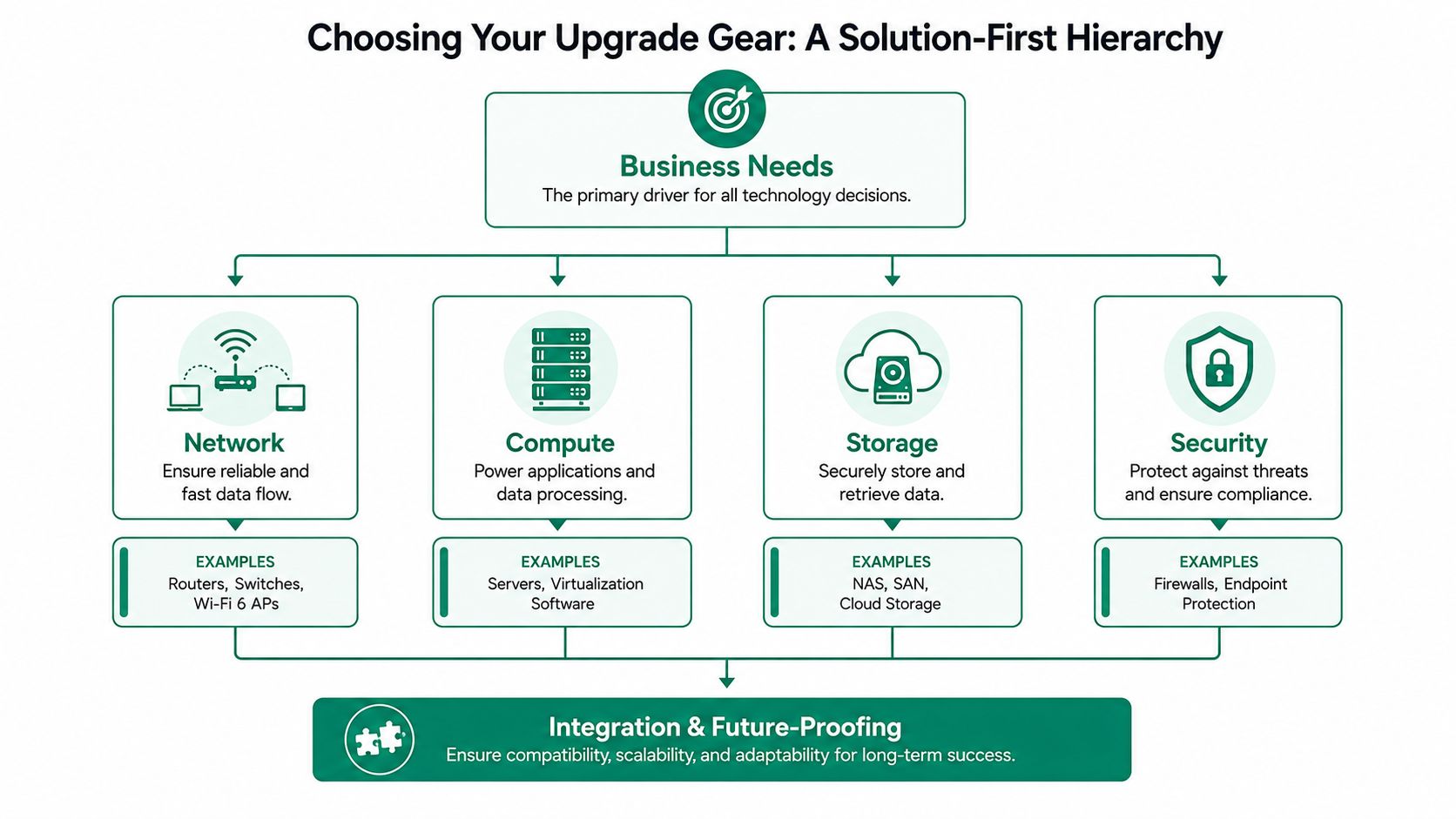
Hardware choices matter, but only when they support the way your business works. The right stack for a medical office in Greenwood isn't identical to the right stack for a manufacturer near the I-65 corridor or a downtown Indy professional services firm in a brick building with nasty RF behavior.
Buy for the problem, not the brochure
If the building kills wireless signal, UniFi networking can be a sensible fit for some SMB environments because it gives clear centralized management and flexible access point placement. If the issue is endpoint risk, Bitdefender GravityZone may make more sense as part of the broader design. If storage resiliency is weak, the conversation shifts to replication, snapshots, and immutable off-site backups.
That's what solution-first planning looks like.
A modern layout usually includes business-grade switching, a next-generation firewall, segmented wireless, clean structured cabling, monitored power protection, and remote visibility into the whole stack. In some environments, latency-optimized mesh nodes are the right answer for awkward layouts. In others, mesh is a bandage and hardwired access points are the only adult decision.
For owners weighing purchase timing, it helps to compare lease, loan, and outright purchase options. This guide to best equipment financing rates is useful when you need to preserve cash flow without postponing critical replacement.
A network upgrade also exposes whether your building's physical layer is helping or hurting. Bad patching and unlabeled drops waste more time than most owners realize. This is why structured cabling for business networks belongs in the planning conversation early.
Security has to be part of the design
The upgrade is the perfect time to move toward Zero Trust architecture. In plain English, that means users and devices don't get broad trust just because they're “inside” the office. Access should be limited, verified, and logged.
That matters for compliance too. A healthcare office has to think about HIPAA. A defense contractor or supplier needs to think about CMMC. A general business trying to mature security posture can align choices with NIST CSF. Those standards affect segmentation, logging, remote access, backup design, and how tightly you control privileged accounts.
A robust continuity plan also has to define Recovery Time Objectives (RTO) and Recovery Point Objectives (RPO) for each critical service, which means setting the maximum acceptable downtime and data loss for that service, as explained in this business continuity planning guide covering RTO and RPO.
If you can't answer how long email, phones, file access, or line-of-business software can be down, you're not choosing gear. You're guessing.
In our 17 years of local service, we've seen owners buy strong hardware and still get burned because the design ignored segmentation, backup immutability, and monitoring. Good boxes don't fix weak decisions. One available option for ongoing operations is managed services from Finchum Fixes IT, which includes the kind of monitoring and support many SMBs need after the install crew leaves.
The Cutover Plan That Prevents Chaos
The ugliest network projects usually fail in the same place. Not in procurement. Not in rack mounting. They fail during cutover because somebody treated the switch-over like a light switch.
That's where business continuity wins or loses.
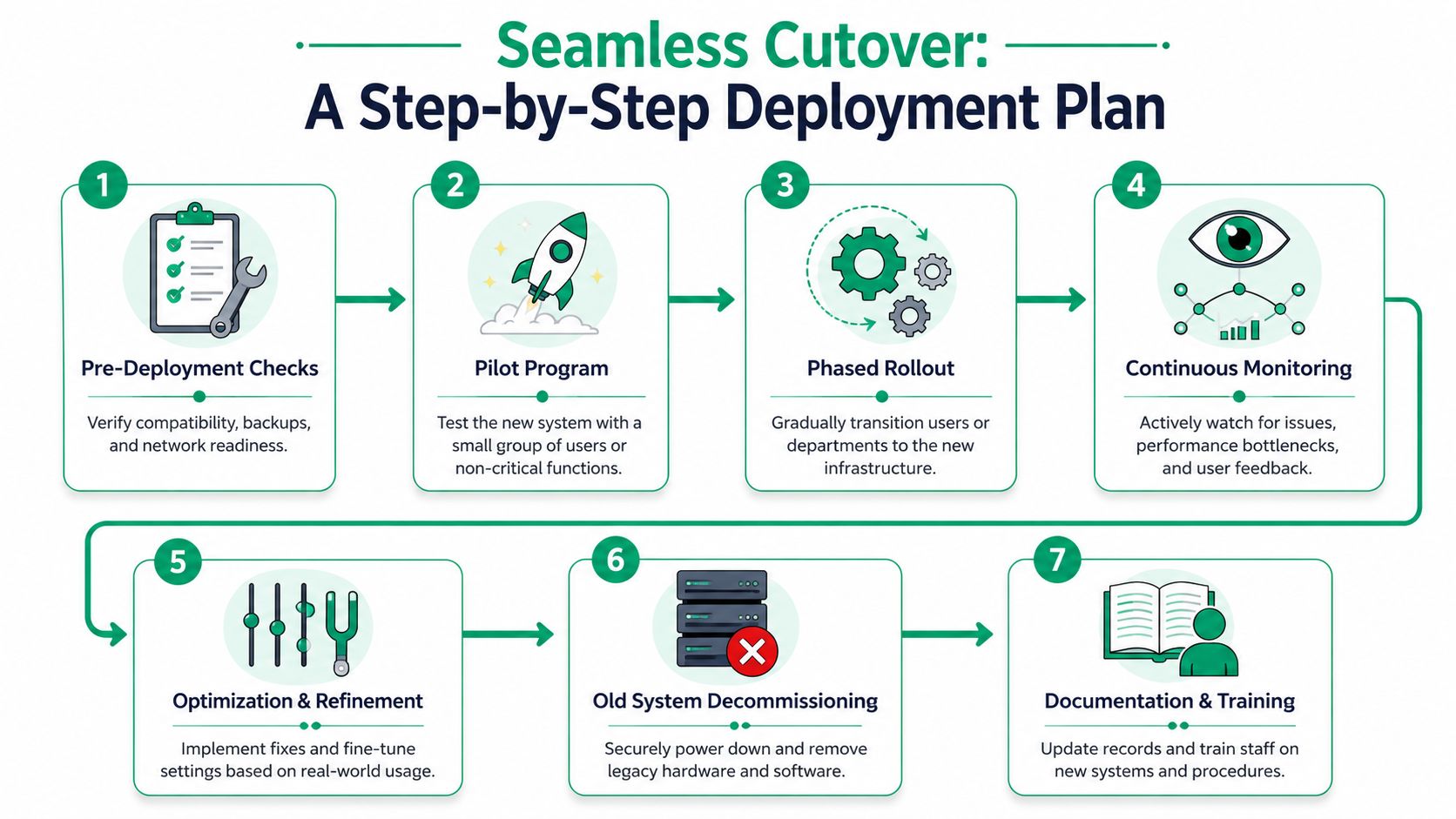
Research cited by Verizon says 70% of SMBs incur costly downtime during upgrades due to poor stakeholder coordination and the lack of a continuity-first framework with phased plans for maintaining uptime, which you can read in Verizon's discussion of network infrastructure upgrade priorities.
The phased rollout that actually works
Don't rip everything out at once unless you enjoy emergency vendor calls and angry staff.
A cleaner deployment looks like this:
-
Stage and verify first
Configure gear offsite or in a test environment. Validate firmware, VLANs, SSIDs, VPN behavior, content filtering, and backups before anything touches production. -
Pilot with a low-risk group
Move a department that can give useful feedback without taking the whole company down. This catches odd printer mappings, line-of-business app quirks, and device compatibility issues. -
Cut over in slices
One floor, one suite, one warehouse zone, or one branch at a time. That keeps the blast radius small. -
Watch everything closely During cutover, monitor traffic, authentication, wireless roaming, firewall events, and user-reported friction. SOC-as-a-Service monitoring aids this process, as someone needs to be watching more than one dashboard.
The rollback plan nobody regrets
In our 17 years of local service, we've learned that a rollback plan you never use is infinitely better than needing one you never made.
That means documenting what “go back” looks like before you begin. Old configs saved. Backups verified. Cabling paths documented. Legacy hardware available until the new environment proves itself. Staff assigned to communications, not just technical tasks.
Practical rule: If your rollback process depends on one person's memory, you don't have a rollback process.
Coordination matters more than most people think
A clean cutover requires more than technical prep. It needs owner approval, staff communication, vendor coordination, and realistic expectations for the first week after launch.
Use a simple communication plan:
- Before the change: tell staff what's changing, when it's happening, and what to do if something breaks.
- During the change: designate one person for internal updates so users aren't guessing.
- After the change: collect issues in one place and rank them by business impact.
The deployment also needs validation from the business side, not just IT. Phones need to ring. Scanners need to connect. Shared folders need to open. If you have remote staff, they need to confirm access from outside the building. If you've got critical data trapped in failing storage, this is also where deeper skills matter. When we dissembled a similar client's failing RAID array to preserve business records before a migration, the difference came down to careful handling and bit-level data recovery discipline before any cutover work touched production data.
A tidy cutover isn't exciting. That's the point.
Get a Free Network Assessment for Your Indiana Business
A strong network upgrade has very little to do with shiny hardware and a lot to do with whether your business can keep operating when people are busy, the building is difficult, and nobody has time for avoidable downtime.
That's especially true in Central Indiana. Greenwood offices often deal with growth that outpaced the original build. Downtown Indy spaces fight old construction and weird wireless behavior. Industrial clients near the I-65 corridor need stable coverage across offices, warehouses, cameras, VoIP, and mobile devices. Healthcare groups need continuity with HIPAA in view. Defense-related shops need to keep CMMC concerns in the mix. Plenty of general SMBs just need a network that stays out of the way and supports the work.
The long-term value is stability
The best return doesn't come from one dramatic improvement. It comes from a network that stops wasting employee time every day. Fewer interruptions. Less firefighting. Fewer mystery outages. Better support for cloud computing, cybersecurity controls, software development teams, and day-to-day IT support.
That's how you convert wasted tech time into billable hours and predictable monthly budgets.
A modern environment should also include current diagrams, documented dependencies, clear recovery priorities, and monitoring that catches trouble early. For recovery planning, that means mapping both on-premises and cloud components, plus the data flows and dependencies between them, which is a core point in this network disaster recovery planning guide. Without that map, restoration becomes guesswork.
Why local support changes the outcome
A local partner matters more than many owners expect. When something goes wrong, you don't need a generic ticket queue three states away. You need someone who understands the building, the users, the ISP handoff, the wireless trouble spots, and the pressure your staff is under.
That's one reason Johnson County business owners often prefer someone who can show up, trace the issue, and explain the fix in plain English. Fast response is good. Familiarity is better. A team that already knows your environment will make better decisions under pressure.
There's also a bigger market shift behind all this. The global telecom network infrastructure market was valued at $108.8 billion in 2025 and is projected to grow from $116.2 billion in 2026 to $190.1 billion by 2033 at a 7.3% CAGR, with North America holding a 38.4% revenue share in 2025, according to Grand View Research's telecom network infrastructure market report. That tells you businesses everywhere are pushing the same direction. Higher throughput, lower latency, and stronger resiliency aren't luxury upgrades anymore.
The next move
If your staff is compensating for flaky Wi-Fi, old switching, scattered security tools, or backup uncertainty, it's time to get eyes on the environment before the next outage picks the schedule for you.
For businesses in Greenwood, Indianapolis, Johnson County, and the surrounding counties, a Free Network Assessment or Security Risk Audit is the right first move. It gives you a clear read on bottlenecks, continuity risks, compliance gaps, and what should be upgraded first.
If your business is in the Greenwood or Indianapolis area and your network is slowing work down, Finchum Fixes IT can help you sort out what's urgent, what can wait, and how to upgrade without wrecking operations. Schedule a Free Network Assessment or Security Risk Audit and get a practical plan built around uptime, security, and the way your team works.