Indiana Structured Cable Solutions: Boost ROI & Secure Data

TL;DR
- Structured cable solutions fix more than ugly server closets. They reduce downtime, speed up troubleshooting, and give your network a clean foundation for Wi‑Fi, phones, cameras, and security.
- In Indiana buildings, especially older offices and mixed-use spaces, bad cabling causes slow links, flaky devices, and expensive guesswork.
- A proper design uses standards-based layouts, patch panels, labeled runs, and the right mix of copper and fiber.
- Good cabling also supports cybersecurity and compliance. It helps with segmentation, documentation, and physical access control for frameworks like HIPAA, CMMC, and NIST CSF.
- Plan for growth from day one. The standard recommends at least two outlets per work area and 30% spare pathway capacity for future expansion.
If you're in Greenwood, Southport, Franklin, or anywhere along the I-65 corridor, you've probably seen the same mess I have. The internet slows down every afternoon. A phone drops off the network for no obvious reason. A printer works only if nobody touches the cable hanging out of the wall. Then someone opens the closet, and there it is. A rat's nest of unlabeled patch cords, old switches, random splices, and one power strip doing work it should never have been asked to do.
That setup doesn't just look bad. It burns staff time, drags out troubleshooting, and turns minor network changes into mini outages. In a business, that's money walking out the door. Downtime wrecks schedules, disrupts billable work, and forces your team to play amateur detective instead of doing their actual jobs.
Structured cabling is the permanent fix. Not a cleanup for appearances. Not a weekend side project. It's the backbone that gives your business stable connectivity, cleaner security boundaries, and room to grow without ripping everything apart six months later.
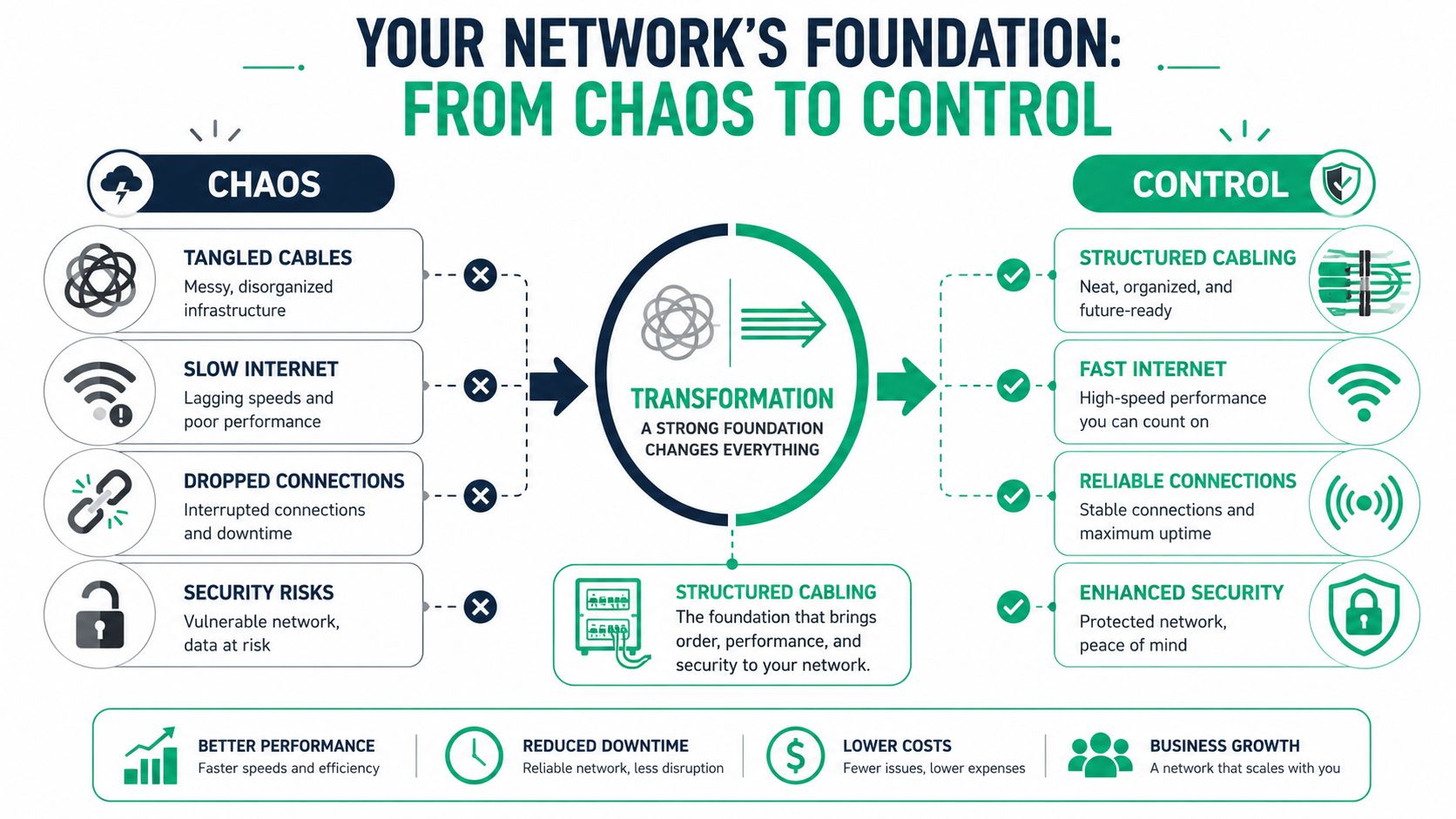
Your Network's Foundation From Chaos to Control
A lot of Johnson County business owners think they have a Wi‑Fi problem when they really have a cabling problem. The access points are fine. The firewall is fine. The internet circuit may even be fine. But if the cable plant behind it is a patchwork of old runs, mystery terminations, and cheap patch cords, the whole network feels unreliable.
That's what makes structured cable solutions so important. They turn the physical layer from a liability into an asset.
Why messy cabling keeps breaking business operations
Consider a building's electrical system. Nobody wants every office powered by extension cords running under doors. It might work for a while, until someone adds one more device, trips something, or starts a fire risk. Network cabling works the same way. Ad hoc wiring holds together right up until growth, changes, or stress expose the weak spots.
A standards-based layout avoids that trap. Structured cabling is a standards-based, generic infrastructure that can support data, voice, video, Wi‑Fi, and security on the same physical plant without re-cabling every time the business changes, as described in this overview of structured cabling standards and specifications.
In plain English, that means a new phone system, added cameras, upgraded UniFi switching, or expanded wireless coverage doesn't automatically turn into another round of cable chaos.
Practical rule: If your technician has to tug on cables and guess where they go, you don't have a network foundation. You have a pile of dependencies.
What control looks like in the real world
In a properly built environment, every run has a purpose. Patch panels are labeled. Racks are organized. Backbone links and endpoint drops are planned instead of improvised. Moves, adds, and changes happen at the panel, not by cutting into live runs and hoping for the best.
That matters in older brick buildings around downtown Indy and in Greenwood business parks where space has been repurposed over the years. One tenant adds a conference room. Another adds cameras. Another puts a server under a desk because the closet is full. Soon the whole setup becomes fragile.
A clean design fixes that permanently. It gives you:
- Faster fault isolation: Techs can trace the problem to a room, panel, or port without hunting blindly.
- Stable performance: Endpoints stop competing with poor terminations, bad bends, and random uplink bottlenecks.
- Less disruption during growth: New users and devices fit into the plan instead of breaking it.
- Better security footing: Cameras, guest Wi‑Fi, access control, and production systems can be separated cleanly.
If your current setup feels one unplugged cable away from a bad day, this guide on networking and cabling services for Indy businesses is a useful next read. It speaks to the same issue local businesses run into over and over.
The Core Components of a Modern Cabling System
A good cabling system isn't one big bundle of wire. It's a set of connected zones, each with a job. Once you understand the parts, you can see why some buildings stay easy to manage and others become a permanent support ticket.
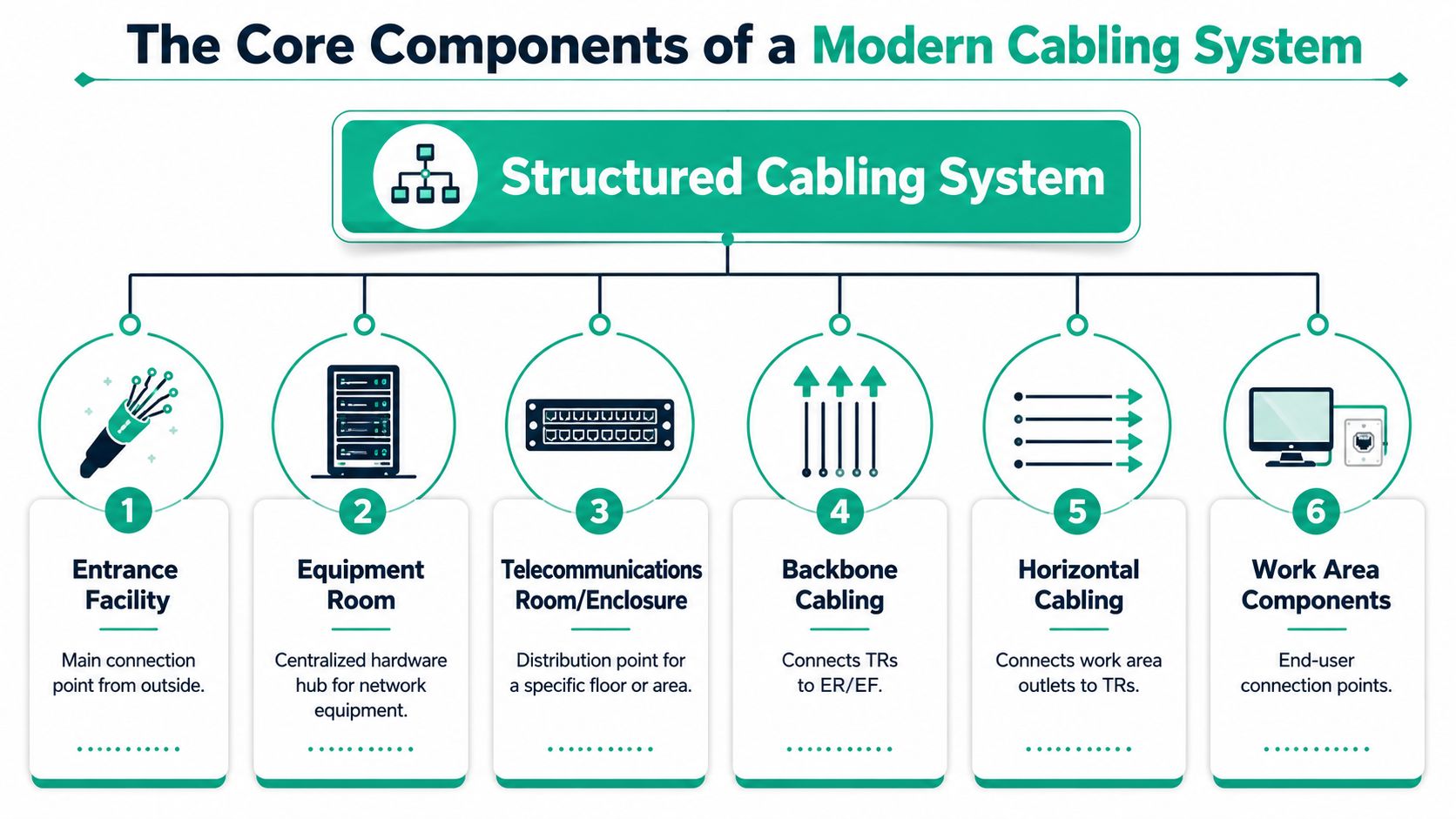
The six pieces that make the system work
-
Entrance facility At the entrance facility, your provider's service enters the building. Fiber handoff, protection, demarcation, all of that starts here. If this area is sloppy or poorly protected, problems begin before traffic even reaches your network core.
-
Equipment room
This is the main hardware hub. Think racks, core switching, firewall, servers, UPS systems, and often storage. In many Indiana SMBs, this room also houses the systems tied to backups, virtualization, Bitdefender GravityZone management, and SOC-as-a-Service monitoring. -
Telecommunications room or enclosure
This is the local distribution point for a floor or area. It connects backbone cabling to horizontal runs. In larger offices or multi-tenant spaces, these rooms save you from trying to home-run everything to one overloaded closet.
A short visual helps if you're mapping this out with your team.
Where security enters the conversation
-
Backbone cabling
This is the building's internal highway between rooms, floors, or buildings. It carries the big traffic loads. -
Horizontal cabling These are the runs from the telecom room to the wall jack or endpoint location. Neatness, labeling, and clean terminations in these runs save you hours later.
-
Work area components
Wall plates, patch cables, endpoint connections. This is the part users touch, and it's often where bad habits creep in.
Most articles stop there. That's the mistake. The six components aren't just an engineering diagram. They affect physical security and segmentation. This breakdown from TechTarget notes that a major gap in most content is how the six components relate to unauthorized access and network resilience in practice, which is exactly why businesses should think about physical network layout as a control, not just a wiring decision, in its discussion of the six components of structured cabling.
If your guest network patching sits in the same unsecured cabinet as finance and medical records traffic, your security model isn't as strong as your firewall dashboard suggests.
What works and what doesn't
What works:
- Patch panels instead of direct spaghetti into switches
- Locked racks and cabinets for shared or semi-public spaces
- Labeled ports and faceplates tied to documentation
- Clean switch design on platforms like UniFi, where VLAN intent matches the physical layout
What doesn't:
- Loose unmanaged growth with random mini-switches under desks
- Unsecured telecom closets that anyone can open
- Mystery jumpers with no labeling
- Field splices as a permanent solution
If your team has ever needed to repair or extend a damaged run midstream, this practical piece on splicing network cable without downtime is worth bookmarking. Just don't mistake emergency repair methods for a substitute for proper architecture.
Copper vs Fiber Choosing Your Network's Speed Limit
Many projects encounter difficulties regarding cabling choices. Somebody asks, "Should we just run fiber everywhere?" Somebody else says copper is cheaper. Both are partly right, and neither answer is useful without context.
For business networks, the key question is where each medium belongs.
The simple rule most installs should follow
Copper usually makes sense for endpoint runs. Fiber usually makes sense for the backbone.
That's not marketing. That's design. For growth-oriented networks, backbone planning matters because fiber is typically used for inter-floor, inter-building, or high-density aggregation links, while shorter endpoint runs often stay on copper for cost and practicality, as explained in this guidance on structured cabling backbone design.
If you ignore that split, you can end up with either an overpriced project or a cheap install that chokes when you add devices.
Copper vs. Fiber Optic Cabling Comparison
| Feature | Copper (Cat6/6A) | Fiber Optic |
|---|---|---|
| Best fit | Workstations, phones, printers, access points, cameras | Inter-floor links, inter-building links, core uplinks |
| Distance profile | Better for shorter endpoint runs | Better for longer-distance links |
| Bandwidth role | Strong choice at the edge of the network | Strong choice for high-capacity backbone traffic |
| Cost profile | Usually more budget-friendly for user drops | Usually higher install complexity and optics cost |
| Interference concerns | More sensitive to environmental conditions and installation quality | Useful where long runs and aggregation demand clean signal integrity |
| Upgrade path | Good for standard office connectivity | Better for scaling dense traffic between closets and buildings |
Real trade-offs for Indiana buildings
A law office in downtown Indy with modern renovations might do great with Cat6A to desks and fiber between floors. A warehouse off the I-65 corridor with separate offices and shop-floor systems may need fiber between structures or long internal runs, then copper from the closet to endpoints. A medical practice in an older building may need careful copper replacement because existing pathways are tight and every exam room now carries more devices than the original build ever expected.
What usually fails in the field are:
- Using all copper in a growing building: The network works until AP density, cameras, and cloud traffic stack up at the closet.
- Using fiber without planning the electronics: The cable is only part of the job. Transceivers, patching, enclosures, and support matter.
- Choosing based only on today's device count: Businesses in Hamilton County learn this fast when headcount expands and the original cabling plan had no breathing room.
Field note: The backbone is where you buy headroom. The edge is where you buy practicality.
If you're trying to line up cabling choices with application performance, cloud usage, and wireless demand, this article on optimizing network performance for SMBs in 2026 adds good context.
Best Practices for Cabling Planning and Deployment
A rushed cabling job usually looks fine on install day. Six months later, a switch fails, a clinic adds two more devices in every exam room, or an auditor asks which ports touch regulated systems. Then the shortcuts show up all at once.
After years of cleaning up network closets around central Indiana, I've seen the same pattern repeatedly. The cable itself is rarely the problem. Poor planning causes the expensive failures. Pathways get filled too early. Racks leave no room for growth. Labels stop at the patch panel. Nobody records which drop supports phones, cameras, access control, or systems that handle sensitive data.

The planning rules that prevent expensive rework
Standards exist for a reason. TIA guidance has long pushed planners to provide enough outlets per work area and leave pathway space for future expansion, as summarized in this article on structured cabling installation questions.
That matters for more than convenience. A business that starts with a few desktops often adds docked laptops, VoIP phones, wireless access points, cameras, badge readers, and specialty devices faster than expected. In healthcare and defense-related environments, that growth also affects segmentation, access control, and audit scope. If the cable plant cannot support clean separation between business, guest, voice, security, and regulated systems, cybersecurity controls get harder to enforce.
What a professional plan should cover
A solid plan starts with how the building is used, not with a generic drop count. Front desks, conference rooms, exam rooms, production lines, and warehouse stations all create different port density, uptime, and power needs.
It should include:
- Outlet counts tied to real workflows: Device needs vary by room, role, and shift.
- Rack elevations and patching layouts: Clear rack plans prevent improvisation during cutover.
- Reserved pathway and rack capacity: Growth room costs less during installation than during rework.
- A labeling standard that survives turnover: Closet, panel, port, room, and jack should map cleanly.
- Cable routing that respects electrical interference: Clean separation helps performance and troubleshooting.
- Pull practices that protect cable performance: Bend radius, tension, and support still matter after the walls close.
For contractors and facility teams that need to firm up labor, materials, and scope before installation starts, Exayard electrical estimating software can help organize the planning side before field conditions start dictating bad decisions.
One mislabeled patch panel can burn hours during an outage.
Where Indiana businesses usually get caught
Fast-growing offices in Hamilton County often run out of pathway space or rack capacity because the original installer built to the exact device count on day one. Older buildings in Greenwood and Indianapolis often have a different problem. Legacy cable was left in place for years, so useful space exists on paper but not in the ceiling or closet.
The fix starts before cable is pulled. Review floor plans, wall types, carrier entry points, IDF and MDF locations, power, cooling, endpoint intent, and growth assumptions. Then document which connections support regulated workflows and which ones do not. That step pays off later during incident response, HIPAA reviews, CMMC scoping, and everyday troubleshooting.
A good design also reduces downtime risk. Teams can isolate a failed link faster, move users without guesswork, and prove where critical systems connect. For a more detailed look at that planning process, this guide to network design service for Indiana businesses is a useful reference.
The ROI of Cabling for Security and Compliance
Most business owners hear "structured cabling" and think neat rack photos. That's too small a view. The bigger payoff is security, compliance, and continuity.
If your network isn't physically organized, documented, and controlled, your cybersecurity stack has blind spots. Zero Trust architecture doesn't start only with identity policy and endpoint controls. It also depends on whether you can segment systems cleanly and prove where connections go.
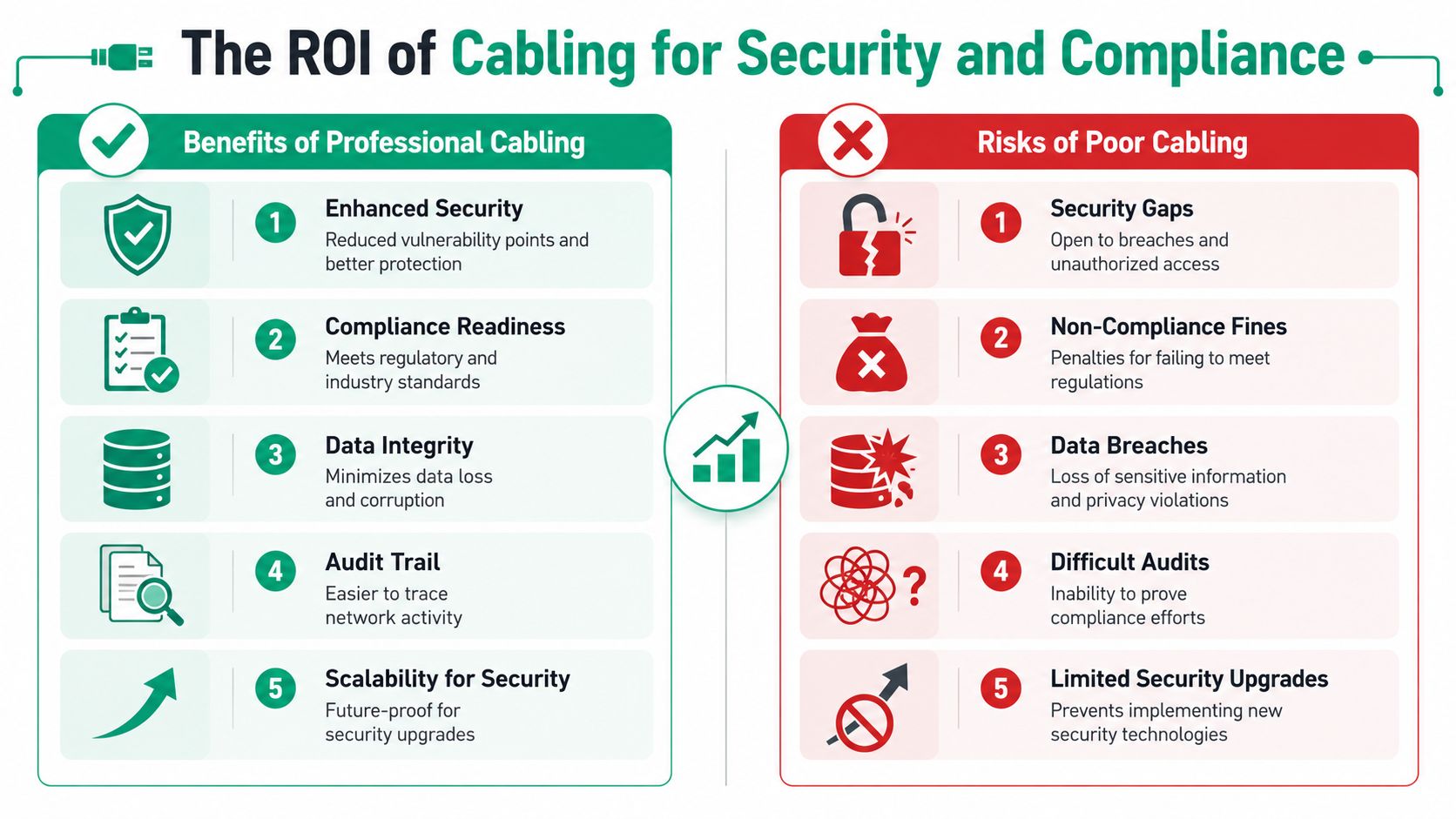
Why compliance teams should care about the cable plant
HIPAA environments need controlled handling of systems that touch protected health information. CMMC environments need disciplined boundaries around contractor data and supporting systems. NIST CSF work depends on being able to identify, protect, detect, respond, and recover. Physical network disorder fights every one of those goals.
When a wall jack is unlabeled, a closet is left open, or production and guest traffic are patched side by side with no clear logic, audits get harder and incident response slows down. That's not theory. That's what happens when an IT team has to chase a live issue while also trying to confirm what connects to what.
How cabling improves ROI beyond neatness
Good structured cable solutions support ROI in a few direct ways:
- Less downtime: Troubleshooting moves faster because the physical map makes sense.
- Cleaner segmentation: Guest Wi‑Fi, cameras, VoIP, clinical systems, and line-of-business traffic can be separated logically and physically.
- Stronger audit readiness: Labels, patch schedules, and documented pathways make it easier to answer compliance questions.
- Better change control: Moves, adds, and security upgrades don't start with guesswork.
For facilities leaders, this overlaps with broader operations planning. Clean asset records, room-level documentation, and infrastructure visibility all help improve facility operations efficiency when IT and facilities stop treating cabling as an afterthought.
A secure network isn't just software-deep. It has to be physically legible.
Why businesses keep investing in this layer
The market size tells the story. One industry estimate values the global structured cabling market at USD 15.13 billion in 2025, rising to USD 16.52 billion in 2026, and projects USD 33.41 billion by 2034 with a 9.20% CAGR over 2026 to 2034. In that same dataset, North America accounted for 40.32% of the market in 2025, which shows how heavily organizations continue to invest in cabling as core infrastructure, according to Fortune Business Insights' structured cabling market outlook.
Businesses don't keep spending in a category like that because cable trays look nice. They spend because downtime costs money, support time gets wasted on preventable messes, and compliance gets painful when the foundation is sloppy.
This is one place where physical infrastructure directly protects monthly budget predictability. A documented cabling plant makes it much easier to support managed security tools, immutable off-site backups, VLAN segmentation, and monitored recovery workflows without surprises.
Network Testing Maintenance and Troubleshooting
A new install isn't finished when the last jack is punched down. It's finished when every run is tested, labeled, and documented well enough that another technician can walk in cold and work the problem fast.
That's the difference between a network that looks clean and one that stays supportable.
Certification is not paperwork fluff
Every cable run should be tested with proper certification gear. In the field, that often means a Fluke tester or equivalent, not a bargain-bin continuity tool that only tells you the wire isn't completely dead. Certification verifies that the installed link performs the way it's supposed to perform.
That matters because a lot of cabling issues hide until the network gets busy. A poor termination, excessive untwist, damaged jacket, or rough bend may not fail loudly on day one. It shows up later as flaky calls, random retransmissions, unstable AP uplinks, or intermittent workstation issues that waste half a day to diagnose.
Why maintenance gets easier in a structured system
In a structured environment, troubleshooting usually follows a short path:
-
Identify the affected area
A room, user group, AP, camera cluster, or switch stack shows the problem. -
Trace the documented run
The label ties the wall jack to the panel and switchport. -
Swap or test the simplest component first
Patch cable, keystone, port, or transceiver. -
Escalate only if needed
You don't start tearing apart ceilings because one desk lost link.
That's how a labeled environment turns a long outage into a short maintenance task. It also aligns well with managed support workflows, where recurring trouble tickets reveal patterns before they become bigger failures.
The fastest network fix is often the one made possible by good labeling six months earlier.
Practical habits that keep the plant healthy
- Audit patching after changes: Temporary jumpers have a way of becoming permanent.
- Keep documentation current: A stale map is only slightly better than no map.
- Inspect closets regularly: Heat, dust, power strips, and accidental unplugging still happen.
- Review segmentation after growth: New devices can end up in the wrong place.
- Tie cabling into broader support: Monitoring, endpoint management, and backup strategy all depend on stable connectivity.
If your team is fighting recurring link issues, mystery outages, or hard-to-isolate performance complaints, this walkthrough on network troubleshooting steps for Indiana SMBs in 2026 gives a practical escalation path.
Choosing the Right Indiana Cabling Installer
A bad cabling hire usually looks fine on day one. The trouble shows up later, when a new firewall needs clean segmentation, an auditor asks for documentation, or one bad run knocks out phones, cameras, and Wi-Fi in the same area. Indiana businesses do not need a crew that only pulls cable. They need an installer who understands how the physical layer affects security, compliance, and recovery time.
Start with the questions that reveal whether the installer is building for the next ten years or just closing the job. Ask who handles layout and pathway decisions. Ask how every run will be labeled, tested, and documented. Ask what changes when you add access points, security cameras, VoIP phones, badge readers, or a second suite. If HIPAA, CMMC, or internal security policy matters to your business, ask how they support segmentation and audit readiness at the cabling level.
The better installers talk comfortably about what happens after the cable is in the wall. They understand switch placement, uplink capacity, wireless density, firewall zones, backup circuits, and failover priorities. That matters because a cheap install can create expensive problems later. I have seen businesses save a little on bid day, then spend far more fixing poor labeling, bad terminations, crowded pathways, and cable routes that made later security upgrades harder than they should have been.
A solid installer usually shows a few habits early:
- They ask about business risk, not just drop counts: Downtime, growth plans, compliance scope, and maintenance access come up in the first conversation.
- They provide as-built documentation: Your IT team should know what goes where without tracing mystery runs through a ceiling.
- They test every run and share results: Certification matters more than a link light.
- They plan for the building you occupy: Older brick buildings, mixed office and warehouse space, and shared tenant environments all change the approach.
- They coordinate with the rest of the network stack: Cabling choices affect switching, wireless performance, security controls, and recovery planning.
One local option businesses may consider is Finchum Fixes IT for network design and related IT support in the Greenwood and Indianapolis area, especially when cabling needs to line up with managed security, wireless, and ongoing support.
The right installer treats cabling as part of your risk posture. Clean pathways, labeled terminations, and documented runs make it easier to enforce segmentation, prove scope during audits, and restore service fast after a failure. That is the return on investment. Less downtime, fewer expensive surprises, and a network that holds up when your business grows.