Cloud Migration for Small Business: 2026 Indy Guide
A cloud migration may cost more in its first year, yet it can reduce downtime and turn wasted technology time into billable work. The business case should include recovery targets, secure access, and an operating budget that reflects migration and support costs.
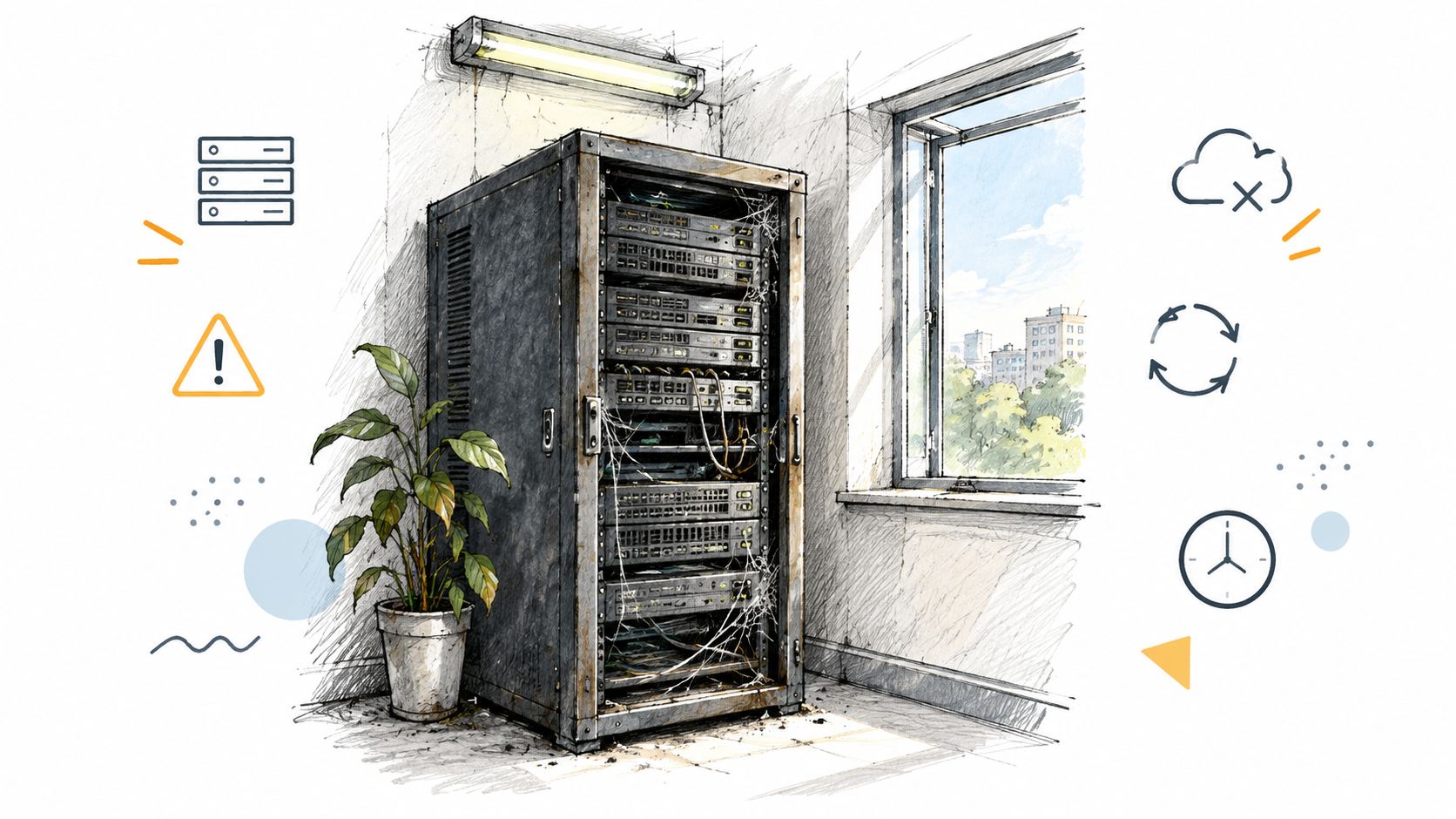
An aging server in a Greenwood business park rarely fails at a convenient moment. Payroll may be due, a customer may be waiting, or a technician may need the database to complete a job. In an older brick building near downtown Indy, unreliable Wi-Fi creates similar losses: employees reconnect, files stop syncing, and someone calls IT instead of serving customers.
Cloud migration for small business is a practical operating decision that goes beyond a software switch. It can reduce hardware responsibilities and provide access to modern services, provided the business budgets for systems running in parallel, staff training, security and compliance controls, redesigned backups, and application dependencies.
Why Cloud Migration Matters for Your Indy Business
A failing disk can halt a Greenwood office during payroll, a customer call, or a scheduled job. Unsupported operating systems and weak wireless access points create the same exposure. Downtime can cost up to $9,000 per minute, according to this analysis of downtime costs for businesses, so continuity planning belongs in the financial discussion, not only the IT checklist.
A Greenwood accounting firm could move email and shared files to Microsoft 365 while keeping a specialized application on a local server. A manufacturer along the I-65 corridor might retain machine control on-site but place backups, identity services, and reporting in the cloud. Hybrid architecture often fits the actual workload better than forcing every system into one destination.
The first-year cost needs an honest baseline
Cloud invoices may rise before they fall. The transition budget should include discovery labor, data cleanup, temporary parallel systems, new licensing, employee training, backup changes, and migration support. A low-cost lift-and-shift can also produce oversized instances, duplicate storage, avoidable data-egress charges, and nonproduction resources that run continuously.
The U.S. Census Bureau found that 40.0% of surveyed businesses adopted cloud-based technology, while 51.8% identified improving process or method quality and reliability as the leading motivation for cloud adoption, as reported in its business technology adoption data. For an Indy business, the practical question is which operational failure the migration should remove.
Practical rule: Approve a cloud project only when you can measure recovery, uptime, latency, support hours, and monthly spend for each workload.
Competitive pressure also matters. An OECD report found that small-business cloud service adoption rose from 38% in 2020 to 41% in 2021, while the adoption gap between small and large businesses widened from 31 percentage points to 33 percentage points, according to the OECD cloud adoption analysis. For Johnson County owners, postponing a suitable migration can leave staff compensating for infrastructure that larger competitors have already replaced.
A measured migration can turn wasted technology time into billable work. Employees spend less time waiting for a local server, searching for unavailable files, or troubleshooting inconsistent access. The business gains a clearer monthly budget instead of repeated emergency purchases. For a practical ROI perspective, review cloud migration benefits for Indiana businesses.
Choosing Your Migration Strategy
The right migration strategy depends on what the workload does, what it depends on, and how much change the business can absorb. A file share, a database server, and a custom manufacturing application shouldn't receive the same treatment.
NIST's Special Publication 800-145 cloud definition, published in September 2011, defines cloud computing as on-demand network access to a shared pool of configurable resources. It identifies on-demand self-service, broad network access, resource pooling, rapid elasticity, and measured service, along with Infrastructure as a Service, Platform as a Service, Software as a Service, and private, community, public, and hybrid deployment models.
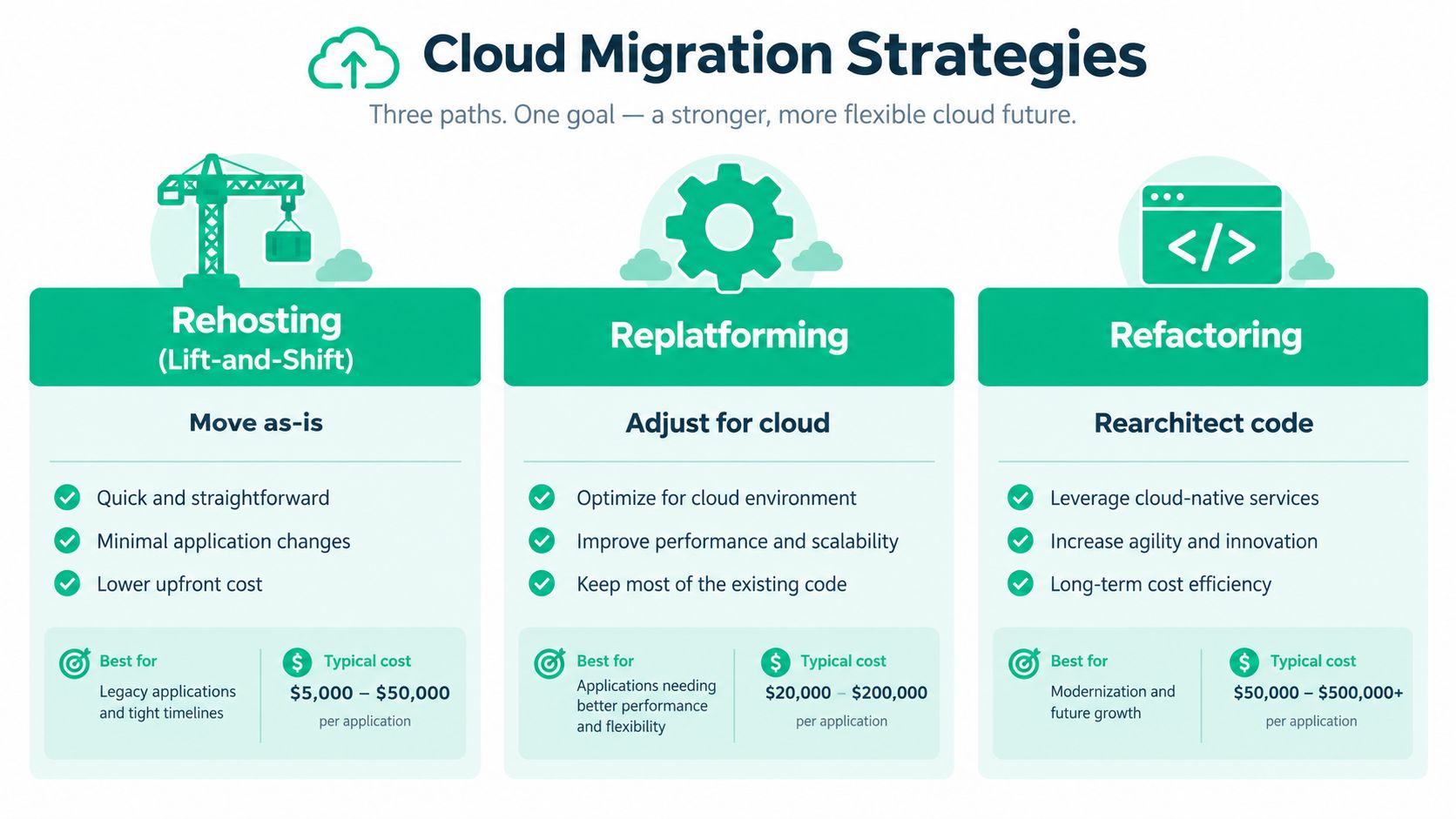
Rehosting moves the workload as-is
Rehosting, or lift-and-shift, transfers a server or application with minimal changes. It can make sense when an aging physical server is nearing failure, the application is supported in a virtual environment, and speed matters more than redesign.
The trade-off is clear. Rehosting preserves old assumptions, including inefficient storage, hard-coded paths, weak authentication, and oversized resources. It may reduce immediate hardware risk without reducing operational complexity. A legacy accounting application that depends on a local database, print service, and license dongle may need a hybrid design rather than a rushed cloud copy.
Replatforming changes the foundation
Replatforming keeps the core application but moves part of its supporting environment to managed services. A business might place a database on a managed database platform, move files into a controlled collaboration service, or replace a self-managed backup server with a managed backup system.
This approach usually requires more testing than rehosting, but it can reduce patching and infrastructure administration. It fits workloads that are stable enough to preserve but expensive to maintain in their current form. For complex resource planning systems, a guide to moving ERP workloads to the cloud can help frame dependency and integration questions.
Refactoring rebuilds the application
Refactoring changes the application architecture for cloud-native operation. Developers may separate services, redesign data access, introduce managed queues, or create an application that scales independently by function.
Refactoring can produce the best long-term fit, but it carries the greatest design and testing burden. It makes sense when the application is strategically important, frequently changed, difficult to maintain, or limited by its current architecture. It rarely makes sense to rebuild a stable, rarely used internal tool only because cloud services are available.
Before selecting a path, map databases, printers, authentication, integrations, licensing, recovery objectives, and compliance obligations. A sound cloud migration best-practices guide for Indiana businesses should support that decision, not replace workload-level analysis.
Selecting the Right Cloud Provider and Hardware
Provider selection should follow the workload rather than the sales presentation. AWS, Microsoft Azure, and Google Cloud Platform can support infrastructure, managed databases, storage, identity integrations, and cloud-native development. Microsoft 365 or Google Workspace may fit better when the business needs hosted email, files, and collaboration instead of server infrastructure.
The provider's service-level agreement is only part of the decision. Review support ownership, response targets, data export, identity control, logging, recovery testing, and exit costs. A low monthly bill can lose its appeal if data transfer, specialist support, or compliance evidence creates unexpected operating work.
Healthcare practices must assign HIPAA responsibilities, preserve audit evidence, control access, manage retention, and test recovery. Defense contractors need to consider CMMC alongside the broader security program. Professional-services companies may place greater weight on identity integration, remote access, document permissions, and support responsiveness.
| Business need | Provider or design question | Local implementation concern |
|---|---|---|
| Hosted productivity | Does Microsoft 365 or Google Workspace cover email, files, and collaboration? | Can staff use MFA and find shared records without recreating open file shares? |
| Infrastructure | Does AWS, Azure, or Google Cloud provide the required compute, storage, and database services? | Are latency, egress, support ownership, and recovery targets documented? |
| Hybrid operations | Can the provider connect securely to remaining local systems? | Does the office have stable internet and properly segmented networks? |
| Wireless access | Can the local network handle cloud-heavy work? | Are UniFi networking devices placed and configured for the building's construction? |
The right choice also depends on where the business operates and how staff work. A Greenwood office serving clients across Johnson County may value responsive local support and predictable connectivity more than a feature available only in a larger cloud tier. Document the workload, compliance duties, recovery targets, and expected support effort before comparing provider quotes.
Hardware still matters in a hybrid office
Cloud services cannot compensate for poor local connectivity. UniFi networking can provide centrally managed switching, wireless access points, VLAN segmentation, and site visibility, but placement and backhaul still matter. In an old brick building, mesh nodes may help where cabling is difficult. Wired backhaul remains preferable when the building allows it.
Keep local equipment for systems that require it, then protect it with segmentation, monitoring, and immutable off-site backups. Avoid buying enterprise hardware until its operating purpose is clear. A review of Indiana cloud migration service providers can help organize questions about provider support, hardware design, recovery testing, and long-term operating costs.
The Three-Phase Migration Roadmap
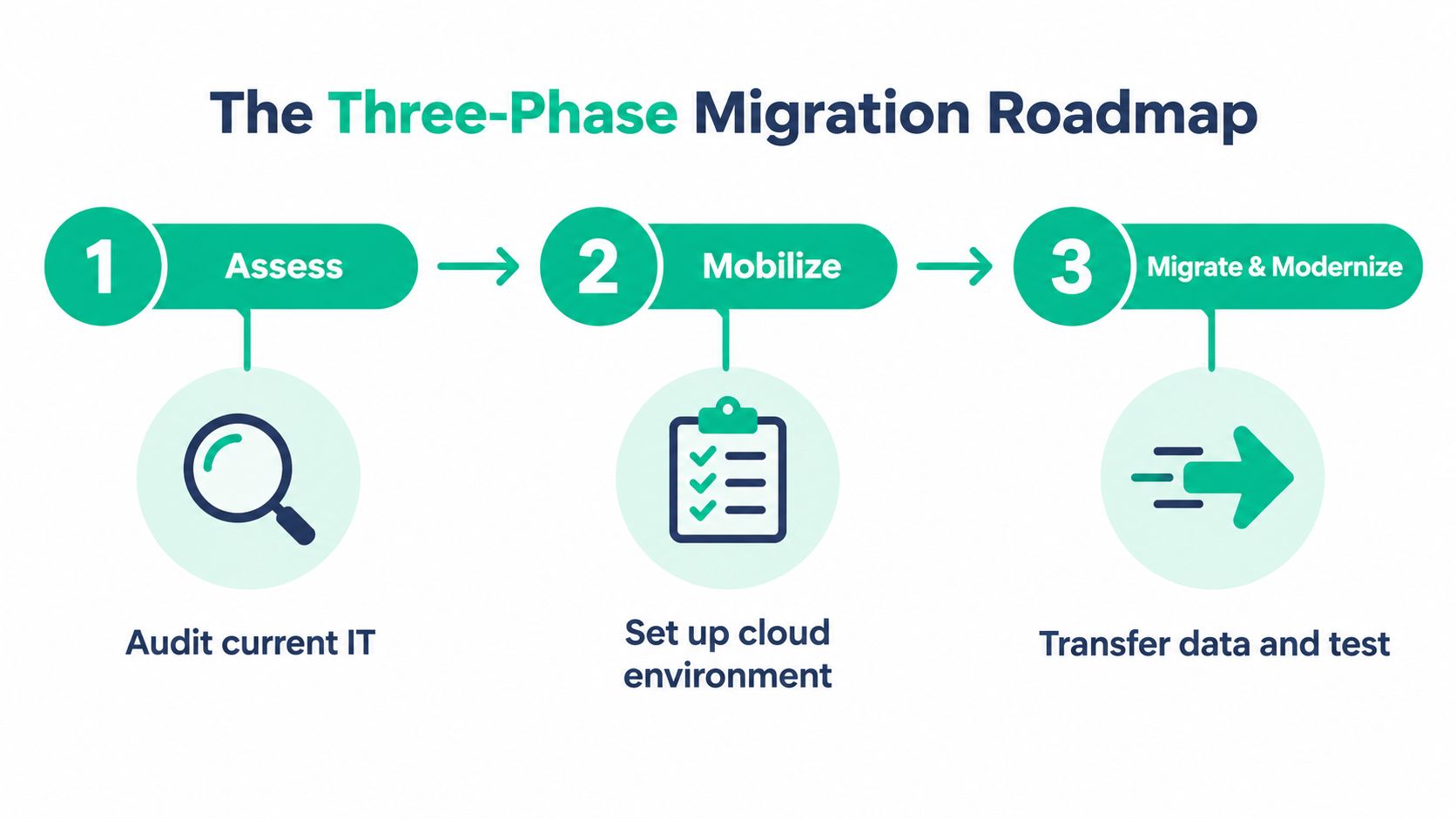
A controlled migration follows Assess, Mobilize, then Migrate and Modernize. Skipping the first phase creates surprises. Skipping the second creates an insecure destination. Skipping the third turns testing into guesswork.
Assess the estate before choosing a destination
Inventory every server, application, database, file share, user account, software license, integration, printer, backup job, and recovery dependency. Record current operating costs, performance, compliance requirements, recovery-time objectives, and recovery-point objectives.
Classify each workload as rehost, replatform, refactor, retain, or retire. Retain a system when it's stable, difficult to modernize, and still cheaper to operate locally. Retire duplicate or obsolete data only after the owner approves it. A hidden Access database, unsupported scanner, or licensing dependency usually appears at this point.
Create success criteria before migration. Each workload should have a target for monthly spend, latency, uptime, recovery time, recovery point, and support hours. If nobody can say what “working” means, production cutover is premature.
Mobilize the landing zone and operating controls
Mobilization creates the environment that receives the workloads. It should include:
- Dependency map: Show which applications rely on databases, identity, file services, printers, VPN access, or other systems.
- Identity model: Define administrative roles, least-privilege access, break-glass procedures, and MFA requirements.
- Network segmentation: Separate users, servers, management systems, guest traffic, and sensitive workloads.
- Backup policy: Define frequency, retention, immutability, geographic separation, and restoration ownership.
- Monitoring plan: Assign alerts for security events, capacity, performance, backup failures, and unusual spending.
- Rollback plan: Write the conditions that trigger rollback, the decision owner, and the steps to restore service.
Use the pilot to test a representative workload, not the easiest file folder. Validate permissions, application behavior, performance, backup restoration, and user access before production waves.
Migrate in dependency-aware waves
Run the pilot first, then move related workloads in an order that respects dependencies. Keep source systems available during validation, perform measured tests, and retain a documented rollback path. Train users on new file locations, MFA prompts, support procedures, and acceptable sharing practices.
This video can serve as a visual introduction to the migration sequence:
AWS-reported benchmarking indicates 31% average infrastructure-cost savings, 62% greater infrastructure-management efficiency, and a 69% reduction in unplanned downtime after migration, but those are provider-sponsored averages, not guaranteed small-business results. Treat them as comparison evidence, then require your own workload-level measurements.
Security, Compliance, and Backup Risks
A cloud provider secures its platform, but your business still controls employee access, administrator credentials, sensitive records, and recovery decisions. A copied server with weak identities carries the same exposure into a new environment. Cloud security therefore remains a shared operating responsibility.
The 2025 Thales Cloud Security Study reports that only 65% of respondents had multifactor authentication deployed for cloud access. For a Greenwood business, that gap makes identity protection an immediate migration concern.

Apply NIST CSF 2.0 to the migration
NIST Cybersecurity Framework 2.0 provides six functions: Govern, Identify, Protect, Detect, Respond, and Recover. For a Greenwood business, apply them by assigning recovery owners, documenting systems and data, protecting accounts and information, monitoring abnormal activity, defining incident decisions, and testing restoration.
HIPAA-covered organizations should map these controls into their broader compliance program. Defense contractors should use them alongside CMMC requirements. General businesses can use NIST CSF to show that security and recovery controls exist beyond a provider's marketing page.
Zero Trust follows the same operating logic. Verify users and devices, limit access to each role's needs, separate administration from ordinary work, and apply stronger controls to sensitive systems. Bitdefender GravityZone can provide endpoint protection. Identity governance, logging, backup testing, and incident ownership still require separate controls and assigned responsibility.
Design recovery for provider and ransomware failure
Replication alone does not equal recovery. Compromised credentials, accidental deletion, ransomware, bad synchronization, or a provider-wide incident can affect replicated data. NIST implementation examples recommend regular backup and restore testing, offline and off-site copies, geographic separation, and schedules matched to each data source's importance.
A practical runbook lists every SaaS platform, database, file share, and virtual machine. Record backup frequency, retention, encryption, immutability, test-restore results, and the person responsible for approval. Test file integrity and application boot behavior, not only whether a backup job reports success.
Recovery is evidence, not a checkbox. If the team has not restored the data, nobody knows whether the business can resume operations.
Review cloud security management for SMBs with the same questions used for local infrastructure. Who owns administrator access? Where is data processed? How does the business operate during an identity-provider or internet outage? How will the company export data if pricing or terms change?
Post-Migration Optimization and Support
Go-live starts operational measurement. During the first 30, 60, and 90 days, review cloud invoices, support tickets, user complaints, backup results, performance, security alerts, and recovery evidence. A technically complete migration can still create financial problems if the environment is oversized or poorly governed.
Tag each resource by owner and cost center. Set budgets and alerts. Review duplicate storage, orphaned accounts, unused licenses, data-egress patterns, and services that do not need continuous operation. Base rightsizing on measured utilization collected after workloads settle.
The first review should test business outcomes
Ask whether employees can reach the systems they need without workarounds. Compare application latency with the agreed baseline. Confirm that the help desk knows who owns each issue, administrators can respond to security alerts, and backups restore within documented recovery objectives.
Benchmark evidence indicates that continuous optimization can reduce user costs, increase the amount of data each administrator manages, and decrease application downtime. Treat those findings as directional. Local results depend on workload design, usage patterns, licensing, governance, and the quality of ongoing support.
A local managed provider can handle recurring administration, endpoint support, network monitoring, backup checks, and SOC-as-a-Service monitoring. Internal leaders can then focus on customers and staff while retaining clear ownership of decisions. Finchum Fixes IT offers cloud, database, server, and storage migration services, along with networking, cybersecurity, data recovery, custom software development, and ongoing technical support for Indiana businesses.
Make optimization part of the budget
A predictable monthly budget requires more than a fixed subscription. Assign a named owner for cloud spend, schedule rightsizing reviews, document support boundaries, conduct security reviews, and retire systems that no longer serve the business.
Use cloud cost optimization for Indiana SMBs to build a review habit around actual usage and business value. When a workload misses its cost, performance, recovery, or security criteria, change it, move it back, or retire it. Migration has delivered lasting value when the business can explain what it pays for, why it needs each service, and how quickly it can recover from failure.
For businesses in Greenwood and the Indianapolis area, Finchum Fixes IT can assess your network, identity controls, backup design, and cloud readiness before a server failure forces the decision. Visit Finchum Fixes IT to schedule a Free Network Assessment or Security Risk Audit and receive a migration plan tied to downtime prevention, compliance, and measurable operating costs.