Enterprise IT Modernization: Indiana Roadmap
A Greenwood office discovers its file server is failing just as payroll starts. Across the I-65 corridor, that scene repeats in different forms: unstable Wi-Fi, unsupported software, aging storage, and staff losing hours to avoidable fixes. Enterprise IT modernization replaces that fragility with a phased, measurable plan that protects operations while improving security, recovery, and engineering capacity.
The Reality of Aging Infrastructure in Central Indiana
Enterprise IT modernization is the phased process of updating legacy systems, applications, and infrastructure to improve security, reduce downtime, and align technology with current business goals without disrupting daily operations. It isn't a blind jump into the cloud. It's a controlled risk-management program tied to uptime, recovery, employee productivity, and predictable spending.
Consider a business in a Greenwood business park with a local server that has been running for years. The RAID array starts reporting errors, backup jobs complete inconsistently, and employees notice that shared files take longer to open. In an old brick building near downtown Indy tech hubs, the equivalent problem might be spotty Wi-Fi caused by thick walls, unmanaged access points, and switches that were never designed for today's device count.
The owner usually notices the business impact before anyone names the technical cause. A sales representative can't access a proposal, a bookkeeper waits for an application to load, and a manager spends part of the morning calling for help instead of serving customers. Downtime can cost up to $9,000 per minute, according to the figure specified for this business continuity discussion. That makes every preventable outage a direct threat to billable work and customer confidence.
The cost of waiting
Old infrastructure creates more than repair invoices. It produces wasted tech time, including repeated logins, slow file transfers, manual workarounds, and interruptions that never appear as a line item. A managed approach turns those recurring surprises into a planned monthly budget covering monitoring, patching, endpoint protection, network maintenance, and support.
The first response shouldn't be “move everything to the cloud.” Start with an asset register, warranty status, software dependencies, backup health, and business criticality. A practical guide to IT asset strategy for businesses can help owners frame hardware and software decisions around lifecycle planning instead of emergency replacement.
What modernization looks like locally
For a Johnson County business owner, the target may be a hybrid environment. A local file cache or latency-sensitive application can remain on-site while identity, backup copies, collaboration tools, and selected workloads move to managed cloud services. UniFi networking can provide centrally managed switching and wireless access, while Bitdefender GravityZone can handle endpoint security policies across office and remote devices.
The network still needs an engineering plan. The Indiana SMB network infrastructure guide offers useful context for evaluating cabling, switching, wireless coverage, and upgrade sequencing. Modernization works when each change has an operational reason, a rollback path, and a clear owner.
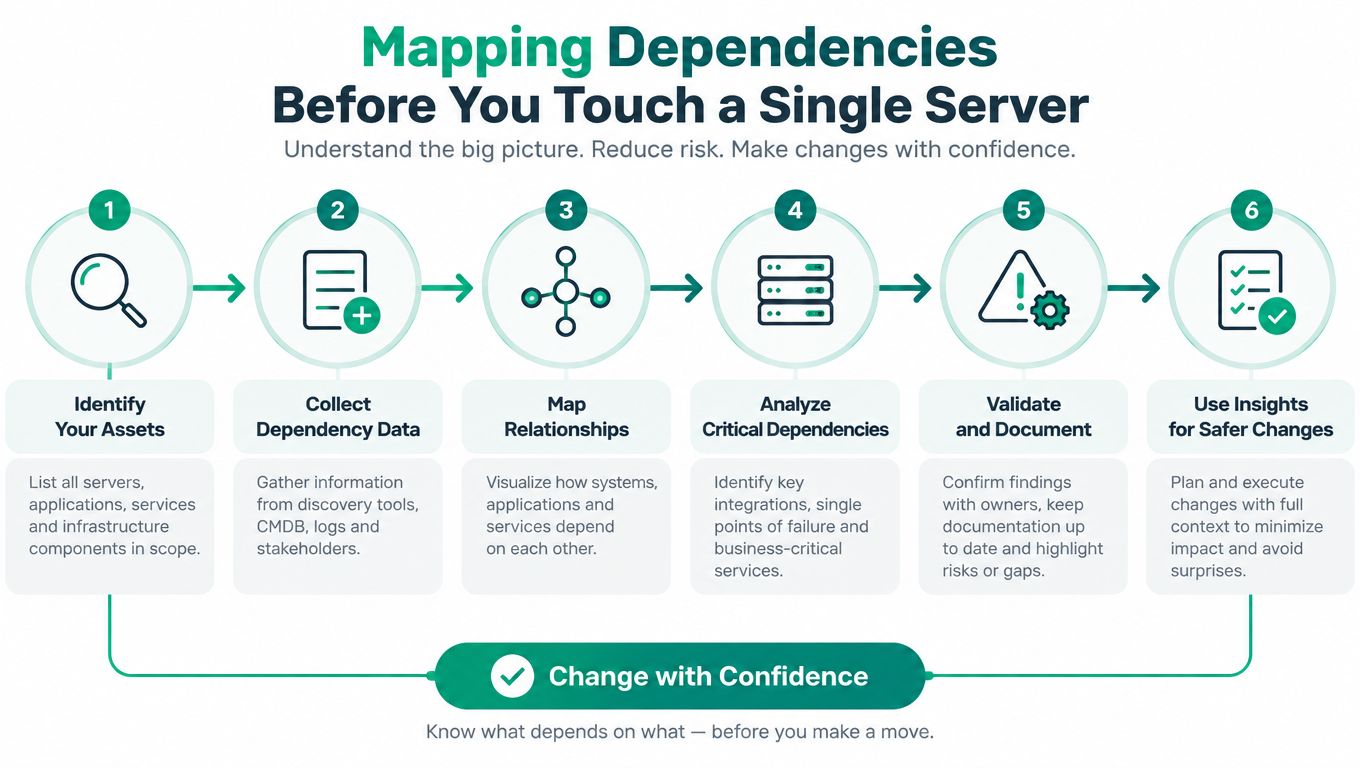
Mapping Dependencies Before You Touch a Single Server
A server can boot successfully after migration and still leave the business broken. The missing pieces are usually hidden dependencies, such as a line-of-business application calling a shared database, a scheduled task pointing to an old folder, or a printer workflow relying on a service nobody documented.
Dependency mapping prevents the classic lift-and-shift mistake. Copying a workload into a cloud virtual machine preserves its architecture, but it can also preserve hardcoded paths, fragile integrations, oversized databases, and single points of failure. The result is often a cloud monolith with a new hosting bill and the same technical debt.
Build an inventory that reflects reality
Start with people and evidence, not assumptions. The finance manager may know which reports must run before billing. A warehouse lead may know that an old workstation launches a label-printing workflow. Application logs, firewall records, scheduled tasks, service accounts, database connection strings, and backup reports reveal the technical relationships behind those business processes.
A useful inventory records:
- Business owner: Who decides whether the workload is functioning correctly?
- Data classification: Does it contain confidential, regulated, or customer information?
- Integration points: Which APIs, file shares, queues, databases, and devices does it use?
- Failure impact: What stops if the workload is unavailable?
- Recovery design: What must be restored first, and how will users verify success?
- Change risk: Which dependencies are undocumented or difficult to test?
The talent problem matters here. Nine in ten organizations report at least one talent gap slowing modernization, with cloud architecture and migration expertise among the most common shortages, and 95% use at least one third-party partner to close those gaps, according to Ensono's modernization research. That doesn't mean an outside provider should take over every decision. Internal domain owners understand the workflow, while external specialists can identify infrastructure and architecture risks those owners may not see.
Trace the dangerous assumptions
Look for integrations that static documentation misses. A legacy application may call an API only during month-end processing. A service may authenticate with an account whose password is stored in a scheduled task. A report generator may expect a database backup to land in a particular directory. A line-of-business application might use a hardcoded hostname or depend on a local print server.
Run discovery in stages:
- Collect configuration evidence from servers, endpoints, applications, and network systems.
- Observe runtime behavior during normal operations and peak business workflows.
- Interview process owners about exceptions, manual workarounds, and timing constraints.
- Classify dependencies by business criticality, data sensitivity, and migration risk.
- Design rollback before selecting a cutover window.
- Test the smallest representative workload before expanding the scope.
Systems that require constant babysitting deserve special attention. The question isn't whether a platform can be moved. It's whether decomposition, replacement, or isolation will release engineering capacity without creating a distributed system nobody can support. A structured IT infrastructure audit checklist can help expose missing documentation before migration work begins.
Choosing the Right Modernization Pattern for Your Workloads
Not every application needs a rewrite. Rewriting a stable internal tool can consume budget without improving the customer experience, while copying a sensitive customer portal into a virtual machine can leave security, scaling, and deployment problems untouched.
The practical choice depends on business criticality, operational pain, change frequency, compliance requirements, and the team's ability to test the workload. Johnson County business owners don't need a fashionable architecture. They need the least disruptive pattern that improves the outcome and doesn't create a larger support burden.
Three paths, three trade-offs
Lift-and-shift moves the workload with limited code changes. It's useful when an internal wiki, file service, or stable application needs new hosting quickly. The advantage is speed and familiarity. The downside is that inefficient architecture, operating system dependencies, and weak automation come along for the ride.
Replatforming changes the underlying service without redesigning the application completely. Examples include moving a database to a managed database service, replacing self-managed storage with cloud storage, or running an existing application on a managed container platform. This can reduce patching and infrastructure work, but compatibility testing remains essential.
Refactoring changes the application structure. A customer-facing portal handling sensitive data might benefit from separated services, stronger identity controls, automated testing, and independently deployable components. Refactoring offers the greatest architectural improvement, but it also demands domain knowledge, disciplined release management, and careful handling of data consistency.
The distinction between these approaches is explored well in this practical resource on making legacy modernisation decisions. The right answer often combines patterns across one portfolio.
Modernization Pattern Decision Matrix
| Pattern | Best For | Technical Debt Impact | Typical Timeline |
|---|---|---|---|
| Lift-and-shift | Stable, bounded workloads with urgent hosting or hardware needs | Preserves much of the existing debt | Shorter |
| Replatform | Applications that can use managed databases, containers, or storage | Reduces selected infrastructure debt | Moderate |
| Refactor | High-value applications that need resilience, security, or faster change | Can reduce architectural debt, but introduces design and testing work | Longer |
Keep latency where it belongs
Cloud adoption doesn't require every workload to leave the building. A hybrid design can keep latency-sensitive services on local, latency-optimized mesh nodes, while sending batch processing, analytics, or backup replication to the cloud. That arrangement may suit a manufacturer along the I-65 corridor, a clinic with local devices, or a growing Hamilton County company with a mix of office and remote users.
The decision should follow business criticality, not technical curiosity. A workload that affects shipping, patient care, production, or revenue deserves dependency mapping, service decomposition planning, and rollback design before anyone chooses a migration tool. More practical guidance is available in these legacy system modernization strategies.
Executing a Phased Migration Without Breaking Daily Operations
The big-bang migration is attractive because it appears decisive. It also concentrates technical risk into one cutover, one weekend, and one long list of assumptions. A phased program gives the team evidence before it commits the next workload.
A recent enterprise modernization survey found that 71% of IT decision-makers said modernization initiatives exceeded their original budgets in the past 24 months. The same research supports phased increments tied to business outcomes rather than code-completion milestones. Read the 2026 enterprise modernization reality check for the broader context.
Use gates, not optimism
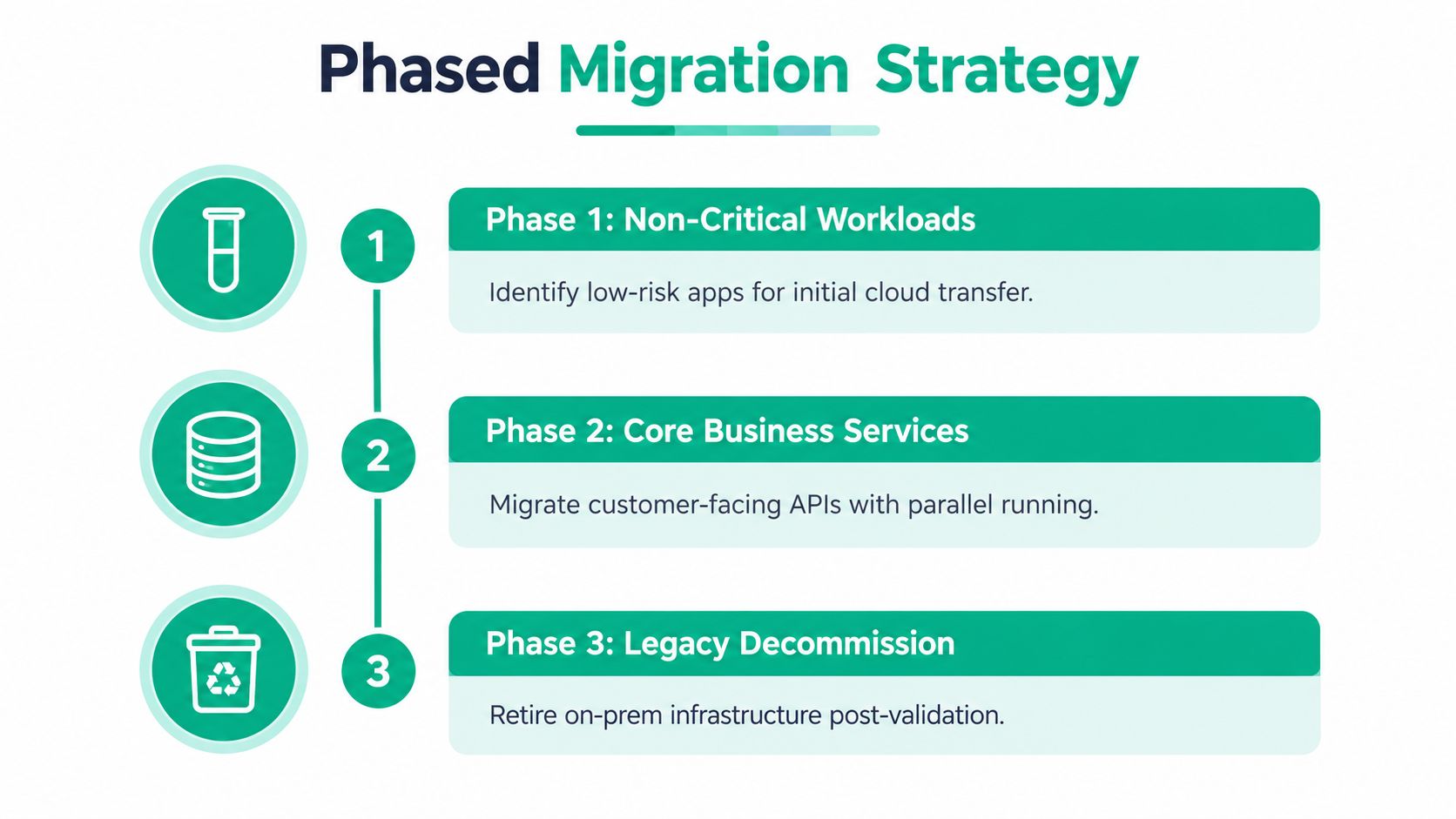
Phase one selects a bounded workload. Choose a non-critical application with a clear owner, manageable data, and a realistic test process. Establish the baseline first, including uptime, response behavior, defect rate, support tickets, and cost-to-serve.
Phase two runs old and new paths in parallel. Replicate data where appropriate, direct a controlled group of users to the new environment, and compare outputs. Don't decommission the legacy path because the first test looks good. Validate business workflows, authentication, reporting, printing, integrations, and backup restoration.
Phase three expands only after evidence. Define exit criteria before deployment. The workload must meet the agreed production metrics, the support team must know the runbook, and the rollback procedure must work in a rehearsal. Decommissioning comes after validation, documentation, and a recoverable archive plan.
A simple rollback workflow might include:
- Stop new writes or place the application into an approved maintenance mode.
- Confirm the last synchronized data point.
- Redirect users to the legacy service.
- Validate login, core transactions, and reporting.
- Preserve logs and deployment artifacts for root-cause analysis.
- Schedule a corrected release rather than improvising during an outage.
Daily operations can consume the entire program. 57% of teams still spend most of their time on day-to-day operations, while only 25% report innovation as their primary focus, according to the cited Ensono survey. Reserve named engineering capacity for discovery, testing, documentation, and change management. Without that allocation, urgent tickets will always displace modernization work.
A short technical walkthrough can make the concept easier to communicate internally:
For Indiana teams building the runbook, this step-by-step cloud migration playbook provides a useful planning reference. The migration isn't complete when the new server answers a health check. It's complete when employees can work, customers can transact, and the business can recover.
Baking Security and Compliance into the New Architecture
A cloud migration can carry old security weaknesses into a new environment. Broad permissions, incomplete logging, production-connected backups, and shared administrator credentials remain risks after the application moves. Treat each architecture decision as part of a phased risk-management plan for the Indiana business, not as a cloud checkbox.
NIST CSF 2.0 provides a practical structure for organizing that work. NIST released version 2.0 on February 26, 2024, the first major update since the framework was created in 2014. It adds a Govern function and addresses current changes in threats and technology, as described in the NIST announcement about CSF 2.0.
Turn governance into engineering work
Governance should produce decisions engineers can implement and test. Assign an owner to every system, record the data it processes, document accepted risks, and define the controls required before release. The NIST CSF 2.0 publication describes the framework as a reference for cybersecurity risk management that can support architecture reviews and managed IT operations.
Use a SOC 2 compliance checklist for readiness to map controls to actual systems before release. That exercise exposes gaps between a written policy and the permissions, logs, endpoints, and vendors operating in production.
Zero Trust architecture requires explicit decisions about identity, devices, and access instead of trusting a user or system because it sits inside an office network. Apply least privilege to administrators, separate service accounts, require strong authentication, and log access to sensitive resources. SOC-as-a-Service monitoring can review endpoint, identity, firewall, and cloud events for suspicious activity that an internal generalist may miss.
Design recovery for regulated work
Healthcare organizations along the I-65 corridor must treat recovery as part of the HIPAA architecture. The HIPAA Security Rule's contingency-plan requirement covers procedures for backing up electronic protected health information, restoring lost data, and continuing critical business processes during emergencies, as stated in HHS guidance on the Security Rule.
HHS guidance emphasizes retrievable exact copies of ePHI and recovery decisions based on risk. HIPAA does not prescribe one backup technology, frequency, or retention period. A commonly cited 3-2-1 strategy keeps three copies on two media types, with one copy offsite, as summarized in this HIPAA backup and recovery guide.
For healthcare practices, immutable off-site backups reduce the chance that an attacker can alter or encrypt every connected copy. Defense contractors should account for CMMC requirements when setting access control, logging, asset handling, and incident response. General businesses can use NIST CSF to organize the work, then verify each control against the systems staff use.
Measuring Success and Securing Your Local IT Partnership
Cloud adoption is not a success metric by itself. A business can move workloads into a cloud account and still have slow releases, fragile integrations, recurring incidents, and engineers spending their days maintaining old behavior in a new location.
Measure the change in operational terms. Track capacity released from maintenance, production defects, recovery readiness, support volume, deployment confidence, and time required to deliver approved improvements. If the modernization doesn't give people more time to serve customers or improve the product, the architecture needs another review.
Use metrics that affect the business
Capacity release is especially useful for SMBs. The cited Ensono research reports that 38% of teams said they spend most of their time on strategic initiatives, up from 25% the prior year, while 49% said legacy maintenance costs exceeded plan. Those figures point to a practical test: did the program reduce babysitting, or did it only move the babysitting to a different platform?
Track each workload with an owner and a small scorecard:
- Availability: Did users experience fewer interruptions?
- Defect rate: Did releases create fewer production problems?
- Recovery confidence: Can the team restore the service and verify the data?
- Cost-to-serve: Are infrastructure and support costs understandable?
- Engineering capacity: Are specialists spending more time on planned improvements?
- Business throughput: Can staff complete core work without technical workarounds?
A local partner should explain those results in business language. In our 17 years of local service, the useful conversation is rarely about how many virtual machines were created. It's about whether the office can open Monday morning, whether a clinic can access records, whether a contractor can protect controlled information, and whether an owner can forecast technology spending.
Choose responsiveness with technical depth
Hamilton County growth brings new offices, remote users, SaaS applications, and security exposure. Downtown Indy tech hubs create different pressures, including distributed teams, cloud identity, collaboration systems, and integrations that cross organizational boundaries. A partner should be able to troubleshoot a UniFi wireless issue, validate an immutable backup, review Bitdefender GravityZone alerts, and discuss application decomposition without treating each problem as unrelated.
Finchum Fixes IT provides managed IT support, cybersecurity, networking and Wi-Fi design, data recovery and migration, custom software development, and technical support for mission-critical environments. In a serious storage failure, the response may require bit-level data recovery rather than repeated reboot attempts, followed by a migration plan that protects the recovered data and addresses the original failure mode.
Book a Free Network Assessment or a Security Risk Audit before replacing equipment or approving a cloud project. Businesses in Greenwood and Indianapolis need a clear inventory, an honest risk ranking, and a modernization roadmap built around continuity and ROI, not a sales quota.
If your Greenwood or Indianapolis business is dealing with aging servers, unreliable Wi-Fi, weak backups, or a risky cloud move, Finchum Fixes IT can assess the environment and build a phased modernization plan. Schedule a Free Network Assessment or Security Risk Audit to identify the failures that threaten uptime, protect critical data, and turn unpredictable technology problems into a manageable operating budget.