Cloud Migration Best Practices for Indiana Businesses
TL;DR: Key Takeaways
- Stop Downtime: A proper cloud migration prevents costly downtime (up to $9,000/minute) by replacing aging on-premise servers with resilient, cloud-based systems. This converts wasted tech time into billable hours.
- Plan Before You Move: The first step is a thorough audit of your current hardware, software, and data. This reveals immediate cost savings and prevents budget-busting surprises. A phased rollout is always safer than a risky "big bang" approach.
- Security is Non-Negotiable: We build every migration on a Zero Trust architecture, using end-to-end encryption and immutable off-site backups to protect your data. This ensures compliance with standards like HIPAA and CMMC from day one.
- Control Your Costs: After the move, we optimize your cloud spending by right-sizing resources and automating shutdowns. This turns a variable expense into a predictable monthly budget with a clear ROI.
When people talk about cloud migration best practices, they're really talking about a game plan. It’s a strategy that lines up with what your business is trying to achieve, starts with a brutally honest look at your current tech, and keeps security front and center from day one.
The goal is to trade unpredictable hardware bills for a steady monthly budget, get your team working more efficiently, and stop those gut-wrenching moments when everything just... stops. For Indiana businesses, it’s about finally unplugging those dusty, aging servers in a Greenwood business park and moving to a cloud setup that can actually keep up with your growth.
From On-Premise Headaches to Cloud Efficiency
Let’s be real. That server rack humming away in your Greenwood office? It's not just a piece of hardware. It's a risk. We've seen it time and time again—every minute of downtime can cost a business up to $9,000, a gamble most Johnson County business owners simply can't afford.
You get trapped in a cycle: buy expensive hardware, pay for unpredictable repairs, and then watch your team waste valuable time trying to fix things instead of doing their actual jobs. That’s not just an IT problem; those are billable hours flying out the window.
A smart cloud migration puts a permanent end to that headache. This isn’t just about storing files on the internet. It's a complete shift in how you budget for technology—moving from massive, upfront capital expenses (CapEx) to a predictable, operational expense (OpEx) you can plan for. For a deeper look at the nuts and bolts, this guide on 10 Cloud Migration Best Practices is a great resource.
What This Actually Looks Like for Your Business
After 17 years of helping businesses up and down the I-65 corridor, we’ve seen the results firsthand. A well-planned migration isn’t about chasing the latest tech fad; it’s about making your business tougher, faster, and more competitive.
Here’s what a proper move to the cloud actually delivers:
- Rock-Solid Business Continuity: With things like immutable off-site backups, you’re shielded from server crashes, ransomware, or a spilled cup of coffee. Your business just keeps running, preventing downtime that costs money.
- A Budget You Can Count On: No more surprise five-figure invoices when a server dies. You get a clear, monthly cost that makes financial planning a whole lot simpler.
- Serious Security and Compliance: We design cloud systems built to meet tough standards like HIPAA for healthcare folks or CMMC for defense contractors. It's all built on a "never trust, always verify" Zero Trust foundation.
- A More Productive Team: Imagine your staff focusing on their clients instead of fighting with a slow, clunky network. All that "wasted tech time" turns right back into billable hours.
Of course, you can't get to where you're going without knowing where you are. The absolute first step is getting a crystal-clear picture of your current IT setup. If you need a roadmap for that, check out our guide on how to perform a thorough IT infrastructure audit: https://finchumfixesit.com/blog/your-ultimate-10-point-it-infrastructure-audit-checklist-for-2026. It's the perfect starting block for a successful move.
Is Your Business Really Ready for the Cloud?
Jumping into a cloud migration without a solid game plan is like trying to build a house without blueprints. It’s a disaster waiting to happen. A lot of Indianapolis businesses get starry-eyed about the benefits but completely skip the most critical first step: a brutally honest look at where they stand right now. This isn't just about tech; it's about avoiding the budget-busting surprises that can turn a smart move into a costly nightmare.
Take a look at that aging server rack humming away in your Greenwood business park office. It’s easy to dismiss it as just another piece of equipment, but that box is the beating heart of your entire operation. Before you move a single byte, you’ve got to know exactly what’s running on it, who needs it, and how badly things break if it goes down.
Taking Stock of What You’ve Got
A thorough inventory is non-negotiable. You can't plan a road trip if you don't know what you’re packing. This means cataloging every single piece of your IT puzzle to build a crystal-clear picture of your starting point.
Here's what that actually looks like:
- A Deep Dive into Your Hardware: We document every server, switch, and storage device. We’re not just jotting down model numbers; we’re looking at performance, age, and any bottlenecks that are just waiting to cause problems. After 17 years of serving local businesses, we've learned that creaky old hardware is often the real culprit behind performance issues people blame on their software.
- Mapping Your Software and Apps: What programs does your team live in every day? We identify everything from your accounting software to that quirky custom app your predecessor built, figuring out how they all talk to each other.
- Classifying Your Data: Let's be real—not all data is created equal. We'll help you sort through it all, figuring out what’s mission-critical, what's sensitive and needs to meet compliance rules like HIPAA, and what can be boxed up and put into long-term storage.
For many growth-focused companies in Hamilton County, this audit is a huge eye-opener. They almost always find redundant software licenses and hardware that’s barely being used, uncovering immediate cost savings before a dollar is even spent on the migration.
Getting a handle on these pieces is the first step in a proper risk assessment. If you want a structured way to tackle this, you can learn more about a cyber security risk assessment template for Indiana businesses that details this exact process. A little proactive work here helps you spot security gaps before they become massive headaches in the cloud.
The Big Question: Lift and Shift or Re-platform?
Once you know what you have, you have to decide how to move it. It's not a one-size-fits-all deal. The two most common paths are "lift and shift" and "re-platforming."
A lift and shift is exactly what it sounds like. You’re essentially picking up an application and its data from your server and dropping it into the cloud with very few changes. It's the fastest, simplest route, making it perfect for older, legacy applications where you don't want to mess with the code.
Re-platforming, on the other hand, involves a bit of tinkering during the move. You might upgrade a database to a managed cloud service or tweak an application to run more smoothly in its new home. It takes a little more planning but almost always pays off with better performance and lower costs down the road. We usually recommend this for the core business apps that stand to gain the most from what the cloud has to offer.
Your Network is More Important Than You Think
One of the most common oversights in cloud migration best practices is the network itself. Your applications might be ready for the cloud, but is your internet connection up to the task? When your core services are no longer in the building, your team's productivity becomes completely dependent on a fast, stable connection.
We've seen this issue absolutely cripple businesses, especially those in older downtown Indy brick buildings where spotty Wi-Fi is a daily frustration. A cloud migration will expose those weaknesses in a heartbeat, leading to infuriating lag and dropped connections.
This is where a modern network isn't just a "nice-to-have"—it's essential. By strategically placing latency-optimized UniFi mesh nodes, we can wipe out dead zones and blanket your entire facility with reliable, high-speed connectivity. This ensures your team has the solid pipeline they need to get their work done, turning that wasted tech time back into productive, billable hours. Your network is the new highway your business runs on. Don't let it be a dirt road.
Building a Migration Plan That Actually Works
Alright, you’ve taken inventory of your entire digital world. Now comes the fun part: figuring out how to get it all from your server closet to the cloud without anything blowing up.
Let's be blunt. A migration plan isn't a "nice-to-have" document you scribble on a napkin. It's the detailed blueprint that keeps your business running while everything is in motion. Skipping this step is the fastest way to turn your exciting cloud project into a costly, hair-pulling disaster.
A lot of folks are tempted to just move everything at once in a single, high-stakes weekend—the dreaded "big bang" approach. Don't do it. We've seen it go wrong too many times. It's an all-or-nothing gamble that puts massive pressure on a single moment and dramatically increases your risk of painful downtime.
Instead, we swear by a phased rollout. It’s a core principle of sound data center migration best practices, and it’s a strategy we’ve used successfully for years with businesses all over Central Indiana.
Sequencing for Success
A phased rollout is exactly what it sounds like: moving your operations in smart, manageable chunks. We always start with the least critical stuff—maybe a development server or an old file archive. This gives us a low-stakes sandbox to test the process, smooth out any wrinkles, and build confidence before we touch anything important.
We saw just how powerful this is when we helped a Hamilton County healthcare provider move their entire practice to a HIPAA-compliant cloud. We started with their back-office administrative files, making absolutely sure our security and transfer methods were rock-solid. Only after that trial run did we even think about touching a single piece of sensitive patient data. This careful sequencing kept their practice fully operational and compliant from start to finish.
The whole idea is to be methodical. You audit what you have, identify what moves when, and make sure your network is ready for the journey.
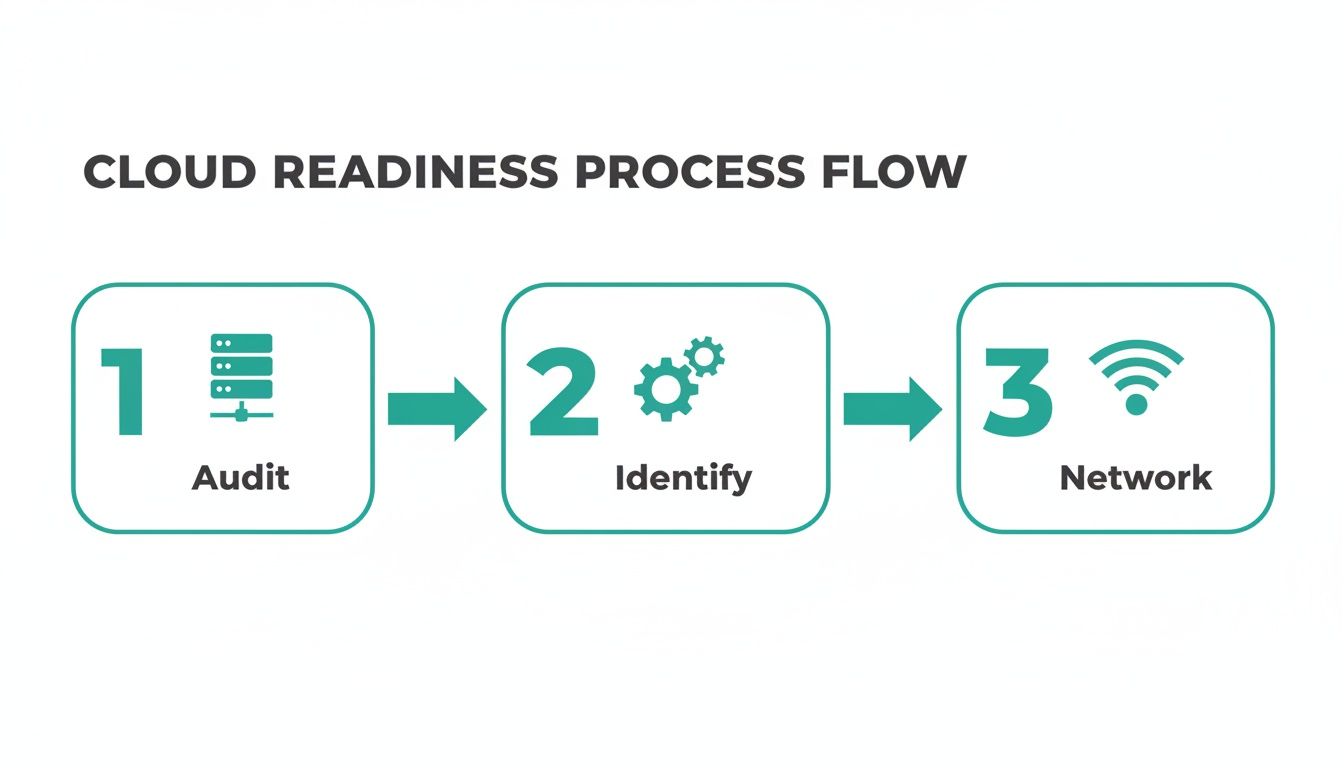
This process highlights a simple truth: a good migration plan starts long before a single file is moved. It’s built on the foundation of a thorough audit and a realistic network assessment.
Choosing Your Migration Strategy
Not all apps are created equal, so you can't move them all the same way. The "how" depends entirely on what the application is, how it's built, and how critical it is to your daily operations. This is where the famous "6 R's" of migration come into play.
Here's a quick rundown of the most common strategies we use to help Indiana businesses decide on the best path forward for each piece of their tech stack.
Cloud Migration Strategy Comparison
| Strategy | Description | Best For | Key Consideration |
|---|---|---|---|
| Rehost (Lift-and-Shift) | Copying an application and its data to the cloud with minimal changes. It's like moving a house without redecorating. | Legacy applications, quick migrations, or when you lack the resources for major changes. | Easiest path, but you won't get many cloud-native benefits. |
| Replatform (Lift-and-Tinker) | Making a few targeted cloud optimizations during the move, like switching to a managed database service. | Improving performance without a full rewrite; getting some quick wins from the cloud. | A good middle ground between speed and optimization. |
| Repurchase (Drop-and-Shop) | Moving to a different product, typically a SaaS (Software-as-a-Service) solution. | Ditching outdated on-premise software (like an old CRM) for a modern cloud-based version. | Involves a new licensing model and potential data migration challenges. |
| Refactor (Re-architect) | Fundamentally redesigning an application to take full advantage of cloud-native features like serverless or microservices. | Core business applications where scalability, performance, and efficiency are top priorities. | Highest cost and effort upfront, but offers the biggest long-term payoff. |
| Retire | Decommissioning applications that are no longer needed. | Redundant, obsolete, or low-value software discovered during your initial audit. | An easy way to cut costs and simplify your IT environment. |
| Retain | Leaving certain applications on-premise for now. | Highly specialized systems, apps with complex compliance needs, or things that just aren't ready to move. | Acknowledges that not everything is a good fit for the cloud... yet. |
Choosing the right mix of these strategies is the key. You might "Rehost" an old accounting app, "Repurchase" your email server with Microsoft 365, and "Refactor" your customer-facing portal all in the same project.
And the numbers don't lie. Research shows that a shocking 73% of unplanned migrations cause major business disruptions, and 40% of migrations blow past their budget or deadline. On the flip side, phased rollouts that run for 1-3 months cut the rate of major incidents by roughly 60% compared to those risky big-bang moves. A little planning goes a long way.
Protecting Your Data in Transit
A plan is worthless if your data gets swiped on its way to the cloud. You can't just leave the digital back door unlocked while you're moving. The transfer process itself is one of the biggest vulnerabilities.
This is non-negotiable for us: we use end-to-end encryption for every single migration. We scramble your data before it ever leaves your building and only unscramble it once it’s safely settled in its new cloud home. This renders the information completely useless to anyone who might try to intercept it.
Even better, we set up immutable off-site backups from day one. Think of this as a "save point" for your entire business—a secure, unchangeable copy of your data that lives outside the migration path. If anything goes sideways during the cutover, we have a perfect, clean rollback point. It’s your ultimate safety net.
To get a handle on this, check out our guide on the https://finchumfixesit.com/blog/10-data-migration-best-practices-that-secure-indiana-businesses-in-2026. Because this isn't just about moving files around; it's about moving your business forward, securely.
Executing the Move with a Security-First Mindset
Alright, the plan is locked in. Now comes the part that makes most business owners nervous: the actual move. This is where cybersecurity stops being a checklist item and becomes a real-time, hands-on job. For many Johnson County business owners I talk to, this is what keeps them up at night. The fear of a data leak, a compliance blunder, or a migration gone wrong is very real.
I get it. That’s why we live and breathe a Zero Trust architecture during every migration. The whole idea is simple but powerful: never trust, always verify. Every single connection, every file transfer, every person trying to log in is treated as a potential risk until proven otherwise. This is a huge shift from the old "castle-and-moat" security model, where we just assumed anyone already inside the network was safe.
During the controlled chaos of a migration, that old way of thinking is a recipe for disaster.
A Story of a Botched Migration
In our 17 years of serving local businesses, we’ve been the cleanup crew on more than a few migrations that went sideways. One that really sticks with me was a manufacturing firm near the I-65 corridor. They’d hired a budget provider to move them to the cloud. What did that provider do? They literally just copied the old server environment and plopped it into the cloud without changing a single security setting.
They might as well have put a "Welcome, Hackers!" sign on the front door.
All their old, relaxed on-premise firewall rules were suddenly exposed to the entire internet, leaving sensitive production data completely vulnerable. We got the call, came in, and immediately locked everything down. We had to rebuild their environment from the ground up with proper network segmentation and modern identity controls. It was an incredibly close call that could have easily tanked their business.
This is the perfect example of why security can't be a final step. It has to be woven into every single part of the process, from the first file you move to the moment you flip the switch. A cheap migration almost always becomes the most expensive mistake you can make.
Locking Down Compliance in the Cloud
Getting the migration right means building your new cloud home to meet your industry’s rulebook from day one. You can't just "add compliance" later. It takes a deep understanding of what auditors and regulators actually care about.
- For Healthcare Providers: If you're a medical office in Hamilton County, we build your cloud environment for HIPAA compliance right out of the gate. That means enforcing ironclad access controls, logging every touch on sensitive data, and making sure everything is encrypted, whether it’s sitting still or on the move.
- For Defense Contractors: For businesses working with the DoD, we implement the controls needed to meet CMMC (Cybersecurity Maturity Model Certification) standards. This is a whole different ballgame, demanding a much more rigid security posture to protect controlled unclassified information (CUI).
- For Everyone Else: We build to the NIST CSF (Cybersecurity Framework). Think of it as the gold standard—a rock-solid set of security guidelines that works for any business, no matter the industry.
Making this happen involves meticulous configuration of cloud tools, from identity and access management (IAM) policies to virtual private cloud (VPC) setups. It’s the kind of technical heavy lifting that shows we’re more than just a "geek with a screwdriver"—we're your long-term security partner. To get a better handle on the basics, you might find our guide on network security best practices for Indianapolis businesses useful.
The Future is Automated and Secure
The global cloud migration services market is absolutely booming—it's projected to hit USD 70 billion by 2030. A huge driver of this growth is AI-powered automation, which can slash migration timelines by up to 40% and dramatically reduce the risk of human error. For you, that means a faster, more accurate move with less disruption to your daily operations. You can discover more insights about these cloud migration trends on kanerika.com.
But automation doesn't stop when the migration is over. Our SOC-as-a-Service (Security Operations Center) provides 24/7/365 monitoring of your new cloud setup. We’re always watching for suspicious activity, managing threats as they appear, and making sure your defenses stay strong long after you’re settled in. It’s how we turn a one-time project into an ongoing partnership that protects your business and your bottom line.
Getting Your Cloud Spend Under Control
You did it. The migration is over, your applications are running smoothly in the cloud, and you've finally said goodbye to that ancient server rack in your Greenwood office. Then the first bill from AWS or Azure lands in your inbox, and your heart sinks. This "sticker shock" is one of the most common—and dreaded—post-migration experiences for Indiana business owners.
Don't panic. A high bill doesn't mean you made a mistake. It just means the job isn't quite done. Moving to the cloud is one thing; learning how to operate efficiently once you’re there is the real game-changer. This is a critical piece of the puzzle that often gets missed in the mad dash to get everything migrated.
Trust me, you're not alone in this. Research shows that companies tend to spend about 14% more on cloud migration than they initially budget for. On top of that, a staggering 84% of organizations admit they have a hard time managing their cloud spending after the move. These numbers show just how crucial it is to have a post-migration optimization plan. If you want to dive deeper, you can read the full research about these cloud migration challenges and see how widespread this issue really is.
Turning Sticker Shock into a Predictable Budget
The beauty of the cloud is its flexibility—you only pay for what you use. The trick is to actually enforce that. Unlike that physical server you had to buy and own, cloud resources can be scaled, tweaked, or turned off in minutes. We start by putting a few simple, yet incredibly powerful, strategies in place to rein in that spending.
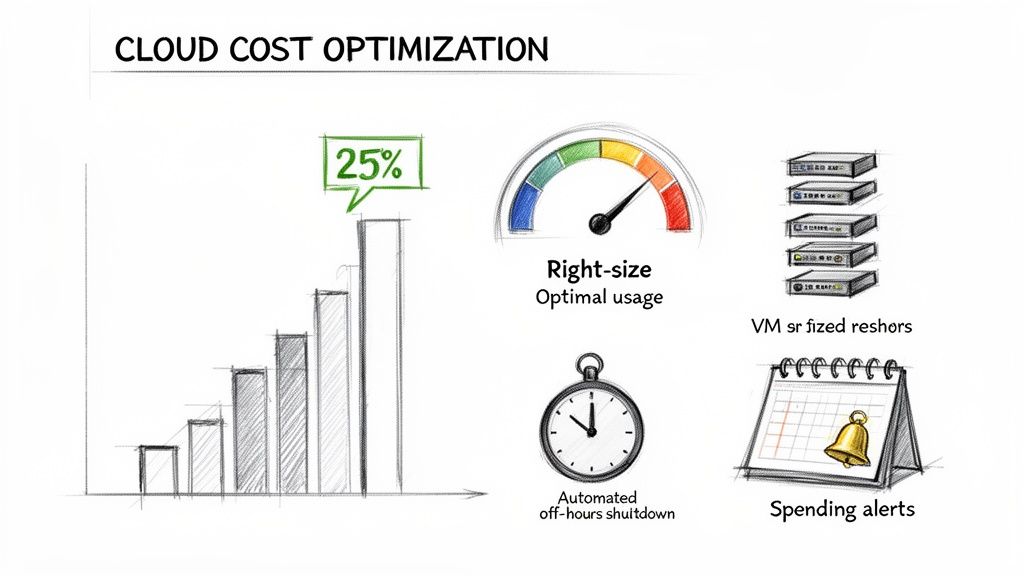
- No More Surprises with Spending Alerts: First things first, we kill the suspense. We set up alerts that fire off a notification the second your spending trends above the forecast. This way, we can jump on it immediately, long before it becomes a massive end-of-month problem.
- Right-Sizing Your Machines: It’s human nature to over-provision resources "just in case" during a migration. After you're live, we dig into the real usage data and "right-size" your virtual machines. There's no point paying for a V8 engine when you only need a four-cylinder.
- Automate Shutdowns: Does that server your developers use for testing really need to run all night and on weekends? Of course not. We identify these non-critical resources and script them to power down automatically, instantly trimming the fat from your bill.
A Quick Story From a Downtown Indy Tech Firm
This isn't just theory; it's what we do every day. We recently helped a fast-growing software company in a downtown Indy tech hub whose first cloud bill was nearly double their estimate, putting a serious strain on their budget. They were paying for massive server instances that were only hitting peak load for a few hours each afternoon.
We jumped in and put our three-pronged plan into action.
- First, we immediately downsized their primary servers to a more appropriate level for their typical daily workload.
- Next, we configured auto-scaling rules. This meant the system would automatically ramp up resources for those brief peak periods and then scale right back down.
- Finally, we scripted their entire testing environment to shut down at 7 PM every night and fire back up at 7 AM the next morning.
The result? We cut their monthly cloud bill by over 25% in the first 60 days. Just like that, a chaotic, unpredictable expense became a stable, manageable line item in their budget, delivering a clear and immediate return.
This is what proactive management looks like. It’s how we turn the cloud’s powerful flexibility into a real financial advantage for your business. It’s about making your IT budget work for you, not against you.
This kind of ongoing, detailed oversight is the final piece of a truly successful migration. It ensures the move to the cloud actually delivers on its promise of efficiency and cost savings.
Your Path to a Secure and Efficient Cloud
Let's be honest, moving to the cloud isn't just a technical task—it's a fundamental business shift. For business owners all over Central Indiana, it's about finally breaking free from the endless cycle of surprise hardware failures and chaotic IT spending. The real magic of following cloud migration best practices is turning all that time you waste fighting with tech into productive, billable hours.
It's about making sure a simple server crash doesn't cost you thousands of dollars a minute in lost business.
Throughout this playbook, we've covered the A-to-Z of a smart migration, from taking stock of your current setup in that Greenwood office park to making the final move with a rock-solid, security-first approach. Each step is a building block for a more resilient and competitive company. A modern cloud strategy gives you a predictable monthly budget and helps you sleep better at night, knowing you're on the right side of compliance, whether it's HIPAA or CMMC.
Your Next Step Starts Here
After 17 years of helping local businesses, we know one thing for sure: no two Indiana companies are the same. Reading a guide is great, but a plan built specifically for you is what separates success from frustration.
The most powerful thing you can do right now is get a crystal-clear, no-strings-attached look at your current infrastructure. You can't chart a course until you know your starting point. And while you're at it, brushing up on the fundamentals is always a good idea; check out our guide on data loss prevention best practices to protect your Indiana business for some crucial tips.
This whole process is about transforming your technology from a constant headache into your greatest asset. It all starts with a single, simple conversation about where you stand today.
Ready to see what a secure, efficient cloud could actually look like for your company? We invite business owners in the Greenwood and greater Indianapolis area to schedule a Free Network Assessment. Let's map out your path to a smarter, more reliable future.
Got Questions About Moving to the Cloud? We've Got Answers.
We get it. Moving your business to the cloud can feel like a huge leap into the unknown. After 17 years of helping Indiana businesses make the switch, we've heard just about every question in the book. Here are straight-up answers to the ones that come up the most.
How Long is This Really Going to Take?
Look, there’s no single answer, but for a typical small or mid-sized business here in the Indy area, you're usually looking at a 4 to 12-week journey. This isn't just a weekend project of dragging files into a folder. It's a proper process: we have to assess what you've got, map out a smart plan, do the actual moving, and then test everything until we're certain it works flawlessly.
If you're just doing a simple "lift-and-shift" for a couple of apps, you might be on the faster end of that timeline. But if you've got multiple servers, custom-built software, or have to meet strict compliance rules like HIPAA, it’s going to take more time to get it right. Trust us, trying to rush this is the fast track to expensive downtime and security holes you can drive a truck through.
What Are the Scariest Security Risks I Should Know About?
Honestly, the biggest threats aren't sophisticated hackers from a spy movie; they're almost always simple human errors. The absolute king of cloud security blunders is misconfiguration. Think of it like moving into a new office and forgetting to lock the back door. An inexperienced team can easily leave sensitive data wide open just by overlooking a default setting.
Another huge one is access control. If you don't have a solid plan built around a Zero Trust mindset—where you verify everything—you're just asking for trouble. It's how ex-employees end up with keys to the kingdom long after they've left. We also see a lot of companies forget to encrypt their data while it's in transit, which is like sending your financials through the mail in a clear envelope.
Is the Cloud Actually Cheaper Than My Old Server?
Over time? You bet. But only if you manage it properly. That first monthly bill from the cloud provider can be a real shocker for businesses who treat it like their old server closet in Greenwood. The whole point is to shift from a big, upfront capital expense to a flexible, operational one.
A classic rookie mistake is to spin up a virtual server in the cloud and just leave it running 24/7, whether you’re using it or not. The real savings come from being smart about it—shrinking or expanding resources as needed, automatically shutting down systems overnight, and using tools like Bitdefender GravityZone to keep everything running efficiently.
This is how you turn a confusing, unpredictable cost into a stable monthly IT budget. For any business up and down the I-65 corridor, that means no more surprises and a much clearer return on your investment.
At Finchum Fixes IT, we know a great cloud migration is about giving your business a real advantage, not just swapping out hardware. If you’re ready for an honest conversation about what it would take to get your business into the cloud, let’s talk.
Schedule your Free Network Assessment today and let's build a migration plan that’s built for your Indianapolis business, not someone else's.