Cloud Security Managed Services: What Indiana SMBs Need
Cloud security managed services give a small business a provider that watches its cloud accounts, identities, and devices around the clock, fixes misconfigurations and patches on schedule, tests recovery before trouble hits, and answers for that work under one flat monthly fee.
You already run your office in the cloud, whether you called it that or not. Email lives in Microsoft 365. Files live in SharePoint, Dropbox, or Google Drive. Your backups copy somewhere off site. The question isn't whether you're in the cloud. It's who checks the locks tonight.
What Managed Cloud Security Services Are
Picture a 25-person accounting office on the Southside. This one is a composite drawn from the kinds of offices a local IT shop walks into regularly, not a specific client. It sits in a 1960s brick building in Greenwood, the kind with thick walls that eat Wi-Fi. A 2015 file server hums in a closet. Every laptop runs Microsoft 365. One UniFi networking access point covers the front, and calls drop near the back offices.
That office thinks its problem is the server and the Wi-Fi. It isn't. The core issue is ownership. Nobody is responsible for the cloud settings, so the admin who left a few years back still has a working login. Nobody noticed. Nobody was assigned to notice.

Break-fix is calling a locksmith after the break-in. A managed service is a guard who checks every door each night, tries the handles, and hands you a report on what was jiggled. One reacts. The other prevents. That report matters more than the guard. Monitoring without a named owner for each fix is just a ticket queue, and a queue is where findings go to age out.
Shared responsibility works like this. The cloud provider secures its own data centers, while you secure your accounts, your data, your devices, and your settings. Microsoft keeps its buildings safe. It doesn't clean up your stale admin accounts, your public file links, or your missing MFA. That's your side of the line, and it's the side a managed provider covers when you can't staff it yourself.
In our local work, we often find a former admin login still active. It tends to show up in offices that grew fast and never wrote down who owned offboarding.
Before you read on, answer three questions about your own office.
- Who can log in: Can you name every admin account in your cloud tenants right now?
- Who fixes a flagged setting: If a storage bucket went public at 2 a.m., whose job is the fix?
- How long a restore takes: Have you timed one, or are you guessing?
If you hesitated on any of them, that's the gap this service exists to close.
The Core Components and What Each One Stops
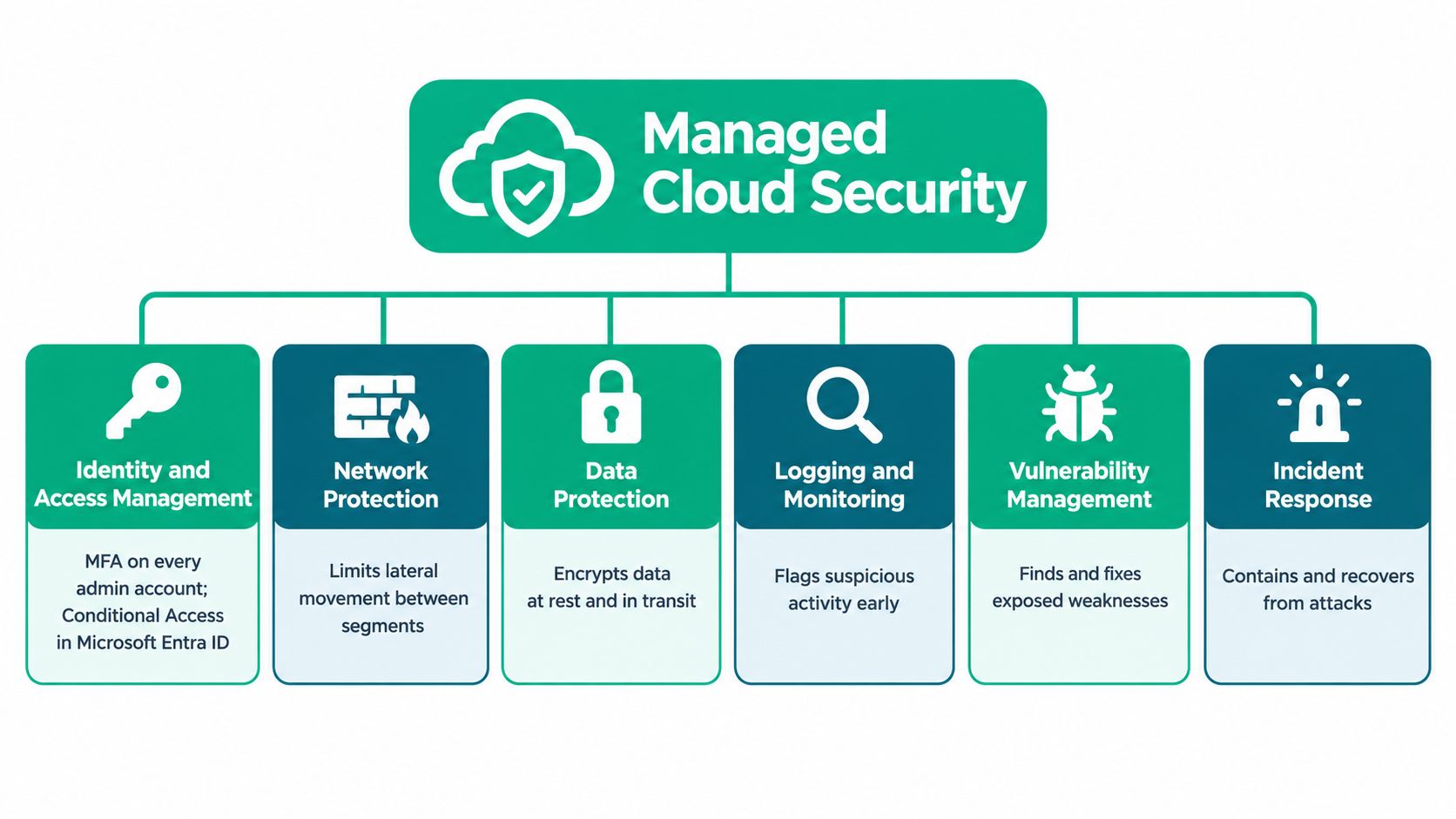
Think of the stack as one roof with six pillars under it. Miss a pillar and the roof still stands, for a while. Miss two and gravity wins.
Identity Comes First Because Attackers Log In
Identity and access management is the front door. That means MFA on every admin account, Conditional Access in Microsoft Entra ID, least-privilege roles, and a quarterly review that kills stale accounts. Attackers rarely smash through a firewall anymore. They use a stolen password and walk in like staff.
Zero Trust architecture is the rule behind this. No sign-in gets trusted just because it comes from inside your office network. Conditional Access checks device health, user risk, and location on every request, whether it's headed to a Microsoft 365 app or a cloud workload. A compliant laptop in Greenwood passes. A strange device overseas at 3 a.m. gets challenged or blocked.
Logs Only Help If Someone Connects Them
A SIEM collects sign-in logs, Microsoft 365 audit logs, firewall events, and endpoint alerts in one place. XDR ties those pieces together, so an endpoint alert can be matched to the suspicious sign-in that caused it. SOC-as-a-Service monitoring means analysts watch that feed around the clock, because an alert nobody reads is just expensive storage.
NIST guidance makes the point plainly. A managed service should work as a continuous control-validation layer that combines SIEM, vulnerability assessment, security validation, discovery, and traffic monitoring, with real-time monitoring and periodic validation proving your controls enforce the policy you intended. Alerts existing isn't proof. Testing authorized and unauthorized access against your own rules is.
A CASB covers the apps your staff use every day. It enforces policy across Microsoft 365, Google Workspace, and Dropbox, flags public links to sensitive files, and spots unapproved apps someone signed up for with a company email. Shadow IT stops being invisible.
This short video walks through how those monitoring pieces fit together in practice.
Finding Holes and Closing Them on Schedule
Vulnerability management runs authenticated scans with Tenable Nessus and ranks findings two ways, by severity and by whether attackers are actively exploiting the flaw. A scary score on a test box matters less than a moderate flaw on your internet-facing server that criminals are hitting this week.
Patching closes what scans find. Bitdefender GravityZone handles endpoint protection and patch deployment, usually in a Tuesday night window when nobody's working, with a rollback plan if an update breaks a line-of-business app. Skipped patches don't announce themselves. They just sit there until someone uses them.
Secure configuration keeps settings honest against the CIS Benchmarks for Microsoft 365 and Azure. That's how you catch public storage, disabled logging, and open admin ports before an audit or an attacker does. Settings drift a little every month. Baselines catch the drift.
Under all of it sit immutable off-site backups, recovery copies that can't be altered or deleted, even by an admin account. When every other pillar fails on the same bad day, that's the one that gets you back. For how these pieces work during an active incident, see threat detection and response for Indiana businesses.
Read the table across each row. Every component earns its place by stopping a specific threat, not by sounding impressive in a proposal.
| Component | Plain-English Job | Threat It Stops | Example Tools |
|---|---|---|---|
| Identity and access management | Decides who gets in and what they can touch | Stolen passwords and over-permissioned accounts | Microsoft Entra ID with Conditional Access |
| SIEM and XDR | Collects logs and connects alerts across endpoints, identities and networks | Silent intrusions that look like normal logins | Microsoft Sentinel, Splunk |
| CASB | Enforces policy on SaaS apps and file sharing | Public file links and unsanctioned apps | Microsoft Defender for Cloud Apps |
| Vulnerability management | Finds known weaknesses and ranks them by risk | Exploitation of known flaws | Tenable Nessus |
| Patching | Closes the holes that scans find, on a schedule | Attacks against unpatched systems | Bitdefender GravityZone Patch Management |
| Secure configuration | Keeps cloud settings matched to a hardened baseline | Public storage, disabled logging, open admin ports | CIS Benchmarks for Microsoft 365 and Azure |
| Immutable off-site backups | Keeps recovery copies that cannot be altered or deleted | Ransomware that targets backups | Immutable object storage with separate admin credentials |
What Downtime Really Costs a Small Business
A server fails at 10:15 on a Tuesday. The true meter starts when staff stop billing, not when the monitoring dashboard turns red. For a small office, the painful number is rarely a giant per-minute figure. It is one bad afternoon that lands in the low four figures once idle wages, rework, and client credits are counted.
Use one worked example and label it as an example. A 22-person office loses 3 hours of productive work valued at $400 per hour: $1,200 gone. Six employees cannot log in for those 3 hours at a loaded wage of $35 per hour: $630. Recovery labor runs 2 technician hours at $150 per hour: $300. Two clients need a $250 service credit each to stay calm: $500. Total: $2,630 for one outage, before the call that slips to a competitor down the I-65 corridor.
Practical rule: If you cannot state your hourly downtime cost in one sentence, you cannot judge any security quote that lands on your desk.
Now price the way you pay. Say break-fix averages six emergency calls a month in your example, each call taking 2 billed hours at $150 per hour. That is $1,800 a month before parts, travel, or the second visit when the first fix only cleared the symptom. The worse cost is ownership: nobody knows whether the alert, the patch, the restore, or the client credit belongs to the provider until something is already down. A managed plan earns its keep when the contract says who fixes each failure and proves coverage with restore tests, patch reports, and log-source lists.
Build a one-page downtime worksheet. List revenue per hour, headcount, average loaded wage, typical emergency call length, hourly rate, and your last three outages with start and end times. Multiply it out with complete candor. If you want the recovery side planned before you need it, disaster recovery solutions for Indiana SMBs covers the restore planning in detail. That page turns “we think downtime is expensive” into a number an owner can budget against.
Choosing a Provider With a Seven-Point Checklist
Every provider leads with the same pitch: we monitor you 24/7. Hold that claim up to evidence. Plenty of organizations learn about cloud incidents from a user report, an auditor, or a third party rather than from the tools they already pay for, a gap documented in the Check Point Cloud Security Report 2025. A dashboard that watches your environment and a team that fixes what it finds are two different purchases.
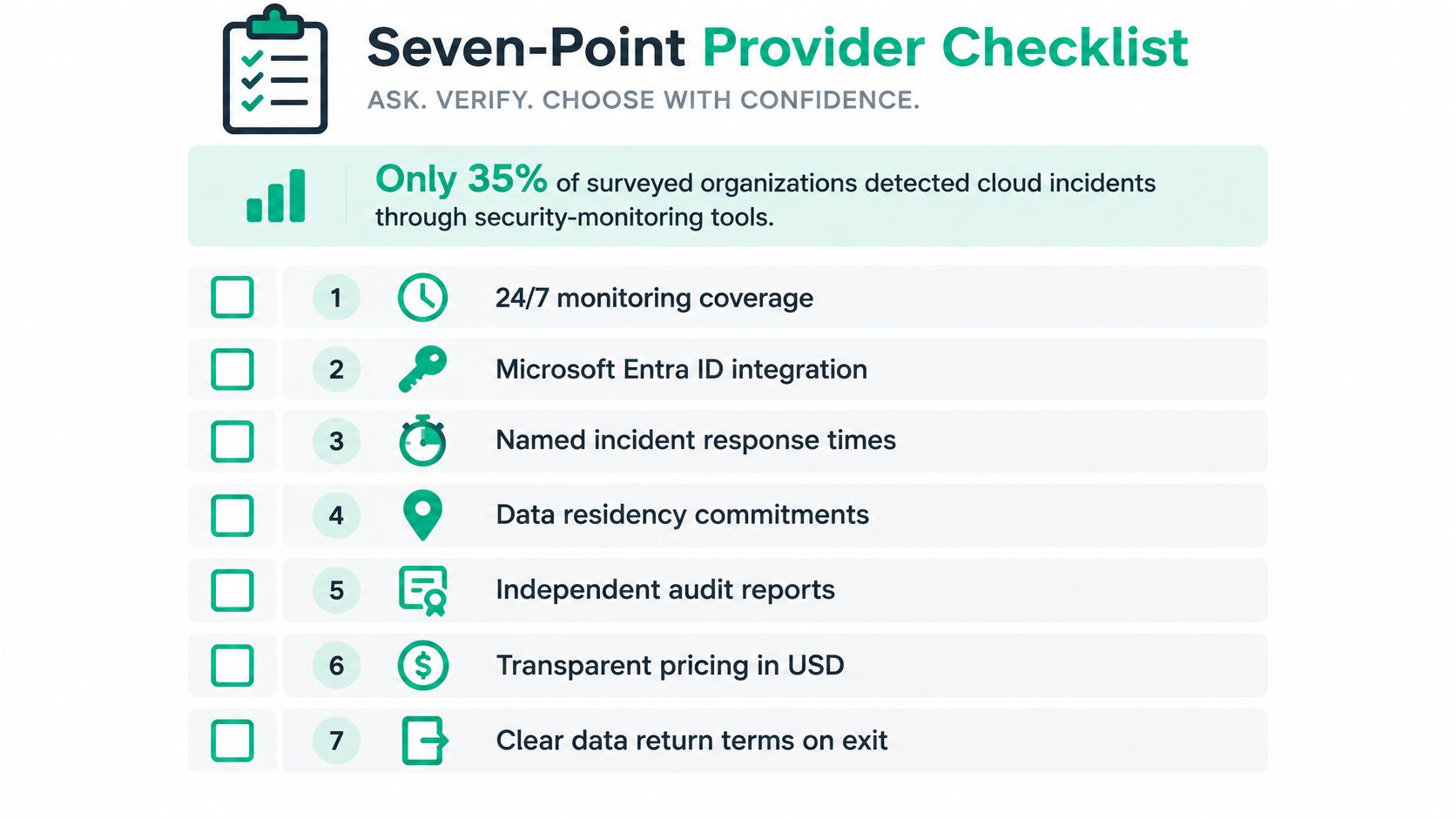
So judge every candidate on two things: what they can actually see, and who owns the fix when something surfaces. These seven questions put that on paper. Copy them into your next vendor call.
- Observation coverage: What percentage of our cloud accounts, identities, workloads, and admin actions can you see, and can we have the log-source list?
- Remediation ownership: When you find excessive privilege or an exposed storage bucket, is the fix included, approved by us first, or billed separately?
- Response times: What's your alert triage target, what's the escalation path, and what do after-hours callouts cost?
- Evidence: Does the monthly report show coverage gaps and exceptions, or just a count of malware blocked?
- Credentials: Which named engineers hold Microsoft, CompTIA, and Cisco certifications, and will we talk to them or a ticket queue?
- Restore tests: How often do you test restores, and into which clean environment?
- Exit terms: What format does our data come back in, what's the notice period, and is there any lock-in?
Question two matters most and gets asked least. Plenty of contracts pay a provider to find problems, then pay again to fix them. Get the boundary in writing before you sign, down to who proves the fix worked.
A provider who can't list your log sources can't tell you what they're watching. A provider who can't name who fixes a finding is selling you a smoke detector with no fire department.
Watch for three red flags. The first is we monitor everything with no source list behind it. The second is a backup story with no restore test ever performed. The third is security tooling sold without a named owner on either side. For a broader framework before you interview anyone, how to choose a managed service provider lays out the full evaluation process.
Score the answers in writing, side by side. Any provider who hedges on remediation ownership or can't produce a restore-test record has already shown you where the gap will appear.
Pricing Models and What Each One Really Costs
Two quotes can land at the same monthly total and buy completely different things. One pays for alerts that pile up in a dashboard. The other pays for a named engineer who closes the finding and proves it closed. The pricing model tells you how you get billed, not what gets fixed, so read the shapes first and the coverage second.
| Pricing Model | Illustrative Planning Range | Best Fit | Watch For |
|---|---|---|---|
| Per user per month (security plus Microsoft 365 monitoring) | $25 to $50 per user; 30 users at $35 runs $1,050 a month | Offices where every person holds a Microsoft 365 license | Minimum seat counts and backup storage add-ons |
| Per endpoint per month | $20 to $40 per device, with servers priced above workstations | Mixed device fleets and field crews | Servers often billed separately on top |
| Flat monthly tier per site | $1,000 to $2,500 per month for a single-site small office | Single-location offices with fixed headcount | Scope creep beyond the included device count |
| Co-managed SOC add-on | $500 to $1,500 per month on top of your existing tooling | Firms with one in-house IT person | Duplicate tools if roles are unclear |
| Project fee for hardening or cloud security review | $1,500 to $5,000 one time, depending on environment size | Before a migration or after an incident | Often required before the monthly plan starts |
Treat every figure in that column as a planning range for budgeting, not a market average. Your stack, headcount, and region shift the actual number, so anything without a written quote behind it is a guess. For context on how big this industry has become, Mordor Intelligence put the global managed security services market at USD 38.31 billion in 2025 and projected USD 76.96 billion by 2031, a 12.33% compound annual growth rate from 2026 through 2031, in its managed security services market report. That is industry context, not an explanation for any quote on your desk. What it does tell a buyer is practical: enough providers compete in this space that you can demand itemized pricing and walk away from one who won't give it.
Run the per-user math so it stops being abstract. Thirty users at $35 per user comes to $1,050 per month. That replaces roughly six emergency calls at $150 per hour, about $900, plus the outage exposure those calls represent. The managed fee isn't new money. It's the same money moved from chaotic to predictable, with monitoring included. The sharper question for any model is who owns each fix at that price, and what the monthly report actually proves.
Where Quotes Hide the Extra Cost
Ask about setup fees up front, because onboarding and hardening take real labor. Confirm whether servers and backups are included or billed as add-ons, since that's the most common surprise in month two. Ask how overage devices get billed when you hire three people in a quarter. Every surprise charge I've seen on a second invoice traces back to a question nobody asked in the first meeting.
Then hold the provider to output, not activity. Before signing, ask them to tie each monthly invoice to a named gap closed in the rollout, like stale accounts removed, MFA enforced, or a restore tested and timed. Request a quote that itemizes every line so you can compare two providers on the same basis. If a quote can't survive that comparison, it wasn't a quote. It was a brochure with a number on it.
Compliance Requirements in Plain English
Start with one question. Which standard do your contracts or your regulators name? Everything else flows from that answer, and guessing wrong wastes money in both directions.
The Three Standards Indiana Offices Run Into
HIPAA covers healthcare. In plain terms it calls for access controls on who can reach patient data, audit controls that record who did, and a contingency plan covering data backup, disaster recovery, and emergency operations under 45 CFR 164.308(a)(7). A clinic in Indianapolis doesn't need a law degree to act on that. It needs unique logins, logs that exist, and a tested way back after an outage.
CMMC covers defense contractors in the Department of Defense supply chain. CMMC Level 2 is built around 110 security requirements from NIST SP 800-171 Rev. 2, including protection of controlled unclassified information backups, according to the Department of Defense CMMC model overview. A backup doesn't pass because files copied successfully. It passes because you control who can reach that data, protect it in storage, and account for the media holding it.
The practical backup list looks like this. Separate backup administration from production credentials. Require MFA on the backup console. Encrypt the repositories, restrict deletion rights, log every restore, and test recovery into a clean environment. Immutable off-site backups cut the risk that ransomware or a compromised administrator alters your recovery copies.
NIST CSF is the general business baseline, built on six functions that get covered in the rollout below. It gives firms without a specific regulator a sane structure that auditors and insurers already understand.
Cyber insurance has become the fourth standard without much fanfare. Applications ask about MFA, backups, and tested recovery, and a wrong answer can void a claim when you need it most. Keep the evidence in one folder, updated monthly. Most Johnson County and Hamilton County firms meet these questions first in vendor security questionnaires from their own customers, long before any formal audit shows up. The cybersecurity compliance solutions Indiana SMB guide walks through mapping each requirement to a control you probably already half own.
How to Roll Out Managed Cloud Security in 90 Days
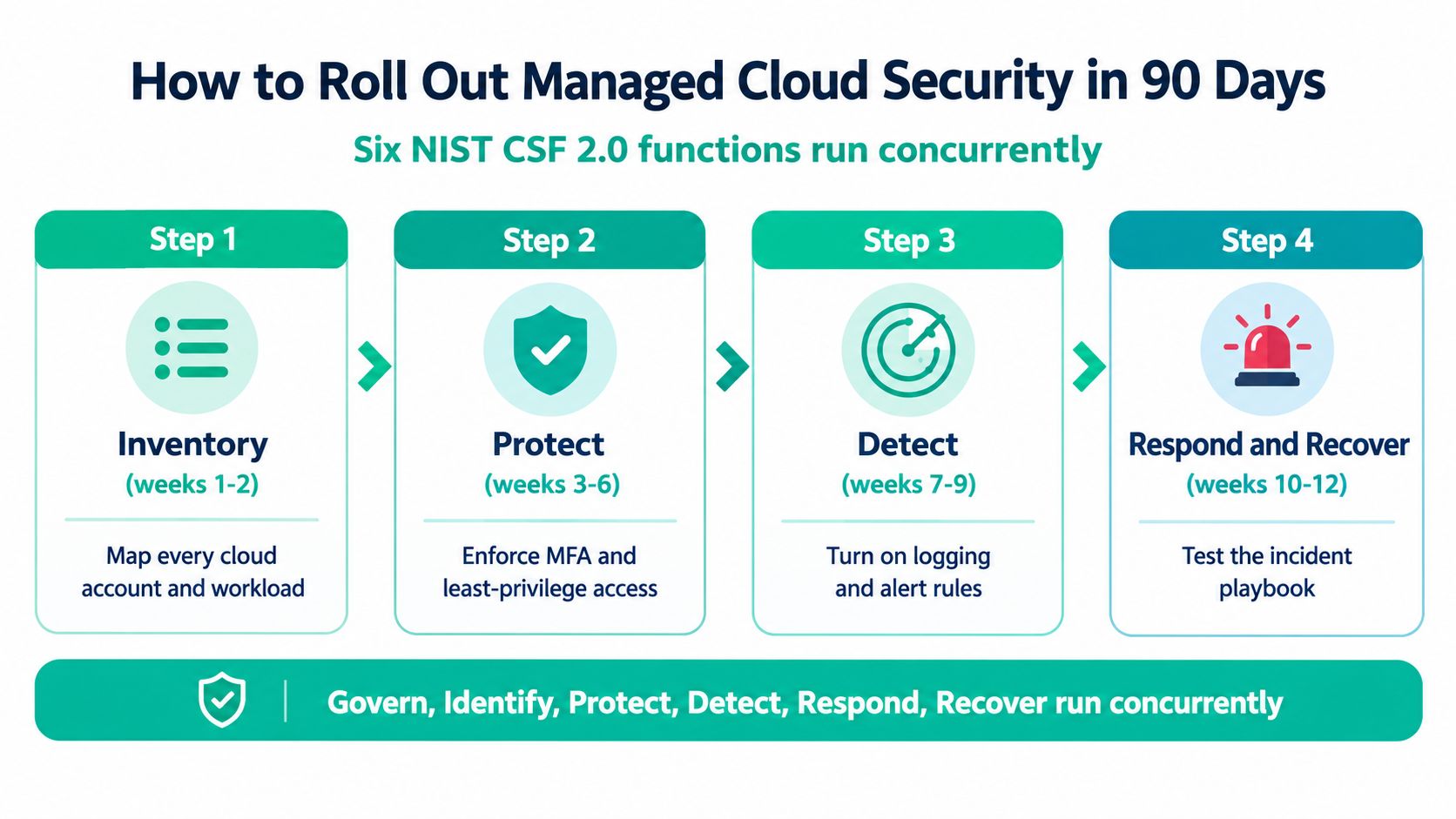
Ninety days works because the workstreams overlap inside the window. The steps below are numbered in start order, and each one keeps running after its block ends: patching continues past week 6, monitoring past week 10. NIST CSF 2.0 organizes the work into six functions, Govern, Identify, Protect, Detect, Respond, and Recover, and the NIST Cybersecurity Framework 2.0 treats them as concurrent activities, which is why the steps carry function labels instead of finish lines. Govern gets no week of its own. It is the named owner attached to every step, the difference between a task list and accountability.
- Inventory and ownership, weeks 1-2 (Govern, Identify): List servers, access points, endpoints, and cloud accounts, and put a named owner next to every item. On the Windows domain controller, run
Get-ADUser -Filter * -Properties LastLogonDate | Where-Object { $_.LastLogonDate -lt (Get-Date).AddDays(-90) }to list accounts idle for 90 days. You can't protect what you haven't cataloged. - Identity, weeks 3-4 (Protect): Enforce MFA, disable the stale accounts from step one, and build Conditional Access rules in Microsoft Entra ID. This closes the door attackers use most.
- Endpoints and patching, weeks 5-6 (Protect): Deploy Bitdefender GravityZone, set a Tuesday 10 p.m. patch window, and rescan to confirm the fixes landed. Trust the rescan. Deployment reports say what you pushed; the rescan says what stuck.
- Backups, weeks 7-8 (Recover): Create an immutable off-site copy and restore one server to a clean VM, timing the whole job. An untested backup is a hope.
- Monitoring, weeks 9-10 (Detect): Connect your log sources to the SIEM and set an alert triage target your provider signs up to. Ask who acknowledges the 2 a.m. alert. If the contract can't name that person, you're paying for a log file instead of a responder.
- Recovery drill, weeks 11-12 (Respond, Recover): Run a tabletop exercise with the owner in the room and record your recovery time and recovery point objectives. Decisions made calmly here get reused under pressure later.
The local work happens alongside the cloud work. That aging server in a Greenwood business park gets replaced or its workload moves to resilient cloud infrastructure. A site survey of the brick building sets latency-optimized mesh nodes and UniFi access point placement, so the Wi-Fi dead spots close before the rollout ends instead of lingering as a separate someday project. If a migration is part of your picture, the Indiana cloud migration plans playbook sequences that move.
A common version of this failure looks like this. A file server dies on a Tuesday, the office manager opens the backup console, and the last clean restore point is months old. The job had been logging errors for weeks. Nobody saw them, because nobody had ever restored anything.
That scenario is why step four exists. A bit-level data recovery job off a dead array is slow, expensive, and uncertain, while a scheduled restore test is none of those. The week-11 drill turns the whole 90 days into a written record with a signature on each fix, which is what insurers and auditors ask to see, and what separates coverage you can prove from coverage you were promised.
Book Your Free Network Assessment in Greenwood
Finding out where you stand costs one meeting, not a contract. Book a Free Network Assessment or a Security Risk Audit with Finchum Fixes IT in Greenwood and see your own numbers before you sign anything.
The assessment covers five things. We review your Microsoft 365 and Entra admin accounts and produce a list of stale accounts and MFA gaps. We run a Wi-Fi survey of your building and map where UniFi access points should sit. We perform a timed restore of one backup so you know your real recovery number. Then you get a written report naming who owns each fix, plus a 90-day plan built from the steps above.
That last part matters more than the findings. Each gap gets a named owner, yours or ours, and a way to prove the fix really happened. Coverage you can't verify is monitoring, and monitoring alone is what leaves businesses thinking they're protected when they're only being watched.
The work fits businesses across Greenwood, Johnson County, Indianapolis, and Hamilton County, and offices up and down the I-65 corridor.
If your admin account list hasn't been reviewed in a year, that's your first call. Finchum Fixes IT provides managed cloud security for Greenwood and Indianapolis area businesses, covering Microsoft 365 identity cleanup, monitored patching, immutable backups, and timed restore tests under one predictable plan. Visit the site or call to schedule your Free Network Assessment and get your admin accounts, coverage gaps, and recovery times in writing.