Cloud-Based Access Control: A Guide for Indy Businesses
TL;DR
- Cloud-based access control replaces the old server-in-the-closet model with centralized management you can run from anywhere.
- It's not just about convenience. It's about business continuity, faster offboarding, cleaner audits, and fewer surprise repair bills.
- Identity is now the biggest cloud security problem. 77% of organizations cite identity and access security as their top cloud-native risk, and over 70% of cloud breaches stem from compromised identities, according to SentinelOne's cloud security statistics.
- The question most vendors skip is the important one. What happens when the internet goes down?
- Indiana businesses in healthcare, manufacturing, and defense should treat access control as part of HIPAA, CMMC, and NIST CSF work, not a separate facilities project.
- The best systems use Zero Trust, RBAC, strong cryptographic trust, and a tested offline plan.
If you own or manage a building in Greenwood, Southport, or anywhere along the I-65 corridor, there's a decent chance your access system lives in a place nobody wants to touch. A hot closet. A back office shelf. Maybe a dusty wall rack next to an aging switch and a UPS that chirps every few weeks.
It still works. Mostly.
Then someone quits on Friday, keeps their fob through the weekend, and your office manager has to text three people to figure out who can disable it. Or your front door reader stops syncing after a storm, and your team burns half the morning messing with a Windows PC nobody's logged into in months. That's the moment access control stops being a facilities issue and becomes an IT issue, a security issue, and a money issue.
That Dusty Server Closet Is Costing You Money
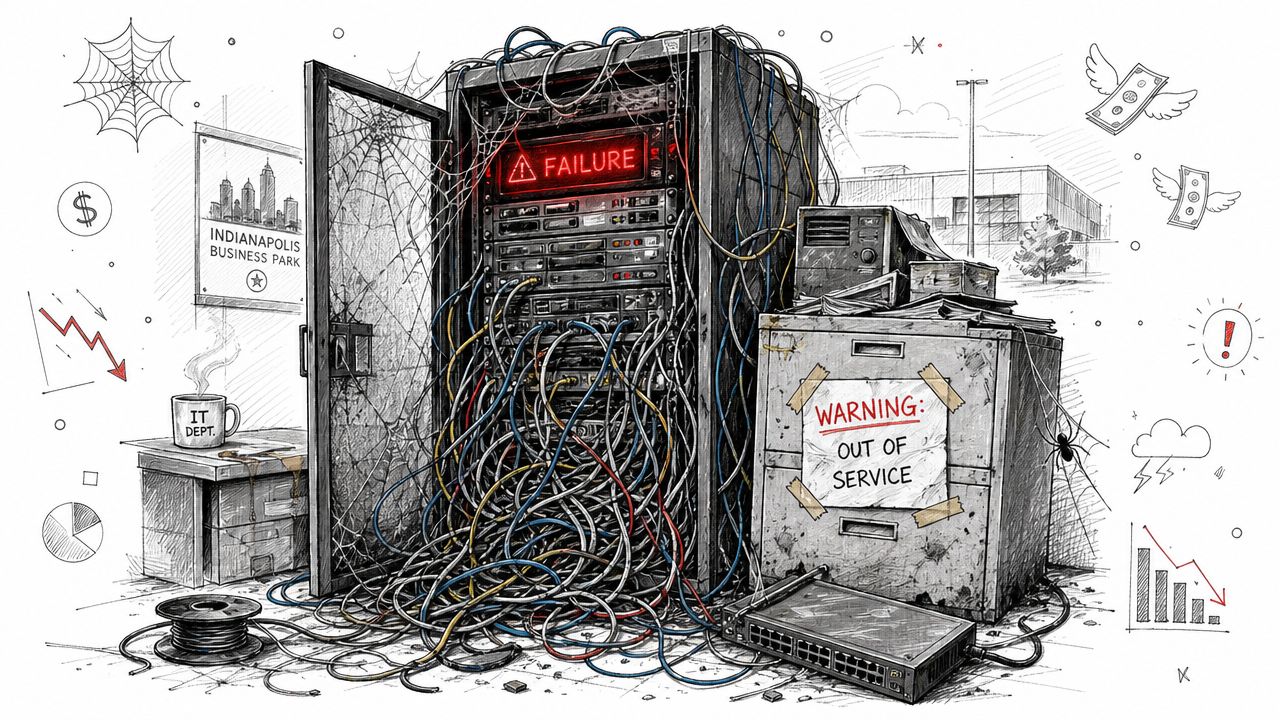
Monday, 7:52 a.m. The first employee is at the front door, the reader is blinking the wrong color, and the one PC that runs your badge system is sitting in a back office waiting on a reboot. If that setup sounds familiar, the problem is bigger than old hardware. It is a continuity risk tied directly to payroll, security, and customer service.
Across Greenwood, Southport, and the rest of the Indy corridor, plenty of businesses are still running access control the same way they did years ago. The system depends on an on-site controller, aging software, and one person who knows which icon to click. That setup works right up until that person is out sick, the internet drops, a power event hits, or a terminated employee still has a valid credential longer than they should.
Where the real cost shows up
The first hit is labor. Badge changes, schedule edits, and offboarding requests should take minutes. On older systems, they pull your office manager, IT provider, or operations lead into low-value support work.
The second hit is interruption. If the lobby door does not grant access on time, a shipping entrance stays down, or staff members cannot get into the right area, the business slows down fast. That cost shows up in late starts, missed deliveries, frustrated employees, and managers spending the morning on a door problem instead of revenue work.
The third hit is resilience. A lot of owners hear "cloud" and immediately ask the right question. What happens when the internet goes down? That concern is valid, especially for Indiana businesses dealing with storms, carrier outages, or older buildings with spotty connectivity. A good access control design does not stop at remote management. It includes local door decisions, cached credentials, backup power, and a clear offline operating plan so your doors keep working even when your ISP does not.
That trade-off matters. A cheap on-premises system can look paid for on paper, but it often carries hidden costs in emergency service calls, unsupported software, replacement parts, and downtime risk.
Why local businesses feel this harder
Johnson County businesses usually do not have extra staff to babysit one more legacy system. A medical office in Greenwood, a machine shop near Franklin, and a small defense supplier on the south side all feel the same pressure. They need systems that keep running, support audits, and do not require a scavenger hunt every time someone is hired, fired, or reassigned.
That is also where return on investment gets more practical. Cloud-managed access control can reduce truck rolls, cut admin time, shorten offboarding delays, and make multi-site management far easier for owners with more than one building. For Indiana SMBs, that often matters more than flashy features. The savings come from fewer interruptions and fewer hours wasted on old infrastructure.
If you are already reviewing servers, backups, and line-of-business apps, this article on cloud migration benefits for Indiana businesses covers the same core issue from the IT side. Old local dependencies rarely stay cheap for long.
What Is Cloud-Based Access Control
Cloud-based access control is the shift from managing doors through local hardware and an on-site server to managing them through a centralized cloud platform. In plain English, you stop relying on the PC in the back office and start controlling users, doors, schedules, and credentials through a browser or app.
One Identity describes it as a centralized service that controls who can access specific resources or systems, and notes that administrators can manage entry points, issue or revoke credentials, and monitor activity in real time from anywhere with an internet connection through a cloud-based access control platform.
The easy analogy
It's similar to the difference between a shelf full of DVDs and a streaming account.
With the DVD shelf, every change is physical. You have to find the disc, move it around, make sure the player still works, and hope the right person has the right remote.
With a streaming account, you manage profiles and permissions from one place. You don't drive across town to make a change. You log in, update it, and move on.
That's what cloud-based access control does for doors, credentials, and entry rules.
What changes for a business owner
You're not buying magic. You're changing the operating model.
| Feature | On-Premises System | Cloud-Based System |
|---|---|---|
| Management location | Usually tied to local software or a server on site | Managed from a centralized cloud portal |
| Credential changes | Often manual and slower | Faster issue and revocation from anywhere |
| Multi-site support | Clunky, often site-by-site | Centralized across locations |
| Infrastructure burden | More local hardware to maintain | Less dependence on on-site server hardware |
| Scaling to new doors | Often requires more planning and local setup | Better suited for growth across sites |
| Visibility | Limited to local tools and access points | Real-time monitoring through internet-connected management |
What works well and what doesn't
Cloud-based access control works very well for businesses with more than one site, any kind of rotating staff, or a need to revoke access fast. Medical offices, manufacturers, multi-tenant buildings, and logistics companies all tend to benefit because the admin pain adds up quickly in those environments.
What doesn't work is buying a system because the app looks slick, while ignoring identity, integration, and policy design. If the platform can't tie into your directory, support clear roles, and fit your broader identity stack, you've just moved old chaos into a new dashboard.
For owners who want that identity piece explained better, this overview of identity and access management tools is worth a read before picking a vendor.
The Real ROI Managing Who Gets Through the Door
Most ROI conversations around access control get stuck on hardware. Owners compare readers, panels, and badge costs. That matters, but it misses the bigger return.
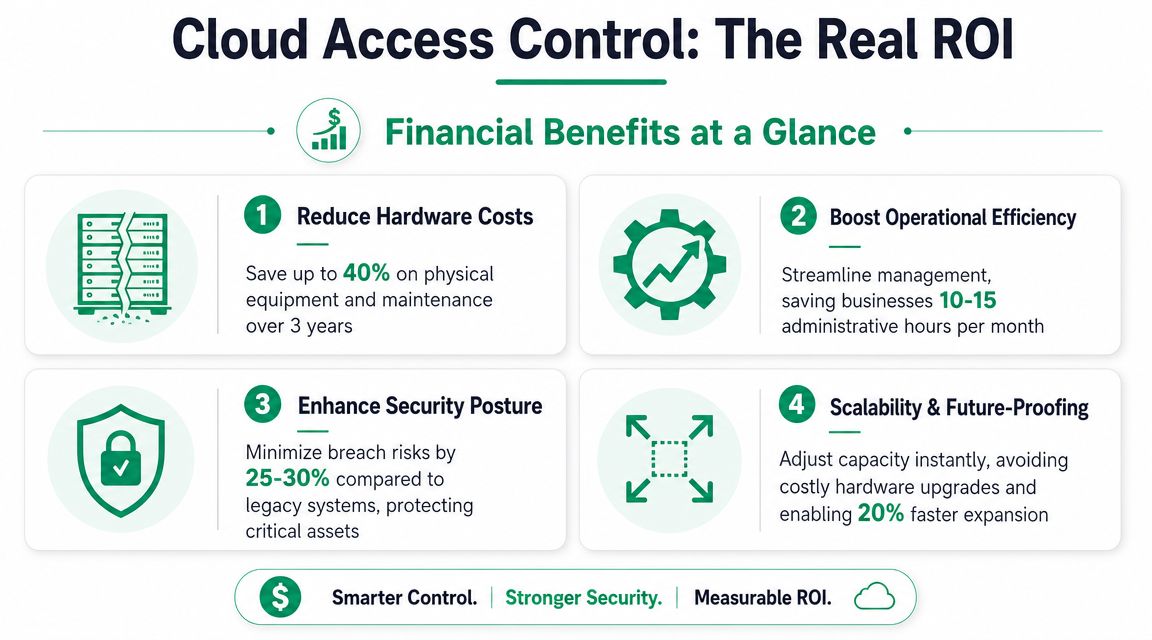
The primary ROI comes from reducing interruption.
A cloud-managed system cuts the amount of human chasing, double-entry, after-hours troubleshooting, and “who still has access?” confusion that drags down normal operations. It also turns a spiky, surprise-driven support model into something far easier to budget.
Three places the return shows up fast
Admin time gets turned back into work time
When HR adds a new employee, facilities shouldn't need a scavenger hunt through spreadsheets, badge printers, and local admin software. In a cloud-based setup, onboarding and offboarding become cleaner. Access follows role, location, and schedule instead of whoever remembered to update the back-office PC.
That reclaimed time matters. For many Indiana SMBs, the gain isn't abstract. It means your office manager, ops lead, or internal IT person gets back to customer work and project work instead of wrestling with door permissions.
Surprise failures become less common
Old systems fail in annoying ways. A Windows update breaks the client. A local database gets corrupt. The one machine running the software dies and nobody knows the password.
Cloud-managed systems don't remove every risk, but they do remove a lot of local fragility. That usually means fewer emergency visits, fewer “we can't make changes right now” moments, and a more predictable monthly spend.
Access control should sit in the same budget conversation as managed Wi-Fi, endpoint security, and backup strategy. It affects continuity just as much as those systems do.
Growth gets easier
A company with one location can limp along with manual processes longer than it should. The second location changes the math. The third location breaks it.
If you expand from Greenwood into downtown Indy or up toward Hamilton County, you don't want every door change to become a road trip or a custom mini-project. Cloud management gives you one control plane. That's cleaner for operations and much better for budgeting.
Where owners overspend
The usual overpayment happens in hidden labor and one-off repair calls. Another common mistake is buying a system that can open doors but can't support a real access policy. Then staff build workarounds, share credentials, or leave former user access hanging around too long.
A better approach is simple:
- Price the full lifecycle: Include admin effort, support burden, and how fast you can revoke access.
- Ask how multi-site changes work: If it's awkward now, it'll be worse after expansion.
- Treat reporting as a business tool: Logs matter for disputes, investigations, and compliance.
- Push for predictable spend: Stable monthly costs beat emergency invoices.
That's how you turn an access system from a recurring annoyance into a predictable operating asset.
How the Technology Actually Works
The old model trusted the credential. If the card looked valid, the door opened.
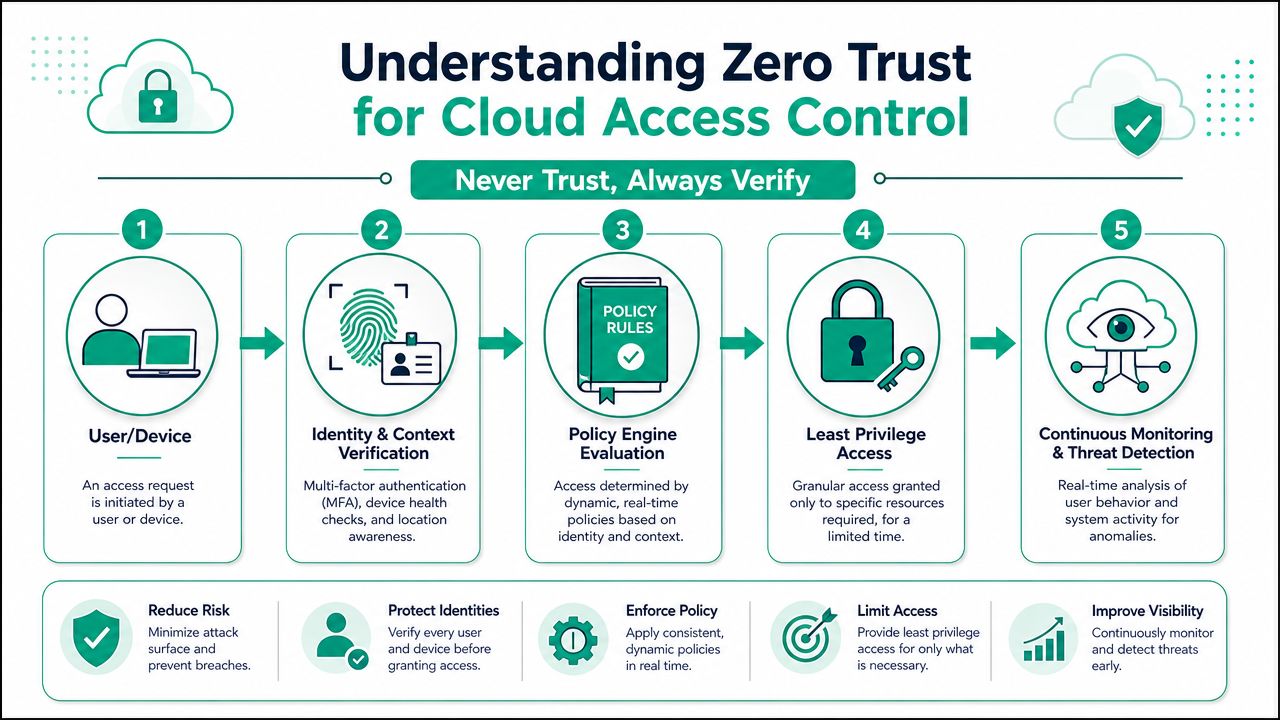
The modern model should trust the decision process, not the badge alone. That's where Zero Trust architecture comes in. Instead of assuming a valid credential means a valid request, the system checks context every time and decides whether that request should pass.
Zero Trust at the door
The Cloud Security Alliance's work on context-based access control explains the key shift. A modern system should act like a Zero Trust decision engine, evaluating signals such as user behavior, device health, location, and network conditions in real time.
That means access can change based on context. The same employee might be approved from a company-issued device during normal hours and challenged, limited, or denied from an unmanaged device at an unusual time.
That matters because stolen credentials are still credentials. A static card database won't notice the difference. A context-aware system can.
RBAC handles the boring part well
Most businesses still need a clean baseline model. That's where Role-Based Access Control, or RBAC, does its job.
RBAC says the shipping lead gets shipping doors, the accounting team gets office areas, the cleaning crew gets after-hours access to defined spaces, and temporary contractors get only what they need. Not more.
If you've already worked with Windows identities, this should sound familiar. The same discipline behind directory design applies here, which is why access control planning often lines up with Active Directory management for Indy SMBs.
Here's a quick explainer before going deeper:
Cryptographic trust matters more than most buyers realize
Readers, controllers, APIs, and admin consoles talk to each other across networks. In a cloud-managed model, that traffic must be trusted.
Research on cloud-native access control notes that RBAC is an efficient baseline, but secure deployments should pair it with mTLS or JWT for client-request authentication and session integrity in distributed environments. That technical separation is important. RBAC decides who should be allowed. Cryptographic trust helps verify who is talking to the system.
A badge reader is no longer just a wall device. In a cloud system, it's part of a distributed security architecture. Treat it that way.
This becomes even more important in warehouses and industrial spaces where physical access ties directly to equipment, inventory, or controlled storage. If you're comparing adjacent options for asset protection, these lockers for secure warehouse environments are a good example of how physical access design is getting tighter and more identity-driven across the board.
Meeting HIPAA CMMC and NIST Compliance
For regulated businesses, access control can't sit in its own silo. It has to support the way you document, restrict, review, and prove access.
That's true for a medical practice on the south side, a defense supplier outside Indy, or a manufacturer trying to get serious about NIST CSF. If your building access system is sloppy, your compliance story is sloppy too.
HIPAA needs clean audit trails
Healthcare offices usually focus first on EHR access, endpoint encryption, and backups. Good. They should.
But HIPAA conversations also run straight into physical access. Who entered the records room? Who had after-hours access to the admin suite? How quickly could you remove access when someone changed roles? A cloud-managed system helps because permissions and logs are centralized instead of scattered across local machines or handwritten exceptions.
If you're mapping a broader software stack for healthcare, this breakdown of HIPAA compliant software requirements is useful because it shows how physical controls should line up with the rest of your protected data environment.
CMMC and controlled access
Defense contractors and subcontractors in Indiana don't need vague “security best practices.” They need controlled access, least privilege, and evidence.
That's where architectural discipline matters. The research cited earlier explains that RBAC is an efficient baseline and that secure cloud deployments should pair it with mTLS or JWT for trusted client-request authentication, especially in distributed environments where control signals travel across public networks, as outlined in this cloud-native access control research.
In practical terms, that means:
- Granular permissions: Staff get access to the right area, not every area.
- Faster revocation: A role change or termination can be handled quickly.
- Verifiable trust: Communications between components are protected, not assumed safe.
- Cleaner evidence: Logs and policy history are easier to review during audits.
NIST CSF fits this naturally
NIST CSF gives owners a useful frame because it forces you to connect physical and digital controls. Access control belongs squarely in Protect and Detect.
Use it to ask harder questions:
| NIST CSF function | Practical access control question |
|---|---|
| Protect | Are users limited to the spaces they actually need? |
| Detect | Can we review unusual entry activity without digging through local systems? |
| Respond | Can we revoke access immediately when a risk appears? |
| Recover | Can the business keep operating if a system component fails? |
For Indiana firms preparing for audits or board reviews, a structured IT security audit checklist for your Indiana business helps tie facility access back to the rest of the security program.
Compliance is easier when your physical access logs, identity rules, and revocation process all live in one disciplined system instead of three half-maintained ones.
Migration Checklist for Indiana Businesses
The first question I'd ask any vendor is not about mobile apps, badge styles, or dashboard screenshots.
It's this. What happens when the internet goes down?
That question gets skipped all the time, and it shouldn't. Public marketing for cloud-based access control usually talks about remote administration and easy management. Fine. But continuity is where the main buying decision lives.
Morefield highlights this gap directly and notes that buyers need to ask about offline modes, local failover, and how long doors remain functional without WAN access in its discussion of cloud access control versus on-premises continuity concerns.
The outage questions that matter
Ask these before you sign anything:
- If the WAN drops, what still works locally? Doors should not become a mystery just because your ISP had a bad morning.
- How does failover work? Some systems keep core door functions running locally. Some don't handle interruption nearly as gracefully.
- How long can the site operate in a degraded mode? You need a real answer, not hand-waving.
- What happens after connectivity returns? Logs and policy changes should reconcile cleanly.
If a vendor gets slippery when you ask about offline behavior, keep shopping.
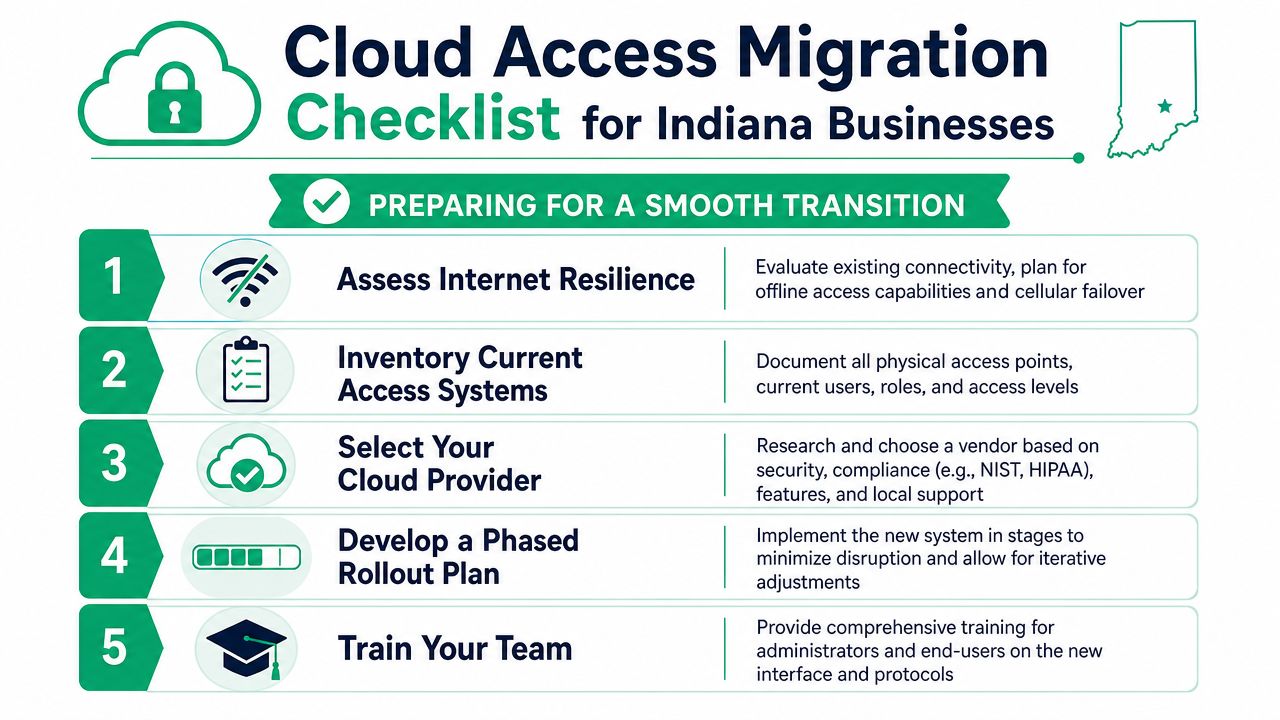
A practical migration checklist
1. Audit every door and every user
List the obvious doors, then keep going. Interior rooms, server closets, records storage, warehouse entrances, back office spaces, and after-hours delivery access all count.
Also inventory users by role, not by name alone. That makes RBAC cleaner from day one.
2. Write the access policy before buying hardware
Don't let the installer invent your security model on the fly.
Define who gets access by role, site, schedule, and exception. For healthcare, that should reflect HIPAA realities. For contractors, manufacturing, and defense-related work, it should line up with CMMC expectations and your broader NIST CSF controls.
3. Check your network like you mean it
Cloud-based access control depends on stable connectivity inside the building. Spotty coverage in an old brick structure or a noisy warehouse will produce weird failures that people wrongly blame on the access platform.
Solid switching, VLAN design, firewall rules, and UniFi networking or comparable gear can make a huge difference. Good wireless design and sane segmentation matter.
4. Roll it out in phases
Don't flip every door on the same afternoon.
Start with a lower-risk area, validate behavior, test revocation, confirm alerting, and then expand. That's safer for staff and far easier to troubleshoot.
5. Train the people who actually run the place
Admins need to know more than how to click “add user.” They need to understand groups, schedules, temporary credentials, emergency overrides, and audit review.
For teams already modernizing infrastructure, these cloud migration best practices for Indiana businesses pair well with the same mindset. Migrate in a controlled way, reduce local dependencies, and test continuity before you trust the new system.
Secure Your Front Door and Your Bottom Line
A keycard upgrade sounds small until you look at what it touches. Security. Staffing. Compliance. Downtime. Growth. Audit trails. Vendor risk. The quality of your front-door system says a lot about the quality of the rest of your operation.
For Indiana SMBs, cloud-based access control usually makes the most sense when the current setup is held together by old hardware, outdated software, and too much tribal knowledge. That's common in Greenwood, across Johnson County, and in plenty of older commercial spaces around Indianapolis. The fix is not to keep polishing a brittle setup. The fix is to move to centralized control, tighter identity rules, and a design that still works when real life gets messy.
That also means choosing the right form factor for your environment. Some buildings may do well with cards and mobile credentials. Others may prefer options built around secure smartphone-controlled building entry when convenience and tenant experience matter. The point isn't the gadget. The point is having a system that fits your workflow and holds up under scrutiny.
If you're managing growth in Hamilton County, modernizing a long-running business in Marion County, or cleaning up a worn-out setup near the I-65 corridor, this is one of those projects that pays you back in fewer interruptions and better control. Done right, it protects the building and gives your team time back.
If your business is in Greenwood or the greater Indianapolis area, the smartest next step is a Free Network Assessment or Security Risk Audit from Finchum Fixes IT. It'll show you where your current access control, network, and identity setup create risk, where continuity could break during an outage, and what a cleaner path forward looks like without guesswork.