Computer Repair South Bend Indiana
A workstation locks up at 8:07 a.m. The accounting file lives on that machine. Two employees are waiting to process payments, the office manager cannot print yesterday's reports, and nobody knows whether the problem is a failing drive, a bad Windows update, or malware spreading across the network.
That is how “computer repair” starts for many South Bend businesses. The underlying problem is not the broken device. Instead, the concern involves lost time, data exposure, and a business process that just stopped.
- South Bend businesses often need more than a retail repair bench. They need diagnosis that accounts for data integrity, security risk, and operational impact.
- Local pricing helps set expectations. Thumbtack's South Bend computer repair listings show a range of rates in the market, but hourly labor is only part of the cost if downtime affects payroll, billing, or customer service.
- Turnaround time matters when work stops. South Bend Computer Repair shows that some providers offer same-day work while others use a longer diagnostic window.
- Replacement is sometimes the better decision. A repair only makes sense if the machine can return to reliable service without creating another failure next month.
- The bigger business need is continuity. Backups, secure migrations, Wi-Fi stability, patching, and managed support reduce repeat failures and protect revenue.**
South Bend's digital economy depends on reliable devices and stable systems. The city's digital skills initiative page shows why. Local employers, staff, and residents are expected to work, communicate, and access services through connected technology every day. For a business owner, that turns a broken computer from an inconvenience into an operations problem fast.
I see the same gap in companies across Indiana. A basic shop can swap a screen, replace a battery, or install a new SSD. That has its place. But if the failed machine holds accounting data, connects to a line-of-business app, or syncs with shared files, the job changes. At that point you need someone who can isolate the fault, protect the data, verify the backup position, and decide whether repair, replacement, or migration is the safer business move.
That difference is where many South Bend companies lose money. They pay once for the repair, then pay again for idle staff, rework, weak documentation, and recurring outages. Businesses that want support built around uptime, risk reduction, and long-term planning usually need a provider with a broader service model, such as business IT support for Indiana companies.
If retired hardware is part of the decision, disposal needs the same level of attention as repair. Systems with client files, employee records, or stored credentials should not leave the building without a documented process. Review this IT asset disposition South Bend resource if replacement is on the table.
Your Guide to Computer Repair in South Bend
Monday starts with one dead PC at the front desk. By noon, invoicing is delayed, staff are sharing logins on a spare machine, and nobody knows whether the failed system contains the only current copy of a customer file. That is the point where “computer repair” stops being a simple bench job and becomes a business risk.
South Bend companies run into a predictable gap. A basic repair shop can replace a screen, battery, keyboard, or SSD. That solves a hardware problem. It does not answer the harder questions a business owner should ask. Was the drive failing before the machine stopped booting? Is there malware present? What data has to be preserved first? If this system connects to accounting, scheduling, CAD, or shared storage, what is the fastest way to restore operations without creating a second problem next week?
The gap between fix-it work and business IT
There are two very different service models in this market.
The first is transactional repair. It works well for obvious part failures and one-off consumer issues. The second is business-focused support built around uptime, data protection, user impact, and recovery planning. South Bend businesses usually need the second model the moment a failed device affects revenue, shared workflows, compliance obligations, or more than one employee.
That difference shows up in the work itself. A technician focused only on the device may reinstall Windows and hand it back. An IT provider focused on business continuity will check backup status, isolate the root cause, confirm line-of-business apps still function, document what changed, and decide whether repair, replacement, or migration has the better return. For companies that need that broader service model, business IT support for Indiana companies is often a better fit than repeated break-fix calls.
One bad decision gets expensive fast.
Replacing a failed workstation sounds cheaper until staff lose half a day, mapped drives break, printers disappear, email signatures vanish, and nobody can open the application that was licensed only on the old machine. Good support reduces that fallout. It treats the computer as part of a working system, not as an isolated box on a counter.
What this guide helps you evaluate
Use this guide to make better decisions under pressure and to avoid paying twice for the same problem.
It explains:
- Which common symptoms point to hardware failure, software corruption, malware, or network issues
- How a proper diagnostic process protects data before repairs begin
- When repair is the right call and when replacement saves more money
- Why planned IT support often costs less than repeated downtime
- What to ask before handing over a device with client, employee, or financial data on it
Retired equipment needs the same level of attention as a live repair. If replacement is on the table, review this IT asset disposition South Bend resource before old systems leave your office.
Common Tech Disasters and What They Mean
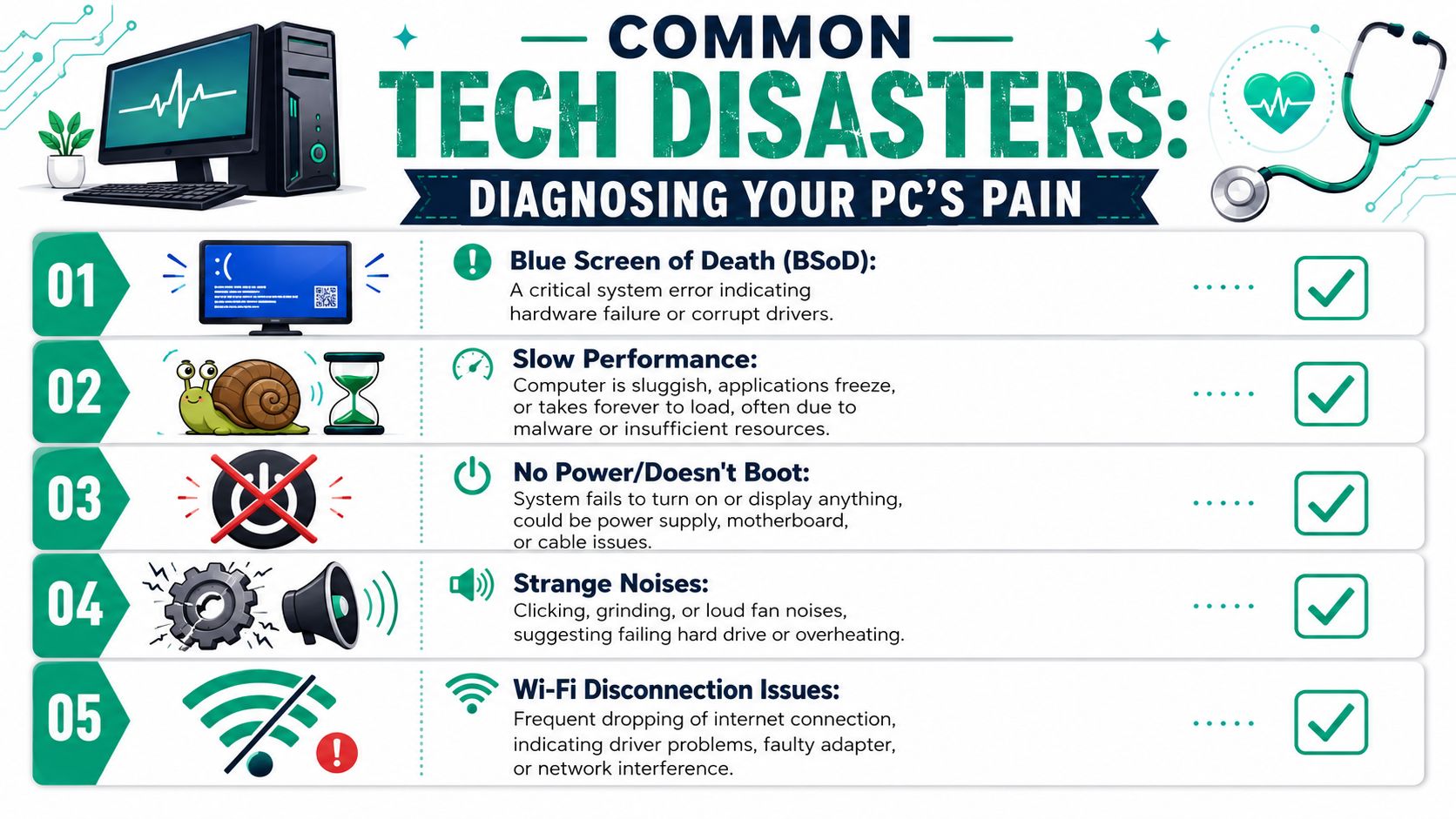
A computer problem rarely introduces itself straightforwardly. A machine that “just runs slow” may have malware, failing storage, bad memory, overheating, or a startup process packed with junk. A laptop that “won't turn on” might have a dead charger, a bad DC input stage, or motherboard damage from a surge.
That's why symptom-based triage matters.
Sudden crashes and blue screens
A blue screen or random shutdown usually points to something lower-level than “the computer being weird.”
Common causes include:
- Corrupt drivers that break communication between Windows and hardware
- Failing RAM that causes unstable reads and writes
- Storage issues where the SSD or NVMe controller starts returning errors
- Thermal problems when dust-clogged cooling or degraded thermal paste pushes the system past safe limits
If the machine reboots and seems normal afterward, don't assume it fixed itself. Intermittent faults are often the hardest to catch and the easiest to ignore until they become full failures.
Slow computers and freezing apps
This one wastes more staff time than obvious breakages because people keep working around it. They wait. They reboot. They blame “old age.”
Common causes are usually more specific:
- Malware or unwanted software
- Low available memory when too many business apps compete at once
- A drive nearing failure
- Windows corruption
- Excessive startup load
If you suspect infection, this guide on how to tell if your computer has malware gives a practical SMB lens on what to watch for before the issue spreads.
Wi-Fi that works everywhere except your office
This one shows up constantly in older buildings. Brick walls, plaster, metal shelving, and poor access point placement can wreck coverage. So can cheap all-in-one gear that was never meant to support a real office.
If your issue is broader internet instability, this consumer-friendly walkthrough on how to resolve slow Wi-Fi and modem problems is useful for basic checks. For a business, though, recurring disconnects usually require a site-specific fix, not another unplug-and-replug cycle.
A weak signal and a crowded channel can look exactly like “bad internet” to your staff. They're not the same problem, and they aren't fixed the same way.
No boot, weird noises, or no power
Here's a quick way to think about the ugly symptoms:
| Symptom | Often means | Why it matters |
|---|---|---|
| No power at all | Power supply, board, charging circuit, or cable issue | Could be simple, or a sign of deeper electrical damage |
| Clicking or grinding | Possible failing hard drive or fan problem | Continuing to run it can increase damage |
| Boot loop | Corrupt OS, bad update, storage fault, or firmware issue | Data may still be recoverable if handled correctly |
| Black screen with lights on | Display path, GPU, RAM, or board-level issue | Easy to misdiagnose if someone starts swapping parts blindly |
Trying random fixes often increases downtime. The business-safe move is disciplined diagnosis first, action second.
Our Diagnostic and Repair Workflow Explained
Monday at 8:07 a.m., a front-desk PC will not boot, the office manager cannot access scheduling, and three people are waiting to work. In that moment, the gap between a basic repair shop and a business IT partner becomes obvious. One can swap parts. The other can protect data, isolate risk, and get the right system back into service without creating a second problem.
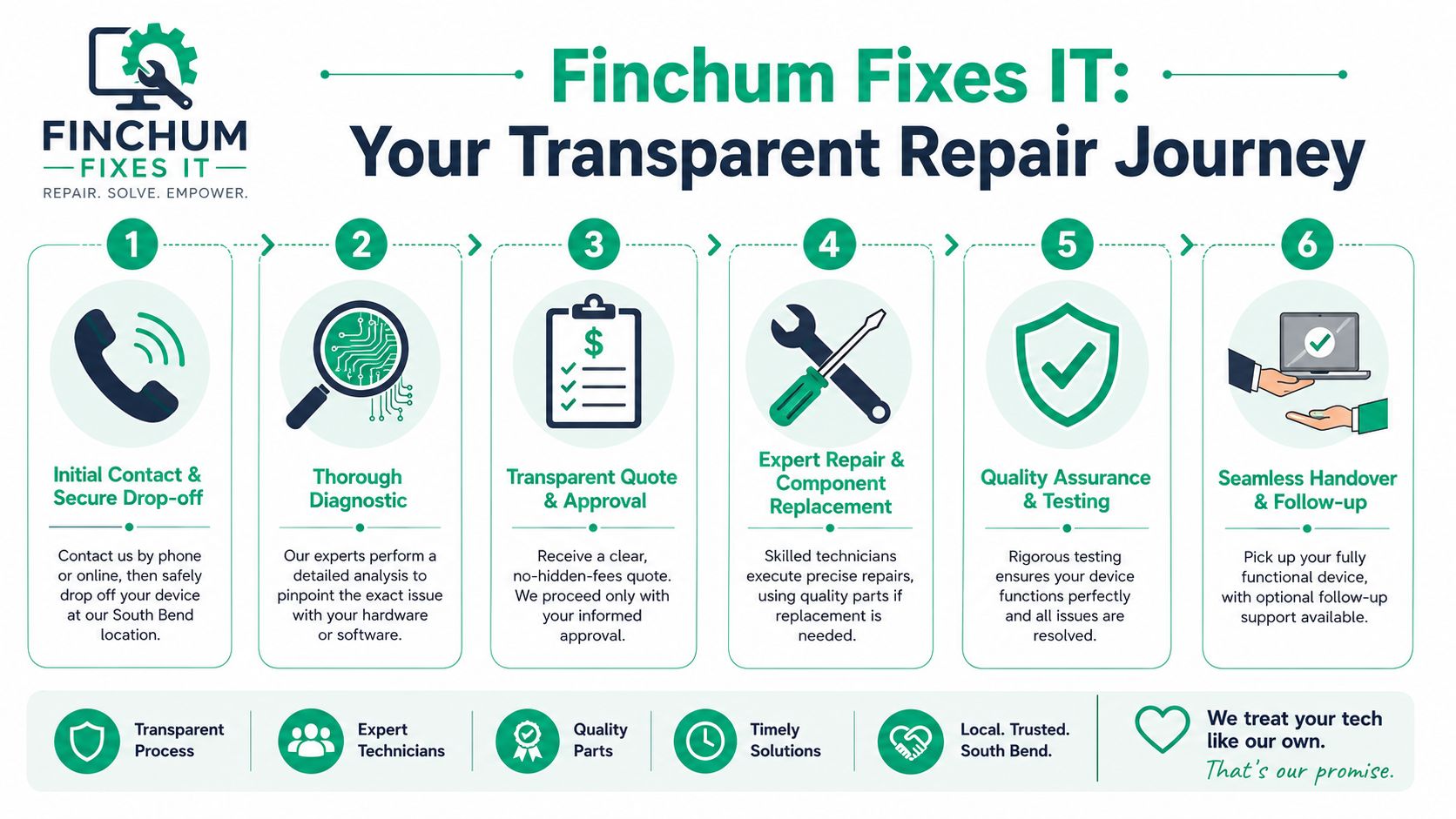
Intake and containment
Good repair starts with context.
Before any disassembly or software work, the intake process should establish what changed before the failure, who uses the device, what systems it connects to, and whether it stores regulated or confidential information. A business laptop that only handles email is one thing. A workstation tied to accounting, CAD files, medical records, or a line-of-business database is another.
A proper intake should identify:
- What changed before failure
- Whether the device handles regulated or confidential data
- Whether the issue might involve malware
- What business process depends on the machine
- Whether there's a current backup
Containment comes next. If there is any chance of ransomware, credential theft, or lateral spread, the machine should be isolated from the network first. That protects the rest of the environment while diagnostics begin.
Diagnostics that go deeper than part swapping
A rushed repair often costs more than a careful one. The wrong first replacement is expensive twice. You pay for the part, and you lose more time while the original fault keeps causing trouble.
That is why disciplined diagnostics matter. For South Bend businesses, this is often the dividing line between a consumer-style fix-it counter and a provider that understands uptime, risk, and downstream impact. Fast turnaround has value, but only if the root cause is correct.
A serious bench process checks the system in layers. Storage health, memory stability, thermals, power delivery, firmware behavior, operating system integrity, and event logs all need to line up before anyone recommends a fix. That is how a technician separates a failing SSD from a damaged Windows installation, or a battery complaint from a board-level charging fault.
A quick look at the overall service lifecycle can help if you've never worked with a structured repair team before:
Some faults also need business judgment, not just technical skill. If a five-year-old desktop has intermittent motherboard issues, the question is not only whether it can be repaired. The core question is whether repair is the best use of money compared with replacement, migration time, warranty coverage, and the cost of another outage next quarter.
Approval, repair, and validation
Clear authorization protects everyone. The technician should identify the likely cause, explain the repair path, note any data or security concerns, and get approval before proceeding.
After repair, validation should be stricter than “it powers on now.” For a business device, testing should confirm that the system is stable under load, that storage and memory pass health checks, that ports and peripherals work, and that the applications the employee depends on still launch and function normally.
Quality control should include:
- Boot stability
- Thermal behavior under load
- Storage and memory checks
- Peripheral verification
- Application-specific sanity checks
That final step is where business-focused service stands out. A PC that boots but cannot print to the front office copier, connect to the mapped drive, open QuickBooks, or reach the practice management platform is not finished. If you want a baseline for what that more structured approach looks like, review this computer repair service overview.
Business Services to Prevent Downtime and Boost ROI
Reactive repair solves today's pain. It doesn't fix the pattern that caused it.
If a South Bend business keeps losing time to dead workstations, spotty Wi-Fi, failed backups, or malware cleanup, the problem isn't bad luck. It's that the environment is being run as a collection of devices instead of a managed system.
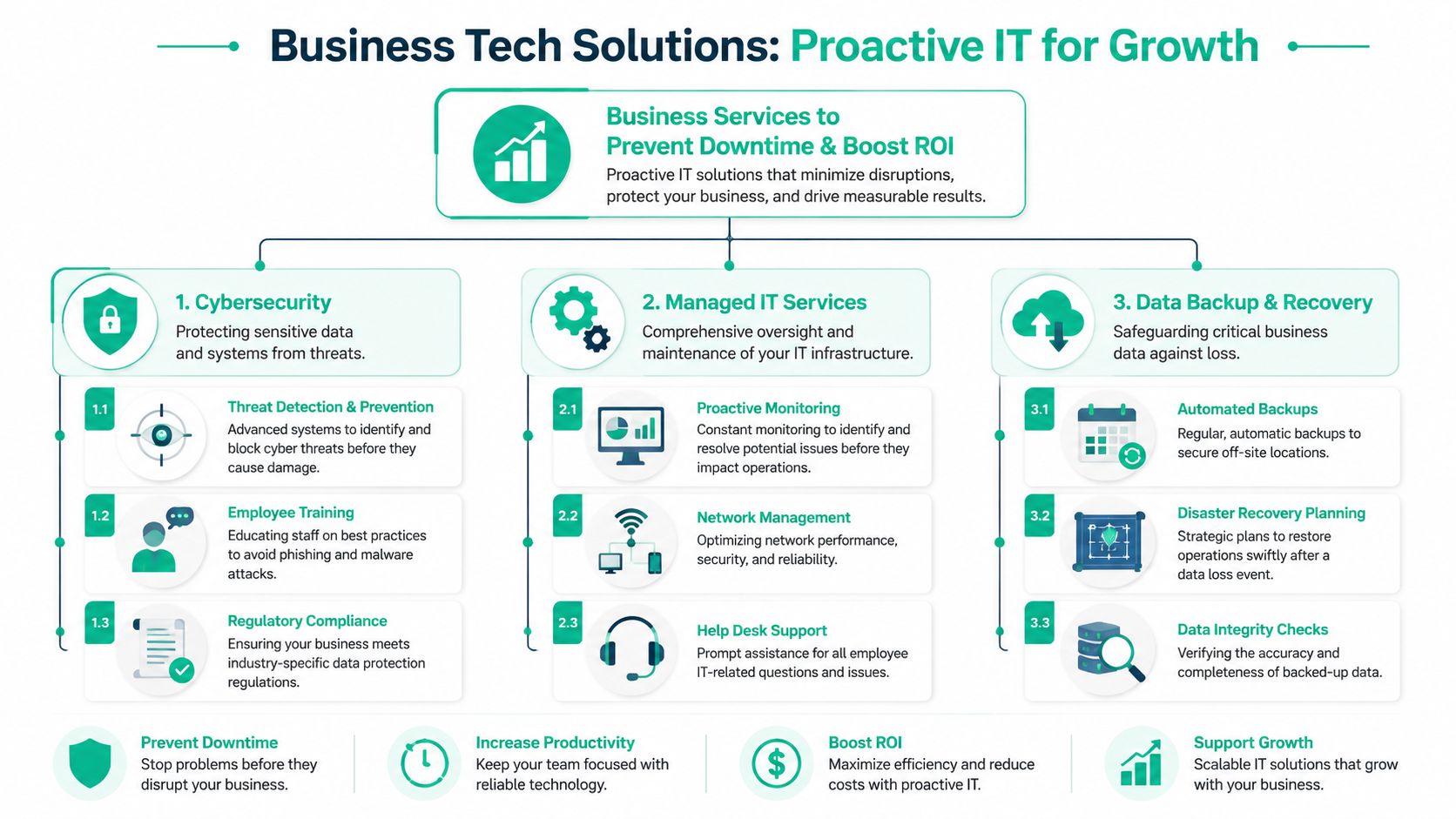
Cybersecurity that supports operations
Most small companies don't need buzzwords. They need fewer breaches, cleaner endpoints, and a clear standard for access control.
That usually means a stack built around:
- Endpoint protection such as Bitdefender GravityZone
- Multi-factor authentication
- Privilege control
- Email filtering
- Zero Trust architecture principles
- Monitoring that catches suspicious behavior before users do
For regulated shops, the language changes but the work is similar. A medical office worries about HIPAA. A defense-adjacent manufacturer may need to align with CMMC. A general business should still use NIST CSF as a practical framework for identifying gaps.
Employee training matters too. The cleanest firewall in the county won't save you if someone approves a fake Microsoft 365 login prompt.
Networking that fits the building
South Bend has its share of older offices, retrofitted spaces, and layouts that weren't built for modern wireless density. The fix isn't buying another consumer router from a big-box shelf.
A durable solution starts with signal mapping, switch capacity review, VLAN planning where needed, and professionally placed access points. In many offices, UniFi networking is a solid fit because it gives central visibility, cleaner roaming behavior, and easier troubleshooting than pieced-together gear.
If a conference room drops calls, a warehouse scanner loses connection, or the accounting team can't stay connected at month-end, you don't have a repair problem. You have an infrastructure problem.
Backup, recovery, and secure migration
This is the gap too many businesses discover too late. The local South Bend market has a notable content gap around data recovery and secure migration, especially with Windows 10 support ending in October 2025, which is pushing many organizations toward replacement projects, as noted by Miles Electronics Group.
That shift creates work that basic repair shops often don't handle well:
- Bit-level data recovery when storage starts failing
- Secure migration from aging PCs to new hardware
- Ransomware-safe restore planning
- Immutable off-site backups
- Validation that files, permissions, and application data made the trip
Replacing a machine is easy. Replacing it without losing data, breaking workflows, or carrying an infection into the new environment takes planning.
Managed support and the ROI question
Here, business owners stop thinking about repair tickets and start thinking about predictability.
When support is managed well, staff waste less time fighting printers, reconnecting shares, rejoining Wi-Fi, or waiting for someone to look at a failing laptop. You also get clearer budgeting because support, patching, monitoring, backup review, and vendor coordination move from surprise expenses into an operating plan.
For many Indiana businesses, the smarter move isn't “Who can fix this today?” It's “Who can keep this from happening again?” A mature managed services approach answers that second question.
Understanding Repair Costs and Service Expectations
A South Bend office can lose half a day to one failed laptop. The repair invoice matters, but the larger cost is the employee who cannot work, the manager who starts improvising, and the customer task that slips.
Business owners usually start with two practical questions. What will this cost, and how long will it take? The right answer covers more than bench labor. It also includes the time to isolate the fault, the chance that parts are delayed or no longer available, and the business impact if the device holds accounting files, line-of-business apps, or local data that was never synced.
What South Bend pricing tells you
Local pricing gives you a rough starting point, not a decision by itself. Low-complexity jobs such as battery swaps, RAM upgrades, or malware cleanup usually price differently than intermittent crashes, liquid damage, motherboard faults, or systems that need careful data handling before any repair begins.
Replacement becomes the better call when repair labor and parts start approaching the value of the machine. I see that most often with older business laptops. Once you add teardown time, a major component, testing, updates, and user setup, the numbers can stop making sense. In those cases, the smarter question is not "Can this be fixed?" It is "Should we put more money into this device, or put that budget toward a stable replacement and a clean migration plan?"
For a broader budgeting view, see this guide to computer repair cost for business in 2026.
What drives the bill
Many owners expect the part to be the expensive piece. In business repair work, labor, risk, and validation often shape the final price more than the component itself.
| Cost factor | What it means for you |
|---|---|
| Diagnostic time | Intermittent issues, boot loops, and multi-cause failures take longer to isolate |
| Parts sourcing | OEM parts, compatible replacements, and shipping delays affect both cost and turnaround |
| Data risk | Devices with unsynced files or specialized software need safer handling before repair starts |
| Repair complexity | A battery swap is straightforward. Board damage, liquid exposure, and thermal faults are not |
| Testing and validation | Business systems need login checks, update review, application launches, and device verification after repair |
That last line gets missed by many fix-it shops.
A consumer repair shop may stop once the machine powers on. Business support should keep going until the device joins Wi-Fi, opens the required apps, reaches mapped resources, prints correctly, and passes a basic security check. That is the gap between simple repair and IT support that protects operations.
Why service expectations matter as much as price
For home users, waiting is inconvenient. For a company, waiting creates idle payroll, delayed approvals, missed calls, and rushed workarounds that create more problems later.
Ask specific questions before approving any repair. How quickly will triage start? When will you get a real diagnosis instead of a guess? If parts are needed, what is the expected lead time? What testing is included before the machine comes back? If the repair fails or the issue returns, what happens next?
Service level agreements matter because they turn vague promises into response targets and escalation rules. Even without a managed contract, you should expect clear communication on priority, timeline, and next steps.
Cheap repair with loose expectations often becomes the expensive option once downtime, repeat visits, and lost staff time are counted.
How to Choose the Right South Bend IT Partner
A South Bend office loses internet access at 8:10 a.m. By 9:00, accounting cannot reach QuickBooks, the front desk cannot print, and a staff member has started emailing files to a personal account just to keep work moving. At that point, you are not shopping for someone who can "fix computers." You are choosing who can restore operations, protect data, and stop the same outage from happening again.
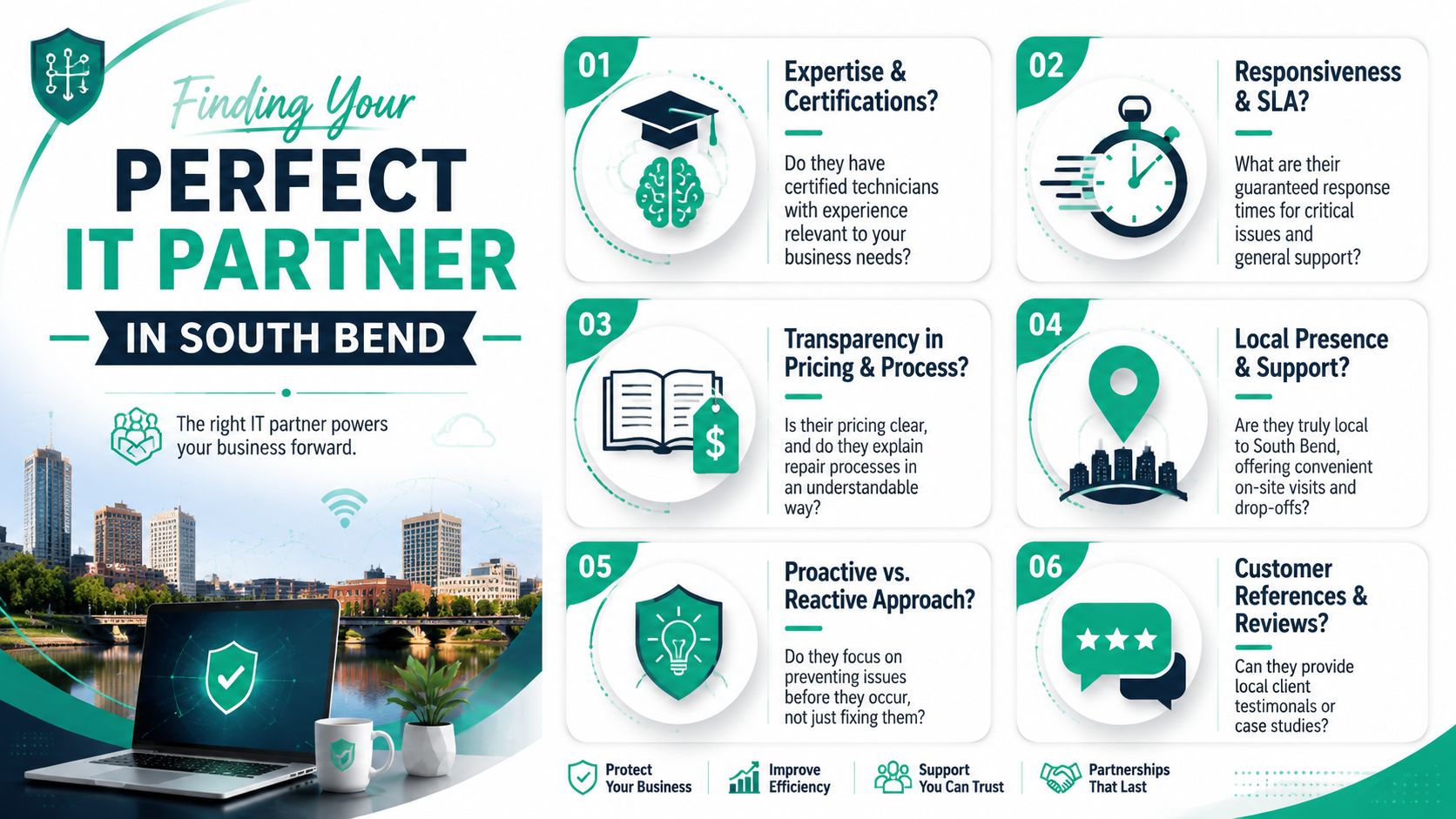
That is the gap between a basic repair shop and a real IT partner. A shop may be fine for a cracked screen or a dead power supply. A business with shared files, cloud apps, line-of-business software, compliance obligations, or multiple employees on the same network needs a provider who can trace cause and effect across the whole environment.
In practice, the best providers explain three things clearly. What failed. Why it failed. What should change so you do not pay for the same outage twice.
Questions worth asking before you sign anything
Use these questions to separate break-fix vendors from firms that can support business operations:
- What work do they handle in-house? Ask whether they support endpoints, Microsoft 365, firewalls, Wi-Fi, backup systems, printers, and user access issues, or whether they only repair individual devices.
- How do they diagnose a problem? Look for a method. Good answers include event logs, SMART data, thermal testing, malware checks, network tests, patch review, and user-impact assessment. Weak answers sound like trial and error.
- How do they treat security during support? They should be able to explain account controls, endpoint protection, patching, backup separation, and how they limit access to your business data while servicing a machine.
- What happens after the repair? Ask what validation they perform before closing a ticket. For a business system, that should include login testing, application launch checks, printer access, file-share access, updates, and basic security review.
- Can they explain repair versus replacement in business terms? The right answer weighs age, reliability, warranty status, performance, security support, and staff downtime. It should not be based only on whether a machine can be powered back on.
Credentials still matter, especially for servers, cloud platforms, networking, and regulated data. But certifications alone do not tell you how a provider handles pressure, communicates with staff, or prevents repeat incidents.
Red flags that should slow you down
Some answers should change the conversation immediately:
- “We usually just swap parts until it works.”
- “We only deal with the computer, not the network or security side.”
- “If data is lost, that is outside our scope.”
- “We cannot give even a rough timeline.”
Those answers point to a reactive service model. That model often creates more downtime than the original fault because nobody is managing business impact, temporary workarounds, or prevention.
Fast service matters. Predictable service matters more.
If a provider cannot tell you how tickets are prioritized, who owns escalation, or what they check before returning a device to staff, you are likely buying inconvenience now and another invoice later.
The provider should fit the business, not just the device
A small manufacturer in South Bend does not need the same support model as a law office or a medical practice. The right partner adjusts to the way your business operates. That includes shift schedules, shared equipment, remote access needs, compliance requirements, and how expensive downtime is for each department.
Use this quick comparison:
| If they say this | It usually means |
|---|---|
| “We fix computers.” | Useful for isolated hardware jobs |
| “We support your systems, users, and recovery plan.” | Better fit for continuity, security, and planning |
| “Bring it in and we'll see what happens.” | Counter-based repair model |
| “We'll review impact, root cause, and the safest path back to production.” | Business IT model |
A good South Bend IT partner does more than close tickets. They reduce repeat failures, shorten interruptions, and help you spend money where it improves uptime. That is what turns IT support from a repair expense into an operational investment.
Frequently Asked Questions and Your Next Step
Do you offer on-site service in the South Bend area
For business issues, on-site service is often the right first move. Network outages, multi-user printer failures, access point problems, shared storage issues, and office-wide malware concerns usually can't be understood from a front counter alone. A provider should be able to tell you when remote support is enough and when a site visit is the safer option.
What should we do before bringing in a device
If the machine is still accessible, back up critical files first. If you suspect malware, don't keep logging in, moving files around, or plugging in random USB drives. If the device has sensitive business data, document who has handled it and avoid handing it off without asking how data access is controlled during service.
Can you help us move from old PCs to newer systems
Yes, but the valuable part isn't the physical swap. It's planning the migration so files, applications, browser data, user permissions, and security settings move cleanly. That's especially important when the old system may already be unstable or infected.
When should we stop repairing and replace instead
Use business logic, not sentiment. If the machine is unreliable, underpowered for current workloads, difficult to secure, or likely to need another round of repair soon, replacement often wins even when a repair is technically possible. The best providers will tell you that plainly.
South Bend businesses don't need more mystery around technology. They need clean diagnosis, honest recommendations, secure handling, and support that protects operations instead of reacting after the damage is done.
If your business is dealing with recurring outages, aging systems, weak Wi-Fi, backup doubts, or security gaps, Finchum Fixes IT can help you get ahead of the next failure. Schedule a Free Network Assessment or Security Risk Audit for your Indiana business and get a clear view of what's putting uptime, data, and productivity at risk.