Data Recovery Services External Hard Drive
An external hard drive usually dies at the worst possible time. It's month-end. Payroll is due. A project folder for a Greenwood contractor won't open. The QuickBooks archive for a Johnson County office is sitting on a desk in a black USB drive enclosure that suddenly won't mount.
That's when a simple storage device turns into a business continuity problem.
For Indiana business owners, this isn't just about files. It's about missed deadlines, staff standing around, compliance exposure, and downtime that can cost up to $9,000 per minute. I've seen versions of this all over the Southside, from older brick buildings with spotty power and aging workstations to fast-growing shops off the I-65 corridor that outgrew their backup habits six months ago. The pattern is familiar. The drive fails, someone tries three different cables, somebody else downloads free recovery software, and the risk gets worse by the hour.
- Stop using the drive immediately: Repeated power-ons can make recovery harder.
- Know the failure type matters: Clicking, read-only errors, and USB-C issues point to different root causes.
- DIY has a limit: Software can help with simple deletion, but it can also worsen physical or firmware damage.
- Professional recovery is often worth it: External drive recovery commonly starts at $300+ and can rise into the thousands for complex cases, according to TrustRadius data recovery service provider guidance.
- Time changes the outcome: Early intervention improves the odds of saving business-critical data.
- Indiana businesses need chain of custody: HIPAA, CMMC, and NIST CSF concerns make local handling a serious advantage.
That Awful Moment Your External Hard Drive Dies
A common Southside version goes like this. A business owner in a Greenwood office park plugs in the external drive that holds client folders, scanned agreements, and a backup export from line-of-business software. The light comes on, then nothing. Windows hangs. The fan on the PC speeds up. The drive makes a faint click, then disappears.
The first instinct is understandable. Try another port. Try another laptop. Shake the cable. Search for a quick fix. But that's the moment where a recoverable problem can turn expensive.
What the business feels first
The technical fault shows up as a dead drive. The business impact shows up somewhere else:
- Operations stall: Accounting can't pull records. Estimators can't access job photos. Admin staff lose half a day hunting old email attachments.
- Labor gets wasted: Good employees stop doing billable work and start doing digital archaeology.
- Compliance risk creeps in: Healthcare groups think HIPAA. Defense-adjacent firms think CMMC. Everyone else should still think NIST CSF and basic chain of custody.
- Downtime snowballs: Even a small outage can ripple through dispatch, invoicing, and customer communication.
That's why I never treat external drive failure as a minor desktop issue. It's part of the same continuity conversation as cybersecurity, networking, cloud computing, software development, and IT support. If your backups are weak, your Wi-Fi is shaky, or your endpoint protection is patchy, a failed drive tends to expose all of it at once.
Practical rule: If the drive holds anything you can't recreate quickly, stop troubleshooting like it's a spare keyboard.
Professional recovery exists for this exact reason. The tooling, diagnosis, and bit-level handling are built to preserve what's left, not to gamble with it. If you're trying to understand the bigger downtime picture, this piece on preventing downtime with data recovery from a corrupted hard drive lays out why speed matters so much once a drive starts failing.
Why panic usually makes it worse
When people panic, they overwrite things. They initialize the disk because Windows suggests it. They run scan-and-fix utilities against unstable media. They copy files until the drive freezes, then power cycle it five times. None of that is malicious. It's just rushed.
In our 17 years of local service, that's been one of the most consistent patterns across Johnson County. The first hour after failure often determines whether the next step is routine logical recovery or a far more delicate lab job involving hardware examination, drive security controls, and clean handling.
Here's the calm version. Stop writing to the device. Don't reformat it. Don't open the enclosure. Document what happened, what sounds it made, and whether it was dropped or exposed to a surge. That information helps separate a simple electronics issue from something physically wrong inside the drive.
What That Clicking Sound Really Means
A bad drive usually tells on itself. The trick is knowing which symptom points to which failure.
A clicking external hard drive doesn't mean the same thing as a drive that powers on but shows as read-only. A USB-C drive that won't mount doesn't always have dead platters. Business owners lose money when all failures get lumped into one bucket.
The fast symptom guide
| Symptom | Likely issue | What to do |
|---|---|---|
| Clicking or grinding | Mechanical trouble, often head-related | Power it down and stop testing |
| No detection at all | Controller, PCB, cable, port, or file system issue | Test basics once, then stop |
| Read-only behavior | Often firmware or logical corruption | Avoid consumer repair tools |
| Burnt smell or unusual heat | Electrical failure | Disconnect immediately |
| Works intermittently | Failing sectors, electronics instability, enclosure issue | Clone or diagnose professionally before more use |
That clicking sound matters because it often points to internal mechanical failure. On spinning hard drives, the read/write heads fly extremely close to the platter surface. When alignment or movement goes wrong, every additional spin-up can increase damage.
USB-C and Thunderbolt drives fool people
Modern external drives add another layer of confusion. A lot of users see a dead USB-C or Thunderbolt drive and assume the internal disk itself is gone. That assumption is often wrong.
According to Gillware's 2025 FAQ data, 70% of users assume the entire drive is dead, yet 45% of USB-C external drive failures are controller board issues, not physical drive damage. The same source notes this confusion can lead people into $500+ recovery fees for cases that may only need a $150 board swap.
That's a big deal for Indiana businesses buying sleek modern external storage without understanding the weak point in the chain. Sometimes the problem is the storage media. Sometimes it's the bridge board translating USB-C to the actual drive interface inside the enclosure.
Don't confuse “the computer can't see it” with “the platters are destroyed.” Those are different problems, and the fix path isn't the same.
If you want a plain-English look at failure types businesses around Indianapolis deal with, this guide to failed hard drive data recovery for Indiana businesses is a useful companion.
Why diagnosis beats guessing
Seasoned IT work is critical. Good diagnosis isn't random cable swapping. It's separating:
- Logical issues like corrupted file systems
- Firmware issues that block access even when hardware is mostly intact
- Electronics faults in the enclosure or controller
- Mechanical failures that require clean handling
- Security-related concerns where encrypted data and drive security policies affect recovery options
That distinction matters for ROI. If you spend a day guessing wrong, your staff is idle, your monthly budget gets less predictable, and your recovery options narrow. The right diagnosis upfront is cheaper than repeated failed attempts later.
When to Stop DIY Data Recovery Attempts
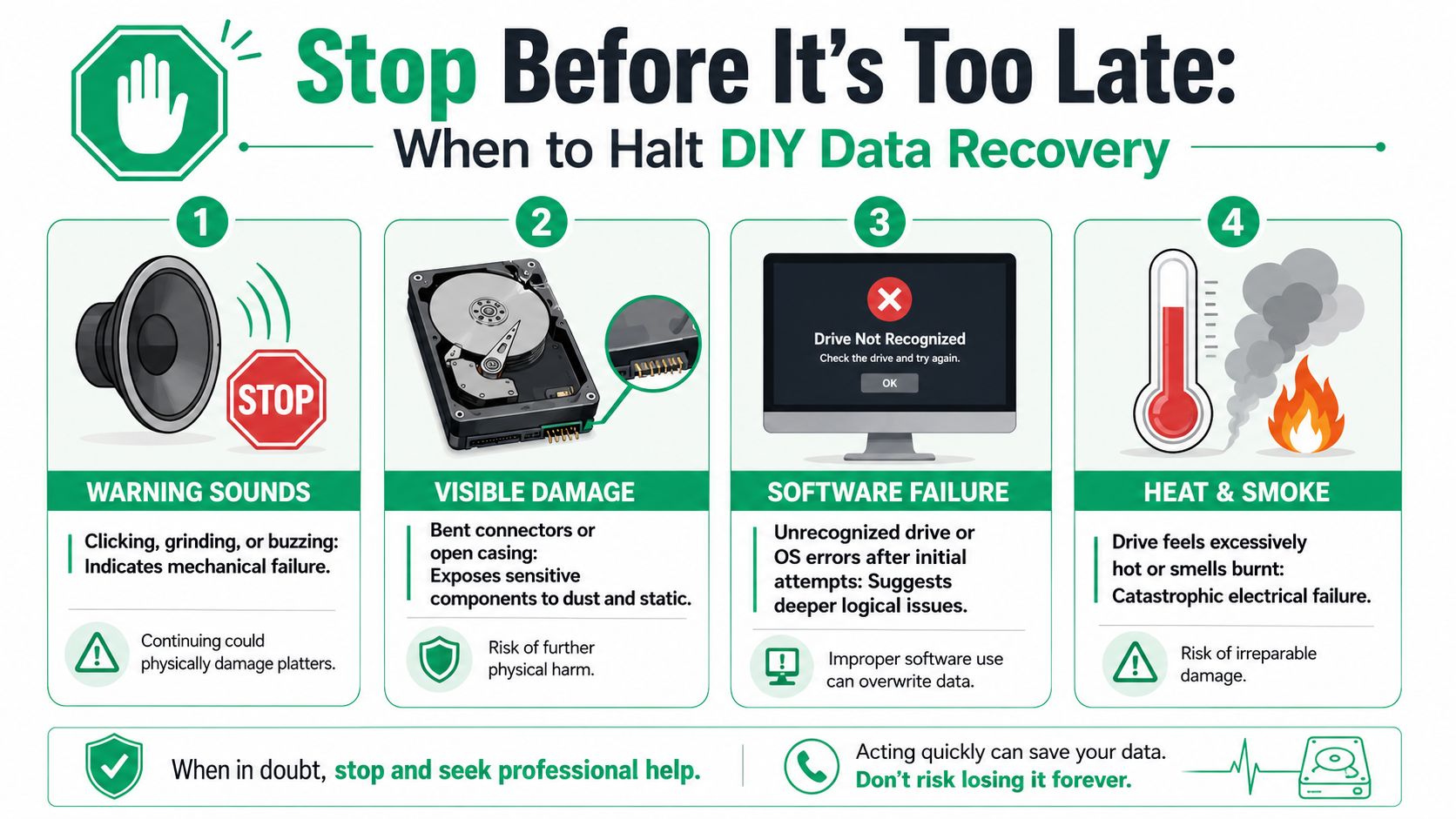
There's a narrow window where basic DIY troubleshooting is reasonable. Try one known-good cable. Try one known-good computer. Confirm the drive has power. After that, the line gets sharp.
If the drive clicks, was dropped, gets unusually hot, smells burnt, or vanishes during reads, stop. If the operating system asks to initialize, format, or “repair” a business-critical drive, stop there too.
The read-only trap
One of the most misleading symptoms is read-only access. People see it and assume they just need different software. That's not always true.
According to the Data Recovery Group FAQ page, 62% of users attempt to recover data from external drives showing read-only errors, but 80% of existing content fails to clarify that read-only often points to firmware corruption requiring cleanroom firmware重写, not just software recovery. The same source says 35% of read-only external drive failures are firmware issues requiring $300+ firmware重写.
That's the kind of detail generic blog posts skip, and it's exactly why businesses burn time on free tools that were never designed for firmware-layer trouble.
The real stop signs
Use this as the practical boundary:
- Noise means no more DIY: Clicking, grinding, or buzzing suggests internal trouble. Every retry can make platter damage worse.
- Physical damage ends the experiment: If the drive was dropped, the connector is bent, or the enclosure cracked, don't keep powering it.
- Software prompts can be destructive: “Initialize disk” and repair prompts may write changes to a drive you're trying to preserve.
- Intermittent access is not good news: Being able to see a few folders doesn't mean the drive is safe to keep reading.
The worst time to “see what happens” is when the data includes accounting records, legal documents, or patient information.
For simple deletions on healthy media, software can have a place. For unstable external drives, it often doesn't. If you're sorting out that difference, this article on how to recover deleted files from a computer for Indianapolis businesses helps separate clean deletion cases from device failure cases.
Why this matters to ROI
Indiana owners usually frame the question as cost. The smarter question is exposure. If a controller issue can be fixed cleanly, great. If firmware corruption needs specialized handling, forcing consumer software against it can turn a recoverable case into a write-off. That's not thrift. That's risk.
The minute your team starts spending half a day trying utilities from random download pages, you're converting paid staff time into non-billable troubleshooting. A managed environment with immutable off-site backups, Bitdefender GravityZone on endpoints, and documented recovery procedures prevents this exact mess from eating a whole afternoon.
The Professional Data Recovery Process Explained
Professional recovery should look controlled. If a Greenwood business owner brings in a failed external drive that holds payroll exports, patient intake scans, or machine setup files, the lab should follow a repeatable process and explain each decision before work starts.
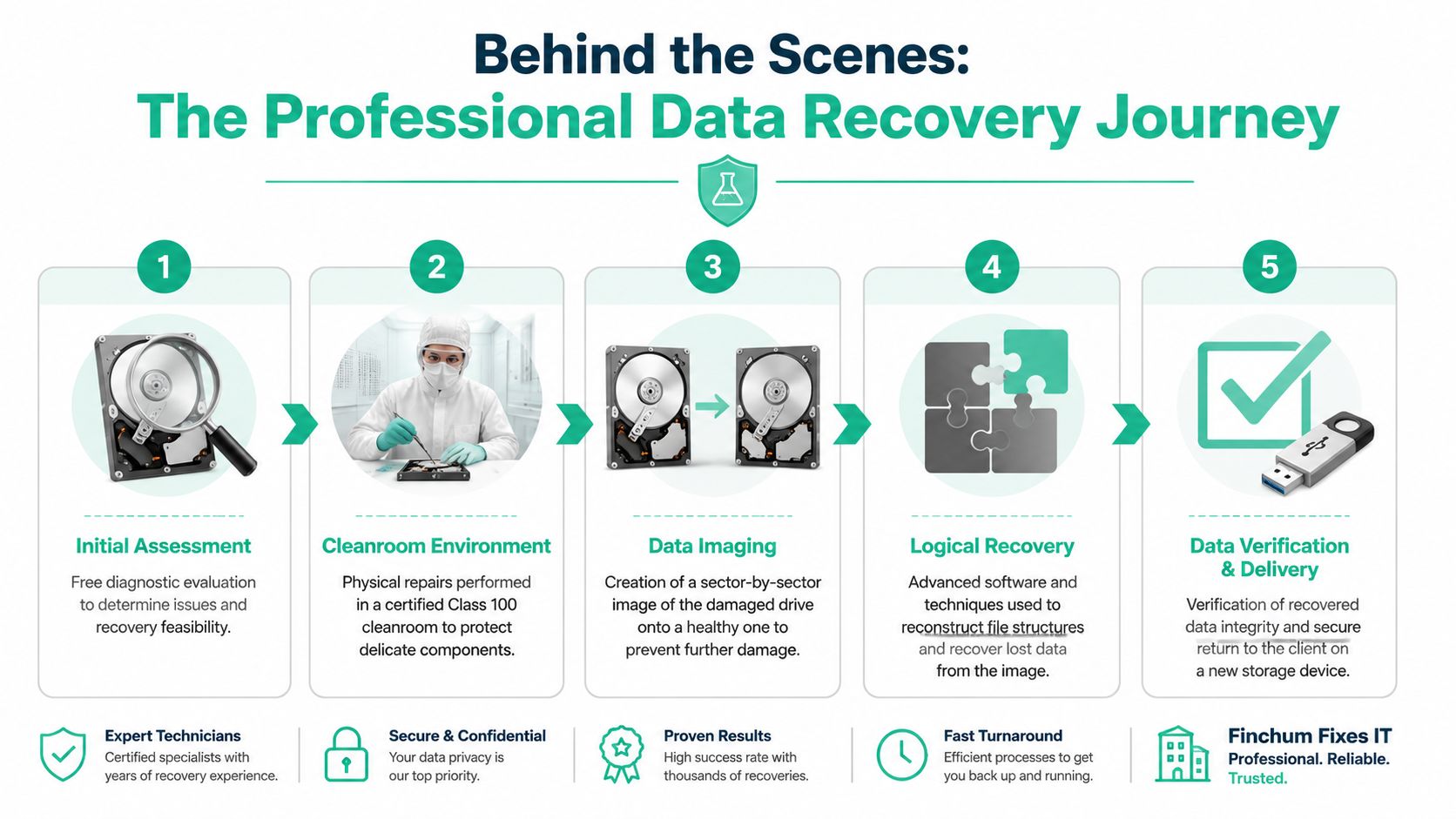
The first job is diagnosis. A technician needs to identify whether the failure sits in the USB enclosure, the drive electronics, firmware, file system, or the mechanical parts inside the disk. That distinction affects both risk and cost. An enclosure problem may be straightforward. A firmware or head issue usually calls for lab equipment, donor parts, and a tighter chain of handling if the files involve HIPAA or CMMC obligations.
A good overview helps before you approve work. This guide on how long data recovery takes is useful because timelines change a lot based on whether the problem is logical corruption or physical failure.
Step one is preservation
On an unstable drive, the immediate goal is to capture as much readable data as possible without making the condition worse. That often means creating a bit-level image, also called a sector-by-sector clone, so the recovery work happens on a copy instead of the original disk.
That step matters more than owners expect.
I have seen cases in Johnson County where the original drive would stay online for only a few minutes at a time. In that situation, a careful imaging pass gave us enough to rebuild the file system and recover usable folders. If we had kept browsing the original drive in Windows, the chance of a clean recovery would have dropped fast.
Physical repair and logical recovery are different jobs
If the drive has internal mechanical damage, opening it on a normal desk is a mistake. Hard drives need controlled lab conditions because dust, static, and improper handling can turn a difficult case into a dead one.
This short video gives a useful visual on what that kind of work involves.
Mechanical cases can involve failed heads, seized spindles, or scratched platters. Logical cases usually focus on damaged partitions, corrupted metadata, or broken directory structures. The tools and the expectations are different. So is the business conversation. If the lost files support accounting, medical records, or controlled project data, the provider should explain how the media is secured, who touches it, and how recovered data is returned.
Verification decides whether the recovery was actually useful
A folder tree by itself does not mean the job is done. Good recovery shops verify that the data opens and works in the applications your business uses. QuickBooks company files should open cleanly. CAD drawings should render. Databases should mount without corruption. VM images should boot if that is what your operation depends on.
That is also where local business context matters. A dental office in Indiana may need to confirm patient files were recovered in a way that supports HIPAA handling. A small defense subcontractor near the I-65 corridor may care more about controlled technical data and documented custody. A manufacturer may care less about Word documents and more about the one legacy VM that runs a production station. Seasoned IT work makes a significant difference here because the target is not "all possible files." The target is the set of files that gets the business functioning again.
That business-first approach lines up with optimizing system recovery. Recovery is not just a lab event. It is part of a larger effort to reduce interruption, restore the right systems first, and protect revenue while the incident is being handled.
Field note: In one past case involving a failing RAID set, the real win was not the raw volume of recovered data. It was restoring the correct line-of-business files in usable order so staff could resume work the same day.
The same rule applies to a single external hard drive. A proper recovery process aims to return usable business data, with structure, verification, and handling that make sense for an Indiana company dealing with compliance and downtime pressure.
Data Recovery Costs vs The Price of Downtime
This is the question every owner asks right after “Can you get it back?”
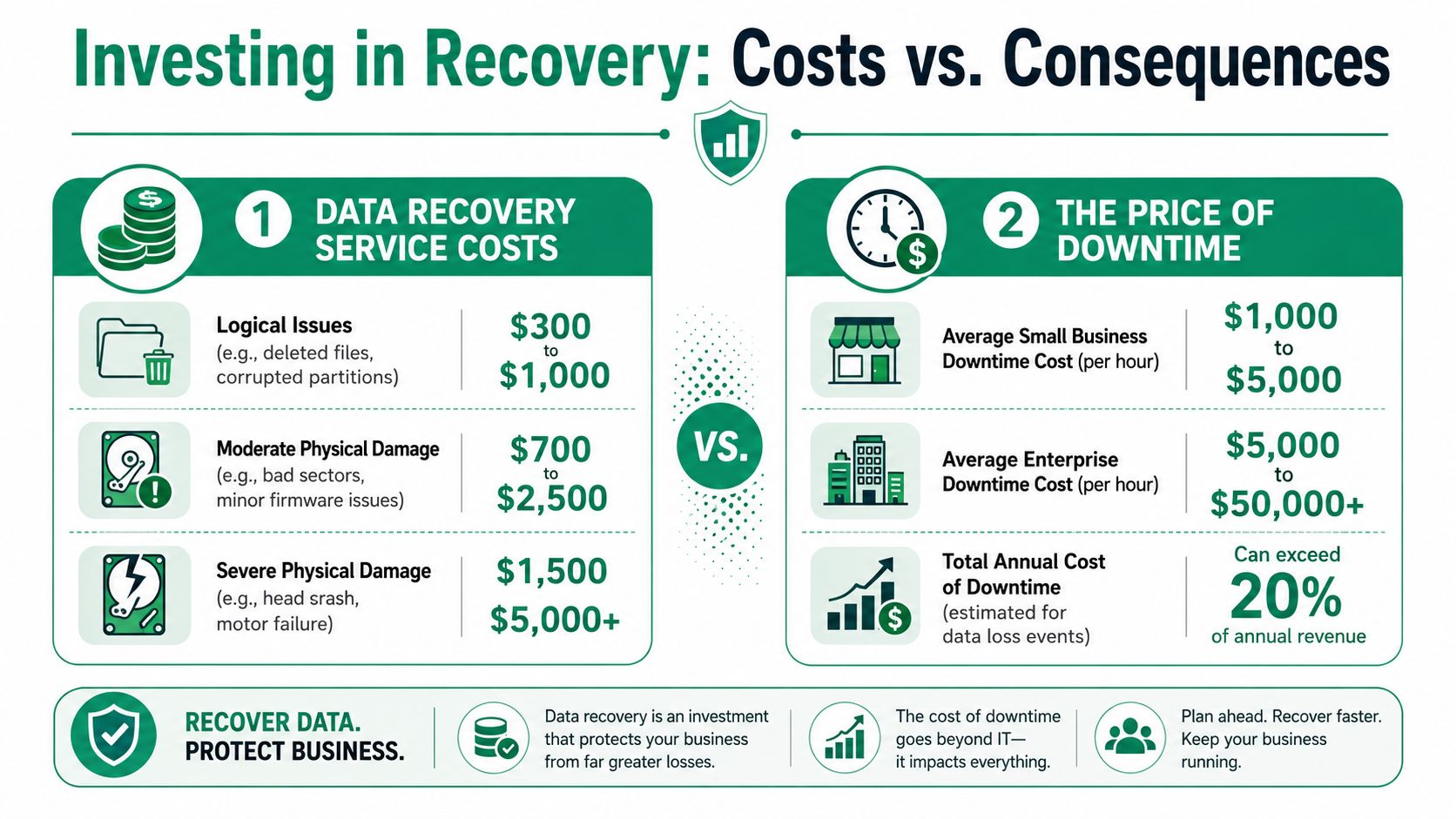
External hard drive recovery isn't cheap, and pretending otherwise doesn't help anyone. According to a public industry discussion cited here, external hard drive recovery for less than 1TB typically ranges from $500 to $2,800 in many cases, reflecting specialized labor and equipment, as noted in this DataHoarder discussion of recovery pricing. That range makes sense if you've ever watched the work involved.
The fee is visible. Downtime is sneaky.
Most owners focus on the invoice because it's obvious. The bigger cost usually sits elsewhere:
- Lost staff output: People stop billing, selling, dispatching, or servicing customers.
- Recreation work: Teams rebuild spreadsheets, proposals, inventory records, or job notes from email scraps.
- Compliance exposure: Missing files can trigger ugly questions in regulated environments.
- Budget volatility: Reactive emergencies wreck predictable monthly IT planning.
That's why business continuity matters more than the narrow recovery quote. One one-time recovery bill can be painful. Ongoing downtime is worse because it multiplies. It also creates the kind of wasted tech time that should've been billable hours or productive operations.
Recovery spending is part of a larger continuity plan
For most Johnson County business owners, the smarter framing is ROI. You're not just paying to get files back. You're buying time, preserving work product, and avoiding a longer outage.
A useful way to think about it is through mean time to recovery. If you want a solid operational lens on optimizing system recovery, MTTR thinking helps explain why preparation matters so much before a failure happens. Faster recovery isn't just nice. It protects margin.
What changes the bill
A few variables move the cost up or down:
| Cost factor | Lower end cases | Higher end cases |
|---|---|---|
| Failure type | Deleted files, minor logical corruption | Mechanical failure, platter or head issues |
| Device condition | Stable enough to image | Intermittent, dropped, or electrically damaged |
| Interface complexity | Standard enclosure issue | USB-C bridge, firmware, or proprietary quirks |
| Urgency | Standard queue | Emergency turnaround |
| Security handling | Basic office files | Sensitive business, legal, medical, or defense data |
For small and midsize businesses, that's another reason to build around managed IT discipline. UniFi networking that's stable. Immutable off-site backups. Bitdefender GravityZone on endpoints. Zero Trust architecture for access control. SOC-as-a-Service monitoring to catch the cyber side before ransomware and hardware trouble collide.
If you're comparing scenarios and trying to budget realistically, this SMB guide to data recovery services cost is a practical next read.
One more thing matters here. Many reputable providers use a No Data, No Charge model. That policy doesn't make recovery free, but it does align the risk better for the client when the case is uncertain.
Why a Local Indiana Partner Matters for Data Security
Mail-in recovery has its place. For many Indiana businesses, it also creates avoidable anxiety.
If you're in healthcare, legal, professional services, or manufacturing around Greenwood, Franklin, and the I-65 corridor, data handling isn't abstract. It touches HIPAA, CMMC, internal retention rules, client confidentiality, and plain common sense. A local provider gives you something national mail-in services can't match easily. You can verify chain of custody, ask direct questions, and deal with people who understand the business environment you operate in.
Why proximity helps compliance
For a Johnson County healthcare office, a failed external drive may contain protected health information. For a defense-related shop north of Greenwood or in the broader Indianapolis orbit, project files may feed directly into CMMC obligations. Even for general business security under NIST CSF, you still need clear handling, documented access, and disciplined recovery.
A local team can tie recovery into the rest of your environment. That means secure transfer, endpoint review, backup validation, and a post-incident plan so the same problem doesn't happen twice. National labs often stop at “here are your files.” Good local IT partners connect recovery to the next move, whether that's immutable off-site backups, refreshed storage, Zero Trust architecture, or latency-optimized mesh nodes for a shaky office network.
Speed and trust still matter
Timing affects outcomes. According to a poll of members of the Data Recovery Professionals group, the overall success rate for data recovery across device types is about 78%, and the same source stresses that bringing a damaged external hard drive to a trusted provider immediately significantly improves the probability of success, as detailed by 300 Dollar Data Recovery's discussion of recovery success rates.
That lines up with what experienced local shops see in the field. Early action helps. Delay hurts. Repeated DIY attempts hurt more.
For broader reading on policies that support resilience before a failure happens, this overview of SMB data protection principles is a good reference point.
What local business owners usually care about
The owners I talk with around Greenwood and downtown Indy tech hubs usually want four things:
- Plain answers: Is it the enclosure, firmware, or the drive itself?
- Security discipline: Who touched it, where did it go, and how is the data protected?
- Business continuity: How fast can work resume, and what should change after recovery?
- Predictable support: Can someone local own the next step instead of disappearing after the handoff?
That's why local matters. Not because national firms are always bad. Because Indiana businesses often need more than a shipping label and a quote.
If your business in Greenwood or the Indianapolis area is dealing with a failed external drive, don't guess and don't keep powering it on. Finchum Fixes IT can help you sort out whether you need recovery, backup validation, or a larger continuity fix. Schedule a Free Network Assessment or Security Risk Audit and get a clear next step before a bad drive turns into a bigger outage.