Cybersecurity Threat Detection for SMBs
A controller in a Greenwood office notices that a shared mailbox sent an invoice nobody remembers approving. The laptop shows no obvious malware, the firewall looks quiet, and business continues. That's exactly why cybersecurity threat detection matters. Attackers often use valid accounts, trusted cloud services, and built-in tools that resemble ordinary work.
Cybersecurity threat detection is the continuous collection and analysis of endpoint, identity, network, email, and cloud signals to identify attacker behavior before it becomes a business-impacting incident. It shortens the time between compromise and action, supports containment and recovery, and turns scattered logs into decisions that protect uptime.
What Threat Detection Actually Does for Your Business
A Greenwood accounting firm may forward a routine invoice on Tuesday morning. By Tuesday afternoon, an attacker using a harvested mailbox credential could be changing payment instructions, creating forwarding rules, or pressing an employee to approve a wire transfer. The difference between an alert the same hour and a call on Friday morning isn't technical trivia. It can determine whether the firm contains one account or spends weeks investigating a wider compromise.
Threat detection looks for the signals that ordinary antivirus often misses:
- Identity abuse: A successful sign-in from an unfamiliar location, suspicious token activity, MFA fatigue, or an unexpected OAuth consent grant.
- Cloud manipulation: New mailbox forwarding rules, unusual file downloads, or administrative changes in Microsoft 365.
- Living-off-the-land activity: PowerShell, Windows utilities, remote administration tools, and scripting engines used in an abnormal sequence.
- Lateral movement: SMB enumeration, remote service creation, unusual administrator activity, or access to a file server that doesn't match the user's role.
CrowdStrike reported that 82% of detections in 2025 were malware-free, with activity involving identity abuse, trusted cloud services, and living-off-the-land techniques (CrowdStrike Global Threat Report). The same report recorded an average eCrime breakout time of 29 minutes, a 65% increase in speed from 2024, and a 42% rise in zero-day vulnerabilities exploited before public disclosure. Those findings explain why a detection program must watch behavior and identity, not just files.
Practical rule: Detection doesn't patch a server, fix a weak password, or segment a flat network. It tells a prepared team that those weaknesses are being used.
A mature program reduces attacker dwell time, gives responders evidence for an insurance claim, and limits the blast radius of ransomware or account takeover. It also supports continuity planning. Downtime benchmarks cited by Palo Alto Networks range from about $5,600 per minute to as high as about $9,000 per minute (Palo Alto Networks on incident downtime costs). That makes early containment a business decision, not merely a security preference.
For Indiana companies, the useful starting point is an operational review of accounts, endpoints, cloud services, backups, and network paths. A practical guide to cybersecurity risk management for Indiana SMBs can help organize that work, but test is whether someone receives, validates, and acts on alerts during a normal workday.
How Detection Fits Inside NIST CSF and Your Stack
NIST CSF 2.0 organizes risk management around Govern, Identify, Protect, Detect, Respond, and Recover. NIST describes these functions as continuous and concurrent, and its Framework Core as activities, outcomes, and references that improve resilience rather than a compliance checklist (NIST CSF FAQ). The Detect function matters because it connects technical observation to the response process.
Two Detect categories are particularly useful for SMB planning:
- DE.CM, continuous monitoring: Watch endpoints, users, network traffic, cloud workloads, and services for signs of compromise.
- DE.AE, anomalies and events: Analyze unusual activity, correlate related events, and determine whether a sequence indicates an incident.
A small business doesn't need to collect every possible log on day one. It does need enough context to answer who acted, from which device, through what service, and what happened next.
| NIST Subcategory | What It Means | Log Source in SMB Stack |
|---|---|---|
| DE.CM | Monitor endpoint behavior and security controls | Bitdefender GravityZone or another EDR |
| DE.CM | Observe authentication and account changes | Entra ID, Microsoft 365, or Active Directory |
| DE.CM | Track network destinations and unusual connections | UniFi gateway, SonicWall, DNS, and firewall logs |
| DE.AE | Correlate events into an attack sequence | SIEM or XDR platform |
| DE.AE | Identify cloud misuse and administrative changes | Microsoft 365 or Google Workspace audit logs |
An EDR platform such as Bitdefender GravityZone supplies process trees, endpoint detections, and isolation capability. Entra ID and Active Directory show sign-ins, privilege changes, MFA events, and account use. A UniFi gateway or SonicWall can provide DNS and firewall context, which is often the missing clue when a workstation reaches a suspicious destination.
A SIEM centralizes logs and supports broad correlation across systems. XDR generally offers tighter, vendor-integrated correlation across endpoint, identity, email, and cloud controls. Sysmon fits on Windows hosts as a detailed event source for process creation, network connections, and related activity, but it needs a collection and retention plan. Installing Sysmon without reviewing its output creates storage and noise, not security.
Teams along the I-65 corridor often skip DNS logging because it feels less urgent than endpoint alerts. That's a mistake. DNS can connect a suspicious process to a domain, reveal repeated beaconing, and add useful context when no malware file exists. Zero Trust network architecture for SMBs provides a broader model for reducing implicit trust while detection supplies the evidence needed to enforce it.
Signature, Behavioral, Anomaly, and Identity Detection Compared
No single detection philosophy covers a modern SMB environment. Signature controls remain useful because they identify known malware hashes, domains, and indicators quickly. They're inexpensive to run and easy to explain, but a new payload, renamed tool, or compromised legitimate service can pass without matching a known signature.
Behavioral detection examines sequences rather than isolated files. PowerShell spawning cmd.exe, writing into an unusual user directory, and disabling a service is more suspicious as a chain than as three separate events. This approach catches fileless activity and misuse of built-in tools, but normal administration can look similar. Suppression must be narrow and tied to a known script, administrator, host, and schedule.
Anomaly detection compares activity with an established baseline. A login from an unfamiliar country at an unusual hour may deserve review, especially when followed by mailbox changes or bulk downloads. Baselines can be powerful against credential abuse and insider risk, but new employees, travel, remote work, and seasonal operations create tuning work.
Identity-based detection deserves priority in Microsoft 365 environments. It watches token use, impossible travel, MFA fatigue, risky sign-ins, privilege changes, and OAuth consent. A valid username and password can defeat a perimeter-focused program, while identity telemetry can expose what the attacker does next.
| Approach | Catches | Misses | False Positive Rate |
|---|---|---|---|
| Signature | Known malware, known-bad hashes, and recognized infrastructure | New payloads, renamed tools, and trusted services | Usually lower, but coverage is narrow |
| Behavioral | Suspicious process chains, scripts, and living-off-the-land activity | Legitimate administration without adequate context | Often higher until tuned |
| Anomaly | Deviations from normal login, access, and network behavior | Activity that has become normal after a long compromise | Depends on baseline quality |
| Identity-based | Token abuse, MFA fatigue, risky sign-ins, and consent changes | Activity with valid identity signals but no unusual account behavior | Moderate and context-dependent |
For a 25-person operation, start with identity, endpoint behavior, and DNS. Signature detection should remain enabled, but it shouldn't be the centerpiece. Access controls also belong in the same conversation. Organizations reviewing Amax Fire & Security's access solutions may find useful context on physical and biometric access, which complements digital identity controls without replacing them.
The trade-off is straightforward. More behavioral and identity coverage creates more investigation work, while a narrow signature-only stack creates blind spots. Choose the combination your team can review, tune, and act on.
Detection Engineering and Tuning in Practice
Detection engineering starts with a question, not a query language. Ask, “What attacker behavior am I trying to catch, and what would that attacker do on this network?” A rule that can't answer those questions usually becomes another unread alert.
A repeatable detection workflow
- Form a hypothesis. For example, an attacker may use an Office document to launch encoded PowerShell.
- Map the data. Confirm that EDR process creation, Windows PowerShell logs, and identity events are collected.
- Write the rule. Use Sigma for portable logic, then translate it into the platform's query language.
- Test the rule. Run a controlled simulation or replay representative events.
- Tune and own it. Suppress approved administrative scripts, set sensible thresholds, assign an owner, and review the result.
A compact Sigma example might look like this:
title: Suspicious PowerShell Encoded Command
logsource:
  product: windows
  category: process_creation
detection:
  selection:
    Image|endswith: '\powershell.exe'
    CommandLine|contains:
      - '-enc'
      - '-encodedcommand'
  condition: selection
level: high
The same logic in a Microsoft-style KQL workflow could be expressed as:
DeviceProcessEvents
| where FileName =~ "powershell.exe"
| where ProcessCommandLine has_any ("-enc", "-encodedcommand")
| project Timestamp, DeviceName, AccountName, ProcessCommandLine
The syntax isn't the hard part. The hard part is deciding whether the event has enough context to justify escalation. A signed management script may be expected on a server but unusual on a receptionist's workstation. Add parent process, account, device role, and frequency where available.
False positives deserve ownership. Recent 2026 detection-engineering survey coverage reported that 66% of false positives came from vendor-provided rules, while 59% of teams measured false-positive rates and only 14% prioritized reducing them (detection gap and tuning coverage). Those figures point to an operational problem, not an automatic reason to buy another platform.
Use attack simulation, administrative change records, and alert reviews to test assumptions. The AI threat detection guide for Indiana businesses can add context around automation, but AI doesn't excuse weak telemetry or untested rules. An untested detection is a hope written in query syntax.
Triage and Response Workflow From Alert to Containment
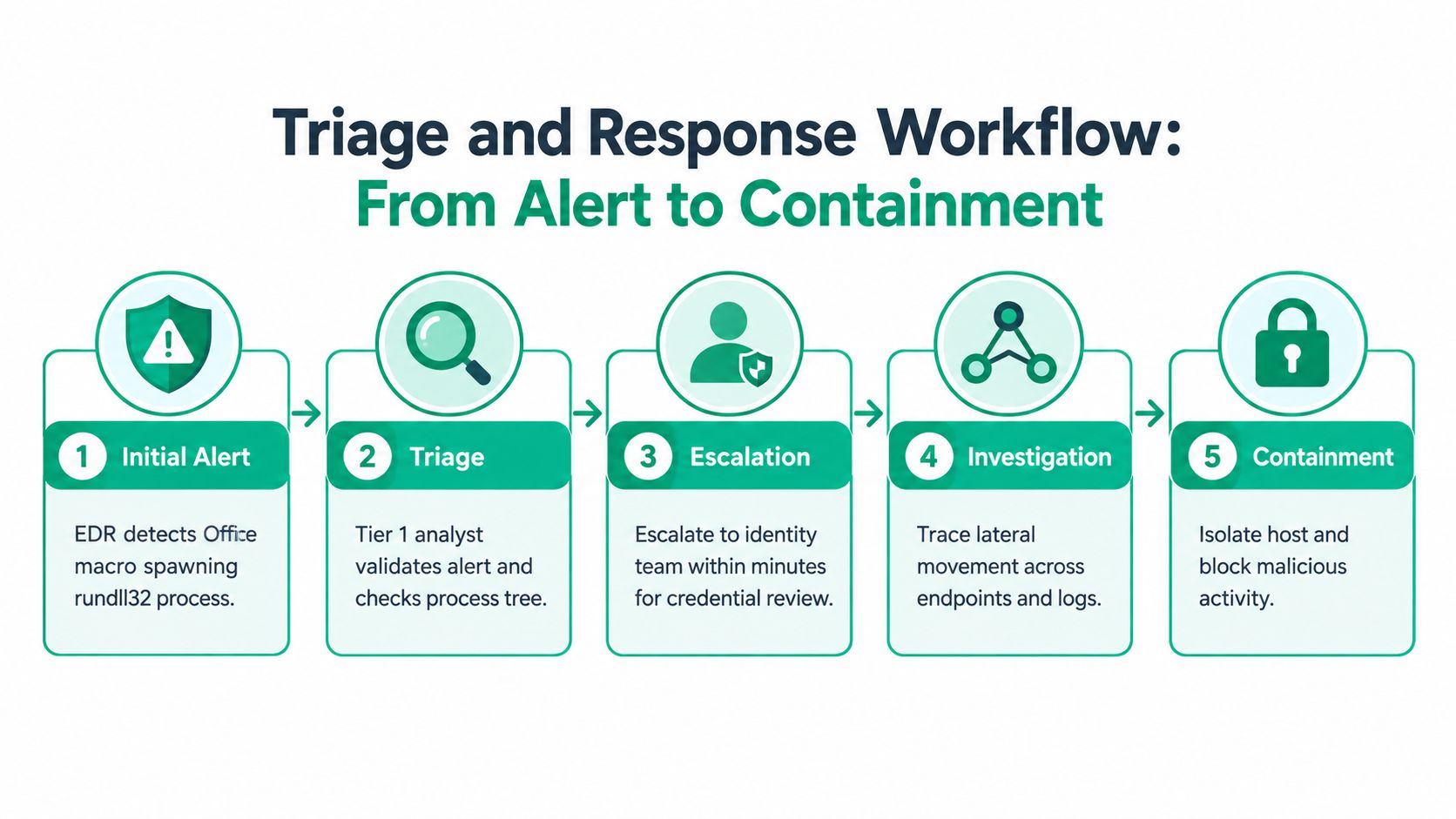
A representative phishing case begins with an EDR alert: an Office macro launches rundll32.exe. A Tier 1 analyst first validates the process tree, checks the document origin, identifies the logged-in user, and confirms whether the activity occurred on one endpoint or several.
The analyst then pivots to identity telemetry. The same user has a suspicious interactive sign-in from a country they never visit. The account accessed email shortly afterward, and the endpoint began attempting SMB enumeration against a file server. That sequence is materially more serious than a macro alert in isolation.
What the analyst does next
- Enrich the alert: Check WHOIS information for contacted infrastructure, use VirusTotal as an investigative reference, and compare the event with asset ownership and user responsibilities.
- Contain the endpoint: Isolate the workstation through EDR while preserving enough evidence for investigation.
- Secure the identity: Force a password reset, revoke active tokens, and review MFA and mailbox rules.
- Block the path: Block the sender domain at the email gateway and search for other recipients.
- Scope the movement: Review file server access, SMB attempts, process creation, and related sign-ins across the environment.
The analyst shouldn't wait for perfect certainty before taking a reversible containment action. Each minute of hesitation can give an intruder another account, endpoint, or file share to touch. The response team should record timestamps, decisions, evidence, and affected assets so management, counsel, insurers, and recovery staff can work from the same record.
The distinction between containment and eradication matters. Isolating a laptop stops one path, but responders still need to determine whether credentials, tokens, email rules, or other hosts were affected. A documented incident response team workflow keeps the process from depending on one exhausted technician.
The media below reinforces the sequence. Use it as a training aid, then adapt the actions to your EDR, identity provider, email gateway, and legal obligations.
Close the case with lessons learned. Identify which log source exposed the activity, which rule fired, what delayed the decision, and which control should change. Heroics don't scale. Playbooks, permissions, and practice do.
MTTD, MTTR, and Other Metrics That Move the Needle
A detection program needs a small dashboard that reflects operational reality. Four metrics usually provide enough signal for an SMB: mean time to detect, mean time to respond or contain, false positive rate, and environment coverage.
MTTD measures the time from the first observable malicious event to a validated detection. MTTR, used here for response or containment, measures the time from validation to a meaningful action such as endpoint isolation, token revocation, or account disablement. A four-minute MTTD can matter if it stops lateral movement, but the number has no value when the alert lacks context or nobody owns the queue.
MITRE separates detection quality from protection quality. Its Detection Quality Index measures how precisely a solution identifies adversary behavior without blocking, while the Total Evaluation Score combines detection and protection on a 0.0 to 2.0 scale, or 0 to 100% when normalized (MITRE ATT&CK Evaluations methodology). MITRE also considers alerting quality, signal precision, detection speed, and blocking effectiveness, with attack-critical techniques weighted more heavily.
In a 2024 managed-services evaluation, CrowdStrike reported detecting 42 of 43 adversary techniques, or 98% coverage, while MITRE measured a four-minute mean time to detect for a simulated advanced eCrime attack (CrowdStrike's MITRE evaluation announcement). Treat that as benchmark context, not a promise that every SMB will see the same result.
| Metric | Definition | Why It Matters | Year-One Target |
|---|---|---|---|
| MTTD | Time from observable activity to validated detection | Limits attacker dwell time | Establish a measured baseline and reduce it through tuning |
| MTTR | Time from validation to containment | Shows whether alerts become action | Establish ownership and measure each major alert |
| False positive rate | Share of alerts closed as benign | Noise buries real incidents and raises analyst fatigue | Review noisy rules regularly and reduce avoidable noise |
| Environment coverage | Share of relevant assets and identities producing usable telemetry | Rule counts mean little without data | Inventory coverage and close the largest source gaps |
Coverage should be reported by endpoint, identity, cloud, network, and critical application, not as one flattering platform number. The 2026 detection coverage noted earlier also highlights a common gap: missing logs and disabled rules can look like vendor capability problems.
For business continuity, connect response time to downtime exposure. Application DDoS downtime was cited at an average of $6,130 per minute in a 2023 report (Security Magazine coverage), while a 2026 industry summary reported $22,000 per minute for DDoS downtime. Keep the dashboard honest through monthly alert review, quarterly coverage validation, and restore testing.
SMB Implementation Checklist for the First 30 Days
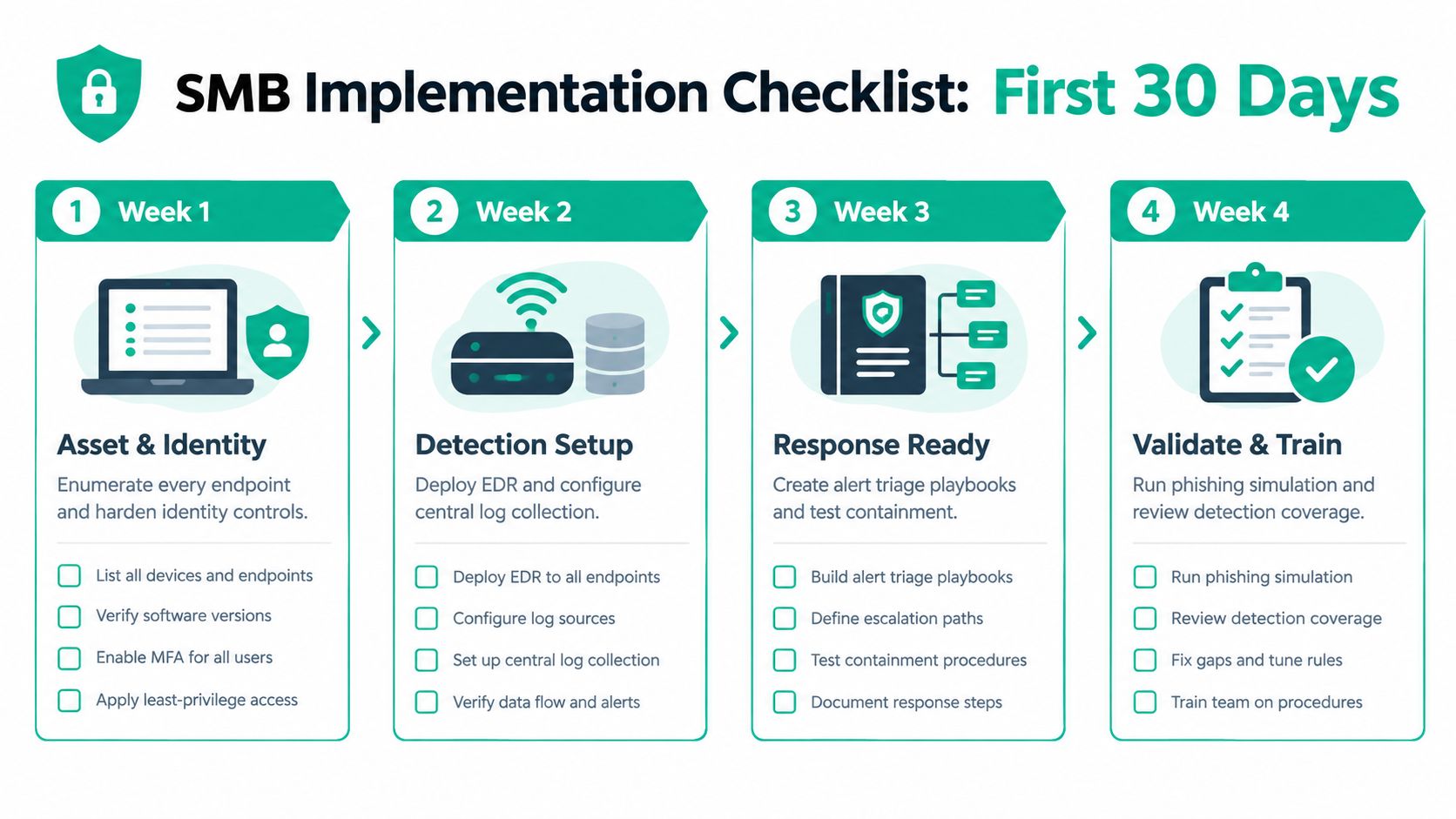
A Johnson County business owner doesn't need a full security department to create a useful first month. The work does need an owner, a written inventory, and a calendar that continues after the initial setup.
Week one covers assets and identity
Enumerate every workstation, server, network device, cloud account, SaaS application, and privileged identity. Decommission stale users, turn on MFA for Microsoft 365 and Google Workspace, and review break-glass administrator accounts. Record who can approve payments, access customer records, administer backups, and change security controls.
Week two turns on useful telemetry
Deploy Bitdefender GravityZone or an equivalent EDR to every endpoint. Enable process and PowerShell logging, then forward UniFi gateway and switch syslog to a central store. Turn on audit logging for Microsoft 365, Entra ID, Google Workspace, and SaaS platforms that hold customer information.
Week three validates detection and recovery
Enable built-in Microsoft or Sentinel rules as a starting baseline, but review whether the required data sources exist. Schedule a restore test for at least one server and one SaaS mailbox, and confirm that immutable off-site backups or equivalent protected copies exist. A backup that has never been restored is an assumption, not a recovery plan.
Week four tests people and measurements
Run a 60-minute phishing-to-lateral-movement drill. Capture MTTD, MTTR, affected assets, escalation delays, and missing evidence. Include finance, operations, and leadership, because a technically correct response can still fail if nobody knows who can stop payment or authorize isolation.
After launch, review alert quality and coverage monthly. Test restores on a scheduled cadence, review privileged access, and repeat a tabletop exercise when systems, staff, or vendors change. Healthcare organizations should map evidence and procedures to HIPAA obligations. Defense contractors should account for CMMC requirements. General businesses can use NIST CSF to organize priorities without treating it as a checkbox exercise.
This is also where technical work protects revenue. A stable endpoint, a tested recovery path, and a tuned alert queue reduce wasted tech time, preserve billable work, and make monthly IT spending more predictable. For companies in old brick buildings near downtown Indy or expanding along the I-65 corridor, detection should be coordinated with network design, segmentation, Wi-Fi reliability, and immutable off-site backups.
In-House SOC Versus MDR and SOC-as-a-Service
A 40-person shop in Columbus or Lafayette may own a SIEM and still have nobody reviewing it at two in the morning. That's the central operating question. A security product can collect alerts, but the business must decide who investigates, who contains, and who communicates during an incident.
| Model | Staffing Required | Indicative Annual Cost | Typical MTTD | Response Ownership | Best Fit |
|---|---|---|---|---|---|
| In-house SOC | Dedicated analysts, engineering, and security leadership | Varies by staffing and tooling | Depends on coverage and queue design | Internal team | Larger environments with sustained security and compliance needs |
| SOC-as-a-Service | Provider handles platform operations and tuning | Contract-specific | Contract-specific | Customer generally owns incident action | SMBs with part-time IT leadership |
| MDR | Provider supplies people, platform, and response playbooks | Contract-specific | Contract-specific | Shared or provider-assisted, as defined in contract | SMBs needing monitored detection and practical containment |
An in-house SOC requires more than a dashboard. It needs staffing, SIEM administration, rule engineering, threat hunting, escalation coverage, documentation, and ongoing training. It can make sense for organizations with complex operations or strong compliance drivers such as HIPAA or CMMC, but many SMBs will struggle to keep the queue staffed and the rules tuned.
SOC-as-a-Service can provide monitoring and engineering while leaving incident action with the customer. That model fits a business with a capable IT lead who can isolate systems, reset accounts, coordinate vendors, and maintain a runbook. MDR adds more operational support, but contract language matters. Ask whether the provider can isolate an endpoint, revoke a token, disable an account, and contact your decision-maker, or whether it only sends an alert.
CrowdStrike's managed-services evaluation measured a four-minute mean time to detect in a simulated advanced eCrime attack, but an evaluation result isn't a universal service guarantee. Review the provider's definitions, escalation process, coverage hours, telemetry requirements, retention, and response authority before comparing marketing metrics.
A documented operating model matters more than a crowded tool stack. Finchum Fixes IT offers managed IT services that include 24/7 threat monitoring and response, and its MSP Lite service includes endpoint detection and response, automated patch management, and Microsoft 365 backup. Those capabilities should be evaluated against your actual assets, identity controls, recovery requirements, and compliance needs.
Before signing any retainer, book a Security Risk Audit. It should identify which detections are enabled, which logs arrive, who reviews them, how containment works, and whether recovery has been tested. That baseline keeps the choice between MDR and SOC-as-a-Service tied to real gaps rather than vendor slideware.
Greenwood and Indianapolis businesses can request a Free Network Assessment from Finchum Fixes IT to review endpoint coverage, identity telemetry, UniFi or SonicWall logging, backup readiness, and response ownership. Schedule the assessment before an attacker exposes the gaps, and turn scattered alerts into a security program that protects uptime and keeps your monthly IT budget predictable.