Data Center Migration: SMB's Flawless Move
TL;DR
- Data center migration is usually a business continuity project, not a hardware project.
- If you've got an aging server room in Greenwood, along the I-65 corridor, or anywhere around Indy, the real cost isn't the box. It's staff downtime, billing delays, and preventable risk.
- Good migrations start with a full inventory, dependency mapping, rollback planning, and baseline performance testing.
- You need to choose the right path: lift and shift, re-platform, or a deeper rebuild.
- Dry runs matter. So do immutable off-site backups, Zero Trust access controls, and clear go or no-go rules.
- Success isn't just “we moved it.” Success means users can work, reports run cleanly, apps stay stable, and the budget becomes more predictable.
- For Greenwood and Indianapolis businesses, local planning and fast support often make the difference between a clean move and an expensive mess.
A lot of Johnson County business owners are sitting on the same problem right now. The server is still “working,” but nobody trusts it. It lives in a closet, a back office, or a cramped server room in an older building with dusty vents, uneven cooling, and one battery backup that should've retired years ago.
That setup feels cheap because you already own it. It isn't cheap.
When that old hardware slows down payroll, stalls QuickBooks, freezes line-of-business apps, or drops remote sessions for staff working between Greenwood and downtown Indy, the damage lands in labor hours, missed invoices, and delayed customer work. Business continuity is the critical issue. A server room problem turns into a cash-flow problem fast.
The fix usually isn't buying one more replacement box and hoping for another year. It's planning a proper data center migration so your systems move cleanly, your staff stays productive, and your IT budget stops swinging between “fine” and “emergency.”
That Old Server in the Closet Is Costing You Money
Monday at 8:12 a.m., your front office logs in, payroll is open, two people are on remote sessions, and the file share starts hanging. Nobody calls it a data center problem. They call it a slow morning. By noon, jobs are backed up, invoices are late, and someone is asking whether the ISP is down again.
That is what aging infrastructure looks like in a small business. It usually shows up as delay before it shows up as failure.
The hidden bill behind old hardware
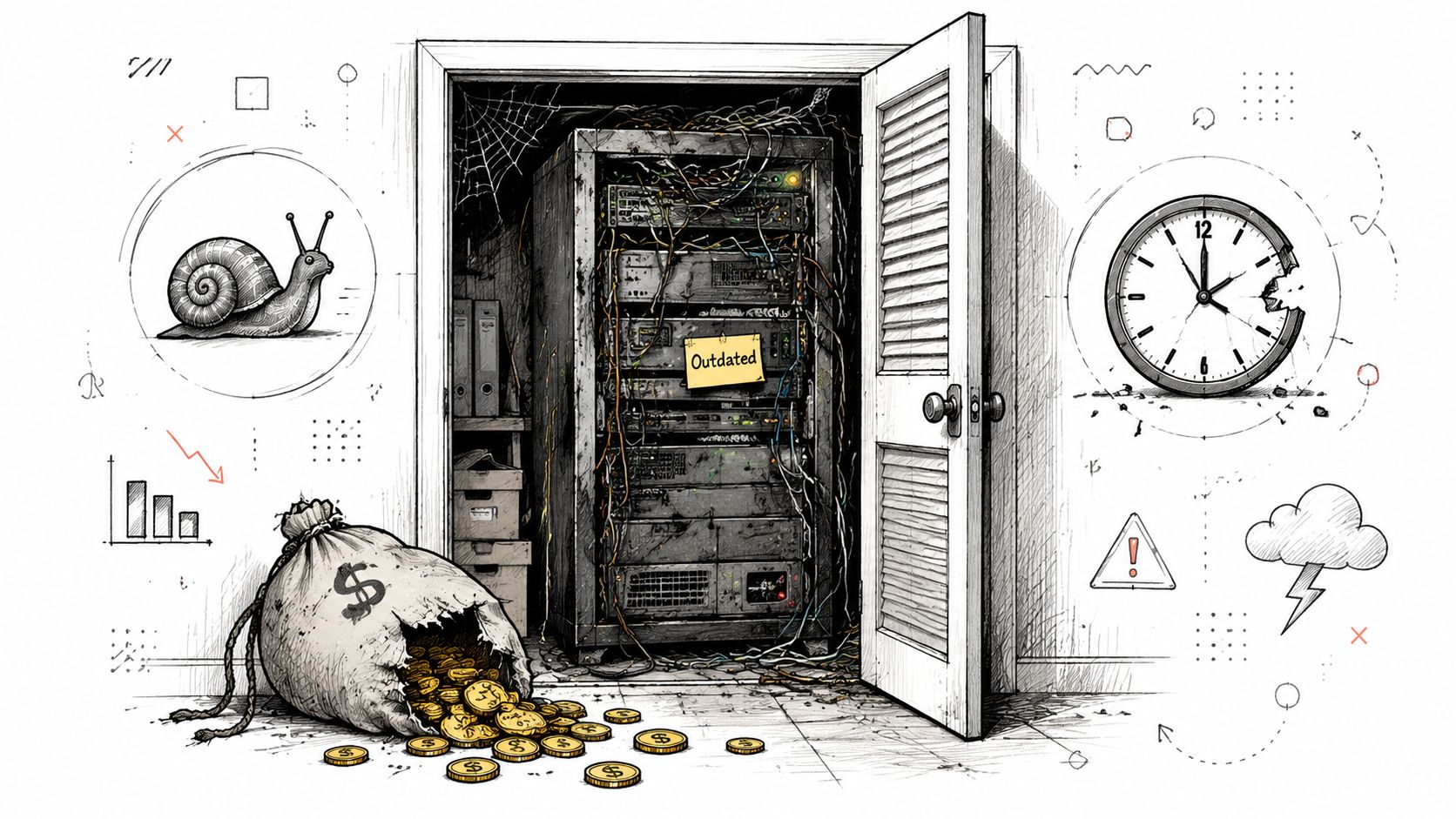
The primary cost is not the box itself. It is the hours your team loses while waiting on it.
I see this across Greenwood, Franklin, and the south side of Indy. A server tucked into a closet or back office keeps running just well enough that nobody wants to touch it. Then QuickBooks lags, a shared folder drops, a dispatch screen freezes, or a remote user gets kicked out in the middle of real work. The expense shows up in payroll, missed billing, delayed production, and staff time spent repeating tasks.
Downtime is expensive even for firms that are nowhere near enterprise scale. IBM's Cost of a Data Breach report notes that business disruption and lost revenue are major cost drivers when systems are unavailable. For a Johnson County contractor, medical office, or small manufacturer, that usually means missed appointments, delayed quotes, slower collections, and frustrated customers.
Practical rule: If one aging server can stop accounting, scheduling, estimating, dispatch, or patient flow, the issue is financial, not just technical.
Older buildings make this worse. Many local companies added cloud apps, VoIP, cameras, remote access, and more users over time, but the back-end setup never changed to match. One UPS, uneven cooling, dusty intake vents, and no clear hardware lifecycle plan is how a “cheap” setup turns into repeated operating loss. If you have not documented what you own and when it should be replaced, start with IT asset management best practices for Indiana businesses.
Why migration is now a business decision
A data center migration is not only about getting newer equipment or moving workloads somewhere else. It is about reducing the cost of interruption.
Some companies still keep key systems on-prem because latency, compliance, or application design makes that the right call. Others move email, file storage, backups, or line-of-business apps into hosted or cloud environments because support is easier and recovery is faster. Many end up in a hybrid model because that gives them the best balance of control, cost, and uptime. A good cloud migration strategy starts with those business trade-offs, not with a sales pitch for one platform.
For Central Indiana SMBs, the useful questions are simple. What system makes money every day? What system stops cash flow if it goes down? How long can each one be unavailable before it affects payroll, billing, production, or compliance?
What a better setup buys you
A well-planned migration gives the business room to operate without constant IT drag. That usually means:
- More predictable spending: Less emergency hardware replacement and fewer surprise service calls.
- More productive hours: Staff spends less time waiting on logins, file shares, and unstable sessions.
- Better recovery options: Backups are easier to verify and faster to restore.
- Stronger security control: Access, monitoring, and policy enforcement are easier to manage in a supported environment.
That is why smart owners do not ask whether the old server can survive one more year. They ask whether another year of slowdowns, outages, and reactive fixes is costing more than a planned move.
Map Everything Before You Move Anything
The businesses that get burned during a data center migration usually skip one ugly, boring job. They don't map the environment well enough.
They know the major servers. They know the accounting app. They know where the files “mostly” live. What they don't know is which copier scans to which folder, which old service account still runs a scheduling tool, which workstation talks to a local database, or which ancient line-of-business app breaks the minute a path changes.
Your inventory has to be more than a server list
A workable migration plan starts with assessment and planning, then moves through dry runs, cutover, validation, optimization, and decommissioning. A strong plan also sets rollback procedures, communication plans, and baseline performance metrics before go-live (Flexential's data center migration best practices).
That sounds formal because it is. Informal migrations create formal disasters.
For a Johnson County manufacturer or defense-adjacent shop, this inventory should include systems tied to CMMC controls, documentation retention, endpoint access, and vendor portals. For a healthcare practice in Hamilton County, it should include every system touching patient information, backup path, user role, and audit-sensitive workflow tied to HIPAA. For general business security, map your target controls to NIST CSF so you're not rebuilding structure after the move.
What needs to be documented
I'd document these categories before any cutover date gets discussed:
- Hardware assets: Servers, firewalls, switches, wireless controllers, SAN or NAS devices, UPS units, and any aging gear that might not survive transport.
- Software and licensing: Windows roles, hypervisors, database versions, antivirus platforms like Bitdefender GravityZone, backup software, VPN tools, and application license dependencies.
- Users and access paths: Remote staff, MFA requirements, shared drive permissions, service accounts, vendor access, and admin privileges.
- Application dependencies: Which app talks to which database, file share, identity service, printer queue, or external SaaS connector.
- Network behavior: VLANs, Wi-Fi segmentation, UniFi networking layouts, ISP handoffs, site-to-site links, and anything latency-sensitive.
- Recovery controls: Backup schedules, restore testing results, retention rules, immutable off-site backups, and who can trigger recovery.
If you can't draw how the app, the data, the users, and the network connect, you're not ready to move it.
How to do the discovery work without guessing
Experienced teams separate documentation from folklore. Use network scanning tools to identify active devices. Pull virtualization inventories directly from the platform. Review switch and firewall configs. Check backup jobs against actual restore records. Watch traffic patterns long enough to catch the odd dependencies everyone forgets.
Then compare all of that against what your staff says they use every day. Those two lists never match perfectly.
A good supporting framework is this guide on IT asset management best practices for Indiana businesses, because migration gets much easier when your asset records are already disciplined.
Baselines matter more than people think
Before the move, record what “normal” looks like. Not just server CPU and storage use. Capture business-side performance too.
Examples include:
- Login experience: How long it takes remote and in-office staff to sign in and reach core apps.
- Key workflow timing: Report generation, file open times, ERP lookups, image retrieval, or accounting batch jobs.
- Support noise: Which systems generate repeated tickets, password complaints, slowness complaints, or disconnects.
If you don't know how the environment performed before migration, you won't be able to prove the move improved anything after.
Choose Your Migration Path Lift and Shift or Full Remodel
The wrong migration path shows up on your P&L fast.
A Greenwood business with 20 employees can survive a little extra project labor. It usually cannot absorb two days of invoicing delays, a week of file access complaints, or a month of staff working around a clunky system that got copied into a new environment without fixing the underlying problem. That is why this decision is not about picking the most modern option. It is about choosing the path that protects revenue, keeps people working, and avoids paying twice for the same move.
Three realistic paths for Indiana SMBs
A law office in downtown Indianapolis with a stable case management system usually needs a low-drama move. A manufacturer in Johnson County with ERP, shop floor systems, and remote access issues often needs selective redesign during the migration. A fast-growing company opening a second location may finally be at the point where rebuilding parts of the environment costs less than dragging old constraints along.
Here is the practical breakdown.
| Strategy | Best For | Risk/Cost | Example Use Case |
|---|---|---|---|
| Lift and Shift | Stable legacy apps that must move quickly | Lower planning effort, but old performance and support problems usually stay with the app | A local law firm relocating a document management server with minimal changes |
| Re-platform | Apps that work today but need improvement in the new environment | Moderate effort with a clearer business payoff | A manufacturer keeping the same database app while upgrading storage, identity, and backup design |
| Full Remodel | Businesses that need better scale, resilience, or multi-site support | Higher effort and more testing, but stronger long-term fit | An Indianapolis software company rebuilding around cloud-native services and modern access controls |
Teams responsible for logging, threat detection, and retained audit data should also review cloud SIEM migration strategies before choosing the target design.
What works and what usually backfires
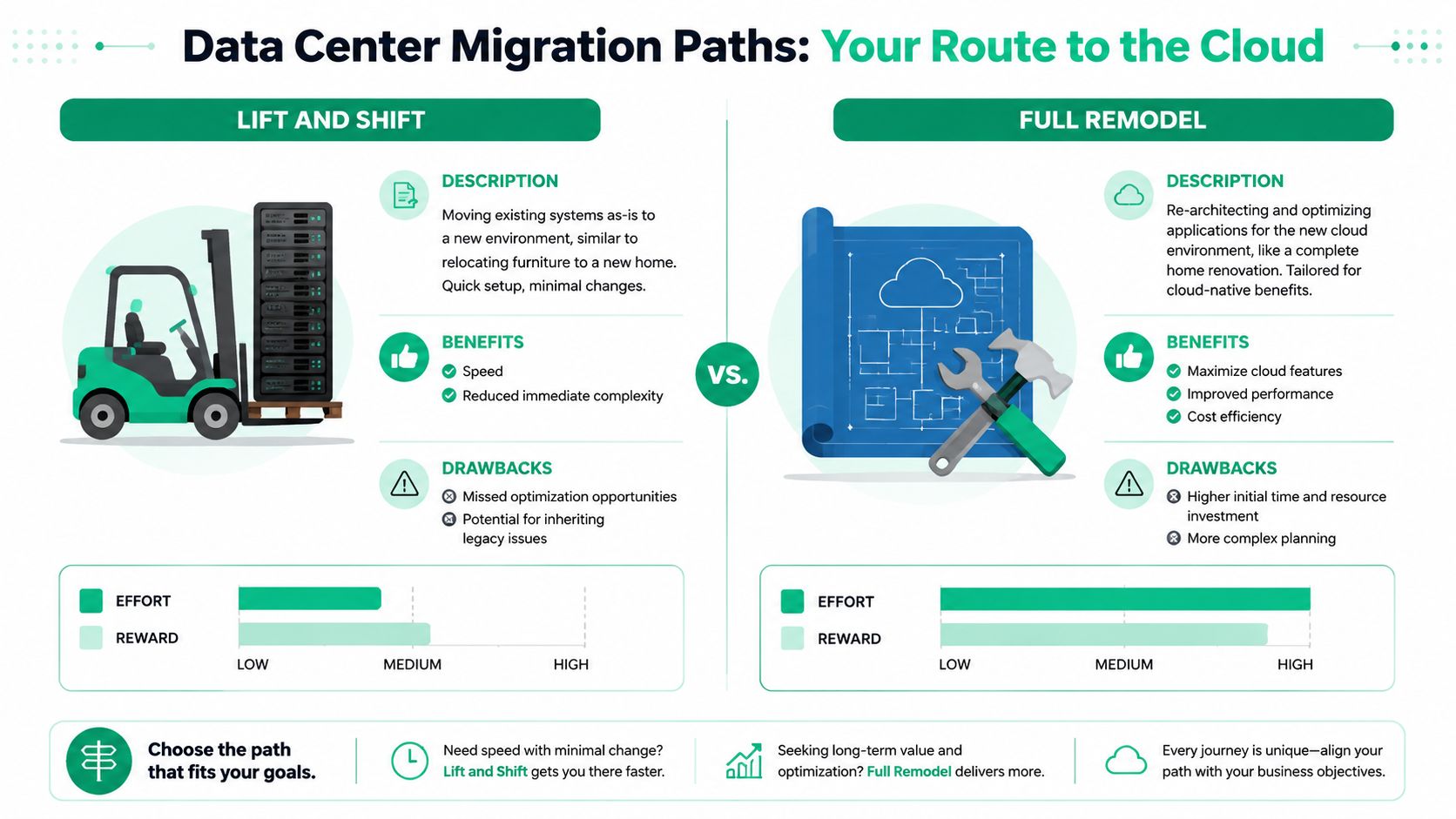
A lift and shift works when the deadline is firm and the application is fragile. I recommend it when the business needs out of a bad server room, a lease is ending, or aging hardware is becoming a real outage risk. It keeps change to a minimum. It also keeps old design flaws, ugly dependencies, and support pain in place.
A re-platform move is often the smartest choice for small and midsize businesses around Central Indiana. Keep the application, but improve what makes it expensive to run. That might mean cleaning up authentication, moving storage to something faster, tightening backup jobs, fixing network bottlenecks, or removing a single point of failure that has been one bad reboot away from causing an outage. This path usually gives owners the best balance between short-term disruption and long-term return.
A full remodel makes sense when the current setup is hurting the business every week. Slow remote access, constant patching problems, hard-coded dependencies, brittle line-of-business apps, and painful scaling are not “server room problems.” They are architecture problems. Rebuilding costs more up front, but it can reduce support labor, speed up onboarding, and make future growth cheaper.
A strong reference for sorting through those trade-offs is this guide to cloud migration best practices for Indiana businesses.
A quick visual helps when owners are weighing speed against payoff:
Pick based on business friction, not vendor hype
Start with the cost of staying where you are, then compare it to the cost of changing the right amount.
Use questions like these:
- What outage would hurt cash flow first: Billing, scheduling, production systems, phones, remote access, or customer portals.
- What frustrates staff every day: Slow logins, file lock issues, dropped VPN sessions, failed backups, or applications that only one person knows how to restart.
- What future change is already coming: A second office, hybrid work, higher compliance expectations, more storage demand, or a major application upgrade.
- What metric has to improve after the move: Less downtime, fewer support tickets, faster transaction times, lower infrastructure spend, or better recovery capability.
The right route is the one that removes business friction without creating a larger support bill six months later.
Build Your Fortress Risk Planning and Compliance
Success in migrations is achieved. Not on cutover weekend. Before it.
Most failed data center migration projects don't fail because the engineers couldn't click the right buttons. They fail because nobody built a fallback. Nobody agreed on the go or no-go line. Nobody tested recovery. And nobody asked what happens if a server boots, but the business process still breaks.
Start with recovery before you touch production
In our 17 years of local service, we helped a manufacturing client on the south side after a previous provider botched a migration. We had to perform bit-level data recovery from a failing RAID array because there was no tested rollback plan and no trustworthy fallback copy of the data.
That kind of cleanup is expensive, stressful, and avoidable.
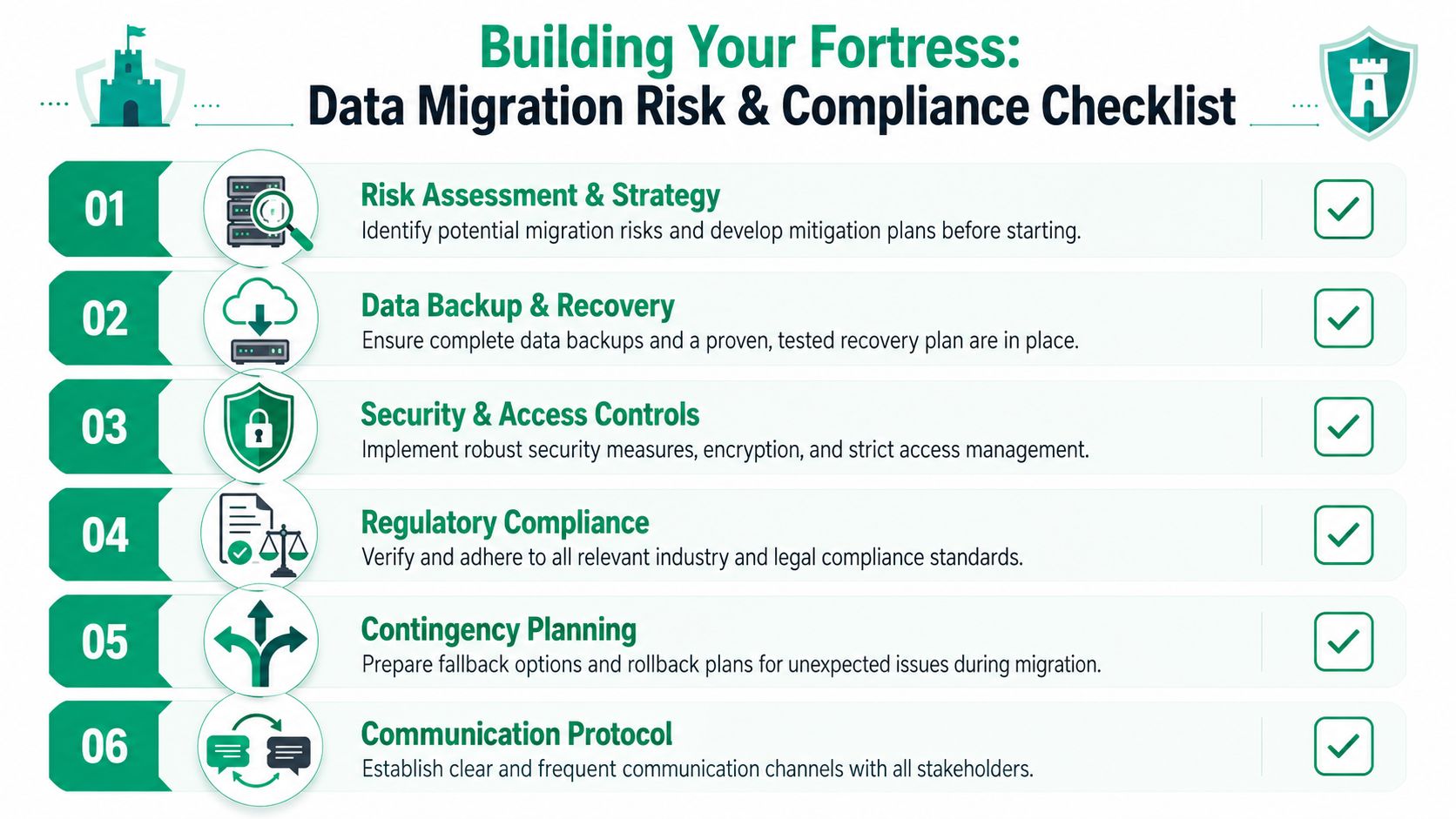
Before any move, lock down these controls:
- Immutable off-site backups: Copies that can't be altered by malware, user error, or rushed admin changes.
- Restore testing: Not “the backup completed.” Actual recovery testing of critical systems and files.
- Rollback criteria: A written point where the team stops and reverses course.
- Stakeholder communication: Who gets called, when, and with what decision authority.
- Access limits: Temporary admin rights should be narrow, logged, and removed after cutover.
A backup you've never restored is a theory, not a safety net.
Security has to improve during the move
Migration is the perfect time to stop dragging weak security habits into the next environment. Recreate less. Redesign more.
That means using Zero Trust architecture principles wherever practical. Verify identity. Limit privilege. Segment access. Treat east-west traffic inside the environment with the same suspicion you'd give outside access. It also means reviewing endpoint policy, MFA enforcement, conditional access, and centralized logging before users touch the new systems.
If your team needs a starting point for documenting those exposures, use a practical cyber security risk assessment template for Indiana businesses.
Compliance is part of continuity
For regulated businesses, compliance failures often hit after a technically successful move. The app opens. The data is there. But access logging changed, retention broke, encryption coverage shifted, or segmentation no longer matches policy.
That's why I treat HIPAA, CMMC, and NIST CSF as operating requirements, not paperwork.
Use a short pre-cutover compliance check like this:
| Control Area | What to Confirm Before Go-Live |
|---|---|
| Access | MFA, least privilege, admin logging, vendor access boundaries |
| Data protection | Backup integrity, encryption handling, retention rules, restore path |
| Monitoring | Alerting, audit trails, log collection, SOC-as-a-Service visibility |
| Network | Segmentation, firewall policy, secure remote access, Wi-Fi isolation |
| Documentation | Updated diagrams, ownership records, change approvals, rollback steps |
The scale of the industry tells you why this discipline matters. One source projects global IT spending at $6.15 trillion in 2026, says data center spending is up 31.7%, and projects the cloud migration services market to grow from $19.28 billion in the current year to $143.7 billion by 2035 (cloud migration market outlook from Auvik).
That isn't just big-market noise. It reflects what local business owners are already feeling. Infrastructure decisions are now tied directly to security, resilience, and operating pressure.
Executing the Cutover and Proving It Was Worth It
Cutover day shouldn't feel exciting. It should feel boring, scripted, and controlled.
When a migration turns into a adrenaline-fueled all-nighter, that usually means the dry run was weak or the planning was thin. Calm is the goal.
Run a dry run before the real move
One of the best migration controls is a controlled pilot or non-critical dry run that tests end-to-end migration behavior and user acceptance in real workflows before production cutover (data migration best practices from The Groove). That advice holds up because small failures are useful when they happen early.
Test a non-critical workload first. Move it. Validate permissions, performance, printer behavior, remote access, monitoring, and support tickets. Then compare post-move performance to the baseline you recorded earlier.
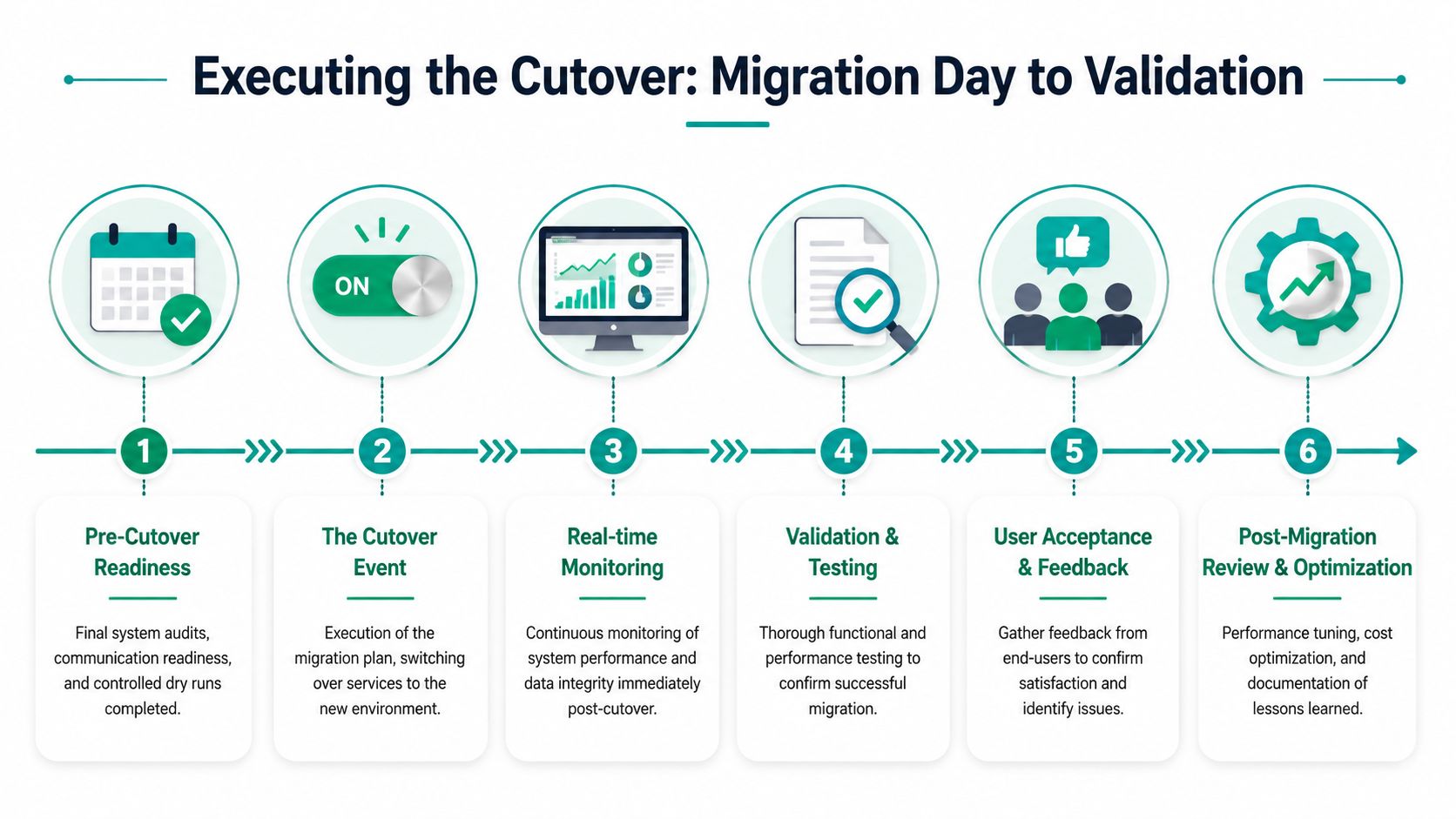
What a clean cutover weekend looks like
A strong cutover usually follows a sequence, even if the tools differ.
-
Final readiness check
Confirm backup completion, snapshots where appropriate, communication contacts, and exact rollback triggers. -
Freeze unnecessary changes
Nobody should be slipping in software updates, switch edits, or permission changes during the move. -
Complete the final sync
Move the last data delta and verify integrity before users are pointed at the new environment. -
Bring systems up in dependency order
Identity first, then databases, then application services, then user-facing systems. -
Test business workflows, not just server health
Don't stop at “the VM is online.” Test quoting, scheduling, scanning, reporting, remote login, and core integrations. -
Watch live behavior closely
Monitoring should catch abnormal latency, failed jobs, unusual auth behavior, and endpoint complaints quickly.
One of the smartest supporting controls here is strong backup posture. This guide to enterprise data backup solutions that guarantee business uptime is worth reviewing before any production cutover.
The migration isn't done when the systems boot. It's done when your people can do their jobs without friction.
Prove success with business metrics
Too many teams stop at two weak claims. We finished on time. We stayed near budget.
Those are project metrics. They are not business outcomes.
After the move, I'd want a short scorecard that includes:
- User experience: Are logins faster, remote sessions steadier, and shared file access cleaner?
- Operational resilience: Do backups restore cleanly, alerts fire correctly, and incidents resolve faster?
- Workflow speed: Can accounting close tasks, can production staff pull records, can managers run reports without lag?
- Support burden: Did ticket volume shift from “system is slow” to normal day-to-day requests?
- Leadership confidence: Can ownership look at the environment and see predictable cost and less risk?
For old brick buildings around Indy with ugly Wi-Fi zones, this is also the time to clean up edge performance. Better wireless design, latency-optimized mesh nodes where appropriate, and smarter segmentation often make post-migration gains more visible to users than the server move itself.
When to Call for Local IT Backup
A server move becomes a business risk the moment an hour of downtime costs more than outside help.
If you are moving one low-impact server with clean documentation, an internal team can often handle it. Once the project touches accounting systems, phones, file shares, identity, backups, remote access, or more than one site, the math changes. For a company with staff in Greenwood, Indianapolis, and nearby Johnson County communities, one bad cutover can stall billing, delay customer response, and burn payroll on people who cannot work.
Signs this should not be a DIY project
Outside help makes sense when the environment has traps that do not show up on a simple inventory sheet:
- Old systems with tribal knowledge: Legacy apps, inherited hardware, forgotten service accounts, and shared folders nobody fully owns.
- Compliance pressure: HIPAA, CMMC, cyber insurance requirements, client security questionnaires, or audit trails you may need to prove later.
- Low tolerance for downtime: Medical scheduling, dispatch, quoting, production, or customer support cannot sit idle while your team troubleshoots.
- An overloaded internal staff: Good admins are usually already covering tickets, vendors, security alerts, and day-to-day maintenance.
- A migration tied to bigger improvements: Network segmentation, stronger backup controls, MFA enforcement, monitoring, and policy cleanup all need to be designed into the move, not patched in after it.
A good local partner also knows the business realities here. Older buildings in central Indiana often come with bad cabling, uneven power, dead Wi-Fi areas, and ISP quirks that never show up in a vendor slide deck. Those details affect cutover risk, recovery time, and user frustration.
What good outside support actually does
Good migration support is not extra hands for rack work. It is project control.
The right team pressure-tests assumptions, documents dependencies, stages rollback options, and ties technical decisions back to business impact. Guidance from AWS specifically recommends defining migration success with both technical and business criteria, including resilience and operational readiness, and evaluating results through end-user experience rather than schedule and budget alone (AWS Migration and Modernization guidance).
That standard fits SMBs in Central Indiana. If invoicing slows down, ticket volume jumps, or your staff loses confidence in the new setup, the move missed the mark even if the equipment arrived on time.
There is also a cost model decision here. Some companies are better served by a one-time migration project. Others use the move to shift into ongoing support so patching, monitoring, vendor management, and recovery testing stop depending on whoever has a free afternoon. If you are comparing those options, this guide to managed IT services for Indiana businesses gives a practical baseline.
The goal is simple. Finish the move with lower risk, fewer support surprises, and an environment that helps the business make money instead of threatening it.