DNS Resolution Problems: An SMB Fix Guide
DNS resolution problems mean a device can't turn a hostname into a usable address, leaving email, VPNs, and cloud apps unavailable even when the internet connection works. Fix them by separating client-cache trouble, office-resolver failures, authoritative-record errors, IPv6 routing, and DNSSEC validation before changing providers or rebooting everything.
What a Broken Lookup Costs Before Lunch
Say a Johnson County clinic in an old brick Greenwood building loses its patient portal just as the waiting room fills. The server lights are green. A laptop on a phone hotspot works, but the front desk can't open the same application.
Someone suggests restarting the server. Someone else blames the Wi-Fi. Neither has established where the failure lives, and along the I-65 corridor, a room full of idle staff is an expensive troubleshooting committee.
DNS sits before the connection to the application. A healthy server doesn't help if the front desk can't discover its address. The managed fix starts by comparing the affected device, its assigned resolver, and the authoritative answer, then correcting the failing layer and monitoring it afterward.
Routine failures, not proof of a dead server
A large-scale study of DNS query failures found that 13.5% of approximately 3 billion queries failed, with A-record queries failing at 6.9% and AAAA-record queries at 64.2%. Those are measurements of the study's traffic, not a prediction of your clinic's downtime, but they make a strong case for checking both address families.
A records supply IPv4 addresses. AAAA records supply IPv6 addresses. Getting an answer for one doesn't establish that the other works, or that the returned destination is reachable.
Practical rule: Preserve the failing result before changing anything. A screenshot and resolver log are more useful than “it worked after lunch.”
Put a business cost beside the ticket
Don't borrow an enterprise outage estimate and pretend it's your Greenwood office's actual loss. Calculate blocked staff time, interrupted appointments, delayed orders, recovery labor, and any contractual consequences.
For a hypothetical high-impact outage costing $9,000 per minute, the case for prevention would be obvious. Your own calculation should use your own operating numbers, not that assumption.
Use the cost view below to frame the conversation around interrupted work rather than blinking equipment.
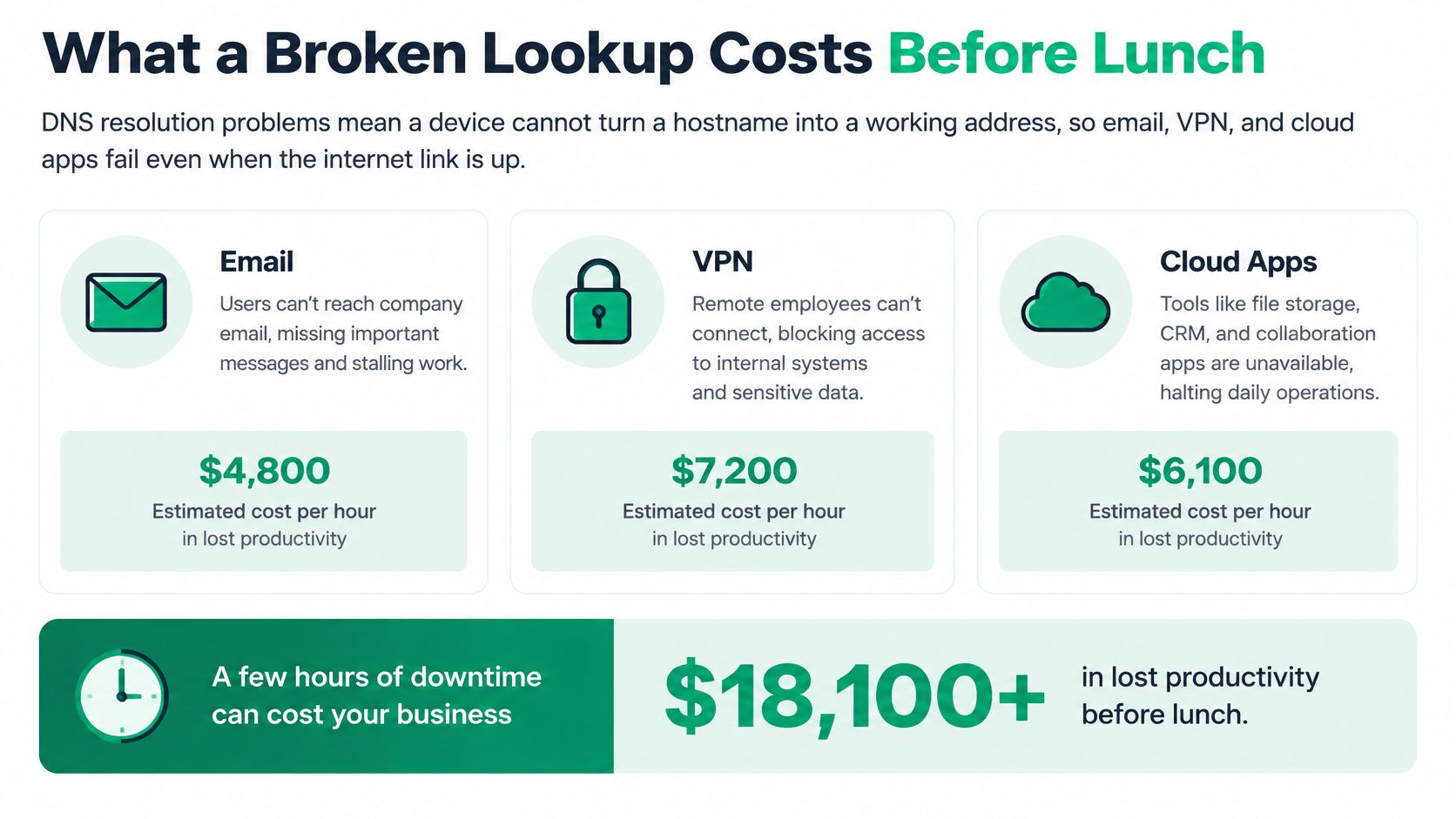
For Johnson County business owners, Hamilton County growth offices, and downtown Indy tech hubs, the return comes from preventing repeat interruptions. Proactive system monitoring that prevents costly downtime turns recurring detective work into scheduled maintenance and a more predictable monthly budget.
Flushing caches or disabling IPv6 might change the symptom. Neither, by itself, establishes the cause.
Client Network or Server Diagnosis Chart
Where a DNS failure lives
| Layer | What staff see | Deciding test | A pass means |
|---|---|---|---|
| Client cache or stub resolver | One PC fails; another user works | Clear the local cache, then compare a direct approved-resolver lookup | The same name resolves correctly on that PC afterward |
| NIC, VPN, or DNS suffix | Only VPN users or one subnet fail | Inspect adapter settings, search suffixes, and assigned DNS servers | The client uses the approved resolver, not leftover VPN DNS |
| Office forwarder or UniFi DHCP | Whole office fails; phones on cellular work | Compare the gateway resolver with an approved independent resolver | The gateway returns an appropriate, consistent answer |
| ISP resolver | Office and wired guests fail similarly | Compare ISP DNS with an independent resolver | Appropriate A and AAAA responses agree |
| Authoritative zone or delegation | Fails across networks and resolvers | Inspect NS and SOA responses from every delegated nameserver | Every listed server is authoritative and consistent |
| DNSSEC validation | Validating resolvers return SERVFAIL | Compare normal validation with a controlled checking-disabled diagnostic | Normal validation succeeds; checking-disabled success alone identifies a validation suspect |
| IPv6 AAAA path | Some applications or dual-stack devices fail | Separate A and AAAA lookups, then test each destination's reachability | IPv6 resolves and routes correctly, or its absence is intentional |
Stop at the first failed row. Don't change the router, endpoint, and public zone together, unless you enjoy solving mysteries after deleting the evidence.
Read the scope before choosing the fix
If another employee can reach the same public service from the same subnet, start with the failing endpoint. Check its cache, adapter configuration, browser behavior, and VPN policy before touching shared infrastructure.
A successful hotspot test makes the office path suspicious, but doesn't prove every authoritative server is healthy. Different networks can reach different caches or service destinations. Internal names also shouldn't be expected to resolve through public DNS.
For VPN-only failures, inspect which interface owns the relevant DNS suffix. A connected tunnel can still direct the application's lookup to the wrong resolver.
Whole-office failures point toward the forwarder, DHCP settings, firewall, or upstream service. UniFi networking makes those settings manageable, but a tidy dashboard doesn't guarantee correct DHCP options.
Distinguish different answers from wrong answers
Independent resolvers can legitimately return different CDN addresses. The deciding question is whether the answers match the service's intended behavior, not whether every address is identical.
Unexpected destinations, conflicting delegation, or persistent failure through only one resolver deserve investigation. For the broader packet-loss and congestion picture, troubleshoot slow networks with RDE Technologies, then correlate that evidence with your DNS results.
An aging firewall in a Greenwood business park can also create selective failures. Ordinary replies pass, while larger responses or TCP fallback fail, making unrelated applications look temperamental.
A browser error identifies the symptom. It doesn't identify the guilty device.
Use the SMB network troubleshooting playbook when DNS lookups succeed but connections still stall. A valid answer moves the investigation toward routing, TLS, proxy behavior, or the application itself.
Exact Commands on Windows Mac and Linux
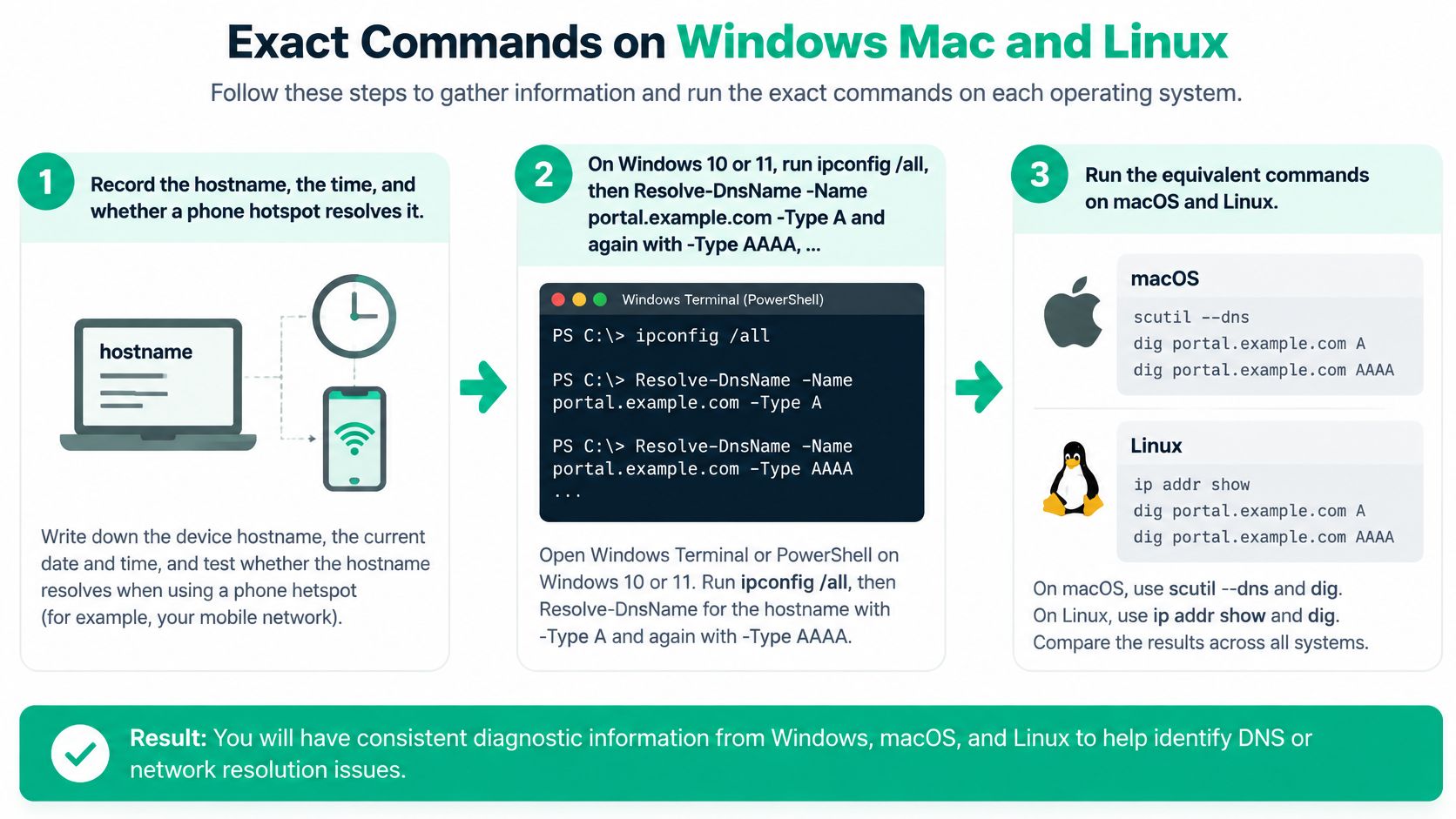
Start with a timestamp, the affected application, the exact hostname recorded privately, and whether the same service works through another network. Keep patient information, credentials, and sensitive internal naming out of public support posts.
The workflow below uses local configuration and log commands. Run DNS-record tests through your approved diagnostic tools, preserving the resolver selected, record type, response code, and returned values.
Capture endpoint evidence first
-
Windows 10 or 11. Run
ipconfig /alland inspect the active adapter's DNS servers, DHCP source, and connection-specific suffix. Compare those settings with a working machine on the same network. Don't assume the disconnected adapter listed first is the one carrying traffic. -
Enable Windows logging. In Event Viewer, go through Applications and Services Logs, Microsoft, Windows, and DNS-Client. Enable the Operational log if available, reproduce the failure, and capture the corresponding events. Logs enabled afterward can't reconstruct events they never recorded.
-
macOS. Run
scutil --dnsto inspect scoped resolvers and search domains. Then uselog show --last 10m --predicate 'process == "mDNSResponder"'to inspect recent resolver messages. VPN-scoped settings matter here, so compare the relevant domain scope rather than only the first resolver displayed. -
Linux with systemd-resolved. Run
resolvectl status, then inspect recent service events withjournalctl -u systemd-resolved --since "30 minutes ago". Check per-link DNS settings, routing domains, and which interface supplies the resolver.
Separate resolution from validation
-
Compare address families and validation behavior. Query A and AAAA separately using the same approved resolver. Then compare a normal lookup with a controlled diagnostic that disables DNSSEC checking for that request only. If only the latter succeeds, investigate validation rather than declaring the website dead.
-
Inspect the authority. Test every delegated nameserver for authoritative SOA and required application responses. Run independent tests in parallel so an unresponsive server doesn't delay every other result.
-
Record timing. Capture the answer TTL and elapsed lookup time. Repeated queries usually measure a warm cache; clearing a client cache doesn't clear the recursive resolver's cache.
The DNSSEC SERVFAIL diagnostic guide explains why normal-query failure paired with checking-disabled success directs attention toward the authentication chain. Preserve both results, including which resolver produced them.
Use this visual workflow alongside the endpoint evidence.
What each response code means
| Code or state | Meaning | Next action |
|---|---|---|
| NOERROR with answer | The resolver returned data successfully | Compare the value with the approved configuration |
| NXDOMAIN | DNS reports that the queried name doesn't exist | Confirm spelling, intended zone, and authoritative records |
| SERVFAIL | Resolution or validation failed | Compare validation behavior, then investigate authority and transport |
| Lame delegation | A listed nameserver isn't authoritative for the zone | Correct the delegation or repair the server's zone configuration |
A successful query is evidence, not a closing ceremony. Verify the affected application afterward, especially when browsers, VPN software, or application runtimes maintain their own caches.
Cache TTL Router and ISP Checks
A mismatched TTL can explain why the front desk still sees yesterday's destination while a remote employee reaches the replacement service. TTL is the cache lifetime attached to an answer, not a worldwide appointment when every resolver changes simultaneously.
Inspect the returned TTL alongside the record value. Compare repeated queries through the same resolver, then compare another approved resolver and the authoritative source.
Clear the right cache
After preserving the original results, clear the endpoint cache once:
- Windows: Run
ipconfig /flushdns. - macOS: Run
sudo dscacheutil -flushcache, followed bysudo killall -HUP mDNSResponder. - Linux with systemd-resolved: Run
resolvectl flush-caches.
These actions clear local state, not the router's cache or the ISP's recursive cache. If an application maintains its own resolver state, restart that application as a separate, documented test.
Lower TTLs support quicker changes but increase authoritative-query demand. Longer TTLs improve cache reuse but keep prior answers in circulation longer, a trade-off discussed in the ACM study of DNS errors and resolver behavior.
Don't keep flushing a client that's faithfully receiving the wrong answer from upstream.
Check UniFi DHCP and firewall transport
On a UniFi gateway, inspect the DHCP DNS settings for the affected network. Confirm that staff devices aren't receiving a retired server address from an old brick-building installation, and check guest networks separately.
Latency-optimized mesh nodes can improve wireless coverage, but they won't repair incorrect DHCP settings. Confirm the client's actual VLAN and assigned resolver instead of blaming whichever access point is nearest.
Check UDP and TCP port 53 between the relevant clients, forwarders, and upstream servers. DNS uses both transports; blocked TCP fallback can break responses that don't fit the available UDP path.
If ordinary browsing also fails, distinguish DNS trouble from a broader outage with the internet outage troubleshooting guide.
Keep fallback controlled
Compare the ISP resolver with approved independent resolvers from the same endpoint. Where only the ISP path fails, preserve the evidence and use a policy-approved fallback during the incident.
CISA's Encrypted DNS Implementation Guidance describes backup resolvers used when protective DNS is unavailable and recommends weekly reporting to identify misconfigurations and anomalies. Arbitrary public DNS shouldn't become a permanent escape hatch around security controls.
For IPv6-specific trouble, inspect gateway advertisements, IPv6 DNS reachability, and the AAAA destination's route. Google's Public DNS troubleshooting documentation distinguishes IPv6 connectivity problems from other resolver failures.
If the WAN doesn't support the intended IPv6 design, document any temporary client-side workaround. Record the approved resolver settings and schedule recurring failover and configuration tests.
DNSSEC Firewalls and Tamper Signals
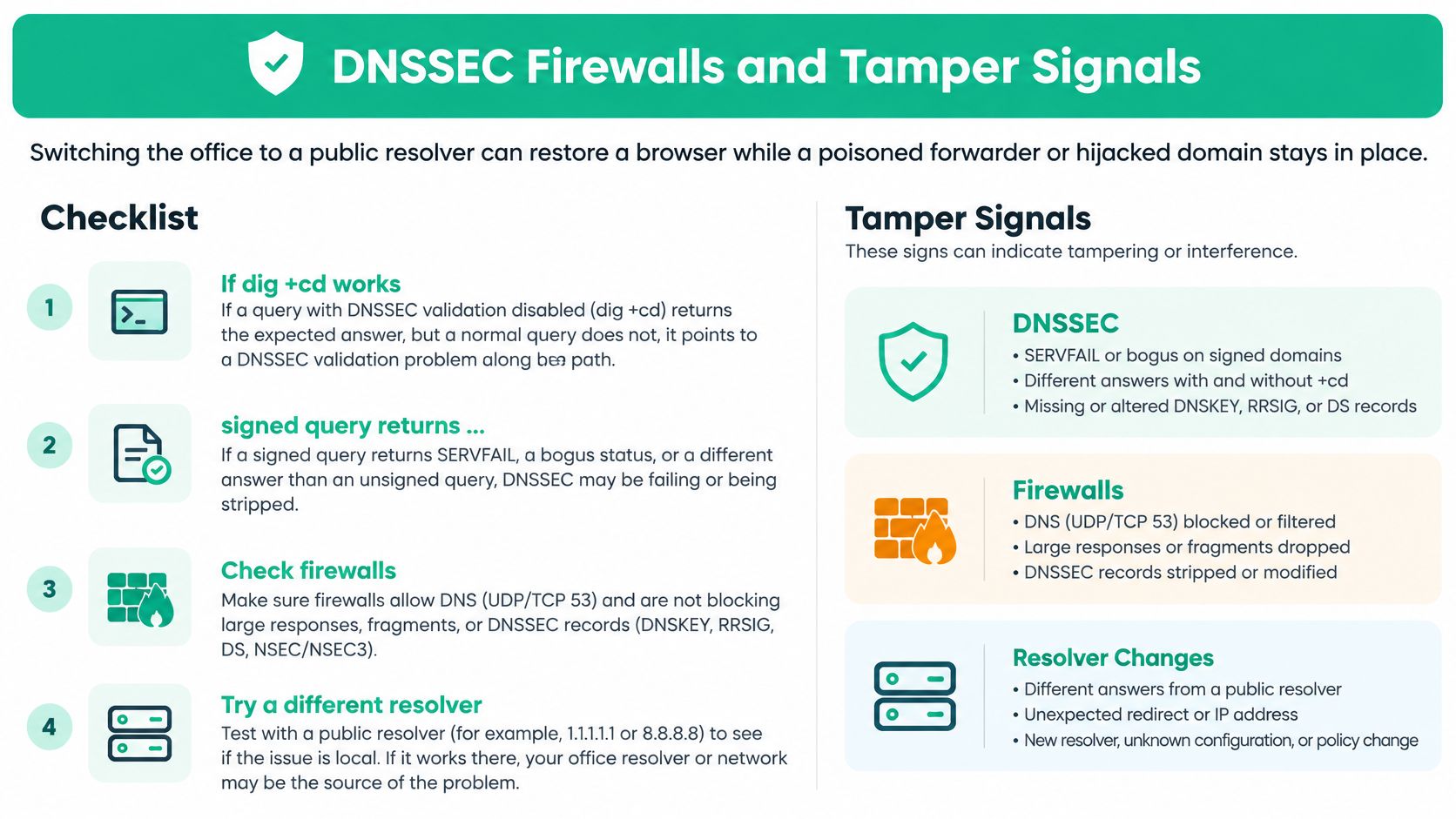
Switching the office to a public resolver can restore a browser while a poisoned forwarder or hijacked domain stays in place. Restored access isn't the same as a resolved security incident.
When checking-disabled diagnostics succeed but normal validation fails, inspect the parent-zone DS record, child-zone DNSKEY set, and RRSIG validity dates. For negative answers, examine NSEC or NSEC3 proofs rather than assuming a missing name is an ordinary typo.
Validate the chain and the transport
A historical USENIX Security study of DNSSEC-aware resolvers found that 82.1% requested DNSSEC data but failed to validate responses, while 12.2% correctly validated them. Those measurements describe that study's resolver population, not today's Indiana networks.
More recently, the European Commission's Joint Research Centre reported average DNSSEC validation rates in Q3 2024 of 47.5% in the European Union and 32.5% globally. Requesting security records and successfully validating them remain different things.
Before changing signing keys, test whether the firewall mishandles EDNS, fragmentation, or TCP fallback. A transport failure can resemble a validation problem from the user's chair.
The checklist below keeps authentication failures separate from unauthorized record changes.
Compare records against an approved baseline
Follow CISA's guidance on mitigating DNS infrastructure tampering:
- Verify delegation. Compare registrar NS records with the approved authoritative servers.
- Inspect destinations. Compare A, AAAA, CNAME, and MX answers from authoritative and secondary servers with the last known-good record sheet.
- Review administration. Investigate unexplained changes, preserve audit logs, rotate credentials for accounts that can modify DNS, and enforce MFA.
An unexpected nameserver or mail destination warrants immediate investigation. A shortened TTL alone isn't proof of compromise, but an unexplained change belongs in the incident record.
For mail-related changes, MailAdept's explanation of how email authentication works helps distinguish authentication records from mail-routing records. Preserve both when investigating suspicious delivery behavior.
Keep the compliance trail useful
Map ownership, inventory, MFA, monitoring, response, and restoration to Govern, Identify, Protect, Detect, Respond, and Recover in the NIST CSF guidance. Defense contractors should retain the relevant evidence for their CMMC control mapping without treating DNS monitoring alone as compliance.
For healthcare, HHS contingency-planning guidance requires backup, disaster-recovery, and emergency-mode procedures. Immutable off-site backups can support that plan, but HIPAA doesn't make a DNS repair a substitute for tested recovery.
Correlate Bitdefender GravityZone endpoint alerts with resolver logs and certificate warnings. Use the Indiana SMB firewall management guide to document transport-policy changes rather than leaving emergency exceptions behind.
Book a Greenwood Network Assessment
Build monitoring around what users need, not whether the gateway answers a ping.
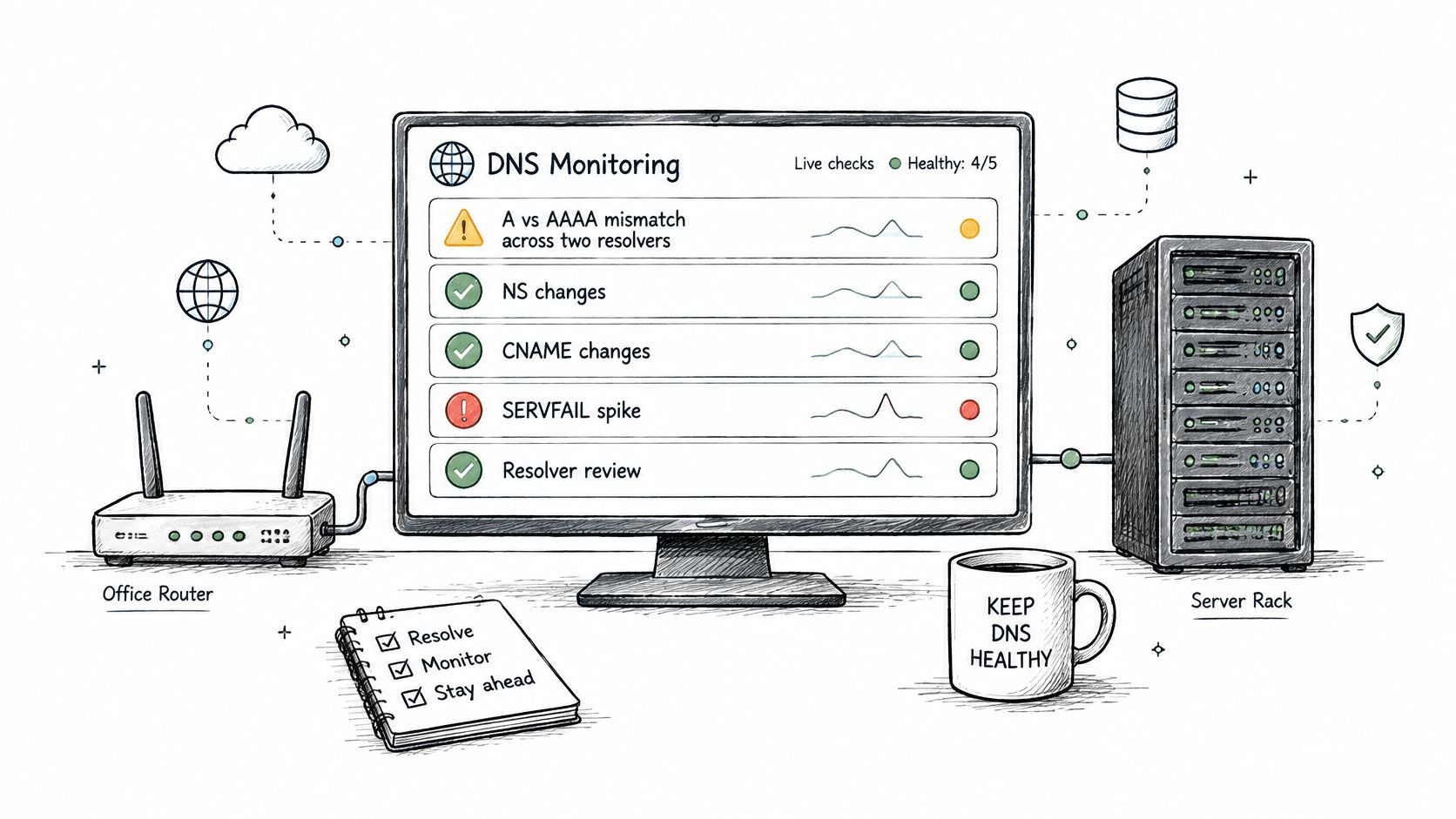
- Compare answers. Alert on unexpected A or AAAA differences across independent approved resolvers, allowing for legitimate CDN behavior.
- Watch control changes. Track NS and CNAME changes against approved maintenance.
- Track failures. Page the responsible technician when SERVFAIL responses rise above the environment's normal pattern.
- Review destinations. Inspect resolver logs weekly for unusual queries, policy bypasses, and unexplained endpoints.
- Exercise failover. Test approved fallback behavior on a calendar, including the return to normal service.
A useful dashboard identifies the affected service, resolver, network, and owner. It shouldn't merely announce that something somewhere is red.
Stop turning outages into a staff hobby
Bring in managed IT when multiple sites fail, registrar records don't match the approved baseline, validation remains broken after signature checks, or staff have already spent an hour repeating unsuccessful fixes. Hand over timestamps, affected networks, resolver results, and administrative changes.
That's wasted tech time that should have been billable work. A recurring maintenance scope, named escalation owner, and documented resolver policy make spending easier to predict than another emergency troubleshooting marathon.
Zero Trust architecture applies here through approved resolver paths, controlled administrative access, and network separation. A guest SSID shouldn't have access to a clinic's internal resolver merely because both networks share a building.
SOC-as-a-Service monitoring adds security context to unusual queries and endpoint behavior. It doesn't replace the network technician, but it can identify suspicious activity that a successful reboot would leave unexplained.
Make continuity the deliverable
Our networking and WiFi services include network design and installation, WiFi setup and optimization, VPN configuration, network monitoring, and bandwidth optimization. Network security work includes firewall management, segmentation, and intrusion prevention; our network uptime is 99.9%.
Finchum Fixes IT provides 24/7 emergency support for urgent technical problems at (317) 847-3279. For a Greenwood office, the useful outcome is a working application plus a documented explanation of what failed, what changed, and who owns the next check.
Keep this video available for the team discussion.
For healthcare decision-makers, include application access and restoration evidence in emergency-mode exercises. A green DNS dashboard won't reopen scheduling if the underlying system can't be recovered.
Johnson County businesses and organizations across the I-65 corridor should make that check before the next busy Monday. The best maintenance window is rarely the moment the front desk starts taking names on paper.
Finchum Fixes IT helps Greenwood and Indianapolis businesses diagnose DNS resolution problems and correct the network conditions behind recurring outages. Visit Finchum Fixes IT to book a Free Network Assessment or Security Risk Audit, and bring the affected application names, outage timestamps, and recent network changes so the conversation starts with evidence.