What Is Network Throughput? a Practical SMB Guide

Network throughput is the amount of data transferred successfully per second across a network, commonly measured in bits per second, Mbps, or Gbps. It describes what your connection delivers during real work, not the theoretical capacity printed on your internet plan or wireless equipment.
Your Greenwood office is connected, but nobody's particularly happy about it. Video calls remain usable while cloud files crawl, backups run into business hours, and point-of-sale transactions drag when everyone arrives. Buying a faster internet plan sounds reasonable. First, find out which part of the connection employees are waiting on.
Why Network Throughput Matters at Work
A connected device isn't proof of a healthy network. In a Greenwood business park, an employee might have a strong Wi-Fi signal yet struggle to upload a proposal because another part of the path can't keep up. In an old brick office, the problem might instead be inconsistent coverage between rooms.
Those situations need different repairs. A managed approach starts with a reproducible symptom, maps the affected path, tests its segments, and validates the correction under comparable conditions. The lasting fix is removing the demonstrated cause and monitoring for recurrence, not repeatedly restarting equipment and hoping it behaves.
This is what a connected but frustrating office can feel like:

Judge the work, not the dashboard
For Johnson County business owners, the useful questions are operational:
- Customer transactions: Can employees complete checkout and access customer records during busy periods?
- Billable work: Can staff retrieve drawings, upload documents, and use cloud applications without working around delays?
- Recovery readiness: Can scheduled backups finish without interfering with the next workday?
- Support costs: Does someone own the problem, document the repair, and check whether it stays repaired?
That's a better starting point than asking whether the speed-test needle moved farther today. A healthy benchmark matters only when it represents the applications, locations, and working conditions your team depends on.
Practical rule: Define the business task that's slow before choosing the equipment you'll replace.
An office along the I-65 corridor may need cabling repairs, a coverage redesign, or different traffic scheduling rather than additional internet capacity. Businesses adding space can use wireless network planning for Indiana SMBs to frame the coverage discussion before buying access points.
Keep the initial complaint specific: which application, which users, which room, and what time? That turns “the internet is terrible” into something a technician can test, price, and resolve.
How Network Throughput Works
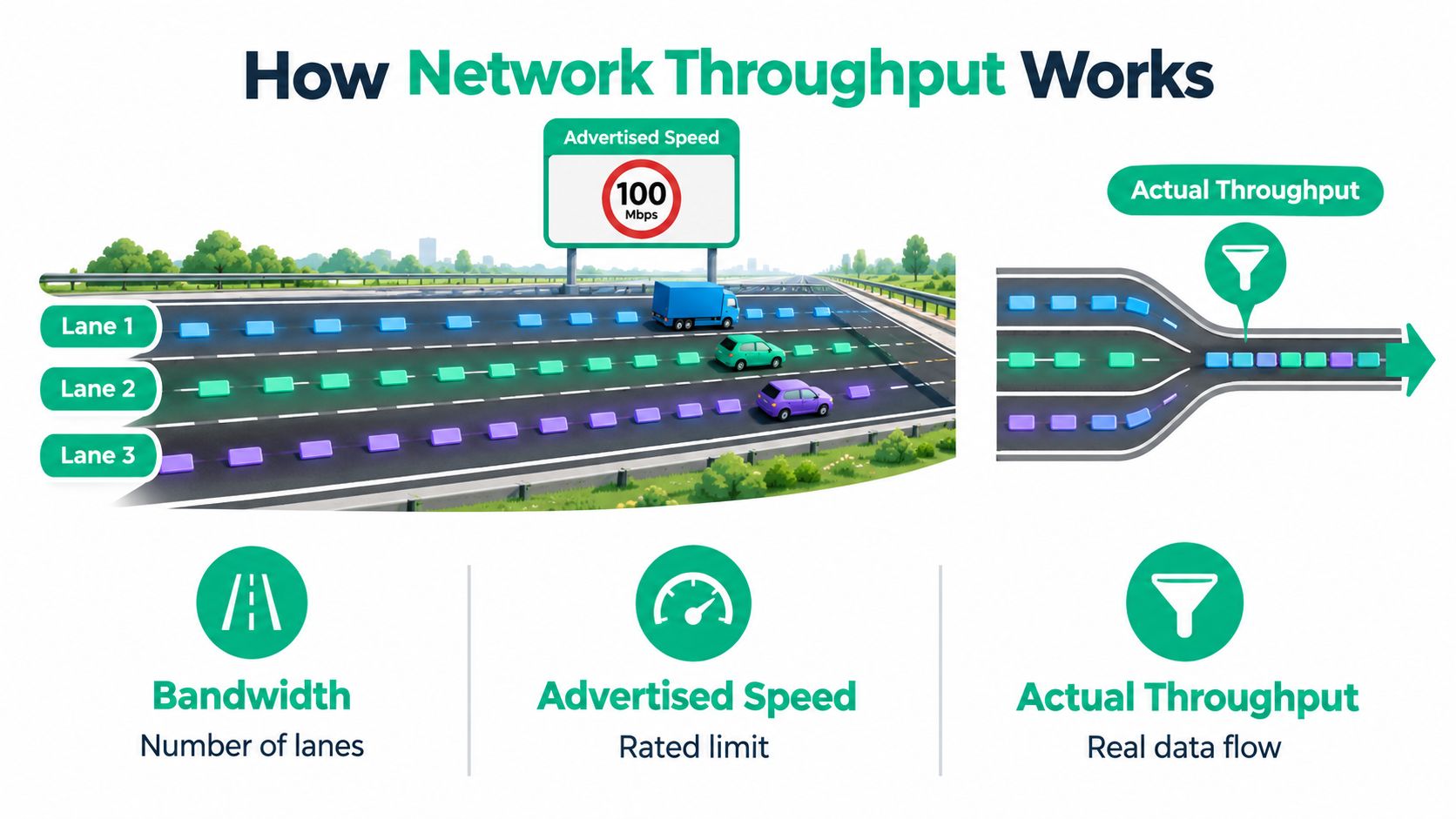
Think of bandwidth as the number of highway lanes. The advertised connection speed resembles the road's rated limit, while throughput is the useful traffic that arrives during rush hour. More lanes help when the road is crowded, but they don't fix a blocked exit.
The analogy is useful because business traffic crosses more than your ISP connection. An employee's device sends data through an access point, switches, a firewall, and a WAN link before reaching the remote application and its destination server.
The highway comparison makes those distinctions easier to see:
Follow the complete delivery path
Each part of that route can impose a different constraint. Wireless clients share radio resources; switches forward traffic; firewalls apply processing and policy; remote systems must receive and handle the request. Protocol overhead, congestion, packet loss, latency, and device capacity affect the delivered result, as described in AWS guidance on improving cloud and hybrid network performance.
Packet size matters alongside transfer volume. Forwarding capacity can be considered as packets per second multiplied by packet size, so equipment may struggle with many small packets even when a large-file test looks healthy. A benchmark that exercises a comfortable workload doesn't prove the device can handle every business traffic pattern.
TCP introduces another constraint. Its bandwidth-delay product describes how much data must remain in flight to use a connection fully. A distant destination and unsuitable TCP windowing can therefore leave capacity unused, even when the local connection looks capable.
For a visual explanation of the terminology, this video provides another way to approach the topic:
- Local traffic: A transfer within the office helps evaluate the internal path.
- Cloud traffic: A remote transfer adds the WAN and destination service.
- Protected traffic: A VPN comparison introduces the tunnel and its processing requirements.
A practical explanation of network data transfer for Indiana SMBs can help owners discuss those paths with their provider. The important distinction is simple: employees experience an end-to-end delivery result, not an isolated port specification.
Compare Throughput, Bandwidth, and Latency
When someone asks, “What is network throughput?” they're often trying to understand why their connection doesn't feel as fast as expected. The answer gets clearer when the measurements stop competing with each other. Capacity, delivery, responsiveness, and reliability describe different parts of performance.
Use this comparison when reviewing a support report or an upgrade proposal.
Network Performance Metrics for SMB Teams
| Metric | What it measures | What it does not prove | Best use |
|---|---|---|---|
| Throughput | Successfully delivered data over time | That every application or location performs equally well | Comparing achieved transfer performance |
| Bandwidth | Theoretical connection capacity | That users can consume that capacity effectively | Planning circuits and identifying capacity limits |
| Goodput | Useful application payload after overhead and other delivery losses | That response times are acceptable | Evaluating useful work completed |
| Latency | Response delay | That bulk transfers are efficient | Assessing interactive application responsiveness |
| Packet loss | Data that fails to arrive | Where the fault originates | Investigating unreliable delivery |
| Wi-Fi link speed | The radio connection's negotiated signaling rate | Actual application transfer performance | Understanding wireless connection conditions |
Goodput is the particularly useful distinction for owners. Employees don't get paid for protocol headers or repeated transmissions. They need the document, transaction, or backup payload to arrive and become usable.
Latency answers a different question. A quick ping response on an otherwise idle connection can coexist with inefficient bulk transfers, so “ping looks fine” shouldn't close a ticket about slow uploads. Likewise, an acceptable file-transfer result doesn't establish that an interactive application responds promptly.
Match the measurement to the complaint
Consider a business that buys a gigabit-class circuit but still struggles with cloud work. The capacity purchase alone doesn't establish whether Wi-Fi contention, firewall processing, TCP behavior, or the destination service is responsible. Treat that as a diagnostic question, not evidence that the ISP has failed.
- Slow document transfers: Compare achieved throughput and useful payload delivery.
- Unresponsive applications: Examine response delay alongside transfer results.
- Inconsistent sessions: Record loss and retransmissions rather than relying on an average.
- Room-specific complaints: Compare radio conditions with a wired control.
For downtown Indy tech hubs and established Johnson County offices alike, the buying rule is the same: specify both capacity and responsiveness under representative working conditions. A proposal that promises only a bigger headline number leaves too much unanswered.
Measure Network Throughput Step by Step
A useful throughput test is repeatable, scoped, and safe. Choose an approved workstation and server endpoint, record the path being tested, and agree on a testing window. Don't turn an active checkout period or a critical client presentation into an accidental stress test.
Use the same client where possible when comparing wired and wireless access. Otherwise, you may end up comparing different computers rather than different network segments.
The testing sequence should move from a controlled baseline toward normal working conditions:
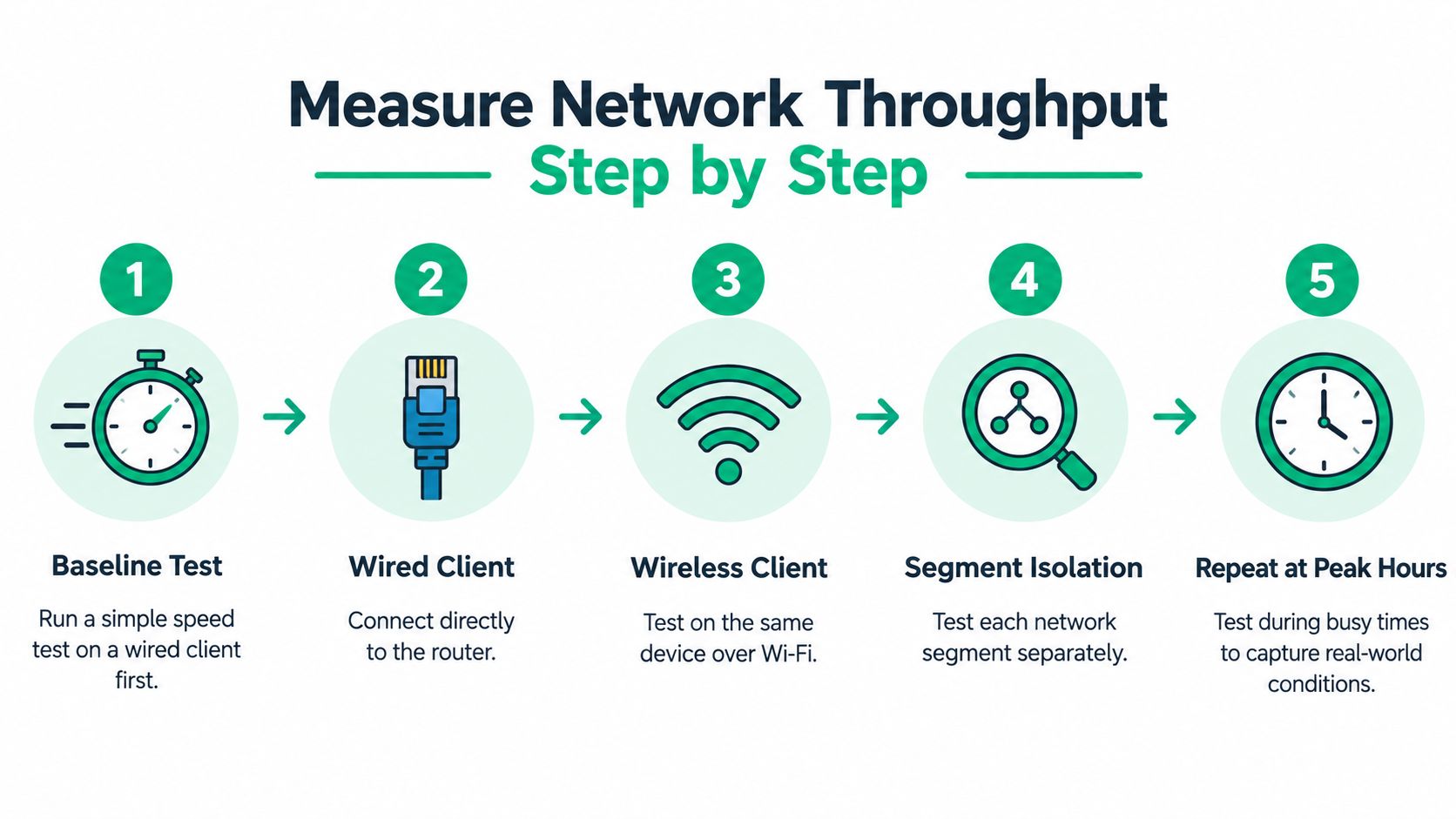
Establish a controlled baseline
iperf3 requires a server endpoint and a client endpoint and can measure TCP, UDP, or SCTP throughput. Start the server with iperf3 -s, then run iperf3 -c <server-ip> -i 1 -t 30 on the client for a 30-second test with one-second reports, following NVIDIA's throughput testing and troubleshooting guidance.
The placeholder identifies your approved test server; it isn't something to paste unchanged into a terminal. Confirm endpoint access with whoever manages the network, and don't expose a test service publicly just to make the command work.
- Begin wired: Establish a local control result before adding wireless variables.
- Compare wireless: Repeat from the same workstation and document its location.
- Separate paths: Compare local transfers with remote application access, then direct access with approved VPN access.
- Check direction: Record whether the client is sending or receiving; uploads and downloads are distinct observations.
- Repeat under load: Capture representative busy-hour behavior and concurrent use without disrupting production.
Record enough evidence to interpret the result
Save achieved Mbps, latency, packet loss, and retransmissions, using supporting monitoring where needed. Don't assume every metric appears in the default output for every protocol or platform. Record the client, destination, connection type, application symptom, and other active workloads beside the measurements.
A test result without its conditions is a screenshot, not a baseline.
After a repair, repeat the same path under comparable load. That comparison is far more useful than a fresh test from a different laptop in a different room.
For ongoing visibility, evaluate network monitoring tools for Indiana businesses against the evidence you need. A dashboard should help explain the complaint, not merely confirm that equipment is powered on.
Find the Bottleneck Across the Network Path
Ethernet's history shows why connection rates are engineering specifications, not vague promises. Invented at Xerox PARC in 1973, its earliest implementation reached 2.94 Mbps; Xerox, Digital Equipment Corporation, and Intel published a 10 Mbps specification in 1980, and IEEE approved 802.3 on June 24, 1983, with publication in 1985, according to IEEE Spectrum's Ethernet milestone history.
That history continued through 100 Mbps Ethernet in the 1990s and gigabit Ethernet in the late 1990s. The original 10BASE-5 designation encoded a nominal 10 Mbps, baseband signaling, and a 500-meter maximum segment, illustrating how capacity and operating conditions belong together.
Read specifications in context
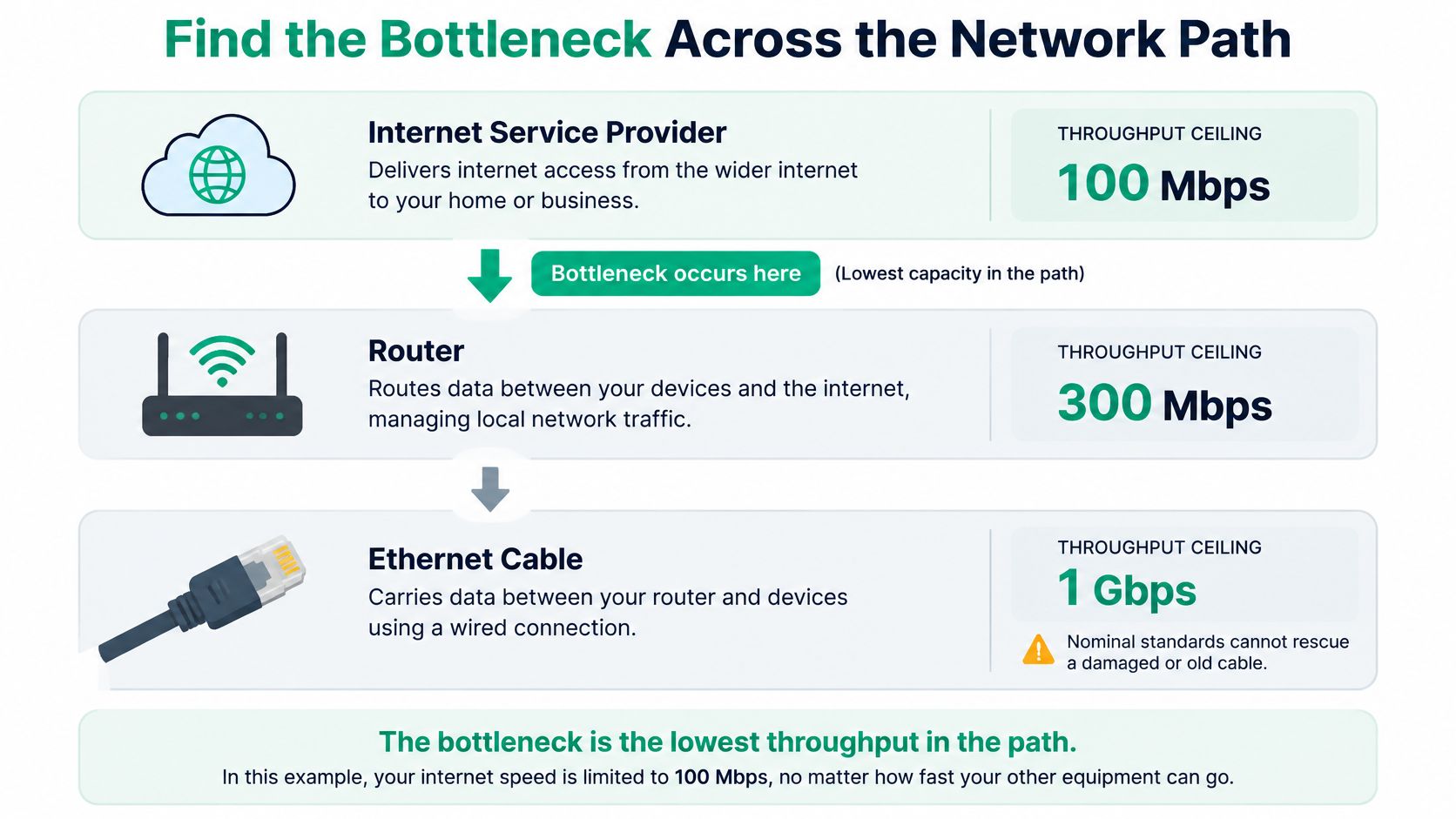
A modern port can't compensate for an undersized or defective component elsewhere. Check the client connection, access-point uplink, switching path, firewall, WAN, and destination before deciding what needs replacement.
The diagram illustrates a capacity bottleneck, not a measurement of your office:
Wireless advertising needs particularly careful interpretation. Wi-Fi 7's theoretical maximum reaches 46 Gbps, but that aggregates bands and spatial streams rather than describing a single client; favorable close-range testing on the 6-GHz band places a single client at roughly 2–2.8 Gbps, with environmental variation, according to Ookla's global Wi-Fi reporting.
Not every client supports 320-MHz channels or every newer feature. Distinguish the PHY rate, which describes radio signaling, from aggregate access-point capacity and the application throughput a particular device receives.
- Representative devices: Test laptops, phones, VoIP handsets, printers, and scanners rather than only the newest laptop.
- Representative locations: Include desks near access points, office edges, enclosed rooms, and normal walking routes.
- Representative occupancy: Evaluate concurrent use, not just an empty building.
- Representative outcomes: Compare coverage, roaming, loss, and latency against application requirements.
For a growing Hamilton County office, predictable service across occupied desks may be worth more than exceptional performance beside an access point. Don't approve a wireless upgrade solely because its box displays a larger number. Ask what the proposed design will deliver to the devices employees use.
Troubleshoot Common Causes of Low Throughput
Start with the scope of the complaint. If everyone struggles with remote services while local transfers remain healthy, investigate the WAN and shared perimeter path. If wired users work normally but wireless users don't, keep the initial investigation inside the wireless environment.
That separation prevents expensive guesswork. It also helps avoid changing unrelated settings that make the original fault harder to reproduce.
Check shared infrastructure first
- WAN congestion: Compare circuit utilization with complaint timestamps. If backups coincide with trouble, evaluate scheduling before ordering more capacity.
- Wired connections: Inspect aging patch leads, terminations, negotiated switch speeds, and signs of duplex errors. Substitute an approved known-good cable before replacing larger equipment.
- Firewall processing: Review resource pressure and the affected traffic path. Compare performance with the required inspection features enabled, not just a vendor's most favorable specification.
- Routing and VPN policy: Verify that traffic follows its intended route and compare approved tunneled and direct access. Don't bypass security controls to manufacture a better result.
These are diagnostic checks, not permission to make broad production changes. Save the existing configuration, establish a rollback plan, and schedule anything that might disconnect users.
Investigate wireless and destination behavior
For UniFi networking, review access-point health, wired uplinks, client distribution, and channel plans alongside switching. A controller showing connected clients doesn't prove that their applications are performing acceptably. Test from the affected workspace instead of standing beside the access point.
Check weak signal, contention, channel selection, and whether the installed access points cover occupied areas adequately. More access points aren't automatically the answer; require measurements and a placement plan before adding hardware. For employees working outside the office, SwiftNet Wifi's guide for remote workers on Wi-Fi offers a separate home-wireless troubleshooting resource.
Use the transport constraints described earlier when interpreting inconsistent remote transfers. Compare the same application from another approved path, and distinguish slow data delivery from time the destination spends processing a request.
Change discipline: Make a single controlled change, record the result, and keep it only if the evidence supports it.
A documented network troubleshooting workflow for Indiana SMBs helps keep this process orderly. Assign an owner to each corrective action, including ISP escalation and vendor follow-up, so unresolved work doesn't disappear after the immediate complaint quiets down.
Upgrade the ISP plan only when measurements show that circuit is the limiting segment. Otherwise, you're paying for additional capacity upstream of an unresolved problem.
Choose Self-Service Troubleshooting or Managed IT
Self-service makes sense when the fault is isolated and someone can test safely. A single workstation, a suspect patch cable, and an existing baseline form a manageable investigation. An intermittent problem spanning offices, VPN users, cloud applications, and shared infrastructure is a different assignment.
For Johnson County business owners, the deciding factor is often staff time rather than technical curiosity. If the office manager is coordinating customer work while troubleshooting routing, the business is already paying for the distraction.
Choose support by risk and scope
| Situation | Reasonable response |
|---|---|
| An isolated device with a reproducible symptom | Perform a controlled local check |
| Shared UniFi, switching, firewall, or VLAN issues | Involve the responsible network administrator |
| Recurring interruptions without a documented cause | Request coordinated diagnosis and monitoring |
| Testing could interrupt revenue-producing work | Schedule managed intervention |
The choice between in-house IT support and managed services should account for escalation ownership, documentation, and time available for follow-through. A managed plan should include a baseline, scheduled correction, and validation, not just access to someone who can restart things.
Business continuity has a financial dimension, but context matters. A Ponemon Institute/Emerson study covering 63 U.S. data-center facilities reported average downtime costs of $8,851 per minute, approximately $531,000 per hour, and $740,357 per incident, as summarized in this data-center downtime cost reference. That minute figure rounds to about $9,000, but it isn't a universal Greenwood SMB loss estimate or a ceiling.
Keep performance and security in their proper roles
Zero Trust architecture concerns access and trust decisions; SOC-as-a-Service monitoring concerns security oversight. Evaluate latency-optimized mesh nodes through measured network design, while treating bit-level data recovery and immutable off-site backups as recovery considerations rather than throughput fixes.
Likewise, healthcare's HIPAA, defense contractors' CMMC, and general business use of NIST CSF belong in governance discussions. Framework alignment doesn't establish network performance.
Call an IT provider when faults recur, infrastructure ownership is unclear, security controls are implicated, or troubleshooting consumes billable work. The ROI is reclaimed productive time and planned support spending, not an unsupported promise that every repair pays for itself immediately.
Build a Practical Network Performance Plan
A workable performance plan fits the office you run. Document what employees need to accomplish, where they work, and which services they depend on. Then keep the testing record with the network inventory rather than scattering results across support emails.
Keep an actionable operating record
- Baselines: Save wired, wireless, and busiest-hour results with their test conditions.
- Delivery quality: Retain latency, loss, and retransmission observations beside achieved throughput.
- Application requirements: Identify critical workflows, acceptable behavior, and the people authorized to validate repairs.
- Infrastructure condition: Record access points, switches, firewalls, routers, cabling, WAN services, and known limitations.
- Ownership: Assign responsibility for monitoring, maintenance, vendor escalation, and post-change verification.
Repeated measurements help distinguish a persistent restriction from an isolated event. They also give an ISP or application vendor something specific to investigate and give owners evidence for investment decisions.
Consider a Greenwood team whose office manager repeatedly interrupts customer work to chase slow uploads. A sensible managed-support arrangement would move diagnosis, scheduled remediation, and follow-up to an assigned provider. That's a proposed operating model, not a claimed client result: its value should be judged by reduced interruptions, preserved billable work, and a predictable monthly budget.
Buy a documented improvement to a business workflow, not a reassuring screenshot.
Include cybersecurity and recovery responsibilities in the same continuity discussion. NIST CSF, HIPAA, or CMMC-related needs may affect how access, changes, and evidence are handled, but they don't replace performance testing.
For Greenwood and Indianapolis businesses, the next step is a scoped assessment of the affected applications and their complete delivery paths. Require clear findings, prioritized corrective work, and a way to verify improvement.
Finchum Fixes IT offers networking and Wi-Fi design, network optimization, and IT support for businesses dealing with slow or unreliable connections. Visit Finchum Fixes IT to request a Free Network Assessment for your Greenwood or Indianapolis business, with attention to coverage, cabling, switching, firewall capacity, WAN performance, and the applications your team needs to keep working.