Network Support Definition for SMBs: What It Really Covers
You already know the feeling. A client is waiting, the front desk can't load the scheduling app, the warehouse Wi‑Fi keeps dropping, and somebody is asking whether the server in the Greenwood closet is “acting up again.” That's where network support starts, not with jargon, but with keeping the business usable.
What Network Support Actually Means for a Small Business
For a small business, network support means the ongoing work of keeping your office connection, Wi‑Fi, switches, firewalls, servers, and cloud access stable, secure, and usable, so employees can work and customers can reach you without interruptions. It's not a one-time fix, it's the upkeep behind uptime.
In plain terms, you're paying for someone to watch the network, find faults early, repair what breaks, secure the edge, and keep the whole setup from turning into a Friday-afternoon fire drill. That's especially true in the Southside where a brick building, old wiring, or a crowded office park can make the same network behave very differently from one room to the next.
A Greenwood owner usually doesn't need a vendor who talks in buzzwords. You need one who can explain whether the problem is the cable, the switch, the Wi‑Fi, the firewall, or the ISP, and who owns the fix all the way through. If your phone system matters too, the business telephone and intercom guide is a useful companion because voice issues often ride on the same network that handles everything else.
Practical rule: if the provider can't describe what they monitor, what they patch, and how they recover you after a failure, they're selling a reaction plan, not network support.
For a broader local IT context, the Indiana small business IT support guide is worth reading alongside this.
The Core Components Inside Modern Network Support
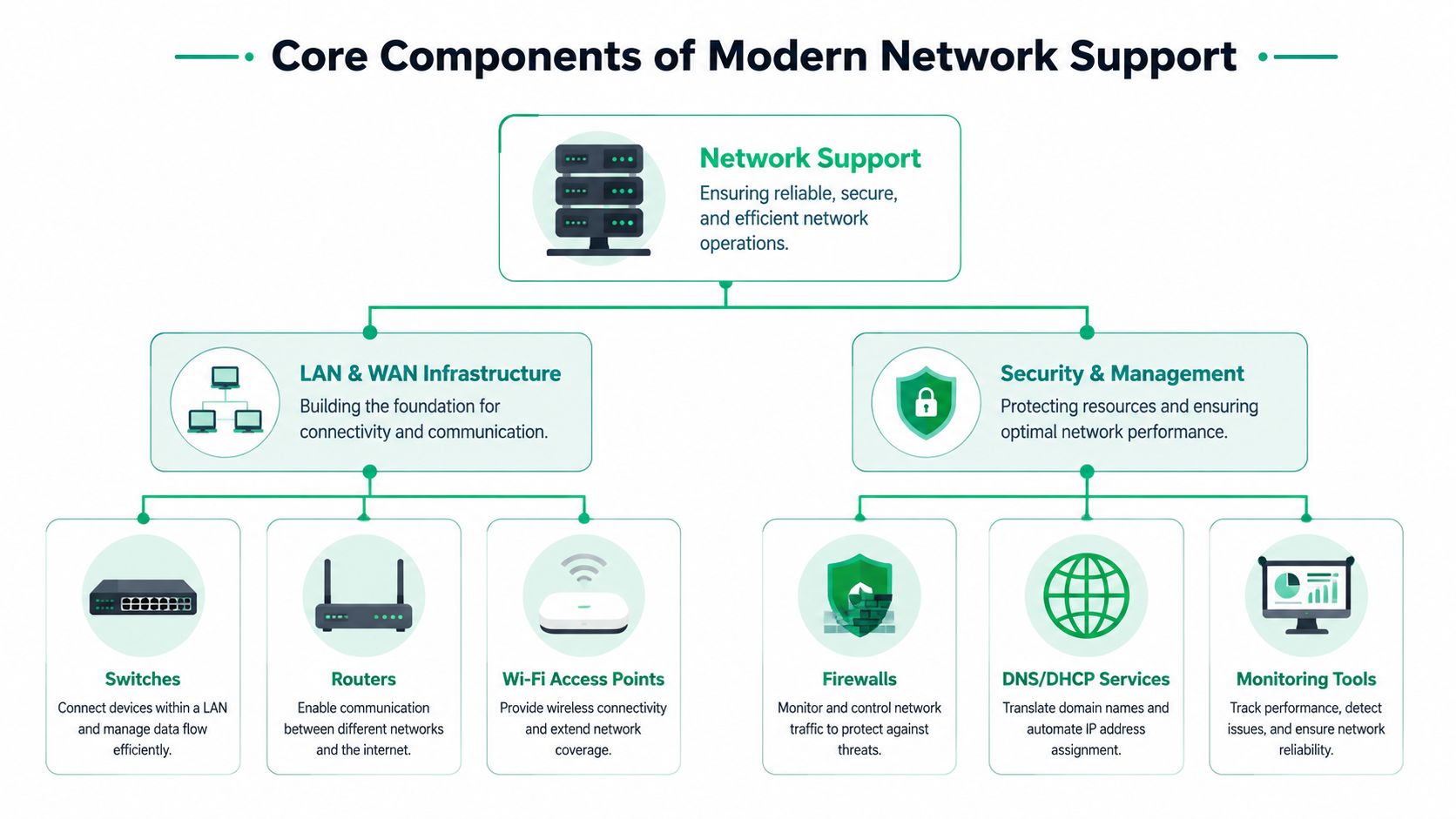
A real network support definition has to include more than “fix the Wi‑Fi.” Modern support spans LAN and WAN infrastructure, security controls, monitoring, and recovery. In practice, that means one layer moves traffic, another layer keeps it safe, and a third layer tells you when the whole thing is drifting toward an outage.
The moving parts that matter
Think of switches as the office's internal plumbing. They route traffic between desks, printers, servers, and access points, and when they're unmanaged or overloaded, users feel it as slowness or random drops. Routers are the traffic cops between your building and the outside world, while Wi‑Fi access points are the ceiling-mounted radios that keep laptops and phones connected without people hunting for the one “good” corner of the office.
A firewall is the front door with a lock, a logbook, and a guard who checks badges.
Firewalls handle segmentation and threat filtering. DNS and DHCP services act like the office directory and the seat assignment desk, because users need names translated and addresses handed out correctly before anything works. Monitoring tools are the dashboard, they show whether the road is clear, where errors are piling up, and whether a device is drifting out of spec before users complain.
For recovery, immutable off-site backups are the copy you keep when the live copy gets wrecked. That matters because support isn't only about speed, it's about being able to restore quickly after a bad update, a ransomware event, or plain old hardware failure. In network work, that recovery layer separates a nuisance from a shutdown.
For a deeper look at how the infrastructure side gets designed, see the network design service guide for Indiana businesses.
Why Network Support Is Really About Uptime and Revenue
A broken network doesn't just annoy staff, it interrupts billing, ordering, client communication, and everything tied to cash flow. That's why the downtime math matters. Independent industry reporting commonly places the cost of downtime at up to $9,000 per minute for large organizations, which is why proactive support isn't a luxury item.

A small business in Greenwood won't usually measure loss in that exact way, but the pattern is the same. A slow point-of-sale system, a dead VPN, or a front desk that can't reach scheduling software turns into wasted tech time, delayed work, and overtime spent cleaning up what should've been prevented. That's the part owners feel in their monthly budget.
The business case behind the wires
The operational goal is simple, keep failures short and predictable. The technical method is less glamorous, continuous monitoring, patch windows, alerting, and response paths that don't depend on someone noticing a problem at 8:00 Monday morning. In SOC-as-a-Service environments, telemetry and alerting do a lot of the early warning work that manual checks miss.
Practical rule: if a provider only sees the problem after employees do, your support model is already too slow.
The ROI comes from shifting spend away from emergency labor and into predictable service. One reactive call can be cheap in isolation, but repeated outages, emergency onsite visits, and after-hours fixes add up fast. That's why network support belongs in the same conversation as business continuity, not just IT housekeeping.
For backup planning that supports uptime, the enterprise data backup solutions guide fits naturally with this discussion.
Delivering Network Support with SLAs and Real Response Times
A serious provider puts expectations in writing. A service-level agreement should spell out response windows, escalation paths, and what counts as urgent, while also making clear what's excluded, such as damage from unsupported gear or changes made outside the agreement. If a vendor can't explain that in plain English, keep looking.
Urgent work in a Greenwood or Indianapolis SMB should not sit in a queue until the next business day if the front desk, payment terminals, or remote staff are blocked. A managed provider should document the ticket, acknowledge the issue quickly, and keep a clear trail of who touched what. Quarterly reviews matter too, because they show whether the environment is getting healthier or just producing the same tickets in different costumes.
What the diagnostic chain looks like
A decent technician usually starts with the simple stuff, then moves outward. They check the router, scan the switch, inspect the access point, validate the IP settings, DNS, and default gateway, then look at DHCP leases and uplink health. That's not theory, that's how you stop blaming the wrong box.
Useful commands in that chain include ping, tracert, nslookup, and ipconfig /all. Those tools help confirm whether the device can reach the local network, whether name resolution is working, and where the break lives. A managed provider automates a lot of that with monitoring agents and alerting, so the issue can be caught before users start filing tickets.
For contract language that keeps vendors honest, the managed services agreement template guide is a practical read.
Common Network Problems and How Troubleshooting Actually Works
The first problem I see in local offices is usually not “the internet is down.” It's a chain of smaller failures that looks like one big failure to the user. One afternoon in the I‑65 corridor, a receptionist could print but couldn't open cloud files, which pointed away from the printer and toward DNS or gateway trouble.
The second pattern is the office that works fine in one room and falls apart in another. In an older Greenwood building, that usually means the Wi‑Fi radio placement, cabling, or switch layout is wrong for the space. The fix isn't shouting louder at the access point, it's tracing the path and cleaning up the weak link.
What a real engineer checks first
- Router status. If the edge device is unstable, everything behind it inherits the mess.
- Switch health. A bad port or failing switch can isolate one department while the internet still “works.”
- Access points. Poor signal, channel overlap, or bad placement can make Wi‑Fi look random.
- Client settings. IP, DNS, and gateway values often explain why one app works and another doesn't.
- DHCP leases. If addresses aren't being handed out correctly, devices stall at startup.
- Uplink and ISP health. If the carrier side is degraded, the internal gear may be innocent.
Practical rule: solve the local layer first, then blame the carrier.
A mature support team ties those checks to continuous telemetry, so the ticket often begins with a warning, not a total outage. If a firmware update starts degrading a switch, or an AP begins flapping, the monitoring system catches the drift and the technician can intervene before the staff notices a slowdown.
For a local troubleshooting playbook, the Indiana SMB network troubleshooting guide is a solid companion.
Problems We See Every Week Around Central Indiana
Around the I‑65 corridor, the most common issue is still aging infrastructure. A Greenwood logistics office with old server hardware can limp along for months, then suddenly choke remote workers every afternoon when the load peaks. The fix is usually not another band-aid, it's moving to a properly sized virtual environment and pairing it with immutable off-site backups so recovery isn't dependent on hope.
Downtown Indy brings a different headache. In an old brick building, Wi‑Fi often dies because the building fights the signal, walls soak it up, and the access points were placed for convenience instead of coverage. A latency-optimized mesh node layout and VLAN-segmented guest traffic usually cleans that up because the network gets divided by purpose, not by guesswork.
The support model changes the outcome
A break/fix shop shows up when something breaks. A co-managed provider shares the load with your internal person. A fully managed partner owns the day-to-day monitoring, patching, response, and review work. The right choice depends on how much risk you want sitting on your desk.
| Model | What it usually delivers | Where it fits |
|---|---|---|
| Break/fix | Reactive repairs, no ongoing monitoring | Very small offices with low network complexity |
| Co-managed | Shared support, block hours, selective coverage | Teams with an IT generalist who needs backup |
| Fully managed | Monitoring, patching, response, reviews, recovery planning | SMBs that need predictable uptime and less chaos |
In practice, the cheaper model often costs more once you count downtime, user frustration, and repeat visits. That's why support around Greenwood, Johnson County, and Hamilton County usually works best when the provider fixes the root cause, not just the latest symptom.
How Providers Structure Network Support Pricing
Pricing in network support usually falls into three buckets. The first is break/fix hourly, which looks cheap until a bad week turns into three tickets, two onsite visits, and a Monday morning scramble. The second is co-managed block hours, which gives you a set pool of time for overflow and special projects. The third is fully managed monthly retainers, often priced per user or per device, where monitoring and maintenance are baked into the budget.
Here's the part owners should think about: a reactive invoice feels smaller than a retainer, but the retainer is buying fewer emergencies. A $25 service call every quarter sounds harmless until the problem starts recurring, and then the cost is staff downtime, not the invoice. Predictable spend matters because it turns support into an operating line instead of surprise damage.
| Model | Typical Cost | Response Window | Best For |
|---|---|---|---|
| Break/fix | Hourly, plus onsite charges | Best effort | Very small, low-risk environments |
| Co-managed block hours | Monthly blocks of time | Agreed business hours, faster for covered items | SMBs with internal IT help |
| Fully managed | Per-user or per-device monthly retainer | Contracted urgent response and escalation | Businesses that want stable budgets and ongoing oversight |
Five warning signs your internal generalist is getting stretched too thin:
- Recurring router reboots. That usually means the edge gear is unstable or undersized, and the cost is recurring disruption.
- Missed patch cycles. Unpatched systems raise security and support risk at the same time.
- No documented inventory. If nobody knows what's in the rack, support gets slower and more expensive.
- Outages that linger until Monday. That's a service problem, not just a technical one.
- Pressure from HIPAA, CMMC, or NIST CSF. Compliance work demands documentation, controls, and response discipline, not guesses.
For owners comparing coverage across support types, the guide for shop and warehouse owners is a useful mirror because physical and network risks usually show up together in small facilities. Finchum Fixes IT also offers network support, network repair, computer network install, Wi‑Fi wireless coverage expansion, and custom firewall protection for businesses, which gives buyers a concrete set of services to compare against generic IT bundles.
Checklist for Choosing a Local Managed Network Partner
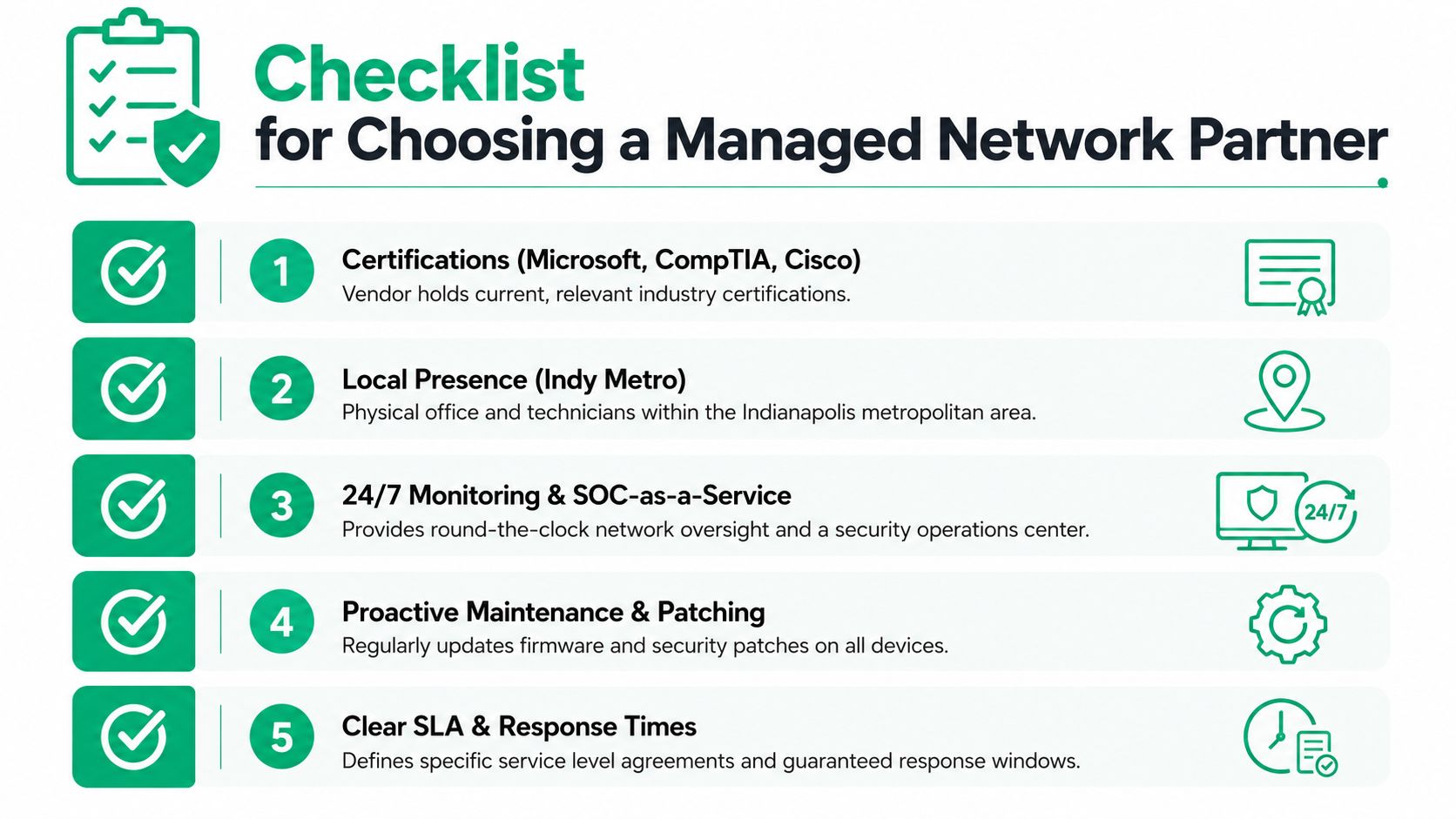
A good partner should be easy to question and hard to confuse. If you're talking to a vendor in Greenwood, Johnson County, Hamilton County, or downtown Indianapolis, ask whether they have current Microsoft, CompTIA, and Cisco certifications, whether they can support 24/7 monitoring or SOC-as-a-Service, and whether they'll put the SLA in writing without caveats hidden in the fine print.
Ask for proof of the security stack too. If they support Bitdefender GravityZone or a comparable endpoint platform, they should be able to explain how it fits into the broader response process, not just name-drop the product. If they only talk about “keeping you safe” but can't describe patching, logging, escalation, or remote access control, the conversation's not serious yet.
Vendor questions worth sending by email
- Certifications and coverage. Who holds the certs, and who answers after hours?
- Local presence. Are technicians in the Indy metro area, or is everything remote and delayed?
- Monitoring scope. What gets watched continuously, and what doesn't?
- Maintenance routine. How do firmware updates, patching, and inventory checks happen?
- Reporting and roadmap. Do you get a fixed monthly bill and a 12-month improvement plan, or just a pile of tickets?
Practical rule: choose the partner who can explain tomorrow's risk, not just today's fix.
For a service partner, the difference shows up in communication, billing predictability, and whether they talk like an operator or a salesperson. If their answers stay clear and their process feels repeatable, you're probably talking to a real managed provider instead of a break/fix shop with a nicer website.
Finchum Fixes IT helps Greenwood and Indianapolis-area businesses with network support, Wi‑Fi design, cybersecurity, and recovery work that's built for uptime, not guesswork. If your office is tired of repeated outages, hidden weak spots, or a network that only gets attention after something fails, visit Finchum Fixes IT to book a Free Network Assessment or Security Risk Audit and get a straight answer about what's going on.